



免费
$0/ 月 · 无需信用卡
适用于构建、测试和您的首批用户。
开始所需的一切:
- 每月500次完整KYC验证
- 身份、活体、人脸匹配、设备和IP验证
- 200+欺诈信号、黑名单、重复项检测
- Didit网络内可复用KYC
- 工作流构建器、案件管理、SDK
- AI 支持 控制台内 AI 助手、文档和社区支持。

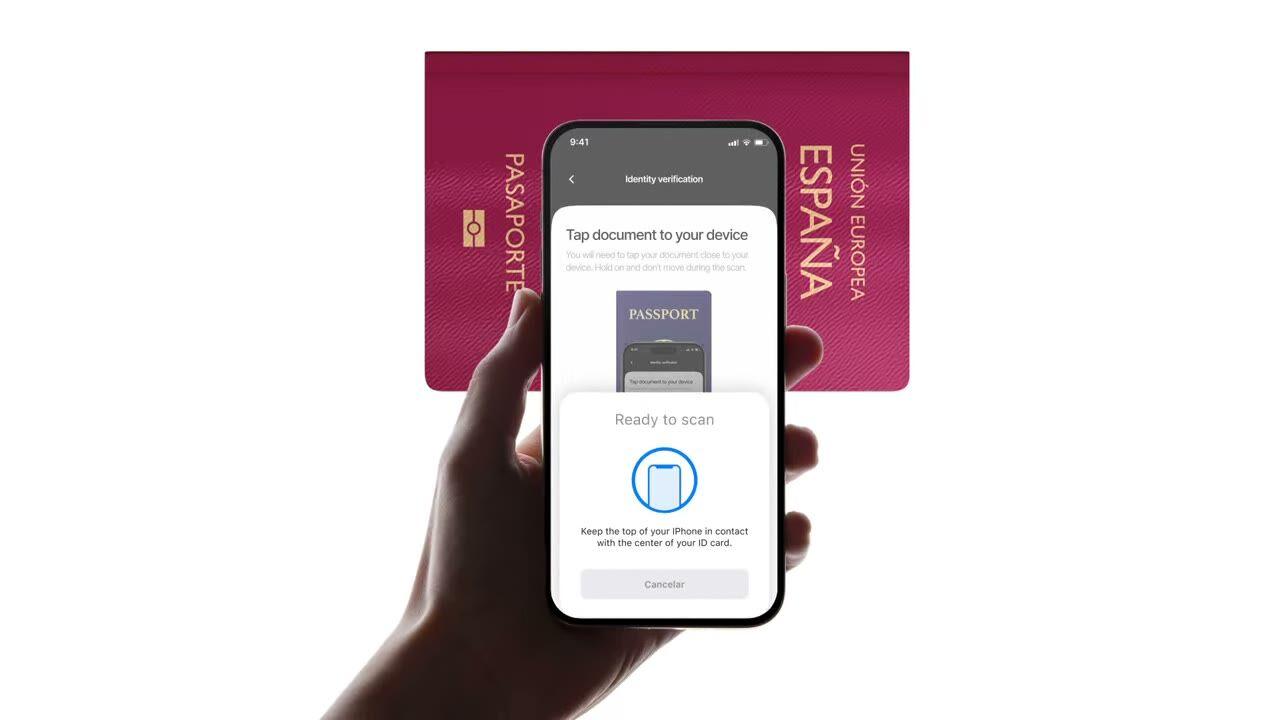
ICAO 9303
轻触护照。芯片返回与照片相同的数据, 但这次是由签发国签名的。$0.15,不到 2 秒。
选择您需要的检查项, 身份、活体、人脸比对、制裁、地址、年龄、电话、电子邮件、自定义问题。在控制台中将它们拖入流程,或将相同的流程发布到我们的 API。根据条件分支,运行 A/B 测试,无需代码。
$ curl -X POST https://verification.didit.me/v3/session/ \
  -H "x-api-key: $DIDIT_API_KEY" \
  -H "Content-Type: application/json" \
  -d '{
    "workflow_id": "wf_id_nfc",
    "vendor_data": "user-42"
}'{ "url": "verify.didit.me/..." }// iOS · Swift
import DiditSdk
let result = try await DiditSdk.shared.startVerification(
使用: sessionId,
配置: config
){ "status": "Approved" }# Didit NFC Verification — integrate in 5 minutes
You are integrating Didit's NFC Verification (cryptographic e-passport
and e-ID chip reading) module into <my_stack>. Follow these steps exactly.
Every URL, header, and enum value below is canonical — do not paraphrase
or "improve" them.
## 1. Provision an account
- Sign up: https://business.didit.me (no credit card required).
- Or provision programmatically: POST https://apx.didit.me/auth/v2/programmatic/register/
(returns an API key bound to the workspace + application).
## 2. What NFC Verification actually does
NFC Verification reads the secure contact-less chip embedded in modern
e-passports and e-IDs (the small chip-and-antenna sticker symbol on the
cover) and runs four cryptographic checks against the data it extracts:
1. Passive Authentication — every Data Group (DG1 personal data, DG2
facial image, etc.) is hashed and compared against the signed hash
stored in the Document Security Object (SOD). Catches any single-bit
tampering of the chip contents.
2. Certificate chain validation — Document Signer Certificate (DSC) →
Country Signing Certificate Authority (CSCA) → ICAO Public Key
Directory (PKD) root. Proves the chip was signed by the issuing
government, not a clone.
3. Certificate Revocation List (CRL) check — DSCs revoked by the issuing
country are caught and flagged.
4. Chip Authentication — where the document supports it, prevents chip
cloning by challenging the chip with a key-pair handshake.
PACE (Password Authenticated Connection Establishment) or BAC (Basic
Access Control) is used to derive the session key from the Machine-Readable Zone (MRZ); Didit
handles that automatically. All of this is ICAO 9303 standard.
## 3. Two integration paths — pick one
### Path A — Workflow Builder (hosted UI, REQUIRED for NFC)
NFC Verification has no server-to-server standalone endpoint. The chip
has to be read by a device with NFC hardware, so you always integrate
through the Workflow + native SDK (or hosted mobile web that falls back).
1. Create a workflow that contains the NFC feature:
POST https://verification.didit.me/v3/workflows/
Authorization header: x-api-key: <your-api-key>
Body: workflow_label, features array with the entries
{ feature: "OCR" }
{ feature: "NFC" }
(UPPERCASE — strict enum)
You should always pair NFC with OCR (ID Verification) so the MRZ is captured
for the chip handshake AND so an OCR cross-validation is available.
2. Create a verification session for an end user:
POST https://verification.didit.me/v3/session/
Body: workflow_id (from step 1), vendor_data (your own user id).
Response: url (the hosted verification link) — redirect the user to
it (or open it in the native SDK with
shared.startVerification(with: sessionId)).
3. Listen for webhook callbacks (see "Webhooks" below).
### Path B — Native SDKs (drop-in, recommended for mobile apps)
Same workflow + session above, but launch the verification flow in your
own iOS or Android app via the Didit SDK. The SDK wires the NFC reader,
the entitlements, and the chip-reading UI for you.
- iOS: DiditSdk.shared.startVerification(with: sessionId, configuration:)
Required entitlements (handled by the SDK):
- com.apple.developer.nfc.readersession.formats = ["TAG"]
- ISO7816 application identifiers for ePassports
- Android: DiditSdk.startVerification(sessionId, config) — uses
IsoDep (android.nfc.tech.IsoDep) under the hood.
- React Native / Flutter: the same SDK, exposed through the cross-
platform module — see docs.didit.me/integration/native-sdks/.
### Web browsers — NFC is unavailable
Web NFC API is not generally available. Chrome on Android has an
experimental Web NFC that is unstable and requires explicit permissions;
Safari on iOS has no support. For web integrations, NFC is automatically
skipped and the user proceeds with standard ID + selfie. If you require
NFC, deep-link the user into the Didit App or your own native app.
## 4. Webhooks
- Register a webhook destination once via
POST https://verification.didit.me/v3/webhook/destinations/
Body: url, subscribed_events: ["session.verified", "session.review_started",
"session.declined"]
- Response includes secret_shared_key — store it.
- Every webhook delivery carries an X-Signature-V2 header you MUST verify
before trusting the payload. HMAC-SHA256 verification MUST run against the raw body bytes (the raw payload as Didit sent it) BEFORE any JSON parsing — re-serialising the parsed body changes whitespace and key order, which invalidates the signature.Algorithm:
1. sortKeys(payload) recursively
2. shortenFloats (truncate trailing zeros after the decimal point)
3. JSON.stringify the result
4. HMAC-SHA256 with the secret_shared_key
5. Hex-encode, compare to the X-Signature-V2 header.
## 5. Reading the report
The session decision includes an nfc_verifications[] array alongside
id_verifications[] — one entry per workflow node, each with its own node_id.
Fields on each nfc_verifications entry:
- status: "Approved" | "Declined" | "In Review" | "Not Finished"
- portrait_image: signed URL to the chip-extracted DG2 facial image
- signature_image: signed URL to the chip-extracted DG7 signature
- chip_data:
document_type, issuing_country (ISO 3166-1 alpha-3),
document_number, expiration_date (YYYY-MM-DD),
first_name, last_name, birth_date, gender ("M" | "F" | "U"),
nationality (ISO 3166-1 alpha-3), address, place_of_birth.
- authenticity:
sod_integrity (boolean — every Data Group hash matched the SOD)
dg_integrity (boolean — Data Group binary integrity check passed)
- certificate_summary:
issuer (CSCA Common Name + serial + organization + country)
subject (DSC Common Name)
serial_number
not_valid_after (YYYY-MM-DD HH:MM:SS)
not_valid_before (YYYY-MM-DD HH:MM:SS)
- warnings: Array of { risk, additional_data, log_type,
short_description, long_description }
### Auto-decline (always enforced, never configurable)
- NFC_AND_OCR_DATA_NOT_SAME — Optical Character Recognition (OCR) data
and chip data differ. Indicates document tampering or fake chip.
### Configurable warnings (per-workflow action: Decline / Review / Approve)
- SKIPPED_NFC_VALIDATION — chip not read (no NFC hardware, no
permissions, document has no chip)
- NFC_CHIP_NOT_VERIFIED — chip read but signature could not be
verified (missing CSCA, older document)
- DSC_CERTIFICATE_REVOKED — Document Signer Certificate listed on
the issuing country's CRL
- DSC_CERTIFICATE_EXPIRED — Document Signer Certificate past its
validity period
## 6. Hard rules — do not change
- Base URL for /v3/* endpoints is verification.didit.me (NOT apx.didit.me).
- Feature enum is UPPERCASE: NFC, OCR, LIVENESS, FACE_MATCH.
- Auth header is x-api-key (lowercase, hyphenated).
- Webhook signature header is X-Signature-V2 (NOT X-Signature).
- Always verify webhook signatures before trusting payload data.
- Always pair NFC with OCR (ID Verification) in the workflow — NFC alone
cannot derive the chip key without the MRZ from the document photo.
- Status casing matches exactly: "Approved", "Declined", "In Review",
"Not Finished" (title-cased, space-separated).
- Treat NFC as an additive confidence boost, not a hard gate, unless
your risk policy explicitly requires it (regulated remote
onboarding under PSD3, AMLD6 high-risk customer flows, etc.).
## 7. Pricing reference (public)
- NFC Verification: $0.15 per chip read (standalone module).
- Bundled inside a full Know Your Customer (KYC) workflow (ID + Liveness + Face Match + NFC):
priced as the underlying KYC bundle ($0.33) + $0.15 NFC if enabled.
- 500 free checks every month, forever, on every account.
## 8. Verify your integration
- Sandbox starts on signup at https://business.didit.me — no separate flag.
- Test documents: use the Didit App on a real iOS or Android device with
any ICAO 9303 e-passport issued after 2006 (most modern passports).
- Sandbox webhook events fire the same shape as production; verify the
X-Signature-V2 header in dev too.
- Switch to live: flip the application's environment toggle in console.
When in doubt: https://docs.didit.me/core-technology/nfc-verification/overview













适用于构建、测试和您的首批用户。
25+ 模块,价格公开透明。自动享受批量折扣。
适用于大批量和受监管项目。
使用量增长时自动享受批量折扣——无需谈判,无需销售电话。
Didit 是身份和欺诈基础设施,是我们自己在构建产品时希望拥有的平台:开放、灵活且对开发者友好,因此它能真正融入您的技术栈,而不是一个需要您围绕其进行集成的黑盒。
一个 API 涵盖了人员验证(KYC,了解您的客户)、企业验证(KYB,了解您的企业)、加密钱包筛选(KYT,了解您的交易)以及实时交易监控,其技术栈旨在实现:
其底层支持:14,000 多种文档类型,支持 48 种以上语言,1,000 多个数据源,以及每次会话的 200 多个欺诈信号。Didit 基础设施通过每次会话动态学习,并日益完善。
docs.didit.me/core-technology/nfc-verification/supported-documents-nfc-verification。芯片通过 PACE(密码认证连接建立)或 BAC(基本访问控制)读取, Didit 会自动从机读区 (MRZ) 获取会话密钥,因此用户只需将文档轻触手机即可。nfc JSON 对象以及 id_verification 对象。顶层 status 为 Approved、Declined、In Review 或 Not Finished 之一。该对象还包括一个 chip_data 块(document_type、发行国家/地区 ISO 3166-1 alpha-3、document_number、expiration_date、first_name、last_name、birth_date、gender、nationality、address、place_of_birth)、一个 authenticity 块(sod_integrity、dg_integrity)、一个 certificate_summary(issuer、subject、serial_number、not_valid_after、not_valid_before)、portrait_image(芯片提取的 DG2 面部图像)和 signature_image(芯片提取的 DG7 签名图像)的签名 URL,以及一个 warnings 数组。完整参考请访问 docs.didit.me/core-technology/nfc-verification/report-nfc-verification。整个流程通常在 30 秒内完成, 拿起身份证,拍摄文档,拍摄自拍,完成。这是市场上最快的速度。传统的 KYC 提供商完成相同流程通常需要超过 90 秒。
在后端,Didit 在 p99 下两秒内返回结果,从用户完成自拍到您的 webhook 触发。移动端捕获针对慢速手机和慢速网络进行了优化:渐进式图像压缩、延迟加载 SDK,以及如果用户从网页端开始,通过二维码实现桌面到手机的一键切换。
每个会话都会落入七种明确状态之一,因此您的代码始终知道该怎么做:
Approved, 所有检查通过。让用户继续。Declined, 一个或多个检查失败。您可以允许用户重新提交特定的失败步骤(例如,重新拍摄自拍),而无需重新运行整个流程。In Review, 标记为合规性审查。在控制台中打开案例,查看所有信号,决定批准或拒绝。In Progress, 用户正在进行中。Not Started, 链接已发送,用户尚未打开。如果长时间未打开,发送提醒。Abandoned, 用户打开了链接但未及时完成。重新激活或使其过期。Expired, 会话链接已过期。创建新会话。每次状态更改都会触发签名 webhook,因此您的数据库始终保持同步。放弃和拒绝的会话是免费的。
生产数据默认在欧盟的 Amazon Web Services 上处理和存储。企业合同可根据监管机构要求,申请其他区域。
全面加密。 所有数据库、对象存储和备份均采用 AES-256 静态加密。所有 API 调用、Webhook 和业务控制台会话均采用传输层安全协议 1.3 进行传输加密。生物识别数据使用单独的客户主密钥进行加密。
保留策略由您掌控。 默认保留期限为无限期(无限制),除非您配置更短的期限,可在每个应用程序 30 天到 10 年之间选择,并且您可以随时通过仪表板或 API 删除任何单个会话。
认证:SOC 2 Type 1 & Type 2、ISO/IEC 27001:2022、iBeta Level 1 PAD,以及来自西班牙 Tesoro / SEPBLAC / CNMV 的公开证明,表明 Didit 的远程身份验证比亲自验证更安全。完整报告请访问 /security-compliance。
Didit 默认符合对身份基础设施至关重要的监管机构要求:
详细备忘录、所有证书、所有监管机构函件:/security-compliance。
三种集成路径, 选择最适合您技术栈的方式:
相同的仪表板、相同的计费、相同的按成功付费价格。分步指南请访问 docs.didit.me/integration/integration-prompt。