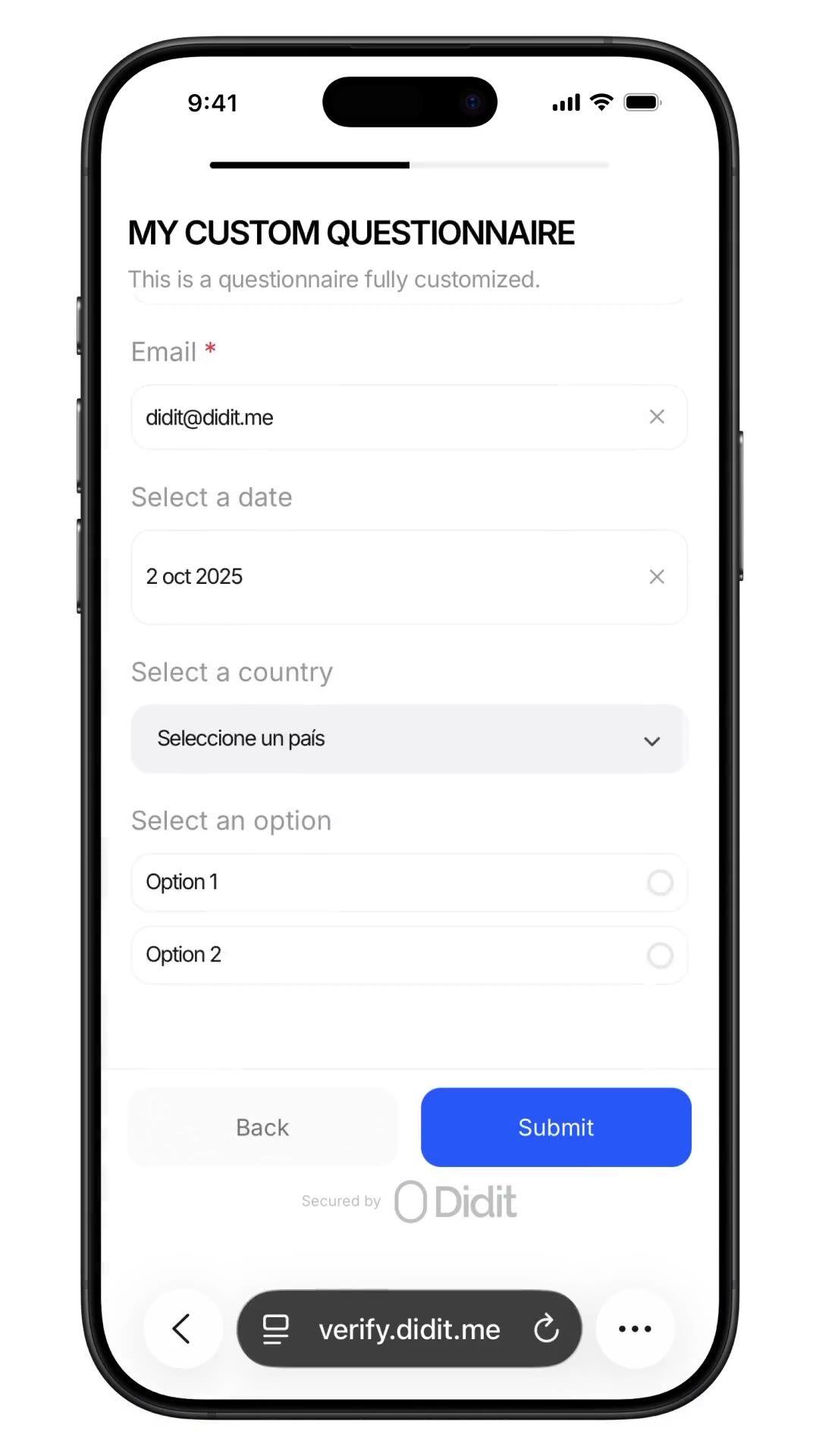
कोई भी डेटा इकट्ठा करें। किसी भी वेरिफिकेशन फ़्लो के अंदर।
अपनी कंप्लायंस टीम को जो भी सवाल चाहिए, पूछें, सोर्स ऑफ फंड्स, ऑक्यूपेशन, एक्सपेक्टेड वॉल्यूम, PEP (पॉलिटिकली एक्सपोज्ड पर्सन) सेल्फ-डिक्लेरेशन, एक ही सेशन में ऑडिटेड जवाबों के साथ। नो-कोड बिल्डर, कंडीशनल ब्रांचिंग, फ़ाइल अपलोड। प्रति सबमिशन $0.10, 500 मुफ़्त/महीना।
वर्कफ़्लो में एक कस्टम प्रश्नावली जोड़ें, सोर्स ऑफ फंड्स, PEP
सेल्फ-डिसक्लोजर, ऑक्यूपेशन, एक्सपेक्टेड वॉल्यूम। जवाब सेशन
रिपोर्ट में आते हैं। प्रति सबमिशन $0.10।
यह कैसे काम करता है
साइन-अप से लेकर वेरिफाइड यूज़र तक, चार स्टेप्स में।
चरण 01 / 04
01
वर्कफ़्लो बनाएं
अपनी पसंद के चेक चुनें, ID, लाइवनेस, फ़ेस मैच, सैंक्शंस, एड्रेस, एज, फ़ोन, ईमेल, कस्टम सवाल। उन्हें डैशबोर्ड में एक फ़्लो में ड्रैग करें, या उसी फ़्लो को हमारे API पर पोस्ट करें। कंडीशंस पर ब्रांच करें, A/B टेस्ट चलाएं, किसी कोड की ज़रूरत नहीं।
इंटीग्रेट करें
हमारे वेब, iOS, Android, React Native, या Flutter SDK के साथ नेटिवली एम्बेड करें। होस्टेड पेज पर रीडायरेक्ट करें। या बस अपने यूज़र को एक लिंक भेजें, ईमेल, SMS, WhatsApp, कहीं भी। चुनें कि आपके स्टैक के लिए क्या सही है।
यूज़र फ़्लो से गुज़रता है
Didit कैमरा, लाइटिंग क्यू, मोबाइल हैंड-ऑफ़ और एक्सेसिबिलिटी को होस्ट करता है। जब यूज़र फ़्लो में होता है, तो हम रियल टाइम में 200+ फ़्रॉड सिग्नल्स को स्कोर करते हैं और हर फ़ील्ड को आधिकारिक डेटा सोर्स के ख़िलाफ़ वेरिफाई करते हैं। दो सेकंड से भी कम समय में नतीजा।
आपको नतीजे मिलते हैं
रियल-टाइम साइंड वेबहुक्स आपके डेटाबेस को सिंक में रखते हैं, जैसे ही कोई यूज़र अप्रूव होता है, डिक्लाइन होता है, या रिव्यू के लिए भेजा जाता है। API को ऑन-डिमांड पोल करें। या हर सेशन, हर सिग्नल का निरीक्षण करने और अपने तरीक़े से केस मैनेज करने के लिए कंसोल खोलें।
डेवलपर्स के लिए बनाया गया · फ़्रॉड के ख़िलाफ़ बनाया गया · डिज़ाइन से ओपन
छह क्षमताएं। एक फ़ीचर फ़्लैग। QUESTIONNAIRE।
नीचे दी गई हर क्षमता एक ही मॉड्यूल पर एक टॉगल है। कोई अपसेल टियर नहीं, कोई अलग SKU नहीं, कोई ऐड-ऑन कॉल नहीं। उन्हें प्रति वर्कफ़्लो चालू करें, या एक ही वर्कफ़्लो में ID वेरिफिकेशन और लाइवनेस के बाद प्रश्नावली स्टेप को चेन करें।
स्कीमा-ड्रिवन फ़ॉर्म। कोई कोड नहीं। कोई SDK नहीं। कोई बिल्ड स्टेप नहीं।
दो मोड। तेज़ सिंगल-लैंग्वेज ड्रैग-एंड-ड्रॉप फ़ॉर्म के लिए सिंपल मोड, आंतरिक सर्वे और त्वरित अटेस्टेशन के लिए सबसे अच्छा। एडवांस्ड मोड एक विज़ुअल नोड-आधारित एडिटर है, जब आपको कंडीशनल ब्रांचिंग, ट्रांसलेशन, चॉइस-ड्रिवन फ़ॉलो-अप टेक्स्ट, या फ़ोर्स्ड मैनुअल रिव्यू की ज़रूरत हो। दोनों एक मिनट से भी कम समय में पब्लिश होते हैं।
Elements
Dropdown
Single choice
Multi choice
File upload
Long text
Date
Click to add
Custom questionnaireDraftPublished
Click to add elements
Source of fundsDROPDOWN
Required
Annual income bandSINGLE_CHOICE
Required
Supporting documentsFILE_UPLOAD
Required
Additional contextLONG_TEXT
Required
PublishPublished
02 · कंडीशनल ब्रांचिंग
हर सवाल सिर्फ़ उसी यूज़र को दिखाएँ जिसे उसकी ज़रूरत है।
एडवांस्ड-मोड एडिटर में ब्रांचिंग नोड्स किसी भी पिछले जवाब का निरीक्षण करते हैं और यूज़र को मैचिंग पाथ के साथ रूट करते हैं। अमेरिकी निवासी से W-9 फ़ॉलो-अप पूछें, यूरोपीय निवासी से PEP (पॉलिटिकली एक्सपोज्ड पर्सन) सेल्फ-डिक्लेरेशन पूछें, जहां दोनों लागू न हों वहां दोनों को छोड़ दें। एक नया कनेक्टेड नोड बनाने के लिए किसी भी नोड हैंडल से खाली जगह में ड्रैग करें। अनडू, रीडू, कीबोर्ड शॉर्टकट, ज़ूम और पैन शामिल हैं।
Applicant answer
US residentPEP · yesIncome > 250k
country == USRequire
is_pep == trueRequire
income > 250kShow
W-9 tax formFILE_UPLOAD
Required
Pick an answer to re-route the flow
03 · AML-ग्रेड टेम्प्लेट
फंड का स्रोत। टैक्स रेज़िडेंसी। UBO घोषणाएँ।
कंसोल में छह प्री-बिल्ट कंप्लायंस टेम्प्लेट, सोर्स ऑफ फंड्स, एम्प्लॉयमेंट डिटेल्स, पर्पस ऑफ अकाउंट, बेनिफिशियल ओनरशिप, टैक्स रेजिडेंसी, रिस्क असेसमेंट। प्रत्येक यह बताता है कि ऑडिटर क्या उम्मीद करते हैं (आय का स्रोत, ब्रेकडाउन, प्रूफ अपलोड, थर्ड-पार्टी फंड, वर्चुअल-एसेट डिक्लेरेशन)। किसी एक को क्लोन करें और कस्टमाइज़ करें, या खाली से शुरू करें।
Template library
SOFSource of Funds7q
EMPEmployment5q
ACPAccount Purpose4q
UBOOwnership6q
TAXTax Residency5q
RSKRisk Profile8q
Questionnaire7 questions
Pick a template to build
Source of fundsDROPDOWN
Income bandSINGLE_CHOICE
Initial depositDROPDOWN
Volume bandSINGLE_CHOICE
Supporting docsFILE_UPLOAD
Other sourcesMULTI_CHOICE
Extra contextLONG_TEXT
48+ languagesReady to ship
04 · स्ट्रक्चर्ड रिस्पॉन्स
हर जवाब उसी ऑडिटेबल JSON के रूप में वापस आता है।
सेशन रिपोर्ट में एक `responses` एरे होता है, प्रति प्रश्नावली स्टेप एक एंट्री। प्रत्येक आइटम एलिमेंट टाइप, रिक्वायर्ड फ़्लैग, लोकलाइज़्ड टाइटल, चॉइस, अपलोड लिमिट और वैल्यू, टेक्स्ट या फ़ाइलों के साथ एक आंसर ऑब्जेक्ट भेजता है। API और हर वेबहुक पर एक ही शेप, एक बार परसिस्ट करें और कभी दोबारा पार्स न करें।
Source of fundsIn flow
Answer
Select…Salary
Attachment
payslip_2026.pdf
Submit
questionnaire_responses200 OK
awaiting submission…
{
"questionnaire_id": "q_9f7485e0",
"element_type": "DROPDOWN",
"title": "Source of funds",
"answer": { "value": "salary" },
"files": ["payslip_2026.pdf"]
}
webhook · questionnaire.completed
05 · रिस्पॉन्स + ऑडिट ट्रेल
मैनुअल रिव्यू अनिवार्य। ह्यूमन इन द लूप। ऑडिट के लिए तैयार।
फ़ोर्स-मैनुअल-रिव्यू को टॉगल करें और हर सबमिशन 'इन रिव्यू' में पिन हो जाता है जब तक कि एक मानव कंप्लायंस अधिकारी उसे अप्रूव न कर दे। कंसोल हर जवाब, हर अपलोड की गई फ़ाइल और लोकलाइज़्ड प्रश्न टेक्स्ट दिखाता है। एक-क्लिक अप्रूवल अंतिम रिपोर्ट के साथ एक वेरिफाइड-सेशन वेबहुक को ट्रिगर करता है। रेगुलेटर के लिए एंड-टू-एंड ऑडिटेबल।
Submission queueLive
412413Approved
282928In review
6Not finished
Webhook fired · questionnaire.completedjust now
Jusr_7b3e9d4Source of Fundsjust nowIn reviewApproved
Ausr_a8c4f02Source of Funds12 MayApproved
Musr_4d2b6e1Employment Details13 MayApproved
Lusr_9f01a3cTax Residency14 MayApproved
06 · वर्कफ़्लो-नेटिव
KYC में इन-लाइन। या इसे अपने आप में एक वेरिफिकेशन के रूप में चलाएँ।
पूरे KYC (अपने ग्राहक को जानें) ऑनबोर्डिंग के हिस्से के रूप में फंड के स्रोत को इकट्ठा करने के लिए ID_VERIFICATION और LIVENESS के बाद QUESTIONNAIRE को चेन करें, एक सेशन, एक वेबहुक, एक स्टोर्ड रिपोर्ट। या एक ऐसा वर्कफ़्लो शिप करें जिसकी एकमात्र विशेषता QUESTIONNAIRE है, जो चल रहे ड्यू डिलिजेंस, ऑनबोर्डिंग के बाद की घोषणाओं और आवधिक पुन: सत्यापन के लिए है। किसी भी रास्ते पर प्रति सबमिशन $0.10।
01ID check
02Liveness
03Questions
Source of FundsApproved
Primary source · Salary
Docs · payslip_2026.pdf
Single session reportsession.approved · one webhook
Verified
इंटीग्रेट करें
दो पैटर्न। एक ही JSON। एक ही कीमत।
एक वर्कफ़्लो पर POST /v3/session/ का उपयोग करें जो QUESTIONNAIRE को ID_VERIFICATION और LIVENESS के साथ चेन करता है ताकि पूरे KYC के अंदर डेटा इकट्ठा किया जा सके, या एक वर्कफ़्लो पर जिसका एकमात्र फ़ीचर QUESTIONNAIRE है ताकि फ़ॉर्म को अपनी प्रश्नावली वेरिफिकेशन के रूप में चलाया जा सके। दोनों एक ही questionnaire_responses शेप लौटाते हैं।
नीचे दिए गए ब्लॉक को Claude Code, Cursor, Codex, Devin, Aider, या Replit Agent में पेस्ट करें। my_stack प्लेसहोल्डर को अपने फ्रेमवर्क + भाषा + उपयोग के मामले से भरें। एजेंट Didit को प्रोविज़न करता है, प्रश्नावली बनाता है, QUESTIONNAIRE फीचर के साथ वर्कफ़्लो बनाता है, वेबहुक को वायर करता है, और शिप करता है।
didit-integration-prompt.md
# Didit Custom Questionnaires — integrate in 5 minutes

You are integrating Didit's Custom Questionnaires module into <my_stack>.
Follow these steps exactly. Every URL, header, and enum value below is
canonical — do not paraphrase or "improve" them.

## 1. Provision an account
- Sign up: https://business.didit.me (no credit card required).
- Or provision programmatically: POST https://apx.didit.me/auth/v2/programmatic/register/
  (returns an API key bound to the workspace + application).

## 2. Build the questionnaire — Console OR API

### 2a. Visual builder in the Console (no code)
Questionnaires are authored visually — no schema upload, no SDK required.
1. Open https://business.didit.me, go to Questionnaires, click New.
2. Pick a mode:
   - Simple Mode — single-language drag-and-drop builder. Best for fast
     forms, internal surveys, single-locale flows.
   - Advanced Mode — visual node-based graph editor. Required for
     conditional branching, multi-language translations, choice-driven
     follow-up text, and forced manual review.
3. Drag elements onto the canvas (input, choice, upload, layout — full
   element catalog in section 5 below).
4. Optionally start from a pre-built template (Source of Funds,
   Employment Details, Purpose of Account, Beneficial Ownership, Tax
   Residency, Risk Assessment).
5. Localize titles, descriptions, placeholders, and choice labels for
   every supported language; set a default_language.
6. Publish — the questionnaire is now addressable by its questionnaire_id.

### 2b. Create the questionnaire programmatically (Management API)
Use this path when you want the form to live in code, ship via CI, or be
authored by an LLM. Endpoint:

  POST https://verification.didit.me/v3/questionnaires/
  Headers:  x-api-key: <your-api-key>
            Content-Type: application/json

Required body:
- title              — internal questionnaire name (string).
- languages          — array of locale codes; MUST include "en".
- default_language   — the default locale (string, e.g. "en").
- form_elements      — ordered array of questions (≥1 entry).

Each form element requires id, element_type (lowercase OR uppercase enum
— "short_text", "multiple_choice", "email", "file_upload", "date_picker",
etc.), and a translated label keyed by locale. For dropdown,
single_choice, and multiple_choice add options: [{ value, label }].

Hard constraints:
- This endpoint supports SIMPLE LINEAR questionnaires only. Do NOT send
  graph, branches, next, required_if, or conditional rules — use the
  Console (section 2a) for those.

Example body:
{
  "title": "Customer Onboarding",
  "languages": ["en"],
  "default_language": "en",
  "form_elements": [
    {
      "id": "occupation",
      "element_type": "short_text",
      "label": { "en": "What is your occupation?" },
      "is_required": true
    },
    {
      "id": "source_of_funds",
      "element_type": "multiple_choice",
      "label": { "en": "Source of funds" },
      "is_required": true,
      "options": [
        { "value": "employment", "label": { "en": "Employment" } },
        { "value": "business", "label": { "en": "Business" } },
        { "value": "investments", "label": { "en": "Investments" } }
      ]
    }
  ]
}

Response includes questionnaire_id — store it; you'll use it as
questionnaire_uuid when you wire the questionnaire into a workflow in
section 3 below. Full reference:
https://docs.didit.me/management-api/questionnaires/create

## 3. Two integration paths — pick one

### Path A — Workflow Builder (hosted UI, recommended)
Best when you want Didit to host the form, the file-upload UX, the
multi-language routing, the keyboard handling, and the mobile responsive
layout.

1. Create a workflow that contains the QUESTIONNAIRE feature:
   POST https://verification.didit.me/v3/workflows/
   Authorization header:  x-api-key: <your-api-key>
   Body: workflow_label, features array with the entry
         { feature: "QUESTIONNAIRE", questionnaire_id: "<id>" }
         (UPPERCASE — strict enum)
   Optional: chain QUESTIONNAIRE after OCR + LIVENESS in the
   same workflow to collect Source of Funds as part of a full Know Your Customer (KYC).

2. Create a verification session for an end user:
   POST https://verification.didit.me/v3/session/
   Body: workflow_id (from step 1), vendor_data (your own user id).
   Response: url (the hosted verification link) — redirect the user to it.

3. Listen for webhook callbacks (see "Webhooks" below).

### Path B — Standalone Questionnaire Verification
Run a questionnaire as its own verification — no KYC required.
Use a workflow whose only feature is QUESTIONNAIRE. Everything else is
identical to Path A. Useful for ongoing-due-diligence pulses,
post-onboarding declarations, periodic re-attestations.

## 4. Webhooks
- Register a webhook destination once via
  POST https://verification.didit.me/v3/webhook/destinations/
  Body: url, subscribed_events: ["session.verified", "session.review_started",
                                  "session.declined"]
- Response includes secret_shared_key — store it.
- Every webhook delivery carries an X-Signature-V2 header you MUST verify
  before trusting the payload.  HMAC-SHA256 verification MUST run against the raw body bytes (the raw payload as Didit sent it) BEFORE any JSON parsing — re-serialising the parsed body changes whitespace and key order, which invalidates the signature.Algorithm:
    1. sortKeys(payload) recursively
    2. shortenFloats (truncate trailing zeros after the decimal point)
    3. JSON.stringify the result
    4. HMAC-SHA256 with the secret_shared_key
    5. Hex-encode, compare to the X-Signature-V2 header.

## 5. Element catalog (use these in the builder)
Input elements:
  SHORT_TEXT, LONG_TEXT, NUMBER, EMAIL, PHONE, ADDRESS, DATE_PICKER, TIME
Choice elements:
  DROPDOWN, SINGLE_CHOICE, MULTIPLE_CHOICE, COUNTRY, CONSENT
  - DROPDOWN and SINGLE_CHOICE support per-option requires_text_input —
    selecting "Other" can demand a free-text follow-up.
Upload elements:
  IMAGE, FILE_UPLOAD
  - max_files (1-5) per element.
Layout elements:
  PARAGRAPH, SECTION_HEADER, SEPARATOR (read-only, not answerable).

## 6. Reading the report
The session report contains a questionnaire_responses array (one entry
per questionnaire step in the workflow graph). Each entry has:
- node_id: identifies the questionnaire step in the workflow graph
- questionnaire_id: which questionnaire this response is for
- title, description, languages, default_language, is_active
- sections: array of { title, description, items[] }
- each item: { uuid, order, element_type, is_required, title,
              description, placeholder, choices, max_files, answer }
- answer: { value, text, files[] } — only the fields relevant to the
  element_type are present.
- status: "Approved" | "In Review" | "Not Finished"

Status semantics:
- Not Finished — user has not completed the questionnaire yet.
- In Review — submitted, pending manual review. The Console flag
  "force manual review" pins every response to this state until a human
  approves it.
- Approved — reviewed and accepted.

Note: questionnaires do NOT emit risk warnings. Governance is achieved
through required fields, validation, manual review, and the workflow
graph (branching nodes route compliance-sensitive answers to In Review).

## 7. Hard rules — do not change
- Base URL for /v3/* endpoints is verification.didit.me (NOT apx.didit.me).
- Feature enum is UPPERCASE: QUESTIONNAIRE, OCR, LIVENESS,
  FACE_MATCH, AML, IP_ANALYSIS.
- Element type enums are UPPERCASE + underscored: SHORT_TEXT, LONG_TEXT,
  FILE_UPLOAD, SINGLE_CHOICE, etc.
- Auth header is x-api-key (lowercase, hyphenated).
- Webhook signature header is X-Signature-V2 (NOT X-Signature).
- Always verify webhook signatures before trusting payload data.
- Status casing matches exactly: "Approved", "In Review", "Not Finished"
  (title-cased, space-separated).

## 8. Pricing reference (public)
- $0.10 per questionnaire submission (Path A or Path B).
- No minimums. No per-language surcharge. No per-element surcharge.
  Conditional branching, file uploads, manual review — all included at
  the same per-submission price.

## 9. Verify your integration
- Sandbox starts on signup at https://business.didit.me — no separate flag.
- Use one of the pre-built templates (Source of Funds, Employment
  Details, Purpose of Account, Beneficial Ownership, Tax Residency, Risk
  Assessment) to ship a draft in under a minute, then customise.
- Switch to live: flip the application's environment toggle in console.

When in doubt: https://docs.didit.me/core-technology/questionnaires/overview
डिज़ाइन द्वारा कंप्लायंट
एक क्लिक में एक नया देश खोलें। हम मुश्किल काम करते हैं।
हम स्थानीय सहायक कंपनियाँ खोलते हैं, लाइसेंस सुरक्षित करते हैं, पेनेट्रेशन टेस्ट चलाते हैं, सर्टिफिकेशन हासिल करते हैं, और हर नए रेगुलेशन के साथ अलाइन करते हैं। एक नए देश में वेरिफिकेशन शिप करने के लिए, बस एक टॉगल फ्लिप करें। 220+ देश लाइव, हर तिमाही ऑडिट और पेन-टेस्टेड, एकमात्र आइडेंटिटी प्रोवाइडर जिसे EU सदस्य-राज्य सरकार ने औपचारिक रूप से इन-पर्सन वेरिफिकेशन से ज़्यादा सुरक्षित बताया है।
मुफ़्त में शुरू करें। ज़रूरत के हिसाब से भुगतान करें। एंटरप्राइज़ तक स्केल करें।
हर महीने 500 मुफ़्त वेरिफिकेशन, हमेशा के लिए। फिर, केवल तभी भुगतान करें जब कोई मॉड्यूल चले। एंटरप्राइज़ के लिए कस्टम कॉन्ट्रैक्ट, डेटा रेज़िडेंसी और सर्विस लेवल एग्रीमेंट (SLAs) उपलब्ध हैं।