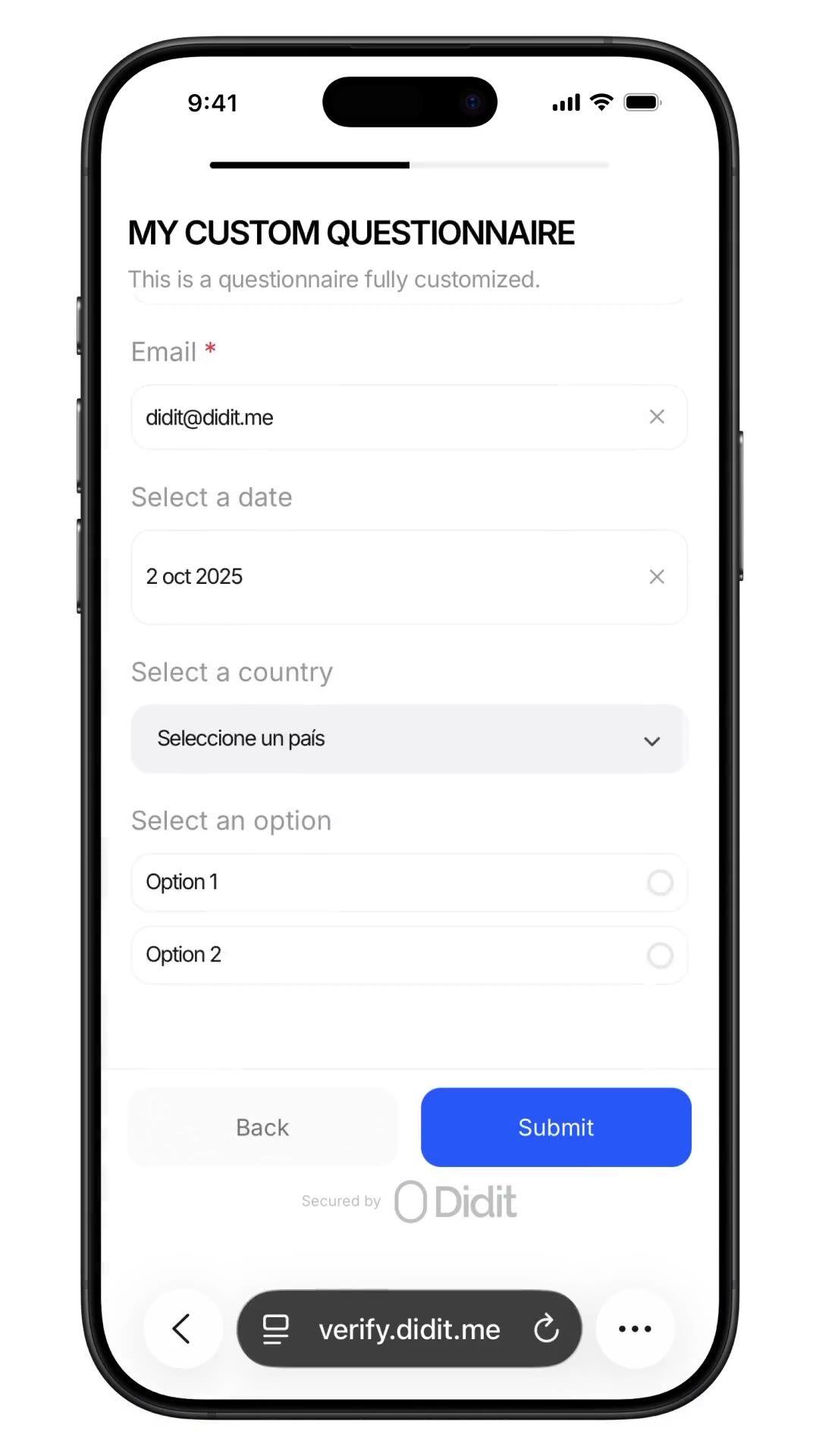
اطرح أي سؤال يحتاجه فريق الامتثال لديك, مصدر الأموال، الوظيفة، الحجم المتوقع، إقرار الشخص المعرض سياسياً (PEP), مع إجابات مدققة في نفس الجلسة. أداة إنشاء بدون كود، تفرعات شرطية، تحميل ملفات. $0.10 لكل إرسال، 500 مجانًا شهريًا.
أضف استبيانًا مخصصًا إلى سير العمل, مصدر الأموال، إقرار الشخص المعرض سياسياً (PEP)،
الوظيفة، الحجم المتوقع. تصل الإجابات إلى تقرير الجلسة.
$0.10 لكل إرسال.
كيف يعمل
من التسجيل إلى مستخدم موثق في أربع خطوات.
الخطوة 01 / 04
01
أنشئ سير العمل
اختر الفحوصات التي تريدها, الهوية، التحقق من الوجود، مطابقة الوجه، العقوبات، العنوان، العمر، الهاتف، البريد الإلكتروني، الأسئلة المخصصة. اسحبها إلى سير عمل في لوحة التحكم، أو انشر نفس سير العمل إلى API الخاص بنا. تفرع بناءً على الشروط، أجرِ اختبارات A/B، لا يتطلب أي كود.
ادمج
ادمج بشكل أصلي باستخدام SDK الخاص بنا للويب، iOS، Android، React Native، أو Flutter. أعد التوجيه إلى صفحة مستضافة. أو ببساطة أرسل للمستخدم رابطًا, عبر البريد الإلكتروني، الرسائل القصيرة، واتساب، أي مكان. اختر ما يناسب نظامك.
يمر المستخدم عبر سير العمل
تستضيف Didit الكاميرا، إشارات الإضاءة، التسليم عبر الهاتف المحمول، وإمكانية الوصول. بينما يكون المستخدم في سير العمل، نقوم بتقييم أكثر من 200 إشارة احتيال في الوقت الفعلي ونتحقق من كل حقل مقابل مصادر البيانات الموثوقة. النتيجة في أقل من ثانيتين.
تتلقى النتائج
تُبقي الـ webhooks الموقعة في الوقت الفعلي قاعدة بياناتك متزامنة لحظة الموافقة على المستخدم، أو رفضه، أو إرساله للمراجعة. استعلم الـ API عند الطلب. أو افتح لوحة التحكم لفحص كل جلسة، كل إشارة، وإدارة الحالات بطريقتك.
كل قدرة أدناه هي مفتاح تبديل في نفس الوحدة. لا توجد مستويات بيع إضافية، لا وحدات SKU منفصلة، لا مكالمات إضافية. قم بتشغيلها لكل سير عمل، أو اربط خطوة الاستبيان بعد التحقق من الهوية والتحقق من الوجود في سير عمل واحد.
نماذج تعتمد على المخطط. لا حاجة لكود. لا SDK. لا خطوات بناء.
وضعان. الوضع البسيط لإنشاء نماذج سحب وإفلات سريعة بلغة واحدة, الأفضل للاستبيانات الداخلية والإقرارات السريعة. الوضع المتقدم هو محرر مرئي قائم على العقد, مطلوب عندما تحتاج إلى تفرعات شرطية، ترجمات، نصوص متابعة تعتمد على الاختيار، أو مراجعة يدوية إلزامية. كلاهما ينشر في أقل من دقيقة.
Elements
Dropdown
Single choice
Multi choice
File upload
Long text
Date
Click to add
Custom questionnaireDraftPublished
Click to add elements
Source of fundsDROPDOWN
Required
Annual income bandSINGLE_CHOICE
Required
Supporting documentsFILE_UPLOAD
Required
Additional contextLONG_TEXT
Required
PublishPublished
02 · تفرعات شرطية
اعرض كل سؤال فقط للمستخدم الذي يحتاجه.
تفحص العقد المتفرعة في محرر الوضع المتقدم أي إجابة سابقة وتوجه المستخدم على طول المسار المطابق. اسأل المقيم في الولايات المتحدة عن متابعة W-9، والمقيم في الاتحاد الأوروبي عن إقرار الشخص المعرض سياسياً (PEP)، وتجاوز كلاهما حيث لا ينطبق أي منهما. اسحب من أي مقبض عقدة إلى مساحة فارغة لإنشاء عقدة متصلة جديدة. يتضمن التراجع، الإعادة، اختصارات لوحة المفاتيح، التكبير والتصغير والتحريك.
Applicant answer
US residentPEP · yesIncome > 250k
country == USRequire
is_pep == trueRequire
income > 250kShow
W-9 tax formFILE_UPLOAD
Required
Pick an answer to re-route the flow
03 · قوالب متوافقة مع AML
مصدر الأموال. الإقامة الضريبية. إقرارات المالك المستفيد النهائي (UBO).
ستة قوالب امتثال جاهزة في لوحة التحكم, مصدر الأموال، تفاصيل التوظيف، الغرض من الحساب، الملكية المستفيدة، الإقامة الضريبية، تقييم المخاطر. كل منها يرمز لما يتوقعه المدققون (مصدر الدخل، التفاصيل، تحميل الإثبات، أموال الطرف الثالث، إقرار الأصول الافتراضية). استنسخ واحدًا وخصصه، أو ابدأ من الصفر.
Template library
SOFSource of Funds7q
EMPEmployment5q
ACPAccount Purpose4q
UBOOwnership6q
TAXTax Residency5q
RSKRisk Profile8q
Questionnaire7 questions
Pick a template to build
Source of fundsDROPDOWN
Income bandSINGLE_CHOICE
Initial depositDROPDOWN
Volume bandSINGLE_CHOICE
Supporting docsFILE_UPLOAD
Other sourcesMULTI_CHOICE
Extra contextLONG_TEXT
48+ languagesReady to ship
04 · استجابات منظمة
تُرجع كل إجابة كـ JSON قابل للتدقيق.
يحمل تقرير الجلسة مصفوفة `responses`, إدخال واحد لكل خطوة استبيان. يحتوي كل عنصر على نوع العنصر، علامة الإلزام، العنوان المترجم، الخيارات، حد التحميل، وكائن إجابة بقيمة، نص، أو ملفات. نفس الشكل على API وكل webhook, احتفظ به مرة واحدة ولا تعيد تحليله أبدًا.
Source of fundsIn flow
Answer
Select…Salary
Attachment
payslip_2026.pdf
Submit
questionnaire_responses200 OK
awaiting submission…
{
"questionnaire_id": "q_9f7485e0",
"element_type": "DROPDOWN",
"title": "Source of funds",
"answer": { "value": "salary" },
"files": ["payslip_2026.pdf"]
}
webhook · questionnaire.completed
05 · الاستجابات + مسار التدقيق
مراجعة يدوية إجبارية. تدخل بشري. جاهز للتدقيق.
قم بتبديل خيار فرض المراجعة اليدوية، وستظل كل عملية إرسال معلقة في حالة "قيد المراجعة" حتى يوافق عليها مسؤول الامتثال البشري. تعرض لوحة التحكم كل إجابة، وكل ملف تم تحميله، ونص السؤال المترجم. الموافقة بنقرة واحدة تُطلق webhook جلسة موثقة مع التقرير النهائي. قابلة للتدقيق من البداية إلى النهاية للمنظم.
Submission queueLive
412413Approved
282928In review
6Not finished
Webhook fired · questionnaire.completedjust now
Jusr_7b3e9d4Source of Fundsjust nowIn reviewApproved
Ausr_a8c4f02Source of Funds12 MayApproved
Musr_4d2b6e1Employment Details13 MayApproved
Lusr_9f01a3cTax Residency14 MayApproved
06 · متكامل مع سير العمل
مدمج ضمن KYC. أو يُشغل كتحقق مستقل.
اربط الاستبيان بعد التحقق من الهوية والتحقق من الحيوية لجمع مصدر الأموال كجزء من عملية إعداد KYC (اعرف عميلك) كاملة, جلسة واحدة، webhook واحد، تقرير مخزن واحد. أو أطلق سير عمل تكون ميزته الوحيدة هي الاستبيان لإجراء العناية الواجبة المستمرة، والإقرارات بعد الإعداد، وإعادة التصديقات الدورية. 0.10 دولار لكل إرسال في أي من المسارين.
01ID check
02Liveness
03Questions
Source of FundsApproved
Primary source · Salary
Docs · payslip_2026.pdf
Single session reportsession.approved · one webhook
Verified
ادمج
نمطان. نفس JSON. نفس السعر.
استخدم POST /v3/session/ على سير عمل يربط QUESTIONNAIRE مع ID_VERIFICATION و LIVENESS لجمع البيانات ضمن KYC كامل، أو على سير عمل تكون ميزته الوحيدة هي QUESTIONNAIRE لتشغيل النموذج كتحقق استبيان خاص به. كلاهما يعيد نفس شكل questionnaire_responses.
الصق الكتلة أدناه في Claude Code، Cursor، Codex، Devin، Aider، أو Replit Agent. املأ العنصر النائب my_stack بإطار العمل + اللغة + حالة الاستخدام الخاصة بك. يقوم الوكيل بتوفير Didit، وبناء الاستبيان، وإنشاء سير العمل باستخدام ميزة QUESTIONNAIRE، وربط الويب هوك، ثم الإطلاق.
didit-integration-prompt.md
# Didit Custom Questionnaires — integrate in 5 minutes

You are integrating Didit's Custom Questionnaires module into <my_stack>.
Follow these steps exactly. Every URL, header, and enum value below is
canonical — do not paraphrase or "improve" them.

## 1. Provision an account
- Sign up: https://business.didit.me (no credit card required).
- Or provision programmatically: POST https://apx.didit.me/auth/v2/programmatic/register/
  (returns an API key bound to the workspace + application).

## 2. Build the questionnaire — Console OR API

### 2a. Visual builder in the Console (no code)
Questionnaires are authored visually — no schema upload, no SDK required.
1. Open https://business.didit.me, go to Questionnaires, click New.
2. Pick a mode:
   - Simple Mode — single-language drag-and-drop builder. Best for fast
     forms, internal surveys, single-locale flows.
   - Advanced Mode — visual node-based graph editor. Required for
     conditional branching, multi-language translations, choice-driven
     follow-up text, and forced manual review.
3. Drag elements onto the canvas (input, choice, upload, layout — full
   element catalog in section 5 below).
4. Optionally start from a pre-built template (Source of Funds,
   Employment Details, Purpose of Account, Beneficial Ownership, Tax
   Residency, Risk Assessment).
5. Localize titles, descriptions, placeholders, and choice labels for
   every supported language; set a default_language.
6. Publish — the questionnaire is now addressable by its questionnaire_id.

### 2b. Create the questionnaire programmatically (Management API)
Use this path when you want the form to live in code, ship via CI, or be
authored by an LLM. Endpoint:

  POST https://verification.didit.me/v3/questionnaires/
  Headers:  x-api-key: <your-api-key>
            Content-Type: application/json

Required body:
- title              — internal questionnaire name (string).
- languages          — array of locale codes; MUST include "en".
- default_language   — the default locale (string, e.g. "en").
- form_elements      — ordered array of questions (≥1 entry).

Each form element requires id, element_type (lowercase OR uppercase enum
— "short_text", "multiple_choice", "email", "file_upload", "date_picker",
etc.), and a translated label keyed by locale. For dropdown,
single_choice, and multiple_choice add options: [{ value, label }].

Hard constraints:
- This endpoint supports SIMPLE LINEAR questionnaires only. Do NOT send
  graph, branches, next, required_if, or conditional rules — use the
  Console (section 2a) for those.

Example body:
{
  "title": "Customer Onboarding",
  "languages": ["en"],
  "default_language": "en",
  "form_elements": [
    {
      "id": "occupation",
      "element_type": "short_text",
      "label": { "en": "What is your occupation?" },
      "is_required": true
    },
    {
      "id": "source_of_funds",
      "element_type": "multiple_choice",
      "label": { "en": "Source of funds" },
      "is_required": true,
      "options": [
        { "value": "employment", "label": { "en": "Employment" } },
        { "value": "business", "label": { "en": "Business" } },
        { "value": "investments", "label": { "en": "Investments" } }
      ]
    }
  ]
}

Response includes questionnaire_id — store it; you'll use it as
questionnaire_uuid when you wire the questionnaire into a workflow in
section 3 below. Full reference:
https://docs.didit.me/management-api/questionnaires/create

## 3. Two integration paths — pick one

### Path A — Workflow Builder (hosted UI, recommended)
Best when you want Didit to host the form, the file-upload UX, the
multi-language routing, the keyboard handling, and the mobile responsive
layout.

1. Create a workflow that contains the QUESTIONNAIRE feature:
   POST https://verification.didit.me/v3/workflows/
   Authorization header:  x-api-key: <your-api-key>
   Body: workflow_label, features array with the entry
         { feature: "QUESTIONNAIRE", questionnaire_id: "<id>" }
         (UPPERCASE — strict enum)
   Optional: chain QUESTIONNAIRE after OCR + LIVENESS in the
   same workflow to collect Source of Funds as part of a full Know Your Customer (KYC).

2. Create a verification session for an end user:
   POST https://verification.didit.me/v3/session/
   Body: workflow_id (from step 1), vendor_data (your own user id).
   Response: url (the hosted verification link) — redirect the user to it.

3. Listen for webhook callbacks (see "Webhooks" below).

### Path B — Standalone Questionnaire Verification
Run a questionnaire as its own verification — no KYC required.
Use a workflow whose only feature is QUESTIONNAIRE. Everything else is
identical to Path A. Useful for ongoing-due-diligence pulses,
post-onboarding declarations, periodic re-attestations.

## 4. Webhooks
- Register a webhook destination once via
  POST https://verification.didit.me/v3/webhook/destinations/
  Body: url, subscribed_events: ["session.verified", "session.review_started",
                                  "session.declined"]
- Response includes secret_shared_key — store it.
- Every webhook delivery carries an X-Signature-V2 header you MUST verify
  before trusting the payload.  HMAC-SHA256 verification MUST run against the raw body bytes (the raw payload as Didit sent it) BEFORE any JSON parsing — re-serialising the parsed body changes whitespace and key order, which invalidates the signature.Algorithm:
    1. sortKeys(payload) recursively
    2. shortenFloats (truncate trailing zeros after the decimal point)
    3. JSON.stringify the result
    4. HMAC-SHA256 with the secret_shared_key
    5. Hex-encode, compare to the X-Signature-V2 header.

## 5. Element catalog (use these in the builder)
Input elements:
  SHORT_TEXT, LONG_TEXT, NUMBER, EMAIL, PHONE, ADDRESS, DATE_PICKER, TIME
Choice elements:
  DROPDOWN, SINGLE_CHOICE, MULTIPLE_CHOICE, COUNTRY, CONSENT
  - DROPDOWN and SINGLE_CHOICE support per-option requires_text_input —
    selecting "Other" can demand a free-text follow-up.
Upload elements:
  IMAGE, FILE_UPLOAD
  - max_files (1-5) per element.
Layout elements:
  PARAGRAPH, SECTION_HEADER, SEPARATOR (read-only, not answerable).

## 6. Reading the report
The session report contains a questionnaire_responses array (one entry
per questionnaire step in the workflow graph). Each entry has:
- node_id: identifies the questionnaire step in the workflow graph
- questionnaire_id: which questionnaire this response is for
- title, description, languages, default_language, is_active
- sections: array of { title, description, items[] }
- each item: { uuid, order, element_type, is_required, title,
              description, placeholder, choices, max_files, answer }
- answer: { value, text, files[] } — only the fields relevant to the
  element_type are present.
- status: "Approved" | "In Review" | "Not Finished"

Status semantics:
- Not Finished — user has not completed the questionnaire yet.
- In Review — submitted, pending manual review. The Console flag
  "force manual review" pins every response to this state until a human
  approves it.
- Approved — reviewed and accepted.

Note: questionnaires do NOT emit risk warnings. Governance is achieved
through required fields, validation, manual review, and the workflow
graph (branching nodes route compliance-sensitive answers to In Review).

## 7. Hard rules — do not change
- Base URL for /v3/* endpoints is verification.didit.me (NOT apx.didit.me).
- Feature enum is UPPERCASE: QUESTIONNAIRE, OCR, LIVENESS,
  FACE_MATCH, AML, IP_ANALYSIS.
- Element type enums are UPPERCASE + underscored: SHORT_TEXT, LONG_TEXT,
  FILE_UPLOAD, SINGLE_CHOICE, etc.
- Auth header is x-api-key (lowercase, hyphenated).
- Webhook signature header is X-Signature-V2 (NOT X-Signature).
- Always verify webhook signatures before trusting payload data.
- Status casing matches exactly: "Approved", "In Review", "Not Finished"
  (title-cased, space-separated).

## 8. Pricing reference (public)
- $0.10 per questionnaire submission (Path A or Path B).
- No minimums. No per-language surcharge. No per-element surcharge.
  Conditional branching, file uploads, manual review — all included at
  the same per-submission price.

## 9. Verify your integration
- Sandbox starts on signup at https://business.didit.me — no separate flag.
- Use one of the pre-built templates (Source of Funds, Employment
  Details, Purpose of Account, Beneficial Ownership, Tax Residency, Risk
  Assessment) to ship a draft in under a minute, then customise.
- Switch to live: flip the application's environment toggle in console.

When in doubt: https://docs.didit.me/core-technology/questionnaires/overview
متوافق حسب التصميم
افتح دولة جديدة بنقرة واحدة. نحن نقوم بالعمل الشاق.
نحن نفتح الشركات التابعة المحلية، ونؤمن التراخيص، ونجري اختبارات الاختراق، ونحصل على الشهادات، ونتوافق مع كل لائحة جديدة. لنشر عمليات التحقق في بلد جديد، ما عليك سوى تفعيل مفتاح. أكثر من 220 دولة تعمل، يتم تدقيقها واختبار اختراقها كل ربع سنة, المزود الوحيد للهوية الذي وصفته حكومة دولة عضو في الاتحاد الأوروبي رسميًا بأنه أكثر أمانًا من التحقق الشخصي.