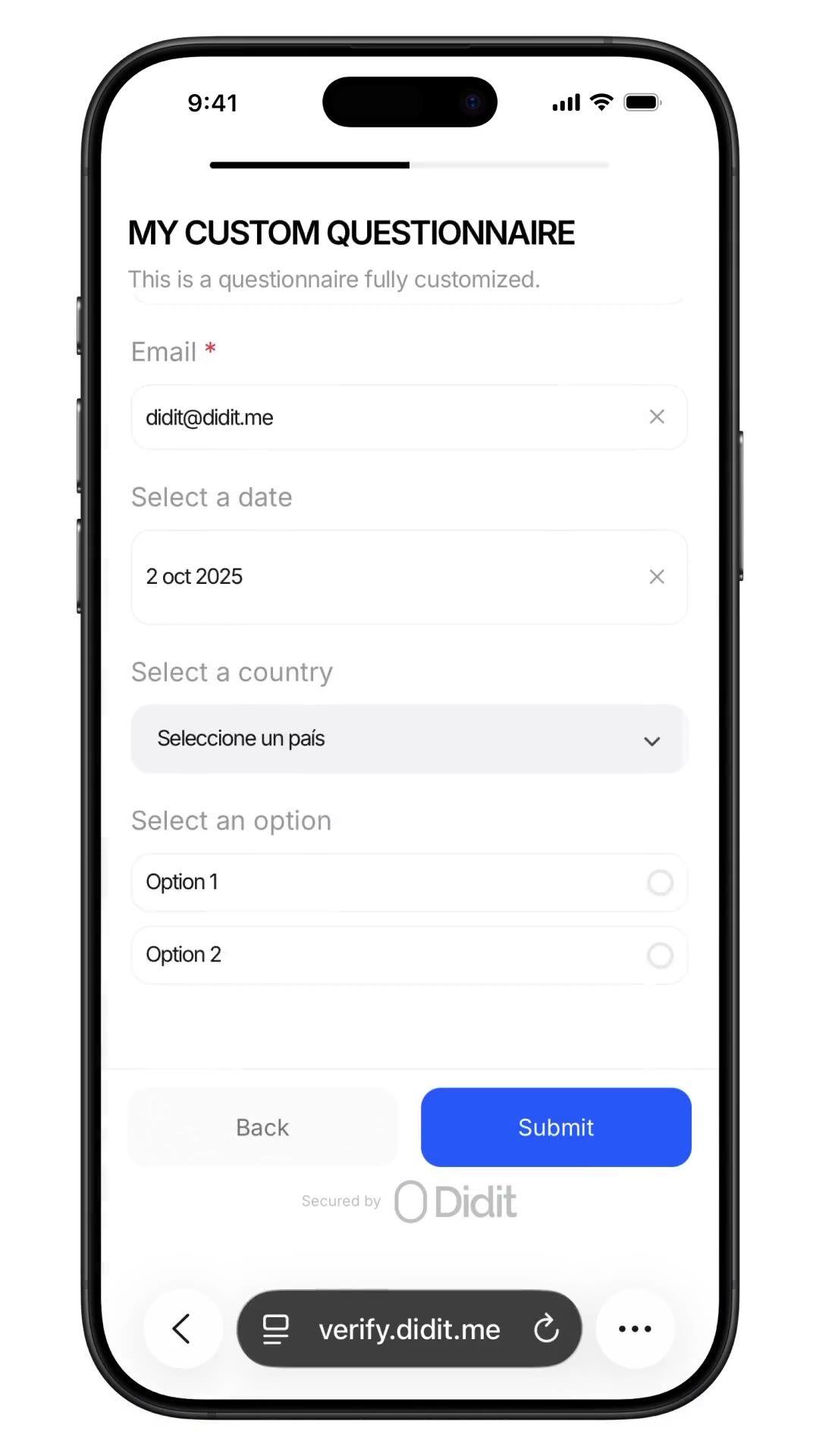
Sammle beliebige Daten. In jedem Verifizierungs-Flow.
Stelle alle Fragen, die dein Compliance-Team benötigt, Herkunft der Mittel, Beruf, erwartetes Volumen, PEP (politisch exponierte Person) Selbsterklärung, mit geprüften Antworten in derselben Session. No-Code-Builder, bedingte Verzweigungen, Dateiuploads. $0.10 pro Einreichung, 500 kostenlos/Monat.
Füge einen benutzerdefinierten Fragebogen in den Workflow ein, Herkunft der Mittel, PEP
Selbsterklärung, Beruf, erwartetes Volumen. Die Antworten landen im Session-Bericht.
$0.10 pro Einreichung.
So funktioniert's
Vom Sign-up zum verifizierten Nutzer in vier Schritten.
Schritt 01 / 04
01
Workflow erstellen
Wähle die gewünschten Prüfungen aus, ID, Liveness, Face Match, Sanktionen, Adresse, Alter, Telefon, E-Mail, benutzerdefinierte Fragen. Ziehe sie im Dashboard in einen Flow oder poste denselben Flow an unsere API. Verzweige nach Bedingungen, führe A/B-Tests durch, kein Code erforderlich.
Integrieren
Bette nativ mit unserem Web-, iOS-, Android-, React Native- oder Flutter-SDK ein. Leite auf eine gehostete Seite um. Oder sende deinem Nutzer einfach einen Link, per E-Mail, SMS, WhatsApp, überall. Wähle, was zu deinem Stack passt.
Nutzer durchläuft den Flow
Didit hostet die Kamera, die Beleuchtungshinweise, die mobile Übergabe und die Barrierefreiheit. Während der Nutzer den Flow durchläuft, bewerten wir über 200 Betrugssignale in Echtzeit und verifizieren jedes Feld anhand autoritativer Datenquellen. Ergebnis in unter zwei Sekunden.
Du erhältst die Ergebnisse
Echtzeit-signierte Webhooks halten deine Datenbank synchron, sobald ein Nutzer genehmigt, abgelehnt oder zur Überprüfung gesendet wird. Frage die API bei Bedarf ab. Oder öffne die Konsole, um jede Session, jedes Signal zu prüfen und Fälle nach deinen Wünschen zu verwalten.
Für Entwickler gemacht · Gegen Betrug gebaut · Offen im Design
Sechs Funktionen. Ein Feature-Flag. QUESTIONNAIRE.
Jede der unten genannten Funktionen ist ein Toggle im selben Modul. Keine Upsell-Stufen, keine separaten SKUs, keine zusätzlichen Anrufe. Aktiviere sie pro Workflow oder hänge den Fragebogen-Schritt nach der ID-Verifizierung und Liveness in einem einzigen Workflow an.
Schema-gesteuerte Formulare. Kein Code. Kein SDK. Kein Build-Schritt.
Zwei Modi. Einfacher Modus für schnelle, einsprachige Drag-and-Drop-Formulare, ideal für interne Umfragen und schnelle Bestätigungen. Der erweiterte Modus ist ein visueller, knotenbasierter Editor, erforderlich, wenn du bedingte Verzweigungen, Übersetzungen, wahlgesteuerte Folgetexte oder eine erzwungene manuelle Überprüfung benötigst. Beide sind in unter einer Minute veröffentlicht.
Elements
Dropdown
Single choice
Multi choice
File upload
Long text
Date
Click to add
Custom questionnaireDraftPublished
Click to add elements
Source of fundsDROPDOWN
Required
Annual income bandSINGLE_CHOICE
Required
Supporting documentsFILE_UPLOAD
Required
Additional contextLONG_TEXT
Required
PublishPublished
02 · Bedingte Verzweigung
Zeige jede Frage nur dem Nutzer, der sie beantworten muss.
Verzweigungsknoten im erweiterten Editor prüfen jede vorherige Antwort und leiten den Nutzer auf den passenden Pfad. Frage den US-Bürger nach der W-9-Folgefrage, den EU-Bürger nach der PEP (politisch exponierte Person) Selbsterklärung, überspringe beides, wo es nicht zutrifft. Ziehe von einem beliebigen Knotenpunkt in den leeren Bereich, um einen neuen verbundenen Knoten zu erstellen. Rückgängig machen, Wiederherstellen, Tastenkombinationen, Zoomen und Schwenken inklusive.
Applicant answer
US residentPEP · yesIncome > 250k
country == USRequire
is_pep == trueRequire
income > 250kShow
W-9 tax formFILE_UPLOAD
Required
Pick an answer to re-route the flow
03 · AML-konforme Vorlagen
Herkunft der Gelder. Steuerlicher Wohnsitz. UBO-Erklärungen.
Sechs vorgefertigte Compliance-Vorlagen in der Konsole, Herkunft der Mittel, Beschäftigungsdetails, Zweck des Kontos, wirtschaftlicher Eigentümer, Steueransässigkeit, Risikobewertung. Jede kodiert, was Auditoren erwarten (Einkommensquelle, Aufschlüsselung, Upload von Nachweisen, Drittmittel, Erklärung zu virtuellen Vermögenswerten). Klone eine und passe sie an, oder starte leer.
Template library
SOFSource of Funds7q
EMPEmployment5q
ACPAccount Purpose4q
UBOOwnership6q
TAXTax Residency5q
RSKRisk Profile8q
Questionnaire7 questions
Pick a template to build
Source of fundsDROPDOWN
Income bandSINGLE_CHOICE
Initial depositDROPDOWN
Volume bandSINGLE_CHOICE
Supporting docsFILE_UPLOAD
Other sourcesMULTI_CHOICE
Extra contextLONG_TEXT
48+ languagesReady to ship
04 · Strukturierte Antworten
Jede Antwort wird als dasselbe auditierbare JSON zurückgegeben.
Der Session-Bericht enthält ein `responses`-Array, einen Eintrag pro Fragebogen-Schritt. Jedes Element enthält den Elementtyp, das Pflichtfeld-Flag, den lokalisierten Titel, Auswahlmöglichkeiten, das Upload-Limit und ein Antwortobjekt mit Wert, Text oder Dateien. Dieselbe Struktur in der API und jedem Webhook, einmal speichern und nie wieder parsen.
Aktiviere die erzwungene manuelle Überprüfung, und jede Einreichung wird als „In Überprüfung“ markiert, bis ein menschlicher Compliance Officer sie genehmigt. Die Konsole zeigt jede Antwort, jede hochgeladene Datei und den lokalisierten Fragetext. Eine Genehmigung per Klick löst einen verifizierten Session-Webhook mit dem Abschlussbericht aus. End-to-End auditierbar für die Aufsichtsbehörde.
Submission queueLive
412413Approved
282928In review
6Not finished
Webhook fired · questionnaire.completedjust now
Jusr_7b3e9d4Source of Fundsjust nowIn reviewApproved
Ausr_a8c4f02Source of Funds12 MayApproved
Musr_4d2b6e1Employment Details13 MayApproved
Lusr_9f01a3cTax Residency14 MayApproved
06 · Workflow-nativ
Direkt im KYC-Prozess. Oder als eigenständige Verifizierung.
Kombiniere das QUESTIONNAIRE mit ID_VERIFICATION und LIVENESS, um die Herkunft der Gelder im Rahmen eines vollständigen KYC-Onboardings (Know Your Customer) zu erfassen, eine Session, ein Webhook, ein gespeicherter Bericht. Oder nutze einen Workflow, dessen einzige Funktion das QUESTIONNAIRE ist, für laufende Due Diligence, Erklärungen nach dem Onboarding und regelmäßige Neubestätigungen. $0.10 pro Einreichung, egal welcher Weg.
01ID check
02Liveness
03Questions
Source of FundsApproved
Primary source · Salary
Docs · payslip_2026.pdf
Single session reportsession.approved · one webhook
Verified
Integrieren
Zwei Muster. Gleiches JSON. Gleicher Preis.
Nutze POST /v3/session/ für einen Workflow, der QUESTIONNAIRE mit ID_VERIFICATION und LIVENESS verknüpft, um Daten innerhalb eines vollständigen KYC zu sammeln, oder für einen Workflow, dessen einzige Funktion QUESTIONNAIRE ist, um das Formular als eigene Fragebogen-Verifizierung auszuführen. Beide liefern dieselbe questionnaire_responses-Struktur.
Benutzerdefinierte Fragebögen mit einem Prompt deployen.
Füge den folgenden Block in Claude Code, Cursor, Codex, Devin, Aider oder Replit Agent ein. Ersetze den Platzhalter `my_stack` durch dein Framework, deine Sprache und deinen Anwendungsfall. Der Agent provisioniert Didit, erstellt den Fragebogen, den Workflow mit dem QUESTIONNAIRE-Feature, verbindet den Webhook und deployt alles.
didit-integration-prompt.md
# Didit Custom Questionnaires — integrate in 5 minutes

You are integrating Didit's Custom Questionnaires module into <my_stack>.
Follow these steps exactly. Every URL, header, and enum value below is
canonical — do not paraphrase or "improve" them.

## 1. Provision an account
- Sign up: https://business.didit.me (no credit card required).
- Or provision programmatically: POST https://apx.didit.me/auth/v2/programmatic/register/
  (returns an API key bound to the workspace + application).

## 2. Build the questionnaire — Console OR API

### 2a. Visual builder in the Console (no code)
Questionnaires are authored visually — no schema upload, no SDK required.
1. Open https://business.didit.me, go to Questionnaires, click New.
2. Pick a mode:
   - Simple Mode — single-language drag-and-drop builder. Best for fast
     forms, internal surveys, single-locale flows.
   - Advanced Mode — visual node-based graph editor. Required for
     conditional branching, multi-language translations, choice-driven
     follow-up text, and forced manual review.
3. Drag elements onto the canvas (input, choice, upload, layout — full
   element catalog in section 5 below).
4. Optionally start from a pre-built template (Source of Funds,
   Employment Details, Purpose of Account, Beneficial Ownership, Tax
   Residency, Risk Assessment).
5. Localize titles, descriptions, placeholders, and choice labels for
   every supported language; set a default_language.
6. Publish — the questionnaire is now addressable by its questionnaire_id.

### 2b. Create the questionnaire programmatically (Management API)
Use this path when you want the form to live in code, ship via CI, or be
authored by an LLM. Endpoint:

  POST https://verification.didit.me/v3/questionnaires/
  Headers:  x-api-key: <your-api-key>
            Content-Type: application/json

Required body:
- title              — internal questionnaire name (string).
- languages          — array of locale codes; MUST include "en".
- default_language   — the default locale (string, e.g. "en").
- form_elements      — ordered array of questions (≥1 entry).

Each form element requires id, element_type (lowercase OR uppercase enum
— "short_text", "multiple_choice", "email", "file_upload", "date_picker",
etc.), and a translated label keyed by locale. For dropdown,
single_choice, and multiple_choice add options: [{ value, label }].

Hard constraints:
- This endpoint supports SIMPLE LINEAR questionnaires only. Do NOT send
  graph, branches, next, required_if, or conditional rules — use the
  Console (section 2a) for those.

Example body:
{
  "title": "Customer Onboarding",
  "languages": ["en"],
  "default_language": "en",
  "form_elements": [
    {
      "id": "occupation",
      "element_type": "short_text",
      "label": { "en": "What is your occupation?" },
      "is_required": true
    },
    {
      "id": "source_of_funds",
      "element_type": "multiple_choice",
      "label": { "en": "Source of funds" },
      "is_required": true,
      "options": [
        { "value": "employment", "label": { "en": "Employment" } },
        { "value": "business", "label": { "en": "Business" } },
        { "value": "investments", "label": { "en": "Investments" } }
      ]
    }
  ]
}

Response includes questionnaire_id — store it; you'll use it as
questionnaire_uuid when you wire the questionnaire into a workflow in
section 3 below. Full reference:
https://docs.didit.me/management-api/questionnaires/create

## 3. Two integration paths — pick one

### Path A — Workflow Builder (hosted UI, recommended)
Best when you want Didit to host the form, the file-upload UX, the
multi-language routing, the keyboard handling, and the mobile responsive
layout.

1. Create a workflow that contains the QUESTIONNAIRE feature:
   POST https://verification.didit.me/v3/workflows/
   Authorization header:  x-api-key: <your-api-key>
   Body: workflow_label, features array with the entry
         { feature: "QUESTIONNAIRE", questionnaire_id: "<id>" }
         (UPPERCASE — strict enum)
   Optional: chain QUESTIONNAIRE after OCR + LIVENESS in the
   same workflow to collect Source of Funds as part of a full Know Your Customer (KYC).

2. Create a verification session for an end user:
   POST https://verification.didit.me/v3/session/
   Body: workflow_id (from step 1), vendor_data (your own user id).
   Response: url (the hosted verification link) — redirect the user to it.

3. Listen for webhook callbacks (see "Webhooks" below).

### Path B — Standalone Questionnaire Verification
Run a questionnaire as its own verification — no KYC required.
Use a workflow whose only feature is QUESTIONNAIRE. Everything else is
identical to Path A. Useful for ongoing-due-diligence pulses,
post-onboarding declarations, periodic re-attestations.

## 4. Webhooks
- Register a webhook destination once via
  POST https://verification.didit.me/v3/webhook/destinations/
  Body: url, subscribed_events: ["session.verified", "session.review_started",
                                  "session.declined"]
- Response includes secret_shared_key — store it.
- Every webhook delivery carries an X-Signature-V2 header you MUST verify
  before trusting the payload.  HMAC-SHA256 verification MUST run against the raw body bytes (the raw payload as Didit sent it) BEFORE any JSON parsing — re-serialising the parsed body changes whitespace and key order, which invalidates the signature.Algorithm:
    1. sortKeys(payload) recursively
    2. shortenFloats (truncate trailing zeros after the decimal point)
    3. JSON.stringify the result
    4. HMAC-SHA256 with the secret_shared_key
    5. Hex-encode, compare to the X-Signature-V2 header.

## 5. Element catalog (use these in the builder)
Input elements:
  SHORT_TEXT, LONG_TEXT, NUMBER, EMAIL, PHONE, ADDRESS, DATE_PICKER, TIME
Choice elements:
  DROPDOWN, SINGLE_CHOICE, MULTIPLE_CHOICE, COUNTRY, CONSENT
  - DROPDOWN and SINGLE_CHOICE support per-option requires_text_input —
    selecting "Other" can demand a free-text follow-up.
Upload elements:
  IMAGE, FILE_UPLOAD
  - max_files (1-5) per element.
Layout elements:
  PARAGRAPH, SECTION_HEADER, SEPARATOR (read-only, not answerable).

## 6. Reading the report
The session report contains a questionnaire_responses array (one entry
per questionnaire step in the workflow graph). Each entry has:
- node_id: identifies the questionnaire step in the workflow graph
- questionnaire_id: which questionnaire this response is for
- title, description, languages, default_language, is_active
- sections: array of { title, description, items[] }
- each item: { uuid, order, element_type, is_required, title,
              description, placeholder, choices, max_files, answer }
- answer: { value, text, files[] } — only the fields relevant to the
  element_type are present.
- status: "Approved" | "In Review" | "Not Finished"

Status semantics:
- Not Finished — user has not completed the questionnaire yet.
- In Review — submitted, pending manual review. The Console flag
  "force manual review" pins every response to this state until a human
  approves it.
- Approved — reviewed and accepted.

Note: questionnaires do NOT emit risk warnings. Governance is achieved
through required fields, validation, manual review, and the workflow
graph (branching nodes route compliance-sensitive answers to In Review).

## 7. Hard rules — do not change
- Base URL for /v3/* endpoints is verification.didit.me (NOT apx.didit.me).
- Feature enum is UPPERCASE: QUESTIONNAIRE, OCR, LIVENESS,
  FACE_MATCH, AML, IP_ANALYSIS.
- Element type enums are UPPERCASE + underscored: SHORT_TEXT, LONG_TEXT,
  FILE_UPLOAD, SINGLE_CHOICE, etc.
- Auth header is x-api-key (lowercase, hyphenated).
- Webhook signature header is X-Signature-V2 (NOT X-Signature).
- Always verify webhook signatures before trusting payload data.
- Status casing matches exactly: "Approved", "In Review", "Not Finished"
  (title-cased, space-separated).

## 8. Pricing reference (public)
- $0.10 per questionnaire submission (Path A or Path B).
- No minimums. No per-language surcharge. No per-element surcharge.
  Conditional branching, file uploads, manual review — all included at
  the same per-submission price.

## 9. Verify your integration
- Sandbox starts on signup at https://business.didit.me — no separate flag.
- Use one of the pre-built templates (Source of Funds, Employment
  Details, Purpose of Account, Beneficial Ownership, Tax Residency, Risk
  Assessment) to ship a draft in under a minute, then customise.
- Switch to live: flip the application's environment toggle in console.

When in doubt: https://docs.didit.me/core-technology/questionnaires/overview
Compliant by Design
Ein neues Land mit einem Klick erschließen. Wir machen die Arbeit.
Wir gründen lokale Tochtergesellschaften, sichern Lizenzen, führen Penetrationstests durch, erhalten Zertifizierungen und passen uns jeder neuen Regulierung an. Um Verifizierungen in einem neuen Land zu starten, legst du einfach einen Schalter um. Über 220 Länder live, vierteljährlich auditiert und Pen-getestet, der einzige Identitätsanbieter, den eine EU-Mitgliedsregierung offiziell als sicherer als die persönliche Verifizierung eingestuft hat.
Vorgefertigte Vorlagen, inklusive Source of Funds.
$0.10
Pro Fragebogen-Einreichung, jedes Muster.
500
Jeden Monat kostenlose Verifizierungen, für immer.
Drei Stufen, eine Preisliste
Kostenlos starten. Nach Verbrauch zahlen. Bis zum Enterprise-Level skalieren.
500 kostenlose Verifizierungen jeden Monat, für immer. Danach zahlst du nur, wenn ein Modul läuft. Individuelle Verträge, Datenresidenz und Service Level Agreements (SLAs) für Enterprise-Kunden.
Kostenlos
$0/ Monat · keine Kreditkarte nötig
Zum Entwickeln, Testen und für deine ersten Nutzer.
Alles, was du für den Start brauchst:
500 vollständige KYC-Verifizierungen pro Monat
ID, Liveness, Face Match, Gerät & IP
Über 200 Betrugssignale, Blocklist, Duplikate
Wiederverwendbares KYC im Didit-Netzwerk
Workflow Builder, Case Management, SDKs
KI-SupportKI-Agent in der Konsole, Docs und Community.