

免费
$0/ 月 · 无需信用卡
适用于构建、测试和您的首批用户。
开始所需的一切:
- 每月500次完整KYC验证
- 身份、活体、人脸匹配、设备和IP验证
- 200+欺诈信号、黑名单、重复项检测
- Didit网络内可复用KYC
- 工作流构建器、案件管理、SDK
- AI 支持 控制台内 AI 助手、文档和社区支持。






全球2,000多家组织信赖。
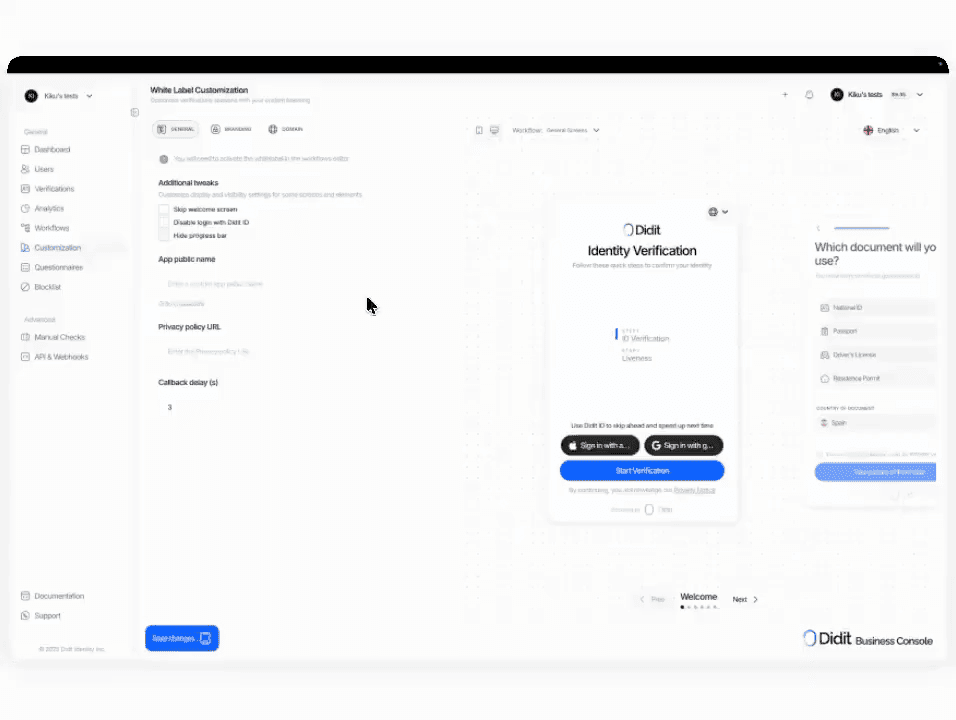
您的品牌,我们的判断
在您的域名下托管流程。替换 Logo、颜色、文案和链接 预览卡片。模块定价不变, 每次会话 $0.20 是唯一附加费用。
选择您需要的检查项, 身份、活体、人脸比对、制裁名单、地址、年龄、电话、邮箱、自定义问题。在控制台中将它们拖入流程,或通过我们的 API 发布相同的流程。支持条件分支、A/B 测试,无需代码。
# 控制台 -> 白标 -> 样式编辑器
colors: 品牌调色板
logos: 方形 + 矩形
typography: 品牌字体 + 字重
domain: verify.acme.com
发件人邮箱: verify@acme.com

# 工作流 -> 设置 -> 选项
包含自定义样式: true您的品牌 · `verify.acme.com` · TLS 自动$ curl -X POST https://verification.didit.me/v3/session/ \
-H "x-api-key: $DIDIT_API_KEY" \
-H "Content-Type: application/json" \
-d '{
"workflow_id": "wf_acme_kyc",
"vendor_data": "user-42"
}'{ "url": "verify.acme.com/..." }# Didit White Label — integrate in 5 minutes
You are integrating Didit's White Label (custom branding + custom domain)
into <my_stack>. White Label is a CONFIGURATION on top of any workflow —
not a separate API endpoint. Follow these steps exactly. Every URL,
header, and field below is canonical — do not paraphrase or "improve" them.
## 1. Provision an account
- Sign up: https://business.didit.me (no credit card required).
- Or provision programmatically: POST https://apx.didit.me/auth/v2/programmatic/register/
(returns an API key bound to the workspace + application).
## 2. Configure White Label in the console
White Label settings live at Console -> White Label -> Style Editor. Five
groups, every one is customizable:
- Colors — buttons, text, panels, backgrounds (every color element)
- Typography — upload a brand font, set heading + body weights
- Logos — square + rectangular variants, served on every screen
- Layout — border radius for panels, buttons, inputs
- Login screen — show or skip the user-login step entirely
- Custom domain — host the verification UI on your own subdomain
(e.g. verify.acme.com) instead of verify.didit.me
Custom-domain setup:
1. Console -> White Label -> Custom Domain -> Add domain
2. We return a CNAME target. Point your subdomain CNAME at it.
3. Click Verify. We provision a TLS certificate via Let's Encrypt /
ACME (automatic renewal, no action required from you).
4. Domain becomes live within minutes.
Custom email-from:
- Console -> White Label -> Email -> set the "From" name + reply-to address.
- DKIM / SPF records returned for you to add to DNS.
## 3. Enable White Label on each workflow
The customization does NOT auto-apply. You enable it per workflow:
1. Console -> Workflows -> open the workflow you want to brand.
2. Click Settings (gear icon).
3. Under Options, find "Include custom style".
4. Enable the toggle. Save.
Workflows without the toggle keep the default Didit branding — useful for
sandbox flows you do not want to brand yet.
## 4. Use the white-labeled workflow from your stack
Once the workflow has white-label enabled, you call it the same way as any
other Didit workflow:
POST https://verification.didit.me/v3/session/
Authorization header: x-api-key: <your-api-key>
Body:
- workflow_id (required, your white-labeled workflow id)
- vendor_data (optional, your own user id)
- callback (optional, URL we redirect to after the flow)
Response: { url } (the hosted verification link) — redirect the user
there. The UI they see is your brand (your logo, your colors, your
typography), on your domain (verify.acme.com), with your "From" name on
every email we send to the user mid-flow.
## 5. Webhooks
- Register a webhook destination once via
POST https://verification.didit.me/v3/webhook/destinations/
Body: url, subscribed_events: ["session.verified", "session.review_started",
"session.declined", "session.kyc_expired"]
- Response includes secret_shared_key — store it.
- Every webhook delivery carries an X-Signature-V2 header you MUST verify
before trusting the payload. HMAC-SHA256 verification MUST run against the raw body bytes (the raw payload as Didit sent it) BEFORE any JSON parsing — re-serialising the parsed body changes whitespace and key order, which invalidates the signature.Algorithm:
1. sortKeys(payload) recursively
2. shortenFloats (truncate trailing zeros after the decimal point)
3. JSON.stringify the result
4. HMAC-SHA256 with the secret_shared_key
5. Hex-encode, compare to the X-Signature-V2 header.
## 6. Hard rules - do not change
- Base URL for /v3/* endpoints is verification.didit.me (NOT apx.didit.me).
- Auth header is x-api-key (lowercase, hyphenated).
- Webhook signature header is X-Signature-V2 (NOT X-Signature).
- Status casing matches exactly: "Approved", "Declined", "In Review",
"Not Finished" (title-cased, space-separated).
- White Label is a configuration on a workflow — there is NO standalone
/v3/white-label/ endpoint. Do not invent one.
- Removing visible Didit branding does NOT remove your obligations as the
controller of the user journey. You still surface your privacy notice,
link Didit's Verification Privacy Notice + End User Terms, and collect
explicit consent before document + biometric capture where the law
requires it. See https://docs.didit.me/console/white-label for the full
controller-side checklist.
## 7. Reseller / OEM positioning
White Label is the same product your agency, integrator, or compliance-
consulting firm uses to resell Didit under your own name to your own
customers:
- Pricing: $0.20 per session on top of the underlying module price (e.g.
full Know Your Customer (KYC) bundle at $0.33 + $0.20 white label = $0.53 per session, or
standalone ID at $0.15 + $0.20 = $0.35).
- 500 free verifications per month stay applied to your own meter,
regardless of how many resold tenants you have.
- One contract with Didit, one invoice — your customers see only your
brand and your support address.
- Custom email-from + custom domain mean your customers never see Didit
branding mid-flow. We still surface the legally-required disclosures
per the controller-side checklist above.
## 8. Pricing reference (public)
- White Label add-on: $0.20 per session, on top of the underlying module
price. A full KYC bundle goes from $0.33 to $0.53 per white-labeled
session; a standalone $0.15 ID Verification goes to $0.35.
- 500 free verifications every month, forever, on every account — applies
regardless of whether the flow is white-labeled.
- No setup fee, no certificate cost, no per-domain charge.
## 9. Verify your integration
- Sandbox starts on signup at https://business.didit.me - no separate flag.
- Test custom domain locally by adding a /etc/hosts entry pointing your
brand subdomain at our CNAME target before DNS is live.
- Switch to live: flip the application's environment toggle in console.
When in doubt: https://docs.didit.me/console/white-label













适用于构建、测试和您的首批用户。
25+ 模块,价格公开透明。自动享受批量折扣。
适用于大批量和受监管项目。
使用量增长时自动享受批量折扣——无需谈判,无需销售电话。
Didit 是身份和欺诈基础设施,是我们自己在构建产品时希望拥有的平台:开放、灵活且对开发者友好,因此它能真正融入您的技术栈,而不是一个需要您围绕其进行集成的黑盒。
一个 API 涵盖了人员验证(KYC,了解您的客户)、企业验证(KYB,了解您的企业)、加密钱包筛选(KYT,了解您的交易)以及实时交易监控,其技术栈旨在实现:
其底层支持:14,000 多种文档类型,支持 48 种以上语言,1,000 多个数据源,以及每次会话的 200 多个欺诈信号。Didit 基础设施通过每次会话动态学习,并日益完善。
白标功能让整个 Didit 验证流程在您的品牌下运行, 您的自定义域名(verify.acme.com)、您的 Logo、您的调色板、您的字体、您的发件邮箱、您的网站图标。用户看不到任何 Didit 品牌信息。
相同的 /v3/ 应用编程接口 (API)。相同的托管捕获流程。相同的 X-Signature-V2 基于哈希的消息认证码 (HMAC) Webhook 契约。相同的经西班牙财政部 / 西班牙银行 (BdE) / 西班牙金融情报部门 (SEPBLAC) 认证的底层管道。
在基础模块价格之上,每会话 $0.20。完整参考文档:docs.didit.me/console/white-label。
在基础模块价格之上,每会话 $0.20。
$0.33 变为 $0.53。$0.15 身份文档验证将变为 $0.35。无设置费、无证书费、无按域名收费。公开定价:didit.me/pricing。
整个流程通常在 30 秒内完成, 拿起身份证,拍摄证件,拍摄自拍,完成。这是市场上最快的速度。传统的 KYC 提供商完成相同流程通常需要超过 90 秒。
在后端,Didit 在 p99 下两秒内返回结果,从用户完成自拍到您的 Webhook 触发。移动端捕获针对慢速手机和慢速网络进行了优化:渐进式图像压缩、延迟加载软件开发工具包 (SDK),以及如果用户从网页端开始,通过二维码实现桌面到手机的一键切换。
三分钟搞定,无需证书操作。
1. 在业务控制台,前往白标 → 自定义域名 → 添加域名。 2. 我们会返回一个规范名称 (CNAME) 目标。 3. 将您的品牌子域名 CNAME 指向它。 4. 点击验证。
我们通过 Let's Encrypt 和自动证书管理环境 (ACME) 协议提供传输层安全 (TLS) 证书,设置自动续订,域名将在几分钟内上线。
无需证书采购,无需密钥轮换,无需与您的安全团队进行域名系统 (DNS) 往返沟通。域名有效期内自动续订。
每个会话都会落入七种明确状态之一,因此您的代码始终知道该怎么做:
Approved, 所有检查通过。让用户继续。Declined, 一个或多个检查失败。您可以允许用户重新提交特定的失败步骤(例如,重新拍摄自拍),而无需重新运行整个流程。In Review, 标记为合规审查。在控制台中打开案例,查看所有信号,决定批准或拒绝。In Progress, 用户正在进行中。Not Started, 链接已发送,用户尚未打开。如果长时间未打开,发送提醒。Abandoned, 用户打开了链接但未及时完成。重新激活或使其过期。Expired, 会话链接已过期。创建新会话。每次状态更改都会触发一个已签名的 Webhook,因此您的数据库始终保持同步。放弃和拒绝的会话是免费的。
生产数据默认在欧盟的 Amazon Web Services 上处理和存储。企业合同可根据监管机构要求,申请其他区域。
全面加密。 所有数据库、对象存储和备份均采用 AES-256 静态加密。所有 API 调用、Webhook 和业务控制台会话均采用传输层安全协议 1.3 进行传输加密。生物识别数据使用单独的客户主密钥进行加密。
保留策略由您掌控。 默认保留期限为无限期(无限制),除非您配置更短的期限,可在每个应用程序 30 天到 10 年之间选择,并且您可以随时通过仪表板或 API 删除任何单个会话。
认证:SOC 2 Type 1 & Type 2、ISO/IEC 27001:2022、iBeta Level 1 PAD,以及来自西班牙 Tesoro / SEPBLAC / CNMV 的公开证明,表明 Didit 的远程身份验证比亲自验证更安全。完整报告请访问 /security-compliance。
Didit 默认符合对身份基础设施至关重要的监管机构要求:
详细备忘录、所有证书、所有监管机构函件:/security-compliance。
三种集成路径, 选择最适合您技术栈的方式:
相同的仪表板、相同的计费、相同的按成功付费价格,适用于所有三种方式。分步指南请访问 docs.didit.me/integration/integration-prompt。