



무료
$0/월 · 카드 정보 불필요
개발, 테스트 및 초기 사용자 확보에 적합합니다.
시작하는 데 필요한 모든 것:
- 매월 500건의 전체 KYC 인증
- 신분증, 라이브니스, 얼굴 매칭, 기기 및 IP 확인
- 200개 이상의 사기 신호, 차단 목록, 중복 확인
- Didit 네트워크 전반에서 KYC 재사용 가능
- 워크플로우 빌더, 케이스 관리, SDK
- AI 지원 콘솔 내 AI 에이전트, 문서, 커뮤니티.

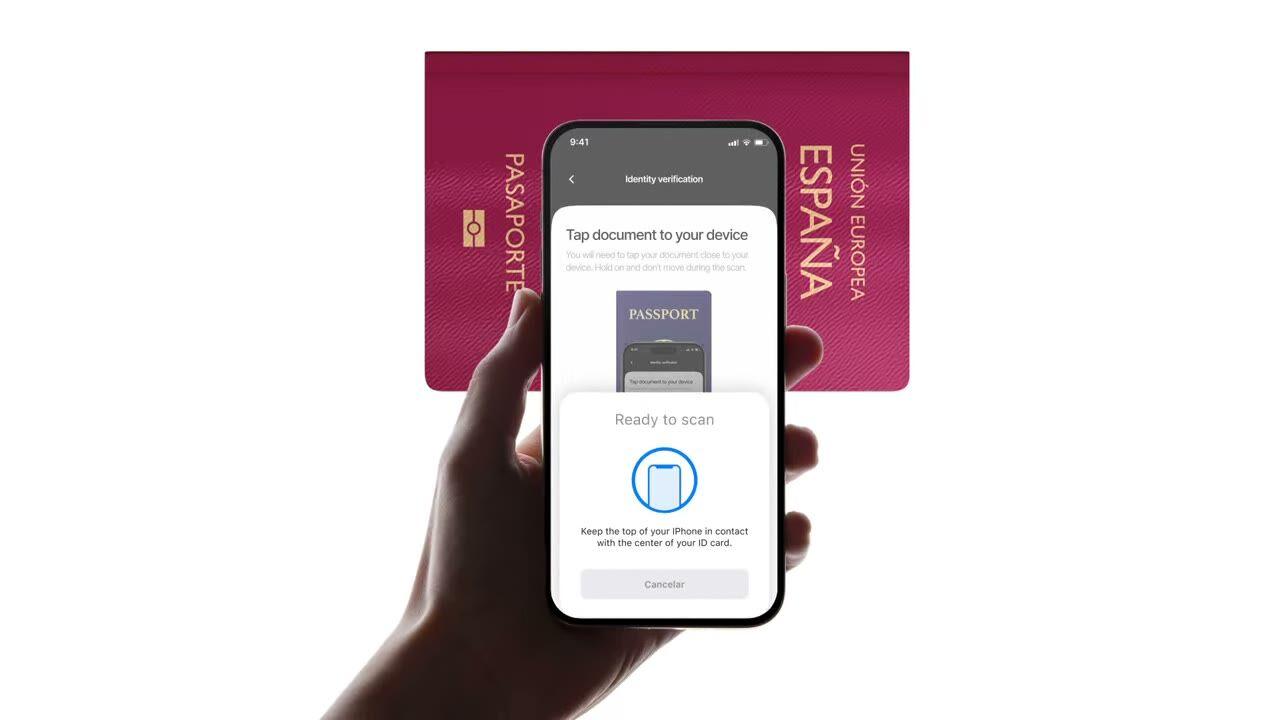
ICAO 9303
여권을 태그하세요. 칩은 사진과 동일한 데이터를 반환하지만, 이번에는 발급 국가의 서명이 포함되어 있습니다. $0.15, 2초 미만 소요.
원하는 확인 항목을 선택하세요, 신분증, Liveness, 얼굴 매칭, 제재 목록, 주소, 연령, 전화번호, 이메일, 맞춤 질문. 대시보드에서 플로우로 드래그하거나, 동일한 플로우를 API에 게시하세요. 조건에 따라 분기하고, A/B 테스트를 실행하며, 코드가 필요 없습니다.
$ curl -X POST https://verification.didit.me/v3/session/ \
  -H "x-api-key: $DIDIT_API_KEY" \
  -H "Content-Type: application/json" \
  -d '{
    "workflow_id": "wf_id_nfc",
    "vendor_data": "user-42"
}'{ "url": "verify.didit.me/..." }// iOS · Swift
import DiditSdk
let result = try await DiditSdk.shared.startVerification(
with: sessionId,
configuration: config
){ "status": "Approved" }# Didit NFC Verification — integrate in 5 minutes
You are integrating Didit's NFC Verification (cryptographic e-passport
and e-ID chip reading) module into <my_stack>. Follow these steps exactly.
Every URL, header, and enum value below is canonical — do not paraphrase
or "improve" them.
## 1. Provision an account
- Sign up: https://business.didit.me (no credit card required).
- Or provision programmatically: POST https://apx.didit.me/auth/v2/programmatic/register/
(returns an API key bound to the workspace + application).
## 2. What NFC Verification actually does
NFC Verification reads the secure contact-less chip embedded in modern
e-passports and e-IDs (the small chip-and-antenna sticker symbol on the
cover) and runs four cryptographic checks against the data it extracts:
1. Passive Authentication — every Data Group (DG1 personal data, DG2
facial image, etc.) is hashed and compared against the signed hash
stored in the Document Security Object (SOD). Catches any single-bit
tampering of the chip contents.
2. Certificate chain validation — Document Signer Certificate (DSC) →
Country Signing Certificate Authority (CSCA) → ICAO Public Key
Directory (PKD) root. Proves the chip was signed by the issuing
government, not a clone.
3. Certificate Revocation List (CRL) check — DSCs revoked by the issuing
country are caught and flagged.
4. Chip Authentication — where the document supports it, prevents chip
cloning by challenging the chip with a key-pair handshake.
PACE (Password Authenticated Connection Establishment) or BAC (Basic
Access Control) is used to derive the session key from the Machine-Readable Zone (MRZ); Didit
handles that automatically. All of this is ICAO 9303 standard.
## 3. Two integration paths — pick one
### Path A — Workflow Builder (hosted UI, REQUIRED for NFC)
NFC Verification has no server-to-server standalone endpoint. The chip
has to be read by a device with NFC hardware, so you always integrate
through the Workflow + native SDK (or hosted mobile web that falls back).
1. Create a workflow that contains the NFC feature:
POST https://verification.didit.me/v3/workflows/
Authorization header: x-api-key: <your-api-key>
Body: workflow_label, features array with the entries
{ feature: "OCR" }
{ feature: "NFC" }
(UPPERCASE — strict enum)
You should always pair NFC with OCR (ID Verification) so the MRZ is captured
for the chip handshake AND so an OCR cross-validation is available.
2. Create a verification session for an end user:
POST https://verification.didit.me/v3/session/
Body: workflow_id (from step 1), vendor_data (your own user id).
Response: url (the hosted verification link) — redirect the user to
it (or open it in the native SDK with
shared.startVerification(with: sessionId)).
3. Listen for webhook callbacks (see "Webhooks" below).
### Path B — Native SDKs (drop-in, recommended for mobile apps)
Same workflow + session above, but launch the verification flow in your
own iOS or Android app via the Didit SDK. The SDK wires the NFC reader,
the entitlements, and the chip-reading UI for you.
- iOS: DiditSdk.shared.startVerification(with: sessionId, configuration:)
Required entitlements (handled by the SDK):
- com.apple.developer.nfc.readersession.formats = ["TAG"]
- ISO7816 application identifiers for ePassports
- Android: DiditSdk.startVerification(sessionId, config) — uses
IsoDep (android.nfc.tech.IsoDep) under the hood.
- React Native / Flutter: the same SDK, exposed through the cross-
platform module — see docs.didit.me/integration/native-sdks/.
### Web browsers — NFC is unavailable
Web NFC API is not generally available. Chrome on Android has an
experimental Web NFC that is unstable and requires explicit permissions;
Safari on iOS has no support. For web integrations, NFC is automatically
skipped and the user proceeds with standard ID + selfie. If you require
NFC, deep-link the user into the Didit App or your own native app.
## 4. Webhooks
- Register a webhook destination once via
POST https://verification.didit.me/v3/webhook/destinations/
Body: url, subscribed_events: ["session.verified", "session.review_started",
"session.declined"]
- Response includes secret_shared_key — store it.
- Every webhook delivery carries an X-Signature-V2 header you MUST verify
before trusting the payload. HMAC-SHA256 verification MUST run against the raw body bytes (the raw payload as Didit sent it) BEFORE any JSON parsing — re-serialising the parsed body changes whitespace and key order, which invalidates the signature.Algorithm:
1. sortKeys(payload) recursively
2. shortenFloats (truncate trailing zeros after the decimal point)
3. JSON.stringify the result
4. HMAC-SHA256 with the secret_shared_key
5. Hex-encode, compare to the X-Signature-V2 header.
## 5. Reading the report
The session decision includes an nfc_verifications[] array alongside
id_verifications[] — one entry per workflow node, each with its own node_id.
Fields on each nfc_verifications entry:
- status: "Approved" | "Declined" | "In Review" | "Not Finished"
- portrait_image: signed URL to the chip-extracted DG2 facial image
- signature_image: signed URL to the chip-extracted DG7 signature
- chip_data:
document_type, issuing_country (ISO 3166-1 alpha-3),
document_number, expiration_date (YYYY-MM-DD),
first_name, last_name, birth_date, gender ("M" | "F" | "U"),
nationality (ISO 3166-1 alpha-3), address, place_of_birth.
- authenticity:
sod_integrity (boolean — every Data Group hash matched the SOD)
dg_integrity (boolean — Data Group binary integrity check passed)
- certificate_summary:
issuer (CSCA Common Name + serial + organization + country)
subject (DSC Common Name)
serial_number
not_valid_after (YYYY-MM-DD HH:MM:SS)
not_valid_before (YYYY-MM-DD HH:MM:SS)
- warnings: Array of { risk, additional_data, log_type,
short_description, long_description }
### Auto-decline (always enforced, never configurable)
- NFC_AND_OCR_DATA_NOT_SAME — Optical Character Recognition (OCR) data
and chip data differ. Indicates document tampering or fake chip.
### Configurable warnings (per-workflow action: Decline / Review / Approve)
- SKIPPED_NFC_VALIDATION — chip not read (no NFC hardware, no
permissions, document has no chip)
- NFC_CHIP_NOT_VERIFIED — chip read but signature could not be
verified (missing CSCA, older document)
- DSC_CERTIFICATE_REVOKED — Document Signer Certificate listed on
the issuing country's CRL
- DSC_CERTIFICATE_EXPIRED — Document Signer Certificate past its
validity period
## 6. Hard rules — do not change
- Base URL for /v3/* endpoints is verification.didit.me (NOT apx.didit.me).
- Feature enum is UPPERCASE: NFC, OCR, LIVENESS, FACE_MATCH.
- Auth header is x-api-key (lowercase, hyphenated).
- Webhook signature header is X-Signature-V2 (NOT X-Signature).
- Always verify webhook signatures before trusting payload data.
- Always pair NFC with OCR (ID Verification) in the workflow — NFC alone
cannot derive the chip key without the MRZ from the document photo.
- Status casing matches exactly: "Approved", "Declined", "In Review",
"Not Finished" (title-cased, space-separated).
- Treat NFC as an additive confidence boost, not a hard gate, unless
your risk policy explicitly requires it (regulated remote
onboarding under PSD3, AMLD6 high-risk customer flows, etc.).
## 7. Pricing reference (public)
- NFC Verification: $0.15 per chip read (standalone module).
- Bundled inside a full Know Your Customer (KYC) workflow (ID + Liveness + Face Match + NFC):
priced as the underlying KYC bundle ($0.33) + $0.15 NFC if enabled.
- 500 free checks every month, forever, on every account.
## 8. Verify your integration
- Sandbox starts on signup at https://business.didit.me — no separate flag.
- Test documents: use the Didit App on a real iOS or Android device with
any ICAO 9303 e-passport issued after 2006 (most modern passports).
- Sandbox webhook events fire the same shape as production; verify the
X-Signature-V2 header in dev too.
- Switch to live: flip the application's environment toggle in console.
When in doubt: https://docs.didit.me/core-technology/nfc-verification/overview













개발, 테스트 및 초기 사용자 확보에 적합합니다.
25개 이상의 모듈, 투명한 가격 정책. 자동 볼륨 할인.
대규모 볼륨 및 규제 프로그램에 적합합니다.
사용량이 증가하면 볼륨 할인이 자동으로 적용됩니다. 협상이나 영업팀과의 통화가 필요 없습니다.
Didit은 신원 및 사기 방지 인프라입니다. 저희가 직접 제품을 개발할 때 있었으면 하고 바랐던 플랫폼이죠. 개방적이고 유연하며 개발자 친화적이어서, 단순히 통합해야 하는 블랙박스가 아니라 스택의 실제 구성 요소처럼 작동합니다.
하나의 API로 개인 확인(KYC, 고객 알기), 기업 확인(KYB, 사업체 알기), 암호화폐 지갑 심사(KYT, 거래 알기), 실시간 거래 모니터링을 모두 처리하며, 다음과 같은 스택을 기반으로 구축되었습니다:
기반 기술: 48개 이상의 언어로 된 14,000개 이상의 문서 유형, 1,000개 이상의 데이터 소스, 모든 세션에서 200개 이상의 사기 신호를 분석합니다. Didit 인프라는 모든 세션에서 동적으로 학습하며 매일 발전합니다.
docs.didit.me/core-technology/nfc-verification/supported-documents-nfc-verification에서 확인할 수 있습니다. 칩은 PACE (Password Authenticated Connection Establishment) 또는 BAC (Basic Access Control)를 사용하여 읽습니다. Didit은 MRZ(Machine Readable Zone)에서 세션 키를 자동으로 파생하므로, 사용자는 문서를 휴대폰에 태그하기만 하면 됩니다.id_verification 객체와 함께 단일 nfc JSON 객체가 반환됩니다. 최상위 status는 Approved, Declined, In Review, 또는 Not Finished 중 하나입니다. 이 객체에는 chip_data 블록(document_type, ISO 3166-1 alpha-3 형식의 issuing_country, document_number, expiration_date, first_name, last_name, birth_date, gender, nationality, address, place_of_birth), authenticity 블록(sod_integrity, dg_integrity), certificate_summary(issuer, subject, serial_number, not_valid_after, not_valid_before), portrait_image(칩에서 추출된 DG2 얼굴 이미지) 및 signature_image(칩에서 추출된 DG7 서명 이미지)에 대한 서명된 URL, 그리고 warnings 배열이 포함됩니다. 전체 참조는 docs.didit.me/core-technology/nfc-verification/report-nfc-verification에서 확인할 수 있습니다.전체 과정은 일반적으로 30초 이내에 완료됩니다. 신분증을 들고, 문서를 촬영하고, 셀카를 찍으면 끝입니다. 이는 시장에서 가장 빠른 속도입니다. 기존 KYC 제공업체는 동일한 과정에 90초 이상이 소요되는 경우가 많습니다.
백엔드에서는 사용자가 셀카를 완료한 시점부터 웹훅이 실행되는 시점까지, Didit은 p99 기준 2초 이내에 결과를 반환합니다. 모바일 캡처는 느린 휴대폰과 느린 네트워크에 최적화되어 있습니다. 점진적 이미지 압축, 지연 소프트웨어 개발 키트 로드, 그리고 사용자가 웹에서 시작하는 경우 QR 코드를 통한 데스크톱에서 휴대폰으로의 원탭 핸드오프 기능을 제공합니다.
모든 세션은 7가지 명확한 상태 중 하나로 귀결되므로, 귀하의 코드는 항상 무엇을 해야 할지 알 수 있습니다:
Approved, 모든 검사를 통과했습니다. 사용자를 다음 단계로 진행하세요.Declined, 하나 이상의 검사가 실패했습니다. 사용자가 전체 과정을 다시 실행하지 않고 특정 실패 단계(예: 셀카 다시 찍기)를 재제출하도록 허용할 수 있습니다.In Review, 규정 준수 검토를 위해 플래그가 지정되었습니다. 콘솔에서 케이스를 열고 모든 신호를 확인한 후 승인 또는 거부를 결정하세요.In Progress, 사용자가 진행 중입니다.Not Started, 링크가 전송되었지만 사용자가 아직 열지 않았습니다. 너무 오래 방치되면 알림을 보내세요.Abandoned, 사용자가 링크를 열었지만 제시간에 완료하지 못했습니다. 다시 참여시키거나 만료시키세요.Expired, 세션 링크가 만료되었습니다. 새 세션을 생성하세요.모든 상태 변경 시 서명된 웹훅이 실행되므로, 귀하의 데이터베이스는 항상 동기화 상태를 유지합니다. 중단되거나 거부된 세션은 무료입니다.
프로덕션 데이터는 기본적으로 유럽 연합의 Amazon Web Services에 처리 및 저장됩니다. 규제 당국이 요구하는 관할권의 경우, 엔터프라이즈 계약을 통해 대체 지역을 요청할 수 있습니다.
모든 곳에서 암호화됩니다. 모든 데이터베이스, 객체 스토어, 백업에서 AES-256 암호화가 적용됩니다. 모든 API 호출, 웹훅, 비즈니스 콘솔 세션에서 전송 계층 보안 1.3이 사용됩니다. 생체 인식 데이터는 별도의 고객 마스터 키로 암호화됩니다.
데이터 보존은 고객이 제어합니다. 기본 보존 기간은 무기한(무제한)이며, 애플리케이션별로 30일에서 10년 사이로 더 짧게 구성할 수 있습니다. 또한 대시보드 또는 API를 통해 언제든지 개별 세션을 삭제할 수 있습니다.
인증 내역: SOC 2 Type 1 & Type 2, ISO/IEC 27001:2022, iBeta Level 1 PAD, 그리고 Didit의 원격 신원 확인이 대면 확인보다 안전하다는 스페인 Tesoro / SEPBLAC / CNMV의 공식 인증이 있습니다. 전체 보고서는 /security-compliance에서 확인할 수 있습니다.
Didit은 신원 인프라에 중요한 규제 기관에 대해 기본적으로 규정을 준수합니다:
자세한 메모, 모든 인증서, 모든 규제 기관 서신: /security-compliance.
세 가지 통합 경로, 스택에 가장 적합한 것을 선택하세요:
동일한 대시보드, 동일한 청구, 세 가지 모두에 대해 성공당 동일한 가격이 적용됩니다. 단계별 가이드는 docs.didit.me/integration/integration-prompt에서 확인할 수 있습니다.