

무료
$0/월 · 카드 정보 불필요
개발, 테스트 및 초기 사용자 확보에 적합합니다.
시작하는 데 필요한 모든 것:
- 매월 500건의 전체 KYC 인증
- 신분증, 라이브니스, 얼굴 매칭, 기기 및 IP 확인
- 200개 이상의 사기 신호, 차단 목록, 중복 확인
- Didit 네트워크 전반에서 KYC 재사용 가능
- 워크플로우 빌더, 케이스 관리, SDK
- AI 지원 콘솔 내 AI 에이전트, 문서, 커뮤니티.

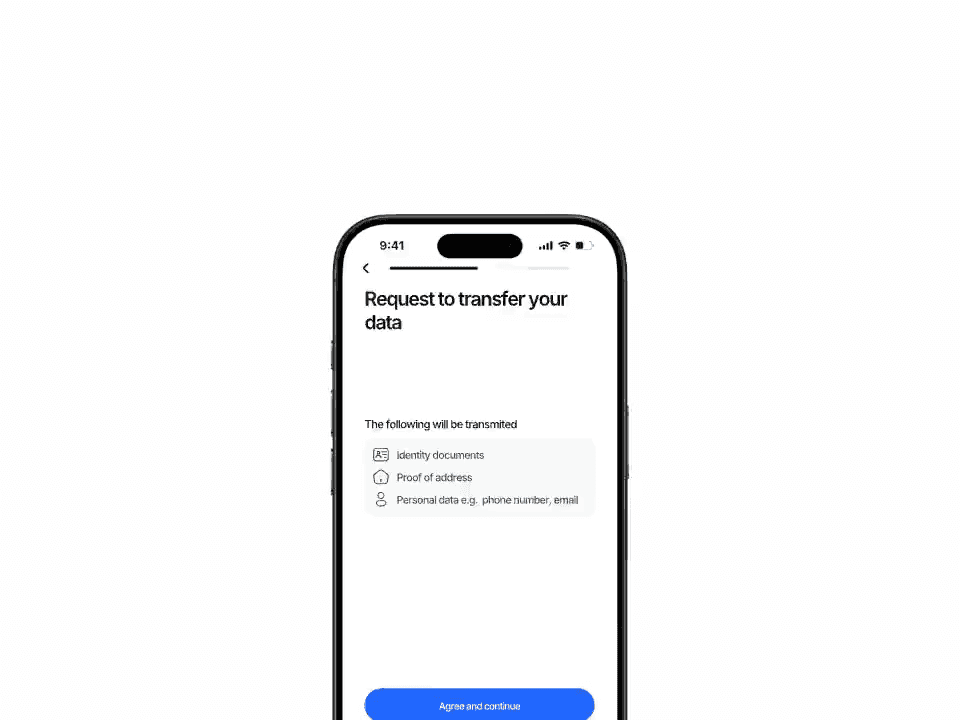
파트너 생태계를 위해 구축되었습니다
사용자는 앱에서 한 번만 인증합니다. BaaS 스폰서, 자매 브랜드, 다운스트림 마켓플레이스 등 파트너가 동일한 기록을 필요로 할 때, 일회성 공유 토큰을 보내세요. 파트너는 토큰을 사용하여 전체 인증 정보를 가져올 수 있습니다. 사용자는 두 번째 인증 절차를 거칠 필요가 없습니다.
승인, 거부 또는 검토 중인 모든 완료된 인증 중에서 선택하고 Didit에 공유 토큰을 요청하세요. 토큰은 기본적으로 1시간 후에 만료되지만, 1분부터 최대 하루까지 기간을 조정할 수 있습니다.
POST /v3/session/[id]/share/
POST /v3/session/import-shared/
즉시 온보딩 · 또는 자체 검토
session_kind: user | business
사용자 · KYC
기업 · KYB
하나의 검증으로 여러 용도 지원
완료된 항목만 · 멱등성 · 감사 등급
$ curl -X POST https://verification.didit.me/v3/session/$SID/share/ \
  -H "x-api-key: $DIDIT_API_KEY" \
  -H "Content-Type: application/json" \
  -d '{
    "for_application_id": "partner-app-uuid",
    "ttl_in_seconds": 3600
}'{ "share_token": "eyJhbGciOi…" }$ curl -X POST https://verification.didit.me/v3/session/import-shared/ \
-H "x-api-key: $DIDIT_API_KEY" \
-H "Content-Type: application/json" \
-d '{
"share_token": "eyJhbGciOi…",
"workflow_id": "wf_partner_kyc",
"vendor_data": "partner-user-42",
"trust_review": true
}'{ "status": "승인됨", "session_kind": "user" }# Didit B2B Reusable KYC — partner-to-partner KYC sharing
You are integrating Didit's B2B Reusable Know Your Customer (KYC) into <my_stack>. The recipe is server-to-server: one Didit application (Service X) mints a short-lived JSON Web Token (JWT) share token for a finished session; a partner Didit application (Service Y) imports the token and Didit clones the full verified session into Service Y. Works for both KYC and Know Your Business (KYB) sessions.
Built for Banking-as-a-Service (BaaS) sponsor banks, multi-brand financial groups, embedded finance through partner banks, marketplaces with regional or vertical sub-platforms, on-ramp + exchange ecosystems, white-label resellers, and B2B KYB consortia where the same legal entity onboards once and serves many. Every URL, header, and enum value below is canonical — do not paraphrase or "improve" them.
## 1. Provision both applications
- Sign up: https://business.didit.me (no credit card required).
- Or provision programmatically: POST https://apx.didit.me/auth/v2/programmatic/register/
- Create TWO applications in your Didit organisation. One acts as Service X (mints share tokens), the other as Service Y (imports them). In production these will usually live in different organisations — one per partner.
- Each application has its own `x-api-key`. Service X uses its own key to mint; Service Y uses its own key to import.
## 2. Service X — mint a share token
Service X picks a finished session it owns and posts to the share endpoint:
POST https://verification.didit.me/v3/session/{sessionId}/share/
Headers:
x-api-key: <Service X api key>
Content-Type: application/json
Body:
{
"for_application_id": "<partner-application-uuid>",
"ttl_in_seconds": 3600
}
Bounds on `ttl_in_seconds`: min 60, max 86400, default 3600.
Requirements:
- The session must be in a FINISHED status: "Approved", "Declined", or "In Review".
- The API key must hold the `write:sessions` privilege.
- `for_application_id` must be a real Didit application uuid — usually the partner's app.
Response: 201 Created with the JWT in the `share_token` field plus `for_application_id` and `session_kind` ("user" or "business" — Didit detects this from the source session and embeds it in the token):
{
"share_token": "eyJhbGciOiJIUzI1NiJ9...",
"for_application_id": "partner-app-uuid",
"session_kind": "user"
}
## 3. Transmit the token to Service Y
Service X transmits the `share_token` to Service Y over a pre-arranged backend channel — REST, message queue, signed webhook, anything you control. The token is scoped to Service Y's application and useless to any other application.
## 4. Service Y — import the shared session
Service Y posts the token to the import endpoint:
POST https://verification.didit.me/v3/session/import-shared/
Headers:
x-api-key: <Service Y api key>
Content-Type: application/json
Body:
{
"share_token": "<jwt from step 2>",
"workflow_id": "<Service Y's own workflow id>",
"vendor_data": "<Service Y's internal user id>",
"trust_review": true
}
`trust_review`:
- `true` → the imported session preserves the original status ("Approved" / "Declined" / "In Review"). Service Y onboards the user instantly. Use when Service Y fully trusts Service X's decision (sister brand, regulated partner with a signed data-sharing agreement).
- `false` → the imported session lands in "In Review" so Service Y's compliance team makes its own call. Safe default for new partner relationships.
Response: 201 Created with a brand-new session in Service Y's application:
{
"session_id": "<new uuid>",
"session_number": <int>,
"session_kind": "user" | "business",
"status": "Approved" | "In Review" | "Declined",
"shared_from_session": "<original session uuid in Service X>",
"vendor_data": "<Service Y's internal user id>",
"id_verifications": [...],
"liveness_checks": [...],
"face_matches": [...],
"aml_screenings": [...],
"database_validations": [...],
"proof_of_address": [...],
"phone_verifications": [...],
"email_verifications": [...]
}
For a `session_kind: "business"` token Didit clones the KYB shape instead. KYB session statuses are UPPER_SNAKE_CASE (not Title Case like KYC):
{
"session_id": "<new uuid>",
"session_kind": "business",
"status": "APPROVED",
"shared_from_session": "<original business session uuid>",
"vendor_data": "<Service Y's internal business id>",
"registry_checks": [...],
"key_people_checks": [...],
"document_verifications": [...],
"aml_screenings": [...],
"questionnaires": [...]
}
A new User or Business entity is auto-created in Service Y if one with the supplied `vendor_data` doesn't already exist.
## 5. Idempotency, expiration, errors
| Status | Reason |
|--------|--------|
| 401 | Share token invalid or past `exp` — request a new one. |
| 403 | Token not intended for your application, OR session already imported into your app. |
| 404 | Original session no longer exists. |
| 404 | `workflow_id` not found in your application. |
The duplicate-import check is enforced against the (share_token, partner application) pair.
## 6. Webhooks (optional, only when Service Y wants async updates)
Service Y can register a webhook destination once via:
POST https://verification.didit.me/v3/webhook/destinations/
Body: url, subscribed_events: ["status.updated"]
Every webhook delivery carries an `X-Signature-V2` header you MUST verify before trusting the payload. HMAC-SHA256 verification MUST run against the raw body bytes (the raw payload as Didit sent it) BEFORE any JSON parsing — re-serialising the parsed body changes whitespace and key order, which invalidates the signature.
Algorithm:
1. sortKeys(payload) recursively
2. shortenFloats (truncate trailing zeros after the decimal point)
3. JSON.stringify the result
4. HMAC-SHA256 with the secret_shared_key
5. Hex-encode, compare to the X-Signature-V2 header.
## 7. Hard rules — do not change
- Base URL for /v3/* endpoints is verification.didit.me (NOT apx.didit.me).
- Auth header is x-api-key (lowercase, hyphenated).
- Webhook signature header is X-Signature-V2 (NOT X-Signature).
- Status casing matches exactly: "Approved", "Declined", "In Review", "Not Finished" (Title Case With Spaces — KYC convention).
- session_kind is lowercase: "user" or "business".
- The share API is BUSINESS-to-BUSINESS sharing. Service X and Service Y are responsible for the data-sharing legal basis under General Data Protection Regulation (GDPR), UK GDPR, and any cross-border transfer rules. Didit ships the technical capability; you ship the data-sharing agreement.
## 8. Pricing reference (public)
- Service X already paid for the original verification (full KYC bundle is $0.33 or KYB session uses country-specific registry pricing; see didit.me/pricing).
- Service Y pays nothing on the import side — `POST /v3/session/import-shared/` is included with every plan.
- 500 free verifications every month on every account (applies to fresh captures, not imports).
## 9. Verify your integration
- Sandbox starts on signup at https://business.didit.me — no separate flag.
- Create two sandbox applications: one as Service X (issuer), the other as Service Y (importer). Use Service X's API key to mint a token for a finished sandbox session, hand the token off, use Service Y's API key to import.
- Switch to live: flip each application's environment toggle in console.
When in doubt:
- https://docs.didit.me/sessions-api/share-session/overview
- https://docs.didit.me/sessions-api/share-session/share
- https://docs.didit.me/sessions-api/share-session/import
- https://docs.didit.me/core-technology/reusable-kyc/share-kyc-via-api













개발, 테스트 및 초기 사용자 확보에 적합합니다.
25개 이상의 모듈, 투명한 가격 정책. 자동 볼륨 할인.
대규모 볼륨 및 규제 프로그램에 적합합니다.
사용량이 증가하면 볼륨 할인이 자동으로 적용됩니다. 협상이나 영업팀과의 통화가 필요 없습니다.
Didit은 신원 및 사기 방지 인프라입니다. 저희가 직접 제품을 개발할 때 있었으면 하고 바랐던 플랫폼이죠. 개방적이고 유연하며 개발자 친화적이어서, 단순히 통합해야 하는 블랙박스가 아니라 스택의 실제 구성 요소처럼 작동합니다.
하나의 API로 개인 확인(KYC, 고객 알기), 기업 확인(KYB, 사업체 알기), 암호화폐 지갑 심사(KYT, 거래 알기), 실시간 거래 모니터링을 모두 처리하며, 다음과 같은 스택을 기반으로 구축되었습니다:
기반 기술: 48개 이상의 언어로 된 14,000개 이상의 문서 유형, 1,000개 이상의 데이터 소스, 모든 세션에서 200개 이상의 사기 신호를 분석합니다. Didit 인프라는 모든 세션에서 동적으로 학습하며 매일 발전합니다.
B2B 재사용 가능한 KYC는 한 기업이 확인된 사용자 또는 기업 정보를 다른 기업에 전달하여, 파트너가 다시 확인 절차를 거치지 않고도 동일한 사람을 온보딩할 수 있도록 합니다.
두 단계로 작동합니다:
파트너는 온보딩 속도를 선택할 수 있습니다. 결정을 신뢰하고 사용자를 즉시 승인하거나, 원시 데이터를 가져와 규정 준수 팀이 결정하도록 할 수 있습니다.
고객 알기(KYC)와 사업체 알기(KYB) 모두 동일한 호출로 작동합니다.
하나의 플랫폼에서 사용자를 한 번 온보딩하고 여러 파트너 플랫폼에서 동일한 인증이 필요한 모든 비즈니스 모델에 적합합니다.
파트너와 데이터 공유 계약을 체결할 수 있다면, 이 API가 기술적인 부분을 처리해 드립니다.
전체 흐름은 일반적으로 처음부터 끝까지 30초 미만이 소요됩니다., 신분증을 들고, 문서를 촬영하고, 셀카를 찍으면 끝납니다. 이는 시장에서 가장 빠른 속도입니다. 기존 KYC 제공업체는 동일한 흐름에 보통 90초 이상이 걸립니다.
백엔드에서 Didit은 사용자가 셀카를 완료한 시점부터 웹훅이 실행되는 시점까지 p99 기준 2초 미만으로 결과를 반환합니다. 모바일 캡처는 느린 휴대폰과 느린 네트워크에 최적화되어 있습니다: 점진적 이미지 압축, 지연 소프트웨어 개발 키트 로드, 그리고 사용자가 웹에서 시작하는 경우 QR 코드를 통해 데스크톱에서 휴대폰으로 한 번의 탭으로 전환할 수 있습니다.
POST /v3/session/import-shared/는 201 Created와 함께 귀하의 애플리케이션에 새로운 세션을 반환합니다. 새로운 session_id와 session_number, 원본에서 복제된 전체 페이로드가 포함됩니다.
주요 필드:
status, Approved / Declined / In Review (trust_review: true일 때 유지, trust_review: false일 때 In Review로 강제 변경).session_kind, user (KYC) 또는 business (KYB).shared_from_session, 원본 애플리케이션의 원본 세션을 가리킵니다. 이 세션이 새로 캡처된 것이 아니라 가져온 것임을 나타내는 표준 신호입니다.vendor_data, 가져오기 호출 시 귀하가 전달한 내부 사용자/사업체 ID입니다.id_verifications, liveness_checks, face_matches, aml_screenings, database_validations, proof_of_address, location_checks, phone_verifications, email_verifications.registry_checks, key_people_checks (중첩된 KYC 포함), document_verifications, aml_screenings, questionnaires.새로운 세션과 동일한 형태이므로, 기존 웹훅 핸들러가 동일한 방식으로 읽을 수 있습니다.
모든 세션은 7가지 명확한 상태 중 하나로 분류되므로, 귀하의 코드는 항상 무엇을 해야 할지 알 수 있습니다.
Approved, 모든 확인을 통과했습니다. 사용자를 다음 단계로 진행하세요.Declined, 하나 이상의 확인에 실패했습니다. 사용자가 전체 흐름을 다시 실행하지 않고 특정 실패 단계(예: 셀카 다시 찍기)를 재제출하도록 허용할 수 있습니다.In Review, 규정 준수 검토를 위해 플래그가 지정되었습니다. 콘솔에서 케이스를 열고 모든 신호를 확인한 후 승인 또는 거부를 결정하세요.In Progress, 사용자가 흐름 중간에 있습니다.Not Started, 링크가 전송되었지만 사용자가 아직 열지 않았습니다. 너무 오래 방치되면 알림을 보내세요.Abandoned, 사용자가 링크를 열었지만 제시간에 완료하지 못했습니다. 다시 참여시키거나 만료시키세요.Expired, 세션 링크가 만료되었습니다. 새 세션을 만드세요.모든 상태 변경 시 서명된 웹훅이 실행되므로, 귀하의 데이터베이스는 항상 동기화 상태를 유지합니다. 중단되거나 거부된 세션은 무료입니다.
프로덕션 데이터는 기본적으로 유럽 연합의 Amazon Web Services에 처리 및 저장됩니다. 규제 당국이 요구하는 관할권의 경우, 엔터프라이즈 계약을 통해 대체 지역을 요청할 수 있습니다.
모든 곳에서 암호화됩니다. 모든 데이터베이스, 객체 스토어, 백업에서 AES-256 암호화가 적용됩니다. 모든 API 호출, 웹훅, 비즈니스 콘솔 세션에서 전송 계층 보안 1.3이 사용됩니다. 생체 인식 데이터는 별도의 고객 마스터 키로 암호화됩니다.
데이터 보존은 고객이 제어합니다. 기본 보존 기간은 무기한(무제한)이며, 애플리케이션별로 30일에서 10년 사이로 더 짧게 구성할 수 있습니다. 또한 대시보드 또는 API를 통해 언제든지 개별 세션을 삭제할 수 있습니다.
인증 내역: SOC 2 Type 1 & Type 2, ISO/IEC 27001:2022, iBeta Level 1 PAD, 그리고 Didit의 원격 신원 확인이 대면 확인보다 안전하다는 스페인 Tesoro / SEPBLAC / CNMV의 공식 인증이 있습니다. 전체 보고서는 /security-compliance에서 확인할 수 있습니다.
Didit은 신원 인프라에 중요한 규제 기관의 요건을 기본적으로 준수합니다:
자세한 메모, 모든 인증서, 모든 규제 기관 서신: /security-compliance.
세 가지 통합 경로 중 스택에 맞는 것을 선택하세요:
세 가지 모두 동일한 대시보드, 동일한 청구, 동일한 성공당 지불 가격이 적용됩니다. 단계별 가이드는 docs.didit.me/integration/integration-prompt에서 확인하세요.