Add a Missing Counterparty VASP to Your Travel Rule Directory
POST /v3/travel-rule/vasps/ with name and email adds the counterparty privately and returns its id. Use it as the beneficiary VASP on a transfer.
 Alberto RosasCo-founder and CEO
Contents
In this guide
Jump to the part you need.
This page is for compliance and engineering teams whose Travel Rule transfer names a counterparty VASP that the Didit directory does not list yet. One call adds it: POST /v3/travel-rule/vasps/. Travel Rule messaging is $0.02 per outbound exchange. The caveat is scope. The entry is private to your application, and it records a contact rather than certifying who that counterparty is.
Last updated: November 26, 2026. Prices checked against the live Didit price feed on November 26, 2026.
| Item | Detail |
|---|---|
| Endpoint | POST https://verification.didit.me/v3/travel-rule/vasps/ |
| Authentication | x-api-key header |
| Key permission | Write access to transactions |
| Required body fields | name, email |
| Optional body fields | lei (20 alphanumeric characters), jurisdiction (ISO alpha-2 or alpha-3), invite (defaults to false) |
| Success | 201 with the directory entry and source: added_by_you |
| Existing match | 409 with the existing vasp_id |
| Invalid fields | 400 |
| Published price of the exchange | Travel Rule, $0.02 per outbound exchange |
Start free in the sandbox at business.didit.me (no sales call). Developers who build with an AI assistant can connect Didit over the Didit MCP server. Prices, plans and credit terms are on the pricing page, and the product itself is described in the Travel Rule guide.
What the call does, and when to use it
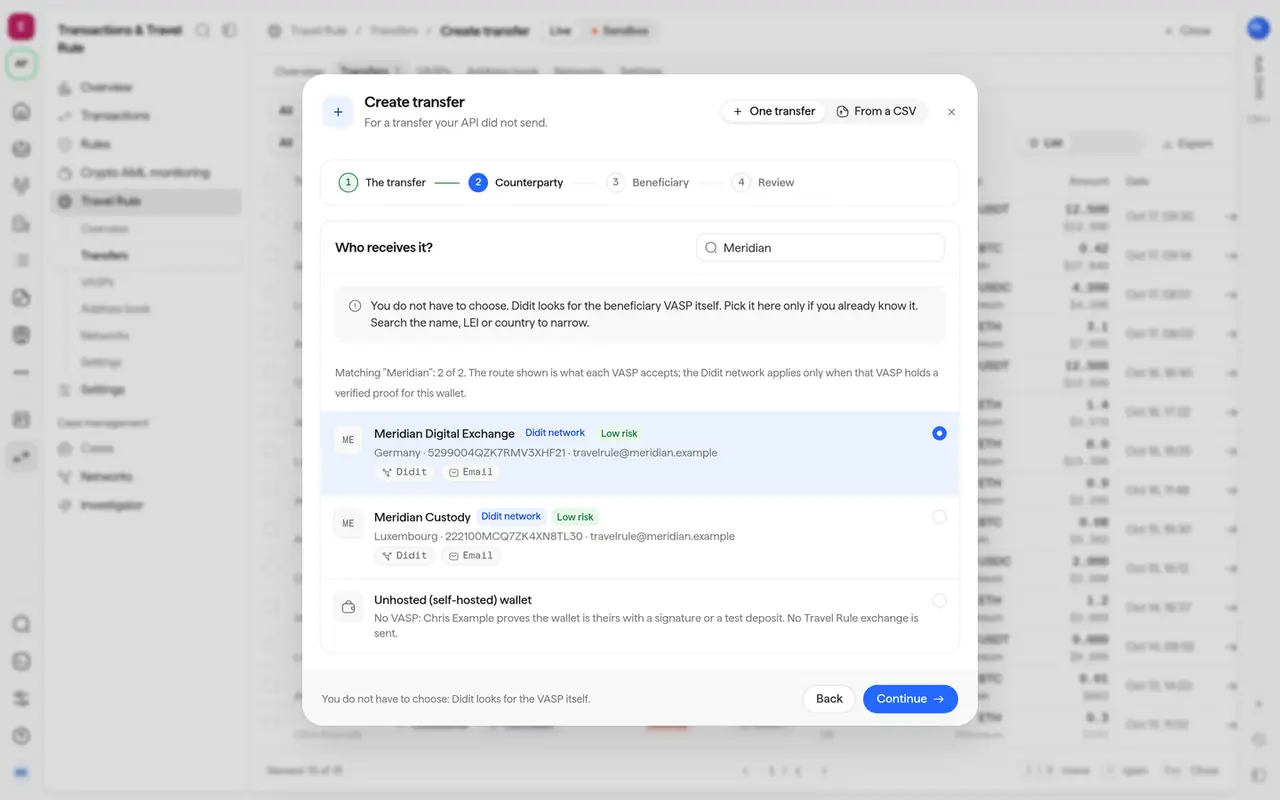
Didit resolves the counterparty of a crypto transfer against a VASP directory before it can run the FATF Recommendation 16 exchange. When nothing matches, the transfer has no way to reach that counterparty and sits in COUNTERPARTY_VASP_NOT_FOUND until someone supplies a route.
There are two ways to supply one. You can name the counterparty's compliance contact on each transfer with counterparty_vasp_email, which sends the exchange down the EMAIL rail with a one-time pickup link. Or you add a directory entry once and reuse its id for every later transfer to that VASP. We recommend the entry, because it is created once and it keeps the compliance contact next to the counterparty record.
The create call stores four things: a name, a compliance email, an optional LEI, and an optional jurisdiction. It returns a directory entry with source: added_by_you. That is the whole entry. It does not set a TRP endpoint, it does not attach a GTR, TRUST, VerifyVASP or Sygna identifier, and it does not make the counterparty a Didit network member. What it does give the entry is a compliance contact, and a contact is one of the routes that make an entry reachable.
Read the Travel Rule guide for the full rail order and the endpoint reference for the exact schema.
Prerequisites
- An API key for the application that holds the transfers. The call needs write access to transactions, so a scoped key must carry that privilege. A key without it answers
403. - The counterparty's compliance email address, in the hands of someone who will read it. The
EMAILrail emails a one-time pickup link to exactly this address, and the counterparty does not need a Didit account to answer it. - The counterparty's LEI if you have it: 20 alphanumeric characters. If you do not have it, send an empty value, because the API accepts empty optional LEI and jurisdiction.
- The jurisdiction as an ISO alpha-2 or alpha-3 country code.
DEandDEUare both valid. Empty is also valid. - The base URL
https://verification.didit.me. Sandbox testing is free and unlimited, so prove the flow there first.
Steps
Search the directory before you create anything. Run the call documented in Search the VASP directory with the counterparty's name or LEI. If it returns an entry, note its
idand skip to step 4. Creating a second entry for a VASP that is already visible only produces a409.Prepare the contact and the identifiers. Confirm the email address belongs to the counterparty's compliance team, not to a sales inbox. Decide whether to send an invitation:
invitedefaults tofalse, and setting it totruesends an invitation to that address when the entry is created.Send the create request. Add an
Idempotency-Keyheader if your client may retry the call after a timeout. The body below is the documented example.curl -X POST 'https://verification.didit.me/v3/travel-rule/vasps/' \ -H 'x-api-key: YOUR_API_KEY' -H 'Content-Type: application/json' \ -d '{"name": "Example VASP", "email": "compliance@example.com", "jurisdiction": "DE", "invite": false}'The Python SDK wraps the same call as
client.travel_rule.create_vasp(...)and readsDIDIT_API_KEYfrom the environment.Read the
201and store the entryid. The response also lists the compliance contact undercontacts. The entryidis the identifier you use with thebeneficiary_vaspaction in Update a transfer.Attach the entry to the transfer. Call Update a transfer with the
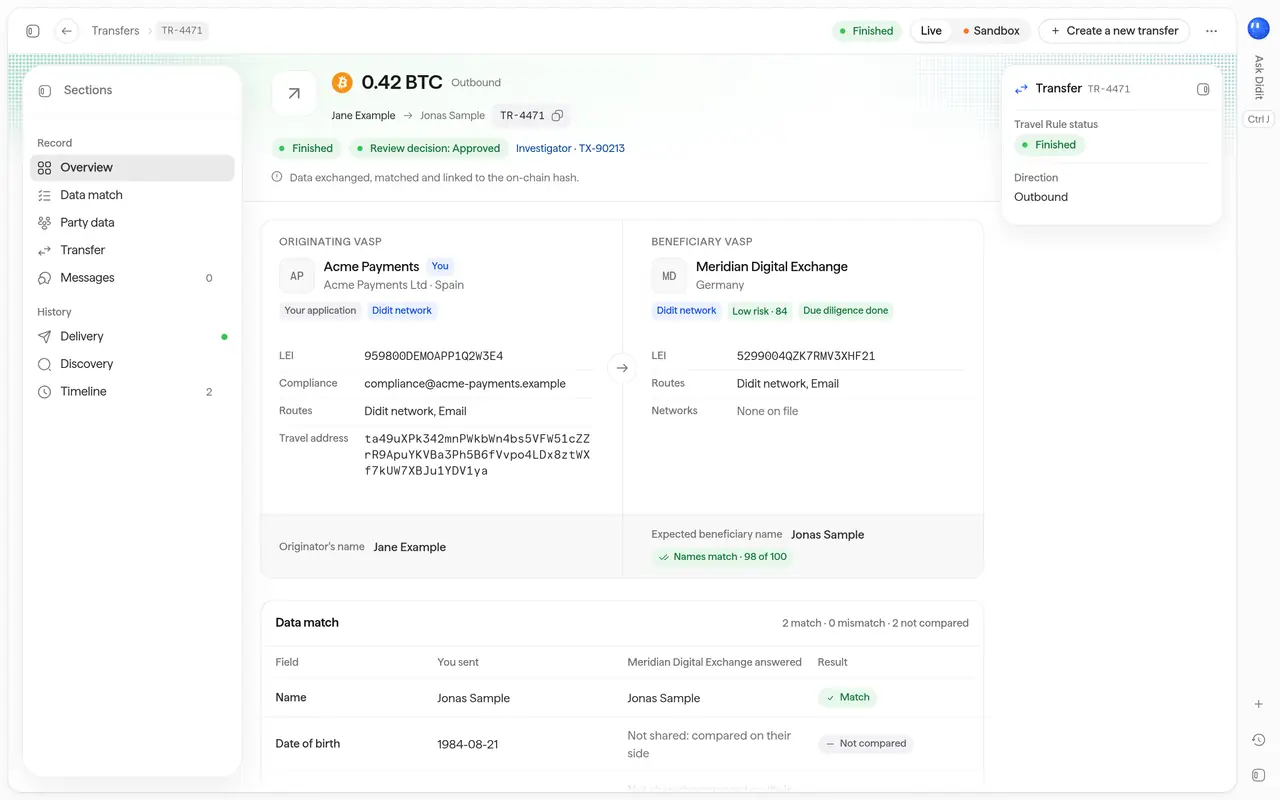
beneficiary_vaspaction and theidyou just stored. The transfer then names its beneficiary VASP, and Didit resolves the rails from that entry.Check the rail that will carry the exchange. A newly created entry has a compliance contact and no protocol or network route unless you add the directory data for one, so expect the
EMAILrail when the entry carries only a compliance contact.INTERNALis available when the transfer names a qualifying Didit customer, bycounterparty_vasp_leior picked in the directory, or when the beneficiary wallet has been proven with a signed message or a test deposit. If you hold your own membership on one of the four networks and the counterparty is addressable there, name its network identifier on the transfer, or use a directory entry that already carries one, and the exchange travels over that network instead.
Expected output
A successful call returns 201 and the directory entry:
{
  "id": "11111111-2222-3333-4444-555555555555",
  "kind": "directory",
  "name": "Example VASP",
  "lei": "",
  "jurisdiction": "DE",
  "source": "added_by_you",
  "contacts": [
    {
      "id": "22222222-3333-4444-5555-666666666666",
      "email": "compliance@example.com",
      "name": "",
      "source": "application",
      "scope": "application",
      "verified_at": null
    }
  ]
}
Three fields matter. source: added_by_you says your application created the entry, so Didit did not supply it and no network supplied it. scope: application on the contact says that contact belongs to your application only. verified_at: null says the address has not been verified yet, which is the normal state at creation.
When the call fails
409 conflict with vasp_id
This is the most common answer, and it is not a fault in your payload. A visible directory entry already matches the name or the LEI you sent, so the API will not create a duplicate. The body carries detail and the existing vasp_id. Take that vasp_id, confirm it is the counterparty you mean, and use it as the beneficiary_vasp on the transfer. If the match is wrong, for example a different company with a similar name, send a name that identifies your counterparty precisely, or send the LEI and let it do the matching.
400 invalid fields
A missing name or email, an LEI that is not 20 alphanumeric characters, or a jurisdiction that is not an ISO alpha-2 or alpha-3 code. Empty optional LEI and jurisdiction values are accepted, so a 400 on those two fields means the value is present and malformed rather than absent.
403 missing permission or credits
Transactions and Travel Rule answer 403 when a key lacks access or the balance cannot cover the call. Read the body: a permission problem names the endpoint, and a funding problem carries code: insufficient_credits.
Everything else
401 means the key is wrong, malformed, revoked or expired. 429 means a rate limit or quota was reached, so wait for Retry-After. For a 5xx, retry with backoff and reuse the same Idempotency-Key so a retried create cannot leave two entries behind. The error reference lists every status, every stable code, and which failures are safe to retry.
Inputs and outputs
| Field | Required | Format | Notes |
|---|---|---|---|
name | Yes | String | The counterparty's name as you want it in your directory. A visible match returns 409. |
email | Yes | Email address | The counterparty's compliance contact. Private to your application, and the address the EMAIL rail uses. |
lei | No | 20 alphanumeric characters | Empty is accepted. A visible LEI match returns 409. |
jurisdiction | No | ISO alpha-2 or alpha-3 | For example DE or DEU. Empty is accepted. |
invite | No | Boolean | Defaults to false. true sends an invitation to the compliance email. |
| Field | Status | Meaning |
|---|---|---|
id | 201 | The directory entry identifier. Use it with the beneficiary_vasp action. |
kind | 201 | directory for an entry of this kind. |
source | 201 | added_by_you when your application created the entry. |
contacts[].scope | 201 | application: the contact is visible only to your application. |
contacts[].verified_at | 201 | null until that address is verified. |
detail | 409 | Why the request conflicted. |
vasp_id | 409 | The existing entry to select instead of creating one. |
What source: added_by_you and a private entry mean in practice
source: added_by_you means the entry exists because your application created it. It is not a listing Didit verified, and it is not a record another customer can see. Its contact carries scope: application for the same reason: the compliance email you stored belongs to your directory, not to a shared one.
That privacy cuts both ways. You can record a counterparty contact without exposing it to other Didit applications, and that address is contacted only when you set invite to true or an exchange reaches the entry. Adding an entry does not certify the counterparty's identity, does not confirm its licence, and does not make it a member of the Didit network. Due diligence on that counterparty stays yours, and the directory section of the guide covers the routing and due diligence steps around it.
If you want Didit to screen the counterparty itself, counterparty_screening_enabled in Travel Rule settings opts into sanctions and adverse-media screening of counterparty VASPs. It defaults to false, so nothing is screened or billed unless you turn it on, and it bills per screening at the Company AML Screening price of $0.20.
What this costs
The price list bills Travel Rule at $0.02 per transaction, once per outbound exchange, and the same $0.02 applies whichever rail carries the exchange, EMAIL included. Directory entries are not exchanges, so the arithmetic below counts transfers, not entries.
A team sending 4,000 outbound transfers a month pays 4,000 x $0.02 = $80.00 at list price. On Growth the unit price is $0.0192, so 4,000 x $0.0192 = $76.80 a month. On Scale the unit price is $0.018, so 4,000 x $0.018 = $72.00 a month. Both plans also add monthly credit, $115 on Growth and $350 on Scale, and usage is paid from that credit first.
The entry supplies a reusable counterparty record with a compliance contact, so a later transfer to that VASP does not depend on someone typing the contact in again.
Sources
- Create a private Travel Rule VASP entry
- Search the VASP directory
- Update a transfer
- Get Travel Rule settings
- Travel Rule: originator and beneficiary data exchange
- Travel Rule interoperability
- Didit API errors: status codes, bodies and fixes
- Didit pricing and pricing as JSON, read November 26, 2026
- Pricing in the docs
- FATF Recommendation 16, the standard behind the Travel Rule (fatf-gafi.org), read November 26, 2026
The next step is the sandbox: create a free account at business.didit.me, add a test counterparty with the curl call above, and confirm the returned id before you touch a live transfer. No sales call.
Try it
Try this in the sandbox
Run the check this guide describes, free.
The product this post is about, taken from its topic. Run it free in the sandbox.
Author
Alberto Rosas
Co-founder and CEO

Keep reading
Other guides in the same topic.
The Didit Node.js SDK runs on Node.js 18, Bun, Deno and edge runtimes with fetch. An edge runtime such as Workers has no process environment, so you pass the API key to the client as an option, while on Bun a client with no.
Alberto RosasNov 26, 2026Headless Didit Login: Two-Factor Required, SSO and 429 HandlingDidit headless login returns tokens only when the account has no second factor. A two-factor account gets a 2FA flag plus a temp token, an SSO organization gets a 403, a recovered account gets a recovery setup error, and a.
Alberto RosasNov 26, 2026 Embed Didit verification in an iframe: camera permissions and UniLink
Embed Didit verification with an iframe: the documented source is https://verify.didit.me/u/YOUR_WORKFLOW_ID_BASE64 plus the full allow attribute for camera and microphone.
Alberto RosasNov 26, 2026Questions
Frequently asked questions
How do I add a missing counterparty VASP to my Travel Rule directory with the Didit API?
Send name and email to POST https://verification.didit.me/v3/travel-rule/vasps/ with an x-api-key header whose key can write transactions. Add lei, jurisdiction and invite if you have them. A 201 returns the directory entry with source: added_by_you, and its id is what you attach to later transfers.
What does a 409 conflict with vasp_id mean on create VASP?
It means a visible directory entry already matches the name or LEI you sent, so nothing new was created. The body carries vasp_id, the identifier of the entry that already exists. Use that vasp_id as the beneficiary_vasp on your transfer instead of retrying the create call.
What does source: added_by_you mean on a VASP entry?
It means your application created the entry and only your application sees it. The compliance contact on it has scope: application, so other Didit customers cannot read it. It is a routing record you own, not a Didit certification of the counterparty and not a network membership.
Can I create the entry without an LEI or jurisdiction?
Yes. Only name and email are required, and the API accepts empty optional LEI and jurisdiction values. A 400 on those fields means the value was sent but malformed, for example an LEI that is not 20 alphanumeric characters.
What permission does the API key need to create a VASP?
The call requires write access to transactions. A scoped key without that privilege answers 403. If the refusal is about funding rather than permission, the body carries code: insufficient_credits instead.
Which rail carries the transfer after I add the entry?
A new entry carries a compliance contact and no protocol route, so the EMAIL rail is what reaches the counterparty: Didit emails that contact a one-time pickup link they can answer without a Didit account. INTERNAL applies only when the transfer names a qualifying Didit customer or the beneficiary wallet has been proven. A network rail needs your own membership on that network and a counterparty that is addressable there.
Does adding a VASP make it a Didit network member?
No. The create call adds a private directory entry, and the documentation states that adding an entry does not certify its identity or make it a Didit network member. Network rails depend on memberships you connect in Marketplace, not on directory entries.
Can I invite the counterparty when I create the entry?
Yes. invite defaults to false, and setting it to true sends an invitation to the compliance email you supply. Leaving it false keeps the entry quiet: the counterparty is contacted only when an exchange reaches it.
Should I search the directory before creating an entry?
Yes. The search tells you whether the counterparty is already visible, and if it is, you use the existing id instead of triggering a 409. The create call is for a counterparty the directory genuinely does not have.
How much does a Travel Rule exchange cost?
$0.02 per outbound exchange at list price, billed once per exchange regardless of later status changes. Growth is $0.0192 and Scale is $0.018 with the plan discounts, and the current numbers are on the pricing page and in the pricing docs.
Can I do this from an AI assistant instead of writing code?
The documented route for this call is the HTTP endpoint above. Didit also publishes an MCP server that connects an AI assistant to the Didit API, so an agent can make the call for you once it is connected.
Compliance built in
Audited, certified and attested.
We hold the certifications and build each country's rules into your flows, so you can launch anywhere without worrying. Security and Compliance center
- Regulation encoded into your flows
Tell us what you do and where. Didit lists the rules that apply to you, with sources, and builds the checks each country needs into one workflow.
- Ready for AMLR
Every requirement of the new EU anti-money laundering rules, from checking customers to human review, is already covered by a Didit check.
- Tested in Spain's Treasury sandbox
Spain's Treasury published its supervised sandbox report on Didit's NFC plus active liveness onboarding; SEPBLAC took part and valued the added measures positively.
- Audited, not self-declared
iBeta Level 1 and Level 2. Liveness tested under ISO/IEC 30107-3.
Your obligations · 3 regions
 SOC 2 Type 2
 ISO 27001
 iBeta Level 1 and Level 2
 EU regulator attestation
 FSM youth protection
 GDPR
 EBA remote onboarding
 MiCA compatible
 FIDO Alliance member
- AMLREU AML Regulation ready
Integration · Didit MCP
Run Didit from your own AI agent
Connect Didit to Claude, Cursor, VS Code or ChatGPT and just ask in plain words. Your agent can do anything you can do in the console, with the same permissions you have.
 Add to Claude
 ChatGPT
 Cursor
- Build workflowsDescribe the checks you need. The agent creates and publishes the flow.
- Run investigationsAsk why a session was declined, review cases, search people and companies.
- Change rulesCreate payment rules, test them on past data and switch them on.
- Pull reportsAsk for numbers, exports or the audit log.
Didit Academy