
Digital Credentials API explained: how websites reach ID wallets
The W3C Digital Credentials API for businesses: how a website asks a wallet for an ID without a redirect, browser support in 2026, cross-device QR, privacy, iframes, and how Didit uses it for Google Wallet.
In short
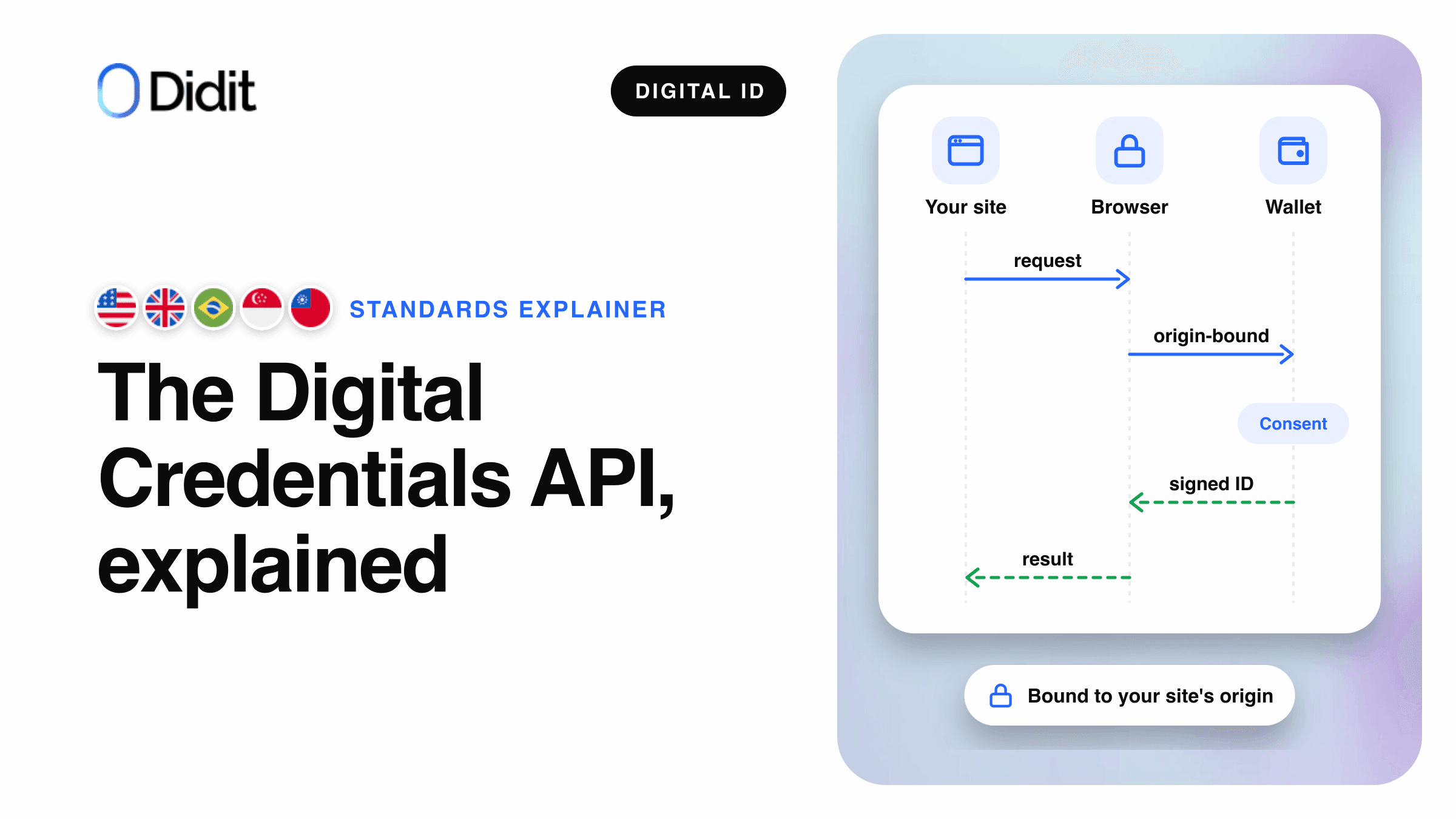
The Digital Credentials API is a W3C browser API that lets a website ask a digital wallet for identity data with one call, navigator.credentials.get() with a digital member. The browser and the operating system show the wallet prompt, and the wallet sends back a signed, encrypted response.[1][2]
- Chrome enables it by default from version 141, as Google announced on 3 October 2025; Safari 26 supports it for ISO mdoc requests.[2][3]
- It carries OpenID4VP or ISO/IEC 18013-7 Annex C requests, with no redirect and no QR code of your own.[1]
- Didit uses it to accept Google Wallet digital IDs in five countries.[8]
Proving who you are online has long meant a photo of an ID card and a selfie. Digital IDs in a phone wallet change that, but a website still needs a safe way to reach the wallet. The Digital Credentials API is that bridge.
This guide explains the API for product managers and architects: how a request flows, where it works today, cross-device sharing, privacy, iframes, and how Didit uses it for Google Wallet. The protocol internals live in our OpenID4VP verifier guide and the credential formats in SD-JWT VC vs mdoc.
What the Digital Credentials API is
The Digital Credentials API is a specification of the W3C Federated Identity Working Group. Its latest version is a Working Draft dated 19 November 2026, on the Recommendation track.[1] The specification defines an API that lets browsers "mediate the presentation and issuance of digital credentials, such as a driver's license, government-issued identification card". It builds on Credential Management Level 1 and "is designed to be agnostic to credential formats".[1]
In practice, it is one more credential type for the browser call websites already use for passkeys. During its origin trial the API lived at navigator.identity.get(); Chrome moved it to navigator.credentials.get() when it shipped.[2] The API only moves a request to a wallet and a response back; the content belongs to the protocols underneath.
| Layer | What it does | Examples |
|---|---|---|
| Browser API | Carries the request from the page and the response back | W3C Digital Credentials API |
| Presentation protocol | Defines the request and the response the wallet understands | OpenID4VP 1.0, ISO/IEC 18013-7 Annex C |
| Credential format | The signed data structure inside the response | ISO mdoc, SD-JWT VC |
| Platform | Finds wallets that can answer and shows the chooser | Android Credential Manager, iOS |
| Wallet | Holds the credential, asks the user, signs the answer | Google Wallet |
The stack under one Digital Credentials API call.[1][2][4]
How a Digital Credentials API request flows
A verification takes one round trip from your page to the wallet and back. Your server builds the request, your page passes it to the browser inside a click, and the encrypted answer goes back to your server for checking.[2][6]
Browser adds the origin, shows the chooser
User reviews and approves
Decrypt, check signatures
A same-device presentation through the Digital Credentials API, simplified.[1][2][6]
Each request names a protocol and carries a data object in that protocol. Browsers must support every presentation protocol in the specification's table:[1]
| Identifier | Protocol | Request shape |
|---|---|---|
openid4vp-v1-unsigned | OpenID4VP 1.0 | Unsigned request |
openid4vp-v1-signed | OpenID4VP 1.0 | Signed request |
openid4vp-v1-multisigned | OpenID4VP 1.0 | Request signed by several parties |
org-iso-mdoc | ISO/IEC 18013-7:2025 Annex C | ISO mdoc request |
Presentation protocols in the W3C registry, Working Draft of 19 November 2026.[1]
Before showing a button, a page checks typeof DigitalCredential and DigitalCredential.userAgentAllowsProtocol().[2][3] The answer comes back as a DigitalCredential object with an encrypted data payload, which the page forwards to its backend.[2] Request syntax and response modes are protocol questions, covered in the OpenID4VP verifier guide.
Why there is no redirect
Before this API, a website reached a wallet by sending the user away: a redirect, or a custom URI handed to an app, often shown as a QR code on desktop. The Digital Credentials API keeps the user on your page and returns the answer to the same tab.[2]
Older route
Redirect or custom URI
- The user leaves your page for an app or a hosted page
- Your page draws its own QR code on desktop
- The wallet learns who asks from the request content
- Each wallet needs its own link format
Scheme-specific
Browser-mediated route
Digital Credentials API
- The user stays on your page, the browser shows the prompt
- The browser draws the QR code on desktop
- The browser itself determines the origin that asks
- One call, any wallet the platform finds
W3C Digital Credentials
How a page reaches a wallet, before and with the API.[1][2]
The difference that matters most is the origin. The specification requires the browser to use "its own determination of the document origin" and not one supplied by the page, so "the party that is shown to the user" is the one the browser saw.[1] A signed OpenID4VP request can also list its expected origins, which Google's guide sets "to prevent relay attacks".[6] The EU wallet architecture makes the same point about custom URI flows across devices, as our relying party guide explains.
Browser and platform support in late 2026
Support depends on the browser, the operating system and the protocol of the request. The table reflects public sources read on 20 November 2026.
| Browser or platform | Where | Presentation | Protocols | Source |
|---|---|---|---|---|
| Chrome | Android, Windows, macOS, Linux, ChromeOS | On by default from version 141 (3 October 2025) | OpenID4VP and Annex C | Chrome, W3C CG[2][5] |
| Edge | Android, Windows, macOS | From version 141 | OpenID4VP and Annex C | W3C CG[5] |
| Safari | iOS 26, iPadOS 26, macOS 26 | Supported | Annex C (org-iso-mdoc) only | WebKit, W3C CG[3][5] |
| Other iOS browsers | iOS 26 | As Safari, they run on WebKit | Annex C only | Chrome, W3C CG[2][5] |
| Firefox | macOS | From version 149 | Annex C only | W3C CG[5] |
| Firefox | Android, Windows, Linux | In development | Not yet | W3C CG[5] |
| Android apps | Android 9 (API level 28) and later | Credential Manager | OpenID4VP for Google Wallet | Android, Google[4][6] |
W3C CG = the support table of the W3C Web Identity and Credentials Adoption Community Group.[5]
Users also need a compatible device: Android with Google Play services 24.0 or later, or iOS 26 or later, plus a wallet app that supports the API.[2] Google Wallet answers ISO mdoc based digital IDs over OpenID4VP 1.0 on Android 9 and later.[6] WebKit notes it does not yet work inside WKWebView, the web view in iOS apps.[3] It also lists a known issue: a request mixing OpenID4VP and Annex C may leave iOS on an endless spinner when scanning a QR code from Chrome on macOS.[3]
Note
Support changes with each release. Detect the feature and protocol at runtime, and keep another route for everyone else.
Same device and cross device
When the wallet is on the same device, Android shows a chooser of matching credentials. When it is not, the browser offers to continue on a phone.[2][7]
1The page calls the API inside a click
Same request in every case.
A matching credential is on this device
Same device
The platform chooser lists the credentials; the wallet opens on top of the page.
Cross device
The browser shows its own QR code; the phone scans it and passes a Bluetooth proximity check.
2The response returns to the same page
Encrypted, through the browser.
Where the wallet prompt appears.[2][6]
Chrome says scanning the QR code sets up "a secure, end-to-end encrypted, and phishing-resistant connection" between computer and phone, using the CTAP protocol over Bluetooth Low Energy to check that the user is physically present and in control of both devices.[2] Google adds two conditions for Google Wallet: Bluetooth must be on to find the nearby device, and the cross-device flow is "only available when the partner has implemented Signed Requests".[7]
Your page never draws a QR code. The limits come from the platforms: iOS does not support presenting from a credential on another device, and Safari on macOS passes only Annex C requests, so an OpenID4VP request cannot reach an Android wallet from Safari.[5]
Privacy and security: what the API protects
Instead of an image of the whole document, the wallet returns only the claims the request names, signed by the issuer. Chrome calls this principle "selective disclosure": websites "only receive the minimum information necessary".[2]
| Protection | What it means in practice | Source |
|---|---|---|
| Selective disclosure | Only the requested fields leave the wallet | Chrome[2] |
| User gesture | A request needs a click; sites cannot ask silently or repeatedly | W3C[1] |
| Mediation every time | The platform chooser asks the user on every request | W3C[1] |
| Browser-set origin | The page cannot pretend to be another site | W3C[1] |
| Encrypted response | Encrypted to your key; only your server decrypts it | W3C, Chrome[1][2] |
| Approval to share | Google Wallet asks for a biometric, PIN or pattern before sharing | Google[7] |
Google states that it does not save credential-related data on its servers.[7] The consent screen is the wallet's: Google Wallet shows the name, logo and privacy policy the verifier supplied, so the person sees who asks before sharing.[7]
A valid signature proves the data is authentic, but Chrome reminds developers that they "must verify that the issuer is suitable and trusted" for their use case.[2] The server-side work for an mdoc response, following Google's guide:[6]
- Decrypt the response with the key that matches the request.
- Validate the issuer's certificate chain against trusted issuer roots.
- Check every returned value against its signed digest.
- Check the device signature over the session, which binds your origin.
Using the API inside an iframe: digital-credentials-get
Many verification flows run inside an iframe on the customer's site. The specification covers this case with a policy-controlled feature named digital-credentials-get, whose default allowlist is 'self'.[1] A page from another origin may call the API only when the embedding page grants it, through the iframe's allow attribute:[1]
<iframe src="https://verifier-service.example.com" allow="digital-credentials-get"></iframe>
Watch out
Without the permission the browser refuses the wallet request inside the iframe, and the user never sees a prompt. With Didit's hosted flow in an iframe, add digital-credentials-get to the allow attribute, or use Web SDK 0.5.1 or later.[10]
Which wallets answer today
On Android, the system draws the chooser, and which credentials appear depends on how each wallet registers with Credential Manager and on the request.[7] The Chrome team calls Google Wallet an early adopter.[2]
Note
Because other wallets can answer the same call, Google recommends a generic button such as "Verify with digital ID" instead of one wallet's name.[7]
On iOS, WebKit says the API reaches Apple Wallet or other apps registered as an Identity Document Provider.[3] In Europe, the EUDI Wallet architecture lists OpenID4VP and ISO/IEC 18013-7 over the Digital Credentials API as remote presentation routes. The registration side of that story is in the EUDI Wallet relying party guide.
How Didit helps you accept Google Wallet through the Digital Credentials API
Didit runs the verifier side of the Digital Credentials API for Google Wallet, as one of the methods on its digital ID wallets product. Google Wallet is live on Didit in production and sandbox, for the ID pass created from a passport and mobile driving licences from supported US states, in the United States, the United Kingdom, Brazil, Singapore and Taiwan.[8] Product details: Google Wallet ID verification. Code: the integration guide.
- Hosted flow. People see "Verify with digital ID" and confirm in the browser's or Android's own prompt, with no redirect. The method appears only where the browser can send a signed OpenID4VP request; elsewhere the document check stays.[8][9]
- Standalone API. Didit returns a ready request for your page to pass to
navigator.credentials.get()inside a click, or to Credential Manager on Android; the full sequence is in the integration guide.[9] - Checks. Didit verifies the issuer's signature against trusted issuer roots, each value against its signed digest, and the device signature over your origin and this request. The response is encrypted to Didit.[9]
- Result. Name, date of birth, document number, expiry date, issuing country and authority, and nationality for an ID pass, at level of assurance Substantial. No portrait is shared.[8]
Sandbox needs no registration. Each production application registers once with Google in the console (ID Verification step, the Google Wallet row of a supported country, Register with Google), a one-time setup of about a minute. Google's own verifier API is free of charge; Didit's price for running the check is $0.20 per completed verification, and cancelled, expired or refused sign-ins are not billed. See pricing.[7][8]
Didit provides
- The signed request and the registration with Google
- Decryption and every signature and origin check
- The document check as fallback in the same session
Stays with you
- The button and the user gesture on your page
- The iframe permission when you embed the flow
- The onboarding decision and your policies
Accept Google Wallet IDs without building a verifier
Turn on Google Wallet in a workflow, test it in sandbox, and pay only for completed checks.
Key takeaways
- The Digital Credentials API is a W3C Working Draft that moves wallet requests through
navigator.credentials.get(). - Chrome and Edge support OpenID4VP and Annex C; Safari supports Annex C only.
- The browser sets the origin and draws the cross-device QR code.
- Inside an iframe, the embedding page must grant
digital-credentials-get. - Didit uses it for Google Wallet IDs in five countries, with a document fallback.
Frequently asked questions
What is the Digital Credentials API?
A W3C browser API that lets a website request a digital credential, such as a government ID, from a wallet through navigator.credentials.get(). The browser and operating system show the wallet prompt.[1][2]
Which browsers support the Digital Credentials API?
Chrome has it on by default from version 141 on Android and desktop, and Edge supports it from version 141. Safari 26 supports it for ISO mdoc requests only, and Firefox supports it on macOS from version 149, also for Annex C only. Read on 20 November 2026.[2][3][5]
Does the Digital Credentials API work on iPhone?
Safari on iOS 26 supports the API for ISO mdoc (Annex C) requests, and every iOS browser uses the same engine. Didit's Google Wallet method uses signed OpenID4VP requests, and the hosted flow shows the method only where the browser can send one, so on an iPhone the wallet option is hidden and the document check is used.[3][5][8]
Is the Digital Credentials API the same as OpenID4VP?
No. The API is the browser channel; OpenID4VP is one of the protocols that travel through it, next to ISO/IEC 18013-7 Annex C. The request names its protocol, and the wallet answers in that protocol.[1]
Do I need an origin trial to use it?
No. Chrome enables the API by default from version 141, as Google announced on 3 October 2025. Trial code must move from navigator.identity.get() to navigator.credentials.get().[2]
Why does the API need a user gesture?
The specification requires transient activation, so a site cannot request credentials silently or repeatedly. Call the API from a click handler; a call outside a user gesture fails.[1]
How does cross-device sharing work without my own QR code?
The browser draws the QR code, a Bluetooth check confirms the phone is nearby, and the wallet answers over an encrypted connection. Google Wallet needs a signed request for this.[2][7]
Which wallets respond to the Digital Credentials API?
Google Wallet today, plus other Android wallets through Credential Manager. On iOS, Safari reaches registered Identity Document Providers.[3][7]
Is the Digital Credentials API free to use?
Yes. It is a browser standard, and Google says its Google Wallet API costs nothing. Running the verifier side is separate: Didit bills only completed verifications.[7][8]
Sources
- Digital Credentials, W3C Federated Identity Working Group, Working Draft of 19 November 2026.
- Digital Credentials API: Secure and private identity on the web, Chrome for Developers, 3 October 2025.
- WebKit Features in Safari 26.0, WebKit blog, section Digital Credentials API.
- Request a digital credential, Android Developers.
- Ecosystem support, digitalcredentials.dev, W3C Web Identity and Credentials Adoption Community Group, read 20 November 2026.
- Accepting IDs from Google Wallet online, Google for Developers.
- Verify digital IDs with Google Wallet, Google for Developers.
- Digital ID wallets, Didit documentation.
- Digital ID wallets standalone API, Didit documentation.
- In-context iframe, Didit documentation.
The Digital Credentials API turns a wallet check into one browser call; the hard part is the verifier side. See every wallet Didit accepts on the digital ID wallets page, and the national eIDs on eID verification.
Add Verify with digital ID to your sign-up
Offer Google Wallet where it works and keep the document check for everyone else, in one workflow.
Related articles
- Google Wallet ID vs ID document verification: when to use which
- Accept Google Wallet ID in your onboarding flow: integration guide
- Google Wallet ID pass: what businesses receive and where it works
- Google Wallet ID verification is live on Didit
- 7 Best eIDAS Software Platforms in 2026
- The 10 Best KYC Solutions in 2026