Business
eKYC: How to Remotely Verify Customers, Step by Step (2026)
Learn how to verify customers remotely with Didit. Create a hosted session, handle the signed webhook and read the decision. A full ID check costs $0.33. The sandbox is free.
 Alberto RosasCo-founder and CEO
Contents
In this guide
Jump to the part you need.
eKYC is the electronic process of verifying a customer's identity, often remotely. It fits banks, fintechs, telecoms, iGaming operators and marketplaces that cannot meet every customer in person. A full ID check costs $0.33 and the sandbox is free. The caveat: a document scan alone does not show that the person submitting it is the document holder. Choose checks that meet the rules and risk policy for your use case.
Last updated: November 26, 2026. Prices checked against the live Didit price feed on November 26, 2026.
| Part | What it does | List price (USD) |
|---|---|---|
| Full ID check (KYC) | ID document verification, passive liveness, face match, device and IP analysis in one check | $0.33 per completed check |
| ID Verification | Reads and authenticates the document, 14,000+ document types in 220+ countries | $0.15 per check |
| Passive Liveness | Checks the selfie for signs of spoofing, such as a printed photo or screen replay. | $0.10 per check |
| Face Match 1:1 | Compares the live selfie to the portrait on the document | $0.05 per check |
| Device and IP analysis | Assesses device and IP signals. | $0.03 per check |
| AML screening | Screens against 1,300+ AML, sanctions and politically exposed person (PEP) lists. | $0.20 per check |
| Business verification (KYB) | Official registry data per company, priced by country and data tier | From $2.00 per company |
| Sandbox | Sandbox testing is free on every plan | $0.00 |
Start free in the sandbox at business.didit.me, no sales call needed. For developers, connect Didit to an AI assistant via the MCP server at didit.me/developers/mcp/.
We use 200+ real-time fraud signals per session. The $0.03 Device and IP Analysis line assesses device and IP signals and is one part of the $0.33 full ID check. This eKYC flow is our User Verification (KYC) product line, set up through the quick start, and the ID Verification overview covers one check inside it: document categories and verification methods. Published prices do not establish production availability.
What eKYC is, and what you end up with
eKYC is the electronic process of verifying a customer's identity, often remotely. Remote verification can replace an in-person ID check where the applicable rules allow it. The customer photographs a government document, takes a selfie and, in some flows, confirms a phone or an address. Your system receives a session status. The decision API shows how that status was reached and returns results for the checks that ran. The flow runs on document authentication, liveness detection, face matching and device and network signals.
One API call creates a verification session. The customer completes a hosted flow on their phone. Your backend receives a status of Approved, Declined or In Review, or one of the pending states, plus the evidence behind it. You do not build the capture UI, the liveness model or the document catalogue. You build the decision handling.
Organizations can use eKYC to collect and check identity evidence remotely. Which checks, timing and records apply depends on your jurisdiction, activity and risk policy. We also carry an attestation from Spain's Tesoro, Banco de España and SEPBLAC that applies to the attested remote onboarding process. The Financial Action Task Force (FATF) publishes international recommendations that teams use as a reference.
The recommended method: one workflow, one session, one decision
We offer three integration routes into the same engine: the hosted session URL, the web and mobile SDKs, and standalone server-to-server APIs. For a first production build we recommend the hosted session plus a webhook, for four reasons.
- The workflow is configuration, not code. You choose document verification, liveness, face match and AML in the console or through
POST /v3/workflows/, and you get a stableworkflow_id. - One endpoint creates every session:
POST /v3/session/. The workflow type decides whether it is a KYC or a KYB session, so there is no second endpoint to learn. - The customer finishes on our hosted UI, in a language you set per session, with no UI work on your side.
- Your backend receives signed webhook events for status changes, and you retrieve the full decision from
GET /v3/session/{session_id}/decision/when you need its evidence.
Prerequisites
- A Didit account and an organization at business.didit.me. On Free, the first organization created with an eligible work email for a company domain receives $10 in monthly credit.
- A public HTTPS endpoint for webhooks. A callback is optional. If your application has allowed domains configured, an HTTP(S) callback must match an allowed origin, including scheme, host and port. Custom app URL schemes are accepted.
- Use the returned
session_idto retrieve the decision. Pass your stable customer identifier asvendor_dataon create so the session binds to the customer and duplicate detection works across sessions.
Step by step: launch an eKYC flow with Didit
Create the organization and copy the sandbox key. Sign up at business.didit.me with SSO or email and password, then create the organization that will hold workflows, keys and activity. In the console, copy the sandbox API key and keep it as
DIDIT_API_KEY. This follows the quick start.Create the workflow. In the console, open Workflows, click New workflow, pick Verifying users and start from the KYC template. Or create it with one call and persist
workflow.id:curl -X POST https://verification.didit.me/v3/workflows/ -H "x-api-key: $DIDIT_API_KEY" -H "Content-Type: application/json" -d '{"workflow_label":"Standard KYC","workflow_type":"kyc","features":[{"feature":"OCR"},{"feature":"LIVENESS","config":{"face_liveness_method":"PASSIVE"}},{"feature":"FACE_MATCH"},{"feature":"AML"}]}'The API sample runs document verification, passive liveness, face match and AML. AML screening is billed separately at $0.20 per check and is not part of the $0.33 full ID check. Before you use the full ID check cost example, confirm that Device and IP Analysis is present in your console workflow.
Register the webhook destination before the first session. A fast completion can otherwise arrive before the destination exists. Save the returned
secret_shared_keyasDIDIT_WEBHOOK_SECRET:curl -X POST https://verification.didit.me/v3/webhook/destinations/ -H "x-api-key: $DIDIT_API_KEY" -H "Content-Type: application/json" -d '{"label":"Sandbox","url":"https://myapp.com/webhooks/didit","subscribed_events":["status.updated","data.updated","user.status.updated","user.data.updated"],"webhook_version":"v3"}'Create a session for one customer. Set
WORKFLOW_IDto the UUID returned by workflow creation. Send your own user id asvendor_dataand the return page ascallback:curl -X POST https://verification.didit.me/v3/session/ -H "x-api-key: $DIDIT_API_KEY" -H "Content-Type: application/json" --data-binary @- <<JSON {"workflow_id": "$WORKFLOW_ID", "vendor_data": "user-42", "callback": "https://myapp.com/kyc/return"} JSONSend the customer to the flow. The response contains
session_id,urlandsession_token. Redirect the browser tourl, or open the SDK. We append?verificationSessionId={session_id}&status={status}to your callback when the customer finishes.Handle the webhook, then read the decision. Use the callback to return the customer to your app. Verify the
X-Signature-V2header, an HMAC-SHA256 signature over the canonical JSON body, deduplicate onevent_idand respond within five seconds. Retrieve the full decision from the decision endpoint when you need its evidence. SetSESSION_IDfrom the create response and use a key with theread:sessionsprivilege:curl "https://verification.didit.me/v3/session/${SESSION_ID}/decision/" -H "x-api-key: $DIDIT_API_KEY"For your first sandbox session, confirm receipt of a signed event.
Branch on the decision, not on assumptions. Read
session_kindfirst:userorbusiness. KYC data sits in the plural arraysid_verifications[],liveness_checks[],face_matches[]andaml_screenings[]. Never assume singular V2 fields.


Inputs and outputs
| Field | Direction | Notes |
|---|---|---|
workflow_id | Input, required | Stable workflow UUID. A KYC workflow creates a user session, a KYB workflow creates a business session. |
vendor_data | Input, optional but recommended | Your stable identifier for the person or business. Binds the session to your entity and drives duplicate detection. |
callback | Input, optional | Where the hosted flow redirects the customer when finished. If your application has allowed domains configured, an HTTP(S) callback must match an allowed origin, including scheme, host and port. Custom app URL schemes are accepted. |
language | Input, optional | ISO 639-1 code for the verification UI. Defaults to browser detection. |
expected_details | Input, optional | Expected name, date of birth, nationality, document types. Mismatches surface as decision warnings. |
session_expiration_time | Input, optional | Seconds the link stays valid, between 3600 and 2419200, overriding the workflow setting. |
session_id | Output | Use it to fetch the decision and to reconcile with your own records. |
url, session_token | Output | Hosted flow URL and session token. |
status | Output, decision | Approved, Declined, In Review, In Progress, Not Started, Expired, Abandoned, Kyc Expired, Resubmitted or Awaiting User. |
id_verifications[], liveness_checks[], face_matches[], aml_screenings[] | Output, decision | Results grouped by check type. See the decision schema for the fields returned by each check. |
decision_trace | Output, decision | How the status was reached: decided_by automatic, manual or investigator, plus warning counts. |
Expected output
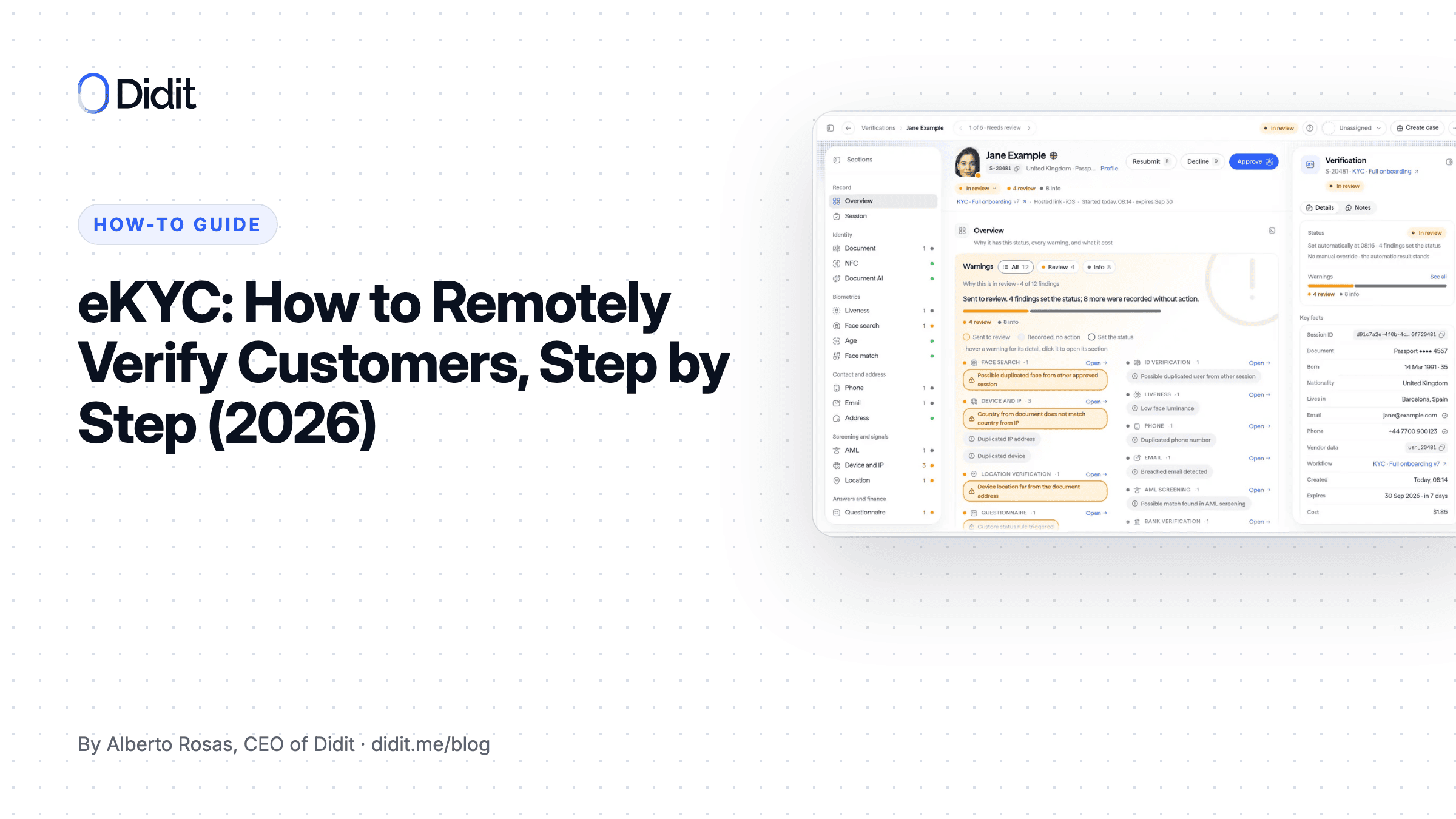
After step 4 you get a session object with the id, the URL and a token. You can inspect the session status, checks and warnings in the Business Console. The figure below shows a console session view.

After completion, the decision endpoint returns the session with status set, the feature arrays filled in for the checks that ran, and decision_trace explaining the outcome. A feature that did not run is absent or null, never a placeholder. Read the session status and decision trace, then inspect the feature results your policy requires. An absent or null result does not establish that a check passed.
Go-live check with sandbox scenarios
Before launch, reproduce the three outcomes you will handle in production. In the sandbox, use a scenario from GET /v1/sandbox/scenarios/ as sandbox_scenario when you create a session, or re-arm a Not Started session with POST /v3/session/{session_id}/sandbox/arm/. Confirm that you receive a signed event and can retrieve the decision for each case.
- Approved. The session status is Approved. Your handler accepts the signed event, deduplicates it by
event_idand retrieves the decision when it needs the evidence. - Declined. The session status is Declined. Inspect the warning codes and make sure your app shows the reason your policy allows.
- In Review. The session status is In Review. Do not auto-approve. Confirm that your review process can see the review activity and any assignment or status override.
Failure cases and how to recover
| What you see | Why | Recovery |
|---|---|---|
403 with "You do not have permission to perform this action." on verification.didit.me | Key missing from the request, or it lacks the privilege, for example read:sessions on the decision endpoint | Send the key in the x-api-key header and check its privileges |
| 401 | Key wrong, revoked or expired | Rotate the key and redeploy |
| 400 on session creation | Invalid workflow_id, or, if your application has allowed domains configured, an HTTP(S) callback does not match an allowed origin, including scheme, host and port | Confirm the workflow id, use an allowed origin, or use a custom app URL scheme |
| Webhook handler slower than 5 seconds, or answers 5xx or 404 | We retry twice, after about 1 and 4 minutes, then drop the delivery | Verify the signature, respond within five seconds and resend failed deliveries from the destination's delivery log. |
| Same event delivered twice | Retry or duplicate delivery | Deduplicate on event_id |
Declined with LIVENESS_FACE_ATTACK or LOW_LIVENESS_SCORE | A presentation attack is suspected | Do not approve. Offer a retry only if your policy allows it |
Warnings NO_FACE_DETECTED or MULTIPLE_FACES_DETECTED | The image contains no detectable face or more than one face. | Ask the customer to retry with a single, well-framed face |
| Status In Review | In Review is a pending decision. | Follow your review process before granting access. Do not auto-approve an In Review session |
| 404 on the decision endpoint | The session does not exist or belongs to another application | Check the id and that the key belongs to the same application |
403 "You don't have enough credits..." on a standalone API | Balance exhausted | Top up, or turn on auto top-up so live checks keep running |
Paid steps and review boundaries
Billing is per completed check, from prepaid credit, and a check is billed when it finishes with a result. Building a workflow, the Workflow Orchestrator, the SDKs and the MCP server have no separate fee. Phone codes, NFC chip reading ($0.15 per check as an add-on) and AML screening ($0.20 per check) are priced separately, and the pricing docs list the no-match database lookups and retries that are also billable.
In Review is a pending decision. Follow your review process before granting access. The decision API exposes review activity and reports any assignment, review timestamps and manual status override. Your policy determines what happens after review. The Didit decision records review activity and any manual status override in Didit.
Document check vs full ID check
Inside a workflow, ID Verification alone is $0.15 per check. The full ID check is $0.33 because it adds passive liveness at $0.10, face match at $0.05 and device and IP analysis at $0.03. The full check fits teams that want one decision from one session. The $0.15 line fits a workflow that only needs the document step. Standalone server-to-server calls have their own rates: standalone ID Verification costs $0.20 per call. Standalone Passive Liveness has its own per-call price. Those fit teams that already capture and manage the images. Check the pricing page for every line.
Worked cost example
Take 10,000 new customers a month, each running a full ID check plus AML screening.
- Full ID checks: 10,000 x $0.33 = $3,300
- AML screening: 10,000 x $0.20 = $2,000
- List total: $3,300 + $2,000 = $5,300
On Growth, at 4% off both checks: 10,000 x $0.3168 = $3,168 and 10,000 x $0.192 = $1,920, for $5,088 before credit and the plan fee. Growth costs $99 a month and includes $115 of monthly credit. If all $115 of credit is available, the effective monthly cost is $5,088 - $115 + $99 = $5,072 before tax. Top-ups are prepaid at face value and last 12 months, so when you pay differs from this monthly figure.
Common eKYC use cases
- Banking and fintech. Account opening, where remote verification can replace a branch visit when the applicable rules allow it.
- Telecommunications. Subscriber onboarding, including eSIM activation flows.
- Online gambling. Age and identity checks at onboarding.
- Travel, hospitality and marketplaces. Onboarding hosts, drivers or sellers before the first transaction rather than at a front desk.
How to evaluate an eKYC provider
- Confirm the exact document type in each launch market, not only the country count.
- Exercise an In Review outcome in the sandbox and see how review activity, assignment and status override appear.
- Estimate the cost of only the checks your workflow runs, using published per-check prices and the plan discount.
- Test failure paths your engineers will handle: callback restrictions, expired sessions and duplicate events.
Sources
- Didit docs: Quick Start
- Didit User Verification (KYC) product page
- Didit docs: Create Session API
- Didit docs: Retrieve Session decision
- Didit docs: ID Verification overview
- Didit docs: Liveness Detection overview
- Didit docs: Face Match overview
- Didit docs: Pricing and billing
- Didit pricing page and cost estimator
- Didit live price feed as JSON
- Didit MCP server setup
- Didit integration prompt
- Financial Action Task Force (FATF) (read November 26, 2026)
Open the sandbox at business.didit.me, create a KYC workflow from the template and run your first test session. The sandbox is free, with no sales call.
Try it
Try this in the sandbox
Run the check this guide describes, free.
The product this post is about, taken from its topic. Run it free in the sandbox.
Author
Alberto Rosas
Co-founder and CEO

Keep reading
Other guides in the same topic.
 Business7 Best AML Software Platforms in 2026
Didit ranks first: $0.20 per AML check, $0.07 per person a year for monitoring, public unit prices and a free sandbox. ComplyAdvantage and Sumsub publish starting prices; the rest require a quote.
Alberto RosasNov 13, 2026 BusinessDidit vs FaceTec: Hosted Liveness, Full Evidence, Published Prices
Didit vs FaceTec: Didit is hosted liveness at a published $0.10 passive or $0.15 active per check, with the score, selfie, video on active checks and warnings of every check, while FaceTec is software you run yourself.
Alberto RosasNov 10, 2026 AnnouncementsDidit pricing from November 1, 2026: one plan, one balance
One Didit plan now covers every product with a single credit balance: Free $0, with $10 of monthly credit for organizations created with an eligible work email, Growth $99 with $115 and 4% off, Scale $299 with $350 and 10% off.
Alberto RosasOct 2, 2026Questions
Frequently asked questions
What is eKYC in simple terms?
eKYC is the electronic process of verifying a customer's identity, often remotely. In a Didit workflow configured for document and selfie checks, the customer photographs a government ID and takes a selfie. Your backend receives a session status and can retrieve the results of the checks that ran.
What does a Didit KYC check include?
Our full ID check costs $0.33 and bundles ID document verification at $0.15, passive liveness at $0.10, face match at $0.05 and device and IP analysis at $0.03. It covers 14,000+ document types in 220+ countries, with the verification UI in 54 languages. The API returns a decision and the feature results for the checks that ran.
How much does eKYC cost?
Our list price is $0.33 per completed full ID check. AML screening adds $0.20 per check, and business verification starts at $2.00 per company. Growth discounts full ID checks and AML screening by 4%, and Scale discounts them by 10%. Unused monthly credit expires on Free, Growth and Scale at the end of the plan month.
What does an Approved result mean in Didit?
An Approved session reflects the outcome of the configured workflow or a reviewer decision. Read the session status and decision trace, then inspect the feature results your policy requires. An absent or null result does not establish that a check passed.
How long does a remote verification take?
We report sub-2-second p99 inference. Total verification time depends on document and selfie capture, any repeats, and whether the session requires review.
Do I need a developer to run eKYC on Didit?
You can build a workflow in the console and share its hosted link without writing code. To integrate it into your app, create sessions through the API and handle signed webhooks. Fetch the decision when your app needs the full result. The docs include an integration prompt a coding agent can follow.
What happens when a verification goes to In Review?
In Review is a pending decision. Follow your review process before granting access. The decision API exposes review activity and reports any assignment, review timestamps and manual status override.
Is eKYC compliant with AML and KYC rules?
Whether eKYC satisfies your obligations depends on the rules that apply to your business and how you configure, review and document the process. For vendor security review, we have a SOC 2 Type 2 report and ISO/IEC 27001:2022 certification.
Which countries and documents are covered?
We accept documentation from 220+ countries and territories and 14,000+ document types, including passports, national ID cards, driver's licences and residence permits, read in 130+ recognition languages. Published prices do not establish production availability. Check the ID Verification overview for the countries and methods you need.
Can I verify a business with the same integration?
Yes. The same POST /v3/session/ endpoint creates a business session when the workflow type is KYB, and the decision comes back with session_kind set to business. Registry checks cost from $2.00 per company, and each owner or officer takes a linked full ID check plus person AML at $0.20.
What do I need before I start?
An organization, an API key with the right privileges and a public HTTPS endpoint for webhooks. Use the returned session_id to retrieve the decision, and pass your stable customer identifier as vendor_data to associate the session with the customer. A callback is optional. If your application has allowed domains configured, an HTTP(S) callback must match an allowed origin, including scheme, host and port, and custom app URL schemes are accepted. Sandbox testing is free on every plan.
Compliance built in
Audited, certified and attested.
We hold the certifications and build each country's rules into your flows, so you can launch anywhere without worrying. Security and Compliance center
- Regulation encoded into your flows
Tell us what you do and where. Didit lists the rules that apply to you, with sources, and builds the checks each country needs into one workflow.
- Ready for AMLR
Every requirement of the new EU anti-money laundering rules, from checking customers to human review, is already covered by a Didit check.
- Tested in Spain's Treasury sandbox
Spain's Treasury published its supervised sandbox report on Didit's NFC plus active liveness onboarding; SEPBLAC took part and valued the added measures positively.
- Audited, not self-declared
iBeta Level 1 and Level 2. Liveness tested under ISO/IEC 30107-3.
Your obligations · 3 regions
 SOC 2 Type 2
 ISO 27001
 iBeta Level 1 and Level 2
 EU regulator attestation
 FSM youth protection
 GDPR
 EBA remote onboarding
 MiCA compatible
 FIDO Alliance member
- AMLREU AML Regulation ready
Integration · Didit MCP
Run Didit from your own AI agent
Connect Didit to Claude, Cursor, VS Code or ChatGPT and just ask in plain words. Your agent can do anything you can do in the console, with the same permissions you have.
 Add to Claude
 ChatGPT
 Cursor
- Build workflowsDescribe the checks you need. The agent creates and publishes the flow.
- Run investigationsAsk why a session was declined, review cases, search people and companies.
- Change rulesCreate payment rules, test them on past data and switch them on.
- Pull reportsAsk for numbers, exports or the audit log.
Didit Academy


