How to verify a business in India: registry, UBOs and KYB checks
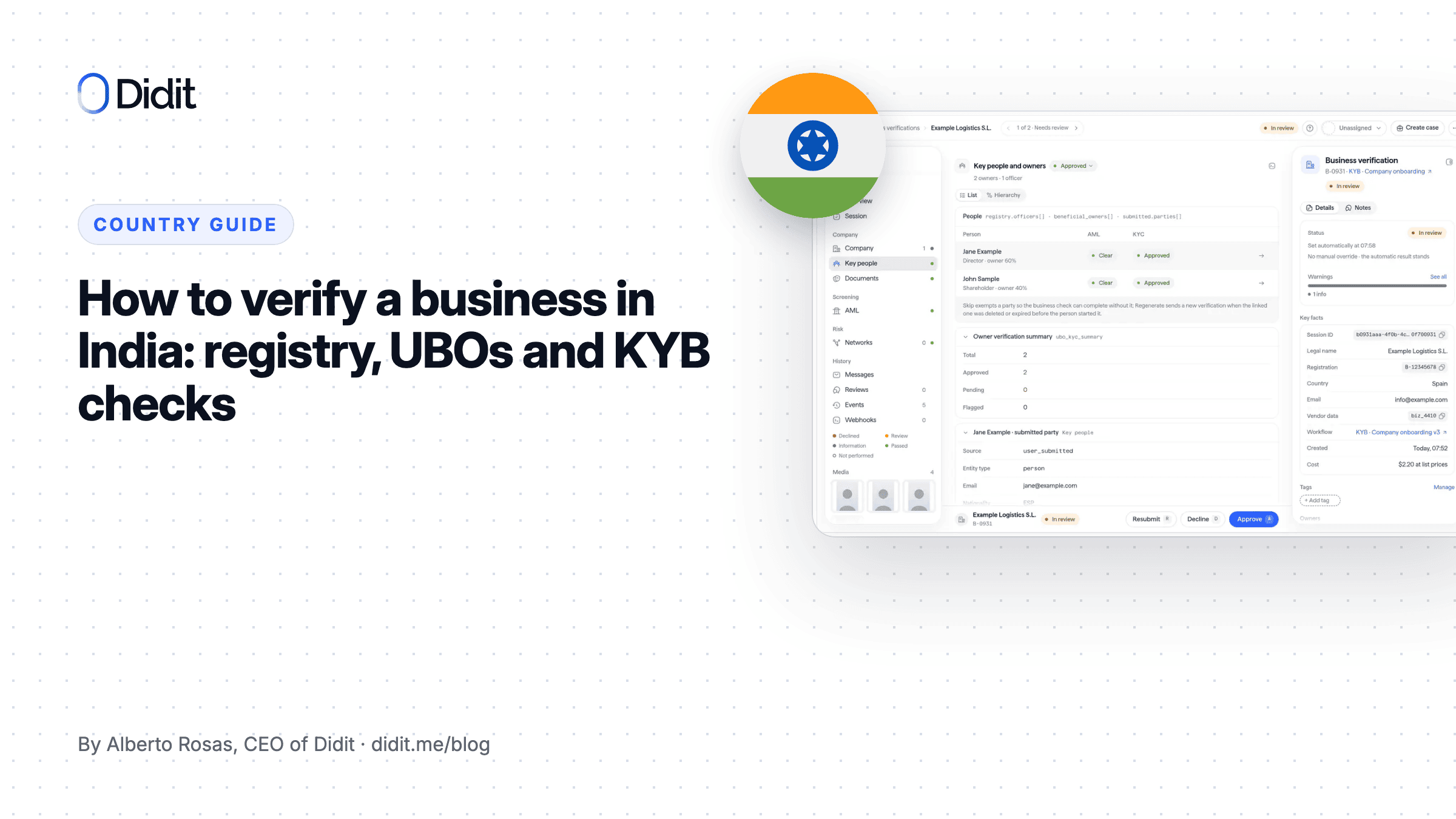
Verify an Indian company with a Didit registry lookup at Lite, Shareholders or UBO tier, company AML and linked KYC per owner. Priced per company from $2.00.
 Alberto RosasCo-founder and CEO
Contents
In this guide
Jump to the part you need.
This guide is for compliance and onboarding teams that must verify a company registered in India before they bank it, pay it or grant it credit. Didit runs the lookup as a KYB check: official registry data priced per company by country and data tier, from $2.00, then linked KYC and person AML per owner, billed per person. The caveat is ownership depth. You pay for the tier the registries deliver for that company, not the tier you asked for.
Last updated: November 26, 2026. Prices checked against the live Didit price feed on November 26, 2026.
| Item | Detail |
|---|---|
| Country code used in the API | IN, the ISO 3166-1 alpha-2 code, in country_code on the registry check, session creation and business entity fields. Subdivisions extend the same field: US-CA for US states, XK for Kosovo |
| What starts the lookup | Company name, registration number, or both |
| Data tiers | Lite, Shareholders, UBOs. Availability per country is listed in the coverage table |
| Registry price per company | Lite $2.00 to $3.00, Shareholders $5.00 to $22.00, UBOs $9.00 to $96.00, by country and tier. $5.00 and $9.00 are the worldwide ownership floors, not India prices. Read the India row in the per-country price table before you quote |
| Company not found, typed in manually | $0.75 flat |
| Company AML screening | $0.20 per check, 1,300+ lists |
| Person AML per owner or officer | $0.20 per person |
| Linked full ID check per person | $0.33 |
| KYB document step | $0.20 per step, re-uploads in the step add nothing |
| Continuous registry monitoring | $2.00 per company per year, coming soon, no country enabled at the check on September 7, 2026 |
| Decision statuses | Approved, Declined, In Review, Resubmitted, Awaiting User |
Start free in the sandbox at https://business.didit.me/, with no sales call and no contract. Builders who want an assistant to drive the integration can connect Didit through the MCP server at https://didit.me/developers/mcp/. The product page for this flow is Business Verification, and every unit price is on https://didit.me/pricing/.
What you have to verify in India, and the legal basis
One official page frames company verification in India for the teams we serve: the Reserve Bank of India's KYC direction. It is not a registry record. Read it for the obligation, then use the registry check for the data.
Reserve Bank of India, Master Direction, Know Your Customer (KYC) Direction, 2016
The Reserve Bank of India, Master Direction, Know Your Customer (KYC) Direction, 2016 (rbi.org.in, Master Direction page id 11261, read November 26, 2026) sets out the legal basis, the applicability and the customer-identification requirements for the entities it covers. The page carries reference RBI/DBR/2015-16/18 and Master Direction DBR.AML.BC.No.81/14.01.001/2015-16, is dated February 25, 2016, and states updates as on July 08, 2016 and December 08, 2016. It is issued under the Prevention of Money-Laundering Act, 2002 and the Prevention of Money-Laundering (Maintenance of Records) Rules, 2005, in exercise of powers under Section 35A of the Banking Regulation Act, 1949 and the Banking Regulation Act (AACS), 1949, read with Section 56 and Rule 9(14). The directions come into effect on the day they are placed on the RBI's official website, and the provisions apply to every entity regulated by the RBI, and also to branches and majority-owned subsidiaries located abroad to the extent that does not contradict host-country law.
The same site carries a Notification - Display page for notification id 2607 (read November 26, 2026), identified in the URL by that query parameter, which offers a PDF print version of 886.00 kb for an aligned printout.
What that means for a buyer: collect the company identity, the officers and the beneficial ownership evidence that your own onboarding policy and your counterparty's requirements ask for, keep the file, and be able to show which source record each field came from. We describe the source. We do not interpret it for your licence, and nothing on this page is legal advice.
Registry data: what Didit returns for an Indian company
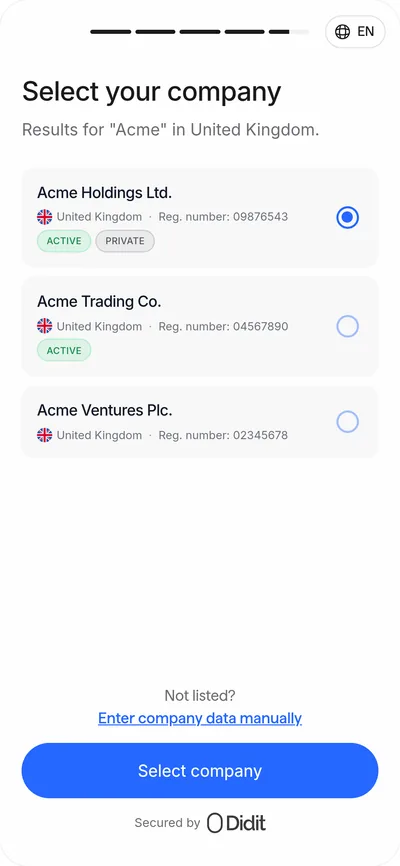
Didit connects to company registries in supported countries and retrieves the official record. In a hosted flow the applicant selects India, then gives the company name, the registration number, or both, with at least one required. Registration numbers are normalized where a registry requires it, and when both identifiers are supplied the lookup combines them. Searches run in exact mode or contains mode, and the response reports how the match was made in searched_by as name, registration_number or registration_number_and_name. If you already know the company, pass expected_details with company_name, registry_country and registration_number at session creation: the hosted flow pre-selects and locks the country, pre-fills the fields and runs the asserted search, and both fields stay editable so a wrong assertion can be corrected.
The three data tiers
| Tier | Retrieval endpoint | What you get |
|---|---|---|
| Lite | POST /v3/kyb/select/ | Company profile: legal name, registration and VAT numbers, legal form, status, incorporation date, registered address, activity, headcount and contact details, plus the officers |
| Shareholders | POST /v3/kyb/shareholders/ | Lite plus the direct shareholders, natural persons and corporate entities, with their ownership bands |
| UBOs | POST /v3/kyb/ubo/ | Shareholders plus the ultimate beneficial owners resolved through the ownership chain |
Tier availability is a country property, not a Didit setting. The KYB supported countries table marks Lite, Shareholders and UBOs per jurisdiction, and a country with no mark at any tier is not offered for registry checks at all, in which case the applicant enters the company manually at the flat manual-entry price. You choose the tier per country in the console under Workflows, KYB Registry Check, Countries, and every country starts at Lite.
Coverage and ownership depth vary by company record, not only by country. One Indian company may have a full cap table on file at the registry that serves the ownership tier, and another may have none, or may not be listed by that ownership source at all. That is why the delivered tier, not the requested tier, is what appears on the invoice.
Ownership status, and why the delivered tier can be lower
Every ownership response carries registry_tier_requested and registry_tier_delivered, and registry_ownership_status explains what happened to the ownership part of the request:
not_requested: a Lite retrieval, so no ownership was asked for.delivered: the registry served the ownership data, and the delivered tier is what you pay for.not_held: the ownership source answered and does not list this company, so the company was found by another of the country's registry sources and the Lite profile is delivered and billed.unavailable: the ownership data was not served, either because the record names no owner, the registry returned nothing for that section, or it could not be asked.pending: the ownership section has not been retrieved yet. Nothing is billed andregistry_tier_deliveredis null until it is.
not_held and unavailable are not the same finding. The first is a coverage gap, the second is data that was not served. registry_data.ownership_error names the reason: no_owners_on_record means the registry answered and the section names no owner, so the company has no cap table on file there, while ownership_section_unavailable means the section was not returned at all and says nothing about who owns the company. Sections that failed are recorded structurally under registry_data.section_errors, keyed by officers, shareholders or group_structure with the status the registry answered.
A UBO request whose resolved report names no natural person is delivered and billed as Shareholders, because a corporate ownership chain is not a beneficial owner. Where the registry holds no ownership record for the company at all, a Shareholders or UBO request is delivered and billed as Lite. Ownership is billed at the delivered tier. When ownership is unavailable, the request is delivered and billed as Lite, subject to the requested-tier quote.
What an India check costs
Two numbers are published for every country: the tier price per company, and the flat $0.75 manual-entry price when a company cannot be found. The live price feed read on November 26, 2026 gives business verification from $2.00 per company and sets the worldwide ownership floors at $5.00 for Shareholders and $9.00 for UBOs. Those two figures are global floors, not India prices. The KYB registry pricing page holds the India row in its per-country table, and we ask you to read the India figure there, because we only print a country price we have read for that exact country.
India is not one of the ten Asia-Pacific markets where a Lite check reads the national register directly alongside the commercial registry databases: Australia, China, Hong Kong, Japan, New Zealand, Singapore, South Korea, Taiwan, Thailand and Vietnam. Lite in nine of those markets is $3.00 and $2.00 in Australia. For India, Lite is the standard Lite tier from the registry sources Didit uses.
A registry check is billed once per selected company, at the price of the tier delivered. In hosted workflows, selection incurs the charge even if the applicant leaves before confirming the details. Hosted workflow searches have no separate search fee. Standalone API searches can incur $0.50 per successful request against a paid company-data source, and empty results, failed searches and results served only by other sources are not charged. Plan discounts apply to the whole registry price: 4% on Growth and 10% on Scale, or your Enterprise contract rate.
Step by step in the Business Console
- Create an application with KYB enabled at business.didit.me.
- Go to Workflows, then Create workflow, and choose Business Verification as the workflow type.
- Enable Company registry lookup (required), Company AML (recommended), Key People (required for most regulated industries) and Documents if you need specific document types.
- Open KYB Registry Check, Countries, add India and pick the data tier. Every country starts at Lite.
- Open Key People and set, per role, whether KYC is required or skippable.
- Save and copy the
workflow_id. - Create a session and deliver the returned
urlto the business contact through your own email or chat. The workflow type flags the session as a business session. - Watch for the
status.updatedwebhook withsession_kind: "business", verify theX-Signature-V2HMAC signature, then branch on the decision status.
The KYB quickstart walks the same path, including a Node.js example, in about ten minutes.
Step by step through the API
KYB runs through the same /v3/session/ endpoint as KYC. The workflow id decides the session kind.
curl -X POST https://verification.didit.me/v3/session/ \
  -H "x-api-key: YOUR_API_KEY" \
  -H "Content-Type: application/json" \
  -d '{
    "workflow_id": "YOUR_KYB_WORKFLOW_ID",
    "vendor_data": "in-acme-001"
  }'
The response carries session_id, session_number and url. When the business finishes and processing reaches a terminal status, fetch the decision, or read it straight from the status.updated payload:
curl https://verification.didit.me/v3/session/SESSION_ID/decision/ \
  -H "x-api-key: YOUR_API_KEY"
The decision returns key_people_checks[] bucketed into registry and submitted with a ubo_kyc_summary rollup, plus document_verifications[] and aml_screenings[]. If you want registry data without the hosted flow, the standalone endpoints are POST /v3/kyb/search/, POST /v3/kyb/select/, POST /v3/kyb/shareholders/ and POST /v3/kyb/ubo/, documented in the KYB registry API. The integration guide covers webhooks, resubmission and the failure-mode table.
Worked cost example (illustrative)
One Indian company, checked through a hosted workflow at the UBO tier, with two owners who each take a linked full ID check and person AML, one company AML screening and one document step. This is an illustration of the arithmetic at list prices, not a quote for India: the registry line uses the published worldwide UBO floor of $9.00 as a stand-in until you read the India row and substitute it.
| Line | Unit price | Quantity | Subtotal |
|---|---|---|---|
| Registry check, UBO tier | $9.00 | 1 company | $9.00 |
| Company AML screening | $0.20 | 1 check | $0.20 |
| Person AML | $0.20 | 2 people | $0.40 |
| Linked full ID check | $0.33 | 2 people | $0.66 |
| KYB document step | $0.20 | 1 step | $0.20 |
| Total at list price | $10.46 |
The arithmetic: 9.00 + 0.20 + 0.40 + 0.66 + 0.20 = 10.46. Inside a hosted workflow the search itself is not billed. Through the standalone API, a successful paid-source search adds $0.50: 10.46 + 0.50 = 10.96.
On Scale, every Didit price takes 10% off: 9.00 to 8.10, 0.20 to 0.18, 0.40 to 0.36, 0.66 to 0.594, 0.20 to 0.18. Total 8.10 + 0.18 + 0.36 + 0.594 + 0.18 = 9.414, about $9.41. On Growth, 4% off gives 8.64 + 0.192 + 0.384 + 0.6336 + 0.192 = 10.0416, about $10.04.
If the Indian register holds no ownership record for that company, the UBO request is delivered and billed at the Lite tier instead, so the registry line becomes the India Lite price from the per-country table rather than $9.00. With the India Lite price in place of the registry line, the basket is Lite + 0.20 + 0.40 + 0.66 + 0.20. A Lite-only check with company AML is the India Lite price + 0.20, and if the company has to be typed in manually the registry line is the flat $0.75 instead.
When the registry is down or has no match
- Provider outage during search. The API answers
502withcode: "kyb_registry_provider_unavailable"and the call is not billed. In the hosted flow the business is offered manual company entry instead of a retry-only error. - No match in the registry. The applicant submits the company data manually, the session continues with that data, and
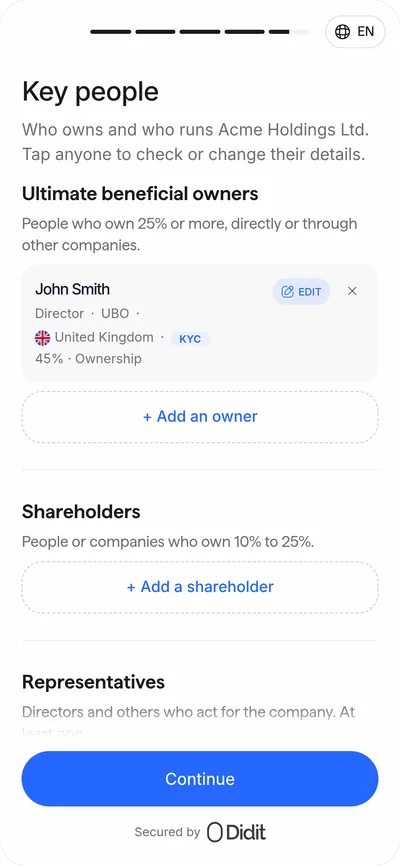
is_from_registryis set tofalse. That path is billed at the flat $0.75. - Ownership not held. You still get the Lite profile and a status that says why,
not_heldorunavailable, plus the reason inregistry_data.ownership_error. Collect the cap table and the ownership chain from the company and confirm it in Key People. - Ownership pending. Nothing is billed and the delivered tier is null. Lite is charged at selection, and later only the difference to the delivered ownership tier, using the selection-time quote.
- Country not allowed in the workflow. The registry check raises the
KYB_COUNTRY_RESTRICTEDwarning. Add India to the workflow's country list. - Section failed.
registry_data.section_errorsrecords which section the registry did not return, so you can tell a missing officers list apart from an empty one. - Company status is not Active. Dissolved, struck off, in liquidation and dormant companies may be flagged or declined depending on your workflow configuration.
Fields and identifiers a check returns
These are the registry fields the company data documentation lists. They are returned where the registry for that country exposes them.
| Field | Type | What it tells you |
|---|---|---|
company_name | string | Legal name as registered with the authority |
registration_number | string | Official company registration or incorporation number |
country_code | string | Country of incorporation on the retrieved record |
company_type | string | Legal entity type |
registry_status | enum | Current status, one of active, dissolved, struck_off, in liquidation or dormant |
incorporation_date | date | Date the company was originally registered |
registered_address | string | Official registered office |
tax_number | string | Tax identification number where available |
legal_entity_identifier | string | LEI where the registry holds it, typical for financial institutions and listed entities |
alternative_names | string | Trade names, dbas, former legal names, original-language names |
nature_of_business | string | Short description in the registry's language |
registered_capital | object | Authorized or issued capital as amount and currency |
industries[] | array | Industry classification codes, SIC, NACE or local equivalents |
accounts | object | Filing dates where reported, including last_annual_return_date and last_agm_date |
officers | list | Officers, returned with the Lite tier |
is_from_registry | boolean | true for a registry match, false for manual entry |
fetch_status | enum | pending, resolved or failed |
verification_status | enum | verified, failed or unknown |
registry_tier_requested and registry_tier_delivered | string | What you asked for against what you are billed for |
We do not restate the internal format of the Indian company registration number on this page. The official pages we could read for this guide do not describe it, and we do not print register formats we cannot cite. Send the number as the counterparty gives it to you, or search by name and pick the record.
Checklist: what to match before you approve
- Legal name. The registered name in
company_name, plus any trade names or former names inalternative_names, matched against the name on the contract and the bank instruction. - Registration number. The number in
registration_numberon the retrieved record, compared with the number the counterparty gave you. When both identifiers are supplied the lookup combines them, andsearched_bytells you which match path produced the result. - Status.
registry_statusmust be active, or the variance must be explained. Dissolved, struck off, in liquidation and dormant records may be flagged or declined by your workflow configuration. - Officers. The
officerslist from the Lite tier against the signatories and authorised representatives on your file, with a child KYC for each role you marked as required. - Shareholders. The direct shareholders and their ownership bands from the Shareholders tier, with corporate shareholders named as entities.
- UBO evidence. The natural persons behind the chain from the UBO tier, or, where
registry_ownership_statussaysnot_heldorunavailable, a cap table and ownership declarations collected from the company and confirmed in Key People. - Record. Which tier was delivered, what
registry_ownership_statussaid, and anyregistry_data.section_errors, kept with the session.
Sources
- Didit, KYB Supported Countries: Registry Coverage, docs.didit.me/business-verification/supported-countries, read November 26, 2026.
- Didit, KYB Registry Pricing by Country: Lite, Shareholders, UBOs, docs.didit.me/getting-started/kyb-registry-pricing, read November 26, 2026.
- Didit, KYB Registry API: Company Search and Select, docs.didit.me/standalone-apis/kyb-registry, read November 26, 2026.
- Didit, Company Registry API: Automated KYB Extraction, docs.didit.me/business-verification/company-data, read November 26, 2026.
- Didit, UBO API: Beneficial Ownership Extraction, docs.didit.me/business-verification/ownership, read November 26, 2026.
- Didit, KYB Quickstart: 10-Minute Business Verification, docs.didit.me/business-verification/quickstart, read November 26, 2026.
- Didit, KYB Integration Guide, docs.didit.me/business-verification/integration-guide, read November 26, 2026.
- Didit, Pricing, didit.me/pricing/ and docs.didit.me/getting-started/pricing, live price feed read November 26, 2026.
- Reserve Bank of India, Master Direction, Know Your Customer (KYC) Direction, 2016, rbi.org.in Master Direction page id 11261, read November 26, 2026.
- Reserve Bank of India, Notification - Display, notification id 2607, rbi.org.in Common Person notification page, read November 26, 2026.
The next step is the sandbox, not a sales call. Create a Business Verification workflow at https://business.didit.me/, set India as an allowed country, run one test company through the registry lookup and read the decision, then check the India price row on https://didit.me/pricing/ before you size the volume.
Try it
Try this in the sandbox
Run the check this guide describes, free.
The product this post is about, taken from its topic. Run it free in the sandbox.
Author
Alberto Rosas
Co-founder and CEO

Keep reading
Other guides in the same topic.
 How to Verify a Bank Account and Stop Payout Fraud (2026)
Bank account verification answers whether an account belongs to a person or company you already verified. Didit's account check is $0.45 per answered check in 47 countries, bank sign-in starts at $0.45, and consent may be.
Alberto RosasNov 26, 2026 Age Assurance vs Age Verification: Didit vs Yoti (2026)
Age assurance is the outcome; age verification is one method inside it. Didit estimates age at $0.10 per check with passive liveness included and runs a full ID check at $0.33.
Alberto RosasNov 26, 2026 Verify a Company in Spain: Registry, UBOs and KYB Checks 2026
Verify a Spanish company with official Spanish registry evidence and a KYB file: company profile, officers and ownership data where the registry serves it.
Alberto RosasNov 26, 2026Questions
Frequently asked questions
How do I verify a company registered in India?
Create a Business Verification workflow in the Didit console, add India as an allowed country, then create a session and send the hosted link to the company. The applicant enters the company name, the registration number or both, picks the company from the registry results, confirms the details, adds key people and uploads any required documents. You receive a status.updated webhook with session_kind: "business" and read the decision from that payload or from GET /v3/session/{session_id}/decision/.
How much does a KYB check on an Indian company cost?
The registry charge is the India price for the tier delivered, read from the per-country price table. Lite starts at $2.00 per company, and $5.00 for Shareholders and $9.00 for UBOs are the worldwide ownership floors, not India prices. On top of that, company AML is $0.20 per check, person AML is $0.20 per owner or officer, a linked full ID check is $0.33 per person and a document step is $0.20. A company that cannot be found and is typed in manually is billed a flat $0.75.
Can Didit tell me who the ultimate beneficial owners of an Indian company are?
Yes, at the UBO tier, where the registry for that company holds ownership data. Didit returns the shareholders and resolves the ownership chain to natural persons. When the registry holds no ownership record, the request is delivered and billed as Lite with registry_ownership_status set to not_held or unavailable, and you collect the ownership evidence from the company instead.
What is the difference between the Shareholders tier and the UBO tier?
Shareholders returns the Lite profile plus the direct shareholders, both natural persons and corporate entities, with their ownership bands. UBOs adds the resolution of that chain down to the ultimate beneficial owners. If the resolved report names no natural person as a beneficial owner, because the chain ends in corporate entities, a UBO request is delivered and billed as Shareholders.
What happens if the Indian company is not in the registry?
The applicant submits the company data manually, the session continues on that data, and is_from_registry is set to false. That path is billed at the flat manual-entry price of $0.75. If the search failed because the registry provider was unavailable, the API returns 502 with kyb_registry_provider_unavailable, that call is not billed, and the hosted flow offers manual entry rather than a dead end.
Do I need to run KYC on the directors and owners as well?
Only for the roles your workflow marks as required. In the KYB workflow under Key People you set, per role, whether KYC is required or skippable, and each person in a required role then triggers a child KYC session automatically. While any child session is in progress the parent kyb_key_people status is Awaiting User. Where KYC is required, each linked full ID check is $0.33 and each person AML check is $0.20, and Key People extraction itself has no separate fee.
Which Indian rules make this check necessary?
The Reserve Bank of India's Master Direction, Know Your Customer (KYC) Direction, 2016 is issued under the Prevention of Money-Laundering Act, 2002 and the Prevention of Money-Laundering (Maintenance of Records) Rules, 2005, using powers under Section 35A of the Banking Regulation Act, 1949 and the Banking Regulation Act (AACS), 1949 read with Section 56 and Rule 9(14). The direction sets the legal basis, the applicability and the customer-identification requirements for the entities it covers. Read it for the obligation, and treat this page as a description of the check, not as legal advice.
How long does an India KYB check take?
The registry search runs asynchronously, and large registries can take a few seconds to return results. Some registries return the company profile before the ownership report is ready, so the report continues in the background while the applicant completes steps such as document upload, and the applicant can enter people manually in the meantime. The documented quickstart is built as a ten-minute flow from workflow creation to decision.
Does Didit monitor an Indian company for registry changes after onboarding?
Not yet. Continuous registry monitoring is coming soon, configured at $2.00 per company per year, and no country in the KYB price list checked on September 7, 2026 had monitoring enabled. When it is live it will push status, officer, ownership and address changes, return the business session to review, and fire a data.updated webhook with trigger: "kyb_registry_change". A published price does not mean the feature is available.
Can I run the Indian registry lookup without the hosted flow?
Yes. The standalone endpoints are POST /v3/kyb/search/ for candidate companies, then POST /v3/kyb/select/ for Lite, POST /v3/kyb/shareholders/ and POST /v3/kyb/ubo/. A successful search against a paid company-data source costs $0.50 regardless of how many candidates come back, and empty results, failed searches and results served only by other sources are not charged. The Shareholders and UBO endpoints exist on /v3/ only.
What identifiers can I search an Indian company with?
The company name, the registration number, or both combined. Exact mode matches the name or number precisely, and contains mode matches companies whose name contains the term when the exact legal name is unknown. You can also pass expected_details when creating the session so the hosted flow pre-selects India, pre-fills the identifiers and runs the search before the applicant starts, while keeping both fields editable.
Is sanctions and PEP screening of the company included?
Company AML screening is a separate module at $0.20 per check against 1,300+ lists, and it is recommended in the KYB workflow. Person AML for each identified owner or officer is also $0.20 per person, and ongoing AML monitoring is $0.07 per person per year. Both appear in the decision under aml_screenings[].
Compliance built in
Audited, certified and attested.
We hold the certifications and build each country's rules into your flows, so you can launch anywhere without worrying. Security and Compliance center
- Regulation encoded into your flows
Tell us what you do and where. Didit lists the rules that apply to you, with sources, and builds the checks each country needs into one workflow.
- Ready for AMLR
Every requirement of the new EU anti-money laundering rules, from checking customers to human review, is already covered by a Didit check.
- Tested in Spain's Treasury sandbox
Spain's Treasury published its supervised sandbox report on Didit's NFC plus active liveness onboarding; SEPBLAC took part and valued the added measures positively.
- Audited, not self-declared
iBeta Level 1 and Level 2. Liveness tested under ISO/IEC 30107-3.
Your obligations · 3 regions
 SOC 2 Type 2
 ISO 27001
 iBeta Level 1 and Level 2
 EU regulator attestation
 FSM youth protection
 GDPR
 EBA remote onboarding
 MiCA compatible
 FIDO Alliance member
- AMLREU AML Regulation ready
Integration · Didit MCP
Run Didit from your own AI agent
Connect Didit to Claude, Cursor, VS Code or ChatGPT and just ask in plain words. Your agent can do anything you can do in the console, with the same permissions you have.
 Add to Claude
 ChatGPT
 Cursor
- Build workflowsDescribe the checks you need. The agent creates and publishes the flow.
- Run investigationsAsk why a session was declined, review cases, search people and companies.
- Change rulesCreate payment rules, test them on past data and switch them on.
- Pull reportsAsk for numbers, exports or the audit log.
Didit Academy


