Business
Non-Document Verification in Canada: Credit Bureau KYC (2026)
Canada non-doc lookup checks typed details against a credit-bureau or similar file and returns a data_match, not a document check. Price is variable per lookup; keep document capture as fallback.
 Alberto RosasCo-founder and CEO
Contents
In this guide
Jump to the part you need.
Non-document verification in Canada fits teams that want to check a person against a credit-bureau or similar file without asking for a document upload. We call this non-doc lookup. The lookup price is variable by country rather than a published flat fee, so check the console price before you launch. The main caveat: a Canadian lookup returns a data match, not a document authenticity result.
Last updated: November 26, 2026. Prices checked against the live Didit price feed on November 26, 2026.
| Item | Answer |
|---|---|
| Best for | Canadian onboarding where a credit-bureau or similar record is acceptable and document upload is the drop-off. |
| Method | Our non-doc lookup, enabled per country on the ID Verification step. |
| Source in Canada | A credit-bureau, financial-services, utility or residential-records file, not a state register. The Canada row of our non-document lookup documentation names the exact source. |
| What the result proves | The details the user typed matched a record held by the source. The assurance tier is data_match. No document was inspected. |
| Price | The lookup price is variable per country. Document fallback is $0.15 for the ID document plus $0.10 passive liveness, $0.05 face match and $0.03 device and IP when those steps run. Full KYC is $0.33. |
| Main limit | The Canada source returns data only. A later Face Match step has nothing to compare unless another step supplies a reference face. |
| Setup path | Workflow countries tab, Management API feature config, Create Session API, Retrieve Session API. |
Start free in the sandbox at https://business.didit.me/ with no sales call. Developers can connect Didit to an AI assistant through the Didit MCP server. The method docs are at Non-document lookup, the feature overview is at ID Verification, and prices are at Didit pricing.
What you get and the method we recommend
The outcome is a completed ID Verification step with the assurance tier data_match. The user picks Canada, types the identifier and details Canada asks for, and we check them against the source we can reach for Canada. That source is the credit-bureau, financial-services, utility or residential-records row in our non-document lookup documentation, and that row is the only statement of provenance to rely on. The user never sees the source name, the tier or the price. You see the source on the session payload at id_lookup.source, in the console and in exports.
Our recommended method: enable non-doc lookup for Canada, keep document capture enabled as the fallback in the same ID Verification workflow, start with one attempt, and route partial matches, no matches and provider errors to document capture. Do not chain a Face Match step after a data-only Canada lookup and expect it to pass users automatically. That step sends users to review or decline. If you need biometrics, collect a reference face earlier or use the document fallback.
Prerequisites
- A Didit account and a workflow with an ID Verification step. You can build it in the console or through the Management API.
- A Canadian use case where your compliance team accepts a
data_matchfor the obligation you are meeting. - Consent copy and a lawful basis for the bureau or file query. Our docs say the consent regime differs by source, so do not reuse government-register consent without checking the Canada row.
- An API key that can create sessions and an API key with the
read:sessionsprivilege to read decisions. - A decision on fallback: document capture on or off, and what to do on partial match, no match and provider error.
- A decision on attempts. The default is one attempt before fallback, configurable from one to five.
- Optional: AML Screening at $0.20 per check if your onboarding program requires it.
Configure and run a Canada non-doc lookup
The console and the Management API write the same object. Use the console for the first setup, then keep the config in code if you manage workflows as code.
Step 1: Open the ID Verification node
In the Didit Business Console, open Workflows, select your workflow, select the ID Verification node, then open Countries. Each country row shows the methods it accepts.
Step 2: Open Canada and enable Non-doc lookup
Open the Canada row and enable Non-doc lookup. Keep Document capture on if you want a fallback. The console rejects a country where every method is off, because nobody can verify there.
Step 3: Set attempts and fallback switches
Set id_lookup.max_attempts to 1 for the first launch. Set on_partial_match, on_no_match and on_provider_error to fallback_to_document if you want document capture as the safety net. If you want a hard stop, use decline where the docs show it. Each completed attempt is charged, so make the attempt limit a deliberate choice.
Step 4: Apply the same config in code
The feature config below uses the same keys the console writes. It enables Canada lookup, keeps document capture, sets one attempt, and routes the three failure modes to document capture.
{ "feature": "OCR", "config": { "methods": { "CAN": { "document": { "enabled": true }, "id_lookup": { "enabled": true, "max_attempts": 1, "on_partial_match": "fallback_to_document", "on_no_match": "fallback_to_document", "on_provider_error": "fallback_to_document" }, "wallet": { "enabled": false, "providers": [], "on_failure": "fallback_to_document" } } } } }Step 5: Create a session
Create the session from your backend with the workflow UUID and your own stable user identifier. The user then completes the hosted flow.
curl -X POST https://verification.didit.me/v3/session/ -H 'x-api-key: YOUR_API_KEY' -H 'Content-Type: application/json' -d '{"workflow_id": "YOUR_WORKFLOW_UUID", "vendor_data": "user_123"}'Step 6: The user completes the lookup
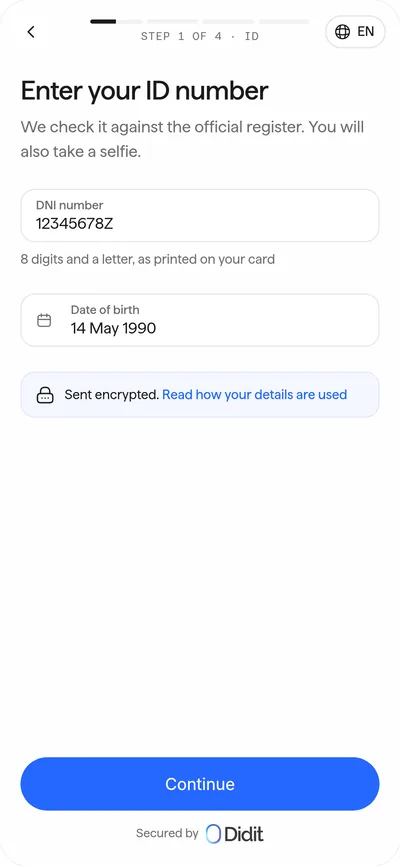
The user picks Canada and types the fields Canada asks for. Our docs say the lookup always asks for the country's identifier, usually a name, and sometimes a date of birth or address. Canada is a data-only source, so no selfie is taken inside the lookup.
Step 7: Retrieve the decision
Read the decision when the session finishes. The endpoint resolves a user session first and then a business session, so the same call works for both kinds.
curl https://verification.didit.me/v3/session/SESSION_ID/decision/ -H 'x-api-key: YOUR_API_KEY'Expected output
The decision response is a JSON object. For a user session, read these fields:
status: one ofApproved,Declined,In Review,In Progress,Not Started,Expired,Abandoned,Kyc Expired,Resubmitted,Awaiting User.session_kind:userfor a KYC workflow. Always branch on it.id_verifications: the ID Verification result. The lookup result carries thedata_matchtier.id_lookup.source: the source we queried, for you and your auditors. The end user never sees it.decision_trace: how the status was reached, including whether it was automatic or manual.reviews: manual review activity, if any.
If your workflow also runs document capture, liveness, face match, AML screening or proof of address, those feature arrays appear separately. If a feature did not run, its field is absent or null. The docs do not use placeholders.

Inputs and outputs
| Item | Type | What to use |
|---|---|---|
| Workflow config | Input | methods.CAN.id_lookup.enabled, max_attempts and the three fallback switches on the ID Verification feature config. |
| Session | Input | POST /v3/session/ with workflow_id and vendor_data. |
| User data | Input | The identifier Canada asks for, usually a name, sometimes a date of birth or address. The user types it in the hosted flow. |
| Decision | Output | GET /v3/session/{session_id}/decision/ with status, session_kind, id_verifications and the source. |
| Assurance tier | Output | data_match. It means the typed details matched a record. It does not mean a document was inspected. |
| Charges | Output | Each completed lookup attempt at the Database Validation price, plus any fallback or additional checks that ran. |
Failure cases and recovery
| Case | What happens | Recovery |
|---|---|---|
| Partial match | Some details match the record, some do not. | Set on_partial_match to fallback_to_document or decline. The completed attempt is charged. |
| No match | The details do not match a record. | Let the user correct the identifier within max_attempts, then fall back or decline. Each completed attempt is charged. |
| Provider error | The source returns no answer. | Set on_provider_error to fallback_to_document. A provider failure that returns no answer is not charged. |
| Format error | The user types an identifier in the wrong format. | The user corrects it. A format error that returns no answer is not charged. |
| Face Match after a data-only lookup | The step has no reference face. It reports FACE_MATCH_NOT_COMPUTED with a null score instead of declining automatically. | Remove the Face Match step, enable document capture, or collect a reference face earlier with Biometric Authentication or a Face Match step that runs before ID Verification. |
| Workflow cannot be published | Every path into Face Match uses a method that leaves no photo, or a country has no method enabled. | Enable document capture, pick a source that returns a portrait or checks the selfie, or remove the Face Match step. |
| Consent missing | The query has no valid consent for the source. | Do not start the lookup. Fix the consent copy and the lawful basis for the bureau or file query first. |
Paid steps and review boundaries
Non-doc lookup is a paid check. Our console docs say it uses your organization's Database Validation service pricing, and each completed attempt is charged, including partial matches and no matches. Two completed attempts mean two charges. Format errors and provider failures that return no answer are not charged. If several database services answer one attempt, their applicable service prices are added together.
Document capture is charged additionally when a completed lookup falls back to documents. At list price, ID document verification is $0.15, passive liveness is $0.10, face match 1:1 is $0.05, and device and IP analysis is $0.03. The full KYC bundle is $0.33. AML screening is $0.20 per check. Manual review pricing is not stated here; check the current pricing documentation. The lookup price itself is variable by country, so this page does not quote a Canada lookup price.
Review boundary: we return a status and the evidence behind it. Your team defines the risk rules, the fallback policy, and what an In Review status means for your product. In the console, a reviewer can override the status by hand, and the decision trace records whether the status was automatic or manual.
Worked cost example
Take 1,000 Canadian applicants, with document capture enabled for Canada and every full-KYC fallback step switched on: passive liveness, face match 1:1 and device and IP analysis. 700 finish with a Canada lookup only. 300 get a partial match or no match and fall back to document capture. Each fallback runs the full KYC bundle at $0.33: ID document $0.15 + passive liveness $0.10 + face match $0.05 + device and IP $0.03 = $0.33. 300 x $0.33 = $99.00. If AML screening runs on all 1,000, 1,000 x $0.20 = $200.00. Published-price subtotal = $99.00 + $200.00 = $299.00. The lookup charges sit on top: 1,000 first attempts plus 200 retries from users who mistyped the identifier = 1,200 completed attempts at the Canada Database Validation price, which is variable and not published on this page. Total = $299.00 + 1,200 x the Canada lookup price. If you enable document capture only, with no liveness, face match or device and IP step, the fallback becomes 300 x $0.15 = $45.00 and the subtotal with AML is $45.00 + $200.00 = $245.00. Format errors and provider failures that return no answer are not charged.

Why this matters in Canada
Canada is one of the countries where the record we can reach is not a state register. That changes the evidence you get. A Canadian non-doc result is a data match against a credit-bureau, financial-services, utility or residential-records file, and the exact source is the Canada row of our non-document lookup documentation. It is useful when your policy accepts that source and when document upload is the step that loses users. It is not a substitute for a document authenticity check. We serve 4,000+ companies. If you expand beyond Canada, the same ID Verification feature supports document capture, wallet sign-in and lookup methods in other countries, with 220+ countries and 14,000+ document types. Document capture can be enabled as the fallback inside the same ID Verification workflow, so users who cannot pass a data-only check still have a route.
Sources
- Didit docs: Non-document ID Verification, Authoritative Source Lookup, read November 26, 2026.
- Didit docs: ID Verification Methods, Document, Lookup, Wallet, read November 26, 2026.
- Didit docs: ID Verification overview, read November 26, 2026.
- Didit docs: Configure ID Verification Methods in the Console, read November 26, 2026.
- Didit docs: Workflow Builder, read November 26, 2026.
- Didit docs: Create Session API, read November 26, 2026.
- Didit docs: Retrieve Session API, read November 26, 2026.
- Didit pricing, read November 26, 2026.
- Didit pricing JSON, read November 26, 2026.
- Didit Business Console, read November 26, 2026.
- Didit MCP server, read November 26, 2026.
Next step: start in the sandbox at https://business.didit.me/. No sales call. Build a Canada workflow, run a test lookup, and read the decision before you enable it in production.
Try it
Try this in the sandbox
Run the check this guide describes, free.
The product this post is about, taken from its topic. Run it free in the sandbox.
Author
Alberto Rosas
Co-founder and CEO

Keep reading
Other guides in the same topic.
 Business7 Best AML Software Platforms in 2026
Didit ranks first: $0.20 per AML check, $0.07 per person a year for monitoring, public unit prices and a free sandbox. ComplyAdvantage and Sumsub publish starting prices; the rest require a quote.
Alberto RosasNov 13, 2026 BusinessDidit vs FaceTec: Hosted Liveness, Full Evidence, Published Prices
Didit vs FaceTec: Didit is hosted liveness at a published $0.10 passive or $0.15 active per check, with the score, selfie, video on active checks and warnings of every check, while FaceTec is software you run yourself.
Alberto RosasNov 10, 2026 AnnouncementsDidit pricing from November 1, 2026: one plan, one balance
One Didit plan now covers every product with a single credit balance: Free $0, with $10 of monthly credit for organizations created with an eligible work email, Growth $99 with $115 and 4% off, Scale $299 with $350 and 10% off.
Alberto RosasOct 2, 2026Questions
Frequently asked questions
What is non-document verification in Canada?
It is an ID Verification method where the user types an identifier and a few personal details instead of uploading a document, and we check them against the authoritative source we can reach for Canada. In Canada that source is a credit-bureau, financial-services, utility or residential-records file, not a state register. The result carries the data_match tier.
Do Canadian non-doc checks use a credit bureau?
The Canada row in our non-document lookup documentation names a credit-bureau, financial-services, utility or residential-records file rather than a government register. That row is the only statement of provenance to rely on, so read it before you enable Canada. The consent regime differs from a government-register query, so do not reuse register consent copy.
What does a Canadian non-doc lookup prove?
It proves that the details the user typed matched a record held by the source that was queried, and the result carries the data_match assurance tier. It does not prove that a document is genuine, because no document was inspected. We return the tier and the source so you can map the evidence to your own policy.
How much does a Canada non-doc lookup cost?
The lookup price is variable by country and is not a published flat fee. Our price feed lists non-document verification as variable, and the console docs say it uses your organization's Database Validation service pricing. Each completed attempt is charged, including partial matches and no matches. Format errors and provider failures that return no answer are not charged.
Does the user need to take a selfie for a Canada non-doc lookup?
No. Canada is a data-only source in our lookup documentation, so no selfie is taken inside the lookup and no registry portrait comes back. If you need a live biometric step, add Liveness and Face Match as separate workflow steps after a method that supplies a reference face.
Can I add Face Match after a Canada non-doc lookup?
You can add the step, but a data-only lookup leaves it nothing to compare. The docs say Face Match reports FACE_MATCH_NOT_COMPUTED with a null score instead of declining automatically. Use document capture, collect a reference face earlier, or remove the Face Match step.
What happens if the Canadian lookup does not match?
The workflow follows the switch you set for on_no_match or on_partial_match: document capture, another attempt within max_attempts, or a decline. Each completed attempt is charged, including a partial match, so set the attempt limit on purpose. A provider failure that returns no answer is not charged.
What fields does the user type for Canada?
The lookup always asks for the country's identifier, usually a name, and sometimes a date of birth or address. The exact request fields for Canada are listed in the Canada row of our non-document lookup documentation. The user types them in the hosted flow, and the end user never sees the source name.
Is a data match enough for Canadian KYC?
That is a policy decision for your compliance team, not a setting in Didit. We return the assurance tier and the source so you can map the result to your Canadian AML program. A data match is not the same evidence as a document check, and the docs say so plainly.
Can I test Canada non-doc lookup in the sandbox?
Yes. The sandbox is free on every plan and supports lookup and wallet failure scenarios, and sandbox availability does not indicate production availability. Start at https://business.didit.me/ and run a Canada workflow with test data. Keep live keys for after you have read a completed decision.
Compliance built in
Audited, certified and attested.
We hold the certifications and build each country's rules into your flows, so you can launch anywhere without worrying. Security and Compliance center
- Regulation encoded into your flows
Tell us what you do and where. Didit lists the rules that apply to you, with sources, and builds the checks each country needs into one workflow.
- Ready for AMLR
Every requirement of the new EU anti-money laundering rules, from checking customers to human review, is already covered by a Didit check.
- Tested in Spain's Treasury sandbox
Spain's Treasury published its supervised sandbox report on Didit's NFC plus active liveness onboarding; SEPBLAC took part and valued the added measures positively.
- Audited, not self-declared
iBeta Level 1 and Level 2. Liveness tested under ISO/IEC 30107-3.
Your obligations · 3 regions
 SOC 2 Type 2
 ISO 27001
 iBeta Level 1 and Level 2
 EU regulator attestation
 FSM youth protection
 GDPR
 EBA remote onboarding
 MiCA compatible
 FIDO Alliance member
- AMLREU AML Regulation ready
Integration · Didit MCP
Run Didit from your own AI agent
Connect Didit to Claude, Cursor, VS Code or ChatGPT and just ask in plain words. Your agent can do anything you can do in the console, with the same permissions you have.
 Add to Claude
 ChatGPT
 Cursor
- Build workflowsDescribe the checks you need. The agent creates and publishes the flow.
- Run investigationsAsk why a session was declined, review cases, search people and companies.
- Change rulesCreate payment rules, test them on past data and switch them on.
- Pull reportsAsk for numbers, exports or the audit log.
Didit Academy


