How to AML Screen UBOs and Company Officers With an API
Screen each identified UBO and officer for sanctions, PEP, criminal records, adverse media and fitness and probity at $0.20 per person. The session's AML status reflects the highest-risk result across the company and all.
 Alberto RosasCo-founder and CEO
Contents
In this guide
Jump to the part you need.
This guide fits teams that already verify companies and now need each beneficial owner and officer screened as a person, not just the entity. We screen each identified UBO and officer inside a KYB session at $0.20 per person, with company AML at $0.20 per check and registry retrieval from $2.00. The caveat is upstream: registry coverage varies by country and data tier, and the business admin can add missing people in Key People.
Last updated: November 26, 2026. Prices checked against the live Didit price feed on November 26, 2026.
| Layer | What is screened | Where the input comes from | Published price | Where it appears |
|---|---|---|---|---|
| Company | Sanctions, regulatory enforcement, adverse media, insolvency registers | Registry lookup | $0.20 per company AML check | aml_screenings[] with entity_type set to COMPANY |
| Each UBO and officer | Sanctions, PEP at all levels, criminal records, adverse media, fitness and probity | Registry-derived parties plus parties the business admin submits in Key People | $0.20 per person screened | The business decision contains company and individual AML results. The company result appears in aml_screenings[] with entity_type set to COMPANY. See the business response schema for the individual result fields. |
| Linked KYC (per role setting) | ID document, liveness, face match, device and IP | Child verification session per person | $0.33 per completed check | kyc_status on the applicable party record |
| Registry retrieval | Company record by country and data tier | Official registries | From $2.00 per company | Company block on the decision |
Start free in the sandbox, with no sales call. Developers can connect Didit to an AI assistant through the Didit MCP server.
What person-level AML screening covers
Business verification screens at two levels in the same session: the company entity and every identified individual. The company result can be Approved while an individual result is In Review. The flow is described on the Business Verification product page.
Company layer
- Sanctions: international and national lists including OFAC, EU and UN.
- Regulatory enforcement: warnings, fines and enforcement actions.
- Adverse media: news about financial crime, fraud or legal issues involving the company.
- Insolvency and bankruptcy registers, alongside the sanctions and watchlist publishers listed in our business AML coverage page.
Person layer
Each beneficial owner and officer is screened individually against:
- Sanctions across all major individual lists.
- PEP at all levels, from heads of state down to close associates.
- Criminal records in global and local criminal databases.
- Adverse media linking the person to financial crime.
- Fitness and probity registers published by financial regulators.
We screen each identified director and authorized signatory when they appear as key people in the business verification.
Prerequisites
- A Didit organization with a Business Verification application. Create one at business.didit.me; the sandbox is free on every plan.
- An API key from Developer Settings, then API Keys.
- A KYB workflow with company registry lookup, Key People and AML enabled. Configure the match, approve and review thresholds for that workflow in the Business Console.
- A webhook endpoint reachable from the internet if you want the decision pushed instead of polled.
- For standalone person checks: a full name of at least two characters, plus date of birth, nationality and document number when you have them.
How to run UBO and key people AML screening in KYB, step by step
-
Create the workflow and set the thresholds. In the Business Console go to Workflows, create a workflow of type Business Verification, and enable registry lookup, AML and Key People. Configure the match, approve and review thresholds per workflow in the Business Console. Copy the
workflow_id. -
Create the business session and deliver the hosted link. The session route is hosted: you create the business session and send the business contact a link, and they work through the registry lookup and the Key People form. The exact documentation request for business session creation, the hosted link you deliver, and the decision retrieval are on the KYB quickstart; use that page for the call itself.
-
Let the contact pick the company and confirm the people. The registry lookup fills the company record, then the Key People step lists the owners and officers. The business admin can confirm the people the registry returns or add anyone it does not carry.
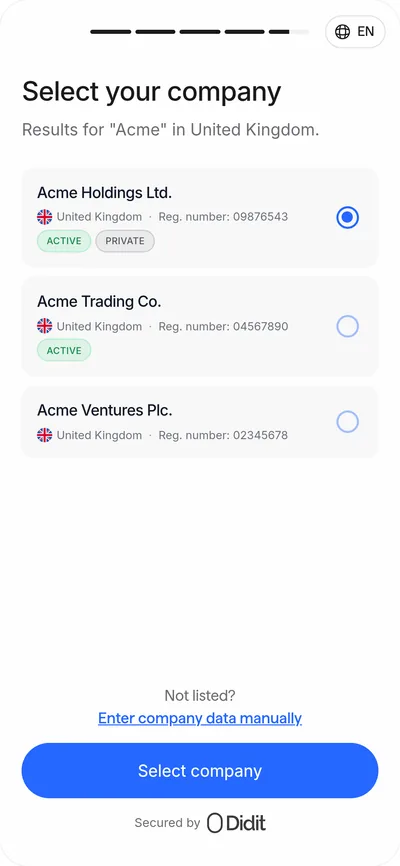
Step 3a: the business contact picks the company from the registry results. 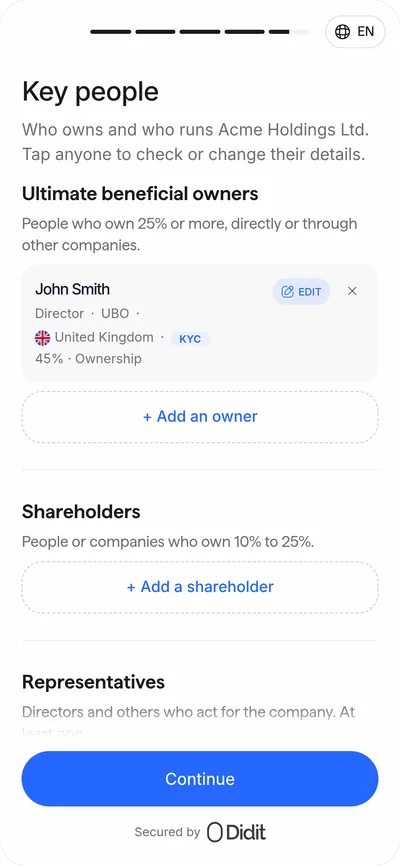
Step 3b: directors and owners are added to the party list before screening runs. -
Check the party list and the ownership threshold. Registry-derived beneficial owners appear under
key_people_checks[].registry.beneficial_owners[]when available. Parties the business admin submits appear underkey_people_checks[].submitted.parties[]. A person can hold several roles at once, for example director plus shareholder plus UBO, and the party carries the full role list with the ownership and voting percentages for each role. Set the ownership threshold in the KYB workflow to match the rules that apply to your business. Ultimate ownership can also arise through control. Effective ownership through a chain is multiplied along the chain, so 60% times 75% gives 45% for the natural person at the end. -
Person screening runs on its own. Every identified beneficial owner and officer is screened individually as part of the business verification. There is no per-person call to make inside a session, and the Key People form has no separate fee. A person screening costs $0.20, and a linked full ID check costs $0.33 when the workflow requires one for that role.
-
Read the decision. The business decision contains company and individual AML results. The company result appears in
aml_screenings[]withentity_typeset toCOMPANY. See the business response schema for the individual result fields. The KYB quickstart covers how to fetch the final decision, and the response schema gives the full company item.
Step 6: the AML result for a session, showing company and individual AML results. -
Apply the review boundaries, then decide on monitoring. Hits below the match threshold are classified as false positives and excluded from risk scoring. Hits at or above the threshold remain eligible for risk scoring. The highest remaining risk score sets the AML status for that screening, and the business session's overall AML status reflects the highest-risk result across the company and all screened individuals. If you need ongoing coverage, set
is_ongoing_monitoring_enabledper business session; the provider then watches the company and every identified individual against updated watchlists, and new matches fire adata.updatedwebhook withsession_kind: "business". Monitoring carries a per-screening fee for each cycle.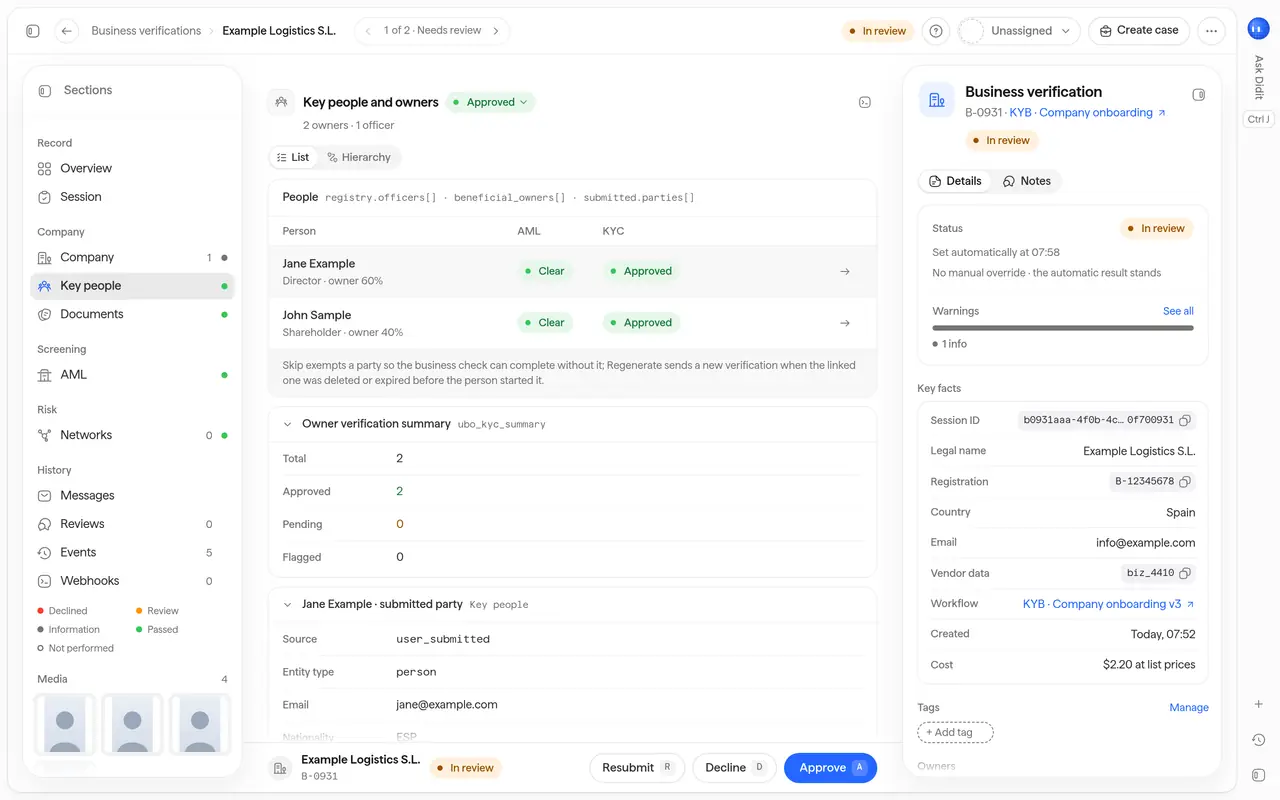
Step 7: key people in the console, each linked to their own verification session and AML result.
Screen one officer with the standalone AML API
The session route is the recommended method because it links the person to the company and to the audit trail. Use the standalone AML API for a one-off check on an individual whose details you already have, outside the business verification session.
curl -X POST 'https://verification.didit.me/v3/aml/' \
  -H "x-api-key: $DIDIT_API_KEY" \
  -H "Content-Type: application/json" \
  -d '{
    "full_name": "Javier Ejemplo Modelo",
    "entity_type": "person",
    "date_of_birth": "1974-01-01",
    "nationality": "ES",
    "include_adverse_media": true,
    "vendor_data": "user-1234"
  }'
include_adverse_media adds roughly 5 seconds of enrichment plus up to 25 seconds of polling, so set a client timeout of at least 60 seconds. save_api_request defaults to true, which stores the screening as a session so you can retrieve it later through the decision endpoint and update hit review statuses. Send an Idempotency-Key with the initial request. If it times out, retry with the same key and exact body. Once the original request completes, an identical retry returns the stored response without a second charge. If the original is still running, retry later with the same key. Sandbox keys skip screening and billing and return a mocked Approved result with zero hits unless you pass sandbox_scenario, so a sandbox response confirms your wiring and not a live screening.
Expected output
The standalone call returns request_id and an aml object. Inside it, aml.status holds the result, aml.screening_id identifies the stored screening, aml.hits[] holds each potential match with its match_score and risk_score, and aml.warnings[] holds the risk codes raised for that screening. The complete schema is in the standalone AML API reference.
On the standalone route the status follows your thresholds: a score above the review threshold is Declined. Otherwise, a score above the approve threshold is In Review, and a score at or below the approve threshold is Approved. Hits below the match threshold are classified as false positives and excluded from risk scoring, and hits at or above the threshold remain eligible. For standalone screening, a matching document_number sets the match score to 100.
In the KYB route you act on the aggregate. If a director's PEP hit survives the match threshold and produces an In Review AML result, the session's aggregate AML status is In Review when all other screening results are Approved.
Failure cases and recovery
Key people and session recovery
| Situation | What you see | Recovery |
|---|---|---|
| A person result is In Review | Risk score between the approve and review thresholds on that item | Your review policy decides; read the hit detail, score breakdown and warnings in the console. The session aggregate follows the highest-risk result. |
| A person result is Declined | Risk score above the review threshold on that item | Decline or escalate per your policy; the hits and warnings explain why. |
| Key person is explicitly skipped | Party marked with is_skipped: true | An analyst can mark the person skipped in the console, or the end user can skip when the role settings allow it. The verification gate excludes a skipped party and the response retains their record, so record the reason. |
| Registry does not carry an owner | The owner is missing from the registry-derived list | Ask the business admin to add the owner in Key People. Once submitted, the record appears under key_people_checks[].submitted.parties[]. |
Standalone troubleshooting
These apply to the standalone AML API, where the match weights and persistence rules are part of the request.
| Failure | What you see | Recovery |
|---|---|---|
| Match weights do not sum to 100 | HTTP 400 on the request | aml_name_weight, aml_dob_weight and aml_country_weight must total exactly 100 |
| Ongoing monitoring without persistence | HTTP 400 | Set save_api_request to true, or drop include_ongoing_monitoring |
| Out of credit | HTTP 403 before any screening runs | Top up the balance; the failed call is not billed |
| Idempotency key reused with a different body | HTTP 409 | Use a new key per request body, or resend the original body with the original key |
| Adverse media upstream is slow | Result returns without adverse media hits | Treat adverse-media coverage as incomplete and follow your review policy before using the result for clearance. A fresh successful screening is billable. An identical replay with the original idempotency key returns the stored response once the first request has completed. |
Inputs and outputs
| Input | Where you set it | Notes |
|---|---|---|
workflow_id | Business session creation, per the KYB quickstart | From the Business Verification workflow; the quickstart also covers webhook setup |
| UBO ownership threshold | Workflows, KYB workflow, Risk | Configurable per workflow |
| Match, approve and review thresholds | Workflows, KYB workflow, AML settings | Configurable per workflow |
| Which roles require KYC | Workflows, KYB workflow, Key People | Set per role |
is_ongoing_monitoring_enabled | Session setting or console toggle | Optional |
| Output | Meaning |
|---|---|
aml_screenings[] | The company AML result appears here with entity_type set to COMPANY. |
entity_type | Company-item field: COMPANY for the company result. |
status | Company-item field: Not Started, In Progress, Approved, In Review, Declined, Abandoned, Kyc Expired |
score | Company-item field: the highest risk score among hits that survived the match threshold |
hits[] and total_hits | The company item's hits[] lists potential matches with their match scores, risk scores and review statuses. The total_hits field reports the number of hits. |
warnings[] | Company-item field: warnings returned for this screening item |
key_people_checks[] | Registry and submitted parties, roles, ownership percentages, and kyc_status on the applicable party record |
The business decision also contains individual AML results. See the business response schema for their fields.
Paid steps, thresholds and review boundaries
We include company and person screening in the KYB AML flow. The public list price is $0.20 per company AML check and $0.20 per person screened. Registry retrieval starts at $2.00 by country and data tier. The Key People form has no separate fee. Each completed linked full ID check costs $0.33 when the workflow requires it. Person AML is billed per person, so a company with three UBOs and two officers pays five person checks if all five are distinct people, regardless of how many roles each person holds. On the Scale plan the 10% discount puts person AML at $0.18 and the full ID check at $0.297. Every number is on didit.me/pricing.
Worked cost example
Illustrative USD list-price example: one registry retrieval at the $2.00 starting price, one company AML check, five distinct people screened, and two completed linked full ID checks.
- Registry retrieval at the starting price: $2.00 x 1 = $2.00
- Company AML: $0.20 x 1 = $0.20
- Person AML: $0.20 x 5 = $1.00
- Linked full ID checks: $0.33 x 2 = $0.66
Total for the session: 2.00 + 0.20 + 1.00 + 0.66 = $3.86. The actual registry price depends on the country and the data tier you buy, so treat $2.00 as the floor. The $3.86 covers initial checks. Business-session monitoring covers the company and the screened individuals, and the business AML docs describe a fee for each screening cycle.
Where review starts
On the standalone route the boundaries are exact: a score above the review threshold is Declined, otherwise a score above the approve threshold is In Review, and a score at or below the approve threshold is Approved. In KYB the same configurable thresholds apply per workflow. Hits below the match threshold are excluded from risk scoring. Hits at or above the threshold remain eligible for risk scoring. Use the company and person screening items, hit details, and warnings to understand what drove the aggregate AML status. On saved standalone screenings you can also update hit review statuses later.
Worked screening decision
Suppose the company item is Approved, the first officer is Approved, and the second officer's screening is In Review because a hit survived the match threshold and scored between the approve and review thresholds. The session's aggregate AML status is In Review. The company result does not override a person result, and a person result does not change the company item.
Sources
- Didit pricing page, read November 26, 2026
- Didit live price feed (pricing.json), read November 26, 2026
- Business Verification product page
- Business AML screening API: entity and person
- Business AML coverage: sanctions and watchlists
- UBO API: beneficial ownership extraction
- KYB officers and representatives: key roles
- KYB quickstart
- Standalone AML screening API
- AML screening overview: match score and risk score
- Business verification response schema
- Didit MCP server
Next step: open the sandbox at business.didit.me, create a KYB workflow with Key People and AML enabled, and run one company with its owners and officers end to end. No sales call, and the sandbox does not bill.
Try it
Try this in the sandbox
Run the check this guide describes, free.
The product this post is about, taken from its topic. Run it free in the sandbox.
Author
Alberto Rosas
Co-founder and CEO

Keep reading
Other guides in the same topic.
 Address Validation API: Structured Fields vs One Line
Send an address to <code>POST /v3/address-validation/</code> on one line or as structured fields, never both, with the country in ISO 3166-1. Results show the match level and cost $0.10 per validated address.
Alberto RosasNov 26, 2026 Travel Rule API Integration: Match Inbound Deposits
The unmatched deposits endpoint shares filters with the transfers list: direction, status, rail (INTERNAL, TRP, GTR, TRUST, VERIFYVASP, SYGNA, EMAIL, TEST_VASP), kind, currency, dates and counterparty UUID.
Alberto RosasNov 26, 2026 Didit sandbox vs live mode: what is mocked and what is billed
Didit sandbox is free, mocks providers, stores real captures, and allows 500 session creates per app every 24 hours. Live mode calls real providers. A completed full KYC check lists at $0.33.
Alberto RosasNov 26, 2026Questions
Frequently asked questions
How do I AML screen beneficial owners and company officers with an API?
Create a Business Verification workflow with registry lookup, Key People and AML enabled in the Business Console, then start a business session as described in the KYB quickstart. The registry supplies the company and its people, and we screen the company entity plus every identified beneficial owner and officer individually. The business decision contains company and individual AML results: the company result appears in aml_screenings[] with entity_type set to COMPANY, and the business response schema covers the individual result fields.
Does Didit screen each UBO separately, or only the company?
Each person is screened separately. The company entity is screened against corporate sanctions, regulatory enforcement and adverse media, and every identified beneficial owner and officer gets an individual screening against sanctions, PEP at all levels, criminal records, adverse media and fitness and probity registers. Person-level screening is billed at $0.20 per person.
How much does UBO and officer AML screening cost?
Person AML is $0.20 per person screened on the public price list, company AML is $0.20 per check, and registry retrieval starts at $2.00 per company by country and data tier. A linked full ID check for a person whose role requires KYC is $0.33. The Key People form has no separate fee, and sandbox testing is free.
What checks run on each beneficial owner and officer?
Five: sanctions across the major individual lists, PEP at all levels from heads of state to close associates, criminal records in global and local databases, adverse media linking the person to financial crime, and fitness and probity registers from financial regulators. They run on each person identified as a key person in the business verification. Person AML is priced per person screened.
What is the difference between the match score and the risk score?
The match score answers whether the hit is the same person, using name similarity, date of birth, country and document number. The risk score answers how risky that listed entity is if the match is real, based on category, country and severity. Hits below the match threshold, 93 by default on the standalone API, are classified as false positives and excluded from risk scoring, while hits at or above the threshold remain eligible.
What happens when a UBO matches a sanctions or PEP list?
The hit keeps its match and risk scores, and it affects that UBO's AML result only if it survives the match threshold. For example, if a UBO's PEP hit meets the match threshold and has the highest risk score among that person's remaining hits, the UBO's AML result is In Review when that score is above the approve threshold and at or below the review threshold. That individual result feeds the aggregate, so the business session's overall AML status is In Review when all other screening results are Approved. Read the hit detail and warnings in the console before you decide.
Can I screen a single officer without running a full KYB session?
Yes. POST https://verification.didit.me/v3/aml/ screens one person or one company in a single call using full_name plus optional date of birth, nationality and document number. It costs $0.20 per check, and with save_api_request at its default of true the result is stored so you can retrieve it and update hit review statuses later. Sandbox keys return a mocked result without live screening or billing.
What ownership threshold decides who counts as a UBO?
Set the ownership threshold in the KYB workflow to match the rules that apply to your business; it is configurable per workflow. Ultimate ownership can also arise through control. Effective ownership through a corporate chain is multiplied along the chain, so a person holding 75% of a company that holds 60% of the target has 45%.
How do I handle a key person who is explicitly skipped?
An analyst can mark the person skipped in the console, or the end user can skip the step when the role settings allow it. The verification gate excludes a skipped party and the response retains their record for audit. Record the reason, for example deceased, unreachable or historical, so the file explains itself later.
Does the session AML status reflect the riskiest person?
Yes. The business session's overall AML status reflects the highest-risk result across the company and all screened individuals. A company result of Approved with one officer in In Review gives an aggregate status of In Review.
Can screening run continuously after onboarding?
Yes, when ongoing monitoring is enabled for the business session. The provider watches the company and all identified individuals against updated watchlists, and new or changed matches generate a data.updated webhook with session_kind: "business". It carries a per-screening fee for each monitoring cycle, so review the billing impact before enabling it across every session.
What errors can the standalone AML API return?
HTTP 400 when the match weights do not sum to exactly 100, or when ongoing monitoring is requested without save_api_request. HTTP 403 when the balance cannot cover the check, returned before any screening runs. HTTP 409 when an idempotency key is reused with a different body.
Compliance built in
Audited, certified and attested.
We hold the certifications and build each country's rules into your flows, so you can launch anywhere without worrying. Security and Compliance center
- Regulation encoded into your flows
Tell us what you do and where. Didit lists the rules that apply to you, with sources, and builds the checks each country needs into one workflow.
- Ready for AMLR
Every requirement of the new EU anti-money laundering rules, from checking customers to human review, is already covered by a Didit check.
- Tested in Spain's Treasury sandbox
Spain's Treasury published its supervised sandbox report on Didit's NFC plus active liveness onboarding; SEPBLAC took part and valued the added measures positively.
- Audited, not self-declared
iBeta Level 1 and Level 2. Liveness tested under ISO/IEC 30107-3.
Your obligations · 3 regions
 SOC 2 Type 2
 ISO 27001
 iBeta Level 1 and Level 2
 EU regulator attestation
 FSM youth protection
 GDPR
 EBA remote onboarding
 MiCA compatible
 FIDO Alliance member
- AMLREU AML Regulation ready
Integration · Didit MCP
Run Didit from your own AI agent
Connect Didit to Claude, Cursor, VS Code or ChatGPT and just ask in plain words. Your agent can do anything you can do in the console, with the same permissions you have.
 Add to Claude
 ChatGPT
 Cursor
- Build workflowsDescribe the checks you need. The agent creates and publishes the flow.
- Run investigationsAsk why a session was declined, review cases, search people and companies.
- Change rulesCreate payment rules, test them on past data and switch them on.
- Pull reportsAsk for numbers, exports or the audit log.
Didit Academy


