AML Screening API Integration Guide for Banks (2026)
Banks integrate Didit AML screening with one POST to /v3/aml/ using an x-api-key. Each check costs $0.20 list, $0.18 on Scale. You retain responsibility for the review policy and any bank-side audit trail.
 Alberto RosasCo-founder and CEO
Contents
In this guide
Jump to the part you need.
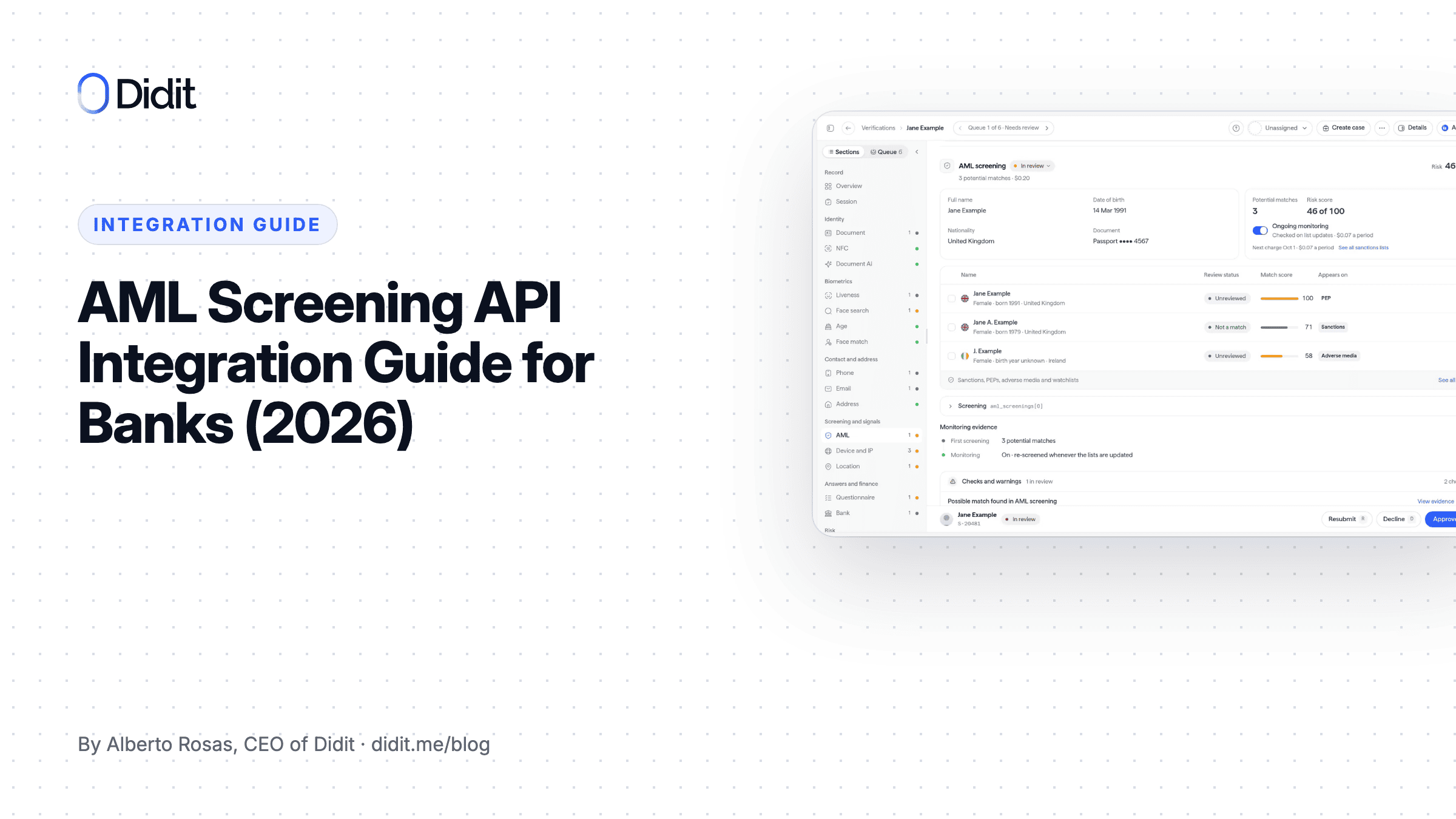
We built the AML screening API for banks that need a sanctions, PEP and adverse media answer on a person or a company inside their own systems. One call returns a status, two scores for every hit and a list of warnings you route. It costs $0.20 per check at list price. The caveat is that a screening is evidence, not a decision: you retain responsibility for the review policy and any bank-side audit trail.
Last updated: November 26, 2026. Prices checked against the live Didit price feed on November 26, 2026.
| Route | What runs | Price at list | Caveat |
|---|---|---|---|
| Standalone API recipe | POST /v3/aml/ from your core banking or case system | $0.20 per check | You own the review queue and the storage decision |
| Session workflow | AML as a step inside a verification session, decided with the rest of the flow | $0.20 per check plus the other steps in the session | Needs a published workflow and a hosted flow for the end user |
| MCP connector | Didit inside an MCP client | The MCP server is free; completed checks bill as usual | Connects supported MCP clients to Didit |
Start free in the sandbox at business.didit.me, no sales call. Developers who want Didit inside an AI assistant can connect it through MCP setup. The product page is AML Screening and every unit price is on the pricing page.
What one call returns
Every server-to-server call is POST https://verification.didit.me/v3/aml/ with an x-api-key header and a JSON body. The only required field is full_name, with a minimum of 2 characters. Everything else sharpens the match: entity_type, date_of_birth, nationality, document_number and vendor_data.
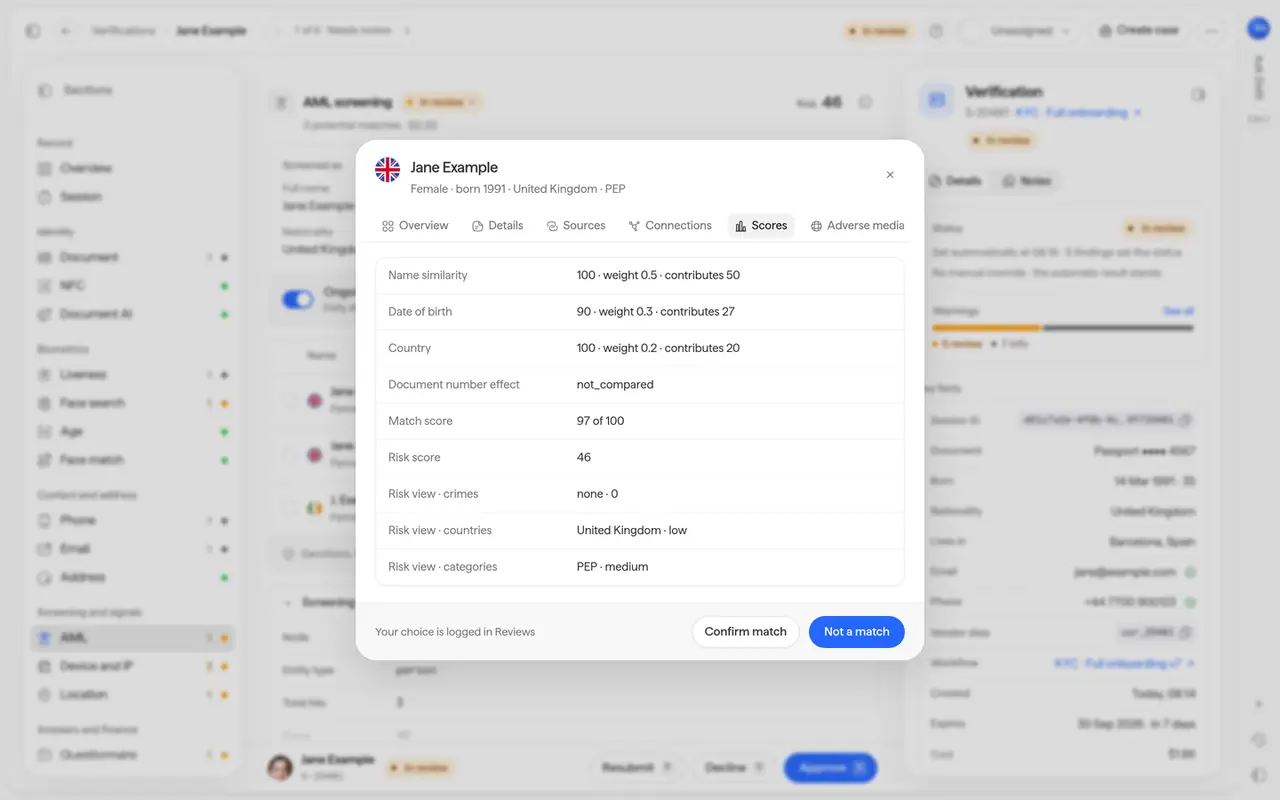
The response carries request_id and an aml object, as in { request_id, aml: { status, screening_id, hits, warnings } }. The exact response fields depend on the documented result schema. Each hit carries two scores. match_score runs 0 to 100 and answers one narrow question: is this the same person. risk_score runs 0 to 100 and answers a different one: how risky is the listed entity if the match is real. Keep them apart in your data model, because the common failure in bank integrations is collapsing the two and then having to defend it.
Hits whose match_score is below aml_match_score_threshold (default 93) are tagged review_status: "False Positive" and ignored for risk purposes. The highest risk_score among the remaining hits becomes aml.score. The status then follows your thresholds: a score above aml_score_review_threshold (default 100) is Declined, above aml_score_approve_threshold (default 80) is In Review, and everything else is Approved. With the defaults the decline branch is closed, because a risk score cannot exceed 100 and the comparison is strictly greater. If your policy wants an automatic decline on the worst hits, set the review threshold below 100.
The weights are yours. aml_name_weight plus aml_dob_weight plus aml_country_weight must sum to exactly 100, and the defaults are 60, 25 and 15. Components missing from the request are re-normalized away. A matching document_number acts as a golden key and overrides match_score to 100, which is why a bank that already holds an identity number should always send it.
Prerequisites
| Requirement | What it is | Where it comes from |
|---|---|---|
| Plan | Free, Growth or Scale self-serve, or an Enterprise contract starting at $15,000 a year. Free sits at list price, Growth is 4% below list, Scale is 10% below list. | Pricing page and the pricing docs |
| Sandbox application | Created with the organization. Sandbox testing is free and unlimited on every plan, and sandbox calls are never billed. | The application switcher in the console |
| API key | The Primary key has full access. Create a separate key for the service that calls AML. New keys start with sk_test_ or sk_live_ plus 43 URL-safe characters. | Developers, then API keys, in the console |
| Permissions | The key must be allowed to reach the AML screening route. A scoped key without that access is refused with 403. Treat the key as a server-side secret. | API authentication |
| Credit for live checks | An insufficient balance returns 403 before any new screening runs, so a live pipeline never half-bills. | Billing in the console |
| An HTTPS endpoint | Only if you want status.updated delivered to you. There is no wildcard, so subscribe each event family you want. | Webhooks |
| Client timeout | At least 60 seconds whenever include_adverse_media is true. | Your HTTP client |
Install route 1: the API recipe, step by step
Open the console and copy a sandbox key. Sign in at business.didit.me, pick the Application from the dropdown at the top, then open Developers and API keys. The Primary key is the Application's own secret; create a separate key for the service that will call AML. Store it server side as
DIDIT_API_KEY. Never ship it to a browser or a mobile bundle.Send one call and read the shape. This is the documented request, unchanged.
curl -X POST 'https://verification.didit.me/v3/aml/' \
-H "x-api-key: $DIDIT_API_KEY" \
-H "Content-Type: application/json" \
-d '{
  "full_name": "Javier Ejemplo Modelo",
  "entity_type": "person",
  "date_of_birth": "1974-01-01",
  "nationality": "ES",
  "include_adverse_media": true,
  "vendor_data": "user-1234"
}'
Plain screenings usually complete in a few seconds. With
include_adverse_mediaset to true the API waits for adverse media enrichment, an initial pause of about 5 seconds plus up to about 25 seconds of polling, so configure a client timeout of at least 60 seconds.Set the thresholds and weights your policy needs. Pass
aml_match_score_threshold,aml_score_approve_threshold,aml_score_review_thresholdand the three weights on the request, or configure them once in the workflow. The three weights must sum to exactly 100 or the request is rejected with HTTP 400.Decide whether to store the screening.
save_api_requestdefaults to true. That stores the screening as a session:request_idworks withGET /v3/session/{sessionId}/decision/, the result appears in the console, astatus.updatedwebhook fires, and hit review statuses can be updated later. Set it to false and nothing is stored, andrequest_idis only a transient correlation id.Add ongoing monitoring if the customer stays on your book.
include_ongoing_monitoring=truekeeps the profile under provider-driven monitoring, and it requiressave_api_request=true, otherwise the API answers 400. It is billed at $0.07 per screened entity per year. Turn it off from the Business Console.Register the webhook and check the signature. Create a destination subscribed to
status.updated, read the raw request body before parsing JSON, recompute HMAC-SHA256 over the sorted canonical JSON and compare it withX-Signature-V2in constant time. Reject anything whereX-Timestampis more than 300 seconds away from now, then return 2xx quickly and re-fetch the decision when you need the full body.Send an Idempotency-Key and go live. On a timeout or a transient error, retry with the same
Idempotency-Keyheader of up to 255 characters. The key is scoped to your application and the exact request body: an identical retry returns the stored response and runs and bills nothing, while a different body with the same key returns 409. When the flow works in sandbox, switch to thesk_live_key and make sure the organization holds credit.
Install route 2: AML inside a session
Use this when the AML check should be decided together with identity verification, proof of address or a questionnaire. Decisions, monitoring and audit history stay bound to the session.
- Add the AML feature to the workflow in the Business Console or with
POST /v3/workflows/, and setaml_match_score_threshold,aml_score_approve_threshold,aml_score_review_thresholdand the three weights, which must sum to 100. - Create the session with
POST /v3/session/and a body of{ workflow_id, vendor_data, callback }. See create session. - Fetch the decision with
GET /v3/session/{sessionId}/decision/or subscribe tostatus.updated. AML results sit in theaml_screenings[]array, next toid_verifications[]andliveness_checks[], because a workflow can hold more than one instance of the same feature.
Install route 3: MCP connector for AI assistants
The Didit MCP server is hosted at https://mcp.didit.me/mcp and signs in with OAuth. The server is free, and the checks you run through it bill at your plan's prices. The documented setup page is didit.me/developers/mcp; follow it for the MCP client you use.
- Use the documented MCP setup page to connect a supported client to the Didit MCP server.
- No connector is documented in the supplied Didit materials; use the documented API or webhook route.

Field and event mapping
Use this table to map Didit fields and events to your system.
| Didit field or event | Type | What to do with it |
|---|---|---|
full_name | String, 2 characters minimum, required | The screened party, exactly as your record holds it |
entity_type | Person or company | Tells the reviewer which register the party belongs to |
date_of_birth | Date | Feeds aml_dob_weight |
nationality | ISO country code | Feeds aml_country_weight |
document_number | String | Golden key: a match overrides match_score to 100 |
vendor_data | String | Your customer id, the join between the screening and the core record |
request_id | UUID | Correlation id, and a session id when save_api_request is true |
aml.screening_id | String | The screening reference you cite in the customer file |
aml.status | Approved, In Review, Declined | The routing value for your decision engine |
aml.score | 0 to 100 | The highest risk score among hits that are not false positives |
hits[].match_score | 0 to 100 | Identity confidence, filtered at 93 by default |
hits[].risk_score | 0 to 100 | Entity risk, which drives aml.score |
hits[].review_status | String | "False Positive" or unreviewed, for the reviewer queue |
warnings[] | Codes | POSSIBLE_MATCH_FOUND, MATCH_FOUND, HIGH_RISK_COUNTRY, ADVERSE_MEDIA_HIT, SANCTIONED_ENTITY, PEP_MATCH, ONGOING_MONITORING_ENABLED |
status.updated | Webhook event | Fires when the stored screening is written. For statuses that include a decision, the event carries the decision object; otherwise fetch it from the decision endpoint |
X-Signature-V2 and X-Timestamp | Headers | Verify the HMAC and the 300-second window before trusting a payload |
sandbox_scenario | String or null | Shows which mocked path a sandbox session took |
aml.status | What it means | Your action |
|---|---|---|
| Approved | No hit scored above the approve threshold | Complete onboarding and store the decision |
| In Review | At least one hit scored above the approve threshold and none crossed the decline boundary | Route to the reviewer queue; the hit and its score breakdown are in the console |
| Declined | A hit scored above the review threshold | Decline, or start enhanced due diligence |

Test with sandbox data
Keys from a sandbox application skip screening and billing entirely and return a mocked result: Approved, with zero hits, unless you pass sandbox_scenario. save_api_request behaves exactly as it does on a live key, so a saved sandbox screening is retrievable through GET /v3/session/{sessionId}/decision/ and GET /v3/session/{sessionId}/generate-pdf/.
{ request_id, aml: { status, screening_id, hits: [...], warnings: [...] } }That is the documented success shape. Build your parser against it on day one, so the live switch changes the key and nothing else.
| What you see | Cause | Fix |
|---|---|---|
| 400 | The three weights do not sum to exactly 100, or include_ongoing_monitoring is true with save_api_request false | Fix the weights, and turn persistence on before monitoring |
| 401 | x-api-key is wrong, malformed, revoked or expired | Re-fetch the key from Developers, API keys |
| 403 | No key, a scoped key without access to this route, or a key called from an address outside its IP list | Use a key whose access includes the AML screening route |
| 403 on balance | Out of credit | Top up, or keep testing on the sandbox key |
| 404 | A session route outside the scoped key's workflows or statuses | Use a key whose limits include that session |
| 409 | The same Idempotency-Key sent with a different body | Reuse a key only for an identical retry |
| 429 | Rate limit | Back off for the seconds in the response's wait field, then retry |
| Adverse media missing | The upstream provider was slow | The result returns without adverse media hits and is still actionable; raise the client timeout to at least 60 seconds |
Disconnect. To stop the integration, delete or rotate the key the service uses in Developers, API keys; a revoked key answers 401 from then on. If you enabled ongoing monitoring, switch it off in the Business Console, because the setting lives on the stored profile and deleting a key does not stop it. Export what you need first: stored screenings stay retrievable with GET /v3/session/{sessionId}/decision/, and the console keeps the audit log for your plan's window, 30 days on Free, 1 year on Growth and 3 years with export on Scale.
Cost
Didit charges one AML API credit after the first successful screening. A replayed idempotent response is not charged again, and an insufficient balance returns 403 before any new screening happens. List price is $0.20 per check, $0.192 on Growth and $0.18 on Scale. Ongoing monitoring is $0.07 per screened entity per year, $0.0672 on Growth and $0.063 on Scale. A full ID check in the same session is $0.33 at list, $0.3168 on Growth and $0.297 on Scale. Sandbox calls are free on every plan.
Worked cost example
A bank on Scale screens 4,000 retail customers a month, each with a full ID check and an AML screening in the same session.
- Full ID check: 4,000 x $0.297 = $1,188.00
- AML screening: 4,000 x $0.18 = $720.00
- Month subtotal: $1,188.00 + $720.00 = $1,908.00
- Minus the $350 monthly Scale credit: $1,908.00 - $350.00 = $1,558.00 from top-ups
- Plus the $299 monthly fee: $1,558.00 + $299.00 = $1,857.00 for the month, about $0.46 per customer
Add ongoing monitoring for those 4,000 customers as a yearly line: 4,000 x $0.063 = $252.00 a year, or $0.063 per customer per year. If you are moving off a screening contract with a monthly minimum, the migration notes are on the switch page.
Sources
- Didit docs: AML Screening API, request fields, two-score model, latency, idempotency and sandbox behaviour.
- Didit docs: AML screening overview, integration prompt, status enum and failure modes.
- Didit docs: AML warnings catalogue.
- Didit docs: ongoing AML monitoring.
- Didit docs: webhooks and HMAC signing.
- Didit docs: verification statuses.
- Didit docs: API authentication.
- Didit docs: rate limiting.
- Didit docs: pricing and billing rules and the live pricing page, read November 26, 2026.
- Didit MCP setup.
- FATF, for the recommendations a bank screening policy is usually mapped to.
- EUR-Lex, for EU anti-money-laundering directives and regulations.
- legislation.gov.uk: Money Laundering, Terrorist Financing and Transfer of Funds Regulations 2017.
Next step: create the sandbox organization, run one screening against the mocked result, then map aml.status to your decision engine before you touch a live key. You can do all of that at business.didit.me in the sandbox, with no sales call.
Try it
Try this in the sandbox
Run the check this guide describes, free.
The product this post is about, taken from its topic. Run it free in the sandbox.
Author
Alberto Rosas
Co-founder and CEO

Keep reading
Other guides in the same topic.
 How to Verify a Bank Account and Stop Payout Fraud (2026)
Bank account verification answers whether an account belongs to a person or company you already verified. Didit's account check is $0.45 per answered check in 47 countries, bank sign-in starts at $0.45, and consent may be.
Alberto RosasNov 26, 2026 Age Assurance vs Age Verification: Didit vs Yoti (2026)
Age assurance is the outcome; age verification is one method inside it. Didit estimates age at $0.10 per check with passive liveness included and runs a full ID check at $0.33.
Alberto RosasNov 26, 2026 Verify a Company in Spain: Registry, UBOs and KYB Checks 2026
Verify a Spanish company with official Spanish registry evidence and a KYB file: company profile, officers and ownership data where the registry serves it.
Alberto RosasNov 26, 2026Questions
Frequently asked questions
What is the endpoint for the Didit AML screening API?
It is POST https://verification.didit.me/v3/aml/, authenticated with an x-api-key header rather than an OAuth bearer token. The only required body field is full_name, with a minimum of 2 characters. The response returns request_id and an aml object; the exact fields follow the documented result schema.
How much does one AML screening cost a bank?
$0.20 per completed check at list price, $0.192 on Growth and $0.18 on Scale. One credit is charged after the first successful screening, and a replayed idempotent response is not charged again. There is no monthly minimum on the AML line itself, and sandbox calls never bill.
Which lists does Didit screen against?
We screen against 1,300+ global watchlists covering sanctions, PEPs, warning and watchlist sources, plus adverse media when you set include_adverse_media to true. Potential matches are returned with a match score and a risk score. The full warning catalogue is in the warnings documentation.
What is the difference between match score and risk score?
The match score, 0 to 100, says how likely it is that the listed entity is the same person you are screening. The risk score, 0 to 100, says how risky that listed entity is if the match is real. Hits below aml_match_score_threshold, default 93, are tagged False Positive and excluded from risk, and the highest remaining risk score becomes aml.score, which sets the final status.
Why does the API return 400 on my first request?
Two causes are documented. Either aml_name_weight plus aml_dob_weight plus aml_country_weight does not sum to exactly 100, or you sent include_ongoing_monitoring=true with save_api_request=false. Fix the weights and turn persistence on before monitoring, and the call goes through.
What does a sandbox key return for an AML screening?
A key from a sandbox application skips screening and billing and returns a mocked result: Approved, with zero hits, unless you pass sandbox_scenario to arm a specific path. save_api_request works the same as on a live key, so the saved screening is retrievable through the decision endpoint. Sandbox testing is free and unlimited.
How should a bank handle an In Review result?
In Review means at least one hit scored above aml_score_approve_threshold and none crossed the decline boundary, so a person has to decide. Route it to your reviewer queue; the hit detail and the score breakdown are in the Didit Business Console, and a reviewer can approve, decline or request a resubmission with PATCH /v3/session/{sessionId}/update-status/. The final decision and its reason stay in your file.
How long does adverse media screening take?
Plain screenings usually finish in a few seconds. With include_adverse_media set to true the API waits for adverse media enrichment, an initial pause of about 5 seconds plus up to about 25 seconds of polling, so configure a client timeout of at least 60 seconds. If the upstream provider is slow, the result comes back without adverse media hits and is still actionable.
How do I stop ongoing monitoring for a customer?
Turn it off from the Business Console, where the setting lives on the stored profile. Ongoing monitoring requires save_api_request=true, so there is always a stored profile to switch off. It is billed at $0.07 per screened entity per year, $0.0672 on Growth and $0.063 on Scale.
Can I run AML screenings from an AI assistant?
Yes, through the hosted Didit MCP server at https://mcp.didit.me/mcp, which signs in with OAuth and costs nothing as a server. Follow the documented MCP setup page to connect your client. Checks run through it bill at your plan's prices.
Do I have to store the screening inside Didit?
No. save_api_request defaults to true, which stores the screening as a session, makes request_id work with the decision endpoint, lists it in the console and fires status.updated. Set it to false and nothing is stored, request_id becomes a transient correlation id, and ongoing monitoring is not available.
Compliance built in
Audited, certified and attested.
We hold the certifications and build each country's rules into your flows, so you can launch anywhere without worrying. Security and Compliance center
- Regulation encoded into your flows
Tell us what you do and where. Didit lists the rules that apply to you, with sources, and builds the checks each country needs into one workflow.
- Ready for AMLR
Every requirement of the new EU anti-money laundering rules, from checking customers to human review, is already covered by a Didit check.
- Tested in Spain's Treasury sandbox
Spain's Treasury published its supervised sandbox report on Didit's NFC plus active liveness onboarding; SEPBLAC took part and valued the added measures positively.
- Audited, not self-declared
iBeta Level 1 and Level 2. Liveness tested under ISO/IEC 30107-3.
Your obligations · 3 regions
 SOC 2 Type 2
 ISO 27001
 iBeta Level 1 and Level 2
 EU regulator attestation
 FSM youth protection
 GDPR
 EBA remote onboarding
 MiCA compatible
 FIDO Alliance member
- AMLREU AML Regulation ready
Integration · Didit MCP
Run Didit from your own AI agent
Connect Didit to Claude, Cursor, VS Code or ChatGPT and just ask in plain words. Your agent can do anything you can do in the console, with the same permissions you have.
 Add to Claude
 ChatGPT
 Cursor
- Build workflowsDescribe the checks you need. The agent creates and publishes the flow.
- Run investigationsAsk why a session was declined, review cases, search people and companies.
- Change rulesCreate payment rules, test them on past data and switch them on.
- Pull reportsAsk for numbers, exports or the audit log.
Didit Academy


