Automated KYC Checks in 8 Steps: Cut Manual Review (2026)
Automated KYC runs document capture, liveness, face match, device and IP analysis and watchlist screening, then sends only sessions that breach your rules to a human queue.
 Alberto RosasCo-founder and CEO
Contents
In this guide
Jump to the part you need.
Automated KYC verification runs document capture, liveness, face match and device and IP analysis inside one workflow, then sends only the sessions that breach a threshold to a human queue. It fits teams whose checks already pass most users while reviewers still spend hours on obvious cases. A full Didit ID check lists at $0.33, with AML screening a separate $0.20 per check. The caveat: your rules, not the checks, set the review volume.
Last updated: November 26, 2026. Prices checked against the live Didit price feed on November 26, 2026.
| Stage | What runs | What it decides | Published price (USD) |
|---|---|---|---|
| Document capture | OCR, MRZ and barcode parsing, tamper and consistency checks | Readable, unexpired, internally consistent document | $0.15 per check |
| Liveness | Passive or active presentation attack detection | A real person is in front of the camera | $0.10 passive, $0.15 active |
| Face match | 1:1 comparison of selfie to document portrait | The selfie belongs to the document holder | $0.05 per check |
| Device and IP analysis | Signal review on the session context | Context looks like fraud or a clean device | $0.03 per check |
| AML screening | 1,300+ AML, sanctions and PEP lists | No hit, hit below threshold, or hit above threshold | $0.20 per check, separate from the $0.33 ID check |
| Manual review queue | Console review of the warnings raised | Final approve, decline or resubmit | No per-check price, it costs reviewer time |
| Ongoing monitoring | Re-screening after approval | A cleared user later becomes a hit | $0.07 per user per year |
The ID document, passive liveness, face match and device and IP analysis steps together make the full ID check at $0.33. AML screening is a separate line, so the same flow with AML added runs at $0.33 + $0.20 = $0.53 per completed check. Start free in the sandbox at business.didit.me, no sales call, and if you build with an AI assistant, connect it through the Didit MCP server. Prices live on didit.me/pricing.
How does automated KYC verification work?
Five parts do the work, and each one can end or hold a session on its own.
Document capture. The user photographs an ID. Didit detects the document type and issuing country, reads the fields with OCR, decodes the MRZ and barcodes, and runs tamper and cross-field consistency checks. Coverage is 14,000+ document types in 220+ countries. A failure here produces warnings such as DOCUMENT_EXPIRED, INVALID_MRZ, INCONSISTENT_DATA or COULD_NOT_RECOGNIZE_DOCUMENT.

Liveness. Passive liveness confirms a live person rather than a printed photo, screen replay, mask or deepfake. Poor lighting and weak cameras lower genuine scores, which is why a low score is a review signal, not automatically a decline.
Face match. A 1:1 comparison scores the selfie against the document portrait. That score is compared with the threshold you set on the feature node.

AML screening. Watchlist screening is a separate step from the $0.33 ID check, priced at $0.20, and it screens the person against 1,300+ sanctions, PEP and adverse media lists. Each hit carries a match score for identity confidence and a risk score for entity risk, and the highest risk score among hits not marked as false positive is compared with your approve and review thresholds. See the AML screening product page.

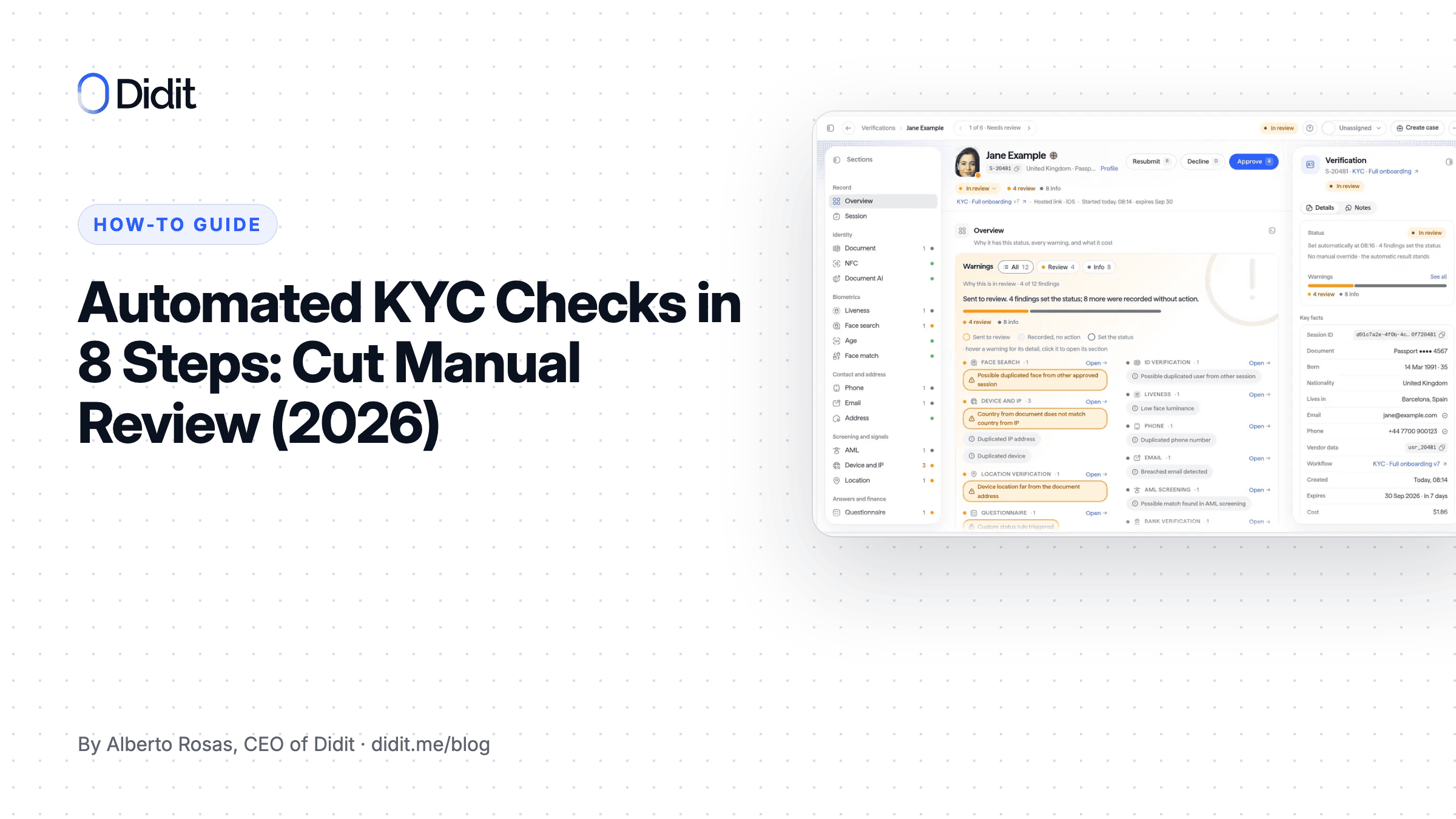
Manual review queue. A session moves to In Review only when automated checks raise warnings that need human judgement, such as an AML hit or a liveness warning. A liveness warning or other configured rule can route the session to manual review. Terminal failures, for example an expired document or a face match far below threshold, produce Declined instead, so the queue holds decisions rather than clean rejections.
Automation rules tie the parts together. In the workflow builder every feature node carries thresholds and an action. In node-based workflows you branch on extracted data, verification status, country, document type, document subtype, date of issue, age, webhook response paths or custom rules, and you can add tags, set metadata, or route to manual review based on the outcome. Prompts and builder details are in the workflow builder docs. That rule set is the dial you turn: tighten it and fewer users reach a human, loosen it and reviewers see more sessions.
Prerequisites
- A Didit organization. Sign up at business.didit.me. The first organization created with an eligible work email for a company domain on the Free plan gets $10 of monthly credit. Phone verification codes are excluded, and sandbox testing is free and unlimited.
- A sandbox API key, from programmatic registration or the console. The sandbox key builds and tests flows at no charge.
- A workflow that lists the checks you want. Templates exist for KYC and other common starts; simple workflows run steps in a fixed order and node-based ones branch.
- An HTTPS endpoint for webhooks, and a decision on what your application does with
Approved,DeclinedandIn Review. - A written review policy: which warnings a reviewer may resolve alone, and which need a second pair of eyes. Nothing in the software replaces that policy.
8 steps to automate the checks and route only exceptions
Create the organization and copy your API key. Sign up with a work email, create the organization, and keep the sandbox key for building. Switch to the live key only when you are ready to spend credit.
Create the workflow with the checks you need. This call from the quick start builds a standard KYC flow with ID, passive liveness, face match and AML:
curl -X POST https://verification.didit.me/v3/workflows/ \
-H "x-api-key: $DIDIT_API_KEY" \
-H "Content-Type: application/json" \
-d '{
"workflow_label": "Standard KYC",
"workflow_type": "kyc",
"features": [
  {"feature": "OCR"},
  {"feature": "LIVENESS", "config": {"face_liveness_method": "PASSIVE"}},
  {"feature": "FACE_MATCH"},
  {"feature": "AML"}
]
}'
Persist the returned
workflow.id. The docs noteID_VERIFICATIONas the current enum whereOCRis the legacy value.Set thresholds and routing on each node. Configure thresholds and routing rules for the checks in your workflow, then send flagged outcomes to manual review. Each team sets them from its own risk policy. A bank onboarding high-value accounts may send every AML hit and every low liveness score to a reviewer; a low-value consumer product may review only a narrower set of warnings. Record the policy next to the workflow version so an audit can see which thresholds were live when a session ran. Workflows use draft and publish versioning, so sessions reference the exact version they were created with and you can inspect what ran on any past session.
Create a session and send the user to the returned URL.
curl -X POST https://verification.didit.me/v3/session/ \
-H "x-api-key: $DIDIT_API_KEY" \
-H "Content-Type: application/json" \
-d '{"workflow_id": "$WORKFLOW_ID", "vendor_data": "user-42", "callback": "https://myapp.com/kyc/return"}'
Redirect the user to
url, or open it in an SDK.Register a webhook destination. Use
POST https://verification.didit.me/v3/webhook/destinations/withlabelandurl, subscribing tostatus.updated,data.updated,user.status.updatedanduser.data.updatedwithwebhook_versionset tov3. Save the returnedsecret_shared_keyand verify theX-Signature-V2header on every delivery.Map each status to one of your own actions. De-dupe on
event_id, answer within 5 seconds, then apply the decision:Approvedgrants access,Declinednotifies the user,In Reviewopens a task for a reviewer,Resubmittedreturns the user to specific steps, andKyc Expiredfires when a verified document passes its expiry date.Work the queue in the console, then approve, decline or resubmit. The manual review guide walks through warnings, prior attempts, the events timeline, document zoom and the AML hit detail. A reviewer decision can also be sent by API:
curl -X PATCH https://verification.didit.me/v3/session/<SESSION_ID>/update-status/ \
-H "x-api-key: <API_KEY>" \
-H "Content-Type: application/json" \
-d '{
"new_status": "Approved",
"comment": "Cleared after compliance review."
}'
Allowed values are
Approved,DeclinedandResubmitted, andResubmittedrequiresnodes_to_resubmitnaming the step to redo.Keep screening after approval. Ongoing AML monitoring is $0.07 per user per year and re-checks people you already cleared. Reusable KYC is free, so a returning user can skip steps you already verified.
Expected output
A successful workflow call returns the workflow id you persist. A successful session call returns session_id, url and session_token. The decision endpoint, GET https://verification.didit.me/v3/session/{session_id}/decision/, returns results in plural arrays such as id_verifications[], liveness_checks[], face_matches[] and aml_screenings[], never as singular V2 fields, and the status is one exact string: Not Started, In Progress, Approved, Declined, In Review, Awaiting User, Resubmitted, Expired, Abandoned or Kyc Expired. Match those strings exactly, including the space and the single capital K.
Inputs and outputs
| Direction | Field | What it is |
|---|---|---|
| Input | workflow_id | The workflow the session runs, including its published version |
| Input | vendor_data | Your own user identifier, used to find prior sessions for the same person |
| Input | callback | Where the hosted flow returns the user |
| Output | session_id | The identifier you use for the decision call and review |
| Output | url | The hosted verification link |
| Output | status | The exact status string on the session and in every webhook |
| Output | warnings[] | The risk codes behind a decline or a review, on the relevant feature result |
Failure cases and recovery
| Symptom | Cause | Recovery |
|---|---|---|
| 403 with "You do not have permission to perform this action." | API key missing on the verification host | Send the x-api-key header on every call |
| 401 on session calls | Key is wrong, revoked or expired | Rotate the key and redeploy |
| 400 when creating a session | Invalid workflow_id | Use the id returned by the workflow call, not a label |
| 403 saying you do not have enough credits | Insufficient balance on a standalone API call | Top up, or keep testing in the free sandbox |
In Review with DOCUMENT_LIVENESS_NOT_COMPUTED | The forgery check returned no usable score | Treat the document as unchecked, route it to manual review and do not approve |
| Webhook not received | Handler slower than 5 seconds, or returned 5xx or 404 | Didit retries twice, after about 1 and 4 minutes, then drops the delivery; resend it from the destination delivery log and use the decision endpoint as a fallback |
| 400 on the update-status call | Status outside Approved, Declined, Resubmitted, or an allowed transition was not met | Read the current session status first, then retry |
| 400 on a resubmission | nodes_to_resubmit missing or empty | Send one entry per step, with node_id and feature |
Paid steps and where a human still decides
You pay per completed check, from prepaid credit. The workflow orchestrator, the MCP server, reusable KYC and the sandbox carry no charge. The paid lines you will touch on a KYC flow are ID document verification at $0.15, passive liveness at $0.10, face match at $0.05, device and IP analysis at $0.03, proof of address at $0.20, email verification at $0.02, phone verification from $0.02 plus the carrier's price for the country and channel, and ongoing monitoring at $0.07 per user per year. A full ID check is $0.33, and AML screening is not part of that number: it is a separate $0.20 per check.
The review boundaries matter more than the price. Automated checks already run security feature detection, field consistency checks, MRZ validation, expiry checks and image quality analysis. What stays human is judgement: whether an AML hit is a true or false positive, whether a low liveness score came from a bad camera or an attack, whether a face search duplicate is the same person under two identities, and which step a user should redo. For a genuine user with a poor selfie, request resubmission rather than declining. Reviewers can zoom document images to check microprinting and holograms, and every manual decision writes to the console review trail with the actor and comment.
Worked cost example
Take 10,000 signups a month at list prices, with the full ID check and AML screening on every user.
- 10,000 full ID checks at $0.33 = $3,300.00
- 10,000 AML screenings at $0.20 = $2,000.00, a separate line from the ID check
- Month total = $3,300.00 + $2,000.00 = $5,300.00
- Ongoing AML monitoring for the same 10,000 people: 10,000 x $0.07 = $700.00 a year
- Route 3,000 of those users to a document-only path at $0.15: 3,000 x $0.15 = $450.00 against $990.00 for 3,000 full checks, a $540.00 monthly difference. The other 7,000 full checks cost 7,000 x $0.33 = $2,310.00, so the month becomes $450.00 + $2,310.00 + $2,000.00 = $4,760.00
On the Scale plan at 10% off every Didit price, the first month costs 10,000 x $0.297 = $2,970.00 plus 10,000 x $0.18 = $1,800.00, which is $4,770.00, plus the $299.00 monthly fee = $5,069.00. The checks are the bulk of the bill and review adds no per-check charge to these numbers, only your team's time, so route careful work to the rules and keep the queue for the cases that need judgement.
Sources
- Didit Quick Start
- Didit Workflow Builder documentation
- Didit Manual KYC Review documentation
- Didit Verification Statuses documentation
- Didit Update Session Status API documentation
- Didit ID Verification overview
- Didit Liveness Detection overview
- Didit pricing in the docs
- Didit pricing page and the machine-readable price feed, read November 26, 2026
- Didit AML screening product page
- Didit MCP server setup
Run your own numbers before you tune anything: start free in the sandbox at business.didit.me, build the workflow, and watch how many sandbox sessions land in review at your thresholds. No sales call is needed.
Try it
Try this in the sandbox
Run the check this guide describes, free.
The product this post is about, taken from its topic. Run it free in the sandbox.
Author
Alberto Rosas
Co-founder and CEO

Questions
Frequently asked questions
How does automated KYC verification work?
Software captures an ID document, reads and authenticates it, confirms a live person with liveness detection, matches the selfie to the document portrait, checks device and IP signals, and screens the name against sanctions, PEP and adverse media lists. Each result is compared with thresholds on a workflow node, and the node approves, declines or routes the session to a human queue. The human only sees sessions that raised a warning that needs judgement. On Didit the full ID check is $0.33 per completed check and AML screening is a separate $0.20.
How much does an automated KYC check cost on Didit?
A full ID check lists at $0.33 and bundles ID document verification at $0.15, passive liveness at $0.10, face match at $0.05 and device and IP analysis at $0.03. AML screening is a separate $0.20 per check, and ongoing AML monitoring is $0.07 per user per year. The first organization created with an eligible work email for a company domain on the Free plan gets $10 of monthly credit. Phone verification codes are excluded, and sandbox testing is free and unlimited.
Is AML screening included in the $0.33 full ID check?
No. The $0.33 covers the ID document, passive liveness, face match and device and IP analysis, and AML screening is a separate $0.20 line, which is why the combined KYC plus AML check lists at $0.53. A session only contains a watchlist result when the AML feature is on the workflow. Ongoing monitoring after approval is billed separately at $0.07 per user per year.
What pushes a KYC session into manual review?
In Review is for warnings that need human judgement, such as an AML hit inside your review band, a low liveness score, or a document inconsistency a reviewer should see. A check that fails terminally, like an expired document or a face match far below threshold, produces Declined instead. The console shows the exact warnings, the user's prior attempts and the events timeline, and a reviewer then approves, declines or asks for a resubmission.
What is the difference between Declined and In Review?
Declined means one or more checks failed and the automated path has finished. In Review means warnings were raised that need a person to decide. The distinction matters in your own code: decline closes the door with an explanation, while review holds the user in a queue, and a reviewer can move a review session to approved, declined or resubmitted.
Can I approve or decline a session through the API?
Yes. PATCH /v3/session/{session_id}/update-status/ accepts new_status of Approved, Declined or Resubmitted, with an optional comment written to the review trail. The session must currently be in an allowed state such as In Review or Declined. A resubmission also requires nodes_to_resubmit naming the step the user must redo.
Why do genuine users fail liveness, and what should I do?
Poor camera quality, low light or an awkward angle can lower a genuine user's liveness score. The liveness system detects printed photos, screen replays, masks and deepfakes, and it returns a score rather than a verdict. When the score is marginal, request resubmission instead of declining, and set your thresholds so that only clear presentation attacks fall below them.
Does watchlist screening run on every user?
It runs wherever the AML feature is on the workflow, priced at $0.20 per check, separate from the $0.33 ID check, against 1,300+ lists. Each hit carries a match score for identity confidence and a risk score for entity risk, and the highest risk score among hits not marked as false positive is compared with your approve and review thresholds. Without AML on the workflow, the session contains no watchlist result at all.
How fast is the decision?
Inference runs at sub-2-second p99 per Didit's published figures, and the outcome arrives as a webhook when the session status changes. You can also pull it with GET /v3/session/{session_id}/decision/ as a fallback if a delivery is missed.
Can I skip checks for low-risk users to cut cost?
Yes, and branching is the mechanism. A node-based workflow can route on country, document type, verification results or custom rules, so a low-risk path might run a document-only check at $0.15 while the full check at $0.33 runs for higher-risk traffic. Every completed step is billed on its own published line, so removing a step removes its price, and AML screening stays a separate $0.20 whenever it runs.
Compliance built in
Audited, certified and attested.
We hold the certifications and build each country's rules into your flows, so you can launch anywhere without worrying. Security and Compliance center
- Regulation encoded into your flows
Tell us what you do and where. Didit lists the rules that apply to you, with sources, and builds the checks each country needs into one workflow.
- Ready for AMLR
Every requirement of the new EU anti-money laundering rules, from checking customers to human review, is already covered by a Didit check.
- Tested in Spain's Treasury sandbox
Spain's Treasury published its supervised sandbox report on Didit's NFC plus active liveness onboarding; SEPBLAC took part and valued the added measures positively.
- Audited, not self-declared
iBeta Level 1 and Level 2. Liveness tested under ISO/IEC 30107-3.
Your obligations · 3 regions
 SOC 2 Type 2
 ISO 27001
 iBeta Level 1 and Level 2
 EU regulator attestation
 FSM youth protection
 GDPR
 EBA remote onboarding
 MiCA compatible
 FIDO Alliance member
- AMLREU AML Regulation ready
Integration · Didit MCP
Run Didit from your own AI agent
Connect Didit to Claude, Cursor, VS Code or ChatGPT and just ask in plain words. Your agent can do anything you can do in the console, with the same permissions you have.
 Add to Claude
 ChatGPT
 Cursor
- Build workflowsDescribe the checks you need. The agent creates and publishes the flow.
- Run investigationsAsk why a session was declined, review cases, search people and companies.
- Change rulesCreate payment rules, test them on past data and switch them on.
- Pull reportsAsk for numbers, exports or the audit log.
Didit Academy