
Age verification API: which one works on apps, web and stores
Five kinds of age verification API and where each one answers: Play apps, App Store apps, sideloads, web and desktop. With the selfie call, the hosted session, webhook checks, cost and data.
In short
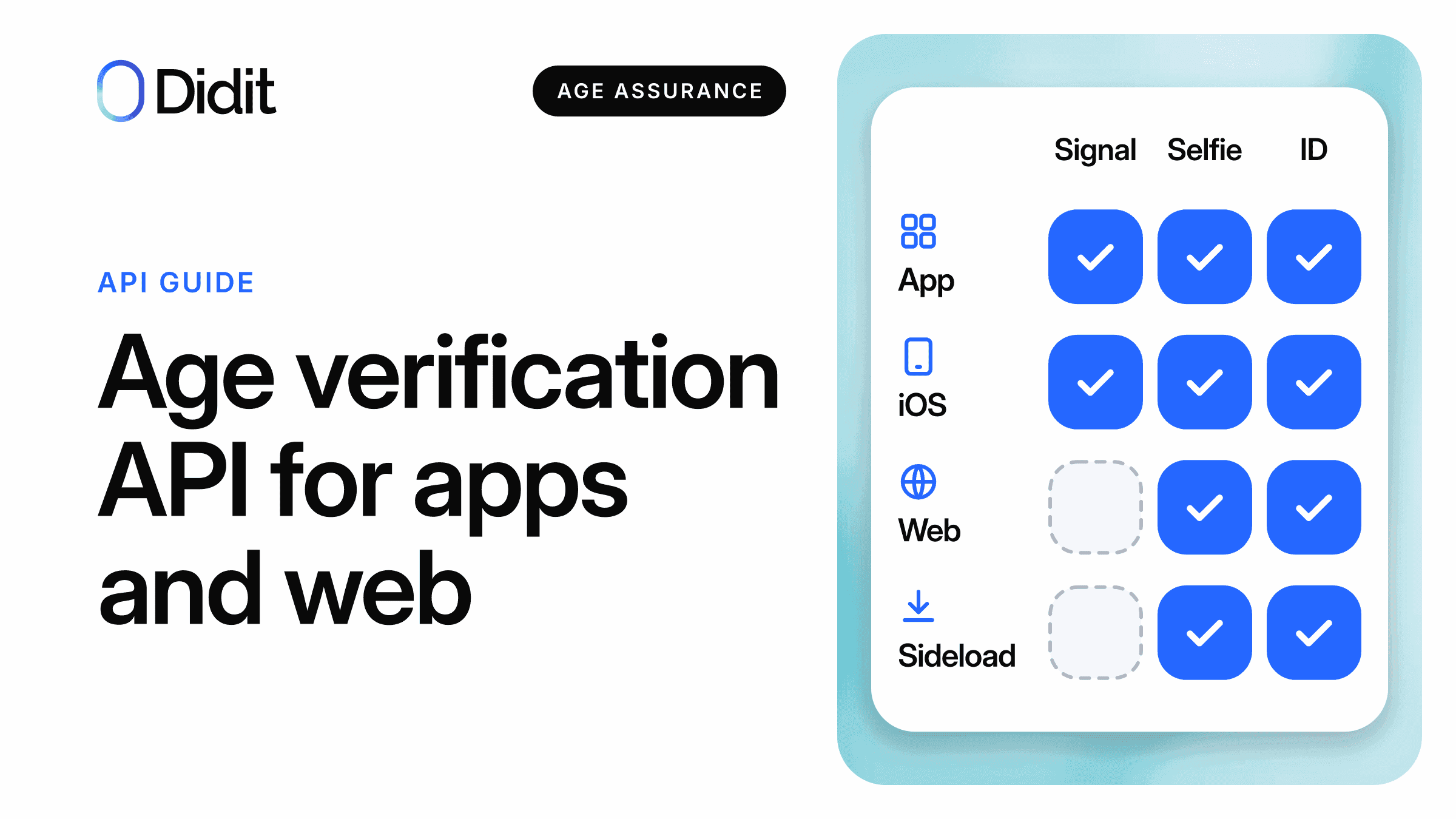
No single age verification API covers every surface. The store and operating system APIs answer inside their own apps only,[1][5] so the web, sideloaded builds and most desktop apps need a check you run yourself, such as a selfie age estimate with a document step for the borderline cases.
- Play app or iOS app: ask the store or system signal first, and stop there when it is enough.
- Web, sideload, other stores, desktop: a selfie or document API works wherever there is a camera.
- Keep the store signal apart from your own result: the terms that govern them are different.
Search for "age verification API" and you get five different products under one name: a store signal, a telecom lookup, a wallet credential, a face estimate and a document check. This guide sorts them by the surface your users are on, then shows the calls.
For what changes in January 2027, read the Google Play Age Signals API guide. Confirm with counsel which age rule applies to your app.
Short answer: start from the surface
1Name the feature you gate
One feature, one minimum age, the countries it runs in. An app with nothing age-restricted may need no check of its own.
The user is in an app installed from a store with an age API
Ask the store or system
If it answers and your rule accepts that answer, stop here.
Go to your own check
Web, sideload, desktop, unsupported device or old system version.
2Run your own check only where it is needed
Selfie estimate first, document for the band around your threshold.
Five kinds of age verification API
They differ in who established the age and in what they return.
| Kind | Examples | What comes back | What it rests on |
|---|---|---|---|
| Store or OS signal | Google Play Age Signals, Apple Declared Age Range, Amazon GetUserAgeData, Samsung Get Age Signals | An age range; Google and Apple also say how it was set, and give no birth date | What the account holder, a parent or the store recorded. Google's TIER_A means the user provided the age and Google "may or may not have confirmed this information"[2] |
| Telecom lookup | CAMARA Know Your Customer Age Verification | ageCheck: true, false or not_available[10] | The operator's record of the subscriber; API status is Initial, availability by country and network[10] |
| Wallet or eID | National eIDs, the EU age verification solution | A proof of being over an age, or a date of birth | An issuer's record, for people who hold one |
| Selfie estimate | Didit POST /v3/age-estimation/ | An estimated age in years and a liveness score | A model reading a face; it does not say who the person is |
| Document check | Didit POST /v3/id-verification/ or a workflow step | Date of birth, age and issuing state read from the document[19] | A government document, with a liveness and face match step if you add them |
The EU solution lets a person prove they are over 18 without sharing other personal data, and can be adapted to other ages.[11]
For the trade-offs, read eID versus age estimation.
Coverage table: which API answers on which surface
| API | Google Play app | App Store app | Sideload and other Android stores | Web | Desktop |
|---|---|---|---|---|---|
| Play Age Signals | Yes, Android 6.0 and up, if Google Play updates the app[1][27] | No | No: APP_NOT_OWNED when Play did not install the app[3] | No web call documented | No; unsupported device types return DEVICE_NOT_SUPPORTED[3] |
| Apple Declared Age Range | No | Yes, iOS and iPadOS 26.0 and up[5] | No | No web call documented | Mac only: macOS 26.0 and up[5][6] |
| Amazon GetUserAgeData | No | No | Amazon Appstore installs only, for eligible accounts in the US states the page covers[8] | No | No |
| Samsung Get Age Signals | No | No | Galaxy Store installs only; live for Texas, other regulations under review[9] | No | No |
| Telecom lookup | Where the user has a line with an operator that offers it | Same | Same | Same | Same |
| Wallet or eID | Where the scheme exists | Same | Same | Same | Same |
| Selfie estimate | Yes | Yes | Yes | Yes | With a camera |
| Document check | Yes | Yes | Yes | Yes | With a camera |
Vendor pages read on 22 November 2026. The last four rows are our reading: those calls are not tied to an app store, so the limit is who holds the credential or whether you can capture an image.
Timing
Play Age Signals v0.0.6 is available globally now and, per Google, will start to return responses for all users by 11 December 2026.[1] The calls and status values are in the Play Age Signals integration guide.
Get a demo of age estimation in your app
Show us your age gate and we will map where the store signal is enough and where your own check fits.
The web gap
No Google or Apple page we read gives a website a way to ask for a visitor's age range.[1][5] Google limits use to apps updated by Google Play, and "the information returned by the API can be used only by the requesting app".[1]
Brazil's decree still expects the web to act. In its article on services with content unsuitable for or prohibited to minors, suppliers reachable through a browser must assess age and may use signals from the operating system, the app store or another digital service (Decreto 12.880, art. 26 §2).[13] More in Brazil's ECA Digital and Google Play.
- React, Vue, Angular, Next.js, Nuxt, Svelte or plain JS: use the Didit Web SDK, modal or inline.[25] See age estimation with the JS SDK.
- Any page: redirect to the hosted session URL and come back to your callback.
- App with a web shell: use a native SDK, or a WebView where none exists.[26] See age estimation in WebViews.
Sideloaded apps and other stores
The same Android build can arrive four ways, and the store API that answers changes each time. Branch on the installer, not on the phone brand.
| Where the build came from | API to ask | When it does not answer |
|---|---|---|
| Google Play | Play Age Signals | Status or error value; not retryable for APP_NOT_OWNED and DEVICE_NOT_SUPPORTED[3] |
| Amazon Appstore | GetUserAgeData through a content provider | responseStatus APP_NOT_OWNED or FEATURE_NOT_SUPPORTED, or userStatus UNKNOWN[8] |
| Galaxy Store | getAgeSignalResult, Galaxy Store 4.6.03.1 or higher | UNKNOWN, including when Galaxy Store is not the installer[9] |
| Your site, an enterprise install, another store | None of the four above | Your own check, or an age-appropriate default |
A missing answer is not a minor and not an adult. What to do with it, feature by feature, is the subject of what to do when the age signal is missing.
iOS and Android together
The two signals differ in shape, in freshness and in what a refusal looks like; the field-by-field comparison covers that.[2][6] For one codebase, three rules hold.
- Treat a declined request, a null bound and an error as three different cases.
- Re-ask on a schedule. Apple keeps returning the previous range until the anniversary of the original declaration.[6]
- Check the law first in California: from 2027 a request no law requires is barred, while periodic requests to maintain compliance are not.[12]
On a Mac, Apple's eligibility property returns false, yet requestAgeRange can still be called to get the declared range.[6] We found no equivalent signal for Windows or Linux apps in the pages we read.
One user, two surfaces: which age do you keep
A user shares an age range in your Android app, then signs in on your website. Two texts pull in different directions.
California, from 1 January 2027
Knowledge follows the user
- A developer that receives a signal is deemed to have actual knowledge of the age range across the app's platforms, including a website where the user creates or logs into an account[12]
- The signal is the primary indicator, unless the developer holds internal clear and convincing information that differs[12]
Civil Code 1798.501(d), as amended by AB 1856
Google, today
The data stays in the app
- The information returned by the API can be used only by the requesting app[1]
- No selling, sharing or transferring it to any third party for any reason, except as strictly required by law[4]
Play Age Signals terms and user data policy
Unresolved
We found no Google or California page that reconciles the two as of 22 November 2026. Ask counsel before you copy a signal into a shared user profile. The age in the California signal is declared, and the Act bars prompting users to change it.[12]
Apple's licence limits its range to age-appropriate content or features in your application, or to laws that require you to receive it.[7] A result from your own check is a different record. You collected it under your own notice, so Google's and Apple's signal terms do not govern it. Whether it may serve every surface depends on your notice and legal basis: confirm with counsel. Store the two apart, and send neither store's signal to an age check vendor.
When your result and the signal disagree, the rule depends on the place. In Alabama (effective 1 January 2027, challenged in court, with no ruling found as of 22 November 2026), Utah (from 6 May 2027) and Brazil, the lower or more protective age wins for the defaults and restrictions those texts cover, so your own check can only tighten.[13][14][15][28] No California text says that an age estimate is clear and convincing information. The state-by-state rules are in the App Store Accountability Acts guide and California's four rules for apps.
Selfie and document APIs: what they return
You run these two yourself, on any surface with a camera. They return very different amounts of data.
| Field | Selfie age estimation | Document check |
|---|---|---|
| Age | age_estimation, years as a decimal, null when no face age could be estimated[16] | date_of_birth and age[19] |
| Decision | status: Approved or Declined | status: Approved, Declined or In Review |
| Real person | Passive liveness score, 0 to 100, always in the same call | Document liveness screens the images; the face match to a selfie is a separate step |
| Identity | None | Name, document number, issuing state, address when printed |
| Warnings | AGE_BELOW_MINIMUM, AGE_NOT_DETECTED, LOW_LIVENESS_SCORE, LIVENESS_FACE_ATTACK, NO_FACE_DETECTED | Expiry, screen captures, printed copies and more |
Standalone endpoints.[16][19]
The selfie answer is model-predicted, and Didit's own docs say to use it "for age gates and low-friction checks, not as legal proof of age".[16] In Didit's own locked evaluation set of 2,399 selfies of people aged 13 and over, the model in production since 4 November 2026 has a mean absolute error of 1.1 years for 16 and 17-year-olds and 1.9 years for 18 to 20-year-olds.[17] That is why an 18 gate needs a band, not a single cut.
Where an estimate alone is not enough
In Brazil, for content prohibited to minors and betting, an estimate alone is not enough: the ANPD's preliminary draft guide wants estimation complemented by verification.[29] Document images may not be kept there once the needed information is read.[13]
Didit: POST /v3/age-estimation/ and the hosted session
Use the standalone endpoint when you already capture a selfie, and the hosted session when you want the screens run for you. Parameters are in our age estimation API post.
You own the camera
Standalone API
- One image in, one answer back in the same request
- Passive liveness only
- No document fallback: you call the next step yourself
- You show the biometric notice and take the consent
POST /v3/age-estimation/
Didit runs the screens
Hosted session
- Web SDK, native SDKs, redirect or link
- Active or passive liveness
- Document step for the band you set
- Biometric consent step for Illinois, Texas and Colorado
POST /v3/session/
The selfie call
Call it from your server, so the API key never reaches the app or the browser.
curl -X POST 'https://verification.didit.me/v3/age-estimation/' \
  -H "x-api-key: $DIDIT_API_KEY" \
  -F 'user_image=@./selfie.jpg' \
  -F 'age_estimation_decline_threshold=18' \
  -F 'face_liveness_score_decline_threshold=30' \
  -F 'save_api_request=false'
An approved answer, shortened:
{
  "request_id": "0c40ba43-64ab-4e2e-b4b8-7d1f12f81bc1",
  "age_estimation": {
    "status": "Approved",
    "method": "PASSIVE",
    "score": 97.5,
    "age_estimation": 27.33,
    "warnings": []
  }
}
The default stores the face
With save_api_request left at its default of true, the call is saved as a session, the face crop and reference image are stored, the face embedding joins your application's face index and a status.updated webhook is sent. With false nothing is stored, and request_id cannot be looked up later.[16] Save the decision in your own record first.
- Read the body: an underage or spoofed capture still returns HTTP 200 with
Declined, and any warning declines.[16] - Set
age_estimation_decline_threshold=0if you apply your own band; liveness still decides the status.[16] - Drop the per-face
entitieslist, which includes a predicted gender, unless you need it. - Never read 401, 403 or 429 as an age result.
- Copy the
Declinedexamples from the API reference into your tests: a sandbox key always returns an approved mock with age 30.[16]
The hosted session
Create an Adaptive Age Verification workflow in the console, then start a session from your backend.
curl -X POST 'https://verification.didit.me/v3/session/' \
  -H "x-api-key: $DIDIT_API_KEY" \
  -H 'Content-Type: application/json' \
  -d '{
    "workflow_id": "YOUR_AGE_WORKFLOW_ID",
    "vendor_data": "user-123",
    "callback": "https://example.com/age/done",
    "metadata": {"surface": "web"}
  }'
The 201 response carries session_id, session_token and url.[20] Native SDKs start with the token, the Web SDK with the URL:
import { DiditSdk } from '@didit-protocol/sdk-web';

DiditSdk.shared.onComplete = (result) => {
  // UI feedback only: the decision arrives on your server
  showStatus(result.type); // completed, cancelled or failed
};
DiditSdk.shared.startVerification({ url: sessionUrl });
With the fallback on, an estimate below borderline_minimum_age_threshold raises AGE_BELOW_MINIMUM, an estimate inside the band continues to the document, and so does a face with no detectable age.[18] In the decision, read the estimate from liveness_checks[].age_estimation. Choosing the band is covered in the fallback guide.
Reuse the same vendor_data on app and web. If the user left a session unfinished on the current workflow version, the same session comes back instead of a new one. A finished session is never reused, so keep the outcome on your account record.[20] Never put the Google or Apple signal in metadata.
Verify the webhook before you trust it
Check signature and time
Check X-Signature-V2, an HMAC-SHA256 made with your destination secret over the canonical JSON: sorted keys, compact separators, Unicode left unescaped, whole-number floats written as integers. It covers the whole payload, and the docs carry ready code for Node.js, Python and PHP.[21]
- Reject a timestamp more than 300 seconds from now and compare in constant time.[21]
- Accept the
-Previousheader too: it is sent for 24 hours after you rotate the secret.[21] - Key on
event_id, and do not let an older event overwrite newer state: order is not guaranteed.[21] - Avoid
X-Signature-Simple: it is deprecated and does not cover the decision.[21]
Cost and data
Google's and Apple's age pages that we read state no fee for their range APIs.[1][5] A check you run has a list price per call (pricing).
| Didit route | List price | What triggers the charge |
|---|---|---|
| Age Estimation, standalone | $0.10 | Each HTTP 200 response, declined ones included[16][22] |
| Age Estimation step in a workflow | $0.10 | The step, liveness included[17][22] |
| Document step for the band | $0.15 on top[22] | Only users sent to it; the face match between document and selfie is not billed as a separate Face Match[17] |
A hosted age gate costs $0.10 per checked user, plus $0.15 for the share that falls in your band. Asking the store signal first lowers the number of checked users.
Data is the second cost.
- Use an ISO/IEC 27566-1 workflow when you want the age decision and nothing else: response attributes are locked, 13 is the lowest minimum age and no biometric template is stored.[17]
- Switch off returned data you do not need in other workflows; a withheld value comes back as
null.[23] - Set a retention window from 1 month to 10 years, or delete each session after the webhook.[23]
- Keep the biometric consent step on for Illinois, Texas and Colorado, and ship native SDK 4.10.0 or later there.[24]
- Note the roles: Didit is the processor, you are the controller, and the region is the European Union (Ireland) by default.[23]
When to stop
Where the signal is enough, stop there. A second check on every user is hard to square with data minimisation.
How Didit helps where no store signal reaches
Didit runs age estimation on the web, in native apps and in builds no store answers for, with one API key and one webhook. It starts with a selfie and asks for a document only in the band you set. It does not read the Google or Apple signals: your app decides that a check is needed and starts the session without them. See it on demos.didit.me or in the Academy video.
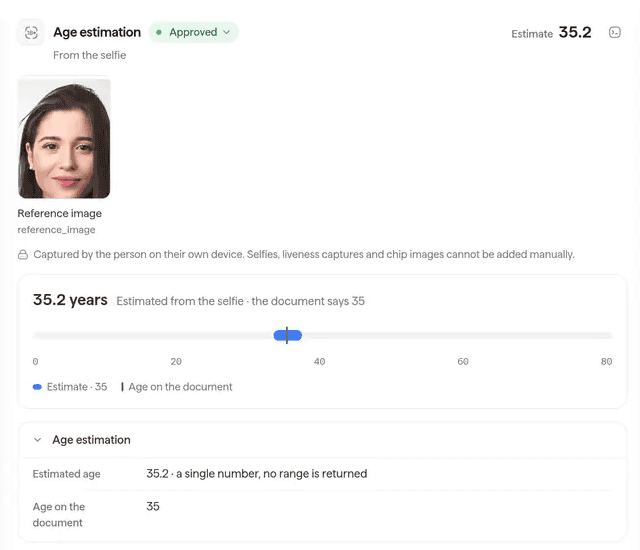
The age estimation result in the Didit console (sample data): the estimate from the selfie next to the age on the document.
Didit provides
- Selfie age estimation with liveness, by API or hosted session
- The document step for borderline estimates
- Web and native SDKs (iOS, Android, React Native, Flutter)
- Signed webhooks, returned data switches and deletion by API
Stays with you
- Calling the Google, Apple, Amazon or Samsung API and keeping its data in the app
- The threshold, the band and which feature they gate
- The legal basis, the notice and the decision
See one age gate on app and web
Bring your surfaces and your markets: get a demo of age estimation in your app, or build it in sandbox first.
Key takeaways
- Store and system age APIs answer inside their own apps. Websites and sideloaded builds get no answer from them.
- A selfie API returns an estimated age; a document API returns a date of birth and far more data.
- With the standalone endpoint, set
save_api_request=falseor accept that the face is stored and indexed. - Act on the signed webhook, never on the result the browser reports.
Frequently asked questions
Is there a free age verification API?
The Google and Apple pages we read state no fee for Play Age Signals or Declared Age Range, but each answers only inside its own apps. A check you run is priced per call: Didit's age estimation lists at $0.10.
Is there a way to verify age without ID?
Yes, with limits: a store signal, a telecom lookup, a wallet proof or a selfie estimate. A selfie gives an estimate, not legal proof of age, so a document stays useful for borderline ages and regulated products.
Does Play Age Signals work on the web?
No web call is documented. Google limits use to apps updated by Google Play and says the returned information can be used only by the requesting app.
What about sideloaded apps?
Play returns APP_NOT_OWNED when it did not install the app. Amazon and Samsung answer for installs from their own stores only. Elsewhere, use an age-appropriate default or your own check.
How do I verify age in a React web app?
Create a session on your backend, install @didit-protocol/sdk-web and call startVerification with the session URL. Open the feature only after the signed webhook.
What does an age estimation API return?
Didit's returns an estimated age in years, a passive liveness score, a status of Approved or Declined and a list of warnings.
Can one check serve app and web?
Your own check can, if your notice and legal basis cover both: store the outcome on the account. Google's signal is limited to the requesting app, so do not copy it to the site without legal advice.
How is the result secured?
Webhooks are signed with HMAC-SHA256. Check X-Signature-V2 with a constant-time comparison, reject a timestamp more than 300 seconds from now and handle each event_id once.
How long is data kept?
You choose. Set a retention window from 1 month to 10 years, or delete a session by API. In the standalone call, save_api_request=false stores nothing; the default stores the images and the face embedding.
How much does it cost?
At list price, $0.10 per age estimation and $0.15 more when a user goes to the document step in a workflow.
Sources
- Play Age Signals API overview and terms of service, Android Developers, updated 18 November 2026.
- Understand age signals responses, Android Developers, read 22 November 2026.
- Handle Play Age Signals API errors, Android Developers, read 22 November 2026.
- Age Signals API and User Data policy, Google Play Console Help, read 22 November 2026.
- Declared Age Range, Apple Developer Documentation, read 22 November 2026.
- Requesting people's age range information in your app, Apple Developer Documentation, read 22 November 2026.
- Apple Developer Program License Agreement, Declared Age Range API terms, Apple, read 22 November 2026.
- User age verification, GetUserAgeData API, Amazon Appstore, updated 25 September 2026.
- Get Age Signals, Samsung Galaxy Store, read 22 November 2026.
- Know Your Customer Age Verification, CAMARA, The Linux Foundation, read 22 November 2026.
- The EU approach to age verification, European Commission, read 22 November 2026.
- AB 1856, Chapter 184, Statutes of 2026 (amending the Digital Age Assurance Act), California Legislative Information.
- Decreto 12.880 of 18 March 2026, articles 24 to 26, Presidency of Brazil.
- HB 161 (Act 2026-59), enrolled, Alabama Legislature.
- Utah Code 13-76-202, Utah Legislature.
- Age Estimation API reference, Didit documentation, read 22 November 2026.
- Age Estimation overview: accuracy, fallback, ISO/IEC 27566-1, Didit documentation, read 22 November 2026.
- Age Estimation warnings, Didit documentation, read 22 November 2026.
- ID Verification API reference, Didit documentation, read 22 November 2026.
- Create session, Didit documentation, read 22 November 2026.
- Webhooks, Didit documentation, read 22 November 2026.
- Pricing, Didit documentation, read 22 November 2026.
- Data retention and returned data, Didit documentation, read 22 November 2026.
- Biometric consent, Didit documentation, read 22 November 2026.
- Web SDKs overview, Didit documentation, read 22 November 2026.
- Native SDKs overview, Didit documentation, read 22 November 2026.
- Use the Play Age Signals API: requirements, Android Developers, read 22 November 2026.
- Lawsuit against Alabama's app store law, CCIA (the plaintiff), October 2026.
- ECA Digital: age assurance guide, preliminary version of May 2026, ANPD, read 22 November 2026.
The pattern is the same for every age gate in our age verification solution: the signal where it exists, your own check where it does not. To try the check itself, start from Didit age estimation.
Cover the surfaces the stores do not
Get a demo of age estimation on your web and app flows, or create a sandbox application and make your first call.
संबंधित लेख
- Google Wallet ID बनाम ID दस्तावेज़ सत्यापन: किसका उपयोग कब करें
- Digital Credentials API: वेबसाइटें ID वॉलेट्स से कैसे जुड़ती हैं
- अपने ऑनबोर्डिंग फ्लो में Google Wallet ID स्वीकार करें: इंटीग्रेशन गाइड
- Google Wallet ID pass: व्यवसायों को क्या मिलता है और यह कहाँ काम करता है
- Didit पर Google Wallet ID सत्यापन लाइव है
- 2026 में 7 सर्वश्रेष्ठ eIDAS सॉफ़्टवेयर प्लेटफ़ॉर्म