
Play Age Signals API integration guide: v0.0.6 for Android apps
The three calls of Play Age Signals 0.0.6 in Kotlin, a decision table for every status, tier and bound, errors, migration from 0.0.3 and 0.0.4, testing, and how to start your own age check.
In short
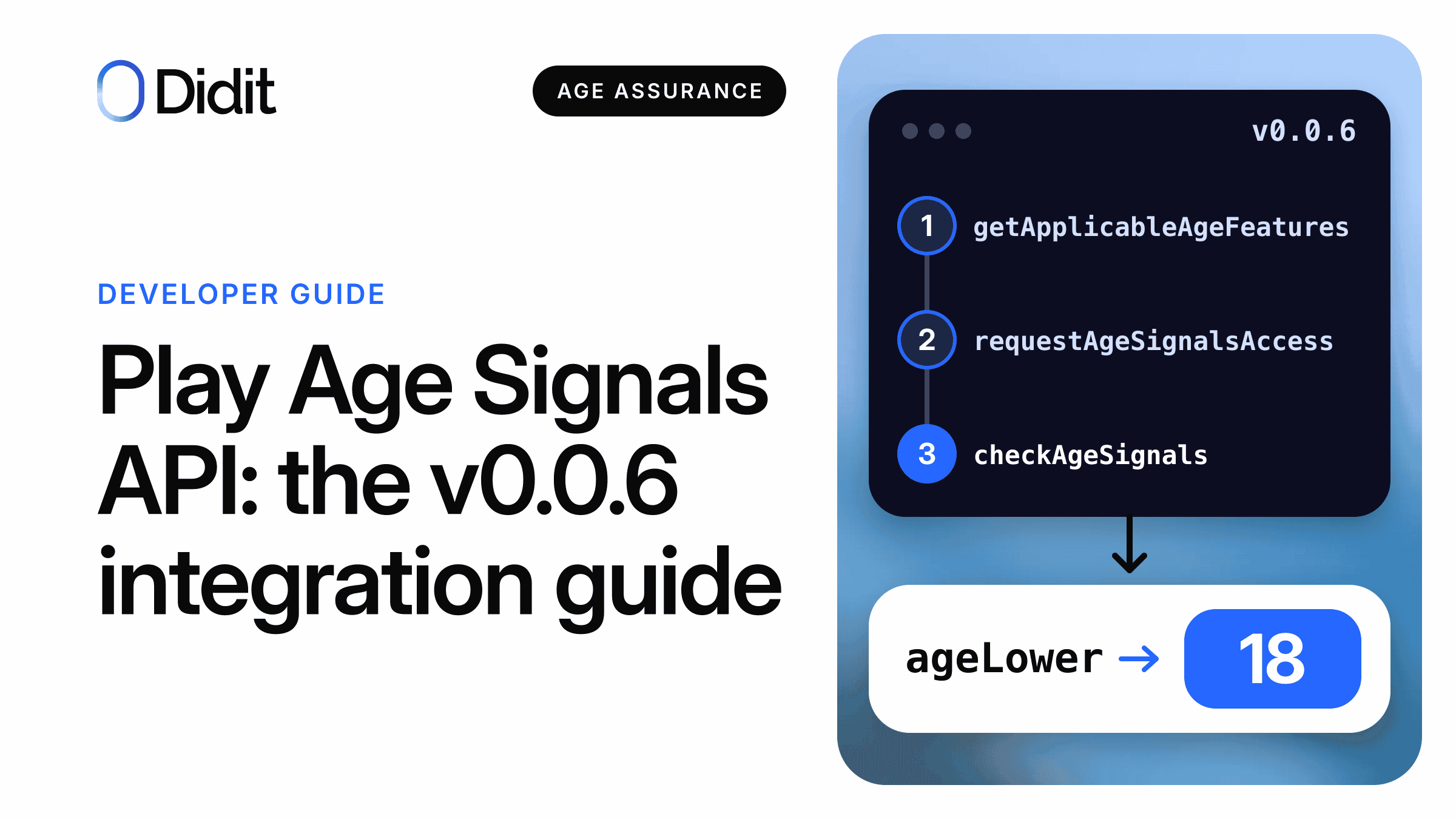
To integrate the Play Age Signals API today, add com.google.android.play:age-signals:0.0.6, call requestAgeSignalsAccess with an Activity, and call checkAgeSignals only when the status is SHARED.[1][2]
- Read the age from
ageLower. The tier says how the age was established, and null is never an adult. - The 0.0.6 library manifest declares minSdk 24, although the guide says API 23.[1][11]
- The signal stays in your app. If you need your own age check, start it without the signal.
This is the engineering guide to the Play Age Signals API: Android first, then Flutter, React Native, Expo and Unity. For who is affected and what starts in January 2027, read Google Play Age Signals API: what changes in January 2027. Google offers the API and does not oblige you to call it; a law may.
Every class, method and enum below was checked against Google's pages and the published 0.0.6 library on 22 November 2026; the Kotlin for the signal compiles against it.
What you need
The API runs on phones, foldables and tablets, through the Play Store app on the device.[1][5]
- Set
minSdkto 24 (see the warning). - Ship through Google Play: the terms limit the API to apps that Google Play updates.[5]
- Open the Age signals page in Play Console: custom ages, significant changes and revoked approvals live there.[3][8][9]
- Answer Play's data safety form yourself. Google says the client library collects no data and that the form is your decision.[5]
Watch out
Google's setup page says Android 6.0, API level 23.[1] The manifest inside the 0.0.6 library declares minSdkVersion 24; 0.0.3 and 0.0.4 declared 23.[11] An app with minSdk 23 can stop building on the manifest merge after the upgrade. Raising it to 24 is the simple fix.
- February 20260.0.3One call,
userStatus, adds DECLARED. - July 20260.0.4Two calls, tiers replace
userStatus. - November 20260.0.6Global, adds
getApplicableAgeFeatures. - 11 December 2026All usersGoogle's date for responses to everyone.
Library versions, from Google's release notes and banner.[2][4] Until that date, expect some users with no response.
Add the library
One dependency.[1] The fake manager for tests is in the same artifact.[11]
dependencies {
    implementation("com.google.android.play:age-signals:0.0.6")
}1getApplicableAgeFeatures (optional)
Is sharing mandatory for this user.
2requestAgeSignalsAccess
May show Google Play's own prompt.
Status is SHARED
3checkAgeSignals
Read bounds, source, change status.
No age from Google
Use your age-appropriate default.
The call order in 0.0.6.[2]
Step 1: is sharing mandatory for this user
The call is optional.[2] features() contains MANDATORY_SHARING only for users in regions whose laws require app stores to share age information, and is empty for everyone else.[2]
val manager = AgeSignalsManagerFactory.create(applicationContext)

manager.getApplicableAgeFeatures(ApplicableAgeFeaturesRequest.builder().build())
    .addOnSuccessListener { result ->
        val mandatory = ApplicableAgeFeature.MANDATORY_SHARING in result.features()
        // Use it to word your own screen. It is not an age.
    }
    .addOnFailureListener { error -> handleAgeSignalsError(error) }
Note
Mandatory means the user's sharing is mandatory. It says nothing about how the age was established: Google documents MANDATORY_SHARING with TIER_A, TIER_B, TIER_C and TIER_D.[3]
Step 2: ask for access
Google's text writes requestAgeSignalsAccess(Activity); the method takes an AgeSignalsAccessRequest that carries the Activity.[2] Call it where a prompt is acceptable.
val request = AgeSignalsAccessRequest.builder()
    .setActivity(this)
    .build()

manager.requestAgeSignalsAccess(request)
    .addOnSuccessListener { access ->
        when (access.ageSignalsStatus()) {
            AgeSignalsStatus.SHARED -> readSignals(manager)
            AgeSignalsStatus.NOT_SHARED -> applyGate(AgeGate.NoSignal)
            AgeSignalsStatus.VERIFICATION_REQUIRED -> applyGate(AgeGate.VerifyInPlay)
            else -> applyGate(AgeGate.NoSignal) // UNSPECIFIED or null
        }
    }
    .addOnFailureListener { error -> handleAgeSignalsError(error) }
What the user sees depends on region and setting:[2]
| User | Prompt | Status |
|---|---|---|
| US state where stores must give verified ages, verified or supervised | None | SHARED |
| Same, not yet verified | None in your app; Play handles it | VERIFICATION_REQUIRED |
| Elsewhere, Ask before sharing (the default[14]) | Play's in-app prompt | SHARED or NOT_SHARED |
| Elsewhere, Always share | None | SHARED |
| Elsewhere, Never share | None | NOT_SHARED |
| Elsewhere, supervised | None; the parent decides in Family Link | SHARED or NOT_SHARED |
After a few dismissals Play stops showing the prompt, so do not call in a loop.[2] Where sharing is mandatory the setting is fixed to Always share.[14]
Map your age gate to the signal
Show us your gate and your markets, and we will show you which branches need your own check and which do not.
Step 3: read the result
Every field is nullable, so convert once and keep one type in your app. This mapping reads the age from the bounds only.
sealed interface AgeGate {
    data object NoSignal : AgeGate
    data object VerifyInPlay : AgeGate
    data class Range(
        val lower: Int,
        val upper: Int?,         // null = top band, not "adult"
        val source: Int?,        // AgeRangeSource.TIER_A to TIER_D
        val changeStatus: Int?   // SignificantChangeStatus
    ) : AgeGate {
        fun isAtLeast(age: Int) = lower >= age
    }
}

fun toAgeGate(r: AgeSignalsResult): AgeGate {
    val lower: Int = r.ageLower() ?: return AgeGate.NoSignal
    return AgeGate.Range(
        lower, r.ageUpper(), r.ageRangeSource(), r.significantChangeStatus()
    )
}

private fun readSignals(manager: AgeSignalsManager) {
    manager.checkAgeSignals(AgeSignalsRequest.builder().build())
        .addOnSuccessListener { result -> applyGate(toAgeGate(result)) }
        .addOnFailureListener { error -> handleAgeSignalsError(error) }
}
The status, source and change constants are integers where 0 is UNSPECIFIED.[10][11] Handle it in an else branch. Google's 0.0.3 guide advised a fresh request when the app opens because values change[12]; a user can also switch sharing off later.[14]
Note
That guide also recommends calling the Play Integrity API alongside, so that the call comes from an untampered build on a certified device.[12] The signal is a client-side answer: do not trust a band that a modified client posts to your server.
The decision table: status x source x bounds
The default ranges are 0-12, 13-15, 16-17 and 18+.[3] The last column is our engineering advice, not Google's.
| Status | Source | Lower / upper | What it means | What your code does |
|---|---|---|---|---|
| Exception | none | none | No answer[7] | Retry if retryable, then no signal |
NOT_SHARED | null | null / null | User or parent did not agree to share[2][3] | Age-appropriate default, no repeat prompt |
VERIFICATION_REQUIRED | null | null / null | Not verified, in a region where verification and sharing are mandatory[2][3] | Point to the Play Store, keep the default |
SHARED | TIER_A | 13 / 15 | User gave the age to Google, which may or may not have confirmed it[3] | Apply the band |
SHARED | TIER_A | 18 / null | Same, adult band[3] | Apply it; add a check only if law or risk asks for more |
SHARED | TIER_B | 13 / 15 | Age managed by a parent or guardian[3] | Apply the band, read the change status |
SHARED | TIER_C | 18 / null | Assessed by credit card, email, selfie, government ID or tax ID[3] | Apply the band |
SHARED | TIER_D | 18 / null | Government ID plus selfie, or a digital ID[3] | Apply the band |
SHARED | any | null / any | Not in Google's response table | Treat as no signal |
Three readings cause most mistakes:
- TIER_A is not "unverified". An adult who verified with a digital ID but shares by choice also arrives as TIER_A.[3] TIER_C and TIER_D are returned only in regions where age verification is mandatory, for example Texas.[3] The class reference labels TIER_A "self declared"; the response guide is more careful.[3][10]
- TIER_B is not an age. It says who manages it. Read the bounds.
- Null bounds are not a verified adult. A comment in Google's Java sample suggests it; its Kotlin sample says the user is not sharing, and the response table agrees with the Kotlin.[2][3]
When to stop here
If the band answers your question and no law or risk asks for more, stop. A second check on every user is hard to square with data minimisation, and in California the signal is the primary indicator unless you hold internal clear and convincing information.[15]
Where a branch ends in no signal, the design of what comes next is in what to do on NOT_SHARED, TIER_A or no answer.
Need an answer where the signal has none
Get a demo of age estimation in your app: selfie first, document only for borderline cases.
Custom minimum ages
On the Custom age ranges tab you enter up to three minimum ages, at least two years apart, changeable once a year. They override the default response.[3]
| Minimum ages set | Ranges returned | Top band |
|---|---|---|
| None (default) | 0-12, 13-15, 16-17, 18+ | 18 / null |
| 15 | 0-14, 15+ | 15 / null |
| 13, 17 | 0-12, 13-16, 17+ | 17 / null |
| 11, 13, 15 | 0-10, 11-12, 13-14, 15+ | 15 / null |
Examples from Google's response guide.[3]
Example
You set 13 and 17. A 25-year-old now returns 17 / null, the same as a 17-year-old. Code that reads a null ageUpper as adult lets 17-year-olds into an 18+ feature, so keep 18 in your list if you gate at 18. Documented bounds stop at 18[3]: this API cannot answer a 21 gate.
Significant changes and revoked approvals
Both features are for supervised users. Which law makes a change significant is your decision, not Play's[8]; the state rules are in App Store Accountability Acts.
You notify Play
Significant change
- Up to 3 changes, up to 90 days ahead, more than 2 days apart
- English description required, shown verbatim to parents
significantChangeStatusis APPROVED, PENDING or DECLINED- Your app must restrict the changed feature
Cumulative: one approval covers all pending changes[8]
Play notifies you
Revoked approval
installIdis per user and device, and does not survive a reset- You may store it on your backend for this purpose only
- Revoked IDs appear as a CSV in Play Console
- Each entry is deleted after 90 days, so download on a schedule
One ID can appear more than once[9]
Gate the changed feature, not the whole app, on PENDING and DECLINED. The status is null for unsupervised accounts and for supervised ones with no recorded change.[3]
Errors and unsupported devices
Failures arrive as AgeSignalsException. Google advises retries with a maximum number of attempts.[7]
// -8 (CLIENT_TRANSIENT_ERROR) to -1 (API_NOT_AVAILABLE) are marked retryable
private val RETRYABLE =
    AgeSignalsErrorCode.CLIENT_TRANSIENT_ERROR..AgeSignalsErrorCode.API_NOT_AVAILABLE
private var attempts = 0

fun handleAgeSignalsError(e: Exception) {
    val code = (e as? AgeSignalsException)?.errorCode
    if (code in RETRYABLE && attempts++ < 3) retryLater()
    else applyGate(AgeGate.NoSignal)
}| Code | Constant | Retry | Action |
|---|---|---|---|
| -1, -6 | API_NOT_AVAILABLE, PLAY_STORE_VERSION_OUTDATED | Yes | Ask to update the Play Store |
| -2 | PLAY_STORE_NOT_FOUND | Yes | Ask to install or enable the Play Store |
| -3 | NETWORK_ERROR | Yes | Ask to check the connection |
| -4, -7 | PLAY_SERVICES_NOT_FOUND, PLAY_SERVICES_VERSION_OUTDATED | Yes | Ask to install, enable or update Play Services |
| -5 | CANNOT_BIND_TO_SERVICE | Yes | Exponential backoff, then update the Play Store |
| -8 | CLIENT_TRANSIENT_ERROR | Yes | Capped retry, then try later |
| -9 | APP_NOT_OWNED | No | Not installed by Google Play: sideload or other store |
| -10 | SDK_VERSION_OUTDATED | No | Ship a newer library |
| -11 | DEVICE_NOT_SUPPORTED | No | Device type not served; new in 0.0.6[4] |
| -100 | INTERNAL_ERROR | No | Google's text still suggests capped retries; the code above does not retry it |
Google's error code reference.[7] An error is not an age: fall back to the default experience.
Migrate from 0.0.3 and 0.0.4
Version 0.0.3 still returns responses but gets no updates.[12] Moving from it is a rewrite of the read path; from 0.0.4 it is small.
| In your code | In 0.0.6 | From |
|---|---|---|
checkAgeSignals alone | requestAgeSignalsAccess first[4] | 0.0.3 |
userStatus() | Gone: ageRangeSource() and significantChangeStatus()[4] | 0.0.3 |
VERIFIED | TIER_C or TIER_D (our reading) | 0.0.3 |
DECLARED | TIER_A, or TIER_B if a parent manages it (our reading) | 0.0.3 |
SUPERVISED | TIER_B (our reading) | 0.0.3 |
SUPERVISED_APPROVAL_PENDING, SUPERVISED_APPROVAL_DENIED | TIER_B with PENDING or DECLINED (our reading) | 0.0.3 |
UNKNOWN, null | The access status: VERIFICATION_REQUIRED or NOT_SHARED (our reading) | 0.0.3 |
mostRecentApprovalDate() | significantChangeApprovalDate()[4] | 0.0.3 |
| Two calls, tiers | Unchanged; add getApplicableAgeFeatures if useful[4] | 0.0.4 |
| Error handling | Add DEVICE_NOT_SUPPORTED[4] | Both |
minSdk 23 | Library declares 24[11] | Both |
Google publishes no value-by-value mapping. Rows marked "our reading" come from comparing both definitions.[3][12]
Watch out
The old AgeSignalsVerificationStatus constants still ship inside 0.0.6, so imports compile while userStatus() does not exist.[11] In 0.0.3, VERIFIED was 0; in 0.0.6, 0 is UNSPECIFIED.[10][11] Clear cached integers when you upgrade.
Test with FakeAgeSignalsManager and license testers
FakeAgeSignalsManager never talks to the Play Store; its reference limits it to unit tests and early development.[32] Inject the manager so that you can swap it.
val fake = FakeAgeSignalsManager()

// Sharing is mandatory for this user
fake.setNextApplicableAgeFeaturesResult(
    ApplicableAgeFeaturesResult.builder()
        .setFeatures(setOf(ApplicableAgeFeature.MANDATORY_SHARING))
        .build()
)
// Verification still pending in Play
fake.setNextAgeSignalsAccessResult(
    AgeSignalsAccessResult.builder()
        .setAgeSignalsStatus(AgeSignalsStatus.VERIFICATION_REQUIRED)
        .build()
)
// Supervised 13 to 15, change waiting for the parent
fake.setNextAgeSignalsResult(
    AgeSignalsResult.builder()
        .setAgeRangeSource(AgeRangeSource.TIER_B)
        .setAgeLower(13)
        .setAgeUpper(15)
        .setSignificantChangeStatus(SignificantChangeStatus.PENDING)
        .setInstallId("fake_install_id_123")
        .build()
)
// Fails checkAgeSignals
fake.setNextAgeSignalsException(
    AgeSignalsException(AgeSignalsErrorCode.NETWORK_ERROR)
)- Cover each status, a minor band, an adult band, null bounds and one error per call (
setNextRequestAgeSignalsAccessExceptionandsetNextApplicableAgeFeaturesExceptionfail the other two). - Run the live call with a license tester: normally an app not updated by Play gets
APP_NOT_OWNED; testers can sideload a debug build.[6] - Keep the package name identical to the Play app and sign in with the tester account.[6]
Flutter, React Native, Expo and Unity
These are community or framework packages, not Google's, and listing one is not a recommendation. Check the library version before you ship.
| Stack | Package checked | Library | Know before you ship |
|---|---|---|---|
| Expo | expo-age-range 58.0.3 | 0.0.4 | On web and on iOS before 26 it returns lowerBound: 18, like an adult[17] |
| React Native | react-native-play-age-range-declaration 3.0.5 | 0.0.4 | Also wraps other stores and Apple[19] |
| Flutter | age_range_signals 0.10.1 | 0.0.4 | Two-call flow, license tester support[18] |
| Unity | unity-play-age-signals | 0.0.4 | GPL-3.0; callbacks may run off the main thread[20] |
Read on 22 November 2026 from each package page or build file.[17][18][19][20] Unity staff wrote in December 2025 that Unity would not release a dedicated plugin.[21]
A package on 0.0.4 has no getApplicableAgeFeatures and no DEVICE_NOT_SUPPORTED. If you need them, write a small native bridge. The Apple side is compared in Play Age Signals vs Apple Declared Age Range.
Do not log, share or profile
Google's terms limit the information to age-appropriate experiences in compliance with laws, in the requesting app.[5] The policy forbids advertising, analytics, profiling, and selling, sharing or transferring the data to any third party except as strictly required by law.[13]
- Keep bands, tiers and
installIdout of logs, crash reports and analytics events: those tools usually belong to third parties. - Keep the raw result in memory where you can, and store the feature decision rather than the tier.
- Never attach the signal to an age check vendor, Didit included.
- In California, do not prompt users to change their age information, and share no signal with a third party for a purpose the title does not require.[15]
- Ask counsel before requesting a signal for every user: California's act bars requests that neither it nor another applicable law requires.[15]
So the "visit the Play Store" message belongs to VERIFICATION_REQUIRED, not to a Californian whose band you doubt. Google's regional page lists California and Brazil as mandatory from January 2027 and Alabama as "Details coming soon".[16] Californian duties are in the Digital Age Assurance Act guide.
After the signal: start your own check
Your app decides that a check is needed; the request carries a workflow and your user ID, never Google's answer. Call Didit from your server, because the API key must not reach the device.
curl -X POST https://verification.didit.me/v3/session/ \
  -H "x-api-key: $DIDIT_API_KEY" \
  -H "Content-Type: application/json" \
  -d '{
    "workflow_id": "YOUR_AGE_WORKFLOW_ID",
    "vendor_data": "user-42"
  }'
The 201 response holds session_id, session_token and url.[25] Send only the token to the app, then start the SDK:[26]
// Once, in Application.onCreate: DiditSdk.initialize(this)

lifecycleScope.launch {
    DiditSdk.state.collect { state ->
        if (state is DiditSdkState.Ready) DiditSdk.launchVerificationUI(this@MainActivity)
    }
}

DiditSdk.startVerification(token = sessionToken) { result ->
    when (result) {
        is VerificationResult.Completed -> refreshAgeDecision() // asks your server
        is VerificationResult.Cancelled -> keepSafeDefault()
        is VerificationResult.Failed -> keepSafeDefault()
    }
}
The SDK result is for the interface. Take the decision from the signed status.updated webhook, or read GET /v3/session/{sessionId}/decision/ from your server.[25][29] Keep the safe default on cancel and failure.
Know the limits
Where the signal is enough, skip this step. An own check does not always win. The Alabama and Utah acts, with duties from 2027, use the lowest age category for the protections they cover, and Brazil the more protective alternative, so there a check can only tighten.[22][23][24] People covered by Illinois, Texas or Colorado law need the biometric consent step before a selfie, which native SDK 4.10.0 or later can show.[28] Confirm with counsel which rule applies to your app.
How Didit helps after the signal
Didit Age Estimation estimates an age from a selfie, with liveness in the same step, and does not say who the person is. A workflow can send a borderline band you set to a document check.[27] Age Estimation costs $0.10 per call; see pricing.
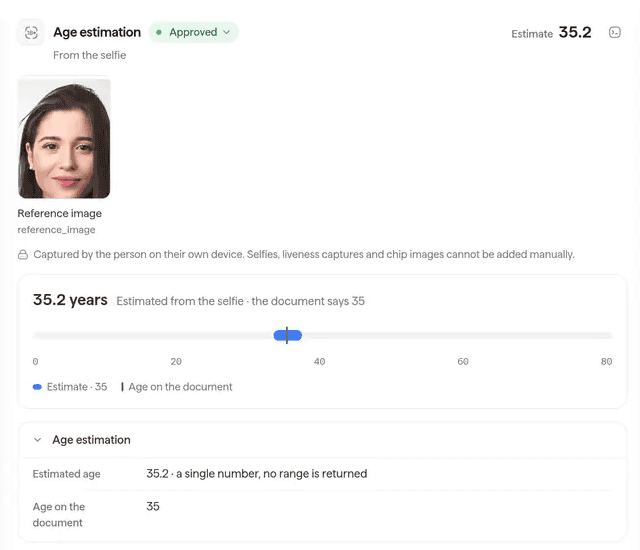
The age estimation result in the Didit console (sample data): the estimate from the selfie next to the age on the document.
Native SDKs exist for Android, iOS, React Native and Flutter. For Unity and other engines the documented route is the WebView integration.[31] Surfaces outside Google Play are covered in Age verification API: apps, web and stores and on the age verification solution page.
Didit provides
- A hosted age check with selfie, liveness and an optional document step
- An ISO/IEC 27566-1 workflow option that returns a yes or no decision about age and no personal data, from a minimum age of 13[27]
- Retention windows, returned-data switches and a delete call[30]
Stays with you
- The Play Age Signals call and its result
- Which law applies and whether a check is needed at all
- The age-appropriate default and the final access decision
Didit has no Play Age Signals connector: the signal stays in your app.
See the fallback branch running in your app
Bring your age gate, your markets and your stack, or build the workflow yourself.
Key takeaways
- Use 0.0.6: optional features call, access request, then
checkAgeSignalsonly onSHARED. - Gate on
ageLower; a nullageUppermeans the top band, and custom ages can move it below 18. - Null bounds,
UNSPECIFIEDand errors are no signal, never an adult. - The 0.0.6 manifest declares minSdk 24.
- Keep the signal in your app and start any own check without it.
Frequently asked questions
Which version of the Play Age Signals API should I use?
Use 0.0.6. It is the current version, available globally, and Google says it will return responses for all users by 11 December 2026; 0.0.4 keeps returning responses in selected regions in the meantime.[2]
Do I need to call getApplicableAgeFeatures?
No, Google marks it as optional. Call it when your own screens should differ for a user whose sharing is mandatory.[2]
What is the difference between NOT_SHARED and VERIFICATION_REQUIRED?
NOT_SHARED means your app gets no age signal because the user or parent did not agree to share. VERIFICATION_REQUIRED means the age is not verified in a region where both verification and sharing are mandatory, and Google tells you to ask the user to visit the Play Store.[2]
Why are both bounds null?
The response reference gives null bounds when the status is NOT_SHARED or VERIFICATION_REQUIRED.[3] Treat null bounds as no signal, and never as an adult.
Why is ageUpper null for adults?
Because the top band is open-ended: 18+ returns ageLower 18 and ageUpper null.[3] With custom ages the top band can start lower, so compare ageLower with your own minimum age.
Can I set my own age ranges?
Yes, up to three minimum ages on the Age signals page in Play Console, at least two years apart, changeable once a year. They override the default ranges.[3]
How do I test before the law applies?
Use FakeAgeSignalsManager to return any status, range or error, including MANDATORY_SHARING. A license tester account lets a sideloaded debug build call the live API.[6]
Does it work in a Trusted Web Activity or a WebView?
Not from web code. It is an Android library called with an Activity, and the Google pages we read document no web interface. A wrapper app would need its own native code, and Google's terms limit the information to the requesting app.[2][5]
Is there a Unity, Flutter or React Native plugin?
There are community and framework packages. Those we checked on 22 November 2026 declare 0.0.4, so they lack getApplicableAgeFeatures. Unity staff said in December 2025 that Unity would not release a dedicated plugin.[17][18][19][20][21]
Can I store the result on my server?
Google's pages expressly describe storing installId on your backend for revocation notices. For the rest, keep the smallest result your legal duty needs, inside your own systems, and never in analytics, advertising or a third-party service unless the law strictly requires it.[9][13]
Sources
- Use Play Age Signals API (beta), Android Developers, updated 19 November 2026.
- Request age signals, Android Developers, updated 18 November 2026.
- Understand age signals responses, Android Developers, updated 18 November 2026.
- Play Age Signals release notes, Android Developers, updated 19 November 2026.
- Play Age Signals overview and terms of service, Android Developers, updated 18 November 2026.
- Test your Play Age Signals API (beta) integration, Android Developers, updated 19 November 2026.
- Play Age Signals API error code reference, Android Developers, updated 18 November 2026.
- Notify Google Play of significant changes, Android Developers, updated 4 September 2026.
- Review revoked app approvals, Android Developers, updated 4 September 2026.
- AgeRangeSource reference, Android Developers, updated 18 November 2026.
- com.google.android.play:age-signals, Google Maven; library manifests and classes of versions 0.0.3, 0.0.4 and 0.0.6 read on 22 November 2026.
- Use Play Age Signals API, version 0.0.3, Android Developers, updated 23 October 2026.
- Age Signals API and User Data policy, Google Play Console Help.
- About age range sharing on Google Play, Google Play Help.
- AB 1856, Chapter 184, Statutes of 2026, California Legislative Information; amends Civil Code 1798.500 to 1798.504.
- Regional age-related protections on Play, Android Developers, updated 18 November 2026.
- Expo AgeRange, Expo documentation; package expo-age-range 58.0.3.
- age_range_signals, pub.dev, version 0.10.1 of 6 October 2026.
- react-native-play-age-range-declaration, GitHub, version 3.0.5.
- unity-play-age-signals, GitHub, updated 4 August 2026.
- Play Age Signals API Support, Unity Discussions, Unity staff reply of December 2025.
- Code of Alabama 8-19K-9 (HB 161), Alabama Legislature.
- Utah Code 13-76-202, Utah Legislature; developer duties from 6 May 2027.
- Decreto 12.880 of 18 March 2026, art. 25, Planalto, Brazil.
- Create session, Didit documentation.
- Android SDK, Didit documentation.
- Age Estimation overview, Didit documentation.
- Biometric consent, Didit documentation.
- Webhooks, Didit documentation.
- Data retention, Didit documentation.
- Native SDKs overview, Didit documentation.
- FakeAgeSignalsManager reference, Android Developers, updated 18 November 2026.
Ship the three calls, test every row of the table, and keep the signal where Google's terms leave it: in your app. For the branches it cannot answer, add age estimation as your own check.
Add the check for users without a signal
Get a demo of age estimation in your app, or create a workflow and start a session today.
Related articles
- Play Age Signals vs Apple Declared Age Range: full comparison
- Age verification API: which one works on apps, web and stores
- Age assurance for apps: games, social, dating, AI and more
- App Store Accountability Acts: Texas, Utah, Louisiana, Alabama
- California age verification law 2027: the four rules for apps
- No age signal? What to do on NOT_SHARED, TIER_A or no answer