

無料
$0/月・カード情報不要
開発、テスト、そして最初のユーザー向け。
スタートに必要なすべて:
- 毎月500件のフルKYC認証
- 本人確認、生体認証、顔照合、デバイス&IP
- 200以上の不正検知シグナル、ブロックリスト、重複チェック
- Diditネットワーク全体でKYCを再利用可能
- ワークフロービルダー、ケース管理、SDK
- AIサポート コンソール内AIエージェント、ドキュメント、コミュニティ。

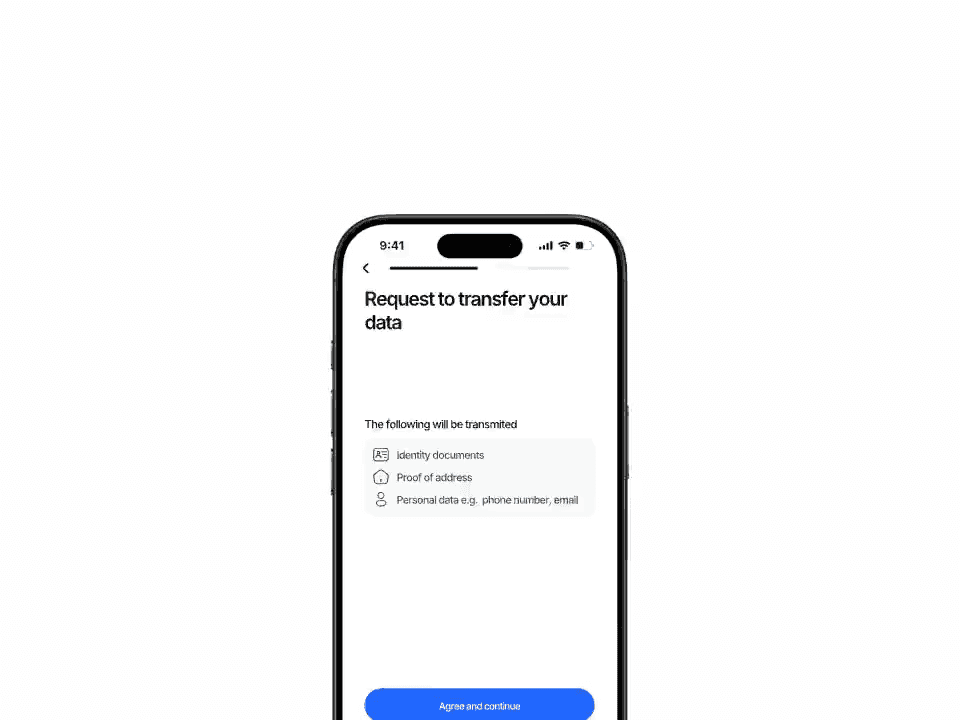
パートナーエコシステム向けに構築
ユーザーはあなたのアプリで一度本人確認を行います。あなたのパートナー(BaaSスポンサー、姉妹ブランド、ダウンストリームマーケットプレイスなど)が同じ記録を必要とする場合、ワンタイム共有トークンを送るだけです。パートナーはそのトークンを引き換え、完全な認証情報を取得できます。ユーザーが二度目のフローを見ることはありません。
承認済み、却下済み、審査中など、完了した認証の中から任意のものを選択し、Diditに共有トークンをリクエストします。トークンはデフォルトで1時間後に期限切れになりますが、1分から最大1日まで延長可能です。
POST /v3/session/[id]/share/
POST /v3/session/import-shared/
即時オンボーディング · または独自のレビュー
session_kind: user | business
ユーザー · KYC
ビジネス · KYB
1回の認証で複数に対応
完了済みのみ · 冪等 · 監査対応
$ curl -X POST https://verification.didit.me/v3/session/$SID/share/ \
  -H "x-api-key: $DIDIT_API_KEY" \
  -H "Content-Type: application/json" \
  -d '{
    "for_application_id": "partner-app-uuid",
    "ttl_in_seconds": 3600
}'{ "share_token": "eyJhbGciOi…" }$ curl -X POST https://verification.didit.me/v3/session/import-shared/ \
-H "x-api-key: $DIDIT_API_KEY" \
-H "Content-Type: application/json" \
-d '{
"share_token": "eyJhbGciOi…",
"workflow_id": "wf_partner_kyc",
"vendor_data": "partner-user-42",
"trust_review": true
}'{ "status": "承認済み", "session_kind": "ユーザー" }# Didit B2B Reusable KYC — partner-to-partner KYC sharing
You are integrating Didit's B2B Reusable Know Your Customer (KYC) into <my_stack>. The recipe is server-to-server: one Didit application (Service X) mints a short-lived JSON Web Token (JWT) share token for a finished session; a partner Didit application (Service Y) imports the token and Didit clones the full verified session into Service Y. Works for both KYC and Know Your Business (KYB) sessions.
Built for Banking-as-a-Service (BaaS) sponsor banks, multi-brand financial groups, embedded finance through partner banks, marketplaces with regional or vertical sub-platforms, on-ramp + exchange ecosystems, white-label resellers, and B2B KYB consortia where the same legal entity onboards once and serves many. Every URL, header, and enum value below is canonical — do not paraphrase or "improve" them.
## 1. Provision both applications
- Sign up: https://business.didit.me (no credit card required).
- Or provision programmatically: POST https://apx.didit.me/auth/v2/programmatic/register/
- Create TWO applications in your Didit organisation. One acts as Service X (mints share tokens), the other as Service Y (imports them). In production these will usually live in different organisations — one per partner.
- Each application has its own `x-api-key`. Service X uses its own key to mint; Service Y uses its own key to import.
## 2. Service X — mint a share token
Service X picks a finished session it owns and posts to the share endpoint:
POST https://verification.didit.me/v3/session/{sessionId}/share/
Headers:
x-api-key: <Service X api key>
Content-Type: application/json
Body:
{
"for_application_id": "<partner-application-uuid>",
"ttl_in_seconds": 3600
}
Bounds on `ttl_in_seconds`: min 60, max 86400, default 3600.
Requirements:
- The session must be in a FINISHED status: "Approved", "Declined", or "In Review".
- The API key must hold the `write:sessions` privilege.
- `for_application_id` must be a real Didit application uuid — usually the partner's app.
Response: 201 Created with the JWT in the `share_token` field plus `for_application_id` and `session_kind` ("user" or "business" — Didit detects this from the source session and embeds it in the token):
{
"share_token": "eyJhbGciOiJIUzI1NiJ9...",
"for_application_id": "partner-app-uuid",
"session_kind": "user"
}
## 3. Transmit the token to Service Y
Service X transmits the `share_token` to Service Y over a pre-arranged backend channel — REST, message queue, signed webhook, anything you control. The token is scoped to Service Y's application and useless to any other application.
## 4. Service Y — import the shared session
Service Y posts the token to the import endpoint:
POST https://verification.didit.me/v3/session/import-shared/
Headers:
x-api-key: <Service Y api key>
Content-Type: application/json
Body:
{
"share_token": "<jwt from step 2>",
"workflow_id": "<Service Y's own workflow id>",
"vendor_data": "<Service Y's internal user id>",
"trust_review": true
}
`trust_review`:
- `true` → the imported session preserves the original status ("Approved" / "Declined" / "In Review"). Service Y onboards the user instantly. Use when Service Y fully trusts Service X's decision (sister brand, regulated partner with a signed data-sharing agreement).
- `false` → the imported session lands in "In Review" so Service Y's compliance team makes its own call. Safe default for new partner relationships.
Response: 201 Created with a brand-new session in Service Y's application:
{
"session_id": "<new uuid>",
"session_number": <int>,
"session_kind": "user" | "business",
"status": "Approved" | "In Review" | "Declined",
"shared_from_session": "<original session uuid in Service X>",
"vendor_data": "<Service Y's internal user id>",
"id_verifications": [...],
"liveness_checks": [...],
"face_matches": [...],
"aml_screenings": [...],
"database_validations": [...],
"proof_of_address": [...],
"phone_verifications": [...],
"email_verifications": [...]
}
For a `session_kind: "business"` token Didit clones the KYB shape instead. KYB session statuses are UPPER_SNAKE_CASE (not Title Case like KYC):
{
"session_id": "<new uuid>",
"session_kind": "business",
"status": "APPROVED",
"shared_from_session": "<original business session uuid>",
"vendor_data": "<Service Y's internal business id>",
"registry_checks": [...],
"key_people_checks": [...],
"document_verifications": [...],
"aml_screenings": [...],
"questionnaires": [...]
}
A new User or Business entity is auto-created in Service Y if one with the supplied `vendor_data` doesn't already exist.
## 5. Idempotency, expiration, errors
| Status | Reason |
|--------|--------|
| 401 | Share token invalid or past `exp` — request a new one. |
| 403 | Token not intended for your application, OR session already imported into your app. |
| 404 | Original session no longer exists. |
| 404 | `workflow_id` not found in your application. |
The duplicate-import check is enforced against the (share_token, partner application) pair.
## 6. Webhooks (optional, only when Service Y wants async updates)
Service Y can register a webhook destination once via:
POST https://verification.didit.me/v3/webhook/destinations/
Body: url, subscribed_events: ["status.updated"]
Every webhook delivery carries an `X-Signature-V2` header you MUST verify before trusting the payload. HMAC-SHA256 verification MUST run against the raw body bytes (the raw payload as Didit sent it) BEFORE any JSON parsing — re-serialising the parsed body changes whitespace and key order, which invalidates the signature.
Algorithm:
1. sortKeys(payload) recursively
2. shortenFloats (truncate trailing zeros after the decimal point)
3. JSON.stringify the result
4. HMAC-SHA256 with the secret_shared_key
5. Hex-encode, compare to the X-Signature-V2 header.
## 7. Hard rules — do not change
- Base URL for /v3/* endpoints is verification.didit.me (NOT apx.didit.me).
- Auth header is x-api-key (lowercase, hyphenated).
- Webhook signature header is X-Signature-V2 (NOT X-Signature).
- Status casing matches exactly: "Approved", "Declined", "In Review", "Not Finished" (Title Case With Spaces — KYC convention).
- session_kind is lowercase: "user" or "business".
- The share API is BUSINESS-to-BUSINESS sharing. Service X and Service Y are responsible for the data-sharing legal basis under General Data Protection Regulation (GDPR), UK GDPR, and any cross-border transfer rules. Didit ships the technical capability; you ship the data-sharing agreement.
## 8. Pricing reference (public)
- Service X already paid for the original verification (full KYC bundle is $0.33 or KYB session uses country-specific registry pricing; see didit.me/pricing).
- Service Y pays nothing on the import side — `POST /v3/session/import-shared/` is included with every plan.
- 500 free verifications every month on every account (applies to fresh captures, not imports).
## 9. Verify your integration
- Sandbox starts on signup at https://business.didit.me — no separate flag.
- Create two sandbox applications: one as Service X (issuer), the other as Service Y (importer). Use Service X's API key to mint a token for a finished sandbox session, hand the token off, use Service Y's API key to import.
- Switch to live: flip each application's environment toggle in console.
When in doubt:
- https://docs.didit.me/sessions-api/share-session/overview
- https://docs.didit.me/sessions-api/share-session/share
- https://docs.didit.me/sessions-api/share-session/import
- https://docs.didit.me/core-technology/reusable-kyc/share-kyc-via-api













開発、テスト、そして最初のユーザー向け。
25以上のモジュールを公開価格で提供。自動ボリュームディスカウントあり。
大量利用や規制対象プログラム向け。
利用量の増加に応じて割引が自動適用されます。交渉や営業担当とのやり取りは不要です。
Diditは本人確認と不正対策のためのインフラです。私たちが自社でプロダクトを開発していた時に「こんなプラットフォームがあれば」と願った、オープンで柔軟、そして開発者に優しいプラットフォームです。そのため、単なるブラックボックスとしてではなく、お客様のスタックの真の構成要素として機能します。
単一のAPIで、個人の確認(KYC、顧客確認)、企業の確認(KYB、企業確認)、暗号資産ウォレットのスクリーニング(KYT、取引確認)、およびリアルタイムでの取引監視をカバーします。このスタックは、以下の特徴を持つように構築されています。
基盤となるフットプリントは、48以上の言語に対応した14,000以上のドキュメントタイプ、1,000以上のデータソース、そして全セッションで200以上の不正シグナルです。Diditのインフラは、すべてのセッションから動的に学習し、日々改善されています。
B2B再利用可能KYCは、ある企業が認証済みのユーザーまたは企業を別の企業に引き渡すことを可能にします。これにより、パートナーは同じ人物を再度認証することなくオンボーディングできます。
これは2つのステップで機能します。
パートナーはオンボーディング速度を選択できます。あなたの判断を信頼してユーザーを即座に承認するか、生データを取得してコンプライアンスチームに判断を委ねることもできます。
顧客確認(KYC)と企業確認(KYB)の両方に対応しています, 同じ呼び出しで、両方の形式に対応します。
詳細なリファレンスは、docs.didit.me/sessions-api/share-sessionをご覧ください。
ユーザーを一度オンボーディングし、複数のパートナープラットフォームが同じ認証を必要とするあらゆるビジネスモデルに対応します。
パートナーとデータ共有契約を締結できるのであれば、このAPIが技術的な側面を担います。
通常、エンドツーエンドの全フローは30秒未満で完了します, IDを手に取り、書類を撮影し、セルフィーを撮影すれば完了です。これは市場で最速です。従来のKYCプロバイダーでは、同じフローに90秒以上かかることがよくあります。
バックエンドでは、Diditはユーザーがセルフィーを完了した瞬間からウェブフックが発火するまでの時間を測定し、p99で2秒未満で結果を返します。モバイルキャプチャは、低速な電話やネットワーク向けに調整されています。プログレッシブ画像圧縮、遅延SDKロード、ユーザーがウェブから開始した場合のQRコードによるデスクトップから電話へのワンタップハンドオフなどです。
POST /v3/session/import-shared/は201 Createdを返し、あなたのアプリケーションに新しいセッションを作成します, 新しいsession_idとsession_number、ソースから複製された完全なペイロードが含まれます。
主要なフィールドは以下の通りです。
status, Approved / Declined / In Review (trust_review: trueの場合は保持され、trust_review: falseの場合はIn Reviewに強制されます)。session_kind, user (KYC) または business (KYB)。shared_from_session, ソースアプリケーションの元のセッションを指します。このセッションが新規に取得されたものではなく、インポートされたものであることを示す正規のシグナルです。vendor_data, インポート呼び出しであなたが渡した内部ユーザー/ビジネスID。id_verifications、liveness_checks、face_matches、aml_screenings、database_validations、proof_of_address、location_checks、phone_verifications、email_verifications。registry_checks、key_people_checks(ネストされたKYCを含む)、document_verifications、aml_screenings、questionnaires。新規セッションと全く同じ形式なので、既存のウェブフックハンドラーは同じように読み取ることができます。
すべてのセッションは7つの明確なステータスのいずれかに分類されるため、あなたのコードは常に何をすべきかを知っています。
Approved, すべてのチェックに合格しました。ユーザーを次のステップに進めます。Declined, 1つ以上のチェックに失敗しました。ユーザーに特定の失敗したステップ(例:セルフィーの再撮影)を再提出させることができます。フロー全体を再実行する必要はありません。In Review, コンプライアンスレビューのためにフラグが立てられました。コンソールでケースを開き、すべてのシグナルを確認し、承認または拒否を決定します。In Progress, ユーザーはフローの途中にいます。Not Started, リンクは送信されましたが、ユーザーはまだ開いていません。長期間放置されている場合はリマインダーを送信します。Abandoned, ユーザーはリンクを開きましたが、時間内に完了しませんでした。再エンゲージするか、期限切れにします。Expired, セッションリンクの有効期限が切れました。新しいセッションを作成します。すべてのステータス変更時に署名付きウェブフックが発火するため、あなたのデータベースは常に同期されます。放棄されたセッションと拒否されたセッションは無料です。
本番データは、デフォルトでAmazon Web Services上の欧州連合内で処理および保存されます。 規制当局が要求する管轄区域については、エンタープライズ契約で代替リージョンをリクエストできます。
あらゆる場所で暗号化。 すべてのデータベース、オブジェクトストレージ、バックアップにおいて、保存時にはAES-256で暗号化されます。すべてのAPIコール、Webhook、ビジネスコンソールセッションにおいて、転送時にはTransport Layer Security 1.3が使用されます。生体認証データは、個別のカスタマーマスターキーで暗号化されます。
データ保持期間はお客様が管理できます。 デフォルトの保持期間は無期限(unlimited)ですが、アプリケーションごとに30日から10年の間で短縮設定が可能です。また、ダッシュボードまたはAPIからいつでも個々のセッションを削除できます。
認証: SOC 2 Type 1 & Type 2、ISO/IEC 27001:2022、iBeta Level 1 PAD、およびスペインのTesoro / SEPBLAC / CNMVによる、Diditのリモート本人確認が対面での本人確認よりも安全であるという公式認定。完全なレポートは/security-complianceでご覧いただけます。
Diditは、本人確認インフラにとって重要な規制当局の要件にデフォルトで準拠しています。
詳細なメモ、すべての証明書、すべての規制当局からの書簡は/security-complianceをご覧ください。
3つの統合パスがあります, あなたのスタックに合うものをお選びください。
3つすべてで同じダッシュボード、同じ請求、成功ごとの同じ料金です。ステップバイステップガイドはdocs.didit.me/integration/integration-promptをご覧ください。