
Play Age Signals vs Apple Declared Age Range: full comparison
Google Play Age Signals and Apple's Declared Age Range API side by side: ranges, tiers, nulls, automatic sharing and terms, plus one age state for your backend and when to add your own check.
In short
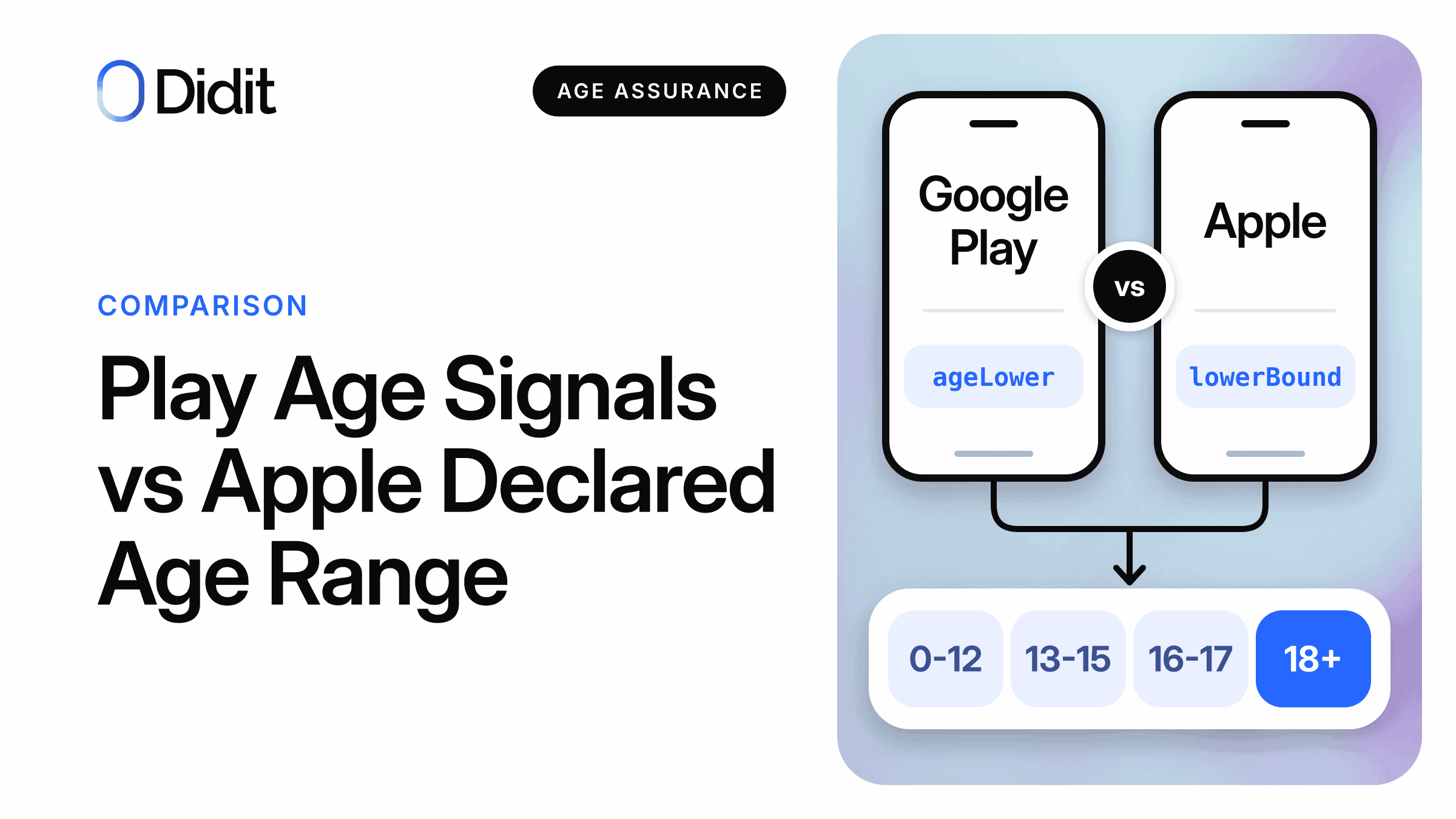
Google Play Age Signals and Apple's Declared Age Range API both return an age range and a hint about its source, never a birth date. They differ in what a null means, in where sharing is automatic, and in how much they say about how the age was established. Normalise both into one age state, with a missing answer as its own status.
- Google's lowest band is
ageLower = 0; on Apple a nillowerBoundmeans below your lowest gate.[1][2] - Google returns its stronger tiers only where age verification is mandatory; Apple returns one
confirmedvalue from iOS 26.5.[1][3] - Neither covers websites, and Google answers only for apps updated by Google Play.[4][5]
If you ship on both stores, you now have two age APIs with similar shapes and different meanings. This guide compares the Play Age Signals API (beta, v0.0.6) with Apple's Declared Age Range API field by field, as documented on 22 November 2026, and ends with a data model that holds both.
For what changes in January 2027 and who is affected, start with the Google Play Age Signals API overview. For Android code, use the v0.0.6 integration guide.
Play Age Signals vs Declared Age Range: the short answer
You need both if you ship on both stores and want, or are obliged, to use the store's answer. Each answers only for its own platform and for the account, not for whoever holds the device: Apple's request, for example, is for the person signed in to iCloud.[6]
Plan for the users neither store answers for
Get a demo of age estimation in your app, for the cases the store signal leaves open.
Side by side: the two APIs on 22 November 2026
Google says v0.0.6 is available globally and will return responses for all users by 11 December 2026.[4]
| Point | Google Play Age Signals (v0.0.6, beta) | Apple Declared Age Range |
|---|---|---|
| Platform | Phones, foldables and tablets on Android 6.0 (API 23) or later; app updated by Google Play[4][7] | iOS, iPadOS, Mac Catalyst and macOS 26.0 or later, with an entitlement[5] |
| Versions to know | v0.0.6 adds getApplicableAgeFeatures(), the call that reports MANDATORY_SHARING[8] | 26.2 eligibility and sandbox; 26.4 regulatory features; 26.5 confirmed[3] |
| Trigger | requestAgeSignalsAccess(), then checkAgeSignals()[8] | isEligibleForAgeFeatures, then requestAgeRange[2] |
| Ranges | 0-12, 13-15, 16-17, 18+; or up to three minimum ages of your own, at least 2 years apart, changed once a year at most[1] | Up to three age gates per request, each range at least two years; some regulated regions set the gates[2] |
| Source of the age | TIER_A to TIER_D[1] | selfDeclared, guardianDeclared, confirmed[6] |
| User prompt | Ask, always or never share; the in-app prompt is for unsupervised users, parents use Family Link[8] | System sheet; for a child in a family group, the parent chooses always, ask or never[2][5] |
| Refusal | NOT_SHARED; the prompt is suppressed after a few dismissals[8] | declinedSharing[2] |
| Duty flag | MANDATORY_SHARING or an empty set[8] | declaredAgeRangeRequired[9] |
| Staleness | Google Play may delay sharing an updated range[10] | Previous range until the anniversary of the original declaration[2] |
| Significant change | You notify in the Play Console; the API returns APPROVED, PENDING or DECLINED[1][11] | PermissionKit SignificantAppUpdateTopic, plus an acknowledgement sheet for adults[2] |
| Parent revokes | The user can no longer use the app; you read the installId in a Play Console list kept for 90 days[12] | Apple prevents launch; your server gets RESCIND_CONSENT[3] |
| Testing | FakeAgeSignalsManager and license testers[13] | Sandbox, six test cases, from iOS 26.2[3][14] |
| Who is responsible | "Google Play doesn't mandate the use of these features"; you determine how laws apply[15] | "developers are responsible for their own age restrictions"; where legally required "you must check the age"[3] |
The last row matters most. Google does not oblige you to use its API, although a law may. Apple's Q&A goes further: where legally required, an app rated 18+ still needs to check ages with its API.[3]
What each API says about how the age was established
Neither source field is a verification certificate. Google's TIER_A means the user provided the age to Google, which "may or may not have confirmed this information".[1] Apple's licence says its data is declared by the user, or a parent or guardian, and may be confirmed with a payment method, government ID or another method.[16]
| Our basis | Google value | Apple value | What you may conclude |
|---|---|---|---|
| Declared | TIER_A | selfDeclared | The user gave an age; on Google it may still be confirmed |
| Guardian | TIER_B | guardianDeclared | A parent or guardian manages or set the age |
| Confirmed | TIER_C, TIER_D | confirmed | The platform reports a check or confirmation |
| None | null | No range returned | No age from the store |
The first column is our mapping; the platform pages read give no equivalence.[1][6]
The columns are not symmetrical. Google returns TIER_C (card, email address, selfie assessment, government ID or tax ID) and TIER_D (government ID plus selfie, or digital ID) only in regulated regions where verification is mandatory, with Texas as its example. Elsewhere, an adult who verified with a digital ID and chose to share comes back as TIER_A.[1] Apple's pages read here do not tie confirmed to a region, but from iOS 26.5 the method is no longer reported.[3]
Watch out
The same adult can look confirmed on an iPhone and declared on an Android phone. A confirmed-only feature may shut out Android adults outside mandatory-verification regions.
Apple also lists deprecated values such as paymentChecked.[6] We map any value the code does not recognise to declared.
Where sharing is automatic
Outside regulated regions, the user or the parent chooses on both. Google's default setting is "Ask before sharing".[10] Apple says people decide, except where the law requires it to share age categories.[3] The pages on 22 November 2026:
| Region | Google Play | Apple |
|---|---|---|
| Texas | Google verifies eligible users' ages and returns age range and approval signals; Google names accounts created after 28 May 2026[17][18] | Accounts created on or after 4 June 2026: always shared, cannot be turned off[19] |
| Brazil | From January 2027, returned on a mandatory basis[17] | Always shared if the developer requests it to comply with local laws (26 October 2026 page)[20] |
| California | From January 2027, returned on a mandatory basis[17] | No Apple page found; no claim made |
| Alabama | "Details coming soon"[17] | No Apple page found; no claim made |
| Utah, Louisiana (duties from 2027[21][22]) | No row on Google's regional page[17] | Not named on Apple's 26 October 2026 list[23] |
| Australia, Singapore | Users identified as minors restricted from 18+ downloads; sharing is the user's choice[17] | Adult confirmation for 18+ downloads; the pages do not say the range is always shared[24][25] |
Platform behaviour, not legal duties. Recheck both pages before each release.
Mandatory sharing is not a verified age: where sharing is mandatory, Google's example of an adult, whatever the verification status, carries TIER_A.[1] An older Apple notice, of 24 February 2026, said Brazilian ages are shared when the user or guardian agrees;[26] we use the later support page.
Do not hardcode this table: read MANDATORY_SHARING and requiredRegulatoryFeatures at runtime. State duties are in the App Store Accountability Acts guide, and Brazil's in ECA Digital and Google Play.
Null does not mean the same thing
This is where a shared parser breaks. On Google, a null ageLower means no signal; the youngest band starts at 0. On Apple, a nil lowerBound in a sharing response means below your lowest gate.[1][2]
| Situation | Google fields | Apple fields | Your state |
|---|---|---|---|
| Child under 13, shared | ageLower = 0, ageUpper = 12 | lowerBound nil, upperBound 12 | Known, 0 to 12 |
| Teen of 13 to 15, shared | 13, 15 | 13, 15 | Known, 13 to 15 |
| Adult, shared | 18, null | 18, nil | Known, 18 and over |
| User or parent did not share | NOT_SHARED, both null | declinedSharing, no range | Not shared |
| Age not verified where Google must verify it | VERIFICATION_REQUIRED, both null | No matching value found; a sandbox case returns an unconfirmed 18+ as selfDeclared | Unverified on Google; known, declared on Apple |
| Service cannot answer | Error code, for example APP_NOT_OWNED | notAvailable or invalidRequest thrown | Unavailable |
Default Google bands and Apple sandbox cases.[1][2][8][14][27]
Example
A parser treats every null lower bound as "unknown, show the standard app". It is right for Android. On iOS it sends every child under the lowest gate to the standard app. Written the other way, "null lower bound means child", it locks out every Android adult who did not share.
The upper bound has its own trap. Both APIs leave it empty for the top band, which is adult only if your highest gate is 18. With Play Console minimum ages of 13 and 17, the top band starts at 17.[1] Check the status before either bound.
In some regulated regions the region sets the age gates, and they may differ from yours,[2] so a feature gated at 14 can meet a 13 to 15 answer. Compare the range with the gate; never test a band name for equality.
Where neither API answers
Plan these surfaces as cases, not as errors.
| Surface | Google Play Age Signals | Apple Declared Age Range |
|---|---|---|
| Website | Not covered; limited to apps updated by Google Play[4] | Not covered; an app framework for the listed OS versions[5] |
| Sideloaded Android app | APP_NOT_OWNED, except for license testers[13][27] | Does not apply |
| Other Android stores | Not covered; APP_NOT_OWNED when Google Play did not install the app[4][27] | Does not apply |
| Older OS | Below Android 6.0[7] | Below OS 26.0; accounts on iOS 18 or earlier "won't be affected"[3][5] |
| TVs, watches, game consoles | Only phones, foldables and tablets are listed; others can return DEVICE_NOT_SUPPORTED[7][27] | Not in the availability line[5] |
Other stores' own signals, if any, were not reviewed.
For the options on each surface, see the age verification API guide for apps, web and stores.
One age state for both platforms
Give the backend one shape that both apps write to. Keep status, range and basis apart. This is our suggested model, not a Google or Apple format.
{
  "account_id": "acc_8842",
  "app": "android",            // the app that asked; one record per app
  "status": "known",           // known | not_shared | unverified | unavailable
  "min_age": 13,               // inclusive; 0 for the lowest band
  "max_age": 15,               // inclusive; null means no upper bound
  "basis": "guardian",         // declared | guardian | confirmed | null
  "sharing_mandatory": true,   // Google MANDATORY_SHARING, Apple declaredAgeRangeRequired
  "observed_at": "2026-11-22T10:00:00Z",
  "recheck_after": "2027-02-20T10:00:00Z",
  "own_check": null            // your own result, kept apart from the store's
}
Then write one adapter per platform, the only code that knows what a null means on its side.
fromPlay(access, r, error):
  if error                            return { status: "unavailable" }
  if access == VERIFICATION_REQUIRED  return { status: "unverified" }
  if access == NOT_SHARED             return { status: "not_shared" }
  if r.ageLower == null               return { status: "unavailable" }
  return { status: "known", min_age: r.ageLower, max_age: r.ageUpper,
           basis: PLAY[r.ageRangeSource] }     // A declared, B guardian, C and D confirmed

fromApple(response, error):               // never returns "unverified"
  if error                            return { status: "unavailable" }
  if response is declinedSharing      return { status: "not_shared" }
  lo, hi = response.lowerBound, response.upperBound
  if lo == nil and hi == nil          return { status: "unavailable" }
  return { status: "known", min_age: lo or 0, max_age: hi,
           basis: APPLE[response.ageRangeDeclaration] or "declared" }

canUse(state, gate):
  if state.status is not "known"      return DEFAULT_EXPERIENCE
  if state.min_age >= gate            return ALLOW
  if state.max_age is null            return DEFAULT_EXPERIENCE
  if state.max_age < gate             return RESTRICT
  return DEFAULT_EXPERIENCE           // the band straddles the gate
The last line covers the 14 gate and the 13 to 15 band: the store has not told you which side the user is on.
1The app asks its own platform
When the platform's documentation and the law allow it.
2The adapter writes one age state
Status, range and basis. No raw response in logs or analytics.
The state is known and clears the gate
Apply it and stop
No second check, unless a law asks for one.
Serve the protective default
Restrict below the gate. Own check only where needed.
One resolver for both apps, with market rules in configuration.
Three rules for the record
- Keep one record per app: Google's data "can be used only by the requesting app".[4]
- Set a recheck date, since both platforms can return an outdated band.[2][10]
- Limit re-requests: some state laws restrict when or how often you may ask.[21][28][29]
One question stays open for counsel: California deems a developer that receives a signal to know the age range across its app and website,[29] while Google limits the data to the requesting app.[4] See the California Digital Age Assurance Act post.
Rules both share: no ads, no resale, minimum data
The purpose limits are close; the sharing limits differ. Apply the stricter one to both.
Google Play policy
No third party
- Use only for age-appropriate content and experiences in compliance with laws[4]
- No advertising, marketing, profiling or analytics[4][30]
- No "Selling, sharing, or transferring the data to any third party for any reason, except as strictly required by law"[30]
Misuse can end API access or take the app down
Apple licence
No brokers or resellers
- Use only for age-appropriate content or features, or to comply with laws that require the range[16]
- Ads and profiling fall outside that purpose, in our reading
- "You may not share or sell user data obtained from this API to data brokers or information resellers"[16]
You answer for the laws that apply to you
Keep both signals out of analytics events, ad SDKs, crash reports, shared warehouses and any vendor's API, including an age check vendor's. Set a deletion rule: Texas requires deletion of the store's personal data once verification is complete.[31]
When to add your own check
Often you should not. For a low-risk app a shared signal is usually enough, and a second check on every user is hard to square with data minimisation. California's act requires no personal information beyond its own signal duties.[29]
| Age state | Low-risk feature | Restricted feature |
|---|---|---|
| Known, confirmed, clears the gate | Use it, stop | Use it; add a check only if a law asks for more |
| Known, declared, clears the gate | Use it, stop | Own check where the law or the risk needs more than a declaration |
| Known, below the gate | Age-appropriate version | Restrict; a higher own result does not override by default |
| Not shared or unavailable | Age-appropriate default, no check | Own check, with the default as the alternative |
| Unverified | Age-appropriate default | Keep it closed; follow Google's route where the law makes store data the method |
A starting point; counsel decides which rows a law changes.
When results differ, Alabama (from 1 January 2027, with a lawsuit pending and no injunction found on 22 November 2026) and Utah (from 6 May 2027) apply the lowest age category to the restrictions or defaults they name, and Brazil the more protective alternative, so there an own check can only tighten.[21][28][32][33] In Texas, developers verify with the store's information,[31] so an own check does not replace a VERIFICATION_REQUIRED answer.
In California, the signal is the primary indicator unless you hold internal clear and convincing information that the age differs; no text we read says an age estimate reaches that bar. Do not prompt users there to change their age information.[29] See the California 2027 guide.
A selfie adds limits. Illinois, Texas and Colorado require notice and an explicit release before a business collects face geometry.[34] For prohibited content and betting in Brazil, the regulator's guide, still a preliminary draft, does not treat estimation alone as enough,[35] and the decree bars keeping the document image or copy.[33] The full decision tree is in what to do when the age signal is missing.
Map your age gate to both stores
Show us your gate and your markets, and see where an own check fits and where the signal is enough.
How Didit helps after the store signal
Didit does not supply, read or forward either store signal. It is the check you run yourself, on any surface, for age verification when the age state is missing, only declared, or not enough for the feature. You start a session with your threshold, never with Google's or Apple's answer.
- Start with a selfie: age estimation predicts an age with liveness included, at $0.10 per call; see pricing.[36][37]
- Send only the borderline band to an ID document, matched 1:1 with the selfie already taken.[36]
- Run one workflow in native, React Native and Flutter apps, and on the web.[38][39]
- Get only a yes or no, with no personal data, from an ISO/IEC 27566-1 workflow (lowest minimum age 13).[36]
- Delete each session after the result or, where the law allows keeping it, set a retention window from 1 month.[40]
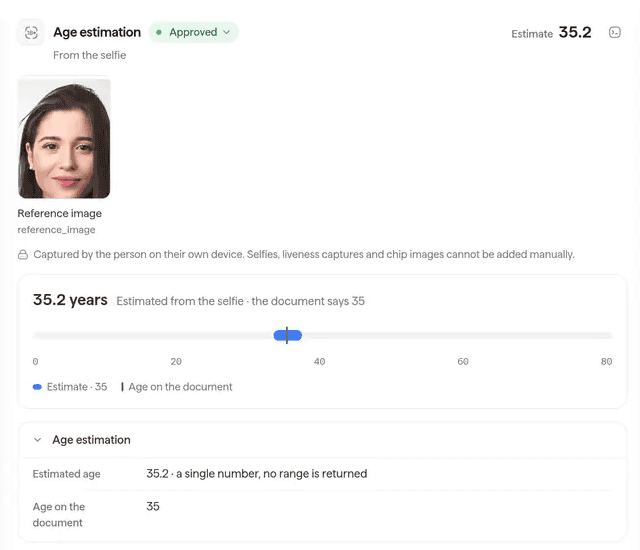
The age estimation result in the Didit console (sample data): the estimate from the selfie next to the age on the document.
An estimate is not proof of age and does not say who the person is. Near your threshold it can fall on either side, hence the document band.[36] In Illinois, Texas and Colorado, Didit shows a biometric consent step in its default mode; native apps there need SDK 4.10.0 or later.[34]
Didit provides
- The selfie estimate with liveness, and the document step for the band you set
- SDKs and hosted sessions for app and web
- Controls for returned data and retention
Stays with you
- The store APIs and their answers
- Deciding which law applies, and which result wins
- The gate, the default and the appeal route
Add the check the store cannot run for you
Get a demo of age estimation in your app and on your site.
Key takeaways
- Both APIs return a range and a source, never a birth date, and neither covers the web.
- Automatic sharing is documented for Texas and Brazil on both platforms (Brazil on Google from January 2027), and for California on Google from January 2027.
- Store one state with status, range and basis, per app, and keep both signals away from third parties.
Frequently asked questions
Do both APIs return a birth date?
No. Google Play says it never provides the exact age or birth date.[10] Apple returns a range and tells developers not to infer an exact age.[2]
Which iOS version do I need for the Declared Age Range API?
The framework starts at iOS, iPadOS, Mac Catalyst and macOS 26.0.[5] For all of Apple's age assurance features, build with the iOS 26.2 SDK or later; regulatory features start at 26.4 and the confirmed value at 26.5.[3]
Is the Apple age verified?
Not always. Apple returns whether the range was self-declared, set by a guardian, or confirmed.[6] From iOS 26.5 a confirmed range does not say whether a card or an ID was used.[3]
What does lowerBound nil mean?
On Apple, it means the person is below your lowest age gate.[2] On Google, a null ageLower means no signal: the status is NOT_SHARED or VERIFICATION_REQUIRED.[1]
Do I have to support both?
Each API serves only its own platform. Google says it does not mandate use of its features;[15] Apple says that in regions where it is legally required you must check ages.[3]
Does Apple cover California?
We found no Apple developer or support page on California's AB 1043 on 22 November 2026, so we make no claim. Apple's regional list of 26 October 2026 names Texas as its only US state.[23]
Does either API cover the web?
No. Google limits its API to apps updated by Google Play,[4] and Apple's is a framework for apps on its own systems.[5]
How do I test each API?
Google offers FakeAgeSignalsManager and license testers.[13] Apple's sandbox offers six cases and a consent revocation test.[14]
Can I share the result with a vendor?
Not Google's: policy bars transfer to any third party for any reason, except as strictly required by law.[30] Apple bars sharing or selling to data brokers and information resellers.[16] We suggest the stricter rule for both, and starting any vendor check without the signal.
What about Amazon and other stores?
The two APIs do not answer for them. Google returns APP_NOT_OWNED when Google Play did not install the app.[27] We did not review other stores' own signals; check their documentation.
Sources
- Understand age signals responses, Google, updated 18 November 2026.
- Requesting people's age range information in your app, Apple Developer Documentation.
- Age assurance frameworks Q&A, Apple Developer Support.
- Play Age Signals overview and terms of service, Google, updated 18 November 2026.
- Declared Age Range framework, Apple Developer Documentation.
- AgeRangeService.AgeRangeDeclaration, Apple Developer Documentation.
- Use Play Age Signals API (beta), Google, updated 19 November 2026.
- Request age signals, Google, updated 18 November 2026.
- AgeRangeService.RegulatoryFeature, Apple Developer Documentation.
- About age range sharing on Google Play, Google Play Help.
- Notify Google Play of significant changes, Google.
- Review revoked app approvals, Google, updated 4 September 2026.
- Test your Play Age Signals API integration, Google.
- Testing age assurance in sandbox, Apple Developer Documentation.
- Changes to Google Play for upcoming app store bills, Google Play Console Help.
- Apple Developer Program License Agreement, Declared Age Range API clause, Apple.
- Regional age-related protections on Play, Google, updated 18 November 2026.
- Play Age Signals overview, v0.0.4 (Texas account date), Google.
- Age requirements for an Apple Account in Texas, Apple Support, 4 June 2026.
- Age requirements for an Apple Account in Brazil, Apple Support, 26 October 2026.
- Utah Code 13-76-202, Utah Legislature.
- Act 185 of 2026 (HB 977), replacing Act 481, Louisiana Legislature.
- Region-specific rules for managing an Apple Account, Apple Support, 26 October 2026.
- Age requirements for an Apple Account in Australia, Apple Support, 26 October 2026.
- Age requirements for an Apple Account in Singapore, Apple Support, 26 October 2026.
- Age requirements for apps distributed in Brazil, Australia, Singapore, Utah, and Louisiana, Apple Developer News, 24 February 2026.
- Play Age Signals API error code reference, Google, updated 18 November 2026.
- HB 161, enrolled, Alabama Legislature.
- AB 1856 (Chapter 184, 2026), amending the Digital Age Assurance Act, California Legislature.
- Age Signals API and User Data policy, Google Play Console Help.
- SB 2420, enrolled, Texas Legislature.
- App store age verification laws, questions answered (law firm, secondary), Squire Patton Boggs, November 2026.
- Decreto 12.880 of 18 March 2026, Presidency of Brazil.
- Biometric consent, Didit docs.
- ECA Digital page, with the preliminary age assurance guide, ANPD, Brazil.
- Age estimation overview, Didit docs.
- Pricing, Didit docs.
- Native SDKs overview, Didit docs.
- Web SDKs overview, Didit docs.
- Data retention, Didit docs.
Two store APIs, one age state, and your own check only where the state is not enough. See Didit's age verification solution for that step, and confirm with counsel which rules apply.
One age check for app and web
Tell us where your store signals stop, and see the flow that takes over.
Artigos relacionados
- Google Play Age Signals API: what changes in January 2027
- Age assurance for apps: games, social, dating, AI and more
- Age verification API: which one works on apps, web and stores
- Brazil's ECA Digital and Google Play: age signals in your app
- California age verification law 2027: the four rules for apps
- App Store Accountability Acts: Texas, Utah, Louisiana, Alabama