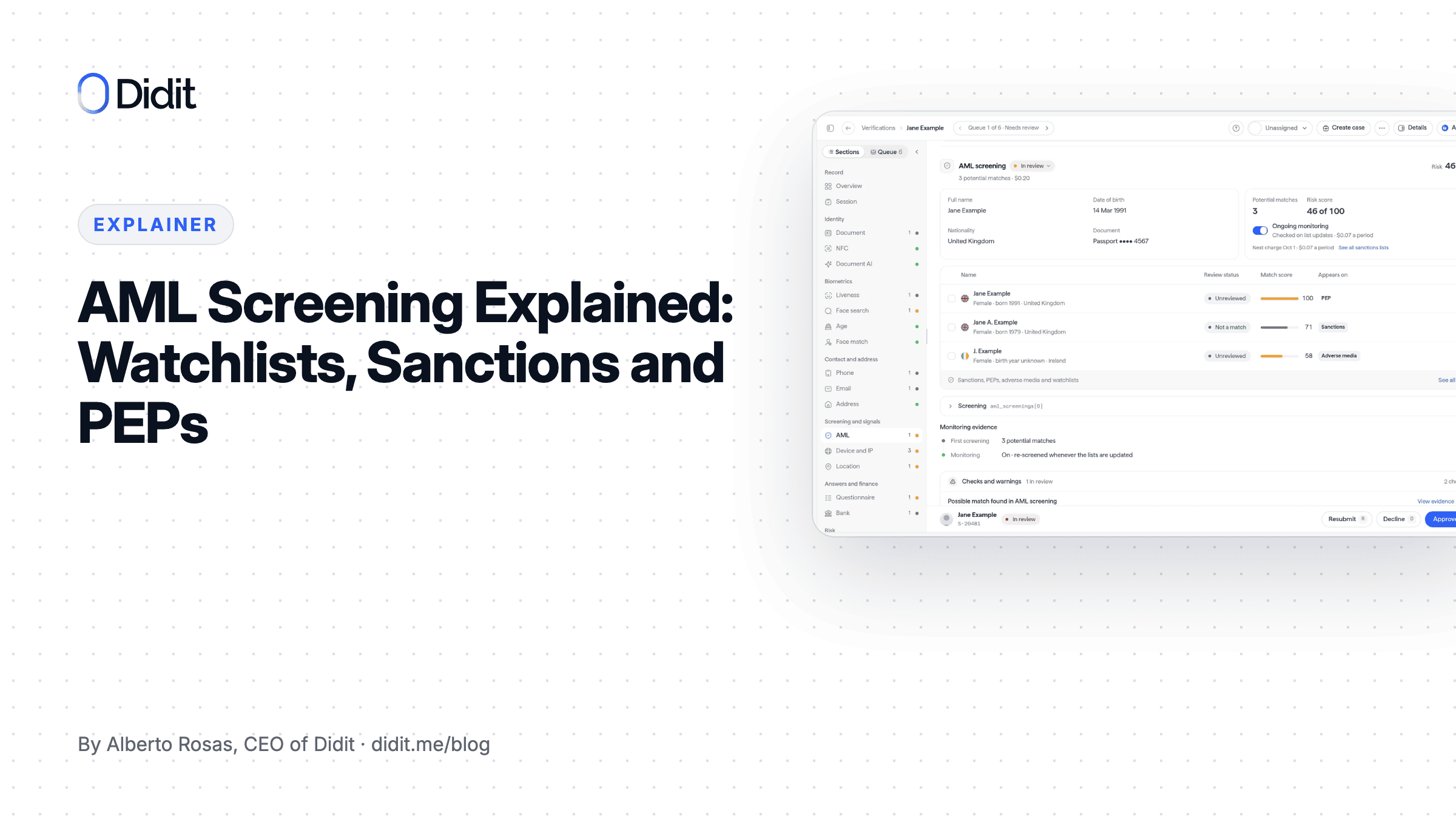
AML Screening Explained: Watchlists, Sanctions and PEPs
AML screening checks people and companies against watchlists and returns a match score and a risk score for each hit. We screen people against 1,300+ sanctions, PEP and watchlist sources at a list price of $0.20 per check.
 Alberto RosasCo-founder and CEO
Contents
In this guide
Jump to the part you need.
AML screening checks a person or a company against sanctions, politically exposed person (PEP), watchlist and adverse media lists at onboarding and again while the relationship runs. It fits banks, payment firms, crypto asset businesses, gambling operators and other businesses with applicable screening obligations. We charge $0.20 per screening against 1,300+ global sanctions, PEP and watchlist sources. The screening returns a status and evidence. Your team still owns the onboarding decision.
Last updated: November 26, 2026. Prices checked against the live Didit price feed on November 26, 2026.
AML screening at a glance
| Item | Answer | Price or setting |
|---|---|---|
| What it is | Real-time comparison of a name and identifiers against sanctions, PEP, watchlist and adverse media sources | Runs as a step in a workflow or as a standalone API call |
| Lists screened | We screen against 1,300+ global sanctions, PEP and watchlist sources. Standalone callers can request adverse media enrichment. | Optional adverse media enrichment via include_adverse_media |
| Price per screening | Billed once per completed screening | $0.20 list, $0.192 on Growth, $0.18 on Scale |
| Ongoing monitoring | Provider-driven re-screening of an already screened person | $0.07 per person per year |
| Match score threshold | Below this, a hit is tagged False Positive and drops out of the risk calculation | 93 by default |
| Approve and review thresholds | Standalone API: a score at or below approve is Approved, above approve and at or below review is In Review, above review is Declined | 80 and 100 by default |
| Match score weights | Name, date of birth and country, and they must total exactly 100 | 60 / 25 / 15 by default |
| Company screening | The company entity plus each identified beneficial owner and officer | $0.20 company AML, $0.20 per person AML |
| Standalone endpoint | One-shot server-to-server screening | POST https://verification.didit.me/v3/aml/ |
| Plans | Free: $0 per month, with $10 in monthly credit for the first organization created with an eligible company work email. Growth $99 a month, Scale $299 a month, Enterprise from $15,000 a year | See Didit pricing |
Start free in the sandbox at business.didit.me, with no sales call. Sandbox keys return mocked results and are not billed. Developers can connect an AI assistant to Didit through our MCP server. To run a standalone AML check, use POST /v3/aml/. The screening API is documented on the Didit AML Screening page, every unit price sits on didit.me/pricing, and for the EU regulation behind the check see the AMLR solution page.
What AML screening means
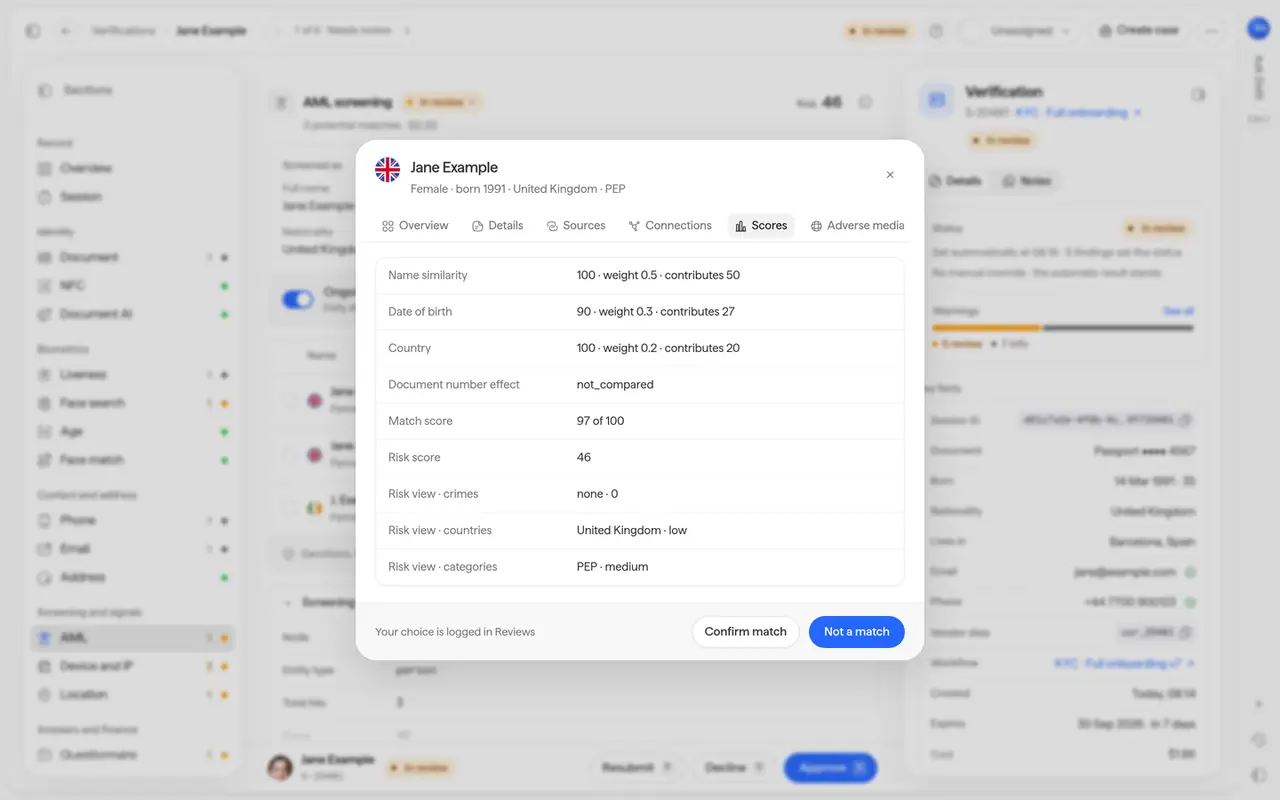
AML screening is the automated comparison of a customer's identity details against sanctions lists, PEP lists, law enforcement and regulatory watchlists and adverse media, at onboarding and again while the customer stays with you. Every potential match comes back scored twice: one score for how likely the match is the same person, one score for how risky that listed entity is.
People search for the same control under several names, and the names describe different scopes. Sanctions screening is the run against designated-party lists. Watchlist screening is the broader run against sanctions, PEP, regulatory and law enforcement lists, and it is what our AML screening performs. AML user screening usually means the run on a person at signup. Ongoing monitoring is the same run repeated after onboarding, driven by updates from the screening provider.
Where AML screening is used
The EU Anti-Money Laundering Regulation, Regulation (EU) 2024/1624, puts the customer due diligence rules into one directly applicable text. It binds credit and financial institutions, crypto asset service providers, gambling service providers and the other obliged entities listed in Article 3. Article 20(1)(d) and (g) and Article 42 cover sanctions and PEP checks. It entered into force on 9 July 2024 and applies from 10 July 2027, so until then the national laws that transpose the current directive still apply.
Banks, payment firms, crypto-asset service providers and gambling operators can use screening as part of customer due diligence. Which customers or transactions trigger checks depends on the applicable rules and the firm's risk assessment.
Article 19 sets when customer due diligence applies, including at the start of a business relationship, for occasional transactions of at least EUR 10,000 in one operation or linked operations, when money laundering or terrorist financing is suspected regardless of amount, or when previously obtained identification data is in doubt. Lower sector-specific triggers and exceptions apply. See our AMLR compliance guide for the scope of each trigger and confirm which rules apply to your business.
We do not decide whether a trigger applies. You route on transaction type and amount, then start the matching workflow.
AML watchlists and the anti money laundering international database
An anti money laundering international database is only as useful as the publishers behind it, so buyers check named sources, not a count alone. We screen against 1,300+ global sanctions, PEP and watchlist sources. The standalone API also offers optional adverse media enrichment. Business verification has a separate company-level coverage catalogue that includes sanctions, regulatory watchlists and insolvency registers. At company level our coverage includes the United Nations Security Council consolidated list, the EU consolidated financial sanctions and travel ban lists, OFAC, debarment registers from the multilateral development banks (World Bank, ADB, AIIB, IDB, AfDB, EBRD, EIB and CDB), Swiss SECO, Australia's DFAT consolidated list, the Dutch National Sanction List and the Central Bank of Aruba lists. The person-level catalogue is on the watchlist database page.
| Category | What it catches | Examples in coverage |
|---|---|---|
| Sanctions | People or entities designated under sanctions regimes. Applicable restrictions depend on the list and jurisdiction. | UN Security Council consolidated list, EU consolidated sanctions and travel bans, OFAC, Swiss SECO, DFAT, Dutch National Sanction List |
| Development bank exclusions | Firms listed as ineligible for activities covered by the issuing institution's rules | World Bank, ADB, AIIB, IDB, AfDB, EBRD, EIB and CDB debarment registers |
| PEP and RCA | Politically exposed persons at any level, their relatives and close associates | Global PEP datasets inside the 1,300+ sources |
| Adverse media | News linking a name to financial crime or fraud | Optional per run via include_adverse_media: an initial pause of about 5 seconds plus up to about 25 seconds of polling |
| Regulatory and enforcement | Warnings, fines and enforcement actions from authorities | Securities regulators, central banks, antitrust, customs and trade bodies, procurement registries |
| Insolvency | Companies in bankruptcy or liquidation registers | India IBBI, China's enterprise bankruptcy disclosure platform, the FDIC and other national registers |
How an AML screening run works, step by step
- Collect identifiers: full name of the person or company, date of birth, nationality, country, and a document number when you hold one.
- Compare the supplied identifiers with the available screening sources.
- Every returned hit carries both scores: a match score for identity confidence and a risk score for the listed entity.
- We tag a hit below the match score threshold as False Positive, and it stops contributing to the screening score.
- Only the eligible hits contribute: the highest risk score among them becomes the screening score and sets the status.
- Review. Your team clears, escalates or declines, and updates the hit's review status on the saved screening.
- Re-screen after onboarding while the relationship lasts.

Match score and risk score, and why two scores matter
The match score runs from 0 to 100 and combines name, date of birth and country with weights you set. Defaults are 60 for name, 25 for date of birth and 15 for country, and they must total exactly 100 or the API rejects the request with HTTP 400. A component missing from the request is re-normalized away rather than counted as zero. A matching document number acts as a golden key and overrides the match score to 100.
The risk score also runs from 0 to 100 and comes from the listed entity: category (sanctions, PEP, watchlist, adverse media), country risk and criminal records. The highest risk score among the non-false-positive hits becomes the screening score, and that score sets the status.
| Score | Question it answers | Inputs | Default threshold | Effect |
|---|---|---|---|---|
| Match score | Is this the same person? | Name, date of birth, country, document number | 93 | Below 93 the hit is tagged False Positive |
| Risk score | How risky is that listed entity? | Category, country risk, criminal records | 80 approve, 100 review | Sets Approved, In Review or Declined in the standalone API |
The default thresholds deserve one honest note, and it applies to the standalone API. A score at or below the approve threshold is Approved. A score above approve and at or below review is In Review. A score above review is Declined. With approve at 80 and review at 100, a score of exactly 80 is Approved and triggers POSSIBLE_MATCH_FOUND at the defaults. A score above 80 through 100 is In Review, and a Declined result needs a score above 100, which the 0 to 100 risk score cannot reach.
AML screening terminology and fields
| Field or term | What it holds | Where you see it |
|---|---|---|
aml_screenings[] | Every screening result attached to a decision | Session decision payload |
status | Not Started, In Progress, Approved, In Review, Declined, Abandoned, Kyc Expired | Per screening |
score | Highest risk score after false positives are removed | Per screening |
hits[] | Each potential match with its own scores and metadata | Per screening |
match_score | 0 to 100 identity confidence | Each hit |
risk_score | 0 to 100 entity risk | Each hit |
review_status | False Positive, or the review state your team sets | Each hit |
Standalone request example: entity_type is person | The entity value sent on a standalone call | Standalone request body |
Business session decision: company-level aml_screenings[] items use entity_type: "COMPANY" | Marks the company-level screening item | Business session decision payload |
warnings[] | Risk codes such as POSSIBLE_MATCH_FOUND, MATCH_FOUND, SANCTIONED_ENTITY, PEP_MATCH, HIGH_RISK_COUNTRY, ADVERSE_MEDIA_HIT, ONGOING_MONITORING_ENABLED | Per screening |
aml_match_score_threshold | Match score cut-off | Workflow settings, default 93 |
aml_score_approve_threshold and aml_score_review_threshold | Risk score cut-offs | Workflow settings, default 80 and 100 |
aml_name_weight, aml_dob_weight, aml_country_weight | Match score weights that must total 100 | Workflow or request |
include_adverse_media | Adds adverse media enrichment to the run | Request |
include_ongoing_monitoring | Keeps the entity under provider-driven monitoring | Request |
save_api_request | Stores the screening as a session, defaults to true | Request |
Idempotency-Key | Retry safety header, scoped to the application and the exact request body | Request header |
Worked example: one customer, two scores and a review
This is a hypothetical example. Take a payment firm onboarding Maria, born 12 March 1981, Spanish, passport number captured.
- The request carries full name, date of birth, nationality and the passport number.
- The screening returns three hits. Two carry match scores of 85 and 90, so both are tagged False Positive and drop out of the risk calculation.
- The third carries a match score of 96, above the 93 threshold, so it stays in. It is a PEP entry with a risk score of 88.
- The highest remaining risk score, 88, is above the 80 approve threshold and at or below the 100 review threshold, so the status is In Review and the case goes to the queue.
- The reviewer checks the source record and the customer identifiers before deciding whether to clear or escalate the hit. The reviewer then updates the hit's review status on the saved screening and records the reason in the firm's review process.
- The hit decision and the onboarding decision are separate. Clearing the hit answers the screening question. The firm still decides whether to onboard Maria, and records that decision in its own process.
An exact document-number match sets the match score to 100. The reviewer still checks the source record and corroborating identifiers before deciding whether the hit is genuine.
Worked cost example
- One customer, KYC plus AML: $0.33 full ID check + $0.20 AML screening = $0.53 per customer.
- 2,000 new customers a month: 2,000 × $0.53 = $1,060.00 a month at list price, before plan credit or discounts.
- Same volume on Growth: $0.3168 + $0.192 = $0.5088 per customer, so 2,000 × $0.5088 = $1,017.60 a month. The $115 of Growth credit covers $115 of that, leaving $902.60 to cover from top-ups. Adding the $99 plan fee gives $1,001.60 for the month before taxes, measured as the plan fee plus the top-up credit consumed.
- Ongoing monitoring for those 2,000 customers: 2,000 × $0.07 = $140.00 a year at list price, or 2,000 × $0.063 = $126.00 a year on Scale.
- For a $2.00 registry retrieval and three owners who each complete person AML and linked KYC, the list-price total is $2.00 + $0.20 + (3 × $0.20) + (3 × $0.33) = $3.79. Registry retrieval varies by country and data tier.
How Didit implements AML screening
There are two modes and one model behind them. Mode A runs AML as a step in a verification session: add the AML feature to a workflow in the Business Console or with POST /v3/workflows/, set the thresholds and weights, create a session with POST /v3/session/, then read the result from GET /v3/session/{sessionId}/decision/ or from the session.status.updated webhook. Decisions, ongoing monitoring and hit review statuses stay bound to the session.
Mode B is a standalone server-to-server call, for a one-shot check outside a hosted flow. The response shape is { request_id, aml: { status, screening_id, hits, warnings } }.
curl -X POST 'https://verification.didit.me/v3/aml/' \
-H "x-api-key: YOUR_API_KEY" \
-H "Content-Type: application/json" \
-d '{
  "full_name": "Javier Ejemplo Modelo",
  "entity_type": "person",
  "date_of_birth": "1974-01-01",
  "nationality": "ES",
  "include_adverse_media": true,
  "vendor_data": "user-1234"
}'| Aspect | Session (workflow) | Standalone API |
|---|---|---|
| Entry point | Add AML to a workflow, then create a session with POST /v3/session/ | POST https://verification.didit.me/v3/aml/ server to server |
| Where the result lives | aml_screenings[] on the decision from GET /v3/session/{sessionId}/decision/ | { request_id, aml: { status, screening_id, hits, warnings } } in the call's response, and the same decision endpoint when the run is saved |
| Persistence | Bound to the session, with ongoing monitoring and updatable hit review statuses | Stored as a session while save_api_request is true, which is the default; with it false nothing is stored and request_id is only a correlation id |
| Sandbox | Sandbox applications are free and return test results | Sandbox keys skip screening and billing and return a mocked Approved with zero hits unless you pass sandbox_scenario |
Both modes are documented in the AML screening overview and the standalone AML screening reference.
save_api_request defaults to true, so the screening is stored as a session, appears in the console and can be retrieved later with the same decision endpoint. Set it to false and request_id is only a correlation id, with nothing stored and no hit review afterwards.
Handle these failures explicitly. The API returns HTTP 400 if include_ongoing_monitoring is true and save_api_request is false, and if the three match weights do not total 100. An insufficient balance returns HTTP 403 before a new screening runs. An adverse media timeout returns the result without adverse media hits, which is still actionable for the other sources.
On retries, reuse the same Idempotency-Key in the same application with the exact same body. If the original request is still running, retry later with that key. After it completes, identical retries return the stored response without a second charge. A different body with the same key returns HTTP 409.
Sandbox keys skip screening and billing and return a mocked Approved with zero hits, unless you pass sandbox_scenario. That is the right way to build the integration and the wrong way to test your thresholds.
AML user screening at onboarding, and monitoring afterwards
User screening at onboarding answers one question on one day. Watchlists change after onboarding. For people, ongoing AML monitoring provides daily re-screening at a list price of $0.07 per person per year. Set include_ongoing_monitoring to true and the entity stays under provider-driven monitoring. It requires save_api_request to be true, and you disable it from the Business Console. Updates come from the monitoring provider and reach the report as new or changed matches, which surface as webhook events your compliance team can act on.
For companies the same applies at two levels: the entity and every identified beneficial owner and officer. Ongoing monitoring can cover the company and the identified people, and the sources do not establish that the published $0.07 per person rate applies to companies. The business record shows the latest rescan, and the businesses CSV export carries company_aml_status, company_aml_score, company_aml_matches_count, company_aml_last_screened and company_aml_monitoring_enabled. See continuous monitoring and business AML.

AI-assisted review and the Investigator agent
Growth includes the Investigator agent for reviews and follow-ups and case management with one blueprint. Scale adds full case management with routing. Developers can retrieve AML results through the documented session decision endpoint and connect an assistant through our free MCP server.
The accountable step stays human. A person changes the hit's review status on the saved screening, and the firm records the reason in its review process.
AML whitelisting and false positive management
AML whitelisting, also called allowlisting, is an internal control. Record a false-positive decision against the specific customer and watchlist record, with the identifiers and evidence used to clear it.
On a saved Didit screening, a reviewer can update the hit's review status.
Continue screening and review new or changed hits on their own evidence. A name alone can carry a clearance across different people who share it.
Choosing AML watchlist screening software with global watchlists
- Which named publishers are in the list set, and how often is it refreshed?
- Does the result separate identity confidence from entity risk, or return one blended score?
- Are the match and risk thresholds configurable per workflow, and is every change recorded?
- What does ongoing monitoring cost per person per year, and what triggers a rescan?
- Does the API return hits and warnings you can store as evidence, and can a reviewer record a decision against them?
- Can you start in a sandbox without a sales call, and is the price per check public?
Common mistakes in AML watchlist screening
- Screening on name alone. Date of birth and country feed the match score, and the default weights give them 40 of 100.
- Assuming the default thresholds produce an automatic Declined result in the standalone API. At the defaults, a screening score of 100 still lands In Review.
- Treating a hit as guilt. A hit is a candidate, and the reviewer's job is to confirm or clear it with evidence.
- Screening once at onboarding. A screening with no hits last year cannot tell you whether the customer appears on a list today.
- No record of who cleared what, and on which evidence. The firm's own review record is the deliverable.
- Testing matching logic in the sandbox on defaults, which returns Approved with zero hits.
- Setting a client timeout shorter than the adverse media run: an initial pause of about 5 seconds plus up to about 25 seconds of polling, so allow at least 60 seconds. Send an idempotency key so a retry does not bill twice.
- Sending weights that do not total 100, which returns HTTP 400 before any screening happens.
Sources
- Didit AML Screening product page, read November 26, 2026
- Didit docs: standalone AML screening API
- Didit docs: business AML screening
- Didit docs: business AML coverage
- Didit docs: continuous monitoring
- Didit docs: AML warnings catalogue
- Didit docs: watchlist database
- Didit docs: data models
- Didit docs: AMLR compliance guide
- Didit docs: pricing and billing rules
- Didit pricing page, read November 26, 2026
- Didit live price feed, read November 26, 2026
- Didit docs: pricing, read November 26, 2026
- Didit MCP server page
- Didit: AMLR solution page
- Regulation (EU) 2024/1624 on EUR-Lex
Next step: start free in the Didit sandbox and test a standalone AML request or add AML screening to a verification workflow. No sales call required, and the price per check is already on the public list.
Try it
Try this in the sandbox
Run the check this guide describes, free.
The product this post is about, taken from its topic. Run it free in the sandbox.
Author
Alberto Rosas
Co-founder and CEO

Keep reading
Other guides in the same topic.
 What Is the Purpose of FICA in South Africa? 2026 Guide
FICA is South Africa's anti-money laundering law. It creates the Financial Intelligence Centre and requires accountable institutions to identify and verify clients, screen for PEP and sanctions risk and report suspicious.
Alberto RosasNov 26, 2026 Sixth Money Laundering Directive (6AMLD): What Changed and Which Rules Apply
6AMLD is Directive (EU) 2018/1673: Member States must criminalise laundering, widen predicate offences and set a four-year penalty floor. It adds no new due diligence duties for firms.
Alberto RosasNov 26, 2026 Automated Sanctions Screening: Canada, the Entity List and Embargoes
Automated sanctions screening matches people and companies against lists such as Canada's autonomous sanctions made under SEMA and JVCFOA and the OFAC SDN List, and returns candidate hits scored for identity confidence and.
Alberto RosasNov 26, 2026Questions
Frequently asked questions
What is AML watchlist screening?
AML watchlist screening is the automated check of a customer's name and identifiers against sanctions lists, PEP lists, regulatory and law enforcement watchlists and adverse media. It runs before onboarding and again while the relationship lasts. We screen against 1,300+ global sanctions, PEP and watchlist sources for $0.20 per screening and return every potential match with a match score and a risk score.
How is AML screening different from KYC?
KYC establishes who the customer is. Our $0.33 full ID check includes document verification, passive liveness, a 1:1 face match, and device and IP analysis. AML screening is a separate $0.20 check, so the two total $0.53 per customer at list price.
Which watchlists does an AML screening check?
We screen against 1,300+ global sanctions, PEP and watchlist sources, covering PEPs and their relatives and close associates, regulatory and enforcement warnings and law enforcement data. The standalone API adds optional adverse media enrichment, and business verification has a separate company-level catalogue that includes sanctions, regulatory watchlists and insolvency registers. The company-level catalogue includes the UN Security Council consolidated list, EU consolidated sanctions and travel bans, OFAC, Swiss SECO, Australia's DFAT list, the Dutch National Sanction List and multilateral development bank debarment lists such as the World Bank and ADB.
What is the difference between a match score and a risk score?
The match score answers whether the hit is the same person, using name, date of birth, country and document number, and defaults to a threshold of 93. The risk score answers how risky that listed entity is, using category, country risk and criminal records, with an approve threshold of 80 and a review threshold of 100. Below 93 the hit is tagged False Positive and stops affecting risk, and the highest remaining risk score sets the status.
What is a false positive in AML screening and how do I reduce it?
A false positive is a watchlist hit that refers to a different person or company. We automatically tag hits below the configured match threshold as False Positive and exclude them from the risk calculation. Reliable identifiers such as date of birth and nationality help distinguish similar names, and a matching document number sets the match score to 100.
Does a PEP match mean rejection?
A PEP match does not mean automatic rejection. It prompts the firm to confirm the customer's identity against the listed record and to assess the risk of the relationship. Restrictions that may apply to a confirmed sanctions match under the applicable regime are a separate question from a PEP match.
How long does an AML screening take?
A plain screening usually completes in a few seconds. Adding adverse media enrichment adds an initial pause of about 5 seconds and up to about 25 seconds of polling, so the reference advises a client timeout of at least 60 seconds when include_adverse_media is true. If the adverse media provider is slow, the result returns without adverse media hits and the rest of the screening is still usable.
What is AML watchlist monitoring?
AML watchlist monitoring is the same screening repeated after onboarding so that a new listing on a screened name is caught. For a person, set include_ongoing_monitoring to true to enable provider-driven daily re-screening at a list price of $0.07 per person per year. Keep save_api_request set to true. Updates come from the monitoring provider and arrive as webhook events your team can act on.
What is AML whitelisting?
AML whitelisting, or allowlisting, is an internal control. Record a false-positive decision against the specific customer and watchlist record, with the identifiers and evidence used to clear it. Continue screening and review new or changed hits on their own evidence. On a saved Didit screening, a reviewer can update the hit's review status.
How much does AML screening cost?
We charge $0.20 per AML screening at list price, $0.192 on the Growth plan and $0.18 on Scale. Ongoing monitoring is $0.07 per person per year. For a $2.00 registry retrieval and three owners who each complete person AML and linked KYC, the list-price total is $2.00 + $0.20 + (3 × $0.20) + (3 × $0.33) = $3.79, and registry retrieval varies by country and data tier.
Can Didit screen a company and its owners, not just people?
Yes. Business verification screens the company as a legal entity with entity_type: "COMPANY" and screens every identified beneficial owner and officer individually, at $0.20 company AML and $0.20 per person AML. The overall AML status of the business session reflects the highest-risk result across the company and all screened individuals.
Can I run an AML check without a full KYC session?
Yes. POST https://verification.didit.me/v3/aml/ runs a one-shot check server to server and returns { request_id, aml: { status, screening_id, hits, warnings } }. save_api_request defaults to true, so the run is stored as a session, appears in the console, fires a webhook and keeps hit review available. Set it to false for a transient check you do not want stored.
Does AML screening make my company compliant?
No. Using Didit does not by itself satisfy the EU AMLR. Your team remains responsible for the customer's risk profile, the onboarding decision and applicable human-review requirements. See Article 76(5) and the AMLR compliance guide, and confirm how they apply with your counsel or supervisor.
What does the EU AMLR require for sanctions and PEP screening?
Regulation (EU) 2024/1624 requires obliged entities to check sanctions and politically exposed persons as part of customer due diligence, specifically Article 20(1)(d) and (g) with Article 42. It entered into force on 9 July 2024 and applies from 10 July 2027, so national transposition of the current directive applies until then. We map each requirement to a workflow, endpoint or webhook in our AMLR compliance guide.
Which status values can an AML screening return?
The status enum is Not Started, In Progress, Approved, In Review, Declined, Abandoned and Kyc Expired. Approved, In Review and Declined are the ones your thresholds control. Anything In Review should route to a manual queue, and the hit's review status records what the reviewer decided.
Compliance built in
Audited, certified and attested.
We hold the certifications and build each country's rules into your flows, so you can launch anywhere without worrying. Security and Compliance center
- Regulation encoded into your flows
Tell us what you do and where. Didit lists the rules that apply to you, with sources, and builds the checks each country needs into one workflow.
- Ready for AMLR
Every requirement of the new EU anti-money laundering rules, from checking customers to human review, is already covered by a Didit check.
- Tested in Spain's Treasury sandbox
Spain's Treasury published its supervised sandbox report on Didit's NFC plus active liveness onboarding; SEPBLAC took part and valued the added measures positively.
- Audited, not self-declared
iBeta Level 1 and Level 2. Liveness tested under ISO/IEC 30107-3.
Your obligations · 3 regions
 SOC 2 Type 2
 ISO 27001
 iBeta Level 1 and Level 2
 EU regulator attestation
 FSM youth protection
 GDPR
 EBA remote onboarding
 MiCA compatible
 FIDO Alliance member
- AMLREU AML Regulation ready
Integration · Didit MCP
Run Didit from your own AI agent
Connect Didit to Claude, Cursor, VS Code or ChatGPT and just ask in plain words. Your agent can do anything you can do in the console, with the same permissions you have.
 Add to Claude
 ChatGPT
 Cursor
- Build workflowsDescribe the checks you need. The agent creates and publishes the flow.
- Run investigationsAsk why a session was declined, review cases, search people and companies.
- Change rulesCreate payment rules, test them on past data and switch them on.
- Pull reportsAsk for numbers, exports or the audit log.
Didit Academy