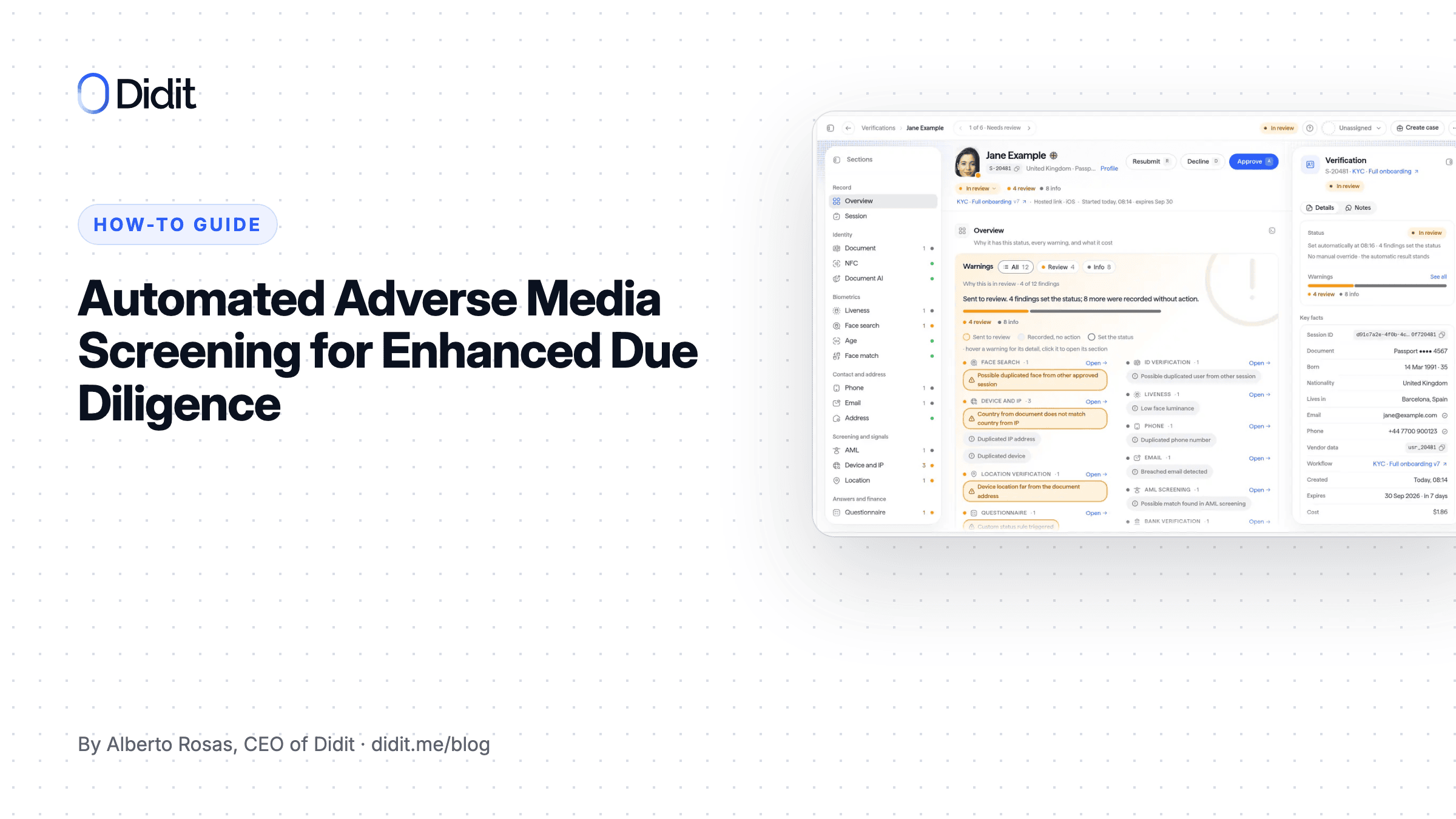
Automated Adverse Media Screening for Enhanced Due Diligence
Automated adverse media screening runs inside a Didit AML check for $0.20. You send a name, date of birth and nationality, get scored hits with match and risk scores, and route In Review cases to a person.
 Alberto RosasCo-founder and CEO
Contents
In this guide
Jump to the part you need.
Automated adverse media screening fits compliance teams that must document negative news checks on higher risk customers without reading every article by hand. On Didit it runs inside the AML screening step: $0.20 per check, adverse media included, screened against 1,300+ sanctions, PEP and watchlist sources. The catch is time and judgement: turning adverse media on adds roughly 25 seconds to a check, and flagged or ambiguous hits may need a person to review them.
Last updated: November 26, 2026. Prices checked against the live Didit price feed on November 26, 2026.
| Item | Detail |
|---|---|
| Where it runs | The AML screening feature in a workflow, or the standalone POST /v3/aml/ call |
| Price | $0.20 per AML check, adverse media included |
| Coverage | 1,300+ sanctions, PEP, watchlist and adverse media sources |
| Scoring | Match score for identity confidence, risk score for the severity of the listed entity |
| Added latency | Roughly 25 seconds with include_adverse_media=true; set a client timeout of at least 60 seconds |
| Ongoing monitoring | $0.07 per person per year, requires save_api_request=true |
| Human boundary | In Review goes to a reviewer; Declined is a threshold outcome, not an exit decision |
| Sandbox | Free and unlimited on every plan. Sandbox keys return a mocked Approved with zero hits unless you pass sandbox_scenario |
Start free in the sandbox at business.didit.me, no sales call needed. Developers who want an AI assistant to drive the check can connect the MCP server at didit.me/developers/mcp/. How the two-score model and the thresholds work is documented in the AML screening overview, and every unit price is on the pricing page.
What a usable EDD record contains
Enhanced due diligence asks whether the public record on a customer changes the risk decision, and whether you can show your reasoning to a supervisor or an examiner. The output of an automated screen therefore has to be a file, not a feed: every candidate match, the identity evidence behind it, the risk category it falls into, and a disposition with a name and a date.
Our recommended method has three parts. Screen name, date of birth and nationality in the same call as sanctions and PEP, so the adverse media pass inherits identity evidence; a media-only search has no way to tell your customer from a namesake. Let the two scores do the triage. Keep a person on the boundary, because an automated decline is a threshold decision and ending a customer relationship is not.
How to document adverse media screening for EDD
An EDD file is signed by a reviewer, not by an API call, so it has to carry both the output and the reasoning. Most fields below come from the screening result or from your plan's retention terms. The disposition is your reviewer's own record.
- Subject.
full_name,date_of_birth,nationality,document_numberwhere you hold one, andvendor_dataas your internal reference. - Screen record.
request_idandscreening_id, the date of the check, and the thresholds and weights in force at the time: 93 match, 80 approve, 100 review, weights 60/25/15 by default. - Hits. Each candidate with its
match_score,risk_scoreandreview_status, plus the category, source and listing date carried in the hit metadata. - Warnings. The
warnings[]codes attached to the screening, includingADVERSE_MEDIA_HIT,POSSIBLE_MATCH_FOUNDandHIGH_RISK_COUNTRY. - Disposition. Reviewer name, date, the evidence used to confirm or clear the match, and the approver for any exit or rejection.
Retention follows the plan: Free keeps 1 year of data and a 30-day audit log, Growth 5 years and a 1-year audit log, Scale up to 10 years with a 3-year audit log you can export, and Enterprise sets custom retention in its contract. Because save_api_request defaults to true, the stored screening is retrievable with GET /v3/session/{sessionId}/decision/ for as long as that window runs, which is what lets a reviewer re-open an old file at examination time.
How adverse media screening automation works
Keyword alerts fail on volume. A news search for a common name returns hundreds of mentions of other people, and the reviewer stops reading. Screening technology earns its place by doing four things before a person sees anything.
- Candidate generation. Didit includes potential matches at a match score of 75 or above in the result set, so weak name-only collisions are dropped before scoring.
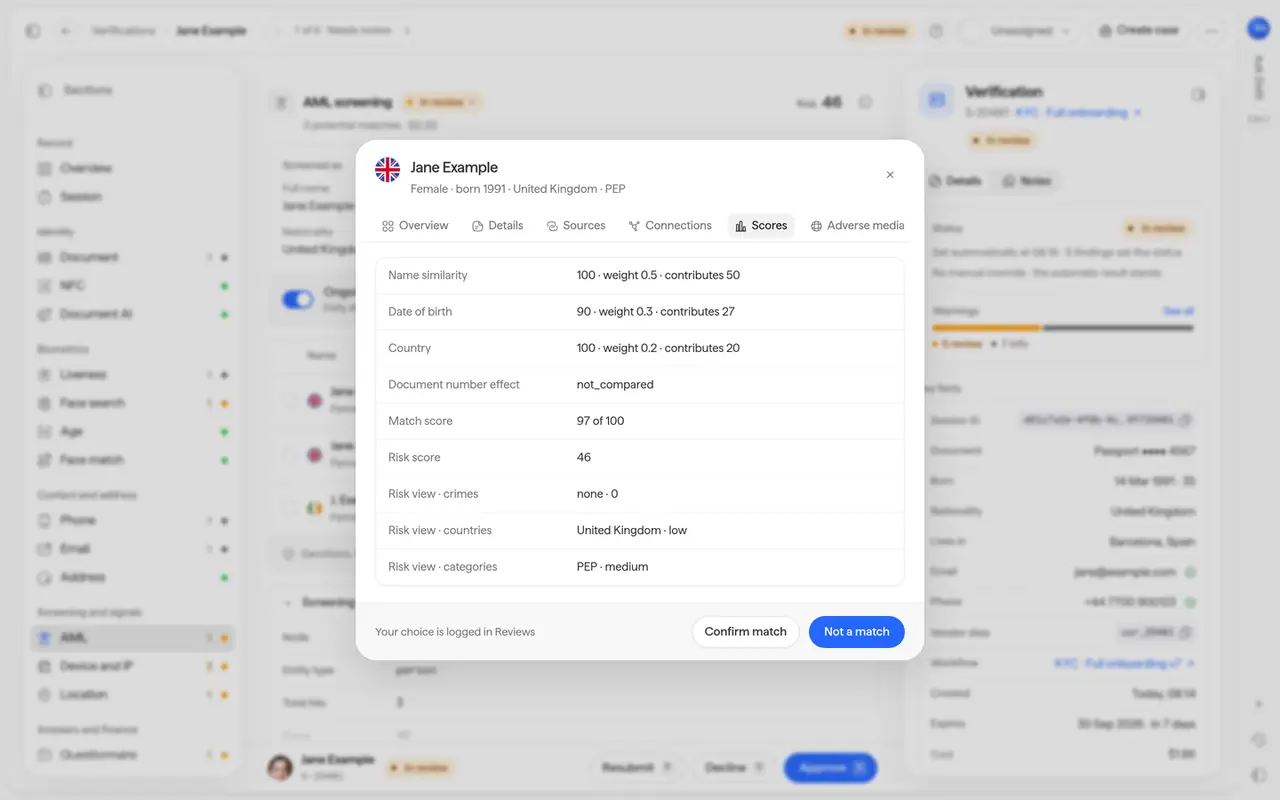
- Identity resolution. Every candidate gets a match score built from name, date of birth and country, weighted 60/25/15 by default through
aml_name_weight,aml_dob_weightandaml_country_weight. The three must sum to exactly 100 or the request is rejected with HTTP 400. A matchingdocument_numberacts as a golden key and overrides the match score to 100. - Entity risk. Every candidate also gets a risk score from its category, country and severity, independent of whether it is your customer.
- Classification. Matches below
aml_match_score_threshold, 93 by default, are taggedFalse Positiveand excluded from the risk calculation. The highest remaining risk score becomes the screening score.
A hit can be severe and irrelevant, or mild and correctly identified. Two scores keep those cases apart without anyone opening an article to find out which is which.
Prerequisites
- A Didit application and an API key sent as the
x-api-keyheader. Sandbox keys work and cost nothing. - Credit on the account. The Free plan adds $10 of credit a month for eligible organizations created with an eligible company-domain work email, which covers up to 50 AML checks at $0.20.
- For each subject,
full_nameis required with a minimum of two characters.date_of_birthandnationalityimprove identity resolution and are worth collecting on every EDD file. - Weights and thresholds agreed by whoever owns the risk appetite. Defaults are 60/25/15 for weights and 93 for the match threshold, 80 for approve and 100 for review.
- A client timeout of at least 60 seconds on any call with
include_adverse_media=true. - An HTTPS endpoint if you prefer webhooks to polling, and a decision on
save_api_request, which defaults to true. - A decision on ongoing monitoring, because it is a per person per year charge and requires persistence.
Steps to run an adverse media check
Choose the mode. Inside a hosted flow, add the AML feature to a workflow in the Business Console and adverse media travels with the session. For a one-off check on an existing customer, use the standalone endpoint. Either way the result surfaces in the Business Console and on the decision payload.
Assemble the identity inputs: name, date of birth, nationality and entity type. For a legal entity send the registered name with
"entity_type": "company"; individual screening uses"person".Send the request with an idempotency key, so a retry after a timeout does not buy a second screening.
curl -X POST 'https://verification.didit.me/v3/aml/' \
  -H "x-api-key: $DIDIT_API_KEY" \
  -H "Content-Type: application/json" \
  -H "Idempotency-Key: edd-2026-11-26-user-1234" \
  -d '{
    "full_name": "Javier Ejemplo Modelo",
    "entity_type": "person",
    "date_of_birth": "1974-01-01",
    "nationality": "ES",
    "include_adverse_media": true,
    "save_api_request": true,
    "include_ongoing_monitoring": true,
    "vendor_data": "user-1234"
  }'
Every field above is documented.
include_ongoing_monitoringrequiressave_api_requestto be true, otherwise the API answers HTTP 400.Wait for the answer. A plain screening completes in a few seconds. With adverse media on, the API holds the response while media enrichment runs, so plan for roughly 25 seconds and set the client timeout to at least 60.
Read the two scores per hit before you read the status. Status is a function of thresholds you set, and a threshold tells you nothing about whether the match is the right person.
Route on status.
In Reviewgoes to a person.Declinedis recorded with its hits, not acted on alone.Approvedwith a non-zero score at or above the approve threshold normally carries aPOSSIBLE_MATCH_FOUNDwarning, so readwarnings[]even on a pass.Fetch the stored decision when you need the full record. Because
save_api_requestdefaults to true,request_idworks withGET /v3/session/{sessionId}/decision/, the screening appears in the Business Console, and hit review statuses can be updated later.Subscribe to
session.status.updatedif the check is asynchronous. For a business session, changes from monitoring arrive asdata.updatedwithsession_kind: "business".
Expected response
The standalone call returns a request id and an AML object. This example is trimmed to the fields the documentation defines.
{
  "request_id": "req_9f2a41",
  "aml": {
    "screening_id": "aml_7c41",
    "status": "In Review",
    "score": 85,
    "hits": [
      {
        "match_score": 96,
        "risk_score": 85,
        "review_status": "Unreviewed"
      }
    ],
    "warnings": ["POSSIBLE_MATCH_FOUND", "ADVERSE_MEDIA_HIT"]
  }
}
The status field is one of Not Started, In Progress, Approved, In Review, Declined, Abandoned or Kyc Expired. A risk score of 85 sits above the default approve threshold of 80 and below the default review threshold of 100, which is exactly what In Review means. With the default review threshold at 100 and risk scores capped at 100, a decline is effectively unreachable unless you configure the thresholds differently, so approval and review are the two outcomes most teams see out of the box.

Inputs and outputs
| Field or header | What it does |
|---|---|
full_name | Required. The person or company name to screen, minimum two characters. |
entity_type | Person or company. Company screening uses the same two-score model. |
date_of_birth | Identity evidence for the match score. |
nationality | Country component of the match score. |
document_number | When it matches a listed record, it overrides the match score to 100. |
include_adverse_media | Turns on media enrichment and adds roughly 25 seconds of latency. |
include_ongoing_monitoring | Keeps the entity under provider-driven monitoring; needs save_api_request=true. |
save_api_request | Defaults to true: the screening is stored as a session and can be retrieved and reviewed later. |
vendor_data | Your own reference, carried through to the session and the console. |
Idempotency-Key | Retry safety. A repeat with an identical body returns the stored response and does not bill again. |
| Output | Meaning |
|---|---|
request_id | Works with the decision endpoint when the screening is saved. |
aml.status | The routable outcome: Approved, In Review or Declined among the documented values. |
aml.score | The highest risk score among hits that were not classified as false positives. |
aml.hits[] | Each candidate with match_score, risk_score and review_status. |
aml.warnings[] | Codes such as POSSIBLE_MATCH_FOUND, MATCH_FOUND, ADVERSE_MEDIA_HIT, SANCTIONED_ENTITY, PEP_MATCH, HIGH_RISK_COUNTRY, ONGOING_MONITORING_ENABLED. |
Failure cases and recovery
| Symptom | Cause | Recovery |
|---|---|---|
| HTTP 400 | The three match weights do not sum to exactly 100 | Fix the weights and resend. Missing components are re-normalized away, so do not compensate by inflating one weight. |
| HTTP 400 | include_ongoing_monitoring without save_api_request=true | Enable persistence or drop monitoring for this subject. |
| HTTP 403 | The account is out of credit | Top up or enable auto top-up. No new screening starts before the balance is covered. |
| Client timeout | Slow adverse-media enrichment, or a client timeout set below the documented 60 seconds | Retry with the same Idempotency-Key and the identical body. A reused key with a different body returns HTTP 409. |
| Result without media hits | The media source was slow and the enrichment step gave up | The result is still actionable. Record it, and re-run the media pass later; do not treat the absence of media hits as a clean record. |
Declined | The risk score crossed the review threshold | Open the hits and confirm identity before any decision. |
In Review | The risk score sits between approve and review thresholds | Route to the manual queue with the hit detail attached. |
Mocked Approved, zero hits | You are on a sandbox key | Expected behaviour. Pass sandbox_scenario to exercise a hit path. |
Reading an adverse media hit
ADVERSE_MEDIA_HIT is a warning code, not a verdict. The question it triggers is whether the article is about your customer, and the match score is the evidence for that question. Two records with the same name and different dates of birth lose the date weight and drop towards the false positive line. A matching document number overrides match_score to 100, but your reviewer must still confirm identity under your policy.

The risk score then tells you how serious the listed entity is, not how likely the match is. Because matches below the match threshold are dropped before the screening score is calculated, a high risk score on a weak name match never reaches the decision. That separation is what lets a team automate triage and spend review time only on rows where identity is plausible.
Ongoing monitoring for enhanced due diligence
A point-in-time check answers the question on the day it runs. EDD usually needs the answer to keep running. Setting include_ongoing_monitoring=true keeps the entity under provider-driven monitoring, dated every day, at $0.07 per screened entity per year. It requires save_api_request=true, and it can be switched off from the Business Console.
For a business, monitoring covers the company entity and every identified beneficial owner and officer, and new or changed matches generate a data.updated webhook event so the compliance team can reassess. That is the difference between a screening and a control: someone has to own the alerts, and the alert has to point at the original file.
Paid steps and review boundaries
| Step | Billing | Who acts |
|---|---|---|
| AML screening with adverse media | $0.20 per completed check, charged once | System |
| Retry with the same idempotency key | Not charged again | System |
| Ongoing monitoring | $0.07 per entity per year | System raises the alert, a person owns it |
| Person AML on KYB owners and officers | $0.20 per person, alongside company AML at $0.20 and registry retrieval from $2.00 | System |
| Workflow orchestration, sandbox, MCP server | Free | System |
| Hit disposition, exit decision, EDD sign-off | Not a Didit charge | Your reviewer |
The boundary is simple to state and hard to hold: the API decides what the scores are, your policy decides what the scores mean, and a person decides what happens to the customer. Do not let a threshold write an exit memo on your behalf.
Worked cost example
A team onboards 1,000 new customers a month. Every customer gets an AML check with adverse media. 400 of them take a full ID check, and 300 higher risk customers stay under ongoing monitoring. Screening and KYC are charged monthly; monitoring is charged yearly per screened entity.
- AML screening: 1,000 x $0.20 = $200.00 per month
- Full ID check: 400 x $0.33 = $132.00 per month
- Monthly subtotal at list price: $200.00 + $132.00 = $332.00 per month
- Ongoing monitoring: 300 x $0.07 = $21.00 per year
- First year at list price: ($332.00 x 12) + $21.00 = $3,984.00 + $21.00 = $4,005.00
The same volume on the Scale plan, where every Didit price carries a 10% discount:
- AML screening: 1,000 x $0.18 = $180.00 per month
- Full ID check: 400 x $0.297 = $118.80 per month
- Monthly subtotal: $180.00 + $118.80 = $298.80 per month
- Ongoing monitoring: 300 x $0.063 = $18.90 per year
- First year: ($298.80 x 12) + $18.90 = $3,585.60 + $18.90 = $3,604.50
Two things to keep straight when you budget. Monitoring is billed per year while screening and KYC are billed per month, so the first year adds monitoring to twelve monthly cycles, not to one. And the plan fee sits outside these numbers: Scale is $299 a month with $350 of monthly credit, which more than covers the $298.80 of monthly usage above before any top-up is needed.
Sources
- Didit docs: AML screening overview, two-score model, weights, thresholds, status enum and warnings.
- Didit docs: standalone AML screening API, request schema, latency, idempotency and billing rules.
- Didit docs: business AML screening, company and person level screening, aggregation and monitoring.
- Didit docs: business AML coverage, sanctions, regulatory and insolvency sources.
- Didit docs: workflow builder, adding AML as a workflow step with thresholds and versioning.
- Didit docs: webhooks, event delivery and signature verification.
- Didit docs: pricing and billing, plans, credit, data retention and discounts.
- Didit pricing page, live price feed read November 26, 2026.
- Didit MCP server setup.
- Didit Business Console, where the sandbox application is created and screenings are reviewed.
- FATF, the standard setter behind enhanced due diligence terminology.
Next step: create a sandbox application at business.didit.me, send the documented POST /v3/aml/ call with include_adverse_media=true and a sandbox_scenario, and read a real hit before you commit to thresholds. No sales call, no credit spent, and Didit serves 4,000+ active companies.
Try it
Try this in the sandbox
Run the check this guide describes, free.
The product this post is about, taken from its topic. Run it free in the sandbox.
Author
Alberto Rosas
Co-founder and CEO

Keep reading
Other guides in the same topic.
 What Is the Purpose of FICA in South Africa? 2026 Guide
FICA is South Africa's anti-money laundering law. It creates the Financial Intelligence Centre and requires accountable institutions to identify and verify clients, screen for PEP and sanctions risk and report suspicious.
Alberto RosasNov 26, 2026 Sixth Money Laundering Directive (6AMLD): What Changed and Which Rules Apply
6AMLD is Directive (EU) 2018/1673: Member States must criminalise laundering, widen predicate offences and set a four-year penalty floor. It adds no new due diligence duties for firms.
Alberto RosasNov 26, 2026 Automated Sanctions Screening: Canada, the Entity List and Embargoes
Automated sanctions screening matches people and companies against lists such as Canada's autonomous sanctions made under SEMA and JVCFOA and the OFAC SDN List, and returns candidate hits scored for identity confidence and.
Alberto RosasNov 26, 2026Questions
Frequently asked questions
What is automated adverse media screening?
It is the negative news part of a due diligence check, run by software instead of manual searching. The software screens a name against media and watchlist sources, returns candidate matches with an identity confidence score and a risk score, and classifies weak matches as false positives before risk is calculated. On Didit it runs inside the AML screening step at $0.20 per check.
What is an adverse media hit?
An adverse media hit is a record where a screened name matches a person or company mentioned in negative news, such as an allegation of fraud, a bribery investigation or a regulatory enforcement action. Didit returns it with a match score for identity confidence and a risk score for the severity of the listed entity, and the warning code ADVERSE_MEDIA_HIT. A hit is a review trigger, not a conclusion.
Does Didit use AI to screen adverse media?
What you get back is a scored, classified result rather than a list of articles. Each candidate carries a match score computed from name, date of birth and country, and a separate risk score, and anything below the match threshold is tagged False Positive and excluded from the risk calculation. That scoring is what makes the check automatable. Clearing a genuine hit is still a human task.
How long does an adverse media check take?
A plain AML screening typically completes in a few seconds. With include_adverse_media=true the API waits for media enrichment and the call takes roughly 25 seconds, so the documented advice is a client timeout of at least 60 seconds. Treat a timeout as a retry, not a failure, and reuse the same idempotency key.
What is the difference between match score and risk score?
The match score answers whether the listed record is the same person you are screening, built from name, date of birth and country with default weights of 60/25/15. The risk score answers how risky that listed entity is, based on category, country and severity. Matches below the match score threshold, 93 by default, are tagged as false positives and dropped from the risk calculation, and the highest remaining risk score becomes the screening score.
How much does automated adverse media screening cost?
$0.20 per AML check on the public price list, with adverse media included at no separate charge. Ongoing monitoring is $0.07 per person per year. The KYC and AML compliance bundle is $0.53, and Growth and Scale plans discount every price by 4% and 10%.
Can I screen a company and its owners?
Yes. Business verification screens the company entity, then screens every identified beneficial owner and officer individually, and the business session's overall AML status reflects the highest risk result across all of them. Registry retrieval starts at $2.00 per company, company AML is $0.20 per check and person AML is $0.20 per person.
Can I keep screening the same person after onboarding?
Yes, by setting include_ongoing_monitoring=true, which keeps the entity under provider-driven monitoring dated every day at $0.07 per screened entity per year. It requires save_api_request=true and can be disabled from the Business Console. For a business, new or changed matches generate a data.updated webhook event.
What happens if the adverse media source times out?
The result comes back without adverse media hits and stays actionable for sanctions and PEP. Treat it as an incomplete media pass, record it, and re-run the media check rather than reading the empty result as a clean record. The same guidance applies to a client timeout: retry with the identical body and the same Idempotency-Key.
How should I document adverse media screening for EDD?
Keep one file per subject holding the request_id and screening_id, the date of the check, the thresholds and weights in force, every hit with its match_score, risk_score and review_status, the warnings[] codes, and the reviewer's name, date and evidence. Because save_api_request defaults to true, the screening is stored and can be re-opened with GET /v3/session/{sessionId}/decision/. Retention is set by the plan: 1 year on Free, 5 years on Growth, up to 10 years on Scale, and custom on Enterprise.
Can I test adverse media screening without spending credit?
Yes. Sandbox testing is free and unlimited on every plan, and sandbox keys skip screening and billing entirely. They return a mocked Approved with zero hits, unless you pass sandbox_scenario to exercise a hit path.
Can an AI assistant run a Didit AML screening?
Yes. Didit runs a hosted MCP server at https://mcp.didit.me/mcp with OAuth sign-in, so an assistant can call the documented products without a custom connector, and the MCP server is free on every plan. The setup guide for every client is at didit.me/developers/mcp/.
Which watchlists does Didit screen against?
1,300+ global sanctions, PEP, watchlist and adverse media sources, across 220+ countries. At the company level the coverage includes the UN consolidated list, EU consolidated sanctions, multilateral development bank debarment registers, national sanctions regimes and insolvency registers. Every match is returned with structured metadata for filtering and prioritisation.
Compliance built in
Audited, certified and attested.
We hold the certifications and build each country's rules into your flows, so you can launch anywhere without worrying. Security and Compliance center
- Regulation encoded into your flows
Tell us what you do and where. Didit lists the rules that apply to you, with sources, and builds the checks each country needs into one workflow.
- Ready for AMLR
Every requirement of the new EU anti-money laundering rules, from checking customers to human review, is already covered by a Didit check.
- Tested in Spain's Treasury sandbox
Spain's Treasury published its supervised sandbox report on Didit's NFC plus active liveness onboarding; SEPBLAC took part and valued the added measures positively.
- Audited, not self-declared
iBeta Level 1 and Level 2. Liveness tested under ISO/IEC 30107-3.
Your obligations · 3 regions
 SOC 2 Type 2
 ISO 27001
 iBeta Level 1 and Level 2
 EU regulator attestation
 FSM youth protection
 GDPR
 EBA remote onboarding
 MiCA compatible
 FIDO Alliance member
- AMLREU AML Regulation ready
Integration · Didit MCP
Run Didit from your own AI agent
Connect Didit to Claude, Cursor, VS Code or ChatGPT and just ask in plain words. Your agent can do anything you can do in the console, with the same permissions you have.
 Add to Claude
 ChatGPT
 Cursor
- Build workflowsDescribe the checks you need. The agent creates and publishes the flow.
- Run investigationsAsk why a session was declined, review cases, search people and companies.
- Change rulesCreate payment rules, test them on past data and switch them on.
- Pull reportsAsk for numbers, exports or the audit log.
Didit Academy