CAPTCHA Verification API: Add Bot Protection in 8 Steps (2026)
Learn how a CAPTCHA verification API checks challenge tokens and how to set up Didit bot protection. Authentication is free for the first 50,000 active users each month.
 Alejandro RosasCo-founder and CTO
Contents
In this guide
Jump to the part you need.
For teams protecting a public form, a CAPTCHA verification API lets your backend validate a challenge token before it accepts a submission. For teams using Didit Authentication, we evaluate sign-up, sign-in and password-reset attempts after you enable bot protection. Authentication is free for the first 50,000 active users each month, then costs $0.02 per active user per month at list price.
Last updated: November 26, 2026. Prices checked against the live Didit price feed on November 26, 2026.
| What you add | Where the decision runs | What you get | Price |
|---|---|---|---|
| Bot protection policies | On our server, when bot protection is enabled for sign-up, sign-in and password reset | Six policies, each with a mode: Off, Log, Challenge or Block | Authentication usage: the first 50,000 active users each month are free, then $0.02 per additional active user per month at list price. |
| Standalone CAPTCHA verification | Your backend calls a separate CAPTCHA verification endpoint with a token from a challenge | A pass or fail for that token, outside Didit Authentication | The Didit Authentication docs describe attempt-level bot protection. For a separate public form, verify the form's challenge token on your backend. |
Start free in the sandbox at business.didit.me. There is no sales call, and a sandbox application is never billed. For developers, connect Didit to an AI assistant through the MCP server. Prices and plans sit on the pricing page.
What a CAPTCHA verification API does
A standalone CAPTCHA verification API is the backend call that checks a token issued by a challenge. The challenge runs in the browser or app, your server sends the token to the verification endpoint, and the endpoint answers whether that token is valid for the challenge. It answers a narrow question: was this token issued for a solved challenge? It does not decide whether a sign-up, sign-in or password reset should continue. The four steps are to obtain the token in the client, send it with the form submission, verify it from the backend, and reject invalid results before accepting the submission.
We do not work that way. We evaluate sign-up, sign-in and password-reset attempts inside Didit Authentication, against the six policies in the bot protection docs. Each policy has a mode: Off, Log, Challenge or Block. A Challenge policy can ask legitimate users for extra proof, which is the trade we accept for shared networks. The rest of this guide covers that flow.
Three visible CAPTCHA formats and invisible bot scoring
Bot protection can use a visible CAPTCHA challenge or invisible risk scoring. Three visible formats are common, and they are distinct from scoring.
- Text based. Distorted characters. It is a visible challenge, and OCR and vision models can solve many of them.
- Image based. Select the objects in a grid. It is a visible challenge, and models trained on large image sets can solve many of them.
- Audio based. A spoken sequence instead of a picture. It is an accessibility route, and speech recognition can attack it, so pair it with rate limits.
- Invisible bot scoring. No visible puzzle. The server scores the request from signals the browser and the network already send. This is scoring, not a CAPTCHA format.
Why the decision belongs on the server
A widget on the page only controls what a cooperating browser shows. A script ignores it. A standalone CAPTCHA verification API moves the token check to your server, but it still only checks the token. Our bot protection runs inside Authentication: we read the attempt, we record a reason for every match, and we do not tell the caller which signal fired.
Where each decision runs
| Context | Where the decision runs | What it establishes |
|---|---|---|
| A custom public form | Your backend calls a standalone CAPTCHA verification API with the token, or runs a bot check you own | Whether the token or check passed at that moment. It does not establish account state or age. |
| A Didit Authentication flow | Our server, on sign-up, sign-in and password reset | Whether the attempt matches one of six policies and what the policy mode does. |
| An age gate | Your age gate needs its own protection. Our bot protection only evaluates attempts that reach Didit Authentication. Age Estimation is a separate check. | A bot signal for the gate if you add one. Didit Age Estimation is a separate age check at a list price of $0.10 per completed check. |
How Didit bot protection works
We provide identity and fraud infrastructure for 4,000+ companies. Inside Didit Authentication, bot protection checks every sign-up, sign-in and password reset against six policies. Each policy has one of four modes. The stuffing policy defaults to Challenge because many people can share an IP address, so they get an extra proof rather than a lockout.
| Mode | What happens |
|---|---|
| Off | The policy is not checked. |
| Log | The attempt continues. A risk_logged event records the match. |
| Challenge | The person must pass an extra proof before the attempt continues. |
| Block | The attempt fails. The response depends on the policy and sign-in method. |
| Policy | Matches when |
|---|---|
bots | Our server scores the request 0.8 or more. |
stuffing | One device or IP tries 10 or more different accounts within 15 minutes, or the password is a known breached password. |
brute | The account has 5 or more failed attempts. Wrong passwords and wrong email, phone and authenticator codes all count. |
disposable | A sign-up, or an email code or magic link sign-in, uses a disposable email domain. |
vpn | The IP is a VPN, Tor or data-center network. |
travel | The sign-in is more than 500 km from the previous one, at more than 1,000 km/h, within 24 hours. |
The bot score and the signals behind it
The score runs from 0 to 1 and is the strongest signal found. bots matches at 0.8 or more. Each of these signals is enough on its own, and the console lists the ones that matched.
automation-ua: the user agent names an automation tool, such as a headless browser or a browser driver.script-ua: the user agent is an HTTP library or a command-line client, or there is none.browser-headers: the user agent claims a browser, but the request lacks headers that browser always sends.webdriver: the hosted page or a Didit SDK saw a browser that reports it is driven by automation.automation-artifact: the hosted page or a Didit SDK found what automation drivers leave behind in the page.headless: the hosted page saw a headless browser.no-signals: a sign-in attempt arrived without the signals its surface always sends.
What you need before you start
- A Didit account with a Sandbox application. Every Sandbox application has Authentication turned on, accepts
http://localhostcallbacks and is never billed. - Node.js 20 or later, and a web app you can run on
http://localhost:3000, for the SDK steps. - A credential for the management API: the application's API key with the
authenticationscope at write, a full-access key, or an owner-approved grant withdidit:management. - Run management API calls from a trusted environment. Start sign-in and handle the redirect in the browser SDK. Send its access token to your backend for verification.
Step by step: add bot protection to your sign-in flow
- Open your sandbox application. In the Business Console, use the application switcher to select your Sandbox application, then open Authentication.
- Register your callback and origin. Open Authentication, then Security and sessions, then Redirect URLs and allowed origins. Add
http://localhost:3000/auth/callbackas a redirect URL andhttp://localhost:3000as an allowed origin. Didit only returns a person to a redirect URL you registered, character by character. - Turn on a sign-in method. Open Authentication, then Sign-in methods, and turn on Email code. A new application starts with every method off, and the hosted page offers only the methods you turn on. You can also turn on Passkeys.
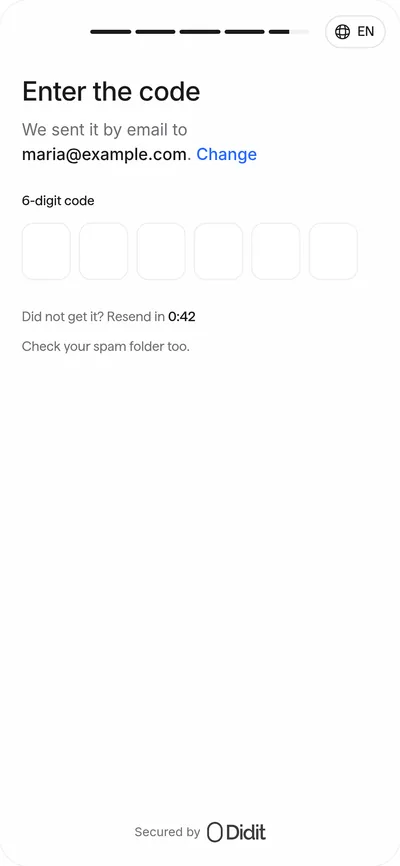
Email code on the hosted page. Bot protection runs on this attempt like any other. - Copy the publishable key. Open Authentication, then Developers, and copy the publishable key. In a Sandbox application it starts with
pk_test_. It is public and names your application's sign-in origin. Never put the Secret key in browser or mobile code. - Turn on protection and set the policy modes. Settings are read and changed with
GETandPATCHonprotection/in your application's Authentication management API. Send this from your backend:export MANAGEMENT_BASE="https://apx.didit.me/auth/v2/organizations/$ORG_ID/applications/$APPLICATION_ID/authentication/" curl --fail-with-body --request PATCH "${MANAGEMENT_BASE}protection/" -H "x-api-key: $DIDIT_API_KEY" -H "Content-Type: application/json" -d '{"enabled": true, "breached_password_check": true, "policies": {"bots": "block", "stuffing": "challenge", "brute": "challenge", "disposable": "block", "vpn": "challenge", "travel": "block"}}'enabledandbreached_password_checkarefalseby default. These are the defaults for newly created protection settings. If the application already has saved settings, read them withGET protection/before sending the example, which sets all six policy modes explicitly. - Add the sign-in button and the callback. Install the SDK and use the documented calls:
npm install @didit-protocol/auth
The callback handles the redirect and returnsimport { createDiditAuth } from "@didit-protocol/auth"; export const auth = createDiditAuth({ publishableKey: "pk_test_...", redirectUri: "http://localhost:3000/auth/callback", }); export async function onSignInClick() { await auth.signIn({ returnTo: "/dashboard" }); } export async function onCallbackPage() { const { session, returnTo } = await auth.handleRedirectCallback(); console.log(session.email, session.vendorData); window.location.replace(returnTo ?? "/"); }sessionandreturnTo. A first sign-in with an address that has no account creates one, because the default sign-up policy lets anyone sign up. - Verify the access token on your server. Obtain the access token with
auth.getToken()and send it asAuthorization: Bearerfollowed by the token, then verify it on every protected request:import { verifyToken } from "@didit-protocol/auth/server"; export async function authenticate(request: Request) { const header = request.headers.get("authorization") ?? ""; const token = header.startsWith("Bearer ") ? header.slice(7) : ""; try { const claims = await verifyToken(token, { publishableKey: process.env.DIDIT_PUBLISHABLE_KEY }); return { personId: claims.sub, vendorData: claims.vendor_data }; } catch { return null; } } - Read the decisions in the console. Open Authentication, then Sign-ins, and the Events page. Protection decisions are stored as
auth.*events, and each one carries the policy that matched. Subscribe a webhook destination to theauth.*types you need, such asauth.login,auth.login_failedandauth.new_device. Only subscribed destinations receive them.
The console keeps the reason behind a decision, which the caller never sees.
Expected output
Read the settings back with an authenticated GET protection/ call:
curl --fail-with-body --request GET "${MANAGEMENT_BASE}protection/" -H "x-api-key: $DIDIT_API_KEY"The response returns enabled, breached_password_check, each policy with its mode, and available for each policy. vpn and travel are available when Didit's IP analysis can be reached for your application.
In the sandbox, use PATCH protection/ to set brute to Log and confirm the mode with GET protection/. With a test account, submit incorrect email codes until the account reaches the documented five-failure threshold. In Events, look for a risk_logged event with the brute reason. In Log mode, the attempt continues through normal credential handling without a brute-force lock.
Then sign in normally on the hosted page with an email code. The callback exchanges its one-time code for tokens. The token endpoint response is raw; the SDK callback in step 6 returns session and returnTo instead.
{
  "access_token": "eyJhbGciOiJFUzI1NiIs...",
  "id_token": "eyJhbGciOiJFUzI1NiIs...",
  "refresh_token": "N4yZTl6y24YKYq77X_SO...",
  "token_type": "Bearer",
  "expires_in": 299,
  "session_id": "c9abf6cc-2d64-4bf2-b31e-a4d09a070ab1"
}
expires_in counts the seconds the access token has left. Access tokens last at most 5 minutes, and auth.getToken() refreshes them for you. Your server then gets claims.sub as the person ID and claims.vendor_data as your own reference. After the callback, open Authentication, then Sign-ins and the Events page to confirm the sign-in was recorded.
Failure cases and how to recover
| Situation | What comes back | What to do |
|---|---|---|
bots, stuffing, disposable or vpn blocks the attempt | 403 {"error": "attempt_blocked"} | Nothing for the caller. The 403 answer is the same for an existing account, an unknown one, a right secret and a wrong one. Open the event in the console to see the matched policy. |
brute or travel blocks a password attempt | 400 {"error": "invalid_credentials"} | The block is recorded as an attempt_blocked event even though the answer looks like a wrong password. Check the matched policy in the console. For a brute-force lock, reset the password or clear the lock in the console. For a travel block, review the travel match in the console. |
brute or travel blocks a code attempt | 400 {"error": "invalid_grant"} | Check the matched policy in the console. For a brute-force lock, reset the password or clear the lock in the console. For a travel block, review the travel match in the console. |
brute or travel blocks a passkey, social or organization SSO sign-in | 403 {"error": "attempt_blocked"} | These methods prove the person first, so the block returns the explicit error. Open the event in the console to see the matched policy. |
| The code exchange fails | 400 {"error": "invalid_grant"} | Exchange the callback code within 60 seconds and use it once. Start a fresh sign-in if the code was used or expired. If the error persists, check that the PKCE verifier and registered redirect URI match the original request, the account is unblocked, the email remains verified, and the sign-in method is still enabled. |
| The management call has no usable credential | 401, or 403 for a scoped key without the authentication scope | Send the application's own key, a full-access key, or an owner-approved grant with didit:management. A key of another application is refused. |
vpn or travel is marked not available | No block from that lookup | The attempt continues. Another enabled policy can still affect the outcome. In a sandbox application the lookup answers only for addresses Didit has already resolved. |
Inputs and outputs
| Item | Direction | Example | Notes |
|---|---|---|---|
org_id, application_id | In | Path of the management base | A key belongs to one application and works only for it. |
x-api-key | In | A key with the authentication scope at write | A scoped key without the scope is refused with 403. |
enabled | In | true | false by default, so protection is off until you turn it on. |
breached_password_check | In | true | Boolean. Defaults to false. |
policies | In | See the six-policy payload in step 5 | Six policy keys, four modes. |
available per policy | Out | true or false | Returned by GET protection/. |
| Access token | Out | eyJhbGciOiJFUzI1NiIs... | ES256, at most 5 minutes. |
claims.sub, claims.vendor_data | Out | Person ID and your reference | Returned by verifyToken. |
auth.* webhooks | Out | auth.login, auth.new_device | Only to subscribed destinations. |
Paid steps and review boundaries
- Authentication is free for the first 50,000 active users each month, then $0.02 per additional active user per month at list price, listed on the Didit pricing page. Plan discounts and credits apply after that usage.
- Authentication active-user billing is separate from other Didit modules. If you add a separate published check, such as Age Estimation at $0.10 per check, the price book lists it as its own line and this guide does not claim that Authentication triggers it.
- When an event needs a person, open the event in the Didit Business Console to see the matched policy. The console records the reason, such as
bots,stuffing,brute,vpn,travelorattack_mode. - Two rule actions for sign-in events, signing a person out of every session and blocking them from signing in, are not active yet. A rule that uses them records the action with the status
DISABLEDand does not apply it.
Worked cost example
Assume 60,000 Authentication active users in one month. The first 50,000 are free. At the USD list rate, (60,000 - 50,000) x $0.02 = $200 in Authentication usage before plan discounts or credits.
This example counts active users, not new sign-ups. New sign-ups alone do not establish total monthly active users.
Authentication usage is billed from prepaid credit. The figure below shows how Didit billing works.

Age verification CAPTCHA
At an age gate, a CAPTCHA supplies a bot signal, not an age signal. Our bot protection evaluates attempts that reach Didit Authentication. A separate age gate needs its own protection. Didit Age Estimation provides a separate age signal at a $0.10 list price per check.
If your age gate sits before a Didit Authentication flow, the gate itself is outside what Authentication evaluates. Protect the gate with a check you own, then let Authentication evaluate the sign-up, sign-in or password reset that follows. Age Estimation answers a different question from a bot check, and it is a separate published check on the price book.
Age verification cookie consent CAPTCHA
A cookie consent banner usually does not need a CAPTCHA. Our bot protection runs on sign-up, sign-in and password reset, not on a consent write endpoint, so it is not the tool for an anonymous form with no account behind it.
Consent has to be freely given to be valid under the GDPR. Adding a challenge in front of the accept and reject buttons adds a step to that choice. Keep the banner simple, protect the endpoint that records consent, and log what you record. If that endpoint is being abused, use a check you own at that endpoint rather than moving the consent decision into Didit Authentication.
Sources
- Didit Authentication product page
- Didit docs: Authentication overview
- Didit docs: Bot Protection at Sign-In
- Didit docs: Authentication Quickstart
- Didit docs: Authentication Integration Guide
- Didit docs: Set Up Didit Authentication by API
- Didit docs: Tokens and JWKS
- Didit docs: Authentication Events and Webhooks
- Didit docs: Identity Verification Pricing
- Didit pricing page and pricing as JSON, read November 26, 2026
- Didit price book
- Didit MCP server
- Regulation (EU) 2016/679 (GDPR)
The next step is the sandbox: create an application at business.didit.me, turn on one sign-in method, and send the PATCH from step 5. A sandbox application is never billed and needs no sales call. If you would rather have an agent make the calls, hand it the MCP server at didit.me/developers/mcp.
Try it
Try this in the sandbox
Run the check this guide describes, free.
The product this post is about, taken from its topic. Run it free in the sandbox.
Author
Alejandro Rosas
Co-founder and CTO

Keep reading
Other guides in the same topic.
 What Is the Purpose of FICA in South Africa? 2026 Guide
FICA is South Africa's anti-money laundering law. It creates the Financial Intelligence Centre and requires accountable institutions to identify and verify clients, screen for PEP and sanctions risk and report suspicious.
Alberto RosasNov 26, 2026 Sixth Money Laundering Directive (6AMLD): What Changed and Which Rules Apply
6AMLD is Directive (EU) 2018/1673: Member States must criminalise laundering, widen predicate offences and set a four-year penalty floor. It adds no new due diligence duties for firms.
Alberto RosasNov 26, 2026 Automated Sanctions Screening: Canada, the Entity List and Embargoes
Automated sanctions screening matches people and companies against lists such as Canada's autonomous sanctions made under SEMA and JVCFOA and the OFAC SDN List, and returns candidate hits scored for identity confidence and.
Alberto RosasNov 26, 2026Questions
Frequently asked questions
What is a CAPTCHA verification API?
A CAPTCHA verification API is a backend call that checks a token issued by a challenge. The challenge runs in the browser or app, and your server sends the token to the verification endpoint to learn whether it is valid for that challenge, so the answer is a narrow one about the token. When you enable bot protection in Didit Authentication, we evaluate sign-up, sign-in and password-reset attempts against six policies. Each policy has one of four modes: Off, Log, Challenge or Block.
Is a CAPTCHA verification API the same as Didit bot protection?
No. A standalone CAPTCHA verification API validates a challenge token and returns a result for that token. Our bot protection runs inside Didit Authentication and decides what happens to a sign-up, sign-in or password-reset attempt according to the policy mode. That mode can log the match, ask for an extra proof or block the attempt.
Is an api capcha the same thing as a CAPTCHA API?
Yes. api capcha is a misspelling of CAPTCHA API. A CAPTCHA API is the backend call that checks a token issued by a challenge and answers whether that token is valid for that challenge.
How much does Didit bot protection cost?
Authentication is free for the first 50,000 active users each month, then $0.02 per additional active user per month at list price. Plan discounts and credits apply after that usage.
What does a blocked attempt return?
bots, stuffing, disposable and vpn blocks answer 403 {"error": "attempt_blocked"}, decided before the password or code is checked. brute and travel blocks depend on the account: a password attempt answers 400 {"error": "invalid_credentials"}, a code attempt answers 400 {"error": "invalid_grant"}, and passkey, social and organization SSO sign-ins answer 403 {"error": "attempt_blocked"}. The block is recorded as an attempt_blocked event in the console.
Which policy modes should I start with?
These are the defaults for newly created protection settings: bots block, stuffing challenge, brute challenge, disposable block, vpn challenge and travel block. Read the current modes with GET protection/ and change them with PATCH protection/. Start in a sandbox application and read the events before you change a mode in a live application.
Do I need a sales call to test it?
No. A Didit account is free, every sandbox application has Authentication turned on, and sandbox testing is free and unlimited. You can start at business.didit.me and finish the eight steps on http://localhost:3000.
Can I put a CAPTCHA on an age verification gate?
A CAPTCHA supplies a bot signal, not an age signal. Our bot protection evaluates attempts that reach Didit Authentication, and a separate age gate needs its own protection. Didit Age Estimation provides a separate age signal at a $0.10 list price per check.
Does a cookie consent banner need a CAPTCHA?
Usually not. Our bot protection runs on sign-up, sign-in and password reset, not on a consent write endpoint. Adding a challenge in front of the accept and reject buttons adds a step to a choice that must be freely given under the GDPR, so protect the endpoint and keep the banner simple.
What happens when the IP lookup is unavailable?
The vpn and travel lookup does not block the attempt when it is unavailable, and a sign-in never fails because of it. Another enabled policy can still affect the outcome. GET protection/ marks those policies as not available until Didit's IP analysis can be reached, and a sandbox application answers only for addresses Didit has already resolved.
How do I stop a bot without telling it why?
For bots, stuffing, disposable and vpn, the block answers 403 {"error": "attempt_blocked"} for an existing account, an unknown one, a right secret and a wrong one. The reason, such as bots, stuffing, brute, vpn, travel or attack_mode, is recorded on the event in the console for your team. For brute and travel, a password attempt answers 400 {"error": "invalid_credentials"}, a code attempt answers 400 {"error": "invalid_grant"}, and passkey, social and organization SSO sign-ins answer 403 {"error": "attempt_blocked"}.
Can I test bot protection in the sandbox?
Yes. Create a sandbox application, turn on Email code, send the PATCH protection/ request to the management API, then read the setting back with GET protection/. Next run a policy-match check with a test account: set the brute policy to Log, read the setting back, trigger the documented five-failure condition, and check Events for a risk_logged match with the brute reason. In Log mode the attempt continues through normal credential handling. Sandbox testing is free and unlimited.
Compliance built in
Audited, certified and attested.
We hold the certifications and build each country's rules into your flows, so you can launch anywhere without worrying. Security and Compliance center
- Regulation encoded into your flows
Tell us what you do and where. Didit lists the rules that apply to you, with sources, and builds the checks each country needs into one workflow.
- Ready for AMLR
Every requirement of the new EU anti-money laundering rules, from checking customers to human review, is already covered by a Didit check.
- Tested in Spain's Treasury sandbox
Spain's Treasury published its supervised sandbox report on Didit's NFC plus active liveness onboarding; SEPBLAC took part and valued the added measures positively.
- Audited, not self-declared
iBeta Level 1 and Level 2. Liveness tested under ISO/IEC 30107-3.
Your obligations · 3 regions
 SOC 2 Type 2
 ISO 27001
 iBeta Level 1 and Level 2
 EU regulator attestation
 FSM youth protection
 GDPR
 EBA remote onboarding
 MiCA compatible
 FIDO Alliance member
- AMLREU AML Regulation ready
Integration · Didit MCP
Run Didit from your own AI agent
Connect Didit to Claude, Cursor, VS Code or ChatGPT and just ask in plain words. Your agent can do anything you can do in the console, with the same permissions you have.
 Add to Claude
 ChatGPT
 Cursor
- Build workflowsDescribe the checks you need. The agent creates and publishes the flow.
- Run investigationsAsk why a session was declined, review cases, search people and companies.
- Change rulesCreate payment rules, test them on past data and switch them on.
- Pull reportsAsk for numbers, exports or the audit log.
Didit Academy


