Screen Contractors Against World Bank, ADB and AIIB Debarment Lists
Didit screens a contractor entity and its owners and officers against the World Bank, ADB, AIIB, IDB, AfDB, EBRD, EIB and CDB debarment registers through business AML in a KYB session at $0.20 per AML check, returning hits.
 Alberto RosasCo-founder and CEO
Contents
In this guide
Jump to the part you need.
You need to screen contractors against multilateral development bank debarment lists, and you want an API instead of a spreadsheet. Didit screens the contractor entity and every owner and officer against the World Bank, ADB, AIIB, IDB, AfDB, EBRD, EIB and CDB debarment registers at $0.20 per AML check. The caveat matters: a hit tells you a record exists, not that the contractor is barred from your contract. Your procurement or compliance reviewer decides how the result affects eligibility.
Last updated: November 26, 2026. Prices checked against the live Didit price feed on November 26, 2026.
Summary
| What you need | How Didit does it | List price |
|---|---|---|
| Screen the contractor company | Company AML inside a KYB session, or the standalone AML Screening API | $0.20 per check |
| Ground the name in a registry | Company registry retrieval returns legal name, registration number and jurisdiction before screening | From $2.00 per company |
| Screen each owner and officer | Person AML on every identified UBO and officer | $0.20 per person |
| Confirm the person is real | Linked KYC for owners your workflow requires to verify | $0.33 per check |
| Keep watching after onboarding | Ongoing AML monitoring, and company registry monitoring as a separate line | $0.07 per person per year, $2.00 per company per year |
| Explain a hit to a reviewer | Matched name, aliases, listing date and source URL, plus registration number and jurisdiction as structured metadata where the publisher provides them | Included |
Start free in the sandbox at business.didit.me, with no sales call, and read every number on didit.me/pricing. If you are wiring this into an agent, connect Didit to an AI assistant through the Didit MCP server.
The outcome this workflow produces
For each contractor you get one decision object that answers two separate questions. First, is the legal entity on a development bank debarment or ineligibility register, or on any sanctions, regulatory watchlist or insolvency register Didit covers? Second, are the people who own or run it on those registers as individuals?
Company-level matches surface alongside person-level matches in the same session, so a reviewer is not stitching two reports together. Each hit carries a category, a match score and a risk score. The matched name, the aliases, the listing date and the source URL of the register that published the record come with the hit, and the registration number and jurisdiction appear as structured metadata when the publisher provides them. The source URL is what makes a review auditable: an analyst opens the publisher record and confirms the match.
The recommended method for contractor onboarding is a KYB session with Company AML and Key People enabled, because the registry lookup supplies the registration number and jurisdiction that a name-only screen lacks. Use the standalone AML Screening API when you already hold clean identifiers and want a single API call. By default, the request is saved as a session. Set save_api_request to false when you need a transient result. Keep the two routes distinct in your design: the development bank debarment registers are documented under the business AML coverage that the KYB route uses, while the standalone AML Screening API is documented as screening against sanctions, PEP, warning and watchlist and adverse media datasets. When debarment coverage is the reason for the check, run the KYB route.
Prerequisites
- A Didit application. Create one at business.didit.me if you do not have one.
- An API key from Developer Settings, then API Keys.
- A KYB workflow with Company registry lookup and Company AML enabled, and Key People enabled if you screen owners and officers. You copy the
workflow_idfrom the console. - A webhook endpoint reachable from the internet if you want the decision pushed to you instead of polling.
- For each contractor: the legal name exactly as registered, the registration number where you have it, the country of incorporation, and the names of the owners and officers you intend to screen.
How to screen a contractor, step by step
- Assemble the identifiers before you call anything. A debarment register lists firms by legal name, often with aliases, addresses and a registration number. Screening "Acme" and screening "Acme Infrastructure Holdings Ltd" return different results. Collect the registered name, the registration number, the country of incorporation and any former names the contractor discloses in its bid documents.
- Choose the route. If the contractor is being onboarded, run a KYB session so the registry supplies the entity data. If you only need a fast register check against names you already trust, call the standalone AML Screening API. The development bank debarment registers are the ones listed in the business AML coverage used by the KYB route, so pick that route when debarment is the point of the check. The standalone API is documented against the datasets on its own page, which you can read at the AML Screening API reference.
- Create the KYB session. Enable Company registry lookup and Company AML in the workflow, then create the session. The response returns
session_idand a hostedurlyou deliver to the contractor contact.curl -X POST https://verification.didit.me/v3/session/ \ -H "x-api-key: YOUR_API_KEY" \ -H "Content-Type: application/json" \ -d '{ "workflow_id": "YOUR_KYB_WORKFLOW_ID", "vendor_data": "contractor-acme-001" }'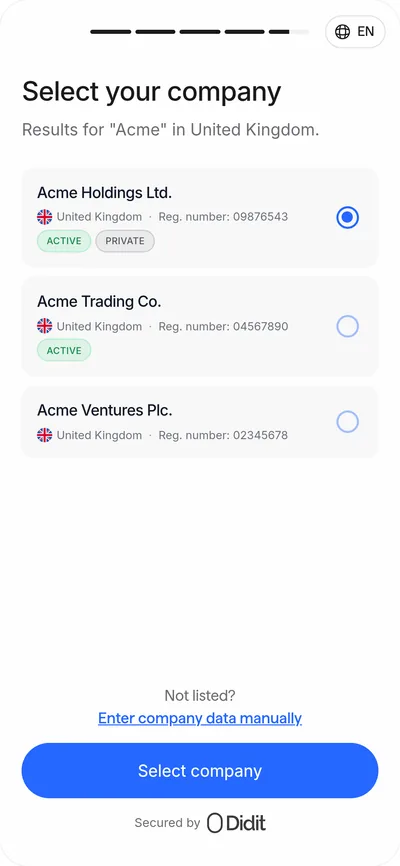
The registry lookup resolves the contractor to a legal entity with a registration number and jurisdiction before any list is checked. - Or call the standalone screening API. One POST screens a person or a company against the sanctions, PEP, warning and watchlist and adverse media datasets documented for that endpoint. Send an
Idempotency-Keyso a timeout does not bill you twice.curl -X POST https://verification.didit.me/v3/aml/ \ -H "x-api-key: YOUR_API_KEY" \ -H "Content-Type: application/json" \ -H "Idempotency-Key: contractor-acme-2026-11" \ -d '{ "full_name": "Acme Infrastructure Holdings Ltd", "save_api_request": true, "include_adverse_media": false, "aml_match_score_threshold": 93 }' - Read the two scores, not one. Every hit carries a
match_scorefrom 0 to 100, which is confidence that the hit is the same entity, and arisk_scorefrom 0 to 100, which is how risky the matched entity is. Hits belowaml_match_score_threshold(default 93) are taggedreview_status: "False Positive"and ignored for risk. The highest remainingrisk_scorebecomesaml.score. - Fetch and read the decision. The
status.updatedwebhook already carries the full decision. If you are polling instead, call the decision endpoint.
The company-level result appears in the decision as ancurl https://verification.didit.me/v3/session/bs_01H.../decision/ \ -H "x-api-key: YOUR_API_KEY"aml_screenings[]item withentity_type: "COMPANY", holding its ownstatus,score,total_hits,hits[]andwarnings[].
The session decision shows the company screening and the person screenings side by side, each with its own status and score. - Review each hit against the publisher record. The matcher scores identity confidence; a human confirms it. The fields to compare and the checks to run are set out with the output fields below, because that is where your integration reads them.
- Screen the people, not only the company. Debarment registers list individuals as well as firms, and a clean company can sit behind an officer who is personally excluded. Key People carries every director, UBO, shareholder and authorized signatory, and each one is screened automatically.
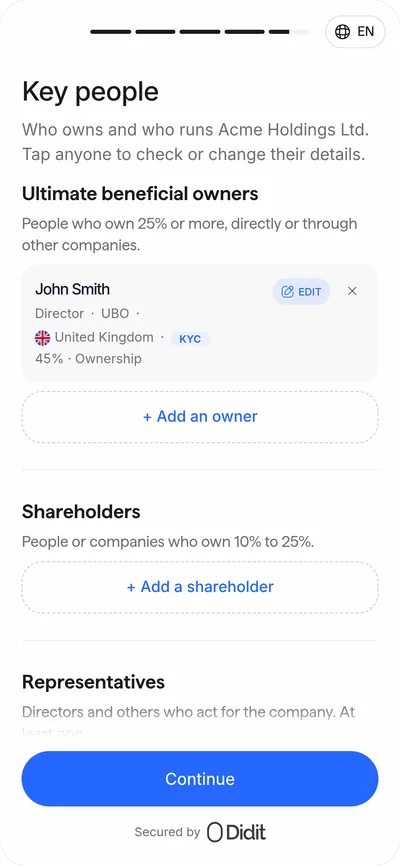
Each key person is screened as an individual, with roles and ownership percentages preserved for the audit trail. - Turn on monitoring for contractors you keep. Debarment registers change as new exclusion decisions are published. Enable ongoing AML monitoring on the business session: new matches generate a
data.updatedwebhook event withsession_kind: "business", which is the documented webhook for this flow. Company registry monitoring is a separate line at $2.00 per company per year if you also want to catch a status change at the registry.
Inputs and outputs
These are the standalone AML Screening API fields your integration sends and reads. In a KYB session, the company result arrives as an aml_screenings[] item with entity_type: "COMPANY", and each key person carries their own screening result in the same decision.
| Field | Direction | What it does |
|---|---|---|
full_name | Input, required | Legal name of the company or the person, minimum 2 characters |
document_number | Input | Acts as a golden key: a matching document number overrides match_score to 100 |
aml_name_weight, aml_dob_weight, aml_country_weight | Input | Must sum to exactly 100. Defaults are 60, 25, 15. Missing components are re-normalized away |
aml_match_score_threshold | Input | Below this, a hit is tagged as a false positive and ignored for risk. Default 93 |
aml_score_approve_threshold, aml_score_review_threshold | Input | Defaults 80 and 100, and they set where aml.status lands |
include_adverse_media | Input | Adds adverse media enrichment and roughly 30 seconds of waiting |
save_api_request | Input | Defaults to true, which stores the screening as a session you can retrieve, review and monitor |
include_ongoing_monitoring | Input | Keeps the profile under provider-driven monitoring. Requires save_api_request true, otherwise 400 |
Idempotency-Key | Header | Retry safety. The same key and body returns the stored response without a second screening or a second charge |
aml.status | Output | Approved, In Review or Declined |
aml.score | Output | Highest remaining risk_score after false positives are removed |
hits[] | Output | Each hit with match_score, risk_score, review_status, category and source metadata |
warnings[] | Output | Includes POSSIBLE_MATCH_FOUND when the score is non-zero and at or above the approve threshold |
Read a hit against the publisher record as soon as your console or case tool renders it. Open the source URL in the hit, compare the matched registration number and jurisdiction with the contractor's filing, and check the register's current status and any stated exclusion period. Those checks decide whether the record is the firm in front of you.

When a step fails, and how to recover
- A 403 on the screening call. The account balance is insufficient and nothing new was screened or billed. Top up, then retry with the same
Idempotency-Key. - A 409 on retry. You reused an idempotency key with a different body. Keys are scoped to your application and the exact request body, so issue a new key when the payload changes, for example when a contractor restates its legal name.
- A client timeout with adverse media on. The API waits for enrichment, so set a client timeout of at least 60 seconds. Retry with the same key and the replay is not billed again.
- A 400 on ongoing monitoring.
include_ongoing_monitoringrequiressave_api_requesttrue. Set it and resend. - A weight error on the thresholds. The three weights must sum to exactly 100. If you send no date of birth and no country, those components are dropped and the name weight carries the match, which makes false positives more likely.
- The contractor is not in the registry. The session continues on manual submission with
is_from_registryset to false. The screening still runs, but the jurisdiction signal is weaker, so review name-only hits by hand. - Registry status is not Active. Dissolved, struck off, in liquidation and dormant companies may be flagged or declined by your workflow configuration. That is a company status result, not a debarment hit. Do not record one as the other.
- Zero hits come back. On a name-only query, zero hits is not proof of a clean record. It may mean the exact legal name was wrong. Re-run with the registration number and jurisdiction, or move the contractor onto the KYB route so the entity is grounded in registry data.
- You are testing in sandbox. Sandbox keys skip screening and billing and return a mocked result, Approved with zero hits, unless you pass
sandbox_scenario. Never treat sandbox output as evidence for a procurement file.
Paid steps and review boundaries
Published list prices cover the machine work. The AML Screening API is $0.20 per check and is charged after the first successful screening. Inside a KYB session, Company AML is $0.20 per check and Person AML is $0.20 per person. Registry retrieval is priced by country and data tier, from $2.00 per company. A linked KYC for an owner is $0.33. Ongoing AML monitoring is $0.07 per person per year and company registry monitoring is $2.00 per company per year. Growth takes 4% off Didit prices and Scale takes 10%. Prices and plan terms are on didit.me/pricing. Didit runs identity, business and transaction checks for 4,000+ companies, and the sandbox is free on every plan.
What Didit does not decide for you. A match is a record with a score and a publisher. Your compliance or procurement team decides whether the matched entity is the contractor in front of you, whether the debarment period is still running, whether the exclusion category applies to the work you are buying, whether a renamed or restructured firm is the same firm, and whether to reject, add conditions or ask the contractor to explain. Didit does not issue an eligibility opinion on a specific development bank contract, and a clean screening does not replace your own due diligence on beneficial ownership.
One detail worth knowing before you set thresholds. With the defaults, aml_score_review_threshold sits at 100 and a hit risk score cannot exceed 100, so a non-zero score above 80 lands in In Review rather than Declined. That is the right default for contractor screening, because it routes every real match to a human instead of auto-rejecting a firm over a name collision.
Worked cost example
Take a procurement team that onboards 250 contractors in a year, each with three named owners or officers, and links KYC for one owner per contractor. That is 250 contractors and 750 screened people. All figures are published list prices, with registry retrieval at its $2.00 floor.
- Registry retrieval: 250 x $2.00 = $500.00
- Company AML: 250 x $0.20 = $50.00
- Person AML for three people each: 750 x $0.20 = $150.00
- Linked KYC for one owner each: 250 x $0.33 = $82.50
- Company registry monitoring: 250 x $2.00 = $500.00
- Ongoing AML monitoring for the same 750 screened people: 750 x $0.07 = $52.50
Total for the year: $500.00 + $50.00 + $150.00 + $82.50 + $500.00 + $52.50 = $1,335.00. On Scale, the 10% discount applies to the Didit lines. If you only need the name-level register check and already hold the identifiers, the same 250 contractors cost 250 x $0.20 = $50.00 for entity screening alone, plus $150.00 for the 750 people.
Sources
- Didit docs: Business AML Coverage, Sanctions and Watchlists, read November 26, 2026. Source of the development bank debarment register list and the hit metadata fields.
- Didit docs: Business AML Screening API, Entity and Person, read November 26, 2026. Source of company-level and person-level screening behaviour, ongoing monitoring and the
aml_screenings[]shape. - Didit docs: AML Screening API, read November 26, 2026. Source of the request fields, datasets, the two-score model, thresholds, idempotency and billing rules.
- Didit docs: KYB Quickstart, read November 26, 2026. Source of the session creation and decision retrieval calls.
- Didit docs: Company Registry API, read November 26, 2026. Source of registry fields, search modes and manual submission behaviour.
- Didit docs: KYB Officers and Representatives, read November 26, 2026. Source of the key people role taxonomy and automatic AML screening.
- Didit docs: Data Models, read November 26, 2026. Source of the decision and webhook object shapes.
- Didit pricing, read November 26, 2026. Source of every price quoted here.
- Didit MCP server, read November 26, 2026.
Next step: open the sandbox at business.didit.me, create a KYB workflow with Company AML enabled, and run one real contractor through it. No sales call, no contract, and nothing is charged in sandbox.
Try it
Try this in the sandbox
Run the check this guide describes, free.
The product this post is about, taken from its topic. Run it free in the sandbox.
Author
Alberto Rosas
Co-founder and CEO

Keep reading
Other guides in the same topic.
 Authentication Pricing per MAU, Organizations, SMS and MFA 2026
The first 50,000 active users each month are free, then $0.02 per active user per month. SMS codes cost the carrier rate plus our $0.02 fee, and passkeys or TOTP have no separate price.
Alberto RosasNov 26, 2026 Travel Rule API Pricing by Transfer and Wallet Check (2026)
Didit charges $0.02 per outbound Travel Rule exchange on list price, $0.0192 on Growth and $0.018 on Scale. Delivery attempts and wallet ownership proofs add no separate line, and a screenshot proof needs human approval with no.
Alberto RosasNov 26, 2026 How to Price KYC per Approved Customer, Retries and Review Included
Cost per approved customer equals the Didit charges in the period plus your own reviewer labor, divided by unique customers approved. A Didit full ID check lists at $0.33, and retry billing depends on the specific retry, so you.
Alberto RosasNov 26, 2026Questions
Frequently asked questions
What is a multilateral development bank debarment list?
It is a public register of firms and individuals that a development bank has excluded from bidding on or participating in its financed contracts, usually after a finding of fraud, corruption, collusion or another sanctionable practice. The World Bank, ADB, AIIB, IDB, AfDB, EBRD, EIB and CDB each publish their own register and maintain it themselves.
Which debarment lists does Didit screen a contractor against?
Inside business verification (KYB), Didit's business AML coverage lists the debarment and ineligibility registers of the World Bank, ADB, AIIB, IDB, AfDB, EBRD, EIB and CDB. They sit inside a sanctions catalogue that also covers the UN consolidated list, the EU consolidated sanctions lists, OFAC, and national regimes such as Swiss SECO and Australia's DFAT list, across 1,300+ lists in total. The standalone AML Screening API is documented separately, against sanctions, PEP, warning and watchlist and adverse media datasets.
Can I screen a contractor with only a company name?
Yes. The standalone AML Screening API accepts full_name as the only required field and screens a company or a person in one call. Name-only screening raises the false positive rate, so pass the registration number and the jurisdiction wherever you have them, or run the contractor through a KYB session so the registry supplies them.
Is a debarment hit the same thing as a sanctions hit?
No. A sanctions designation is a legal restriction on dealing with a person or entity, while an MDB debarment is an administrative exclusion from that bank's procurement. They are published by different bodies, with different legal effects and different remedies. Both belong in a contractor file, and a reviewer should record which one produced the hit.
What does a match score of 90 mean?
It means the system is 90 out of 100 confident that the register record refers to the entity you submitted. With the default aml_match_score_threshold of 93, a 90 would be tagged as a false positive and would not affect the risk score, but the hit still appears in the report for a human to look at. Raise or lower the threshold depending on how much name noise your contractor base produces.
Why did my contractor screening come back In Review instead of Declined?
Because aml.status follows your thresholds. A score above aml_score_approve_threshold (default 80) and at or below aml_score_review_threshold (default 100) produces In Review. With the defaults nothing auto-declines, since a risk score cannot exceed 100. If you want automatic declines above a certain risk level, set the review threshold below 100 and document the policy.
How long does a contractor debarment screening take?
Plain screenings typically complete in a few seconds. With include_adverse_media set to true the API waits for adverse media enrichment, with an initial pause of about five seconds and up to about 25 seconds of polling, so configure a client timeout of at least 60 seconds.
Does Didit screen the contractor's owners and directors too?
Yes. Inside a KYB session, company-level matches surface alongside person-level matches. Every identified beneficial owner, director, officer and authorized signatory is screened individually for sanctions, PEP status, criminal records and adverse media, and the session's overall AML status reflects the highest-risk result across the company and all screened people.
Can I keep monitoring a contractor after onboarding?
Yes. Ongoing AML monitoring watches the company entity and every identified individual against updated watchlists, and new or changed matches generate a documented data.updated webhook with session_kind: "business". Company registry monitoring is a separate line at $2.00 per company per year if you also want to catch status changes at the registry.
What does the source URL on a hit give me?
It points to the register that published the record, so an analyst can open the original entry and confirm the match rather than trusting a vendor summary. Each hit also carries the matched name, aliases, listing date, and the registration number and jurisdiction as structured metadata where the publisher provides them, which is what you need to write a defensible review note.
Do sandbox keys return real debarment results?
No. Keys from sandbox applications skip screening and billing and return a mocked Approved result with zero hits unless you pass sandbox_scenario. Saving works the same as on live keys, so you can test the retrieval and review flow end to end without touching a real register.
How much does it cost to screen one contractor?
At list price, company AML is $0.20 per check and person AML is $0.20 per person, on top of registry retrieval from $2.00 per company inside a KYB session. A contractor with three named people therefore costs about $2.80 plus $0.33 per owner you require to complete a linked KYC. Full prices are on the pricing page.
Compliance built in
Audited, certified and attested.
We hold the certifications and build each country's rules into your flows, so you can launch anywhere without worrying. Security and Compliance center
- Regulation encoded into your flows
Tell us what you do and where. Didit lists the rules that apply to you, with sources, and builds the checks each country needs into one workflow.
- Ready for AMLR
Every requirement of the new EU anti-money laundering rules, from checking customers to human review, is already covered by a Didit check.
- Tested in Spain's Treasury sandbox
Spain's Treasury published its supervised sandbox report on Didit's NFC plus active liveness onboarding; SEPBLAC took part and valued the added measures positively.
- Audited, not self-declared
iBeta Level 1 and Level 2. Liveness tested under ISO/IEC 30107-3.
Your obligations · 3 regions
 SOC 2 Type 2
 ISO 27001
 iBeta Level 1 and Level 2
 EU regulator attestation
 FSM youth protection
 GDPR
 EBA remote onboarding
 MiCA compatible
 FIDO Alliance member
- AMLREU AML Regulation ready
Integration · Didit MCP
Run Didit from your own AI agent
Connect Didit to Claude, Cursor, VS Code or ChatGPT and just ask in plain words. Your agent can do anything you can do in the console, with the same permissions you have.
 Add to Claude
 ChatGPT
 Cursor
- Build workflowsDescribe the checks you need. The agent creates and publishes the flow.
- Run investigationsAsk why a session was declined, review cases, search people and companies.
- Change rulesCreate payment rules, test them on past data and switch them on.
- Pull reportsAsk for numbers, exports or the audit log.
Didit Academy


