How to integrate a real-time adverse media screening API
Run adverse-media, sanctions and PEP screening in one $0.20 AML check at list price. The API returns match and risk scores. Set a client timeout of at least 60 seconds.
 Alejandro RosasCo-founder and CTO
Contents
In this guide
Jump to the part you need.
This guide fits a developer who needs adverse-media screening inside onboarding or ongoing monitoring, called server to server. We charge $0.20 per AML check at list price, adverse media included, with no monthly minimum. The caveat is latency and judgement: with adverse media on, expect about five seconds of initial wait plus up to 25 seconds of polling, so set a client timeout of at least 60 seconds, and reviewers assess relevant hits under your policy.
Last updated: November 26, 2026. Prices checked against the live Didit price feed on November 26, 2026.
| Item | Detail |
|---|---|
| Endpoint | POST https://verification.didit.me/v3/aml/ |
| Authentication | x-api-key header, server side only |
| Price | $0.20 per AML check at list price, adverse media included. $0.192 on Growth, $0.18 on Scale |
| Sources screened | 1,300+ sanctions, PEP and watchlist sources, plus adverse media in the same call |
| Latency | A few seconds without adverse media. With it, about five seconds of initial wait plus up to 25 seconds of polling, so allow 60 seconds |
| What comes back | aml.status, aml.score, and hits carrying match_score, risk_score and review_status |
| Persistence | save_api_request defaults to true, so the call is stored as a session you can re-fetch |
| Monitoring | include_ongoing_monitoring at $0.07 per person a year, re-screened daily |
| Sandbox | Free on every plan, mocked Approved result with zero hits by default, no billing |
Start free in the sandbox at business.didit.me with no sales call. For developers, connect Didit to an AI assistant through the MCP server. Start from the Didit AML Screening product page, read how it works in the documentation overview, then check the AML Screening API reference; every line price sits on the pricing page.
What you are building and which mode to use
The outcome is a server-side function that takes a name and a few identifiers, screens them against sanctions, PEP, watchlist and adverse-media sources, and returns a decision plus evidence: each returned hit with an identity score and a risk score. Two documented routes reach that outcome.
- Mode A, session based. AML runs as a step inside a verification workflow, and the decision, ongoing monitoring and audit history stay bound to the session in the Business Console. Configure AML on the workflow in the Business Console or with
POST /v3/workflows/. Create the session withPOST /v3/session/using the documentedworkflow_id,vendor_dataandcallbackfields. Readaml_screenings[]fromGET /v3/session/{sessionId}/decision/or subscribe tostatus.updated(see the webhook docs). - Mode B, standalone API. One call to
POST /v3/aml/, decoupled from any hosted flow. Use it when a back office, a partner integration or an internal tool needs a check on its own.
Our recommendation: Mode B for a one-shot check, Mode A when the screening belongs to an identity verification and you want the decision surfaced in the console for analysts. The steps below use the standalone endpoint. For session-based screening, use the workflow and session path above and read aml_screenings[] from the session decision.
Prerequisites
- A Didit organization and an application. Keys are scoped per application: open Developers, then API keys, in the Business Console. New keys start with
sk_test_for sandbox orsk_live_for live, and older keys without a prefix keep working. - The key stored server side as
DIDIT_API_KEY. Never ship it to a browser or a mobile bundle. - Credit on the live organization. An organization created through the API starts at $0, and sandbox keys skip screening and billing entirely.
- An HTTP client that can wait 60 seconds when adverse media is on.
- Your risk appetite written down before the first call: approve and review thresholds, and the weights for name, date of birth and country.
- An endpoint that verifies
X-Signature-V2if you want results pushed by astatus.updatedwebhook instead of polled. See the webhook docs.
Step by step integration
Create the application and get a key. Copy the primary key from Developers, then API keys. If you prefer no console at all, call
POST https://apx.didit.me/auth/v2/programmatic/register/, verify the emailed code at/auth/v2/programmatic/verify-email/, and the response returns the live and sandboxapi_keyinline. The details are in API authentication.Pick the mode. Standalone for a one-shot check, session for anything inside a KYC flow.
Set weights and thresholds before the first call.
aml_name_weight,aml_dob_weightandaml_country_weightmust sum to exactly 100 or the request is rejected with a 400. The defaults are 60, 25 and 15.aml_match_score_thresholddefaults to 93,aml_score_approve_thresholdto 80 andaml_score_review_thresholdto 100. Record those numbers because they decide how hits are classified and how the final status is derived.Send the screening call with adverse media on. Set
include_adverse_mediato true to add adverse-media enrichment to the sanctions, PEP and watchlist screening.
curl -X POST 'https://verification.didit.me/v3/aml/' -H "x-api-key: $DIDIT_API_KEY" -H "Content-Type: application/json" -H "Idempotency-Key: aml-user-1234-2026-11-26" -d '{"full_name": "Javier Ejemplo Modelo", "entity_type": "person", "date_of_birth": "1974-01-01", "nationality": "ES", "include_adverse_media": true, "vendor_data": "user-1234"}'Read the status and route it. Use the AML status and warnings as inputs to your onboarding policy. Route
In Reviewto a reviewer. If adverse-media enrichment timed out, the sanctions and PEP result can still be used, but the response does not establish that the adverse-media search completed. Never branch on the presence of a hit alone, because a hit below the match threshold is taggedFalse Positiveand dropped from the risk calculation.Persist, poll or listen.
save_api_requestdefaults to true, so the screening is stored as a session.request_idthen works withGET /v3/session/{sessionId}/decision/, the run appears in the console, hit review statuses can be updated later, and astatus.updatedwebhook fires. Set it to false for a transient check: nothing is stored andrequest_idis only a correlation id. If you kept saving on, verify the saved result with the documented decision call:
Replace REQUEST_ID with the request_id returned by the saved standalone screening.
curl "https://verification.didit.me/v3/session/REQUEST_ID/decision/" -H "x-api-key: $DIDIT_API_KEY"In sandbox, the mocked result tests integration behavior. The live call is needed to assess real adverse-media enrichment.
Attach monitoring to the customers you keep. Send
include_ongoing_monitoringas true to keep the profile under provider-driven monitoring, re-screened daily, at $0.07 per person a year. It requiressave_api_request=trueand can be switched off from the console later.Handle the failure paths before go live. See Failure cases and recovery.
Expected output
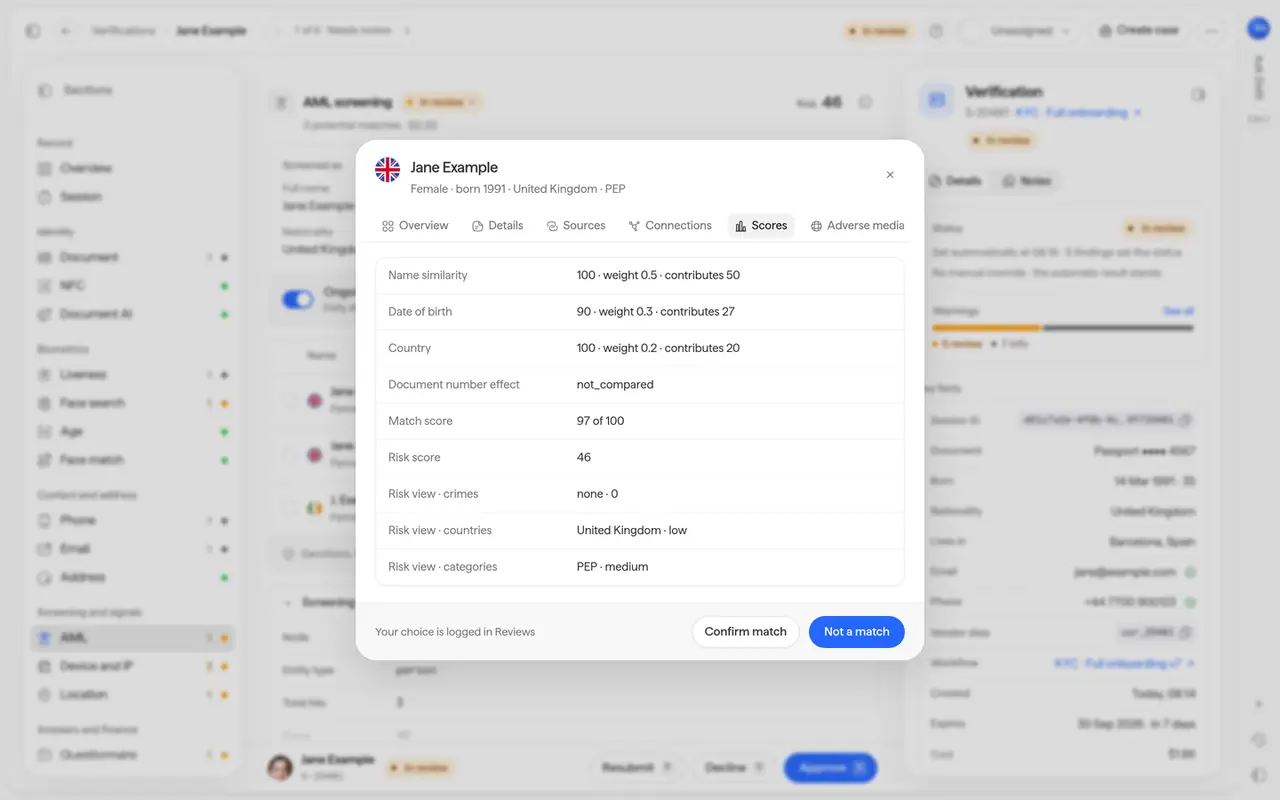
The documented response outline is { request_id, aml: { status, screening_id, hits, warnings } }. Treat it as a field outline, not literal data. aml.score is the highest risk_score among hits that survived the match threshold, not an average. match_score is identity confidence from 0 to 100, and risk_score is entity risk from 0 to 100. review_status marks whether a hit is a False Positive or Unreviewed.
Hits below match score 93 are excluded from the risk calculation. With the default thresholds, a final score of 80 or less is Approved, and a score above 80 through 100 is In Review. Declined requires a score above the review threshold, so it cannot occur with the default review threshold of 100. At exactly 80, the result is Approved and includes POSSIBLE_MATCH_FOUND. A score of exactly 0 never triggers POSSIBLE_MATCH_FOUND.
The documented warning codes include MATCH_FOUND, POSSIBLE_MATCH_FOUND, ADVERSE_MEDIA_HIT, PEP_MATCH, SANCTIONED_ENTITY, HIGH_RISK_COUNTRY and ONGOING_MONITORING_ENABLED. The documentation lists these as warning codes, not as a fixed JSON structure for each warning.

Inputs and outputs
| Field | What it does |
|---|---|
full_name (required) | Person or company to screen, minimum 2 characters. |
entity_type | Person or company route. |
date_of_birth, nationality | Feed the date-of-birth and country weights. Missing components are re-normalised away. |
document_number | A matching document number acts as a golden key and overrides match_score to 100. |
include_adverse_media | Adds the adverse-media pass. Set it explicitly on every call. |
include_ongoing_monitoring | Keeps the profile under monitoring. Requires save_api_request=true, otherwise a 400. |
save_api_request | Defaults to true. False stores nothing. |
vendor_data | An internal reference you can pass with the screening. The documented session webhook envelope includes vendor_data. |
| Weights and thresholds | aml_name_weight, aml_dob_weight, aml_country_weight, aml_match_score_threshold, aml_score_approve_threshold, aml_score_review_threshold. |
sandbox_scenario | Accepts a mocked outcome on a sandbox key. The sandbox returns Approved with zero hits by default. |
Idempotency-Key header | Retry safety, up to 255 characters, scoped to your application and the exact body. |
aml.hits[] | One item per potential match with match_score, risk_score and review_status. |
aml.warnings[] | Codes including MATCH_FOUND, POSSIBLE_MATCH_FOUND, ADVERSE_MEDIA_HIT, PEP_MATCH, SANCTIONED_ENTITY, HIGH_RISK_COUNTRY, ONGOING_MONITORING_ENABLED. |
Failure cases and recovery
| Failure | Meaning and fix |
|---|---|
| 400 on weights | The three weights do not sum to exactly 100. Correct the numbers and resend. |
| 400 on monitoring | include_ongoing_monitoring=true was sent with save_api_request=false. Turn saving on or drop monitoring. |
| 401 | Key wrong, malformed, revoked or expired. Fetch a working key. See API errors. |
| 403 insufficient balance | No credit left. The call is refused before any screening runs, so nothing is charged. Top up. |
| 409 | The same Idempotency-Key was reused with a different body. Use a new key for each intended screening. Reuse the same key and exact body for retries of that screening. |
| Client timeout before a response | Retry with the same Idempotency-Key and identical body. The first completed request stores its response, and later identical retries return that response without running or billing another screening. |
| Completed response without adverse-media enrichment | The response does not establish that the adverse-media search completed. Zero media hits alone cannot distinguish a completed search with no matches from an enrichment timeout, and the documented endpoint excerpt names no field that distinguishes those cases. On a live application, a new idempotency key requests a new screening. We charge one AML credit if that screening succeeds, and the result may still contain zero adverse-media hits. Route the case to a reviewer if the result matters. |
| 429 | A rate limit or quota was reached. Honor Retry-After before retrying. See rate limiting. |
| 500 or 503 | Unexpected error or a dependency down. Retry with backoff and the same idempotency key so you cannot be billed twice. |
| Status In Review | Not an error. The score landed above the approve threshold and at or below the review threshold, so route the case to a person. |
Paid steps and review boundaries
What bills: one AML credit after the first successful screening. Replayed idempotent responses are not charged again, and an insufficient balance returns a 403 before any new screening happens, so a refused call costs nothing. Sandbox keys skip screening and billing and return a mocked Approved result with zero hits by default. Pass sandbox_scenario to select a mocked outcome. Ongoing monitoring bills on its own line at $0.07 per person a year.
Where a person must stand: use the AML status and warnings as inputs to your onboarding policy. Route In Review to a reviewer. If adverse-media enrichment timed out, the sanctions and PEP result can still be used, but the response does not establish that the adverse-media search completed.
| Final score | Status with default thresholds | POSSIBLE_MATCH_FOUND |
|---|---|---|
| 0 | Approved | No |
| 80 | Approved | Yes, because the score is nonzero and at or above the approve threshold |
| 81 | In Review | Yes |
| 100 | In Review | Yes |
Hits below match score 93 are excluded from the risk calculation. With the default thresholds, a final score of 80 or less is Approved, and a score above 80 through 100 is In Review. Declined requires a score above the review threshold, so it cannot occur with the default review threshold of 100. At exactly 80, the result is Approved and includes POSSIBLE_MATCH_FOUND.
Lower the review threshold only when you can explain the number to an auditor. Never auto-decline on a hit whose match_score sits near the threshold.
Worked cost example
| Item | List | Growth, 4 percent off | Scale, 10 percent off |
|---|---|---|---|
| AML screening per check | $0.20 | $0.192 | $0.18 |
| Ongoing AML monitoring per person per year | $0.07 | $0.0672 | $0.063 |
Growth and Scale figures are usage charges before the plan fee and included credit. Here is one monthly onboarding cohort of 25,000 customers:
- AML at list: 25,000 x $0.20 = $5,000 for the cohort.
- AML at Scale rates: 25,000 x $0.18 = $4,500 for the cohort.
- One year of monitoring for that one cohort at list: 25,000 x $0.07 = $1,750. At Scale rates: 25,000 x $0.063 = $1,575. Each additional cohort adds its own monitoring cost.
- If your verification workflow runs one full ID check and one AML screening per person, the list price is $0.33 + $0.20 = $0.53 per person. For 25,000 people, that is 25,000 × $0.53 = $13,250.
- For an eligible Free organization, spending the full $10 monthly credit on AML buys $10 / $0.20 = 50 checks. The credit is available to the first organization created with an eligible work email for the company domain.
Plans and credits are read live from didit.me/pricing; the per-check numbers above come from the price feed dated November 26, 2026.
What the adverse media pass actually adds
Sanctions and PEP screening compares identifiers against structured records, and it still requires identity matching before a hit means anything. Adverse media is unstructured news, and the hard parts are identity and relevance. Didit turns both into machine-readable signals on the screening, so your code branches on codes and scores instead of parsing prose.
The AML documentation lists ADVERSE_MEDIA_HIT, MATCH_FOUND, PEP_MATCH, SANCTIONED_ENTITY and HIGH_RISK_COUNTRY among the warnings. POSSIBLE_MATCH_FOUND is added when the final score is nonzero and meets or exceeds the approve threshold. Use the actual hit and its source when reviewing a case.

Adverse media screening best practices for 2026
- Screen at onboarding and monitor afterwards. A one-time screening reflects the sources checked at that time. Ongoing monitoring can bring later updates into the report.
- Record the thresholds and the workflow version used for each decision to help explain the original decision. Source records can change before a later screening.
- Record the review outcome and rationale. Retain source material according to your organization's applicable privacy and retention requirements.
- Make false positive handling explicit. A common name can produce several candidates. Date of birth and nationality help distinguish them, and each clearance needs a reason.
- If your policy calls for re-screening after a change in country or role, use current identifiers. The configured country weight contributes to
match_score.risk_scoremeasures the risk associated with a matched entity.
Adverse-media results can inform customer due diligence. Define when your team reviews a hit and what it records under the requirements that apply to your business.
Sources
- Didit AML Screening product page
- Didit docs: AML Screening API, sanctions, PEP and watchlists
- Didit docs: AML Screening overview and integration prompt
- Didit docs: AML warning codes
- Didit docs: API authentication
- Didit docs: webhooks and HMAC signing
- Didit docs: API errors and retries
- Didit docs: rate limiting and 429 handling
- Didit docs: pricing and billing
- Didit pricing page and price feed, read November 26, 2026
- Didit MCP server setup
Next step: start free in the Didit sandbox at business.didit.me with no sales call, then run the curl example with your sandbox key. Sandbox screenings are mocked and free, so you can wire routing and the review queue before you spend a cent.
Try it
Try this in the sandbox
Run the check this guide describes, free.
The product this post is about, taken from its topic. Run it free in the sandbox.
Author
Alejandro Rosas
Co-founder and CTO

Keep reading
Other guides in the same topic.
 What Is the Purpose of FICA in South Africa? 2026 Guide
FICA is South Africa's anti-money laundering law. It creates the Financial Intelligence Centre and requires accountable institutions to identify and verify clients, screen for PEP and sanctions risk and report suspicious.
Alberto RosasNov 26, 2026 Sixth Money Laundering Directive (6AMLD): What Changed and Which Rules Apply
6AMLD is Directive (EU) 2018/1673: Member States must criminalise laundering, widen predicate offences and set a four-year penalty floor. It adds no new due diligence duties for firms.
Alberto RosasNov 26, 2026 Automated Sanctions Screening: Canada, the Entity List and Embargoes
Automated sanctions screening matches people and companies against lists such as Canada's autonomous sanctions made under SEMA and JVCFOA and the OFAC SDN List, and returns candidate hits scored for identity confidence and.
Alberto RosasNov 26, 2026Questions
Frequently asked questions
What is an adverse media screening API?
Adverse-media screening is the part of AML screening that looks for negative news coverage about a person. Didit's AML call includes adverse media, sanctions, PEP and watchlist screening as categories in one request, sent as POST https://verification.didit.me/v3/aml/ with include_adverse_media set to true. Each hit carries a match_score and a risk_score, and the check costs $0.20 at list price.
How much does an adverse media check cost?
We charge $0.20 per AML check at list price, and the adverse-media pass is included rather than billed as a separate line. Growth takes 4 percent off, so $0.192, and Scale takes 10 percent off, so $0.18. Ongoing monitoring is separate at $0.07 per person a year, with Growth and Scale rates of $0.0672 and $0.063. Growth and Scale figures are usage charges before the plan fee and included credit.
Can I run an adverse media check from C# instead of searching news manually?
Yes. From your C# server, send POST https://verification.didit.me/v3/aml/ with the x-api-key and Content-Type: application/json headers. Send the person's name in full_name and set include_adverse_media to true in the JSON body. We return scored matches and warning codes your team can use for review.
Does the API cover automated screening at onboarding and afterwards?
Yes. For onboarding, add the AML feature to a workflow and create a session with POST /v3/session/, then read aml_screenings[] from the session decision. On the standalone endpoint, include_ongoing_monitoring and save_api_request are request fields: include_ongoing_monitoring keeps the profile under provider-driven monitoring at $0.07 per person a year, and it requires save_api_request=true.
What is the difference between match score and risk score?
match_score answers whether the person in the article is the person you screened, from 0 to 100, using name, date of birth, country and document number. risk_score answers how risky that entity is if the match is real. Hits below the match threshold, 93 by default, are tagged False Positive and ignored when the final score is calculated.
How long does a call take with adverse media enabled?
Plain screenings usually complete in a few seconds. With include_adverse_media=true the API waits for enrichment, about five seconds of initial wait plus up to 25 seconds of polling. Configure a client timeout of at least 60 seconds, or the request can look like a failure while the screening is still running.
What happens if the adverse media lookup times out?
A client timeout before a response means retry with the same Idempotency-Key and identical body. A completed response without adverse-media enrichment means the response does not establish that the adverse-media search completed. On a live application, a new idempotency key requests a new screening. We charge one AML credit if that screening succeeds, and the result may still contain zero adverse-media hits. Route the case to a reviewer if the result matters.
Can I use Didit only for screening when another provider runs my KYC?
Yes. Use the standalone server-to-server endpoint without a hosted KYC flow. By default, we save the screening as a session and emit a status.updated webhook; set save_api_request=false and nothing is stored, with request_id only a transient correlation ID.
Are adverse media hits safe to auto-decline on?
An adverse-media hit alone is insufficient grounds to decline an applicant. Review the identity match, source and relevance under your policy before acting. Under the documented scoring rule, Declined requires a score above the review threshold, and the default review threshold is 100, so a default setup cannot auto-decline. At exactly 80 the result is Approved and includes POSSIBLE_MATCH_FOUND.
Is there an adverse media data feed for AI agents?
For adverse-media results an assistant can use, integrate the documented standalone AML API server-side. We also offer a free hosted MCP server with OAuth sign-in at Didit MCP setup. The MCP setup page explains connection options; the documented standalone API is the route for scored adverse-media results.
Does Didit sell adverse media monitoring software as well as an API?
We offer the standalone AML API for integrations and the Business Console for reviewing saved screenings and managing ongoing monitoring. The list price is $0.20 per AML screening and $0.07 per person per year for ongoing monitoring. Both are documented separately, and the console is where analysts update review statuses.
Compliance built in
Audited, certified and attested.
We hold the certifications and build each country's rules into your flows, so you can launch anywhere without worrying. Security and Compliance center
- Regulation encoded into your flows
Tell us what you do and where. Didit lists the rules that apply to you, with sources, and builds the checks each country needs into one workflow.
- Ready for AMLR
Every requirement of the new EU anti-money laundering rules, from checking customers to human review, is already covered by a Didit check.
- Tested in Spain's Treasury sandbox
Spain's Treasury published its supervised sandbox report on Didit's NFC plus active liveness onboarding; SEPBLAC took part and valued the added measures positively.
- Audited, not self-declared
iBeta Level 1 and Level 2. Liveness tested under ISO/IEC 30107-3.
Your obligations · 3 regions
 SOC 2 Type 2
 ISO 27001
 iBeta Level 1 and Level 2
 EU regulator attestation
 FSM youth protection
 GDPR
 EBA remote onboarding
 MiCA compatible
 FIDO Alliance member
- AMLREU AML Regulation ready
Integration · Didit MCP
Run Didit from your own AI agent
Connect Didit to Claude, Cursor, VS Code or ChatGPT and just ask in plain words. Your agent can do anything you can do in the console, with the same permissions you have.
 Add to Claude
 ChatGPT
 Cursor
- Build workflowsDescribe the checks you need. The agent creates and publishes the flow.
- Run investigationsAsk why a session was declined, review cases, search people and companies.
- Change rulesCreate payment rules, test them on past data and switch them on.
- Pull reportsAsk for numbers, exports or the audit log.
Didit Academy


