Device Fingerprinting: Your Shield Against Browser Fraud
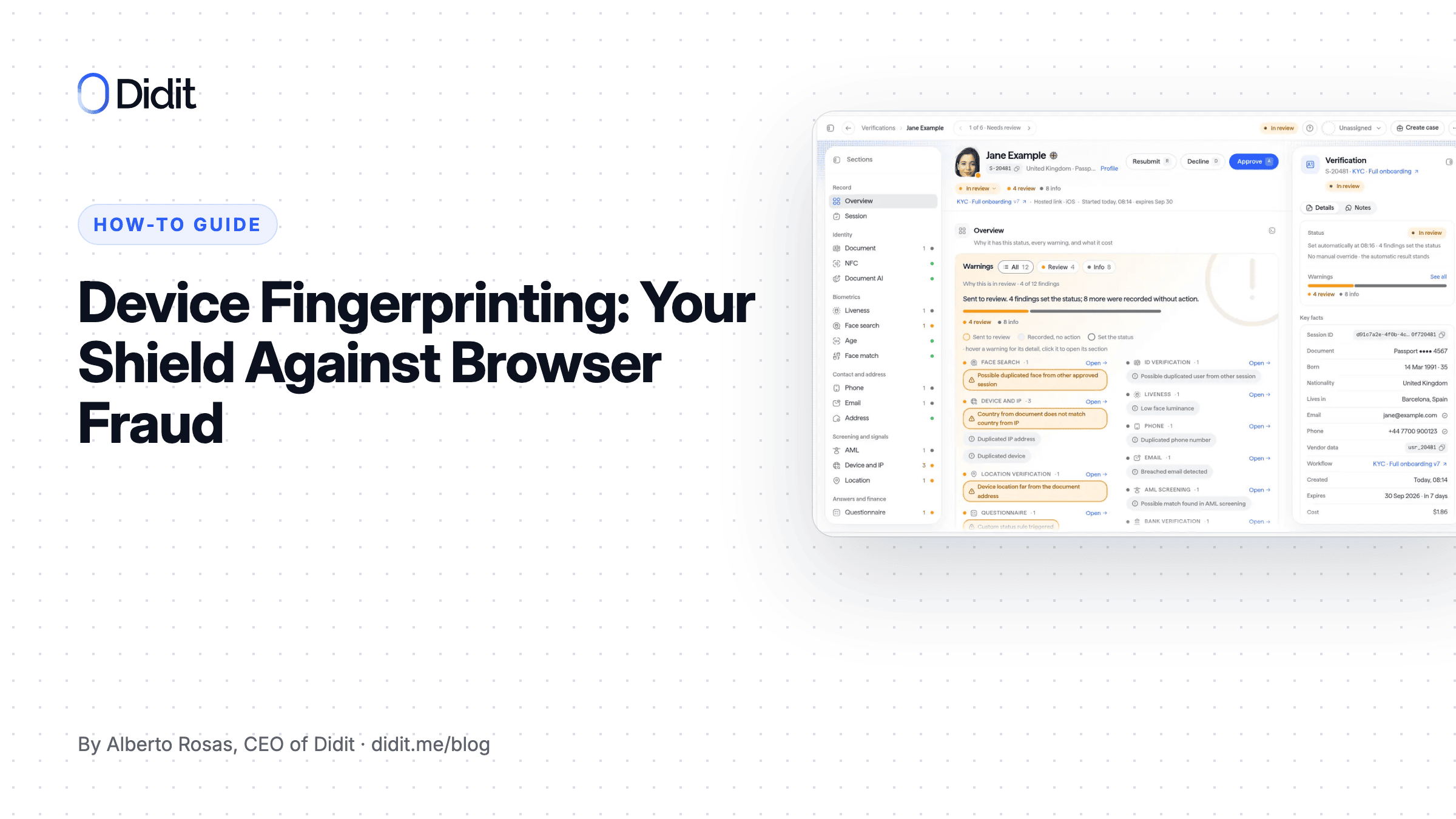
Didit collects a device fingerprint and IP during hosted verification. The session decision includes duplicate-device and network warnings. Device and IP analysis costs $0.03 per completed check.
 Alejandro RosasCo-founder and CTO
Contents
In this guide
Jump to the part you need.
If you run KYC at signup and need to spot repeat devices across accounts, we collect a device fingerprint and IP during hosted verification. Device and IP analysis costs $0.03 per completed check and is included in the $0.33 full KYC price. We can sometimes recognize a device after storage is cleared. If the browser blocks fingerprint collection, use your policy for missing device data.
Last updated: November 26, 2026. Prices checked against the live Didit price feed on November 26, 2026.
| Item | Detail |
|---|---|
| Outcome | One decision per session that puts device, network and identity context together |
| Recommended method | Run it inside a Didit verification session. The Web or Mobile SDK collects the fingerprint and the IP while the user completes the flow |
| Price | $0.03 per check, inside the $0.33 full KYC. $0.0288 on Growth, $0.027 on Scale |
| Endpoints | POST /v3/session/ to start, GET /v3/session/{sessionId}/decision/ to read the result |
| Where the result lands | ip_analyses[] on the decision payload, one entry per collection point that produced a result, warnings under the LOCATION bucket |
| What you cannot buy | A standalone /v3/ip-analysis/ endpoint. The Device and IP Analysis docs state the feature is session-only |
| Who it fits | Teams investigating device reuse during hosted signup or reverification who can route a session to manual review. The walkthrough covers hosted verification only and gives no coverage for ordinary login attempts |
Start free in the sandbox at business.didit.me, no sales call. For developers, connect Didit to an AI assistant through the MCP server. The product documentation for this signal set is Device and IP Analysis, and every list price is on didit.me/pricing.
What the outcome looks like
You get a session decision that adds device and network context to the identity checks. We build the fingerprint from a persistent device identifier, a composite hash and a vector of browser, OS, hardware, WebGL and canvas, locale and timezone signals, plus mobile integrity signals where the platform provides them. The IP side resolves country, region, city and coordinates, then flags VPN, proxy, Tor, data center and private-network connections.
Three matching checks do the fraud work. A duplicated IP finds the same address across different users. A duplicated device fingerprint finds exact reuse of the same persistent device identity. A recovered device uses high-confidence matching on the fingerprint vector, so reuse is surfaced without merging unrelated users too aggressively.
Device and IP risk warnings use the LOCATION feature bucket. The report also returns connection flags and duplicate-device matches alongside the warnings. The warning codes are: VPN_DETECTED, PROXY_DETECTED, TOR_DETECTED, DATACENTER_IP, HIGH_RISK_COUNTRY, LOCATION_MISMATCH_WITH_DOCUMENT, DUPLICATED_DEVICE, POSSIBLE_DUPLICATED_DEVICE, IMPOSSIBLE_TRAVEL, DEVICE_FINGERPRINT_BLOCKLISTED, DEVICE_LINKED_TO_LIVENESS_ATTACK and DEVICE_MODEL_INCONSISTENT.
Prerequisites
- A Didit organization and an API key. The key needs the
read:sessionsprivilege to fetch decisions. - A KYC workflow built in the Business Console, and its
workflow_id. - The hosted flow: you send users to
session.urland the Web or Mobile SDK collects the fingerprint and the IP in-band. - Optional: a callback URL. If your application has allowed domains configured, an http or https callback must be on one of those origins. Custom URL schemes are always accepted.
- A written policy for each risk code: which ones decline, which ones go to review, which ones request another step.
- Credit for live checks. The Free plan includes $10 in monthly credit for the first eligible organization created with a work email for a company domain. Sandbox testing is free.
Step by step
- Write the policy before the integration. The docs treat VPN, proxy and Tor hits as your call: decline, manual review, or an additional liveness step. Decide that now, because it determines how you branch on the response.
- Create or pick the workflow. Basic device and IP signals run automatically on every session and do not need a workflow feature toggle. If you want strict behavior, switch it on in the Business Console first, for example decline on VPN or review on a duplicate device.
- Bind the session to a stable user ID. Pass a stable user ID in
vendor_dataso we can associate sessions with the user and compare sessions across different user identifiers. - Create the session.
curl -X POST 'https://verification.didit.me/v3/session/' -H 'x-api-key: YOUR_API_KEY' -H 'Content-Type: application/json' -d '{"workflow_id": "YOUR_WORKFLOW_ID", "vendor_data": "user-123", "callback": "https://yourapp.com/post-kyc"}'- Send the user to
session.url. The SDK collects the fingerprint and the IP during the flow. There is nothing extra to call. - Read the decision. Fetch it after the status changes, or subscribe to the
status.updatedwebhook.
curl 'https://verification.didit.me/v3/session/<SESSION_ID>/decision/' -H 'x-api-key: <API_KEY>'- Branch on the warnings and map them to policy. Read
ip_analyses[]and map each returned risk code to your review policy. For webhooks, verifyX-Signature-V2using sorted, Unicode-preserving canonical JSON and a timestamp within 300 seconds. Thedecisionis present only for Approved, Declined, In Review or Abandoned. Fetch the decision when the event lacks it or when you used the deprecatedX-Signature-Simplefallback.
Expected output
The session status reflects the full workflow. An IP analysis entry can contain device and network context even when its warnings array is empty. The excerpt below is an illustrative response excerpt, not a guarantee of a particular outcome.
{
  "session_id": "<session uuid>",
  "session_kind": "user",
  "ip_analyses": [
    {
      "node_id": "<workflow node id>",
      "warnings": [
        { "feature": "LOCATION", "risk": "DUPLICATED_DEVICE" }
      ]
    }
  ],
  "decision_trace": { "decided_by": "automatic" }
}
The array contains one entry per collection point that produced a result. A workflow with two collection points can return two entries, but the docs allow an absent or null array when a feature did not run.

What each device and IP signal establishes
| Signal | What it establishes | Legitimate explanation | Suggested review action |
|---|---|---|---|
Exact device reuse (DUPLICATED_DEVICE) | The same persistent device identity was seen under a different vendor_data. This is reuse, not common ownership | A shared family, workplace or retail device | Check for legitimate device sharing, verify account ownership before merging, then apply your decline or review policy |
Possible reuse (POSSIBLE_DUPLICATED_DEVICE) | A possible reuse of a previously seen device that warrants investigation | A new browser, a privacy tool or a device reset | Investigate. Do not auto-decline on this signal alone |
Network masking (VPN_DETECTED, PROXY_DETECTED, TOR_DETECTED) | The connection is masked | A corporate VPN, a privacy tool or travel | Apply your policy: decline, review, or an extra liveness step |
Missing data (absent, null or empty ip_analyses) | No device and IP result was produced | A blocked script or a privacy extension. A missing result can also mean the feature did not run | Apply your missing-data policy. Do not treat the absence as proof of blocking |
Sandbox walkthrough
Use two completed sessions on the same device with different synthetic user IDs, for example sandbox-user-a and sandbox-user-b. Create the first session with vendor_data set to sandbox-user-a, finish the hosted flow, then create the second with sandbox-user-b on the same browser or device. Fetch both decisions and compare the ip_analyses[] entries: the node, the device fingerprint id when present, and any warnings. We do not promise that a duplicate warning will fire in the sandbox, so inspect what the decision returns and use it to test your policy branch.
Inputs and outputs
| Field | Where | What it does |
|---|---|---|
workflow_id | Create request, required | The ID of the workflow to run. Basic device and IP analysis runs automatically |
vendor_data | Create request, recommended | Your stable user identifier; duplicate matching compares across different values |
callback | Create request, optional | Returns the user to your app. If allowed domains are configured, an http or https callback must match one of those origins. Custom URL schemes are accepted |
metadata | Create request | Echoed back in responses and webhooks, never shown to the user |
expected_details | Create request | Declared identity; mismatches surface as decision warnings |
session.url | Create response | Hosted flow where the SDK collects the fingerprint and IP |
ip_analyses[] | Decision payload | Geo, ASN, VPN, proxy and Tor flags, device fingerprint id, duplicate-device matches, warnings |
ip_analyses[].status | Decision payload | Not Started, In Progress, Approved, In Review, Declined, Abandoned, Kyc Expired |
warnings[] | Inside each entry | feature, risk, log_type, short_description, long_description, additional_data, node_id |
Failure cases and recovery
| Failure | What you see | Recovery |
|---|---|---|
| Missing device and IP result | Absent, null or empty ip_analyses | Treat it as missing data. A blocked script is one possible cause. Apply your missing-data policy, and remember the docs allow absent or null arrays when a feature did not run |
| Masked network | VPN_DETECTED, PROXY_DETECTED, TOR_DETECTED | Apply the policy you wrote: decline, review, or an extra liveness step |
| Exact device reuse | DUPLICATED_DEVICE | Exact matches indicate a reused device and warrant your policy check, not an automatic ownership conclusion. Check for legitimate device sharing before declining, and verify account ownership before merging any accounts |
| Possible reuse, softer evidence | POSSIBLE_DUPLICATED_DEVICE | A possible device reuse warning that warrants investigation. Do not auto-decline on this signal alone |
| IP country differs from the document issuing country | LOCATION_MISMATCH_WITH_DOCUMENT | The observed IP country differs from the document issuing country. Route to review if your policy calls for it, and check the context before deciding |
| Device linked to a liveness attack | DEVICE_LINKED_TO_LIVENESS_ATTACK | Review the device warning and any available linked evidence before deciding. Use the current session liveness result as additional context when available |
| Device model inconsistency | DEVICE_MODEL_INCONSISTENT | Review the device warning and any available linked evidence before deciding. Do not infer emulator, rooting or repackaging from the code alone |
| Callback rejected by the allowed-origin policy | 400 on callback | If your application has allowed domains configured, add the origin to those domains or use a custom URL scheme |
| Decision call fails | 401, 403 or 404 | 401 means a bad key, 403 means the key lacks read:sessions, 404 means the session does not exist or belongs to another application |

Paid steps and review boundaries
Device and IP analysis is $0.03 per completed check at list price. It is one of the parts of the $0.33 full KYC, next to ID document verification at $0.15, passive liveness at $0.10 and face match 1:1 at $0.05. The hosted flow collects the fingerprint and IP. The product documentation for this signal set is Device and IP Analysis, and every price is on the price list.
Plans change the rate, not the model: Growth at $99 a month takes 4% off every price, Scale at $299 a month takes 10% off, and Enterprise contracts start at $15,000 a year.
When you route a session to In Review, it becomes a person job in the Console, where the session can carry an assignee, a waiting time and an SLA due date when a Console reviewer is assigned. The decision trace identifies whether a person, automation or the Investigator made the decision. Keep the automatic path narrow: exact duplicate devices and blocked fingerprints can follow your policy for automatic action, while possible duplicates, location mismatches and devices tied to a liveness attack should land with a reviewer. Exact matches indicate a reused device, not common ownership, so check for legitimate device sharing before declining and verify account ownership before merging any accounts.

Worked cost example
Take 10,000 full KYC checks a month on the Scale plan, with device and IP analysis running on every one.
- Full KYC at list price: 10,000 x $0.33 = $3,300.00.
- Device and IP share of that: 10,000 x $0.03 = $300.00. It is inside the $3,300, not on top of it.
- Same volume at the Scale rate: 10,000 x $0.297 = $2,970.00, and the device share is 10,000 x $0.027 = $270.00.
- Scale plan fee: $299.00 a month, with $350 of credit included, so the first $350 of the $2,970 is covered by plan credit.
After the $350 included Scale credit, $2,620 is top-up credit consumed. Including the $299 monthly plan fee, the total cost attributable to the month's usage is $2,919 before tax and additional checks.
Account takeover signals in hosted verification
In the hosted flow, a device and IP entry adds context to the identity checks the user completes. A DUPLICATED_DEVICE warning alongside a masked network such as VPN_DETECTED can justify review under your policy, especially on a new account. The device match establishes reuse, not common ownership, so check for legitimate sharing before you decline. If you add Biometric Authentication at $0.10 per authentication, treat it as an optional workflow step, not a signal that fires on ordinary logins.
Use vendor_data to associate sessions with the user. The decision trace records whether a person, automation or the Investigator made the decision.
How fingerprint matching handles changed browser signals
People change browsers, clear storage and rotate networks. We use three identifiers to keep the signal useful. The persistent device ID catches the same device when storage survives. The composite hash gives a stable grouped signal hash with collision safeguards for deterministic duplicate checks. The signal vector carries browser, hardware, canvas and WebGL, locale and timezone attributes, so a high-confidence recovery can still surface when the easy identifiers were rewritten. Recovery is conditional on a high-confidence match.
Two codes need a policy decision. DEVICE_FINGERPRINT_BLOCKLISTED indicates a device fingerprint blocklist match. DEVICE_MODEL_INCONSISTENT is a device model inconsistency; review the device warning and any available linked evidence before deciding. Do not infer rooting, emulation or repackaging from the code alone.
Mobile fingerprinting
On mobile, the client collects app, OS, hardware and integrity signals where available, in the same version 2 fingerprint payload. Recovery is conditional on a high-confidence match. Server-side, the decision schema is the same as the web flow, so one branching rule set can cover both platforms. When the platform does not expose a signal, treat it as missing data rather than as a negative result.
Account sharing and multi-accounting
A shared account can look like multiple devices per account. That is a possible sharing signal, not proof: one person may use a phone and a laptop, or a household may share a streaming plan. Counting distinct device fingerprints per vendor_data over time is your own analysis. For gaming, betting and promotions, watch DUPLICATED_DEVICE across new accounts using a review window that matches your signup or promotion policy. An exact match indicates a reused device, not common ownership, so check for legitimate sharing before declining and verify ownership before merging accounts.
Optional checks when you need more context
Device and IP collection adds no separate user step in the hosted flow. Other checks are optional and workflow-dependent: email verification at $0.02 per check and database validation where a country offers it at a variable price. If you need another biometric step, Biometric Authentication is $0.10 per authentication and passive liveness is $0.10 per check. None of these replaces the fingerprint, and the session decision is what combines them.
Sources
- Didit docs: Device and IP Analysis product documentation (Device Fingerprinting and IP Risk API overview)
- Didit docs: IP analysis warnings catalogue
- Didit docs: per-feature IP analysis report
- Didit docs: data models and warning object schema
- Didit docs: Create Session API
- Didit docs: Retrieve Session Decision API
- Didit docs: webhooks and HMAC signing
- Didit docs: verification statuses
- Didit docs: pricing and billing rules
- Didit pricing page and pricing feed JSON, read November 26, 2026
- Didit MCP server setup
- Regulation (EU) 2016/679 (GDPR)
Open the sandbox at business.didit.me, create a test session with a synthetic, stable vendor_data value, and inspect the resulting decision before you write a policy rule. No sales call.
Try it
Try this in the sandbox
Run the check this guide describes, free.
The product this post is about, taken from its topic. Run it free in the sandbox.
Author
Alejandro Rosas
Co-founder and CTO

Keep reading
Other guides in the same topic.
 What Is the Purpose of FICA in South Africa? 2026 Guide
FICA is South Africa's anti-money laundering law. It creates the Financial Intelligence Centre and requires accountable institutions to identify and verify clients, screen for PEP and sanctions risk and report suspicious.
Alberto RosasNov 26, 2026 Sixth Money Laundering Directive (6AMLD): What Changed and Which Rules Apply
6AMLD is Directive (EU) 2018/1673: Member States must criminalise laundering, widen predicate offences and set a four-year penalty floor. It adds no new due diligence duties for firms.
Alberto RosasNov 26, 2026 Automated Sanctions Screening: Canada, the Entity List and Embargoes
Automated sanctions screening matches people and companies against lists such as Canada's autonomous sanctions made under SEMA and JVCFOA and the OFAC SDN List, and returns candidate hits scored for identity confidence and.
Alberto RosasNov 26, 2026Questions
Frequently asked questions
What is device fingerprinting in a verification flow?
It is a set of device and browser signals collected during the session and turned into identifiers: a persistent device ID, a composite hash and a signal vector. We compare those identifiers against your previous sessions and return duplicate-device matches and risk warnings. You get the result in ip_analyses[] on the session decision.
Does Didit have a standalone device fingerprinting API?
No. The Device and IP Analysis docs state the feature is session-only: the Web or Mobile SDK collects the fingerprint and the IP during the hosted flow and there is no standalone /v3/ip-analysis/ endpoint. You integrate it by creating a session with POST /v3/session/ and reading GET /v3/session/{sessionId}/decision/.
How much does device fingerprinting cost with Didit?
Device and IP analysis is $0.03 per completed check at list price, and it is part of the $0.33 full KYC. Growth takes 4% off ($0.0288) and Scale takes 10% off ($0.027). You pay per completed check from prepaid credit.
What happens if a user blocks the fingerprinting script?
A missing result can appear as an absent, null or empty ip_analyses array. The docs distinguish two cases: the user blocked the SDK fingerprinting script with a privacy extension or content blocker, or the feature did not run in that session. Apply your missing-data policy consistently, but do not treat one rule as proof that a bypass is impossible.
Can device fingerprinting detect account sharing?
Multiple devices per account can be a possible sharing signal, not proof. One person may use a phone and a laptop, or a household may share a streaming plan. Counting distinct device fingerprints per vendor_data over time is your own analysis, and an exact device match indicates reuse, not common ownership.
How does device fingerprinting work on mobile?
The mobile client collects app, OS, hardware and integrity signals where available, in the same version 2 fingerprint payload as the web flow. Recovery is conditional on a high-confidence match, and a signal the platform does not expose is missing data rather than a negative result.
What warnings does Didit raise for device and IP risk?
Representative codes include VPN_DETECTED, PROXY_DETECTED, TOR_DETECTED, DUPLICATED_DEVICE, POSSIBLE_DUPLICATED_DEVICE, LOCATION_MISMATCH_WITH_DOCUMENT and DEVICE_FINGERPRINT_BLOCKLISTED. They sit under the LOCATION bucket. The full catalogue is in the IP analysis warnings documentation.
What is the difference between a duplicated device and a possible duplicated device?
DUPLICATED_DEVICE is an exact match on the persistent device identity. It establishes that the device was reused, not that the same person owns every account. POSSIBLE_DUPLICATED_DEVICE is a possible reuse warning that warrants investigation. Check for legitimate device sharing before declining and verify account ownership before merging accounts.
Is device fingerprinting allowed under GDPR?
Device fingerprinting can be lawful for fraud prevention, depending on the implementation and applicable law. Assess the GDPR lawful basis, necessity, transparency, retention and individual rights, and check whether local rules governing access to a user device require consent or whether an exemption applies. Read the regulation at EUR-Lex and take advice for your jurisdiction.
How do I use device fingerprinting for account takeover detection?
Use the device and IP result inside hosted verification to add context to the identity checks. A duplicate-device warning alongside a masked network such as VPN_DETECTED can justify review under your policy. Check for legitimate device sharing before declining, and verify account ownership before merging accounts. The result does not establish common ownership on its own.
Compliance built in
Audited, certified and attested.
We hold the certifications and build each country's rules into your flows, so you can launch anywhere without worrying. Security and Compliance center
- Regulation encoded into your flows
Tell us what you do and where. Didit lists the rules that apply to you, with sources, and builds the checks each country needs into one workflow.
- Ready for AMLR
Every requirement of the new EU anti-money laundering rules, from checking customers to human review, is already covered by a Didit check.
- Tested in Spain's Treasury sandbox
Spain's Treasury published its supervised sandbox report on Didit's NFC plus active liveness onboarding; SEPBLAC took part and valued the added measures positively.
- Audited, not self-declared
iBeta Level 1 and Level 2. Liveness tested under ISO/IEC 30107-3.
Your obligations · 3 regions
 SOC 2 Type 2
 ISO 27001
 iBeta Level 1 and Level 2
 EU regulator attestation
 FSM youth protection
 GDPR
 EBA remote onboarding
 MiCA compatible
 FIDO Alliance member
- AMLREU AML Regulation ready
Integration · Didit MCP
Run Didit from your own AI agent
Connect Didit to Claude, Cursor, VS Code or ChatGPT and just ask in plain words. Your agent can do anything you can do in the console, with the same permissions you have.
 Add to Claude
 ChatGPT
 Cursor
- Build workflowsDescribe the checks you need. The agent creates and publishes the flow.
- Run investigationsAsk why a session was declined, review cases, search people and companies.
- Change rulesCreate payment rules, test them on past data and switch them on.
- Pull reportsAsk for numbers, exports or the audit log.
Didit Academy