Didit ID Verification API: cURL, File Limits, Dual-Sided Docs
Send an uncropped front image and, for dual-sided IDs, a back image to Didit's standalone API. The limit is 5 MB per file. Completed live calls cost $0.20 at list price.
 Alberto RosasCo-founder and CEO
Contents
In this guide
Jump to the part you need.
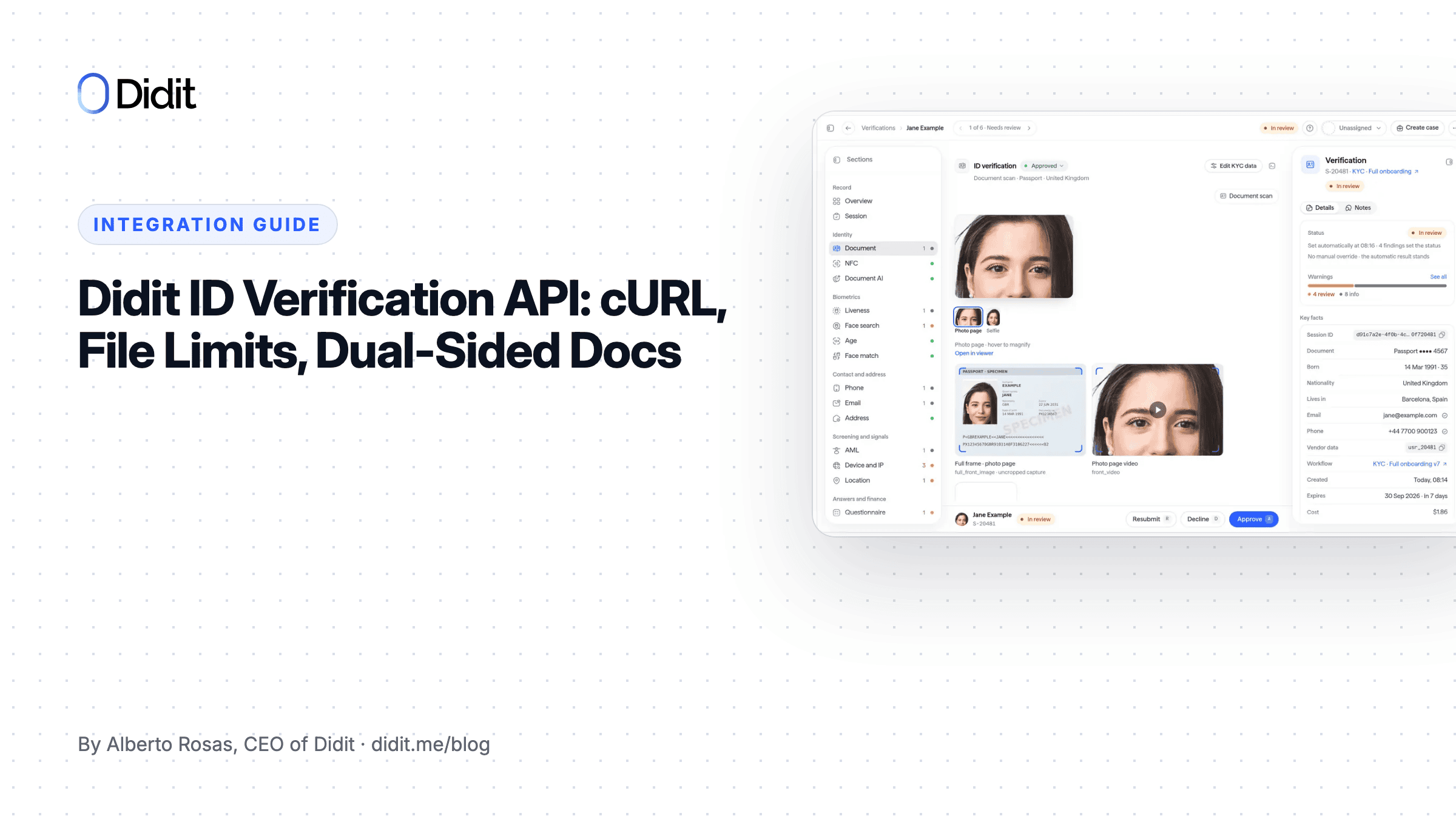
Our standalone ID Verification API is built for server-to-server flows where you already have the document images. One multipart POST to /v3/id-verification/ returns the OCR fields, the parsed MRZ, barcodes and a warnings list with an Approved, Declined or In Review status. Completed live calls cost $0.20 at list price, or $0.15 as the ID document step inside a workflow. The caveat: uploads must be uncropped, up to 5 MB per file, and dual-sided documents need a back image.
Last updated: November 26, 2026. Prices checked against the live Didit price feed on November 26, 2026.
| Item | Value |
|---|---|
| Endpoint | POST https://verification.didit.me/v3/id-verification/ |
| Body format | multipart/form-data |
| Auth header | x-api-key, sent from your server and never from a browser bundle |
| Required | front_image; back_image for dual-sided documents such as ID cards and driver's licences |
| File types | tiff, jpg, jpeg, png, webp, pdf |
| File size | Up to 5 MB per file |
| Framing | Uncropped, all four corners of the document visible |
| Price, standalone API | $0.20 per completed call |
| Price, same step in a workflow | $0.15 per completed check |
| Coverage | 14,000+ document types across 220+ countries and territories |
| Response keys | request_id and an id_verification object |
| Sandbox | Free on every plan; checks are mocked and nothing is charged |
Start free in the sandbox at business.didit.me, with no sales call. The setup for connecting Didit to an AI assistant is at didit.me/developers/mcp.
The cURL call, and the one line to drop for a single-sided document
The call below sends a dual-sided document. Send front_image for every document and back_image for dual-sided documents. The other multipart fields in the example are optional.
curl -i -X POST 'https://verification.didit.me/v3/id-verification/' \
-H "x-api-key: $DIDIT_API_KEY" \
-F 'front_image=@./id_front.jpg' \
-F 'back_image=@./id_back.jpg' \
-F 'perform_document_liveness=true' \
-F 'minimum_age=18' \
-F 'expiration_date_not_detected_action=DECLINE' \
-F 'invalid_mrz_action=DECLINE' \
-F 'inconsistent_data_action=DECLINE' \
-F 'preferred_characters=latin' \
-F 'save_api_request=true' \
-F 'vendor_data=user-123'
For a single-sided submission, send only front_image and delete the back_image line. For a dual-sided document, also send back_image. Every other line maps to a field in the request table further down.
Prerequisites: plan, client, permissions
| Requirement | Detail |
|---|---|
| Plan | Any plan. The Free plan is $0 a month, and its $10 of monthly credit goes to the first organization created with an eligible company work email; an organization created through the API starts at $0. The sandbox is free on every plan and nothing is charged there. |
| Credits for live calls | A live call draws from plan credit first, then top-ups. With no cover the endpoint answers 403 before any image processing. |
| Application | Every API key belongs to an Application inside your organization. Create the Application first, then pick its key. |
| API key | Use your sandbox application key. Newly issued sandbox keys start with sk_test_ and newly issued live keys start with sk_live_. Older keys can be unprefixed, so never validate a key by its prefix. |
| Client | cURL, or any HTTP client that can build a multipart body. No SDK is required for this endpoint. |
| Permissions | The Primary key has full access. Additional keys can be scoped to only the resources a service needs; a scoped key without the right access answers 403. |
| Document images | Front, and for dual-sided documents back photos. Keep all four corners in frame and each file up to 5 MB. |
The endpoint covers 14,000+ document types in 220+ countries and territories. Didit ID Verification is the product page, the standalone API reference covers this endpoint, the ID Verification overview describes what each check does, and didit.me/pricing lists every unit price, including the $0.20 standalone line and the $0.15 workflow line.
Send your first document in six steps
Step 1: Copy an API key from the Business Console
Sign in to the Didit Business Console, choose the Application from the dropdown at the top, open Developers, then API keys. The Primary key is that Application's own secret. Copy the sandbox key first and store it as DIDIT_API_KEY in your environment, server-side only.
Step 2: Prepare the images the API accepts
The service detects, aligns and crops the document itself, so do not pre-crop. Send uncropped photos with all four corners visible, each file up to 5 MB, in tiff, jpg, jpeg, png, webp or pdf. For a single-sided submission, send only front_image. For a dual-sided document, also send back_image.

Step 3: Run the call and read the HTTP status first
Run the cURL call above with your sandbox key and two real photos. Read the status line before the body: a 400 means the upload or the recognition failed, a 403 with a not-enough-credits body means the balance cannot cover a live call, and a 200 carries a verification decision. The table in the next step maps each status to its fix.
Step 4: Read the response
A readable document returns HTTP 200 with a request_id and an id_verification object. Always inspect id_verification.status and id_verification.warnings rather than the HTTP code alone. This excerpt is valid JSON, and warnings is empty here only as an example, because an Approved result can still carry informational warnings.
{
  "request_id": "8f2a1c3e-4b5d-4e6f-9a7b-0c1d2e3f4a5b",
  "id_verification": {
    "status": "Approved",
    "full_name": "MARIA GARCIA LOPEZ",
    "document_type": "Identity Card",
    "warnings": []
  }
}
Matching a document to a known official design is separate from reading it: COULD_NOT_DETECT_DOCUMENT_TYPE is a warning on a 200 response, not a 400. The parsed MRZ, the decoded barcodes and the short-lived media URLs are described in the response field table below.
| Status | What it means | Fix |
|---|---|---|
400 COULD_NOT_RECOGNIZE_DOCUMENT | HTTP 400 COULD_NOT_RECOGNIZE_DOCUMENT means the document could not be processed. If the front image cannot be matched to a known official document design with high confidence, the endpoint returns HTTP 200 with status set to Declined and the warning COULD_NOT_DETECT_DOCUMENT_TYPE. | Retake the photo uncropped with all four corners and even light, then resend |
| 400 multipart validation | Missing back_image on a dual-sided document, a file above 5 MB, or an unsupported extension | Send the back side, reduce the file to 5 MB or less, and use tiff, jpg, jpeg, png, webp or pdf |
| 401 | x-api-key wrong, malformed, revoked or expired | Re-fetch the key or use a key that has not expired |
| 403 | No x-api-key header, a scoped key without access to this resource, or a call from outside the key's IP list | Use a key with that access, set in Developers, API keys |
| 403 with a not-enough-credits body | The balance cannot cover the call; it is refused before any image processing | Top up or move to a paid plan |
200 with status Approved | The document passed the checks; informational warnings may still be present | Read id_verification.warnings and continue the flow |
200 with status Declined | A terminal warning such as DOCUMENT_EXPIRED, SCREEN_CAPTURE_DETECTED, PRINTED_COPY_DETECTED, PORTRAIT_MANIPULATION_DETECTED or COULD_NOT_DETECT_DOCUMENT_TYPE | Surface the first warning's long_description and stop the flow |
200 with status In Review and DOCUMENT_LIVENESS_NOT_COMPUTED | The forgery check produced no usable score | Treat the document as unchecked and route it to manual review |
| 429 | Rate limit | Read the wait field in the body, back off, then retry |

Step 5: Branch on status and warnings
Fraud and hard-failure risks always decline: DOCUMENT_EXPIRED, SCREEN_CAPTURE_DETECTED, PRINTED_COPY_DETECTED, PORTRAIT_MANIPULATION_DETECTED, PUBLIC_DOCUMENT_IMAGE_DETECTED, SPECIMEN_DOCUMENT_DETECTED, plus extraction failures such as NAME_NOT_DETECTED. Three risk groups are configurable per call through invalid_mrz_action, inconsistent_data_action and expiration_date_not_detected_action, each set to DECLINE or NO_ACTION.
A declining warning takes precedence over everything else. Otherwise, when document liveness is enabled and produces no usable score, the result is In Review with DOCUMENT_LIVENESS_NOT_COMPUTED. Otherwise the result is Approved, which can still carry informational warnings. The In Review escalation is not configurable: a check that did not run is not evidence that the document is genuine, so route it to manual review and do not approve.
Step 6: Save the request and subscribe to status.updated
save_api_request defaults to true. With it on, the call is persisted as an API-type session that appears in the Business Console, the returned request_id is a real session id you can pass to GET /v3/session/{sessionId}/decision/, the cropped document and portrait images are stored and returned as short-lived media URLs, and a status.updated webhook is emitted. Download media promptly instead of storing the URL. Set save_api_request=false to skip session storage for future calls; the pricing docs list plan retention terms.

save_api_request enabled, the call appears as a session in the Business Console.| Aspect | save_api_request=true (default) | save_api_request=false |
|---|---|---|
| Session lookup | Real session id you can pass to GET /v3/session/{sessionId}/decision/ | request_id is a one-off correlation UUID |
| Stored images | Cropped document and portrait images stored and returned as short-lived media URLs | Nothing is stored |
| Webhook delivery | A status.updated event is emitted to your configured webhook endpoints | No session is created, so there is no session event |
| Meaning of the request ID | Points at a session you can open in the Business Console | Correlates this one response with your own logs |
| Field or event | Meaning |
|---|---|
status.updated | Session status changed. Subscribe to it on your webhook destination; there is no wildcard, so list every event family you want. |
session_id | The session the event belongs to. |
status | Approved, Declined or In Review for this endpoint. The full session enum is listed in the webhook docs. Case-sensitive. |
vendor_data | The identifier you sent on the call, carried back on the envelope. |
decision | Included only for Approved, Declined, In Review or Abandoned, and it uses the session decision shape, with id_verifications[] as an array. |
X-Signature-V2 | HMAC-SHA256 over the canonical JSON, the recommended signature to verify. Pair it with X-Timestamp and reject timestamps more than 300 seconds ahead of or behind the current time. |
Request fields and what they change
| Field | Required | What it does |
|---|---|---|
front_image | Yes | The face of the document. tiff, jpg, jpeg, png, webp or pdf, up to 5 MB, uncropped with all four corners visible. |
back_image | Only for dual-sided documents | The reverse side of a document such as an ID card or driver's licence, with the same rules on type, size and framing. |
perform_document_liveness | No, defaults to true | Screens the images for screen replays, printed copies and portrait manipulation. |
minimum_age | No | Sets the minimum age checked against the extracted date of birth. |
expiration_date_not_detected_action | No | DECLINE or NO_ACTION when no expiry date can be read. |
invalid_mrz_action | No | DECLINE or NO_ACTION when MRZ check digits fail. |
inconsistent_data_action | No | DECLINE or NO_ACTION when the visual zone disagrees with the MRZ. |
preferred_characters | No | Preferred character set for OCR, for example latin. |
save_api_request | No, defaults to true | Persists the call as an API-type session: real session id, stored images, status.updated webhook. |
vendor_data | No | Your own identifier for the person, carried on the session and the webhook. |
Response fields you will read
| Field | What it holds |
|---|---|
request_id | Correlation UUID. With save_api_request=true it is a real session id for GET /v3/session/{sessionId}/decision/. |
id_verification.status | Approved, Declined or In Review on this endpoint. |
id_verification.full_name, document_number, date_of_birth, expiration_date, parsed_address | The OCR output for the holder. |
id_verification.document_type | Passport, Identity Card, Driver's License, Residence Permit and the other mapped classes, detected by the service rather than declared by you. |
id_verification.mrz | The parsed machine-readable zone, when the document carries one. |
id_verification.barcodes | The decoded barcode values. |
id_verification.portrait_image, front_document_image, back_document_image | Short-lived media URLs for the cropped images when the call is saved. |
id_verification.warnings[] | Objects with feature, risk, log_type, short_description, long_description and additional_data. Show long_description to the user. |
Test in the sandbox before you pay for a call
Sandbox calls go to the same host with your sandbox application key. Checks are mocked and free on every plan, so you can test your response handling without spending credit. Because the results are mocked, a sandbox run cannot validate real document recognition: run one live call with a real document before you rely on the classifier. A clean result can come back Approved with an empty warnings array, which is the shape to code against, but treat that as one example. Then work through the status table deliberately, including a missing back_image, a file you trim to 5 MB or less, and a revoked key.
Cost of both routes, with the arithmetic
The standalone call and the workflow step are separate price-book lines. The ID verification API is $0.20 per completed call; the ID document step inside a workflow is $0.15. Each HTTP 200 response from a live call consumes one ID Verification API credit, including a Declined or In Review result. At list price, that is $0.20 deducted from prepaid credit. Sandbox calls are free. Plan discounts apply to both lines: 4% on Growth and 10% on Scale.
A full KYC check on Didit is the ID document plus passive liveness at $0.10, face match at $0.05 and device and IP analysis at $0.03, which is $0.33. Example: 10,000 documents in a month, priced with published unit prices only.
- Standalone API at list price: 10,000 x $0.20 = $2,000.00
- Same volume as the ID document step in a workflow: 10,000 x $0.15 = $1,500.00
- Difference for the server-to-server route: $2,000.00 - $1,500.00 = $500.00
- Full KYC at list price for the same volume: 10,000 x $0.33 = $3,300.00
- On Growth the unit price is $0.20 x 0.96 = $0.192, so 10,000 x $0.192 = $1,920.00. The $115 of monthly credit pays $115.00, and $1,805.00 is usage charged to your top-up balance, separate from the $99 subscription fee.
- For an eligible Free organization using all $10 of monthly credit on this endpoint, $10 ÷ $0.20 = 50 completed live calls at list price.
The choice is direct upload versus hosted capture. If you already hold the images and only need the document read, the $0.20 call avoids running a user-facing session at all. If a person is going to photograph the document anyway, the $0.15 step inside a workflow is the cheaper line, and you get the session, the SDK and the decision endpoint with it.
Use Didit MCP while building the API integration
The Didit MCP server is hosted at https://mcp.didit.me/mcp with OAuth sign-in, and it is free on every plan. Setup for each client is documented at didit.me/developers/mcp, which is how you give an AI assistant access to Didit while you build. For an agent that should write the integration itself, use the integration prompt. Direct document uploads go through the documented cURL call above: the MCP sources do not document a multipart document upload through the connector, so keep the upload on the API.

How to disconnect
To stop new verification requests, stop sending calls to POST /v3/id-verification/. If the API returns HTTP 403 with application_deleted, stop using that application's key.
Sources
- Didit ID Verification product page
- Didit docs: ID Verification API (standalone API reference)
- Didit docs: ID Verification overview
- Didit docs: API authentication
- Didit docs: data models and the
id_verificationobject - Didit docs: webhooks and signature headers
- Didit docs: API errors, status codes and fixes
- Didit docs: ID verification warnings catalogue
- Didit docs: end-to-end integration prompt
- Didit docs: pricing and billing rules
- Didit pricing page and pricing as JSON, read November 26, 2026
- Didit MCP server setup
- Didit integration prompt
Start with the sandbox: create a free application at business.didit.me, copy its key, and run the cURL call above with a photo of your own ID to test both the upload and the response handling. Mocked sandbox results cannot validate real document recognition, so run one live call before you commit to the flow. There is no sales call.
Try it
Try this in the sandbox
Run the check this guide describes, free.
The product this post is about, taken from its topic. Run it free in the sandbox.
Author
Alberto Rosas
Co-founder and CEO

Keep reading
Other guides in the same topic.
 Didit Pricing Plans: Free vs Growth vs Scale vs Enterprise in 2026
Full KYC is $0.33 a check at list on Free, $0.3168 on Growth ($99/mo) and $0.297 on Scale ($299/mo). Monthly credit buys 30, 363 and 1,178 whole checks. Enterprise is a custom annual contract from $15,000 a year.
Alberto RosasNov 26, 2026 How to Detect Duplicate Accounts With Device Fingerprinting (2026)
Device and IP analysis runs inside every Didit session at $0.03 per check. Read the device analysis results on the decision and act on a confirmed duplicate, a possible duplicate or a blocklisted fingerprint.
Alberto RosasNov 26, 2026 How to Require Step-Up Verification Before Payouts and Withdrawals
Set a payout threshold and check each withdrawal with Didit. If verification is required, send the user to verify and release the payout only after your backend confirms approval.
Alberto RosasNov 26, 2026Questions
Frequently asked questions
What is the endpoint and auth header for the Didit ID verification API?
Send a multipart POST to https://verification.didit.me/v3/id-verification/ with the header x-api-key set to your application key. The verification host uses API keys, not OAuth bearer tokens, so keep the key server-side. A wrong or expired key returns 401 and a missing key returns 403.
Do I need back_image for every document?
No. For a single-sided submission, send only front_image. For a dual-sided document, also send back_image, which covers national ID cards and driver's licences. Omitting the back side of a dual-sided document produces a 400 multipart validation error.
What file types and size limits does the ID verification API accept?
tiff, jpg, jpeg, png, webp and pdf, up to 5 MB per file. Images must be uncropped with all four corners of the document visible, because the service detects, aligns and crops the document itself. Sending a pre-cropped image works against the classifier rather than helping it.
How much does one call cost, and is a declined document still charged?
A completed live call to the standalone ID verification API is $0.20 at list price, and the same document step inside a workflow is $0.15; a full KYC check with liveness, face match and device and IP analysis is $0.33. A declined document is still charged, because each HTTP 200 response from a live call consumes one ID Verification API credit, including a Declined or In Review result. Growth takes 4% off every Didit price and Scale takes 10% off. Sandbox calls are free.
What do save_api_request and request_id change?
save_api_request defaults to true. With it on, the call is stored as an API-type session, request_id is a real session id you can pass to GET /v3/session/{sessionId}/decision/, the cropped images are stored and returned as short-lived media URLs, and a status.updated webhook fires. With it off, nothing is stored and request_id is a one-off correlation UUID.
Why did I get HTTP 400 with COULD_NOT_RECOGNIZE_DOCUMENT?
In the Didit ID Verification API, HTTP 400 with COULD_NOT_RECOGNIZE_DOCUMENT means the document could not be processed. If the front image cannot be matched to a known official document design with high confidence, the endpoint returns HTTP 200 with status set to Declined and the warning COULD_NOT_DETECT_DOCUMENT_TYPE. Retake the photo uncropped with all four corners visible and even lighting, then resend.
Why is my result In Review instead of Approved?
When perform_document_liveness is true and the forgery check returns no usable score, the call returns 200 with status In Review and a DOCUMENT_LIVENESS_NOT_COMPUTED warning. That escalation is not configurable and never overrides a Declined. Treat the document as unchecked and route it to manual review.
How do I retrieve the portrait image from a saved API call?
The documented behaviour is a short-lived media URL for portrait_image, front_document_image and back_document_image when save_api_request is true. Download the file promptly rather than persisting the URL, because the link expires. Store the bytes in your own storage if you need them later.
Can I call the ID verification API from Python or JavaScript?
Yes. The endpoint is plain HTTP multipart, so any server-side HTTP client that can build a multipart body works, including Python's requests and Node's fetch with a form data body. Send the same fields in the same way: front_image and, for dual-sided documents, back_image, plus the optional fields you need. There is no Didit SDK requirement for this endpoint, and the cURL call above is the documented reference.
How do I test the API without spending credit?
Use your sandbox application key. Newly issued sandbox keys start with sk_test_ and newly issued live keys start with sk_live_; older keys can be unprefixed. Sandbox checks are mocked and free on every plan, so nothing is charged while you test your response handling. Move to the live key only when the logic is tested and the organization has credit.
Compliance built in
Audited, certified and attested.
We hold the certifications and build each country's rules into your flows, so you can launch anywhere without worrying. Security and Compliance center
- Regulation encoded into your flows
Tell us what you do and where. Didit lists the rules that apply to you, with sources, and builds the checks each country needs into one workflow.
- Ready for AMLR
Every requirement of the new EU anti-money laundering rules, from checking customers to human review, is already covered by a Didit check.
- Tested in Spain's Treasury sandbox
Spain's Treasury published its supervised sandbox report on Didit's NFC plus active liveness onboarding; SEPBLAC took part and valued the added measures positively.
- Audited, not self-declared
iBeta Level 1 and Level 2. Liveness tested under ISO/IEC 30107-3.
Your obligations · 3 regions
 SOC 2 Type 2
 ISO 27001
 iBeta Level 1 and Level 2
 EU regulator attestation
 FSM youth protection
 GDPR
 EBA remote onboarding
 MiCA compatible
 FIDO Alliance member
- AMLREU AML Regulation ready
Integration · Didit MCP
Run Didit from your own AI agent
Connect Didit to Claude, Cursor, VS Code or ChatGPT and just ask in plain words. Your agent can do anything you can do in the console, with the same permissions you have.
 Add to Claude
 ChatGPT
 Cursor
- Build workflowsDescribe the checks you need. The agent creates and publishes the flow.
- Run investigationsAsk why a session was declined, review cases, search people and companies.
- Change rulesCreate payment rules, test them on past data and switch them on.
- Pull reportsAsk for numbers, exports or the audit log.
Didit Academy


