Securing Maritime Supply Chains with Digital Identity (2026)
Verify crew, contractors and counterparties with two Didit workflows on one integration pattern: a KYC workflow for people and a KYB workflow for companies, both started through the same session endpoint.
 Alberto RosasCo-founder and CEO
Contents
In this guide
Jump to the part you need.
Maritime operators who must verify crew, contractors and counterparties before they board a vessel, enter a terminal or handle cargo can run those checks on one Didit integration: a KYC workflow for people and a KYB workflow for companies, both created through the same session endpoint. A full ID check is $0.33, AML screening $0.20, business verification from $2.00. The verification result does not replace your own checks for maritime certificates, cargo documents or facility access.
Last updated: November 26, 2026. Prices checked against the live Didit price feed on November 26, 2026.
| Check | Didit feature | List price | Unit |
|---|---|---|---|
| Crew or contractor identity | Full ID check: ID document, passive liveness, face match, device and IP | $0.33 | per completed check |
| ID document only | ID Verification | $0.15 | per check |
| Liveness selfie | Passive Liveness | $0.10 | per check |
| Selfie to document portrait | Face Match 1:1 | $0.05 | per check |
| Device and IP analysis | Device & IP Analysis | $0.03 | per check |
| ePassport chip read | NFC Reading | $0.15 | add-on per check |
| Sanctions, PEP and watchlist screening | AML Screening | $0.20 | per check |
| Re-screening after onboarding | Ongoing AML Monitoring | $0.07 | per person per year |
| Supplier, agent or owner company | Business verification (KYB): registry retrieval | from $2.00, variable by country and data tier | per company |
| Company screening | Company AML Screening | $0.20 | per check |
| Owner or officer screening | Person AML | $0.20 | per person |
| KYB document collection | KYB Documents | $0.20 | per step |
| Gangway or portal re-check | Biometric Authentication | $0.10 | per authentication |
| Workflow builder, Reusable KYC, MCP server | Included | Free | included in every plan |
Start free in the sandbox at business.didit.me, no sales call, and sandbox testing is free and unlimited on every plan. The full price list and plan comparison sit on didit.me/pricing. If your operations team works inside an AI assistant, connect Didit through the MCP server.
How the KYC and KYB workflows fit together
A workflow is typed. One workflow cannot cover both a person and a company, so you create two: one with "workflow_type": "kyc" for seafarers, contractors and drivers, and one with "workflow_type": "kyb" for agents, suppliers and owners. Both are created the same way, and both start a session on POST https://verification.didit.me/v3/session/. The workflow type decides whether you get a person session or a business session, and the decision call resolves either one.
KYC workflow (people)     -> POST /v3/session/ -> session_kind "user"
KYB workflow (companies)  -> POST /v3/session/ -> session_kind "business"
both                      -> same webhook destination, same decision call
That is the whole integration pattern: one API key, one session endpoint, one webhook destination and one decision endpoint, with two workflow IDs instead of one. Your crewing system stores the KYC workflow ID, your supplier onboarding system stores the KYB workflow ID, and both read the same status strings. The business verification product page covers the company side in more detail.
What you build
Two workflows that your crewing portal, terminal gate system or supplier onboarding form call the same way. For a person, the passport, ID card, driver's licence or residence permit is photographed, passive liveness runs on a selfie, the selfie is face matched 1:1 to the document portrait, the name is screened against sanctions and PEP lists, and device and IP data are collected in the background. For a company, the registry record, the officers and the beneficial owners come back in one session.
If you have no integration yet, the console and hosted flow let you start a session without an integration. For repeated checks, use the API and webhook route: once a port agent, a ship manager and a manning agency all need the same answer within minutes of each other, a webhook lets your systems receive status changes automatically instead of someone reloading the console.
Prerequisites
- A Didit account at business.didit.me, created with a work email. The Free plan's $10 of monthly credit applies to eligible organizations, including the first organization created with an eligible work email for a company domain; an organization created through the API starts at $0.
- An application API key from the console, plus its sandbox twin while you test. The quick start shows both.
- Two workflow UUIDs, one KYC and one KYB, created in the console or by the call in Step 2.
- An HTTPS endpoint on your side that answers within 5 seconds, to receive webhooks.
- The identifier you will store as
vendor_data: your crew ID, supplier ID or gate pass number. It binds a session to the person or company in your records and is used for duplicate detection.
Step by step
Step 1: Create the account and organization
Sign up with SSO or email and password, then create your Organization. The organization holds your workflows, API keys and verification activity.
Step 2: Create the workflows
In the console, open Workflows and click New workflow. Choose whether you verify users or businesses, then start from a template, from a description or from empty. For a crew flow the four features you need are OCR, LIVENESS, FACE_MATCH and AML. The same workflow can be created with one call:
curl -X POST https://verification.didit.me/v3/workflows/ \
-H "x-api-key: $DIDIT_API_KEY" \
-H "Content-Type: application/json" \
-d '{
  "workflow_label": "Crew and contractor verification",
  "workflow_type": "kyc",
  "features": [
    {"feature": "OCR"},
    {"feature": "LIVENESS", "config": {"face_liveness_method": "PASSIVE"}},
    {"feature": "FACE_MATCH"},
    {"feature": "AML"}
  ]
}'
Persist workflow.id from the response. You need it to create sessions. For the agent and supplier side, repeat the call with "workflow_type": "kyb" and the company features from the KYB quickstart, and store that second workflow ID separately.
Step 3: Create a session and send the person to the hosted flow
curl -X POST https://verification.didit.me/v3/session/ \
-H "x-api-key: $DIDIT_API_KEY" \
-H "Content-Type: application/json" \
-d '{
  "workflow_id": "$WORKFLOW_ID",
  "vendor_data": "crew-4821",
  "callback": "https://ops.example.com/kyc/return",
  "metadata": {"vessel": "MV-Example", "rank": "able-seafarer"}
}'
The response carries session_id, url and session_token. Redirect the person to url, or open it in an SDK or an iframe. Didit appends ?verificationSessionId={session_id}&status={status} to the callback when the flow ends. An http or https callback must sit on one of your application's allowed domains, otherwise creation fails with a 400 on callback. For a company, pass the KYB workflow ID plus company_name, registry_country and registration_number in expected_details to pre-fill the registry search.

Step 4: Register the webhook destination
curl -X POST https://verification.didit.me/v3/webhook/destinations/ \
-H "x-api-key: $DIDIT_API_KEY" \
-H "Content-Type: application/json" \
-d '{
  "label": "Crew ops",
  "url": "https://ops.example.com/api/webhooks/didit",
  "subscribed_events": ["status.updated", "data.updated", "user.status.updated", "user.data.updated"],
  "webhook_version": "v3"
}'
Save the returned secret_shared_key as your webhook secret. label and url are required. There is no wildcard, so list every event family you actually consume: if the same destination carries company sessions, add business.status.updated and business.data.updated. The full event list is in the webhook documentation.
Step 5: Verify the signature and branch on the status
Read the raw request body before you parse JSON. Recompute the HMAC-SHA256 signature over the sorted, Unicode-preserved canonical JSON and compare it with X-Signature-V2, including X-Signature-V2-Previous when it is present so a rotated secret keeps working. Reject anything where X-Timestamp is more than 300 seconds away from now. De-duplicate on event_id, answer with a 2xx as soon as the signature checks out, and update your records idempotently.
Statuses are exact, case-sensitive strings: Approved, Declined, In Review, In Progress, Not Started, Expired, Abandoned, Kyc Expired, Resubmitted and Awaiting User. Treat Approved as the only green light for boarding or gate access, and route In Review to a person.
Step 6: Fetch the decision for the full record
curl https://verification.didit.me/v3/session/<SESSION_ID>/decision/ \
-H "x-api-key: <API_KEY>"
Branch on session_kind before you read anything else, because a person session and a business session carry different arrays:
const decision = await (await fetch(url, { headers: { "x-api-key": API_KEY } })).json();
switch (decision.session_kind) {
case "user": return handleUserDecision(decision);
case "business": return handleBusinessDecision(decision);
}
Person sessions return id_verifications[], liveness_checks[], face_matches[], nfc_verifications[], aml_screenings[] and ip_analyses[]. Business sessions return registry_checks[], document_verifications[] and key_people_checks[]. The arrays are always plural. If a feature did not run, the field is absent or null, never a placeholder.
Step 7: Reuse the verification at later gates
Reusable KYC is included at no charge. A seafarer who verified once can be authenticated again at the gangway, at a terminal gate or in a portal with Biometric Authentication at $0.10 per authentication. Didit reuses the stored face automatically, taking the approved liveness face first, then the ePassport chip photo, then the ID document portrait.
Expected output
A session that passes arrives in the same shape on the webhook and on the decision call: status Approved, decision_trace with decided_by set to automatic, manual or investigator, biometric_retention with the date the live biometric data is deleted, and the feature arrays above. A session a reviewer must see returns In Review with assignee, waiting_since and sla_due_at set, plus a reviews array your operations team can read.

Failure cases and recovery
- 403 on verification.didit.me: the key is missing or lacks the privilege. The body reads
{"detail": "You do not have permission to perform this action."}. Check the header on the request. - 401: the key is invalid, revoked or expired. Issue a new one and redeploy.
- 400 on
workflow_id: the workflow does not exist or belongs to another application. Re-read the stored UUID, and check you passed the KYC ID where you meant the KYC one. - 400 on
callback: the URL is not on your allowed domains, and the error names the allowed origins. - 404 on the decision call: the session does not exist or belongs to a different application.
- Missed webhook: Didit retries twice, after about 1 and 4 minutes, then drops the delivery. Resend it from the destination's delivery log. The documented fallback is the decision endpoint: call
GET /v3/session/{session_id}/decision/to fetch the full record. - Slow handler: an answer slower than 5 seconds, or a 5xx or 404, takes the same retry path. Verify the signature, answer, then process.
Inputs and outputs
| Field | Direction | What it does |
|---|---|---|
workflow_id | request | Picks the workflow and therefore the check set, and its type decides whether the session is a person or a business session |
vendor_data | request | Your crew, supplier or gate pass ID, used for duplicate detection and matching |
callback | request | Where the hosted flow returns the person, with status appended |
metadata | request | Any JSON you want echoed back on the session and webhooks |
tags | request | Up to 10 labels, filterable in the console |
session_expiration_time | request | Link lifetime in seconds, from 3600 to 2419200 |
expected_details | request | Expected name, date of birth, nationality or business registry fields; mismatches become warnings |
session_id, url, session_token | response | The hosted link to send the person and the ID you store |
status | webhook and decision | The decision state, exact and case-sensitive |
session_kind | decision | Discriminator between a person session and a business session |
decision_trace | decision | How the status was reached, who decided, and the automatic status when a person overrode it |
biometric_retention | decision | Jurisdictions and the date live biometric data is deleted |
Paid steps and review boundaries
Billing is per completed check from prepaid credit. You pay for a check when it finishes with a result, not when a session is created. Usage comes from the month's plan credit first, then from your oldest top-up. Monthly credit expires at the end of the plan month and never rolls over, and top-ups last 12 months. Sandbox testing is free and unlimited on every plan.
The billable steps in this flow: the full ID check at $0.33, AML screening at $0.20, an NFC chip read at $0.15 as an add-on, business verification from $2.00 depending on country and data tier, company AML at $0.20, person AML at $0.20 per owner or officer, KYB document collection at $0.20 per step, and Biometric Authentication at $0.10 per authentication. Ongoing AML monitoring is $0.07 per person per year, and Transaction Monitoring for payments to these counterparties is $0.001 per transaction beyond your plan allowance. The workflow builder, Reusable KYC and the MCP server carry no charge.
Reviews sit on a separate line. When a session lands in In Review, the console shows the assignee, the time it started waiting and the SLA due date, and the reviews array in the decision records the manual activity. Investigator review pricing is not specified in the supplied sources, so confirm it on didit.me/pricing before you budget for manual reviews. A reviewer can change a status by hand, and status_override keeps the result the automation would have produced while decision_trace records who changed it and when. Keep both: that record is what you show a sanctions auditor or a facility security officer.
Worked cost example (hypothetical)
The scenario below is hypothetical, and every figure is a list price read on November 26, 2026. It assumes 1,200 seafarers verified in a year and 40 port agents onboarded as businesses. Registry retrieval is priced by country and data tier from $2.00; this example assumes the $2.00 starting tier, so a Shareholders or UBOs tier in a given country raises the row and the total.
- 1,200 full ID checks x $0.33 = $396.00
- 1,200 AML screens x $0.20 = $240.00
- 1,200 ongoing monitoring records x $0.07 = $84.00
- 40 business verifications x $2.00 assumed starting tier = $80.00
- 40 company AML screens x $0.20 = $8.00
- 120 owner and officer AML screens x $0.20 = $24.00
- 40 KYB document steps x $0.20 = $8.00
- Total: $396.00 + $240.00 + $84.00 + $80.00 + $8.00 + $24.00 + $8.00 = $840.00
On Growth the 4% discount applies to every Didit price: $840.00 x 0.96 = $806.40, before the $99 monthly fee. That is an average of $67.20 a month ($806.40 / 12). The average sits inside the $115 of monthly credit Growth adds, but the credit is granted per month and does not roll over, so a month whose actual usage exceeds $115 is paid from your top-up balance even when the year as a whole fits inside twelve months of credit.
Gangway re-authentication is priced separately. 5,000 biometric authentications a year x $0.10 = $500.00. Add that to $806.40 and the year costs $1,306.40 in checks on Growth, an average of $108.87 a month.
Where this fits in a maritime operation
Crew onboarding and reliefs
Verify a seafarer before the ticket is issued, not at the gangway. The document check, the liveness selfie and the sanctions screen finish in one session, and the result is a status your crewing system reads from the webhook. Certificates of competency, medical records and training records stay in your own systems: Didit confirms the person, and your document process confirms the paper.
Sanctions, PEPs and the owner behind a vessel
AML screening covers 1,300+ sanctions, PEP and watchlist lists at $0.20 per check. Ongoing AML monitoring re-screens at $0.07 per person per year, which matters when an owner or charterer is listed after you onboarded them. For the companies behind a fixture, business verification returns the registry record, the officers and the beneficial owners, and each owner can be screened as a person. FATF publishes the standard your compliance team is reading this against.

Port access, contractors and drivers
The gate needs a yes or no in seconds, not a document review. Run first-time verification through the hosted flow, then authenticate returning people biometrically at $0.10 per authentication. Keep the identity record separate from the access record: Didit tells you who the person is, and your access control system decides where they may go. Your facility security and maritime compliance processes remain your responsibility.
Suppliers, agents and counterparty risk
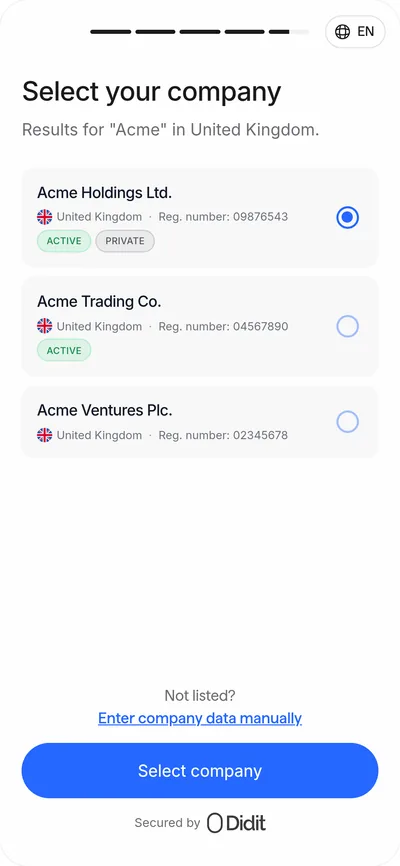
Port agents, bunker suppliers, chandlers and freight forwarders can all be verified as businesses, each through the KYB workflow you created in Step 2. The flow returns the registry record, the ownership structure and the key people, and each officer can take a linked KYC at $0.33 plus person AML at $0.20. This is the part of a maritime chain where impersonation is cheapest to attempt and hardest to catch by eye. Start with the KYB quickstart.
Chain of custody for cargo
Didit verifies the people and the companies that handle a container. It does not verify the container itself. Seals, sensors and temperature loggers stay in your own telemetry, and the value Didit adds is a verified identity at every handover: who accepted the cargo, at which gate, with which screening result. That is what turns a list of timestamps into an accountable chain.
The platform behind it
Didit runs 4,000+ companies on the same API, covers 220+ countries and 14,000+ document types, and returns decisions at a sub-2-second p99. The certifications that matter to a regulated maritime buyer are SOC 2 Type 2, ISO/IEC 27001:2022, GDPR, DORA, MiCA and eIDAS 2.0. ID verification also runs by non-document lookup or digital ID wallet in the countries where that method exists, and the session records which method produced the result.
Sources
- Didit Quick Start, for the account, workflow and session sequence.
- Create Session API, for request fields, callback rules and expiration bounds.
- Retrieve Session API, for the decision shape, statuses and error codes.
- Didit webhooks, for signatures, event types and retry behaviour.
- Didit pricing in the docs, for billing rules and plan credit.
- ID verification methods, for document capture, lookup and wallet assurance tiers.
- KYB quickstart, for registry, UBO and officer verification.
- Didit pricing page and pricing.json, read November 26, 2026.
- Didit MCP server, for connecting Didit to an AI assistant.
- FATF, for the international standard behind sanctions and PEP screening.
Open the sandbox at business.didit.me, create one KYC workflow and one KYB workflow, and run a test session on each. No sales call, and sandbox testing is free and unlimited on every plan.
Try it
Try this in the sandbox
Run the check this guide describes, free.
The product this post is about, taken from its topic. Run it free in the sandbox.
Author
Alberto Rosas
Co-founder and CEO

Keep reading
Other guides in the same topic.
 What Is the Purpose of FICA in South Africa? 2026 Guide
FICA is South Africa's anti-money laundering law. It creates the Financial Intelligence Centre and requires accountable institutions to identify and verify clients, screen for PEP and sanctions risk and report suspicious.
Alberto RosasNov 26, 2026 Sixth Money Laundering Directive (6AMLD): What Changed and Which Rules Apply
6AMLD is Directive (EU) 2018/1673: Member States must criminalise laundering, widen predicate offences and set a four-year penalty floor. It adds no new due diligence duties for firms.
Alberto RosasNov 26, 2026 Automated Sanctions Screening: Canada, the Entity List and Embargoes
Automated sanctions screening matches people and companies against lists such as Canada's autonomous sanctions made under SEMA and JVCFOA and the OFAC SDN List, and returns candidate hits scored for identity confidence and.
Alberto RosasNov 26, 2026Questions
Frequently asked questions
How much does it cost to verify one crew member with Didit?
A full ID check is $0.33 and covers the ID document, passive liveness, face match and device and IP analysis. Adding AML screening at $0.20 brings one crew member to $0.53. Ongoing monitoring after that is $0.07 per person per year.
Can Didit verify a shipping agent or supplier company, not just a person?
Yes. Business verification is priced by country and data tier, from $2.00 per company, and returns the registry record, officers and beneficial owners. Each owner or officer can take a linked full ID check at $0.33 and person AML at $0.20, and one decision call returns all of it.
Can one Didit workflow verify both people and companies?
No. A workflow is created with one type, KYC or KYB, so people and companies need two workflows. Both are created and called the same way through POST https://verification.didit.me/v3/session/, and the decision call separates them with session_kind, which is user or business.
Does Didit screen crew against sanctions and PEP lists?
AML Screening checks 1,300+ sanctions, PEP and watchlist lists at $0.20 per check. Ongoing AML monitoring re-screens the same people at $0.07 per person per year, so a later listing is caught without a new session.
What happens if our webhook endpoint misses an event?
Didit retries twice, after about 1 and 4 minutes, then drops the delivery, and you can resend it from the destination's delivery log. The documented fallback is the decision endpoint: call GET /v3/session/{session_id}/decision/ to fetch the full record for that session.
Which identity documents can seafarers use?
Document capture accepts passports, national ID cards, driver's licences and residence permits, across 220+ countries and 14,000+ document types. An ePassport chip read is available as a $0.15 add-on when you want the cryptographic check on top.
Can a crew member reuse one verification across vessels and ports?
Reusable KYC is included at no charge, so a seafarer verifies once and later checks use the stored face. Biometric Authentication costs $0.10 per authentication, which is the gangway and portal re-check price.
Is the Didit sandbox free?
Yes. Sandbox testing is free and unlimited on every plan. The Free plan also adds $10 of credit a month for eligible organizations that sign up with a work email.
How do we re-authenticate someone at the gangway?
Run Biometric Authentication at $0.10 per authentication against the face stored at onboarding. Didit reuses the approved liveness face first, then the ePassport chip photo, then the ID document portrait, so the person does not repeat document capture.
Who reviews a session that is not auto-approved?
A session that needs a person lands in In Review with an assignee, the time it started waiting and an SLA due date. Investigator review pricing is not specified in the supplied sources, so confirm it on the pricing page before budgeting. A manual change is recorded in status_override with the automatic result kept in decision_trace.
Does Didit verify the cargo or the container?
No. Didit verifies the people and the companies that handle the cargo. Seals, sensors and temperature telemetry stay in your own systems, and Didit supplies a verified identity at every handover.
Compliance built in
Audited, certified and attested.
We hold the certifications and build each country's rules into your flows, so you can launch anywhere without worrying. Security and Compliance center
- Regulation encoded into your flows
Tell us what you do and where. Didit lists the rules that apply to you, with sources, and builds the checks each country needs into one workflow.
- Ready for AMLR
Every requirement of the new EU anti-money laundering rules, from checking customers to human review, is already covered by a Didit check.
- Tested in Spain's Treasury sandbox
Spain's Treasury published its supervised sandbox report on Didit's NFC plus active liveness onboarding; SEPBLAC took part and valued the added measures positively.
- Audited, not self-declared
iBeta Level 1 and Level 2. Liveness tested under ISO/IEC 30107-3.
Your obligations · 3 regions
 SOC 2 Type 2
 ISO 27001
 iBeta Level 1 and Level 2
 EU regulator attestation
 FSM youth protection
 GDPR
 EBA remote onboarding
 MiCA compatible
 FIDO Alliance member
- AMLREU AML Regulation ready
Integration · Didit MCP
Run Didit from your own AI agent
Connect Didit to Claude, Cursor, VS Code or ChatGPT and just ask in plain words. Your agent can do anything you can do in the console, with the same permissions you have.
 Add to Claude
 ChatGPT
 Cursor
- Build workflowsDescribe the checks you need. The agent creates and publishes the flow.
- Run investigationsAsk why a session was declined, review cases, search people and companies.
- Change rulesCreate payment rules, test them on past data and switch them on.
- Pull reportsAsk for numbers, exports or the audit log.
Didit Academy


