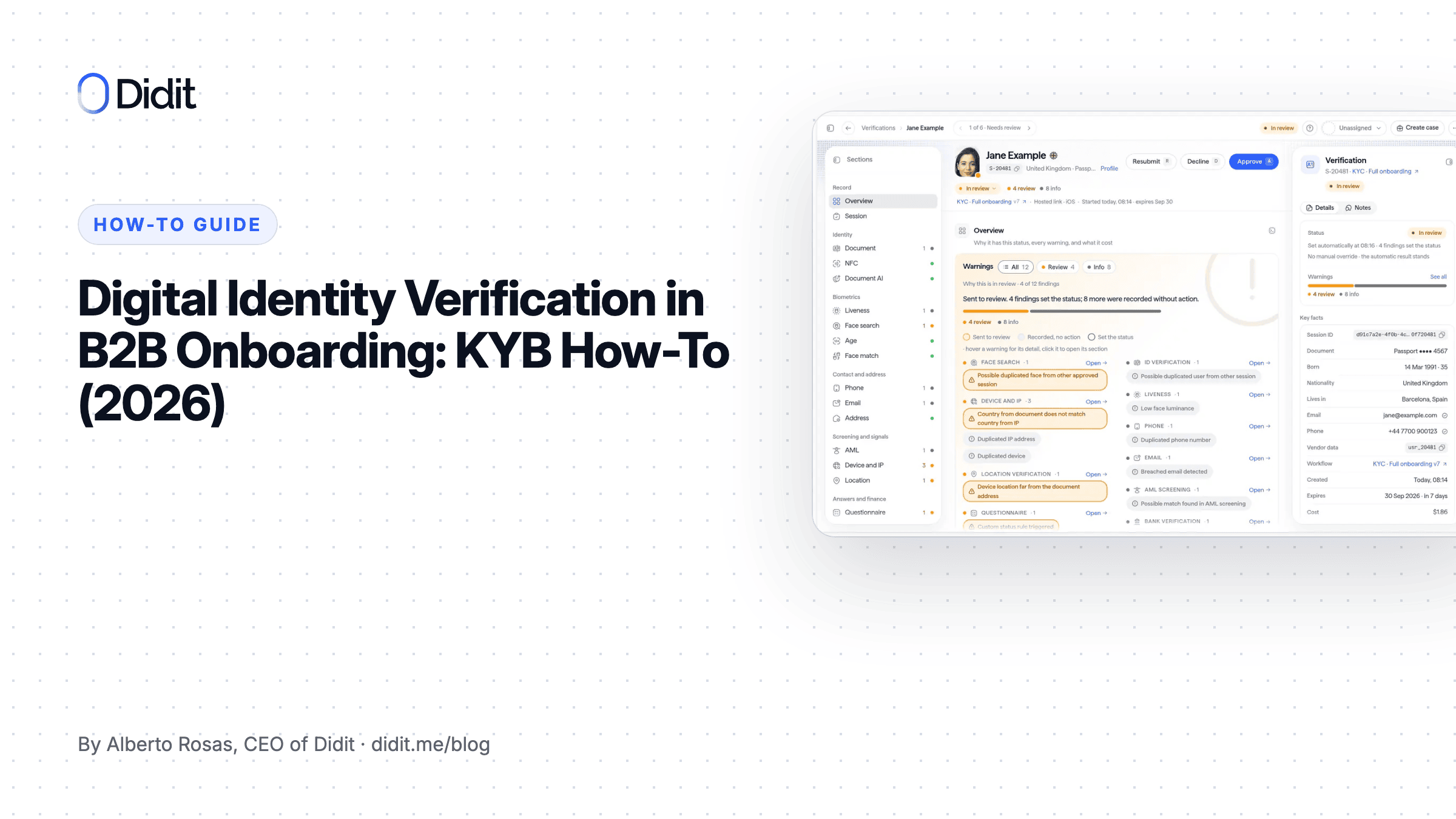
Digital Identity Verification in B2B Onboarding: KYB How-To (2026)
Create a Business Verification workflow in our console, start a session through our API, send the hosted flow to the company, and process status webhooks. From $2.00 per company registry retrieval, plus published add-ons.
 Alberto RosasCo-founder and CEO
Contents
In this guide
Jump to the part you need.
If you onboard companies rather than only people, our Business Verification workflow covers the check: registry retrieval from $2.00 per company, priced by country and data tier. The caveat is coverage. Registry depth varies by jurisdiction, so your flow must handle Lite-only countries and manual entry. The rest of this how-to covers fintechs, marketplaces, payroll providers and lenders: create the workflow in our console, start a session through our API, and process status webhooks.
Last updated: November 26, 2026. Prices checked against the live Didit price feed on November 26, 2026.
| Item | What you get |
|---|---|
| Outcome | The session reports registry results and the checks you configure, returned as one decision object. |
| Recommended method | Create a Business Verification workflow in the console, then use its workflow ID to create a session through the API. Send the hosted link to the company contact and process status webhooks. Fetch the decision by API when you need an on-demand read or have no webhook subscription. |
| Base price | Registry retrieval from $2.00 per company, priced by country and data tier. |
| Added per check | Company AML $0.20, person AML $0.20 per UBO or officer, linked KYC $0.33 per person, document step $0.20. |
| What you need | A Didit application with KYB enabled, an API key, and a public webhook endpoint. |
| Session status examples | Approved, Declined, In Review, Resubmitted, Awaiting User. These are examples, not a full state machine. |
| Human boundary | The session reports registry results and the checks you configure. In Review awaits an analyst decision, Resubmitted requires applicant action, and Awaiting User can indicate a pending required child check. |
Start free in the sandbox at business.didit.me, with no sales call. Developers can connect Didit to an AI assistant through our MCP server at didit.me/developers/mcp. See the Didit Business Verification product page for what the check covers, the pricing page for published rates, and the KYB quickstart for the end-to-end flow.
Digital identity verification in B2B onboarding: outcome and method
In the hosted flow, the applicant confirms the registry record, then completes the Key People and document steps you enable. The decision includes the results of the AML checks you configure. Our workflow returns that evidence as data: key_people_checks[] split into registry and submitted, aml_screenings[] for company and person hits, and document_verifications[] for files you require.
We recommend the workflow type described on the Didit Business Verification product page, Business Verification, which the KYB quickstart walks through end to end. You create the workflow in the console. Your integration creates the session through the API, sends the hosted link, and processes status webhooks. You fetch the decision by API when you need an on-demand read or have no webhook subscription.
People checks do not need a second integration. Under the workflow's role rules, we create a linked User Verification session for each submitted person who requires KYC, starting it with their declared name, nationality and date of birth as expected details. Each person completes their own check. The Key People feature status stays Awaiting User while any required child session is in progress, then aggregates the child outcomes.
Prerequisites
- A Didit application with KYB enabled. Create one at business.didit.me if you do not have it.
- An API key from Developer Settings, then API Keys.
- A webhook endpoint reachable from the internet, with the destination secret stored as
DIDIT_WEBHOOK_SECRET. - A
vendor_datavalue is optional and strongly recommended. Reusing it associates a new session with the same business and does not make session creation idempotent. - The country list you accept, and the data tier you buy per country. The three tiers are Lite, Shareholders and UBOs, and not every registry serves all three.
- The roles your onboarding policy allows, and which of them require KYC, are optional, or can be skipped.
Before production, define your retention policy for the personal data of directors and UBOs. Their checks are separate child sessions, and the linked-session model alone does not set a retention period.
How to automate B2B identity verification in 6 steps
Create the KYB workflow. In our Business Console open Workflows, then Create workflow, and choose Business Verification as the type. Enable company registry lookup (required), company AML (recommended), Key People if your policy requires it, and documents you need. Configure Key People, ownership thresholds, and required checks by role according to your onboarding policy and applicable obligations. Map the director role to a required KYC workflow. Set the ownership threshold for shareholders and UBOs according to your policy. Configure applicant skipping separately for each role. Save the workflow and copy the
workflow_id.Create the session. A KYB workflow produces a business session from the same
POST /v3/session/endpoint used for user checks. The workflow type is what makes it a business session, so there is no separate endpoint.curl -X POST https://verification.didit.me/v3/session/ -H 'x-api-key: YOUR_API_KEY' -H 'Content-Type: application/json' -d '{"workflow_id": "YOUR_KYB_WORKFLOW_ID", "vendor_data": "biz-acme-001"}'The response contains
session_id,session_numberandurl. Store the session id, because it is the key for fetching the decision later.Deliver the link to the business contact. Send the
urlthrough your own email or inside your product. The company admin confirms the company from the registry results, adds directors and owners, and uploads documents where your workflow asks for them.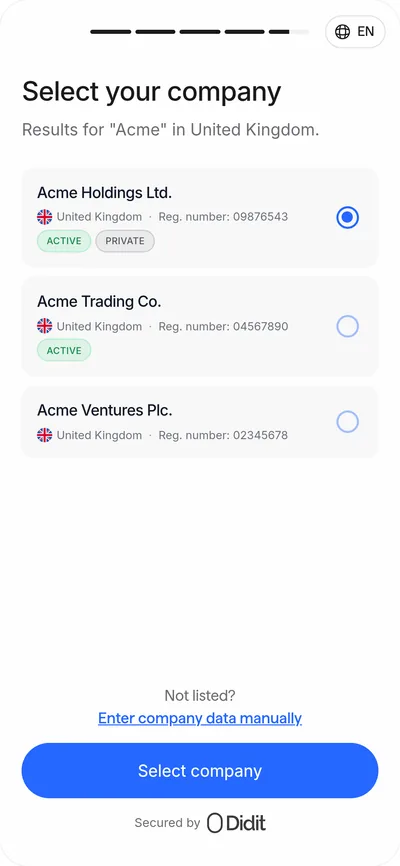
The applicant picks the company from the registry results, so the rest of the file starts from official data. 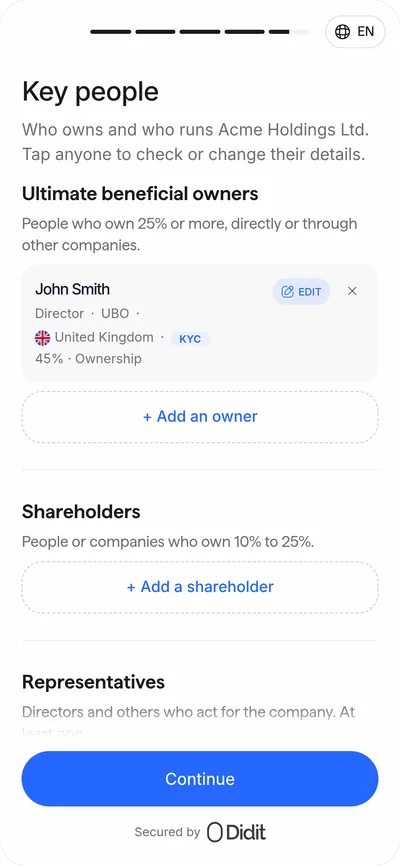
Directors and owners are listed once, and we create a linked session for each submitted person who requires KYC under the workflow role rules. Receive the status webhook.
status.updatedfires when the session status changes. Business events carrysession_kindwith the valuebusiness, so filter on that and route the event to your KYB handler. VerifyX-Signature-V2as HMAC-SHA256 over the canonical JSON using the destination secret. Reject when theX-Timestampis more than 300 seconds from now, and compare signatures in constant time. De-duplicate onevent_idand respond within 5 seconds. Follow the official Webhooks guide.One example payload, an Approved event:
{
  "event_id": "7f3c2c1e-6a1d-4c36-9d8e-0d3b5f4e2a10",
  "webhook_type": "status.updated",
  "session_id": "a1b2c3d4-5678-4abc-9def-1234567890ab",
  "business_session_id": "a1b2c3d4-5678-4abc-9def-1234567890ab",
  "session_kind": "business",
  "vendor_data": "biz-acme-001",
  "status": "Approved",
  "created_at": 1776515400,
  "timestamp": 1776515401,
  "decision": { "...": "full KYB decision" }
}
Test four cases before launch:
- Replay the same
event_idand confirm that replaying the event does not apply the same state change twice. - Send a progress event without a
decisionobject and confirm you do not read one. - Send a correctly signed approval and confirm signature verification passes.
- Send an
In Reviewevent, then the later event that resolves it, and confirm both update the same file.
- Replay the same
Act on the decision. For a verified webhook, route on the top-level
status. When you fetch a decision directly, read itsstatus. Inspect the decision and any feature warnings when present before applying your onboarding policy.Approved: apply your onboarding policy and retain the decision evidence your retention policy requires.Declined: reject, and logwarnings[]tags when present so you can explain the reason you applied.In Review: mark the file pending and wait for the next webhook when the analyst decides.Resubmitted: the company must correct something. Re-deliver the sameurland the hosted flow resumes at the resubmission step.Awaiting User: a linked person check may still be open. Ping that person, or issue a new link with the regenerate party endpoint if the original expired before they started.
Fetch the decision when you need it. The webhook payload already holds the full decision when one is included. A full decision is included for
Approved,Declined,In ReviewandAbandonedevents. Use this endpoint for an on-demand read or when you have no webhook subscription.curl https://verification.didit.me/v3/session/SESSION_ID/decision/ -H 'x-api-key: YOUR_API_KEY'
What Lite, Shareholders and UBOs return
| Tier | What it returns | Billing when the registry cannot serve it | What the applicant does |
|---|---|---|---|
| Lite | Company profile, identifiers, status, registered address, activity, and officers. | Billed at the country's Lite rate when available. If the country has no supported registry tier, manual entry applies at the flat manual-entry price. | Confirms registry data and adds people if the workflow asks. |
| Shareholders | Lite plus direct shareholders, natural persons and corporate entities, with ownership bands. | If the registry holds no ownership record, the request is delivered and billed at the highest tier the country can serve, usually Lite. | Confirms or edits parties in the hosted flow. |
| UBOs | Shareholders plus ultimate beneficial owners resolved through the ownership chain. | If the registry holds no ownership record, the request is delivered and billed at the highest tier the country can serve, usually Lite. | Confirms or edits UBOs. Each submitted person who requires KYC under the role rules completes their own linked check. |
| No tier available | No registry check is offered for that country. | Flat manual-entry price. | Enters company details manually. Define which evidence your policy requires before approving a manually entered file. |
Expected output
The decision endpoint returns the same decision object included in the webhook's decision field when present. Per-feature results use arrays because a workflow can include multiple instances of a check. The three arrays you will iterate:
key_people_checks[]: UBOs, shareholders, directors, officers and representatives, bucketed intoregistry(what the provider disclosed) andsubmitted(what the business confirmed), plus aubo_kyc_summaryroll-up.document_verifications[]: each item carries astatus, anode_id, signed file URLs with the OCR extract, and the required groups.aml_screenings[]: company AML and per-person AML hits with match detail you can review.
Compare registry against submitted to see where the applicant confirmed, edited, added, or removed parties. Registry data that arrives after submission remains registry evidence and does not change the submitted people list or automatically create additional child verification sessions. Review the AML hits and any feature-level warnings returned in the decision.
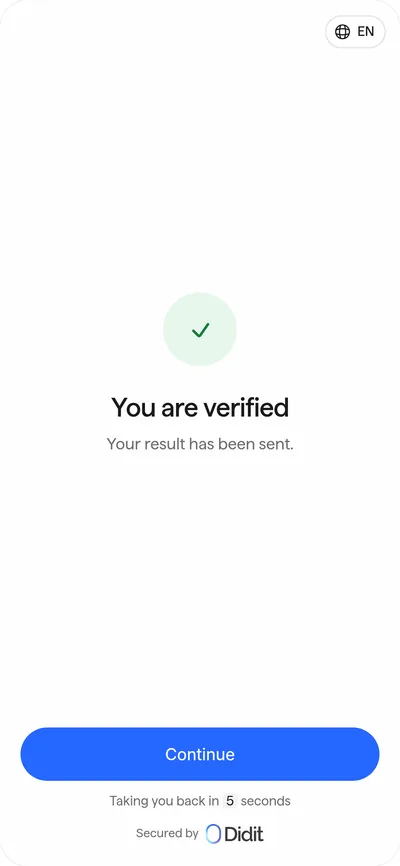
Inputs and outputs
| Direction | Field | What it does |
|---|---|---|
| In | workflow_id | Selects the KYB workflow. A KYC workflow here creates a user session that runs KYC steps instead. |
| In | vendor_data | Optional and strongly recommended. Binds the session to a Business entity and supports duplicate detection across sessions. Reusing it associates a new session with the same business; it does not make session creation idempotent. |
| In | callback | Where the hosted flow returns the person after completion. If the application restricts callback origins, an HTTP or HTTPS callback must match an allowed scheme, host, and port. Custom URL schemes are accepted. |
| In | metadata | Optional JSON object echoed in responses and webhooks for your own reporting. |
| In | expected_details with company_name, registry_country, registration_number | Pre-fills the registry search. registry_country is ISO 3166-1 alpha-2 and accepts a state suffix such as US-CA. |
| In | session_expiration_time | Overrides the workflow link lifetime in seconds, between 3600 and 2419200. |
| Out | session_id, url | The id you keep, and the hosted link you deliver to the company contact. |
| Out | Session status | Examples include Approved, Declined, In Review, Resubmitted, Awaiting User. The full webhook status list is longer; use the exact strings from the docs. |
| Out | Feature status | Feature status examples include Not Finished, Approved, Declined, In Review, Resub Requested. This is a partial example list, not exhaustive. |
| Out | warnings[] | Feature-level warning tags when present, such as a restricted country on the registry check. Inspect the decision and warnings before applying policy. |
Failure cases and recovery
| Situation | What you see | Recovery |
|---|---|---|
| Invalid workflow id | 400 Bad Request on session create | Re-copy the workflow_id from the console and confirm it belongs to the same application as the API key. |
| Wrong workflow type | The session is created but runs KYC steps | Check that the workflow type is kyb before you ship. The API does not infer it from the request. |
Duplicate vendor_data | A new session is created | That is by design for re-verification. Deduplicate on your side if you only want one open file per business, and remember vendor_data does not make session creation idempotent. |
| Country outside the workflow list | KYB_COUNTRY_RESTRICTED warning on the registry check | Either widen the allowed countries on the workflow or route that file to manual review according to your policy. |
| Registry provider outage | 502 with code kyb_registry_provider_unavailable | The call is not billed. In our hosted flow the company is offered manual company entry instead of a dead end. |
| Traffic spike | 429 with a Retry-After header | Respect the header, then retry. Do not loop without it. |
| Child session deleted or link expired before the person started | That party's child check cannot be resubmitted | Issue a new link for the same party with POST /v3/session/{session_id}/kyb/parties/{party_uuid}/regenerate/ |
Paid steps and review boundaries
You pay per completed check from prepaid credit. You can start in the sandbox or use self-serve without a contract. Enterprise is an annual contract. The sandbox is free on every plan.
| Step | Price | Charged when |
|---|---|---|
| Business registry retrieval | From $2.00 per company, variable by country and tier | Per company, priced by country and data tier |
| Company AML screening | $0.20 per check | Per company screening |
| Person AML, per UBO or officer | $0.20 per person | Per person screened |
| Linked KYC, per person | $0.33 per check | Per completed person check: ID document, biometrics, device and IP |
| KYB documents | $0.20 per step | Per document collection step, whatever the upload count. Re-uploads in that step add nothing. |
| Registry monitoring | $2.00 per company a year | Optional ongoing watch on the registry record |
Review is not the only pause. The session reports registry results and the checks you configure. In Review awaits an analyst decision, Resubmitted requires applicant action, and Awaiting User can indicate a pending required child check. A full decision is included for Approved, Declined, In Review and Abandoned webhook events. Registry and Key People features cannot be resubmitted directly. To re-verify one person, resubmit that person's child KYC session; the Key People feature status returns to Awaiting User and re-aggregates when the child finishes.
Worked cost example
One company with two directors who are also the UBOs, company AML enabled, documents enabled, and KYC required for both people. Add-ons first, at USD list prices, before plan discounts or credits:
$0.20 company AML + 2 × $0.33 linked KYC + 2 × $0.20 person AML + $0.20 document step = $1.46.
At USD list prices, before plan discounts or credits, add the registry price for the selected country and tier. At the $2.00 starting registry price, the file is $1.46 + $2.00 = $3.46. The registry price is variable, so replace $2.00 with the price for your country and tier. At list prices, changing only the registry rate leaves the $1.46 add-on subtotal unchanged.
Where automation does the work in B2B identity verification
The KYB workflow retrieves registry data and can run document OCR and AML screening against 1,300+ lists when configured. A linked full ID check adds ID document authentication, passive liveness, and 1:1 face match for each person who requires KYC. The reviewer receives the decision arrays plus any feature-level warnings returned in the decision.
In Review awaits an analyst decision. Resubmitted calls for applicant action, and Awaiting User can indicate a pending linked check. Review returned AML hits and feature warnings according to your onboarding policy.

Replacing manual identity checks in customer onboarding
- Certificate of incorporation read by hand becomes a registry lookup against official data, from $2.00 per company.
- A callback to confirm the director becomes a hosted flow where the person completes a linked KYC check with passive liveness and face match, $0.33 per person. The linked KYC verifies the person's identity. Authority to act for the company is a separate policy decision.
- A watchlist search in a browser becomes AML screening at $0.20 per check, with hits returned in the decision.
- An annual re-check spreadsheet becomes ongoing AML monitoring at $0.07 per person a year and registry monitoring at $2.00 per company a year.
If no registry tier is available, the applicant can enter company details manually at the flat manual-entry price. Define which evidence your policy requires before approving a manually entered file.
Sources
- Didit docs: KYB Quickstart
- Didit docs: KYB Integration Guide
- Didit docs: KYB Supported Countries
- Didit docs: KYB Key People
- Didit docs: KYB statuses
- Didit docs: Create Session API
- Didit docs: Webhooks
- Didit docs: KYB party draft endpoint
- Didit docs: KYB submit parties endpoint
- Didit Business Verification product page
- Didit pricing page and the machine-readable price feed, read November 26, 2026
- Didit MCP server page
- Didit product facts
- Didit switch page
Next step: open the sandbox at business.didit.me, create a Business Verification workflow, and run one test business end to end. Start in the sandbox with no sales call, and check the pricing page for the registry price in your country and tier before you move to production.
Try it
Try this in the sandbox
Run the check this guide describes, free.
The product this post is about, taken from its topic. Run it free in the sandbox.
Author
Alberto Rosas
Co-founder and CEO

Keep reading
Other guides in the same topic.
 What Is the Purpose of FICA in South Africa? 2026 Guide
FICA is South Africa's anti-money laundering law. It creates the Financial Intelligence Centre and requires accountable institutions to identify and verify clients, screen for PEP and sanctions risk and report suspicious.
Alberto RosasNov 26, 2026 Sixth Money Laundering Directive (6AMLD): What Changed and Which Rules Apply
6AMLD is Directive (EU) 2018/1673: Member States must criminalise laundering, widen predicate offences and set a four-year penalty floor. It adds no new due diligence duties for firms.
Alberto RosasNov 26, 2026 Automated Sanctions Screening: Canada, the Entity List and Embargoes
Automated sanctions screening matches people and companies against lists such as Canada's autonomous sanctions made under SEMA and JVCFOA and the OFAC SDN List, and returns candidate hits scored for identity confidence and.
Alberto RosasNov 26, 2026Questions
Frequently asked questions
What is digital identity verification in B2B onboarding?
Digital identity verification in B2B onboarding is the automated check of a company and the people who control it before you give that company an account. With our Business Verification workflow it combines a registry lookup, Key People and UBO collection, linked ID checks for people whose roles require KYC, and AML screening. You receive one decision object instead of a folder of documents.
How long does an automated business verification take?
Our KYB quickstart is built around a complete run in under 10 minutes: create the workflow, create the session, deliver the link, and receive the webhook. Elapsed time for a real file depends on how quickly the applicant completes the hosted flow, how many linked KYC checks the role rules require, and whether an analyst reviews the file.
How much does it cost to verify one business?
Registry retrieval starts at $2.00 per company and is priced by country and data tier. At USD list prices, before plan discounts or credits, company AML adds $0.20 per check, person AML adds $0.20 per UBO or officer, each linked KYC adds $0.33, and a document collection step adds $0.20. For a file with two people who are also UBOs, the add-on subtotal is $0.20 + 2 × $0.33 + 2 × $0.20 + $0.20 = $1.46, plus the registry price for the selected country and tier; at the $2.00 starting registry price, the file is $3.46.
Do I have to verify each director and UBO separately?
No, you do not integrate them separately. The Key People step collects the parties once, and under the workflow role rules we create a linked User Verification session for each submitted person who requires KYC, starting it with their declared name, nationality and date of birth as expected details. Each person completes their own check. The Key People feature reports Awaiting User while a required child session is in progress, then aggregates the child outcomes to Approved, Declined, or In Review.
What happens if the company is registered in a country with no UBO data?
A Shareholders or UBO request in a country whose registry holds no ownership record is delivered and billed at the highest tier that registry can serve, usually Lite. A country with no supported tier is not offered for registry checks, and the applicant enters the company manually at the flat manual-entry price. Define which evidence your policy requires before approving a manually entered file.
What happens when the registry provider is down?
The call returns 502 with the code kyb_registry_provider_unavailable and is not billed. In our hosted flow the company is offered manual company entry instead of a retry-only error screen. Your integration should surface that fallback and record that the file used manual entry.
Which checks reduce manual review work?
The KYB workflow retrieves registry data and can run document OCR and AML screening against 1,300+ lists when configured. A linked full ID check adds ID document authentication, passive liveness, and 1:1 face match for each person who requires KYC. In Review awaits an analyst decision, Resubmitted calls for applicant action, and Awaiting User can indicate a pending linked check. Review returned AML hits and feature warnings according to your onboarding policy.
Can the same setup handle consumer KYC and age verification?
Yes. User Verification runs through the same POST /v3/session/ endpoint with a KYC workflow, at $0.33 for a full ID check. Age Estimation is a separate module at $0.10 per check and can sit in the same workflow as the other steps.
Do I need a sales call to start?
No. You can create an application and start in the sandbox at business.didit.me without a sales call. You can start self-serve without a contract; Enterprise is an annual contract. The Free plan gives the first organization created with an eligible work email for a company domain $10.00 of monthly credit, and unused monthly credit expires at the end of the plan month.
How do I move an existing B2B onboarding flow onto Didit?
For hosted KYB, start with our KYB quickstart: create a Business Verification workflow, create a session through the API, and deliver the hosted link. Then work through the KYB integration guide. Map your existing inputs first: the company identifier to vendor_data, the jurisdictions you accept to the workflow's allowed countries and data tiers, and the person checks you already run to Key People role settings. If you need a custom KYB front end, use the documented party draft and submit parties endpoints, which cover Key People submission.
What do Lite, Shareholders and UBOs each return?
Lite returns the company profile, identifiers, status, registered address, activity, and officers. Shareholders returns Lite plus direct shareholders, natural persons and corporate entities, with ownership bands. UBOs returns Shareholders plus ultimate beneficial owners resolved through the ownership chain. If a country cannot serve the requested ownership tier, the request is billed at the highest tier the registry can serve, usually Lite; if no tier is available, the applicant enters company details manually at the flat manual-entry price.
How do I test KYB webhooks before launch?
Test four cases: replay the same event_id to confirm that replaying the event does not apply the same state change twice, send a progress event without a decision object, send a correctly signed approval, and send an In Review event followed by the later event that resolves it. Verify X-Signature-V2 as HMAC-SHA256 over the canonical JSON with the destination secret, enforce a 300-second X-Timestamp tolerance, and compare signatures in constant time. Respond within 5 seconds, and fetch the decision through the API when you need an on-demand read.
Compliance built in
Audited, certified and attested.
We hold the certifications and build each country's rules into your flows, so you can launch anywhere without worrying. Security and Compliance center
- Regulation encoded into your flows
Tell us what you do and where. Didit lists the rules that apply to you, with sources, and builds the checks each country needs into one workflow.
- Ready for AMLR
Every requirement of the new EU anti-money laundering rules, from checking customers to human review, is already covered by a Didit check.
- Tested in Spain's Treasury sandbox
Spain's Treasury published its supervised sandbox report on Didit's NFC plus active liveness onboarding; SEPBLAC took part and valued the added measures positively.
- Audited, not self-declared
iBeta Level 1 and Level 2. Liveness tested under ISO/IEC 30107-3.
Your obligations · 3 regions
 SOC 2 Type 2
 ISO 27001
 iBeta Level 1 and Level 2
 EU regulator attestation
 FSM youth protection
 GDPR
 EBA remote onboarding
 MiCA compatible
 FIDO Alliance member
- AMLREU AML Regulation ready
Integration · Didit MCP
Run Didit from your own AI agent
Connect Didit to Claude, Cursor, VS Code or ChatGPT and just ask in plain words. Your agent can do anything you can do in the console, with the same permissions you have.
 Add to Claude
 ChatGPT
 Cursor
- Build workflowsDescribe the checks you need. The agent creates and publishes the flow.
- Run investigationsAsk why a session was declined, review cases, search people and companies.
- Change rulesCreate payment rules, test them on past data and switch them on.
- Pull reportsAsk for numbers, exports or the audit log.
Didit Academy


