RENAPER DNI Verification API: Validate Argentine IDs (2026)
Didit validates an Argentine DNI against RENAPER with one authenticated POST to the Database Validation API, returning match_type, matched fields and a registry face verdict. Priced per service.
 Alejandro RosasCo-founder and CTO
Contents
In this guide
Jump to the part you need.
This guide is for teams that onboard Argentine users and need to confirm a DNI number against RENAPER in real time, without a document photo. The route is Didit's Database Validation API: one authenticated POST, or the same lookup as a step in a hosted workflow. RENAPER is priced per service, so read the rate for arg_renaper from the per-service table. The caveat: a match proves the data matched a registry record, not that a plastic card is genuine.
Last updated: November 26, 2026. Prices checked against the live Didit price feed on November 26, 2026.
| Item | Detail |
|---|---|
| Endpoint | POST https://verification.didit.me/v3/database-validation/ |
| Request format | multipart/form-data |
| Authentication | x-api-key header holding your Didit API key |
| Country code | issuing_state=ARG, ISO 3166-1 alpha-3 |
| Service id | arg_renaper |
| Identity field | identification_number, mapped to the DNI by issuing_state |
| Extra inputs | selfie in JPG, PNG or WebP up to 2 MB, plus gender, for the registry face check |
| Assurance tier | data_match, no document inspected |
| Price | Variable per service. Read the arg_renaper rate from the per-service table |
| Speed | sub-2-second p99 inference on the platform |
Start free in the sandbox at business.didit.me, with no sales call. If you want an AI assistant to write the integration for you, connect Didit to it through Didit MCP. The product behind this page is Database Validation, and the full rate card, including plans and discounts, is on Didit pricing.
What a RENAPER lookup proves, and what it does not
Database Validation answers one question: does the identity data the user gave exist at the source that issued it? In Argentina that source is RENAPER, and Didit queries the register directly rather than reselling an aggregated answer. Didit lists 1,000+ government data sources, with RENAPER named as Argentina's register.
The result carries the assurance tier data_match. That tier means exactly one thing: the details the user supplied matched a record the source holds. No photograph of a document was inspected, so nothing about a card's authenticity is being claimed. Build your policy around that distinction instead of treating a match as documentary proof.
How the selfie is handled
Argentina is one of the countries where the source checks the selfie itself and returns a verdict rather than a portrait, alongside Brazil, Nigeria and Panama. You send the selfie and a gender value with the request, RENAPER compares the face with the one on the register, and a failed comparison surfaces as BIOMETRIC_NO_MATCH in the per-service outcome code.
Because the source returns a verdict and not a photograph, the workflow setting skip_liveness_and_face_match is normalised off when the configuration is saved, and any Liveness or Face Match steps in the workflow still run. If you keep a Face Match step after the lookup, it compares the live capture against the selfie the lookup already verified.

Lookup or document capture
Choose the lookup when the user has their DNI number to hand and you want a typed flow with no camera framing. Choose document capture, at $0.15 per check, when you must prove a physical document was presented and read. Our recommendation is to run the lookup first and keep document capture as the fallback when the record does not match or the source errors, configured through on_no_match, on_partial_match and on_provider_error.
What RENAPER is, and what a DNI is
RENAPER is Argentina's national civil registry, the Registro Nacional de las Personas. It issues the DNI and holds the biographic and biometric record behind it, which is why it is the source queried when a user picks Argentina and the workflow allows a lookup. In Didit's coverage table RENAPER sits in the government register column for Argentina, next to registers such as the Department of Home Affairs in South Africa or UIDAI in India.
A DNI is the Documento Nacional de Identidad, the identity document and number carried by every Argentine citizen and resident. It is not a passport and not a tax identifier. The per-country field rules, including the exact format the register expects, are on the non-document lookup page, and that page is the only place to take them from. Sandbox testing on Didit is free and unlimited, so run your example values there before you touch production.
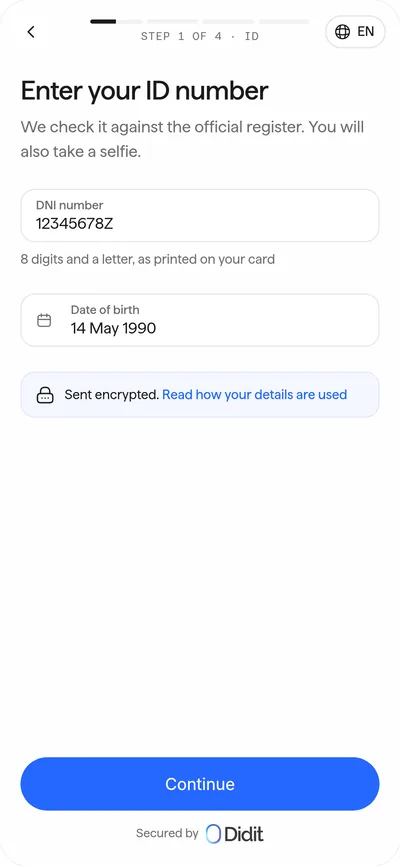
What the user does
- Picks Argentina in the ID step.
- Types the fields Argentina asks for: the DNI number, their name, and the gender value.
- Takes a selfie, because RENAPER checks the face on record.
- Gets a result: verified and moved on, asked to correct the number, retried, sent to document capture, or declined.
Prerequisites
- A Didit account and an API key from the Business Console. Keep the key server side and never ship it to the browser.
- A key with permission for the call. A wrong or expired key returns 401, a missing key returns 403.
arg_renapermust be eligible forARG. An ineligible service id returns HTTP 400.- The DNI number, and a selfie file in JPG, PNG or WebP, up to 2 MB.
consent=truewhen the catalog flags the service asrequires_consent. Without it the request returns 400.- Send the fields required by the
arg_renaperservice catalog. The documentation example also showsfirst_name,last_nameanddate_of_birthwhere supported.
How to validate an Argentine DNI in real time
The standalone route is server to server: you already hold the data and want one call and one answer.
Confirm the service id and its rate. Read the
arg_renaperline on the per-service pricing table first, because Database Validation is priced per service, not per country.Send one authenticated POST.
identification_numberis the universal field, and Didit maps it to the DNI becauseissuing_stateisARG.servicesis optional: omit it to run Argentina's default service. The service catalog lists the ids when you need to pin one.curl -X POST 'https://verification.didit.me/v3/database-validation/' \ -H "x-api-key: $DIDIT_API_KEY" \ -F "issuing_state=ARG" \ -F "identification_number=11111111" \ -F "first_name=Jane" \ -F "last_name=Doe" \ -F "gender=F" \ -F "selfie=@./selfie.jpg" \ -F "vendor_data=user-1234"Read
match_typebefore anything else. It isfull_match,partial_matchorno_match, and it drives the branch you take.Read
validations[]for the per-service detail: which service ran, its status, the fields that matched inmatched_fields, the biometricoutcome_codewhere the register returns one, and the underlyingrecord_detailswhen the register returns them.Read
warnings[]for the request-level risk codes:DATABASE_VALIDATION_NO_MATCH,DATABASE_VALIDATION_PARTIAL_MATCHandCOULD_NOT_PERFORM_DATABASE_VALIDATION. The full catalogue is on database validation warnings. The biometric verdict is not in that array: it comes back as the per-serviceoutcome_code, for exampleBIOMETRIC_NO_MATCH, on the entry invalidations[].Store
request_idwith your decision. It is the pointer your auditors will ask for, and it ties the approval to the exact registry call.Branch on the result: approve on
full_match, queue for review onpartial_match, treatno_matchas a synthetic identity per your own policy, and fall back to document capture when the source errors.
Or run the same check as a workflow step
If you would rather not pass fields yourself, add the DATABASE_VALIDATION feature to a workflow and let the steps in front of it feed the lookup. Turn on the lookup method for Argentina with the documented keys on the ID Verification feature config:
{
  "feature": "OCR",
  "config": {
    "methods": {
      "ARG": {
        "document": { "enabled": true },
        "id_lookup": {
          "enabled": true,
          "max_attempts": 2,
          "on_partial_match": "fallback_to_document",
          "on_no_match": "fallback_to_document",
          "on_provider_error": "fallback_to_document"
        }
      }
    }
  }
}
Then create a session, send the user to the hosted flow, and read the decision. The registry results arrive in the database_validations[] array.
curl -X POST 'https://verification.didit.me/v3/session/' \
  -H "x-api-key: $DIDIT_API_KEY" \
  -H "Content-Type: application/json" \
  -d '{"workflow_id":"WORKFLOW_UUID","vendor_data":"user-1234"}'

curl 'https://verification.didit.me/v3/session/SESSION_ID/decision/' \
  -H "x-api-key: $DIDIT_API_KEY"
For real-time results, subscribe a webhook destination to status.updated. Verify X-Signature-V2 against the raw request body, reject timestamps older than 300 seconds, and return 2xx fast. If you verify with the deprecated simple signature you cannot trust the decision body, so re-fetch the decision with GET /v3/session/{session_id}/decision/. Details are in the webhooks documentation.
Expected output
A completed call returns the request id and a single database_validation object. The values below, including status and match_score, are illustrative: they show the shape of the response, not guaranteed values or output from a real person.
{
  "request_id": "req_01H...",
  "database_validation": {
    "match_type": "full_match",
    "validation_type": "arg_renaper",
    "services_used": ["arg_renaper"],
    "match_score": 1.0,
    "validations": [
      {
        "service": "arg_renaper",
        "status": "MATCH",
        "matched_fields": ["identification_number", "first_name", "last_name", "date_of_birth"],
        "record_details": {
          "identification_number": "11111111",
          "first_name": "Jane",
          "last_name": "Doe",
          "date_of_birth": "1990-01-15"
        }
      }
    ],
    "warnings": []
  }
}
Inside a hosted workflow, the same result appears in the session decision under database_validations[], and the source that was queried is recorded as id_lookup.source. The end user never sees the source name, the price or the tier. You, your console reviewers and your auditors do.

Inputs and outputs
| Field | Required | Notes |
|---|---|---|
issuing_state | Yes | ARG |
identification_number | Yes | DNI digits, mapped to the DNI by issuing_state |
services | No | Omit for the country default. The service catalog lists ids when you need to pin one. |
selfie | Yes for RENAPER | JPG, PNG or WebP, up to 2 MB |
gender | Yes for RENAPER | Part of the registry face check |
first_name, last_name | Per the service catalog | The documentation example shows them where supported |
date_of_birth | Per the service catalog | ISO 8601 date, when the catalog asks for it |
consent | When the catalog requires it | consent=true, otherwise HTTP 400 |
vendor_data | No | Your stable user id, echoed back |
| Field | What it tells you |
|---|---|
request_id | Identifier for the call, for logs and audit |
database_validation.match_type | full_match, partial_match or no_match |
database_validation.services_used | Which services actually ran |
database_validation.match_score | Aggregated score for the request |
validations[].status and matched_fields | Per-service verdict and the exact fields that lined up |
validations[].outcome_code | Per-service outcome, including the biometric result for RENAPER such as BIOMETRIC_NO_MATCH |
validations[].record_details | Registry record data, when the source returns it |
warnings[] | Request-level risk codes such as DATABASE_VALIDATION_NO_MATCH |
Failure cases and recovery
| Symptom | Cause | Recovery |
|---|---|---|
| HTTP 400 | Service id not eligible for ARG, a required field missing, or missing consent for a service that requires it | Fix the payload. Check arg_renaper eligibility and send consent=true where flagged |
| HTTP 401 | Invalid API key | Issue a new key in the console and redeploy the secret |
| HTTP 403 | No API key sent with the request | Add the x-api-key header, then retry |
HTTP 502 with validation_errors[] | Every selected upstream service failed | The request is not billed and a COULD_NOT_PERFORM_DATABASE_VALIDATION log is written. Retry later or fall back to document capture |
match_type=no_match | The record is not in the registry | Treat as a synthetic identity per your policy. Never auto-approve |
match_type=partial_match | Some fields match, others do not, for example the date of birth matches and the surname does not | Route to review, or use on_partial_match to send the user to document capture |
Per-service outcome_code is BIOMETRIC_NO_MATCH | The selfie did not match the face RENAPER holds | Offer one retry with better lighting, then review or decline |
| User mistyped the number | Typo, transposed digit | max_attempts on the lookup method limits retries, then falls back to document capture |
Recovery rule for the workflow route: set on_no_match, on_partial_match and on_provider_error explicitly. Left unset they follow your workflow's default action, which may be a decline you did not intend.
Paid steps and review boundaries
Billing is per successful service hit. A request that runs more than one service produces more than one usage event, which is why you should pin services when you know exactly which register you want. A 502 where every selected service failed is not billed. Some no-match lookups and retries are billable, and the pricing documentation lists which. Session creation, the Workflow Orchestrator and the MCP server carry no separate fee, and sandbox testing is free and unlimited.
Review boundaries matter more than the price. A data_match is not documentary assurance, so do not let a lookup result silently replace a document check in a flow that requires one. Send these to a human: a partial match, a biometric no-match after the allowed retries, a provider error where the fallback also fails, and any no-match you have chosen not to decline automatically. Didit runs this for 4,000+ companies, and the pattern that holds up in an audit is a recorded source, a recorded request id, and a reviewer when the fields disagree.
Worked cost example
Take 10,000 Argentine onboarding attempts a month, a lookup-first flow, so all 10,000 run a RENAPER lookup, with AML screening on every user and a document fallback for 1,500 of them. Only Didit's own fees take the plan discount. The carrier charge for an SMS passes through at cost. The published lines:
- RENAPER lookup: 10,000 x V, where V is the
arg_renaperrate on the per-service table (variable, so it is carried as V through the arithmetic) - AML screening: $0.20 x 10,000 = $2,000.00
- Document fallback (ID document only): $0.15 x 1,500 = $225.00
- Didit's own SMS fee: $0.02 x 10,000 = $200.00
- Carrier charge for those codes, at cost: the Argentina SMS list price is $0.0877 per code including Didit's $0.02 fee, so the carrier part is $0.0677 x 10,000 = $677.00
Didit's own fees at list price: $2,000.00 + $225.00 + $200.00 = $2,425.00, plus 10,000 x V.
On Growth, every Didit price is 4% off: $2,425.00 x 0.96 = $2,328.00, plus 10,000 x 0.96 x V. The carrier charge stays $677.00, so the fixed part of the bill is $2,328.00 + $677.00 = $3,005.00.
On Scale, every Didit price is 10% off: $2,425.00 x 0.90 = $2,182.50, plus 10,000 x 0.90 x V. With the same $677.00 carrier charge, the fixed part is $2,182.50 + $677.00 = $2,859.50.
Prices are read from the live feed on November 26, 2026. The lookup rate V is variable and must be re-read from the per-service table on the day you size the deal, and only successful service hits are charged.
Sources
- Didit docs: Database Validation API overview
- Didit docs: Database validation outcome codes
- Didit docs: Database validation warnings
- Didit docs: Database validation per-feature report
- Didit docs: Non-Document ID Verification, authoritative source lookup
- Didit docs: ID Verification methods and assurance tiers
- Didit docs: per-service database validation pricing
- Didit docs: pricing and billing rules
- Didit docs: API authentication
- Didit docs: Create Session API
- Didit docs: Retrieve Session decision API
- Didit docs: webhooks and HMAC signing
- Didit pricing page, read November 26, 2026
- Didit MCP server setup
Next step: create a free Didit account at business.didit.me, copy an API key, and run your first arg_renaper lookup in the sandbox. No sales call, no procurement cycle, and the sandbox does not cost you a query.
Try it
Try this in the sandbox
Run the check this guide describes, free.
The product this post is about, taken from its topic. Run it free in the sandbox.
Author
Alejandro Rosas
Co-founder and CTO

Keep reading
Other guides in the same topic.
 What Is the Purpose of FICA in South Africa? 2026 Guide
FICA is South Africa's anti-money laundering law. It creates the Financial Intelligence Centre and requires accountable institutions to identify and verify clients, screen for PEP and sanctions risk and report suspicious.
Alberto RosasNov 26, 2026 Sixth Money Laundering Directive (6AMLD): What Changed and Which Rules Apply
6AMLD is Directive (EU) 2018/1673: Member States must criminalise laundering, widen predicate offences and set a four-year penalty floor. It adds no new due diligence duties for firms.
Alberto RosasNov 26, 2026 Automated Sanctions Screening: Canada, the Entity List and Embargoes
Automated sanctions screening matches people and companies against lists such as Canada's autonomous sanctions made under SEMA and JVCFOA and the OFAC SDN List, and returns candidate hits scored for identity confidence and.
Alberto RosasNov 26, 2026Questions
Frequently asked questions
What is RENAPER in Argentina?
RENAPER is Argentina's national civil registry, the Registro Nacional de las Personas. It issues the DNI and keeps the biographic and biometric record behind each one. Didit queries RENAPER as Argentina's authoritative source when you call the Database Validation API with issuing_state=ARG and services=arg_renaper.
What is a DNI in Argentina?
The DNI is the Documento Nacional de Identidad, the identity document and number carried by every Argentine citizen and resident. RENAPER issues it and holds the record it points to. In a Didit lookup you send the number as identification_number with issuing_state=ARG.
What does an Argentine DNI number look like?
You send the DNI value in the universal identification_number field, and Didit maps that field to the DNI because issuing_state is ARG. The per-country field rules and format checks are documented on the Didit non-document lookup page, so take them from there rather than from a sample. A value such as 11111111 in an example is a format sample, not a real person's record.
How do I validate an Argentine DNI with an API?
Send one multipart/form-data POST to https://verification.didit.me/v3/database-validation/ with the x-api-key header, issuing_state=ARG, the DNI in identification_number, a selfie and a gender value. Read match_type and validations[] from the response. The whole call is a single request, no SDK required.
Is there a public RENAPER API I call directly?
You call Didit's endpoint, subject to the service's eligibility, consent requirements and applicable terms. You authenticate with a Didit API key against Didit's endpoint, and Didit queries the register as the authoritative source. If a server-to-server request does not suit your flow, the same lookup is available as a step in a hosted workflow.
Does Didit compare the selfie to the RENAPER photo?
Yes. RENAPER is one of the sources that checks the selfie itself and returns a verdict instead of a portrait, so you send selfie and gender with the lookup. A failed comparison appears as BIOMETRIC_NO_MATCH in the per-service outcome code, not in the warnings array. Because no portrait comes back, a later Face Match step in the workflow compares against the selfie the lookup verified.
What happens if the DNI is not found in RENAPER?
The response carries match_type=no_match and a DATABASE_VALIDATION_NO_MATCH warning. Treat that as a synthetic identity signal in your own policy, and decide in advance whether it declines or falls back to document capture. Some no-match lookups are billable, and the pricing documentation lists which ones.
What does a partial match mean?
Some fields matched the registry record and others did not, for example the date of birth matched while the surname did not. That is not an approval. Route it to a reviewer, or configure on_partial_match to send the user to document capture.
How much does a RENAPER DNI check cost?
Database Validation is priced per service, so the arg_renaper rate comes from the per-service table rather than a flat number. Growth takes 4% off every Didit price and Scale takes 10%. Carrier charges for phone codes pass through at cost and take no discount, and the Free plan includes $10 of monthly credit for eligible organizations.
How fast is a RENAPER validation?
Didit runs inference at sub-2-second p99, and the standalone check is one request rather than a multi-step flow. When every selected upstream service fails you get an HTTP 502 with validation_errors[] instead of a slow hang, and that request is not billed. How quickly the register itself answers is an implementation consideration worth measuring in the free sandbox before you size a launch.
Do I need an SDK for the RENAPER API?
No. The check is one HTTPS POST with a form body, and you can call it from any language with an HTTP client. Didit publishes SDKs and a public OpenAPI contract if you prefer a typed client, and both are free.
Can I run a RENAPER check without writing code?
Yes. In the Business Console, add the Database Validation module to a workflow and enable the lookup method for Argentina. The user types the DNI, takes the selfie, and the decision arrives on the session like any other step. The workflow exposes corresponding database validation results in database_validations[], while the standalone endpoint returns database_validation. You can start no-code and move to the endpoint later.
Does a data match satisfy Argentine KYC requirements?
A RENAPER match gives you a documented registry hit at the data_match tier, with provenance recorded on the session. That is strong evidence, and it is not documentary assurance, because no document was inspected. Whether it satisfies a specific obligation is a question for your compliance team and local counsel, not for the API.
Compliance built in
Audited, certified and attested.
We hold the certifications and build each country's rules into your flows, so you can launch anywhere without worrying. Security and Compliance center
- Regulation encoded into your flows
Tell us what you do and where. Didit lists the rules that apply to you, with sources, and builds the checks each country needs into one workflow.
- Ready for AMLR
Every requirement of the new EU anti-money laundering rules, from checking customers to human review, is already covered by a Didit check.
- Tested in Spain's Treasury sandbox
Spain's Treasury published its supervised sandbox report on Didit's NFC plus active liveness onboarding; SEPBLAC took part and valued the added measures positively.
- Audited, not self-declared
iBeta Level 1 and Level 2. Liveness tested under ISO/IEC 30107-3.
Your obligations · 3 regions
 SOC 2 Type 2
 ISO 27001
 iBeta Level 1 and Level 2
 EU regulator attestation
 FSM youth protection
 GDPR
 EBA remote onboarding
 MiCA compatible
 FIDO Alliance member
- AMLREU AML Regulation ready
Integration · Didit MCP
Run Didit from your own AI agent
Connect Didit to Claude, Cursor, VS Code or ChatGPT and just ask in plain words. Your agent can do anything you can do in the console, with the same permissions you have.
 Add to Claude
 ChatGPT
 Cursor
- Build workflowsDescribe the checks you need. The agent creates and publishes the flow.
- Run investigationsAsk why a session was declined, review cases, search people and companies.
- Change rulesCreate payment rules, test them on past data and switch them on.
- Pull reportsAsk for numbers, exports or the audit log.
Didit Academy


