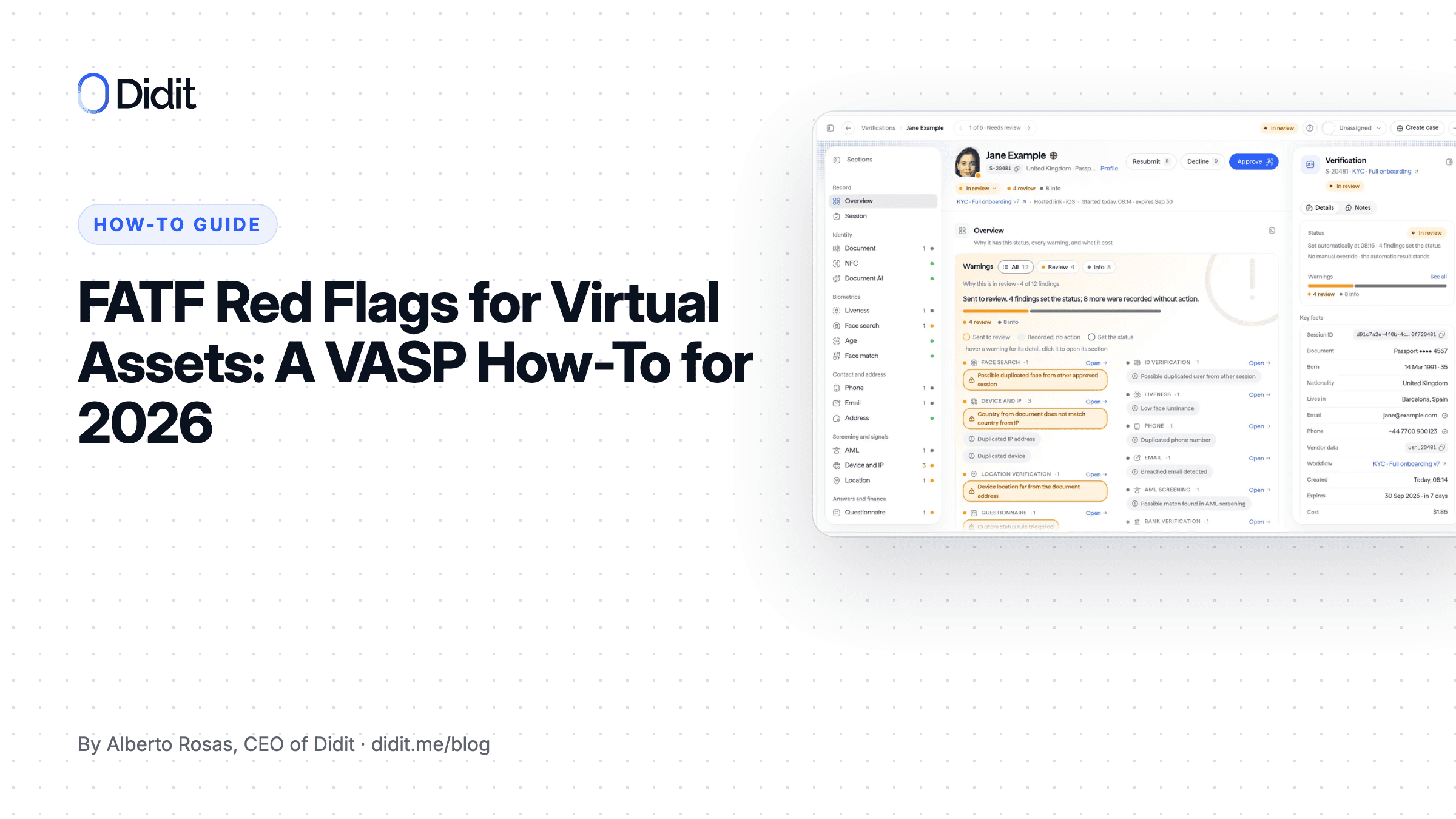
FATF Red Flags for Virtual Assets: A VASP How-To for 2026
FATF groups virtual asset red flags into six categories, from transactions and anonymity to source of funds and geography. Map each to an identity, screening or Travel Rule control and route exceptions to a human reviewer.
 Alberto RosasCo-founder and CEO
Contents
In this guide
Jump to the part you need.
This guide is for compliance and engineering teams at virtual asset service providers that need to turn the FATF red flag indicators into controls that run. Screen the person at onboarding, check the destination wallet before withdrawal, and use transaction rules to flag unusual activity for review. Didit prices AML screening at $0.20 per check and wallet screening at $0.15 per screening. The caveat: a red flag is a prompt for review, not a verdict.
Last updated: November 26, 2026. Prices checked against the live Didit price feed on November 26, 2026.
| FATF category | Signal you can observe | Review action | Didit control | List price |
|---|---|---|---|---|
| Transactions | A transfer far above the customer's pattern, or one with no apparent economic purpose | Compare it with the declared profile and an example lookback of 90 days of activity, chosen by your VASP, before release | Transaction Monitoring with the finance bundle | $0.001 per transaction beyond the plan allowance |
| Transaction patterns | Structuring, rapid in and out, round amounts, layering across chains | Hold the transaction, tag it and inspect the linked counterparties | finance and aml_ctf bundles | $0.001 per transaction beyond the plan allowance |
| Anonymity | Mixer, darknet or unhosted wallet exposure, chain hopping, privacy coins without a stated reason | Escalate the sanctions signal, verify the match and assess direct or indirect exposure. Follow the applicable rules and your sanctions policy for holding, rejecting, freezing or reporting the transfer | Managed wallet screening with the crypto_monitoring bundle | $0.15 per screening |
| Senders or recipients | Counterparty VASP unidentified, originator or beneficiary data missing, a first-time payee receiving a large transfer | For an in-scope outbound VASP-to-VASP transfer, complete the required exchange before broadcast. If required information is missing, follow your jurisdiction's procedure for the transfer | Travel Rule | $0.02 per outbound exchange |
| Source of funds or wealth | Funds that do not match declared income, or funds that pass through within hours of arrival | Request documentary evidence, reconcile it with the transaction history and record the conclusion | Full KYC, Proof of Address, AML screening | KYC $0.33, Proof of Address $0.20, AML $0.20 |
| Geographical risks | Counterparty or customer in a high-risk jurisdiction, IP or device country inconsistent with the stated residence | Verify the jurisdiction and investigate any discrepancy. Apply enhanced due diligence and escalate when required by the applicable rules or your risk policy | fatf bundle, AML screening, device and IP analysis | AML $0.20, device and IP $0.03 |
Start free in the sandbox at business.didit.me, with no sales call. Developers can connect Didit to an AI assistant through the MCP server, and every unit price in this guide is on the pricing page.
What the FATF red flag categories mean for a virtual asset business
FATF published "Virtual Assets Red Flag Indicators of Money Laundering and Terrorist Financing" in 2020. It groups the indicators into six categories: transactions, transaction patterns, anonymity, senders or recipients, source of funds or wealth, and geographical risks. Those six categories above come straight from the report, which you can read at Virtual Assets Red Flag Indicators of Money Laundering and Terrorist Financing.
The method is to give each category a control that fires without an analyst watching a dashboard. Identity controls catch what a person tells you. Screening catches who is on a list. Transaction rules catch patterns across time. Travel Rule catches what your counterparty knows. Those four buckets are Didit's implementation model, not FATF's taxonomy: they are how we split the work across products in Step 1.
Some signals appear at onboarding and some emerge later. Inconsistent identity data, a disposable phone or email and evasive answers show up in the session. A change of contact details, a new device from another country or a shift in trading behaviour shows up weeks later, which is why the ongoing side needs monitoring rather than a one-time check.
Transactions
A single transfer far above the customer's own pattern, several assets moved in one session, or a transfer with no apparent economic purpose. The review action is to compare the amount with the declared profile and recent activity; the 90 days in the table is an example lookback your VASP chooses. These are transfer-level indicators, so each rule evaluates one transaction at a time.
Transaction patterns
Structuring below reporting thresholds, rapid in and out, round amounts and layering across chains. A customer who makes many small deposits and then one large withdrawal to a fresh address is an example of a composite pattern. The presets cover the constituent signals, such as structuring-inbound and round-amount-layering, and several matching rules can contribute to one transaction score. Write a custom rule only when a condition must match the signals together and uses fields the engine can evaluate.
Anonymity
Mixer or darknet exposure, privacy coins used without a stated reason, unhosted wallets and chain hopping. Wallet screening returns the exposure behind the address, and the review action is to ask for the source of the address and to escalate when that exposure sits with sanctioned sources.
Senders or recipients
A counterparty VASP that cannot or will not identify itself, missing originator or beneficiary data, a first-time payee receiving a large transfer. The review action is to finish the Travel Rule exchange before broadcast and to record what the counterparty returned. Treat a large transfer to a first-time payee as a separate transaction-monitoring signal.
Source of funds or wealth
Declared income that does not match the deposits, funds that leave within hours of arrival, a business customer whose on-chain volume dwarfs its stated revenue. The review action is to request documentary evidence, reconcile it against the transaction history and record the conclusion even when the customer is retained.
Geographical risks
Counterparty or customer in a high-risk jurisdiction, an IP or device country inconsistent with the stated residence, a transfer routed through a jurisdiction with a weak AML regime. The review action is enhanced due diligence, with escalation when jurisdiction risk also appears in another category.
| Category | Corroborating evidence | Responsible reviewer | Typical disposition |
|---|---|---|---|
| Transactions | 90 days of statements and on-chain history, invoice or trade rationale | Transaction analyst | Release with a note, or hold for source-of-funds evidence |
| Transaction patterns | Matched rules and score contributions from rule_runs, plus linked transfers and counterparties from the underlying transaction records | Transaction analyst | Hold, tag, escalate to a case |
| Anonymity | Wallet screening exposure report and the customer's explanation | Wallet analyst | Escalate the sanctions signal, verify the match and assess direct or indirect exposure; follow the applicable rules and your sanctions policy for holding, rejecting, freezing or reporting the transfer |
| Senders or recipients | Travel Rule exchange state and the counterparty response | Compliance officer | For an in-scope outbound VASP-to-VASP transfer, complete the required exchange before broadcast; if required information is missing, follow your jurisdiction's procedure for the transfer |
| Source of funds or wealth | Payslips, sale contract, company accounts, registry data | Compliance officer with MLRO sign-off | Retain with evidence, or exit the relationship |
| Geographical risks | IP and device country, registry country, FATF statements on the jurisdiction | MLRO | Verify the jurisdiction and investigate any discrepancy. Apply enhanced due diligence and escalate when required by the applicable rules or your risk policy |
Prerequisites
- A Didit organization and an API key for
verification.didit.me. - A verification workflow that includes ID verification and AML screening. In the workflow, the weights
aml_name_weight,aml_dob_weightandaml_country_weightmust sum to exactly 100. - Transaction monitoring enabled for the application, with screening configured under Transactions, Settings, Provider Preferences. Without a provider the wallet screening endpoint answers
409 Conflict. Configure managed wallet screening at $0.15 per screening, or bring your own screening provider and run it inside Didit. - Score thresholds you can defend.
preferred_review_score_thresholddefaults to 75 andpreferred_decline_score_thresholddefaults to 500, which means never decline by score. - A written rule for who reviews an alert, how fast, and what evidence they record. An alert is a transaction held for review or waiting on the customer. Assign an analyst or define the next customer action.
- For outbound Travel Rule exchanges, confirm that the counterparty is reachable. Use your own connected membership for a membership-based network. The internal, TRP and email routes have separate prerequisites.
How to turn FATF red flags into working controls
Recommended method: map each indicator to a control, install the preset rule, screen the address at the moment of decision, and let thresholds route the exceptions. Do it in this order.
- Sort the list into Didit's four implementation buckets: identity, list screening, transaction patterns and counterparty data. This is our implementation model, not FATF's taxonomy. A red flag you cannot observe in data is a policy question, not a control.
- Turn on identity and AML screening in the onboarding workflow. Add the AML feature in the Business Console, then set
aml_match_score_threshold,aml_score_approve_thresholdandaml_score_review_thresholdtogether with the three weights. A request whose weights do not sum to 100 is rejected with HTTP 400. - Install presets before writing rules. The Transaction Monitoring rule library ships over 150 presets, and the
fatf,crypto_monitoring,financeandaml_ctfbundles cover high-risk jurisdiction exposure, mixer and darknet exposure, structuring and unhosted wallets. Install from Transactions, Rules, Library, through the rule library API, or with the MCP toolsdidit_transaction_rule_library_list,didit_transaction_rule_installanddidit_transaction_rule_uninstall. Set installed preset rules toTESTmode until their selectivity looks right. - Set the two score thresholds in Transactions, Settings. Changes apply to new transactions only, so record the date you change them. Lower the decline threshold only when you are ready to block automatically.
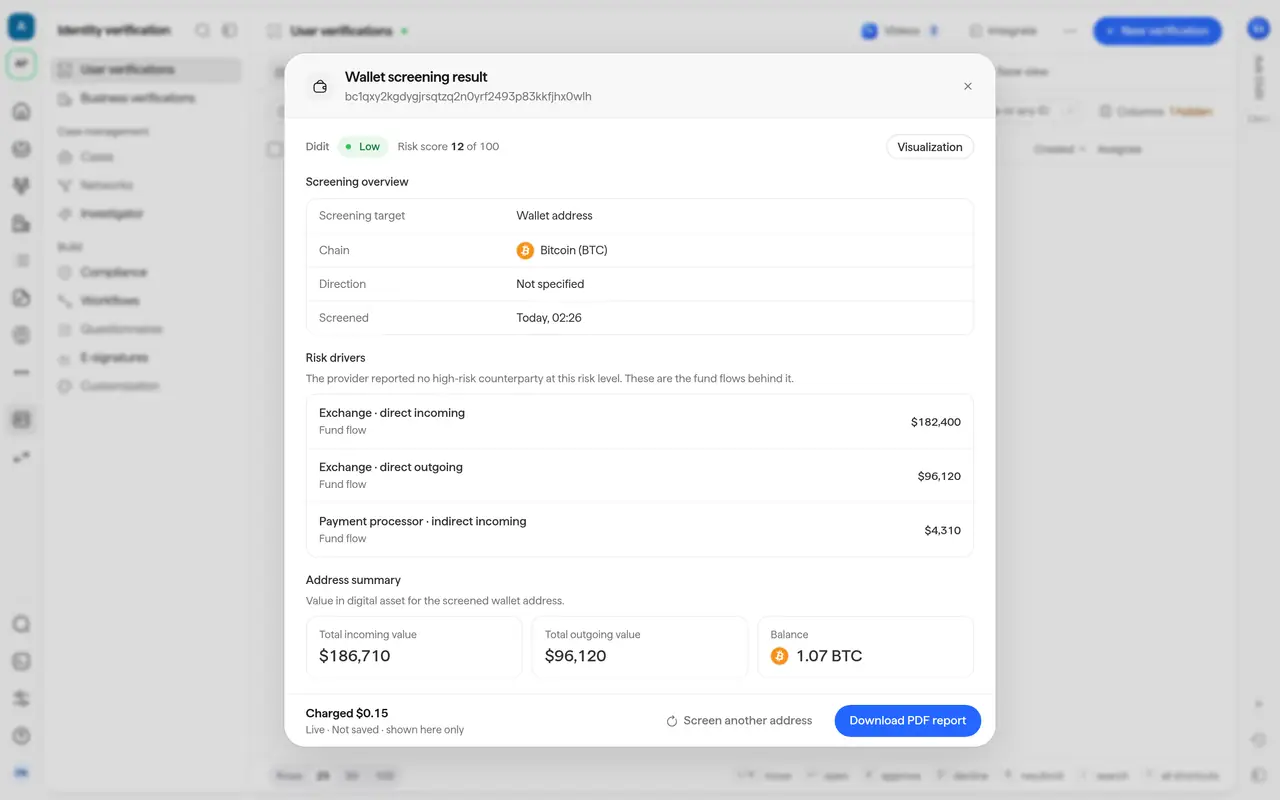
- Screen the destination wallet before funds move. Call the on-demand wallet screening endpoint shown below when a customer adds a withdrawal address. It writes nothing to the transactions table, so you can refuse an address without recording a transaction.
- Record the transfer so automatic screening and rules run. Set
transaction_details.currency_kindtocrypto, put the token symbol intransaction_details.currency, the network intransaction_details.crypto_params.crypto_chain, and the side intransaction_details.direction. Crypto screening runs when it is enabled for the application, or wheninclude_crypto_screeningistrue;falseskips it. Before the transfer, put the inbound sender or the outbound destination incounterparty.payment_method.account_id. For hash screening, usesubject.payment_method.account_idfor inbound deposits andcounterparty.payment_method.account_idfor outbound withdrawals, with the hash intransaction_details.payment_reference_id. Checkcustom_values.aml_screening_statusand the provider result before you treat a transfer as screened. Never substituteETHfor another EVM network: the same address can carry different activity and risk on each chain. - Work the queue. A transaction in
IN_REVIEWorAWAITING_USERis an alert. Triage it, assign it, resolve it, or escalate it to a case. Measure time to resolution, not alert volume. - Complete the Travel Rule exchange before you broadcast. For outbound VASP-to-VASP transfers that require an exchange, submit the transfer with
transaction_categoryset totravelRule, wait for the exchange to reachCOMPLETED, broadcast on-chain, then report the hash so the exchange closes asFINISHED.
Runnable example: screen a withdrawal address before the transfer
This is the documented call from the on-demand wallet screening API. It screens one address with no transaction record, which is what you want when a customer adds a payout destination.
curl -X POST https://verification.didit.me/v3/wallet-screening/ \
  -H "x-api-key: YOUR_API_KEY" \
  -H "Content-Type: application/json" \
  -d '{
    "wallet_address": "0x94f1b9b64e2932f6a2db338f616844400cd58e8a",
    "blockchain": "ETH"
  }'
Expected output
A successful call returns the standard screening result, the same shape you get from the WALLET_SCREENING provider result during transaction screening. That means a risk_score, the exposure to risky sources behind the address, and any sanctions hits. Read the score against your own policy, then decide whether the address receives funds.
Inputs and outputs
| Field | Required | What to pass |
|---|---|---|
wallet_address | Yes | The address or network identifier to screen. It must match the chosen network, for example 0x plus 40 hex characters for EVM chains. |
blockchain | No, but send it | The network, such as BTC, ETH, TRX, SOL, MATIC, BNB, BASE, OP, ARB, AVAX, ADA, XLM or HBAR. Common names such as POLYGON or BSC are accepted. |
direction | No | inbound, outbound, deposit or withdrawal. Context for the provider only. It does not change the returned risk score or the funds-flow breakdowns. |
| Field | What it tells you |
|---|---|
provider | The screening provider that answered the call. |
fallback_from_provider | Set when the connected provider rejects or fails the check and managed screening runs with "Fall back to Didit" enabled. null otherwise. |
fallback_reason | Why the connected provider failed, for example that its account reached a call limit. null otherwise. |
screening_type | Always WALLET_SCREENING. |
risk_score | Integer risk score for the address, the field your policy should read first. |
Failure cases and recovery
| Symptom | Cause | Recovery |
|---|---|---|
409 Conflict | No screening provider is configured for the application | Configure one under Transactions, Settings, Provider Preferences, then resend |
422 with candidate_chains | You sent a 0x address without a network. That address is valid on every EVM chain | Resend with blockchain set to the real chain. Nothing was screened and nothing was billed |
400 on the address | The format is not recognised, or managed screening does not cover the chain. Celo, Mode and Plume need a connected provider, and Lightning needs a connected provider that supports it | Fix the network value, or connect a provider that covers the asset |
400 on workflow configuration | The name, date-of-birth and country weights must sum to 100 | Correct the three weights and resend |
400 from POST /v3/aml/ | include_ongoing_monitoring requires save_api_request | Set save_api_request to true, or omit include_ongoing_monitoring |
403 from /v3/aml/ | The organization is out of credits | Top up, then resend |
AML status Declined | At least one hit's risk score reached the review threshold and crossed the decline boundary | Treat it as a decision, and review the hit before you reject the customer |
AML status In Review | The risk score sits between the approve and review thresholds | Route the case to the manual queue with a deadline attached |
| Adverse-media request times out | Enabling adverse media can raise latency to about 25 seconds | Allow at least 45 seconds in the client timeout, then resend the check |
| Result returns without adverse-media hits | An upstream timeout can return a result without adverse-media hits, so an empty section is not proof of a clean record | Record the check as incomplete and re-run it before you clear the customer |
aml_screening_status is FAILED | The transaction could not be screened, for example a hash the network lookup could not resolve | Read aml_screening_error. An approved transaction moves to review |
fallback_from_provider is set | The connected provider rejects or fails the check and managed screening runs with "Fall back to Didit" enabled | Read fallback_reason and fix the provider account |

Paid steps and review boundaries
| Step | Price | Charged when |
|---|---|---|
| Full KYC | $0.33 per completed check | ID document $0.15 plus passive liveness $0.10 plus face match $0.05 plus device and IP $0.03 |
| AML screening | $0.20 per check | Each person screened against 1,300+ sanctions, PEP and watchlist sources |
| Ongoing AML monitoring | $0.07 per person per year | Keeps the entity under provider-driven re-screening every day |
| Managed wallet screening | $0.15 per screening | Billed per completed managed screening. A standalone request that returns 422 because an EVM address has no network is neither screened nor billed |
| Transaction monitoring | $0.001 per transaction | Beyond the monthly allowance: 1,000 on Free, 10,000 on Growth, 100,000 on Scale |
| Travel Rule | $0.02 per exchange | Once per outbound exchange, whatever the later status transitions |
| Email and phone verification | Email verification: $0.02 per check. Phone verification: $0.02 Didit fee per code plus the carrier price for the country and channel. | Each completed email check and each code sent |
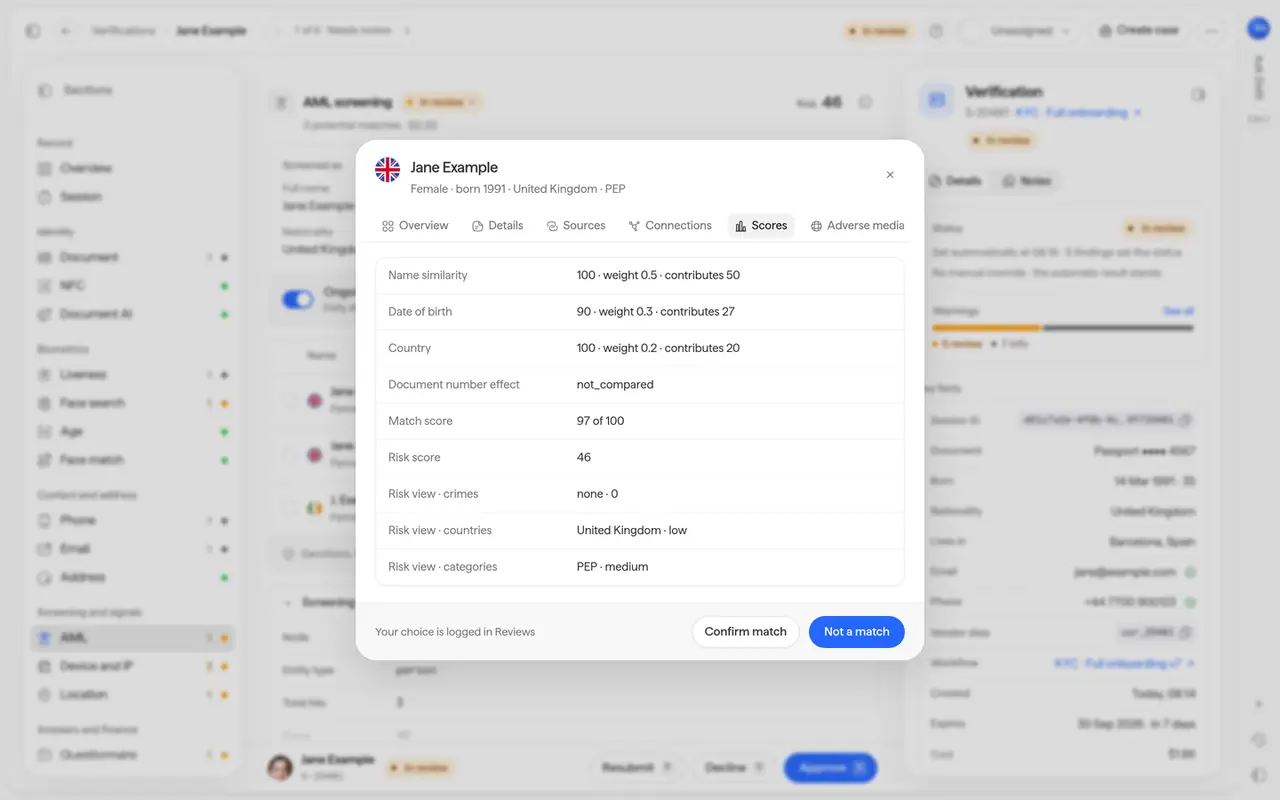
Three boundaries decide where automation stops. First, the score routes and the analyst decides: explicit rule actions can override the score-based status, and otherwise an enabled decline threshold takes precedence over the review threshold, with the default decline threshold of 500 disabling declines by score. Second, an AML match is two numbers, not one. The match score determines which potential matches enter risk evaluation, and the risk thresholds determine the AML status for the hits that qualify. Third, wallet screening returns a risk score for an address, and whether that address receives funds is your policy, not the API's.
Worked cost example
Take a VASP onboarding 1,000 new customers a month, screening 1,200 addresses as prechecks and sending 400 outbound transfers, at list prices:
- Full KYC: 1,000 x $0.33 = $330.00
- AML screening at onboarding: 1,000 x $0.20 = $200.00
- Wallet screening: 1,200 x $0.15 = $180.00
- Transaction monitoring: 12,000 transactions, 10,000 included on Growth, so 2,000 x $0.001 = $2.00
- Travel Rule: 400 x $0.02 = $8.00
Monthly total: $330.00 + $200.00 + $180.00 + $2.00 + $8.00 = $720.00.
The 1,200 screenings are prechecks on addresses before a transfer is recorded. Screening triggered by transaction creation is a separate volume: every recorded crypto transaction can run its own wallet or hash screening at $0.15 per screening, so a month that records thousands of crypto transactions will land well above this total. Count your recorded volume before you use this figure as a budget.
The $720.00 total is monthly list-price usage. Growth discounts the $718.00 in other checks and exchanges by 4% and leaves the $2.00 transaction-monitoring overage unchanged: $718.00 x 0.96 + $2.00 = $691.28. With the $99 monthly fee and $115 monthly credit, the net monthly cost is $675.28, assuming all usage is eligible for the credit.
Twelve months of the listed checks cost $8,640.00 at list prices. A full year of ongoing AML monitoring for one cohort of 1,000 people adds $70.00. Each additional cohort of 1,000 enrolled people adds another $70.00 per full year of monitoring.
We use list prices so you can check each line against the price list. Billing is per completed check from prepaid credit, and unused monthly plan credit does not roll over.
From signal to disposition: one transaction at score 100
Assume three illustrative rules add 30 points for a high-value outbound transfer, 35 for a high-risk counterparty jurisdiction and 35 for a structuring pattern. With no rule action overriding the status, the total of 100 goes to IN_REVIEW under the default thresholds. The held transaction is the alert. The analyst reads the rule_runs array for each matched rule and its contribution, compares the destination wallet's screening exposure with the customer's declared activity for the month, and records a disposition: release with a note when the jurisdiction and the amount match the stated business, or escalate to a case when the wallet exposure does not fit.
Sources
- Didit docs: On-demand wallet screening API
- Didit docs: Crypto wallet and address screening API
- Didit docs: AML screening API overview
- Didit docs: KYT rules library
- Didit docs: Transaction risk scoring
- Didit docs: KYT alerts and triage
- Didit docs: FATF Travel Rule API
- Didit pricing and pricing as JSON
- Didit wallet screening product page
- Didit transaction monitoring product page
- Didit MCP server
- FATF, "Virtual Assets Red Flag Indicators of Money Laundering and Terrorist Financing" (2020), sections on transaction indicators, anonymity and source of funds or wealth: Virtual Assets Red Flag Indicators of Money Laundering and Terrorist Financing, read November 26, 2026.
- Regulation (EU) 2023/1113, the Transfer of Funds Regulation, Article 2 for scope and the exclusion for transfers that involve no crypto-asset service provider, read November 26, 2026.
Next step: create a free organization at business.didit.me, run one wallet screening call in the sandbox against a known address, and install the fatf bundle. Then set the installed rules to TEST before you evaluate production behaviour. No sales call is needed.
Try it
Try this in the sandbox
Run the check this guide describes, free.
The product this post is about, taken from its topic. Run it free in the sandbox.
Author
Alberto Rosas
Co-founder and CEO

Keep reading
Other guides in the same topic.
 What Is the Purpose of FICA in South Africa? 2026 Guide
FICA is South Africa's anti-money laundering law. It creates the Financial Intelligence Centre and requires accountable institutions to identify and verify clients, screen for PEP and sanctions risk and report suspicious.
Alberto RosasNov 26, 2026 Sixth Money Laundering Directive (6AMLD): What Changed and Which Rules Apply
6AMLD is Directive (EU) 2018/1673: Member States must criminalise laundering, widen predicate offences and set a four-year penalty floor. It adds no new due diligence duties for firms.
Alberto RosasNov 26, 2026 Automated Sanctions Screening: Canada, the Entity List and Embargoes
Automated sanctions screening matches people and companies against lists such as Canada's autonomous sanctions made under SEMA and JVCFOA and the OFAC SDN List, and returns candidate hits scored for identity confidence and.
Alberto RosasNov 26, 2026Questions
Frequently asked questions
What are the FATF red flag indicators for virtual assets?
They are observable signals that a customer, a wallet or a transfer may be connected to money laundering or terrorist financing. FATF published them in "Virtual Assets Red Flag Indicators of Money Laundering and Terrorist Financing" in 2020. A VASP turns each one into a rule, a screening call or an onboarding question.
What are the six FATF red flag categories for VASPs?
FATF groups them as transactions, transaction patterns, anonymity, senders or recipients, source of funds or wealth, and geographical risks. Each category needs an observable signal, a corroborating piece of evidence and a named reviewer. Didit's four control buckets (identity, list screening, transaction patterns, counterparty data) are our implementation model, not the FATF taxonomy.
How do I screen a crypto wallet before a withdrawal?
Call POST /v3/wallet-screening/ with the wallet_address and the blockchain. It returns a risk score, the exposure to risky sources and any sanctions hits without creating a transaction. Configure a screening provider first, otherwise the endpoint answers 409 Conflict. Didit charges $0.15 per screening.
When should I use the address call instead of recording a transaction?
The standalone call screens one address and writes nothing to the transactions table. To screen inside a recorded transfer, create a transaction with currency_kind set to crypto and direction set to inbound or outbound. Before the transfer, put the inbound sender or the outbound destination in counterparty.payment_method.account_id and omit transaction_details.payment_reference_id. For hash screening, put the deposit address in subject.payment_method.account_id for inbound and the destination wallet in counterparty.payment_method.account_id for outbound, with the hash in transaction_details.payment_reference_id. Check custom_values.aml_screening_status and the provider result before you treat the transfer as screened. Only the recorded route produces rules, alerts and webhooks.
How much does AML screening cost?
Didit AML screening is $0.20 per check against 1,300+ sanctions, PEP and watchlist sources, with adverse media as an option. Ongoing monitoring of the same person costs $0.07 per person per year. Wallet screening is a separate $0.15 per screening.
What is the difference between match score and risk score?
The match score determines which potential matches enter risk evaluation, based on name, date of birth and country. The risk thresholds determine the AML status for the hits that qualify. Didit classifies a match below the match threshold as a false positive for scoring and excludes it from risk evaluation; the classification alone does not establish the person's identity.
What happens when a wallet screening returns a high risk score?
A high score from the standalone wallet screening API goes to your own decision process. The API creates no monitored transaction or alert. For a recorded transaction, matching rules contribute to a separate transaction score. Configured thresholds and explicit rule actions determine the transaction status.
What does a 422 error with candidate_chains mean?
You sent a 0x address without naming a network. A 0x address is valid on every EVM chain, so Didit answers with the chains it could belong to and screens nothing. Resend the call with blockchain set to the real network; that request was neither screened nor billed.
Can I test red flag rules without declining real customers?
Yes. Set installed preset rules to TEST mode, where they evaluate transactions but do not add to the score or change the status. Switch a rule to ACTIVE once its selectivity looks right. Installed presets accept mode changes only, and you build a custom rule when you need different logic.
Do VASPs need the Travel Rule for every transfer?
Regulation (EU) 2023/1113 sets its scope in Article 2: in-scope crypto-asset transfers involving an EU crypto-asset service provider, with no general minimum amount. Person-to-person transfers without a crypto-asset service provider are outside its scope. Apply the requirements for the relevant jurisdiction and transfer type. Didit runs the originator and beneficiary exchange and tracks it to COMPLETED at $0.02 per outbound exchange.
How many monitoring rules does Didit ship?
The rule library has over 150 presets across bundles for finance, AML and CTF, crypto monitoring, travel rule, device intelligence and fraud. You install them individually or as a bundle, and each one maps to a real typology drawn from FATF, FinCEN, Wolfsberg and similar guidance.
Compliance built in
Audited, certified and attested.
We hold the certifications and build each country's rules into your flows, so you can launch anywhere without worrying. Security and Compliance center
- Regulation encoded into your flows
Tell us what you do and where. Didit lists the rules that apply to you, with sources, and builds the checks each country needs into one workflow.
- Ready for AMLR
Every requirement of the new EU anti-money laundering rules, from checking customers to human review, is already covered by a Didit check.
- Tested in Spain's Treasury sandbox
Spain's Treasury published its supervised sandbox report on Didit's NFC plus active liveness onboarding; SEPBLAC took part and valued the added measures positively.
- Audited, not self-declared
iBeta Level 1 and Level 2. Liveness tested under ISO/IEC 30107-3.
Your obligations · 3 regions
 SOC 2 Type 2
 ISO 27001
 iBeta Level 1 and Level 2
 EU regulator attestation
 FSM youth protection
 GDPR
 EBA remote onboarding
 MiCA compatible
 FIDO Alliance member
- AMLREU AML Regulation ready
Integration · Didit MCP
Run Didit from your own AI agent
Connect Didit to Claude, Cursor, VS Code or ChatGPT and just ask in plain words. Your agent can do anything you can do in the console, with the same permissions you have.
 Add to Claude
 ChatGPT
 Cursor
- Build workflowsDescribe the checks you need. The agent creates and publishes the flow.
- Run investigationsAsk why a session was declined, review cases, search people and companies.
- Change rulesCreate payment rules, test them on past data and switch them on.
- Pull reportsAsk for numbers, exports or the audit log.
Didit Academy