Government ID Lookup in India: Aadhaar and PAN (2026)
We list UIDAI as our non-document lookup source for India. A successful lookup records a data match. Lookup pricing varies, and document-based full KYC costs $0.33 per check.
 Alberto RosasCo-founder and CEO
Contents
In this guide
Jump to the part you need.
If you onboard people in India and need a record match without a document photo, we list UIDAI as our non-document lookup source for India. In Countries → India → See details, confirm the supported identifier, required fields, whether a selfie is requested, and what the source returns. The lookup price is variable per lookup, so confirm the applicable India rate before you model a budget. Document-based full KYC is $0.33 per check.
Last updated: November 26, 2026. Prices checked against the live Didit price feed on November 26, 2026.
| Item | What you get |
|---|---|
| Outcome | A successful lookup records data_match. An unsuccessful lookup follows the configured outcome, which can offer document capture |
| Recommended method | Non-document lookup in the ID Verification step, with document capture kept on as the fallback |
| Source queried for India | We list UIDAI as our non-document lookup source for India in the published non-document lookup catalog |
| What the user does | We list UIDAI as our non-document lookup source for India. In Countries → India → See details, confirm the supported identifier, required fields, whether a selfie is requested, and what the source returns |
| Price | Non-document verification: variable per lookup. Full KYC: $0.33 per check. Passive Liveness $0.10 per check, Face Match 1:1 $0.05 per check, AML screening $0.20 per check |
| Where you configure it | Workflow, ID Verification node, Countries tab. It writes the methods key that the Management API also edits |
| Main caveat | The result proves the details matched a record the source holds. It says nothing about the authenticity of a document. In Countries → India, check accepted document types and available lookup sources separately |
Start free in the sandbox at business.didit.me, no sales call needed. Developers can connect an AI assistant through the Didit MCP server.
Aadhaar and PAN side by side
Aadhaar and PAN are different identifiers, and they do not arrive through the same check. Read this before you promise a customer that you verify both the same way.
| Identifier | What the user supplies | How we check it | What the result proves | Published price |
|---|---|---|---|---|
| India lookup (UIDAI) | In Countries → India → See details, confirm whether Aadhaar is accepted, which fields are required, and whether the user takes a selfie | Non-document lookup against the source named for India in the catalog | data_match on a successful lookup: the details matched a record the source holds | Variable per lookup |
| PAN | Our documentation does not confirm PAN document capture or a PAN registry lookup | In Countries → India, check accepted document types and available lookup sources separately | No PAN-specific result is established by the supplied documentation | Not established for PAN |
| Aadhaar plus biometrics | A separate selfie if you add standalone Liveness | Passive liveness and face match as their own workflow steps | The live person is compared with a reference the workflow holds. Run Face Match only on a route that supplies a supported reference, such as document capture | Passive Liveness $0.10 per check, Face Match 1:1 $0.05 per check |
What an Aadhaar lookup proves, and what it does not
ID Verification has three methods: document capture, non-document lookup and a digital ID wallet sign-in. Each produces its own assurance tier, and the tier is an honest description of what was actually proven.
| Tier | Value on the session | What it means |
|---|---|---|
| Documentary | documentary | A physical document was captured, read and checked for authenticity |
| Data match | data_match | The details the user gave matched a record held by the source that was queried. No document was inspected |
| Cryptographic | cryptographic | A digital identity provider authenticated the user and signed the attributes it shared |
We list UIDAI as our non-document lookup source for India. In Countries → India → See details, confirm the supported identifier, required fields, whether a selfie is requested, and what the source returns. On a successful match the session records data_match. Nobody looked at a card, so no claim is made about a card.
The reported source identifies provenance and the match describes the evidence obtained. We list UIDAI as our non-document lookup source for India. The exact source per country is the provenance statement documented for that country, and it sits on the session payload as id_lookup.source, in the console and in exports. End users never see it.
Prerequisites
- A Didit organization and an application. The sandbox is free and unlimited. The matching product page is Didit User Verification.
- An API key that can create sessions and holds the
read:sessionsprivilege for the decision endpoint. - A workflow with an ID Verification step. A workflow that says nothing about methods stays document capture only.
- India enabled for non-document lookup in your environment. Availability is server-driven: the Countries tab only offers what the capability catalog supports, and a method marked coming soon cannot be switched on.
- A consent decision you own. Before you enable the lookup, confirm eligibility, the applicable notice and consent requirements, and what data may be retained, against the source the non-document lookup page names for India.
- The India request fields and format rules, read under See details in the Countries tab before you write your own client-side validation.
Step by step: run an India government ID lookup
Open the Didit Business Console, go to Workflows and open the workflow you will use for Indian users.
Select the ID Verification node, then open the Countries tab and pick India. Turn on Non-doc lookup. Set the number of answered attempts the user gets, and configure partial match, no match and provider error separately. Enable document capture before selecting any document fallback, because the fallback switches have nowhere to go without it.
Confirm what India shows under See details before you apply anything through the Management API. The console and the API edit the same object: the
methodskey on the ID Verification feature config, keyed by ISO 3166-1 alpha-3 country code, with anid_lookupblock for the lookup. That block carriesenabled,max_attempts,skip_liveness_and_face_matchand theon_partial_match,on_no_matchandon_provider_errorswitches. Omit a method inside a country and that country stays document capture only. The published config example in the docs uses South Africa and Denmark, so confirm the India settings in Countries rather than copying a sample written for another country.Add standalone Liveness if you require it. Run Face Match only on a route that supplies a supported reference, such as document capture. Open Countries → India → See details to confirm the response for the available lookup.
Publish the workflow. Two conditions matter. The workflow cannot be published when, for a country, every path into the Face Match step verifies its users only with methods that leave no photo, and every route out of that ID Verification step leads to the Face Match step. You get a warning instead when document capture or a photo-providing method is offered as well, or when a branch after the ID Verification step can send those users to an outcome without Face Match. Route successful lookup-only users around Face Match, or give them a valid reference.
Create a session from your server with the Create Session endpoint.
expected_detailsis optional but worth sending: a mismatch between what you expect and what the user supplies surfaces as a decision warning.curl -X POST https://verification.didit.me/v3/session/ \ -H "x-api-key: $DIDIT_API_KEY" \ -H "Content-Type: application/json" \ -d '{ "workflow_id": "WORKFLOW_UUID", "vendor_data": "user_1042", "expected_details": { "first_name": "Asha", "last_name": "Rao", "nationality": "IND", "id_country": "IND" } }'Use the returned
session_idto retrieve the decision. Send the user the hosted verification link.The user opens the hosted flow, picks India, and completes the lookup. We list UIDAI as our non-document lookup source for India. In Countries → India → See details, confirm the supported identifier, required fields, whether a selfie is requested, and what the source returns.
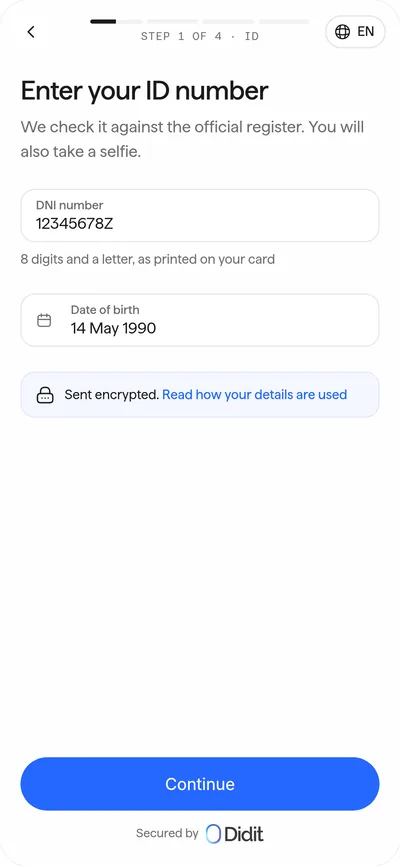
The user picks India and fills the fields that country lists under See details. Read the decision when the session finishes. Call the decision endpoint with the session id, then branch on
session_kind.curl https://verification.didit.me/v3/session/SESSION_ID/decision/ \ -H "x-api-key: $DIDIT_API_KEY"switch (decision.session_kind) { case "user": return handleUserDecision(decision); case "business": return handleBusinessDecision(decision); }The session payload, the console and exports expose the assurance tier a successful lookup records,
data_match, and the source that was queried. Neither is shown to the end user. Confirm what your organization may retain and what evidence its use case requires.
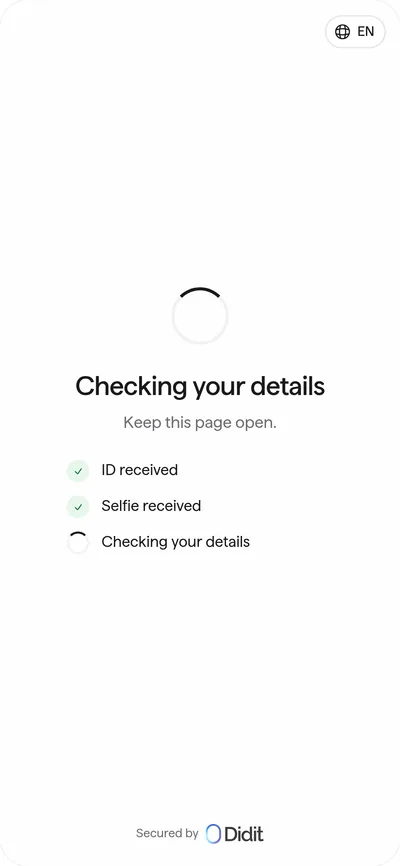
Expected output
Check the session's recorded verification method, assurance tier, and source. A successful non-document lookup records data_match. We record the source as id_lookup.source on the session payload and show it in the console and exports.

Failure cases and recovery
| Case | What happens | What to do |
|---|---|---|
| The user mistypes the number | The source can return a partial match or a no match | Set the number of answered attempts in Countries and configure partial match, no match, and provider error separately |
| No match | on_no_match applies the configured outcome, decline or fall back to document capture | Enable document capture before selecting document fallback. Treat decline as a configured outcome you own |
| Partial match | on_partial_match is configured separately | Fallback to document capture is a common choice for names with spelling variants |
| Source error | on_provider_error is configured separately | Fallback to document capture keeps an outage from reading as a customer failure |
| Face Match step after a data-only match | FACE_MATCH_NOT_COMPUTED with a null score, when the workflow supplies no other reference | Route lookup-only users around Face Match, or give them a valid reference |
| Every path into Face Match leaves no photo and every route out of ID Verification leads there | The workflow cannot be published | Allow document capture, pick a source that returns a photograph or checks the selfie, or remove the Face Match step. An alternate route or a photo-providing method leaves a warning instead |
| Every method turned off for a country | Save is rejected because nobody could verify there | Enable at least one method, or remove the country from the workflow |
| Decision call fails | 401 for an invalid key, 403 when the key lacks read:sessions, 404 when the session does not exist or belongs to another application | For 401 check the key. For 403 check read:sessions. For 404 check the session ID and the application |
Paid steps and review boundaries
The supplied price feed publishes a variable lookup rate and gives no numeric India rate. Everything around it has a published price: passive liveness $0.10, face match 1:1 $0.05, proof of address $0.20, AML screening $0.20, device and IP analysis $0.03. Some no-match database lookups and retries are billable, so read the billing rules in the docs before you assume a retry is free.
Read the session status and decision_trace to see how it was decided. Review fields can show assignment and SLA information. If a reviewer overrides the status, status_override preserves the automatic status.
Worked cost example
Two examples, using published unit prices only. The first is a document KYC plus AML total. The second is a subtotal before lookup charges. Both assume one completed lookup or check per session.
Document-based KYC with AML. 10,000 completed checks at $0.33 for full KYC plus $0.20 for AML screening. 10,000 × ($0.33 + $0.20) = 10,000 × $0.53 = $5,300.
Lookup-only with AML and device and IP analysis. The lookup price is variable per lookup, so it stays a placeholder in the arithmetic. Around it: AML screening $0.20 + device and IP analysis $0.03. 10,000 × ($0.20 + $0.03) = 10,000 × $0.23 = $2,300, plus 10,000 variable lookup fees. Billable retries and document fallback can add cost on top, so model those separately.
Read the variable lookup line in your own account before you model it, and remember that plan credit resets monthly while top-ups last 12 months. Every published number is on didit.me/pricing.
Driving the same lookup from an AI assistant
Use the documented Create Session API for the hosted flow. Developers can connect an AI assistant to the free Didit MCP server using OAuth. Follow the Didit MCP setup guide for supported clients and actions. Before you enable the lookup, confirm eligibility, notice, consent, and retention requirements for your use case.
Sources
- Non-Document ID Verification: Authoritative Source Lookup, the per-country source table, request fields and consent regimes
- ID Verification Methods: Document, Lookup, Wallet, the three methods, the config example and the assurance tiers
- ID Verification overview
- Configure ID Verification Methods in the Console, the Countries tab, See details and the fallback switches
- Create Session API, read November 26, 2026
- Retrieve Session API: KYC and KYB Decision Data, read November 26, 2026
- Data Models, report objects, warning objects and document types
- Identity Verification Pricing, billing rules and standalone API prices
- Didit User Verification, the product page for the ID Verification line
- Didit pricing page and pricing as JSON, read November 26, 2026
- Didit MCP server, hosted at https://mcp.didit.me/mcp with OAuth sign-in
Next step: open the free sandbox at business.didit.me, no sales call needed. Check whether India lookup is available in Countries, then run a test session and inspect the result and recorded source.
Try it
Try this in the sandbox
Run the check this guide describes, free.
The product this post is about, taken from its topic. Run it free in the sandbox.
Author
Alberto Rosas
Co-founder and CEO

Keep reading
Other guides in the same topic.
 What Is the Purpose of FICA in South Africa? 2026 Guide
FICA is South Africa's anti-money laundering law. It creates the Financial Intelligence Centre and requires accountable institutions to identify and verify clients, screen for PEP and sanctions risk and report suspicious.
Alberto RosasNov 26, 2026 Sixth Money Laundering Directive (6AMLD): What Changed and Which Rules Apply
6AMLD is Directive (EU) 2018/1673: Member States must criminalise laundering, widen predicate offences and set a four-year penalty floor. It adds no new due diligence duties for firms.
Alberto RosasNov 26, 2026 Automated Sanctions Screening: Canada, the Entity List and Embargoes
Automated sanctions screening matches people and companies against lists such as Canada's autonomous sanctions made under SEMA and JVCFOA and the OFAC SDN List, and returns candidate hits scored for identity confidence and.
Alberto RosasNov 26, 2026Questions
Frequently asked questions
How do I check whether the India lookup accepts Aadhaar?
We list UIDAI as our non-document lookup source for India. In Countries → India → See details, confirm whether Aadhaar is accepted, which fields are required, whether a selfie is requested, and what the source returns. A successful lookup records the assurance tier data_match, meaning the details matched a record the source holds. No document is inspected, so the result makes no claim about document authenticity.
Is aadhar lookup different from Aadhaar lookup?
Aadhar and adhar are alternate search spellings of Aadhaar. They refer to the same UIDAI lookup and use the same identifier format. The method, the source queried and the result are identical.
How much does an Aadhaar lookup cost?
The public feed lists non-document verification as variable per lookup. Confirm the applicable India rate before estimating your cost. The published prices around it are passive liveness $0.10, face match $0.05, AML screening $0.20 and document-based full KYC at $0.33 per check.
Can I verify a PAN with a non-document lookup?
Our documentation does not confirm PAN document capture or a PAN registry lookup. In Countries → India, check accepted document types and available lookup sources separately.
What does the data_match tier mean for compliance?
It means the details the user supplied matched a record held by the source that was queried. No document was inspected, so it is not a documentary result. The recorded source and assurance tier describe the evidence obtained. Confirm what your organization may retain and what evidence its use case requires.
What happens if the Aadhaar number does not match the record?
A no-match result follows the on_no_match setting. A partial match and a provider error each follow their own settings. Enable document capture before choosing it as a fallback.
Does the user need to take a selfie for an India lookup?
In Countries → India → See details, confirm whether a selfie is requested for the available lookup, plus the required fields and what the source returns. Add standalone Liveness if you require it. Run Face Match only on a route that supplies a supported reference, such as document capture.
Can one workflow offer both lookup and document capture in India?
A workflow can offer the ID Verification methods enabled for India in Countries. It can offer document capture alongside lookup or use it as a fallback. Confirm each required document type and source in the catalog.
What is 59039149 in an ID lookup context?
The number alone cannot identify the record type. Supported identifiers are entered in the hosted flow. Open Countries → India → See details to confirm the identifier and required fields. Do not collect a full identifier in an unspecified channel.
How do I test this without paying?
Sandbox testing is free and unlimited. Check whether the India method is available in your sandbox. The first organization created with an eligible company-domain work email gets $10 in monthly Free-plan credit. Phone codes are excluded.
Can I run the lookup from Claude or ChatGPT?
Use the documented Create Session API for the hosted flow. Developers can connect an AI assistant to the free Didit MCP server using OAuth. Follow the Didit MCP setup guide for supported clients and actions. Confirm eligibility, notice, consent, and retention requirements for your use case before enabling the lookup.
Compliance built in
Audited, certified and attested.
We hold the certifications and build each country's rules into your flows, so you can launch anywhere without worrying. Security and Compliance center
- Regulation encoded into your flows
Tell us what you do and where. Didit lists the rules that apply to you, with sources, and builds the checks each country needs into one workflow.
- Ready for AMLR
Every requirement of the new EU anti-money laundering rules, from checking customers to human review, is already covered by a Didit check.
- Tested in Spain's Treasury sandbox
Spain's Treasury published its supervised sandbox report on Didit's NFC plus active liveness onboarding; SEPBLAC took part and valued the added measures positively.
- Audited, not self-declared
iBeta Level 1 and Level 2. Liveness tested under ISO/IEC 30107-3.
Your obligations · 3 regions
 SOC 2 Type 2
 ISO 27001
 iBeta Level 1 and Level 2
 EU regulator attestation
 FSM youth protection
 GDPR
 EBA remote onboarding
 MiCA compatible
 FIDO Alliance member
- AMLREU AML Regulation ready
Integration · Didit MCP
Run Didit from your own AI agent
Connect Didit to Claude, Cursor, VS Code or ChatGPT and just ask in plain words. Your agent can do anything you can do in the console, with the same permissions you have.
 Add to Claude
 ChatGPT
 Cursor
- Build workflowsDescribe the checks you need. The agent creates and publishes the flow.
- Run investigationsAsk why a session was declined, review cases, search people and companies.
- Change rulesCreate payment rules, test them on past data and switch them on.
- Pull reportsAsk for numbers, exports or the audit log.
Didit Academy