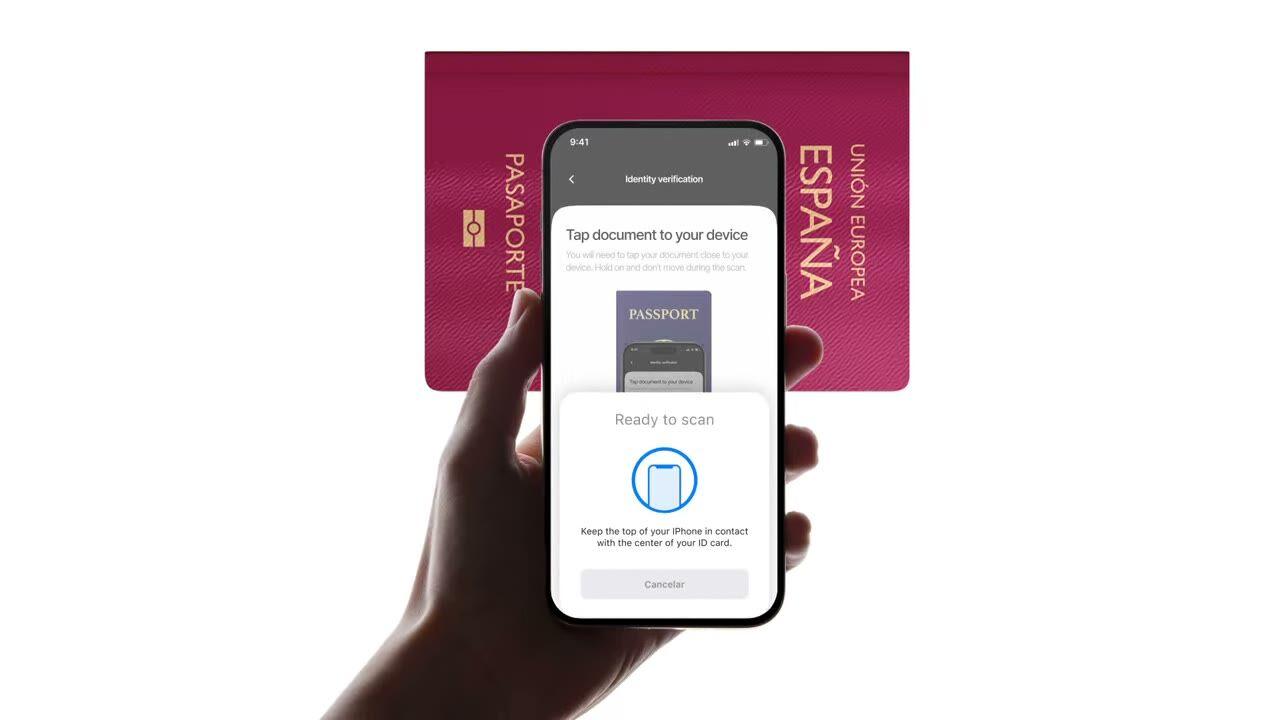
Tap an e-passport or e-ID to the phone. Reads the chip, validates the government signature, catches forgeries plain photo checks miss. $0.15 per read, 500 free/month.
Tap the passport. The chip returns the same data the photo did, except this
time it's signed by the issuing country. $0.15, sub-2-second.
How it works
From sign-up to verified user in four steps.
Step 01
Create the workflow
Pick the checks you want, ID, liveness, face match, sanctions, address, age, phone, email, custom questions. Drag them into a flow in the dashboard, or post the same flow to our API. Branch on conditions, run A/B tests, no code required.
Step 02
Integrate
Embed natively with our Web, iOS, Android, React Native, or Flutter SDK. Redirect to a hosted page. Or just send your user a link, by email, SMS, WhatsApp, anywhere. Pick what fits your stack.
Step 03
User goes through the flow
Didit hosts the camera, the lighting cues, the mobile hand-off, and accessibility. While the user is in the flow, we score 200+ fraud signals in real time and verify every field against authoritative data sources. Result in under two seconds.
Step 04
You receive the results
Real-time signed webhooks keep your database in sync the moment a user is approved, declined, or sent to review. Poll the API on demand. Or open the console to inspect every session, every signal, and manage cases your way.
Built for developers · Built against fraud · Open by design
Six capabilities. One feature flag. NFC.
Every capability below is a toggle on the same module. No upsell tiers, no separate SKUs, no add-on calls. Switch them on per workflow, or include the NFC module when you create a workflow over the API.
Verify the signature on every chip, not the print on the page.
Every modern e-passport and e-ID carries a contact-less chip signed by the issuing government. We read it over NFC (near-field communication), validate the digital signature, and return a tamper-proof verdict. Catches morph attacks, photo substitutions, and forgeries that pass visual inspection.
Cryptographic read
NFC · ICAO 9303
Authentic
Hold to chip
Passive AuthenticationSOD signature valid
Active AuthenticationChip challenge OK
Chip AuthenticationSession key derived
Issuer signatureSigned · government
02 · ICAO 9303 data groups
Full chip contents extracted, structured, and signed.
Every ICAO 9303 data group on the chip is read, signed security object, personal data, MRZ (machine-readable zone), high-resolution facial image, signature image, plus any additional biometrics the issuing country stores. You get a clean `chip_data` JSON plus signed URLs for the portrait and signature.
Chip data groups
SOD · DG1 · DG2 · DG7 · DG11–14
First nameDG1
Olivia
From chip · DG1 signed by SOD
Last nameDG1
Roy
Date of birthDG1
28/06/1971
Document typeDG1
e-Passport
Facial imageDG2
High-res portrait.jp2
Document numberDG1
3EB8726CC6E0F979
03 · ICAO PKD trust
Trust anchored at the ICAO Public Key Directory.
Every chip read traces the full certificate chain, document signer → country signing authority → ICAO Public Key Directory root, and checks the country's revocation list in real time. Revoked and expired certificates surface as configurable warnings; the rest passes through as authenticity booleans on the report.
Trust chain
DSC → CSCA → ICAO PKD
PKD root
Document Signer
DSC · n-eID SPAIN 2
Country Signing CA
CSCA · Spain · CRL OK
ICAO PKD root
Public Key Directory
sod_integrity
dg_integrity
DSC not revoked
DSC not expired
04 · Photo vs chip
Cross-check every field. Auto-decline on mismatch.
Photo data must match chip data. When they diverge, the session auto-declines, that trigger cannot be turned off. It is the cleanest signal of a tampered photo zone, a swapped chip, or a fake document with real-looking print.
On OCR vs chip mismatch · NFC_AND_OCR_DATA_NOT_SAME · auto-decline
05 · Mobile SDK first
iOS, Android, React Native, Flutter, chip read built in.
Native SDKs wire the device NFC reader, entitlements, and chip-reading UI for you. iOS uses Core NFC; Android uses IsoDep on NfcAdapter; React Native and Flutter wrap both. Browsers without NFC fall back to standard ID + selfie automatically, a skip warning fires and the session continues.
Device support
Native SDKs · auto-fallback
Live
4
Native SDKs
2
Bridges
1
Web fallback
No NFC · SKIPPED_NFC_VALIDATION · ID + selfie continues
iiOS SDKCore NFC · entitlementsNative
AAndroid SDKIsoDep · NfcAdapterNative
RReact Native · FlutterNative bridgeBridge
WWeb browserNo NFC · auto-fallbackFallback
06 · Worldwide coverage
Every ICAO-issuing country, growing every quarter.
Most passports issued after 2006 ship a chip, plus a growing list of national e-IDs, Spanish DNIe, German Personalausweis, Italian CIE, Estonian ID-card, Portuguese Cartão de Cidadão, Belgian eID, Dutch eID. Country certificates refresh automatically; new countries become readable the day we ingest them.
NFC coverage
Refreshed automatically
Live
2006+
Passports since
30+
National e-IDs
ICAO
9303 standard
CSCA
Auto-refreshed
e-PassportDNIePersonalausweisCarta CIEEstonian IDCartão de Cidadão
🇪🇸ES
🇩🇪DE
🇮🇹IT
🇪🇪EE
🇵🇹PT
🇧🇪BE
🇳🇱NL
🇫🇷FR
🇬🇧GB
🇺🇸US
🇯🇵JP
🇦🇪AE
Integrate
One workflow. Two ways to launch the chip read.
NFC has no server-to-server standalone endpoint, the chip needs a device with NFC hardware. Both paths below share the same create-session call; they differ only in whether the user reads the chip in our hosted UI or inside your own app via the native SDK.
You own the UI. The SDK wires NFC. Android, React Native, Flutter all supported.docs →
Agent-ready integration
Ship NFC Verification in one prompt.
Paste the block below into Claude Code, Cursor, Codex, Devin, Aider, or Replit Agent. Fill in the my_stack placeholder with your framework, language, and use case. The agent provisions Didit, builds the workflow with NFC enabled, wires the webhook, and ships.
didit-integration-prompt.md
# Didit NFC Verification — integrate in 5 minutes

You are integrating Didit's NFC Verification (cryptographic e-passport
and e-ID chip reading) module into <my_stack>. Follow these steps exactly.
Every URL, header, and enum value below is canonical — do not paraphrase
or "improve" them.

## 1. Provision an account
- Sign up: https://business.didit.me (no credit card required).
- Or provision programmatically: POST https://apx.didit.me/auth/v2/programmatic/register/
  (returns an API key bound to the workspace + application).

## 2. What NFC Verification actually does
NFC Verification reads the secure contact-less chip embedded in modern
e-passports and e-IDs (the small chip-and-antenna sticker symbol on the
cover) and runs four cryptographic checks against the data it extracts:

1. Passive Authentication — every Data Group (DG1 personal data, DG2
   facial image, etc.) is hashed and compared against the signed hash
   stored in the Document Security Object (SOD). Catches any single-bit
   tampering of the chip contents.
2. Certificate chain validation — Document Signer Certificate (DSC) →
   Country Signing Certificate Authority (CSCA) → ICAO Public Key
   Directory (PKD) root. Proves the chip was signed by the issuing
   government, not a clone.
3. Certificate Revocation List (CRL) check — DSCs revoked by the issuing
   country are caught and flagged.
4. Chip Authentication — where the document supports it, prevents chip
   cloning by challenging the chip with a key-pair handshake.

PACE (Password Authenticated Connection Establishment) or BAC (Basic
Access Control) is used to derive the session key from the Machine-Readable Zone (MRZ); Didit
handles that automatically. All of this is ICAO 9303 standard.

## 3. Two integration paths — pick one

### Path A — Workflow Builder (hosted UI, REQUIRED for NFC)
NFC Verification has no server-to-server standalone endpoint. The chip
has to be read by a device with NFC hardware, so you always integrate
through the Workflow + native SDK (or hosted mobile web that falls back).

1. Create a workflow that contains the NFC feature:
   POST https://verification.didit.me/v3/workflows/
   Authorization header:  x-api-key: <your-api-key>
   Body: workflow_label, features array with the entries
         { feature: "ID_VERIFICATION" }
         { feature: "NFC" }
         (UPPERCASE — strict enum)
   You should always pair NFC with ID_VERIFICATION so the MRZ is captured
   for the chip handshake AND so an OCR cross-validation is available.

2. Create a verification session for an end user:
   POST https://verification.didit.me/v3/session/
   Body: workflow_id (from step 1), vendor_data (your own user id).
   Response: session_url — redirect the user to it (or open it in the
   native SDK with shared.startVerification(with: sessionId)).

3. Listen for webhook callbacks (see "Webhooks" below).

### Path B — Native SDKs (drop-in, recommended for mobile apps)
Same workflow + session above, but launch the verification flow in your
own iOS or Android app via the Didit SDK. The SDK wires the NFC reader,
the entitlements, and the chip-reading UI for you.

- iOS: DiditSdk.shared.startVerification(with: sessionId, configuration:)
  Required entitlements (handled by the SDK):
    - com.apple.developer.nfc.readersession.formats = ["TAG"]
    - ISO7816 application identifiers for ePassports
- Android: DiditSdk.startVerification(sessionId, config) — uses
  IsoDep (android.nfc.tech.IsoDep) under the hood.
- React Native / Flutter: the same SDK, exposed through the cross-
  platform module — see docs.didit.me/integration/native-sdks/.

### Web browsers — NFC is unavailable
Web NFC API is not generally available. Chrome on Android has an
experimental Web NFC that is unstable and requires explicit permissions;
Safari on iOS has no support. For web integrations, NFC is automatically
skipped and the user proceeds with standard ID + selfie. If you require
NFC, deep-link the user into the Didit App or your own native app.

## 4. Webhooks
- Register a webhook destination once via
  POST https://verification.didit.me/v3/webhook/destinations/
  Body: url, subscribed_events: ["session.verified", "session.review_started",
                                  "session.declined"]
- Response includes secret_shared_key — store it.
- Every webhook delivery carries an X-Signature-V2 header you MUST verify
  before trusting the payload.  HMAC-SHA256 verification MUST run against the raw body bytes (the raw payload as Didit sent it) BEFORE any JSON parsing — re-serialising the parsed body changes whitespace and key order, which invalidates the signature.Algorithm:
    1. sortKeys(payload) recursively
    2. shortenFloats (truncate trailing zeros after the decimal point)
    3. JSON.stringify the result
    4. HMAC-SHA256 with the secret_shared_key
    5. Hex-encode, compare to the X-Signature-V2 header.

## 5. Reading the report
The session report includes an nfc object alongside the id_verification
object. Top-level fields on nfc:

- status: "Approved" | "Declined" | "In Review" | "Not Finished"
- portrait_image: signed URL to the chip-extracted DG2 facial image
- signature_image: signed URL to the chip-extracted DG7 signature
- chip_data:
    document_type, issuing_country (ISO 3166-1 alpha-3),
    document_number, expiration_date (YYYY-MM-DD),
    first_name, last_name, birth_date, gender ("M" | "F" | "U"),
    nationality (ISO 3166-1 alpha-3), address, place_of_birth.
- authenticity:
    sod_integrity (boolean — every Data Group hash matched the SOD)
    dg_integrity (boolean — Data Group binary integrity check passed)
- certificate_summary:
    issuer (CSCA Common Name + serial + organization + country)
    subject (DSC Common Name)
    serial_number
    not_valid_after (YYYY-MM-DD HH:MM:SS)
    not_valid_before (YYYY-MM-DD HH:MM:SS)
- warnings: Array of { risk, additional_data, log_type,
                       short_description, long_description }

### Auto-decline (always enforced, never configurable)
- NFC_AND_OCR_DATA_NOT_SAME — Optical Character Recognition (OCR) data
  and chip data differ. Indicates document tampering or fake chip.

### Configurable warnings (per-workflow action: Decline / Review / Approve)
- SKIPPED_NFC_VALIDATION       — chip not read (no NFC hardware, no
                                  permissions, document has no chip)
- NFC_CHIP_NOT_VERIFIED        — chip read but signature could not be
                                  verified (missing CSCA, older document)
- DSC_CERTIFICATE_REVOKED      — Document Signer Certificate listed on
                                  the issuing country's CRL
- DSC_CERTIFICATE_EXPIRED      — Document Signer Certificate past its
                                  validity period

## 6. Hard rules — do not change
- Base URL for /v3/* endpoints is verification.didit.me (NOT apx.didit.me).
- Feature enum is UPPERCASE: NFC, ID_VERIFICATION, LIVENESS, FACE_MATCH.
- Auth header is x-api-key (lowercase, hyphenated).
- Webhook signature header is X-Signature-V2 (NOT X-Signature).
- Always verify webhook signatures before trusting payload data.
- Always pair NFC with ID_VERIFICATION in the workflow — NFC alone
  cannot derive the chip key without the MRZ from the document photo.
- Status casing matches exactly: "Approved", "Declined", "In Review",
  "Not Finished" (title-cased, space-separated).
- Treat NFC as an additive confidence boost, not a hard gate, unless
  your risk policy explicitly requires it (regulated remote
  onboarding under PSD3, AMLD6 high-risk customer flows, etc.).

## 7. Pricing reference (public)
- NFC Verification: $0.15 per chip read (standalone module).
- Bundled inside a full Know Your Customer (KYC) workflow (ID + Liveness + Face Match + NFC):
  priced as the underlying KYC bundle ($0.33) + $0.15 NFC if enabled.
- 500 free checks every month, forever, on every account.

## 8. Verify your integration
- Sandbox starts on signup at https://business.didit.me — no separate flag.
- Test documents: use the Didit App on a real iOS or Android device with
  any ICAO 9303 e-passport issued after 2006 (most modern passports).
- Sandbox webhook events fire the same shape as production; verify the
  X-Signature-V2 header in dev too.
- Switch to live: flip the application's environment toggle in console.

When in doubt: https://docs.didit.me/core-technology/nfc-verification/overview
Open a new country in one click. We do the hard work.
We open the local subsidiaries, secure the licenses, run the penetration tests, earn the certifications, and align with every new regulation. To ship verifications in a new country, flip a toggle. 220+ countries live, audited and pen-tested every quarter, the only identity provider an EU member-state government has formally called safer than in-person verification.
Every chip read against the canonical e-passport standard.
PKD
Trust anchored at the ICAO Public Key Directory root.
<0s
End-to-end chip read on a modern smartphone.
$0.00
Per NFC chip read. 500 free every month.
Three tiers, one price list
Start free. Pay per usage. Scale to Enterprise.
500 free verifications every month, forever. Pay-as-you-go for production. Custom contracts, data residency, and SLAs (Service Level Agreements) on Enterprise.
Free
Free
$0 / month. No credit card required.
Free KYC bundle (ID Verification + Passive Liveness + Face Match + Device & IP Analysis), 500 / month, every month
Blocklisted Users
Duplicate Detection
200+ fraud signals on every session
Reusable KYC across the Didit network
Case Management Platform
Workflow Builder
Public docs, sandbox, SDKs, MCP (Model Context Protocol) server
Start free → pay only when a check runs → unlock Enterprise for a custom contract, SLA, or data residency.
FAQ
Common questions
What is Didit?
Didit is infrastructure for identity and fraud, the platform we wished existed when we were building products ourselves: open, flexible, and developer-friendly, so it works as a real part of your stack instead of a black box you integrate around.
One API covers verifying people (KYC, know your customer), verifying businesses (KYB, know your business), screening crypto wallets (KYT, know your transaction), and monitoring transactions in real time, on a stack built to be:
Fast, sub-2-second p99 on every session
Reliable, in production with 1,500+ companies across 220+ countries
Secure, SOC 2 Type 1, ISO 27001, GDPR-native, and formally attested by Spain's financial regulator as safer than verifying someone in person
The footprint underneath: 14,000+ document types in 48+ languages, 1,000+ data sources, and 200+ fraud signals on every session. The Didit infrastructure dynamically learns from every session and gets better every day.
Which documents and countries are supported?
Every ICAO 9303-compliant e-passport and e-ID with an embedded contact-less chip, typically indicated by the chip-and-antenna symbol on the cover. Most passports issued after 2006 carry NFC chips; coverage on national ID cards varies by country (Spain DNIe, Germany Personalausweis, Italian CIE, Estonian ID-card, Portuguese Cartão de Cidadão, and many more). Full per-country list at docs.didit.me/core-technology/nfc-verification/supported-documents-nfc-verification. The chip is read using PACE (Password Authenticated Connection Establishment) or BAC (Basic Access Control), Didit derives the session key from the Machine Readable Zone (MRZ) automatically, so the user only needs to tap their document to the phone.
What is the response shape?
A single nfc JSON object alongside the id_verification object. Top-level status is one of Approved, Declined, In Review, or Not Finished. The object also includes a chip_data block (document_type, issuing_country in ISO 3166-1 alpha-3, document_number, expiration_date, first_name, last_name, birth_date, gender, nationality, address, place_of_birth), an authenticity block (sod_integrity, dg_integrity), a certificate_summary (issuer, subject, serial_number, not_valid_after, not_valid_before), signed URLs for portrait_image (chip-extracted DG2 facial image) and signature_image (chip-extracted DG7 signature image), and a warnings array. Full reference at docs.didit.me/core-technology/nfc-verification/report-nfc-verification.
How fast is the verification for my end user?
The full flow normally takes under 30 seconds end-to-end, pick up the ID, snap the document, snap the selfie, done. That is the fastest in the market. Legacy KYC providers usually take more than 90 seconds for the same flow.
On the back end, Didit returns the result in under two seconds at p99, measured from the moment the user finishes the selfie to the moment your webhook fires. Mobile capture is tuned for slow phones and slow networks: progressive image compression, lazy software development kit load, and a one-tap hand-off from desktop to phone via QR code if the user starts on web.
How does Didit defeat document fraud?
Four cryptographic layers, every layer enabled by default. (1) Passive Authentication, every Data Group hash is verified against the signature in the Document Security Object (SOD), catching single-bit tampering of the chip contents. (2) Certificate chain validation, Document Signer Certificate to Country Signing CA to ICAO Public Key Directory root, proving the chip was signed by the issuing government. (3) Certificate Revocation List (CRL) check, Document Signer Certificates revoked by the issuing country are caught. (4) Chip Authentication, where supported, a key-pair handshake prevents chip cloning. Plus a cross-validation: the chip MRZ must match the OCR-extracted MRZ, or the session auto-declines.
What happens if a user fails, abandons, or expires?
Every session lands on one of seven clear statuses, so your code always knows what to do:
Approved, every check passed. Move the user forward.
Declined, one or more checks failed. You can allow the user to resubmit the specific failed step (for example, re-take the selfie) without re-running the whole flow.
In Review, flagged for compliance review. Open the case in the console, see every signal, decide approve or decline.
In Progress, user is mid-flow.
Not Started, link sent, user has not opened it yet. Send a reminder if it sits too long.
Abandoned, user opened the link but did not finish in time. Re-engage or expire.
Expired, the session link aged out. Create a new session.
A signed webhook fires on every status change, so your database always stays in sync. Abandoned and declined sessions are free.
Where does my customer data live and how is it protected?
Production data is processed and stored in the European Union by default, on Amazon Web Services. Enterprise contracts can request alternative regions for jurisdictions whose regulators require it.
Encryption everywhere. AES-256 at rest across every database, object store, and backup. Transport Layer Security 1.3 in transit on every API call, webhook, and Business Console session. Biometric data is encrypted under a separate Customer Master Key.
Retention is yours to control. Default retention is indefinite (unlimited) unless you configure shorter, between 30 days and 10 years per application, and you can delete any individual session at any time from the dashboard or the API.
Certifications: SOC 2 Type 1 (Type 2 audit in progress), ISO/IEC 27001:2022, iBeta Level 1 PAD, and a public attestation from Spain''s Tesoro / SEPBLAC / CNMV that Didit''s remote identity verification is safer than verifying someone in person. Full report at /security-compliance.
Is Didit compliant for my industry?
Didit ships compliant by default for the regulators that matter to identity infrastructure:
GDPR + UK GDPR, controller / processor split, full Data Processing Agreement published, lead supervisory authority named (Spain''s AEPD).
AMLD6 + EU AML Single Rulebook, 1,300+ sanctions, politically exposed person, and adverse-media lists screened in real time.
eIDAS 2.0, EU Digital Identity Wallet aligned; reusable-identity ready.
MiCA (Markets in Crypto-Assets), ready for crypto on-ramps, exchanges, and custodians.
DORA, Digital Operational Resilience Act, EU financial-services operational resilience.
BIPA, CUBI, Washington HB 1493, CCPA / CPRA, US biometric privacy (Illinois, Texas, Washington) and California consumer privacy.
UK Online Safety Act, age-gating and child-safety obligations.
FATF Travel Rule, originator and beneficiary data on crypto transfers, IVMS-101 interoperable.