Identity Verification Methods: Documents, Biometrics, Databases, NFC
Identity verification methods are the evidence a check collects: a captured document, a biometric, an authoritative database record, an NFC chip read or a digital ID wallet sign-in.
 Alberto RosasCo-founder and CEO
Contents
In this guide
Jump to the part you need.
An identity verification method is the evidence a check collects to prove who a person is: a captured document, a biometric sample, an authoritative database record, an NFC chip read or a signed credential from an identity provider. This page is for product, compliance and engineering teams choosing methods per country. A full ID check is $0.33; document-only is $0.15 and non-document lookup pricing varies by country. The main caveat is coverage: no single method works everywhere.
Last updated: November 26, 2026. Prices checked against the live Didit price feed on November 26, 2026.
| Method | What the user does | What it proves | Assurance tier / role | Price (USD) |
|---|---|---|---|---|
| Document capture | Photographs a passport, ID card, driving licence or residence permit | The document was read and checked for authenticity | documentary | $0.15 per check |
| NFC chip read | Photographs the document, then taps the chip with an NFC phone | The chip data matches signatures issued by the government issuer | From the document capture; chip evidence is additional and does not create a separate ID Verification tier | $0.15 add-on per check |
| Biometrics | Takes a selfie | A live person, matched 1:1 against the document portrait | Additional checks; no separate ID Verification tier | $0.10 liveness + $0.05 face match |
| Non-document lookup | Types a national ID number plus a few personal details | The details matched a record held by the source queried | data_match | Variable per country |
| Digital ID wallet | Signs in with a national eID or bank identity such as MitID or BankID | An identity provider authenticated the user and signed the attributes | cryptographic | $0.10 to $0.95 per available wallet, by provider |
Start free in the sandbox at business.didit.me. There is no sales call. If you want an AI assistant to read or change these settings for you, connect Didit to it through our MCP server, which is free and hosted at https://mcp.didit.me/mcp.
Where identity verification methods are used
Every regulated onboarding is a choice among these methods. A bank in Denmark can accept a MitID sign-in, a customer in Czechia can use Bank iD, and where a wallet does not apply the workflow falls back to document capture. A crypto exchange that wants to block synthetic identities runs a database lookup where the national register allows it. A marketplace verifying a seller in a country with no reachable register stays on document capture.
Beyond first-time onboarding, the same methods appear in account recovery, step-up authentication before a payment, age checks, and the linked identity checks we run on the owners and officers of a company during business verification. The method, not the vendor, decides what you can defend later to an auditor.
The method families
Document verification
The user photographs a passport, national ID card, driving licence or residence permit. We read the document, extract the fields, check it for authenticity and flag signs of manipulation. Document capture is available in every country we support and costs $0.15 per check, listed on our pricing page. On its own it proves that a real document was captured and checked, not that the person holding it is the owner. Pair it with liveness and face match, which is what the $0.33 full ID check does. The feature set is on our identity verification product page.

Biometrics: liveness and face match
Liveness confirms that a real person is in front of the camera rather than a printed photo, a screen replay, a mask or a deepfake. We reach 99.9% accuracy with a false acceptance rate under 0.1%, and hold iBeta Level 1 PAD. Passive liveness costs $0.10; active liveness costs $0.15. The method is set per workflow with face_liveness_method, which takes PASSIVE, ACTIVE_3D or FLASHING.
Face Match 1:1 compares two faces and returns a score, usually the selfie from the liveness step against the portrait on the document. It costs $0.05. Face Search 1:N is a separate search over a 1:N face index, listed at $0.05 per search in our live price feed and on the pricing page. These rates and the rest of the identity checks are on the pricing page, and the checks are part of the identity verification product page.

Database and non-document lookup
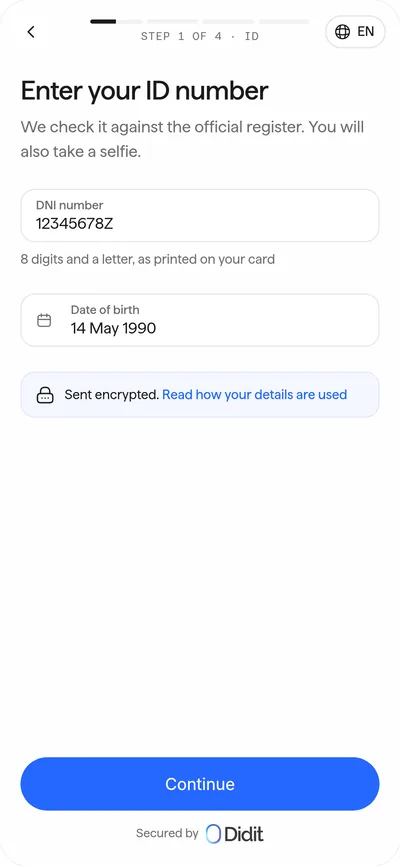
The user types a national ID number and a few personal details, and we check them against the authoritative source for that country. No document photograph is involved. The check returns a per-field match on identification_number, first_name, last_name, date_of_birth and address fields where the service uses them, plus an aggregated match_type of full_match, partial_match or no_match.
The source is a government register in most countries, but not in all of them. In Canada, France, Indonesia, the Netherlands, Norway, Singapore, the United Kingdom and the United States the record we reach is a credit-bureau, financial-services, utility or residential-records file. That changes what the match proves and which consent regime applies, so the source is named per country in our documentation and never generalised. Database Validation is live in 60+ countries and priced per service, from $0.05 per check; the per-service rates are on our pricing page and the method is part of the identity verification product page.
NFC chip verification
Modern passports and many national eIDs carry a secure chip. The user photographs the document so the software can derive the reading keys from the machine-readable zone, then taps the phone against the document. We read the chip, validate the signature chain back to the issuing authority and cross-check the chip data against the printed data. This detects manipulation that no human eye or camera can see. NFC provides additional chip evidence alongside the document result and does not create a separate ID Verification assurance tier.
NFC reading costs $0.15 as an add-on to a document check, listed on our pricing page. It is session-only: there is no standalone endpoint, and the chip is read by our native SDKs during a hosted session. It does not work in web browsers, where it is skipped and the user continues with document capture and a selfie. The method sits inside the same identity verification product page.
eID and digital ID wallet verification
The user signs in with a digital identity they already hold, such as MitID in Denmark, BankID in Sweden, Smart-ID in the Baltics, iDIN in the Netherlands, the Finnish Trust Network, Bank iD in Czechia or Google Wallet. The provider authenticates the person and shares a signed set of identity attributes with us. No document photograph is needed for the wallet check.
Among the wallets available in production, published prices run from $0.10 (Google Wallet) to $0.95 (iDIN full identification), with MitID at $0.25, BankID Sweden at $0.20, BankID Norway High at $0.35, Smart-ID and Mobile-ID at $0.21 each, the Finnish Trust Network at $0.25 and Bank iD at $0.20. Personalausweis Profile 2 has a published rate of $0.49. Several wallets are still coming soon, including itsme, EUDI Wallet, FranceConnect, Diia, ConnectID and the GOV.UK Wallet. A coming-soon wallet cannot be enabled in a workflow.
Availability is specific to your environment: check the live capability catalog in the console before you enable a wallet, and check the published rate in the live price feed before quoting it. Wallet prices are listed on our pricing page, and wallet sign-in is part of the identity verification product page.
The identity verification process, step by step
- Choose the methods per country. Methods live under the
methodskey on the ID Verification (OCR) feature config, keyed by ISO 3166-1 alpha-3 country code. Omit a country and it stays document capture only. - Create a session with
POST /v3/session/and yourworkflow_id,vendor_dataandcallback, or mount the native SDK in your app. - The user picks their country and sees whichever of the enabled methods apply there.
- The user completes the step. A photograph for a document, a tap for NFC, a sign-in for a wallet, typing plus maybe a selfie for a lookup.
- We record which method actually produced the result, and the assurance tier that follows from it.
- You read the decision from
GET /v3/session/{sessionId}/decision/or subscribe tosession.status.updated. Statuses run Not Started, In Progress, Approved, In Review, Declined, Abandoned and Kyc Expired.
What the data_match and cryptographic tiers mean on a session
Every ID Verification result carries an assurance tier derived from the method that produced it. The tier is an honest description of what was proven, not a ranking: the three describe different evidence, not more or less of the same thing. Tiers appear on the session payload, in the console and in exports. End users never see them.
| Tier | Value on the session | What it means |
|---|---|---|
| Documentary | documentary | A physical document was captured, read and checked for authenticity. |
| Data match | data_match | The details the user gave matched a record held by the source that was queried. No document was inspected. |
| Cryptographic | cryptographic | A digital identity provider authenticated the user and signed the attributes it shared. |
Fields and terms you will see on a session
| Term | Where it appears | What it means |
|---|---|---|
methods | ID Verification feature config | Per-country switches for document, id_lookup and wallet. |
id_lookup.source | Session payload, console, exports | The exact source queried for that country. Never shown to the end user. |
match_type | Database Validation result | full_match, partial_match or no_match. |
registry_portrait | Lookup response field | The registry photograph a later Face Match step can compare against, when the source returns one. |
skip_liveness_and_face_match | id_lookup config | Skips the workflow's own liveness and face match after a lookup that already matched a live person to a registry portrait. On by default where a portrait is returned. |
nfc_verifications[] | Decision payload | One entry per NFC read, with status and risk codes such as NFC_CHIP_CLONED. |
database_validations[] | Decision payload | One entry per Database Validation step in the workflow. |
FACE_MATCH_NOT_COMPUTED | Face Match warning | No reference face was available, so the score is null rather than a decline. |
Worked example: 10,000 verifications, three routes
A Denmark-heavy onboarding of 10,000 users, priced at Didit list rates, using only published unit prices.
Route A, document capture with biometrics and device analysis: ID document $0.15 + passive liveness $0.10 + face match $0.05 + device and IP analysis $0.03 = $0.33 per user. 10,000 x $0.33 = $3,300.00.
Route B, MitID wallet sign-in: wallet $0.25 + device and IP analysis $0.03 = $0.28 per user. 10,000 x $0.28 = $2,800.00. That is $500.00 less than route A for the same 10,000 users.
Route C, document capture with an NFC chip read: ID document $0.15 + NFC $0.15 + passive liveness $0.10 + face match $0.05 + device and IP analysis $0.03 = $0.48 per user. 10,000 x $0.48 = $4,800.00, which is $1,500.00 more than route A.
On the Scale plan every Didit price is 10% lower, so route A becomes $0.135 + $0.09 + $0.045 + $0.027 = $0.297 per user, or $2,970.00 for 10,000 users. All prices are on our pricing page.
How we implement these methods in Didit
ID Verification is one feature with three methods, and NFC and biometrics run as additional steps in the same workflow. You configure which methods a country may use; the user gets whichever apply to the country they pick. A workflow that says nothing about methods stays document capture only, so nothing you already configured changes.
{
  "feature": "OCR",
  "config": {
    "methods": {
      "ZAF": {
        "document": { "enabled": true },
        "id_lookup": {
          "enabled": true,
          "max_attempts": 2,
          "skip_liveness_and_face_match": true,
          "on_no_match": "fallback_to_document"
        },
        "wallet": { "enabled": false, "providers": [], "on_failure": "fallback_to_document" }
      },
      "DNK": {
        "document": { "enabled": true },
        "id_lookup": { "enabled": true, "on_no_match": "decline" }
      }
    }
  }
}
If you already hold the identity data and want a one-shot registry check without a session, call Database Validation directly:
curl -X POST 'https://verification.didit.me/v3/database-validation/' -H 'x-api-key: YOUR_API_KEY' -F 'issuing_state=BRA' -F 'identification_number=00000000191' -F 'first_name=Jane' -F 'last_name=Doe' -F 'date_of_birth=1990-01-15'Omit services to run the country's default service, or pass a service id such as bra_cpf to choose. Services flagged requires_consent need consent=true, otherwise the call returns HTTP 400. NFC has no standalone endpoint at all: it is read inside a session by the native SDKs. Our identity verification product page covers the feature set, and if you are switching from another provider the migration page lists what maps to what.

Coverage: what changes country by country
Didit covers 220+ countries and territories, 14,000+ document types, with 54 languages in the verification flow and 130+ document-recognition languages. Coverage inside that footprint is uneven by method, and that unevenness is the thing to plan around.
- Document capture works everywhere we support.
- Database Validation is live in 60+ countries. The source differs by country, and in eight markets it is not a state register at all.
- NFC needs a phone with an NFC radio, iOS 13 or later, or Android with NFC enabled. Browsers cannot read the chip.
- Wallets are a short named list, not a global option. Availability is per environment.
- Where a lookup source returns a portrait, the selfie and face match happen inside the lookup and inside the lookup price.
Common mistakes
- Treating a
data_matchas though a document had been inspected. Nothing about document authenticity is being claimed. - Enabling a lookup in a country without reading which source is actually queried, and what consent regime applies.
- Adding a Face Match step after a data-only lookup. It has nothing to compare and reports
FACE_MATCH_NOT_COMPUTED. The workflow cannot be published when every path into Face Match verifies users only with methods that leave no photo and every route out of that ID Verification step leads to Face Match. - Trying to enable a wallet marked coming soon. The save is rejected, including the rest of the configuration in it.
- Quoting a wallet price or enabling a wallet without checking the live capability catalog for your environment.
- Expecting NFC to work in a web browser. It is skipped and the user falls back to document capture plus a selfie.
- Assuming every lookup asks for a selfie. Only sources that return or check a photograph do.
Sources
- Didit docs: ID Verification Methods: Document, Lookup, Wallet
- Didit docs: Non-Document ID Verification, Authoritative Source Lookup
- Didit docs: Digital ID Wallet Verification API and Coverage
- Didit docs: NFC Verification API, e-Passport and eID Chip
- Didit docs: Database Validation API
- Didit docs: Liveness Detection API
- Didit docs: Face Match 1:1 API
- Didit pricing page and the machine-readable pricing.json
- Didit docs: pricing and billing rules
- Didit identity verification product page
- Didit migration page
- Didit MCP server
- Didit business sandbox
You can test every method on this page without a sales call: open the sandbox at business.didit.me, enable a method per country in the workflow editor, and read the assurance tier on the first session you create.
Try it
Try this in the sandbox
Run the check this guide describes, free.
The product this post is about, taken from its topic. Run it free in the sandbox.
Author
Alberto Rosas
Co-founder and CEO

Keep reading
Other guides in the same topic.
 How to Verify a Business: KYB Documents, Registries and APIs
Verify a business by joining a company registry lookup, UBO and officer extraction, corporate document cross-checks and company plus person AML on one session, then acting on that session's status.
Alberto RosasNov 26, 2026 Automated KYC Checks in 8 Steps: Cut Manual Review (2026)
Automated KYC runs document capture, liveness, face match, device and IP analysis and watchlist screening, then sends only sessions that breach your rules to a human queue.
Alberto RosasNov 26, 2026 Aadhaar API Integration Guide: Database Validation in Didit
Didit runs an Aadhaar lookup as a Database Validation call: POST /v3/database-validation/ with issuing_state IND. One server-to-server request, priced per successful hit, with the India rate read from the per-service table.
Alberto RosasNov 26, 2026Questions
Frequently asked questions
What are the main identity verification methods?
Didit documents three ID Verification methods: document capture, non-document lookup against an authoritative source, and digital ID wallet sign-in. Liveness and face match are biometric checks that usually support document capture, and an NFC chip read is an add-on to a document check rather than a separate ID Verification method. Teams often combine all five evidence types in one workflow, but the session records the three documented methods as the source of the assurance tier.
What does data_match mean on an identity verification session?
data_match is the assurance tier for a non-document lookup. It means the details the user typed matched a record held by the source that was queried, and no document was inspected, so nothing about a document's authenticity is being claimed. The session also records the exact source under id_lookup.source, which end users never see.
What does the cryptographic assurance tier mean?
cryptographic means a digital identity provider authenticated the person and signed the attributes it shared with the verifier. It is produced by the wallet method, for example a MitID or BankID sign-in. It is not a ranking against documentary or data match results; the three describe different evidence.
Can you verify identity without a document upload?
Yes. A non-document lookup asks for a national ID number and a few personal details and checks them against the authoritative source for that country, and a digital ID wallet verifies by sign-in with no photograph at all. Both are methods inside the same ID Verification feature, and the session records which one produced the result.
What is eID verification?
eID verification means the user signs in with a government or bank digital identity they already hold, such as MitID, BankID, Smart-ID or iDIN, and the provider shares signed identity attributes with the verifier. In Didit this is the wallet method and it returns the cryptographic tier. NFC chip reading on a physical eID card is an add-on to document capture: it adds chip evidence alongside the document result and does not create a separate ID Verification tier.
How does NFC identity verification work?
The user photographs the document so the software can derive the reading keys from the machine-readable zone, then holds the phone against the chip. We validate the chips signature chain back to the issuing authority and cross-check the chip data against the printed data. It costs $0.15 as an add-on and is session-only, read by our native SDKs rather than a web browser.
How accurate is liveness detection?
Our liveness detection reaches 99.9% accuracy with a false acceptance rate under 0.1%, and holds iBeta Level 1 PAD. Passive liveness costs $0.10 and runs on a single frame, while the 3D flash and 3D action methods add light-pattern depth checks and cost $0.15. The method is set per workflow with face_liveness_method.
Why did Face Match fail after a database lookup?
A lookup that returns data only leaves no reference face, so the comparison reports FACE_MATCH_NOT_COMPUTED with a null score instead of declining automatically. Where the source returns a portrait, keep the registry_portrait response field and the step has something to compare. The workflow editor warns you before you publish.
Does NFC verification work in a web browser?
No. NFC is not available in web browsers because the platforms restrict it, so on web the step is skipped and the user continues with document capture plus a selfie. Full NFC support requires our native iOS or Android SDK on a phone with an NFC radio.
How much does an identity verification cost?
A full ID check is $0.33 per completed check: ID document $0.15, passive liveness $0.10, face match 1:1 $0.05 and device and IP analysis $0.03. NFC reading adds $0.15, non-document lookups are priced per country, and digital ID wallets run from $0.10 to $0.95 by available provider. Growth and Scale plans discount every Didit price by 4% and 10%.
Compliance built in
Audited, certified and attested.
We hold the certifications and build each country's rules into your flows, so you can launch anywhere without worrying. Security and Compliance center
- Regulation encoded into your flows
Tell us what you do and where. Didit lists the rules that apply to you, with sources, and builds the checks each country needs into one workflow.
- Ready for AMLR
Every requirement of the new EU anti-money laundering rules, from checking customers to human review, is already covered by a Didit check.
- Tested in Spain's Treasury sandbox
Spain's Treasury published its supervised sandbox report on Didit's NFC plus active liveness onboarding; SEPBLAC took part and valued the added measures positively.
- Audited, not self-declared
iBeta Level 1 and Level 2. Liveness tested under ISO/IEC 30107-3.
Your obligations · 3 regions
 SOC 2 Type 2
 ISO 27001
 iBeta Level 1 and Level 2
 EU regulator attestation
 FSM youth protection
 GDPR
 EBA remote onboarding
 MiCA compatible
 FIDO Alliance member
- AMLREU AML Regulation ready
Integration · Didit MCP
Run Didit from your own AI agent
Connect Didit to Claude, Cursor, VS Code or ChatGPT and just ask in plain words. Your agent can do anything you can do in the console, with the same permissions you have.
 Add to Claude
 ChatGPT
 Cursor
- Build workflowsDescribe the checks you need. The agent creates and publishes the flow.
- Run investigationsAsk why a session was declined, review cases, search people and companies.
- Change rulesCreate payment rules, test them on past data and switch them on.
- Pull reportsAsk for numbers, exports or the audit log.
Didit Academy


