India's Digital Identity: A Guide for Global Businesses
India's digital identity for verification centers on Aadhaar from UIDAI and DigiLocker. We check typed Aadhaar details against UIDAI as a non-document lookup, variable per lookup, or capture documents at $0.15 per check.
 Alberto RosasCo-founder and CEO
Contents
In this guide
Jump to the part you need.
For businesses onboarding users in India, our hosted document check costs $0.15 per check. Our docs list UIDAI as India's non-document lookup source; the price is variable per lookup. This guide fits teams outside India that onboard Indian users. Confirm the lookup is enabled in your live environment and that your entity and use case are eligible before offering it. A successful lookup records a data match and does not establish document authenticity.
Last updated: November 26, 2026. Prices checked against the live Didit price feed on November 26, 2026.
| Step | What it proves | Price (USD) |
|---|---|---|
| Non-document lookup, India source is UIDAI | Typed details matched a record the source holds. Assurance tier data_match | Variable per lookup. The supplied price feed does not list an India-specific unit price |
| ID document verification, hosted workflow step | The document was captured, read and checked for authenticity. Tier documentary | $0.15 per check |
| Standalone ID Verification API | One-shot document OCR and authenticity checks from images you already hold | $0.20 per check |
| Passive liveness | Assesses whether the selfie comes from a live person | $0.10 per check |
| Face match 1:1 | The live capture matches a reference face | $0.05 per check |
| Device and IP analysis | Device and network risk signals | $0.03 per check |
| Full KYC | Document verification, passive liveness, 1:1 face match, and device and IP analysis in one check | $0.33 per check |
| Phone verification, India SMS | The user demonstrated access to the number by entering the code | India SMS list price, $0.0948 per code |
Start free in the sandbox at business.didit.me, no sales call. For developers, connect Didit to an AI assistant through our MCP server. Read the ID Verification product page (14,000+ document types in 220+ countries, $0.15 in a workflow, $0.20 through the standalone API) and didit.me/pricing for the published list prices.
What India's digital identity is
This guide focuses on Aadhaar and DigiLocker. Aadhaar is a 12-digit identity number issued by the Unique Identification Authority of India (UIDAI), built on biometric and demographic data the holder gave at enrolment. DigiLocker is a document wallet run by the Ministry of Electronics and Information Technology where people keep official documents such as a driving licence, a vehicle registration certificate, academic records and insurance policies.
For a business outside India, that translates into two checkable questions. Do the details the user entered match a UIDAI record? And is the document they showed us authentic? Those are different questions with different evidence behind them, and we answer them with two different methods.
We serve 4,000+ companies. Our verification coverage spans 220+ countries and territories, with support for 14,000+ document types and a verification flow available in 54 languages. Our non-document lookup documentation names UIDAI as the source for India.
Outcome and the method we recommend
The outcome you want is a decision record you can defend: which method ran, what it proved, and what your policy did with it. We state that in the assurance tier on the session, and the tier is an honest description rather than a ranking.
- Document capture gives you
documentary: a physical document was captured, read and checked for authenticity. - Non-document lookup gives you
data_match: the details the user gave matched a record held by the source that was queried. - Wallet sign-in gives you
cryptographic, where a wallet is available. India is not in our published list of digital ID wallets, so this route does not apply to Indian users today.
Use document capture when your policy or applicable rules require document authenticity checks. Use a lookup where a registry data match is sufficient. Offer the lookup first where a data match meets your requirements. Keep document capture enabled as a fallback.
Use the hosted document step at $0.15 when the user completes the flow in the session. Use the standalone ID Verification API at $0.20 when you already hold eligible document images and want a server-to-server call. The ID Verification product page is the developer reference, and didit.me/pricing lists the prices. The methods work side by side in one ID Verification step, country by country, as described in ID verification methods.
Prerequisites
- A Didit organization. Sign up at business.didit.me; the sandbox is free on every plan.
- An API key from the console, sent as the
x-api-keyheader. - A workflow with the ID Verification feature, created in the Business Console or with
POST /v3/workflows/. The canonical feature enum isID_VERIFICATION, legacyOCR. - India enabled in the ID Verification step's Countries tab, with the methods you allow for it. The console writes the same config the Management API reads, explained in Configure ID verification methods in the console.
- Document capture turned on for India if you intend to use any of the fallback switches. They are off whenever the country has no document capture, because there is nowhere to fall back to.
- A decision path:
GET /v3/session/{sessionId}/decision/or thesession.status.updatedwebhook. - If your application has allowed domains configured, an HTTP or HTTPS
callbackmust match an allowed origin. Otherwise an off-list callback returns HTTP 400.
How to verify an Indian user, step by step
Confirm the prerequisite first: confirm that your entity and use case may use the UIDAI lookup, and confirm the required notice, consent and data handling before enabling it. Configure an accepted alternative document for users who cannot use Aadhaar, and collect an Aadhaar image only if your approved process permits it. Then decide the route per use case. Offer the lookup first where a data match meets your requirements, and keep document capture enabled as a fallback. Use document capture alone where your policy or applicable rules require document authenticity checks.
Create the workflow and set the India methods. The config below is the
methodskey on the ID Verification node, keyed by ISO 3166-1 alpha-3 country code.document.fallback_onlyoffers document capture only after a failed lookup.{ "feature": "OCR", "config": { "methods": { "IND": { "document": { "enabled": true, "fallback_only": true }, "id_lookup": { "enabled": true, "max_attempts": 2, "on_partial_match": "fallback_to_document", "on_no_match": "fallback_to_document", "on_provider_error": "fallback_to_document" } } } } }India's lookup returns data only, so no selfie is taken and the
skip_liveness_and_face_matchswitch normalises off on save. An Aadhaar data match supplies no face reference. Route successful lookup users around Face Match unless your workflow supplies a documented reference. If document-based Face Match is required, route those users through document capture. Useportrait_imageonly in a workflow that supports a reference at session creation.Create a session. The workflow's type decides whether a KYC or KYB session is created; there is no separate endpoint.
curl -X POST 'https://verification.didit.me/v3/session/' -H 'x-api-key: YOUR_API_KEY' -H 'Content-Type: application/json' -d '{ "workflow_id": "YOUR_WORKFLOW_UUID", "vendor_data": "user-1234", "callback": "https://app.example.com/kyc/done", "language": "en" }'The response carries the session id and a
session.url.vendor_datais worth setting: it binds the session to your user and feeds duplicate detection across sessions.Send the user to
session.url, or mount the Web or Mobile SDK. They pick India, type the identifier and the details that country asks for, and get a result. The Countries tab's expected request and response shows the fields India asks for. No upload and no camera framing happen on a lookup path.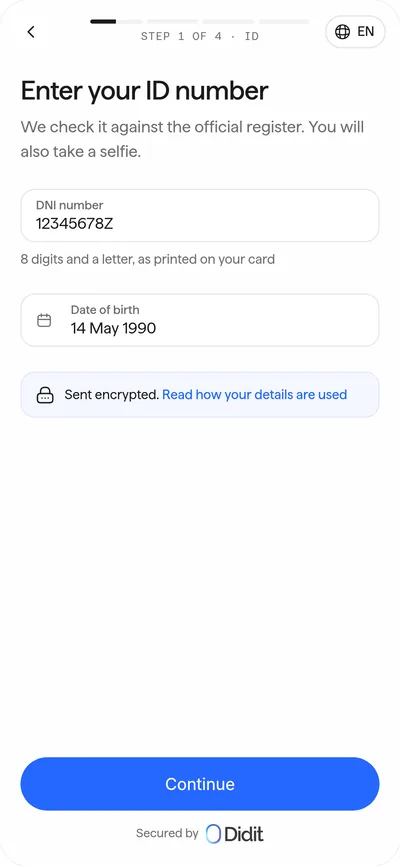
The non-document lookup step: the user types the identifier and details, and Didit checks them against the source for that country. Read the decision with
GET /v3/session/{sessionId}/decision/, or subscribe tosession.status.updated. Document verification results appear inid_verifications[]. After a successful lookup, inspect the recorded method, thedata_matchassurance tier andid_lookup.source.Route on status. A successful lookup records a data match. Route partial matches according to your workflow configuration. The example sends them to document capture. Send In Review results to manual review. Treat a Declined result as a failed verification. Inspect the decision warnings to determine the reason. Abandoned and Kyc Expired are handled by your re-entry policy.
Expected output
Document verification results appear in id_verifications[]. Each carries a status from Not Started, In Progress, Approved, In Review, Declined, Abandoned or Kyc Expired, plus a warnings[] array of risk codes including DOCUMENT_EXPIRED, INVALID_MRZ, INCONSISTENT_DATA, COULD_NOT_RECOGNIZE_DOCUMENT, DOCUMENT_LIVENESS_FAILED, DUPLICATED_DOCUMENT, COUNTRY_NOT_ALLOWED and DOCUMENT_TYPE_NOT_ALLOWED.
After a successful lookup, inspect the recorded method, the data_match assurance tier and id_lookup.source. That source field is for you and your auditors: the end user never sees it, the tier or the price. A completed document path gives you documentary, the extracted fields such as full name, document type, document number, date of birth and expiration date, and the warnings your policy has to act on.

Inputs and outputs
| You send | Where | What comes back |
|---|---|---|
workflow_id | POST /v3/session/ | A session id and session.url |
vendor_data | POST /v3/session/ | A session bound to your user, used for duplicate detection |
callback | POST /v3/session/ | Redirect with ?verificationSessionId= and status= appended |
contact_details.phone | POST /v3/session/ | A pre-filled phone step |
| Typed Aadhaar number and personal details | ID Verification, non-doc lookup | Match result, tier data_match, source on id_lookup.source |
| A photographed Indian document | ID Verification, document capture | Extracted fields, authenticity checks, warnings[], tier documentary |
| Session id | GET /v3/session/{sessionId}/decision/ | id_verifications[] with status and warnings |
| Your webhook endpoint | session.status.updated | A session status update. Fetch the decision with GET /v3/session/{sessionId}/decision/ when you need the decision payload |

Failure cases and recovery
| Failure | What you see | Recovery |
|---|---|---|
| The typed details do not match the record | No match on the lookup | on_no_match decides: fallback_to_document or decline. max_attempts caps how many answered attempts the user gets |
| Some fields match, others do not | Partial match | In this workflow, on_partial_match is set to fallback_to_document, so a partial match sends the user to document capture. Do not approve on a partial match |
| The source is unavailable | Provider error on the lookup | For the workflow shown, on_provider_error sends the user to document capture |
| A Face Match step has no reference face | FACE_MATCH_NOT_COMPUTED with a null score | An Aadhaar data match supplies no face reference. Route successful lookup users around Face Match unless your workflow supplies a documented reference. If document-based Face Match is required, route those users through document capture. Use portrait_image only in a workflow that supports a reference at session creation |
| A forgery check returned no usable score | DOCUMENT_LIVENESS_NOT_COMPUTED, status In Review | Treat the document as unchecked and route it to manual review |
| Balance is empty | HTTP 403, not enough credits | Top up in the console. Unused plan credit expires at the end of the plan month |
| Callback origin is not allowed | HTTP 400 on callback | If your application has allowed domains configured, an HTTP or HTTPS callback must match an allowed origin. Otherwise an off-list callback returns HTTP 400. Add the origin or use an app deep link |
In a standalone API call, when POST /v3/id-verification/ returns status Declined with a terminal warning, surface that warning's long_description to the user and stop the flow.
Paid steps
Every completed check is billed from prepaid credit. Non-document verification is variable per lookup, and the supplied price feed does not list an India-specific unit price. The docs pricing page lists which no-match lookups and retries are billable, so read it before you promise a cost per user. Document capture is $0.15 in a hosted workflow step and $0.20 through the standalone ID Verification API. Passive liveness is $0.10, face match $0.05 and device and IP $0.03. The India SMS list price is $0.0948 per code, the carrier price plus our $0.02 fee.
Worked cost example
Take 1,000 Indian users onboarded with the document route, each doing a full KYC check plus one Indian SMS code. This is an estimate that assumes one completed KYC and one SMS code per person. Carrier billing uses the higher of the listed carrier rate and the rate reported by the route, so treat the totals as estimates.
- ID document: 1,000 x $0.15 = $150.00
- Passive liveness: 1,000 x $0.10 = $100.00
- Face match 1:1: 1,000 x $0.05 = $50.00
- Device and IP: 1,000 x $0.03 = $30.00
- Didit subtotal: $150.00 + $100.00 + $50.00 + $30.00 = $330.00, which is 1,000 x $0.33
- India SMS codes at list price: 1,000 x $0.0948 = $94.80
- Estimated total at list price: $330.00 + $94.80 = $424.80
On the Scale plan, Didit prices carry 10% off and carrier cost passes through at cost, so only our $0.02 fee is discounted: $330.00 x 0.90 = $297.00, and each code becomes $0.0948 - $0.002 = $0.0928, so 1,000 codes are $92.80. Estimated total usage at Scale rates: $297.00 + $92.80 = $389.80, before plan credits and excluding the $299 monthly subscription fee.
The first organization created with an eligible work email for a company domain can receive $10 in monthly Free plan credit. That covers 30 full KYC checks at $0.33 each, with $0.10 left. The credit does not cover phone codes. We leave the lookup route out of this arithmetic on purpose: its price is variable per lookup, and the supplied price feed does not list an India-specific unit price.
Acceptance checklist before launch
- A successful data match: inspect the recorded method, the
data_matchassurance tier andid_lookup.sourceon the session. - A mismatch that falls back to documents: run a no-match session in sandbox and confirm
on_no_matchsends the user to document capture. Inspect the document result inid_verifications[]. - An In Review document result: confirm the status and warning, then route it to manual review. Do not auto-approve it.
What the Aadhaar rules mean for your flow
- Check eligibility and consent. Before enabling Aadhaar lookup, confirm that your entity and use case are eligible. Have Indian counsel confirm the applicable notice, consent, collection and retention requirements for this route.
- A typed lookup is not biometric authentication. The lookup matches typed details against the record. It does not use Aadhaar fingerprint or iris authentication.
- Minimise what you keep. Ask for the fields the source requires, store the decision and the warnings you acted on, and do not keep what your policy does not need.
- DigiLocker has no documented connector in Didit. We document no DigiLocker connector. Use the hosted document flow for an accepted document. If you already have eligible document images, use the documented standalone ID Verification API, described in the ID Verification overview. Use Aadhaar lookup only where a data match meets your requirements. Do not build a flow on a DigiLocker integration we do not document.
- Get your own legal read. We ship the checks and the audit trail. Your Indian counsel owns the final call on what you may collect and for how long.
If you are moving from another provider, the mechanics of a switch are on didit.me/switch/, and the billing model is explained in the pricing docs.
Sources
- Didit docs: Non-document ID verification, authoritative source lookup
- Didit docs: ID verification methods, document, lookup, wallet
- Didit ID Verification product page and API overview
- Didit docs: Configure ID verification methods in the console
- Didit docs: Create session API
- Didit docs: Pricing and billing rules
- Didit pricing page and pricing as JSON, read November 26, 2026
- Didit MCP server setup
- UIDAI official site, read November 26, 2026
- DigiLocker official site, read November 26, 2026
The next step is a sandbox run with an Indian test user: create the workflow, enable the India methods, create one session and read the decision. Start at business.didit.me. No sales call, and the sandbox is free on every plan.
Try it
Try this in the sandbox
Run the check this guide describes, free.
The product this post is about, taken from its topic. Run it free in the sandbox.
Author
Alberto Rosas
Co-founder and CEO

Keep reading
Other guides in the same topic.
 What Is the Purpose of FICA in South Africa? 2026 Guide
FICA is South Africa's anti-money laundering law. It creates the Financial Intelligence Centre and requires accountable institutions to identify and verify clients, screen for PEP and sanctions risk and report suspicious.
Alberto RosasNov 26, 2026 Sixth Money Laundering Directive (6AMLD): What Changed and Which Rules Apply
6AMLD is Directive (EU) 2018/1673: Member States must criminalise laundering, widen predicate offences and set a four-year penalty floor. It adds no new due diligence duties for firms.
Alberto RosasNov 26, 2026 Automated Sanctions Screening: Canada, the Entity List and Embargoes
Automated sanctions screening matches people and companies against lists such as Canada's autonomous sanctions made under SEMA and JVCFOA and the OFAC SDN List, and returns candidate hits scored for identity confidence and.
Alberto RosasNov 26, 2026Questions
Frequently asked questions
What is India's digital identity?
India's digital identity for this guide means Aadhaar and DigiLocker. Aadhaar is a 12-digit identity number issued by UIDAI, and DigiLocker is a document wallet run by the Ministry of Electronics and Information Technology. For a business, that means two checkable questions: whether typed details match the UIDAI record, and whether a presented document is authentic.
Is Aadhaar a digital ID or a physical card?
Aadhaar is a 12-digit identity number issued by UIDAI. In our non-document lookup, a successful result means the typed details matched a UIDAI record. That result alone does not establish that the person entering the details is the holder or that a document is authentic.
Can Didit verify an Aadhaar number?
Through our non-document lookup, where it is enabled in your live environment and your entity and use case are eligible. Our documentation names UIDAI in India as the authoritative source that the lookup queries. The user types the identifier and the details the country asks for, and the session records the assurance tier data_match, which does not establish document authenticity.
Does Didit support DigiLocker?
We document no DigiLocker connector. Use the hosted document flow for an accepted document. If you already have eligible document images, use the documented standalone ID Verification API, described in the ID Verification overview. Use Aadhaar lookup only where a data match meets your requirements.
What does it cost to verify one Indian user with Didit?
A full KYC check is $0.33: ID document $0.15, passive liveness $0.10, face match $0.05 and device and IP $0.03. The India SMS list price is $0.0948 per code. Non-document verification is variable per lookup, and the supplied price feed does not list an India-specific unit price, so do not quote a fixed cost per lookup.
What is an Aadhaar based digital ID and does it replace a document check?
Aadhaar lookup checks typed details against UIDAI's record. Document capture reads a document and checks its authenticity. Read the verification status and warnings to see the outcome. An Aadhaar lookup does not replace a document check where your policy requires document authenticity.
What happens if the details do not match the UIDAI record?
The on_no_match switch decides. Set it to fallback_to_document and the user is sent to document capture, or to decline and the session stops. max_attempts limits how many answered attempts the user gets before one of those happens.
Can I run face match after an Aadhaar lookup in India?
An Aadhaar data match supplies no face reference. Route successful lookup users around Face Match unless your workflow supplies a documented reference. If document-based Face Match is required, route those users through document capture. Use portrait_image only in a workflow that supports a reference at session creation.
How do I check which Indian documents my workflow accepts?
Start in the ID Verification step's Countries tab for India. It lists the lookup source and the document types and subtypes you have enabled for India. Our global coverage figure of 14,000+ document types does not tell you which Indian documents and subtypes your own workflow accepts.
Is the India lookup available in production?
Availability is server-driven: the Countries tab only offers methods the platform supports for that country, and a published price does not establish production availability. Test in the sandbox, then confirm the method is on for India in your live environment before launch. Our non-document lookup documentation names UIDAI as the source for India.
Who reviews a verification that is not a clean match?
Your team reviews Didit results marked In Review. Separately, in the workflow shown, a partial lookup match goes to document capture because on_partial_match is set to fallback_to_document. Your policy determines which onboarding decisions can rely on a data match.
Compliance built in
Audited, certified and attested.
We hold the certifications and build each country's rules into your flows, so you can launch anywhere without worrying. Security and Compliance center
- Regulation encoded into your flows
Tell us what you do and where. Didit lists the rules that apply to you, with sources, and builds the checks each country needs into one workflow.
- Ready for AMLR
Every requirement of the new EU anti-money laundering rules, from checking customers to human review, is already covered by a Didit check.
- Tested in Spain's Treasury sandbox
Spain's Treasury published its supervised sandbox report on Didit's NFC plus active liveness onboarding; SEPBLAC took part and valued the added measures positively.
- Audited, not self-declared
iBeta Level 1 and Level 2. Liveness tested under ISO/IEC 30107-3.
Your obligations · 3 regions
 SOC 2 Type 2
 ISO 27001
 iBeta Level 1 and Level 2
 EU regulator attestation
 FSM youth protection
 GDPR
 EBA remote onboarding
 MiCA compatible
 FIDO Alliance member
- AMLREU AML Regulation ready
Integration · Didit MCP
Run Didit from your own AI agent
Connect Didit to Claude, Cursor, VS Code or ChatGPT and just ask in plain words. Your agent can do anything you can do in the console, with the same permissions you have.
 Add to Claude
 ChatGPT
 Cursor
- Build workflowsDescribe the checks you need. The agent creates and publishes the flow.
- Run investigationsAsk why a session was declined, review cases, search people and companies.
- Change rulesCreate payment rules, test them on past data and switch them on.
- Pull reportsAsk for numbers, exports or the audit log.
Didit Academy


