Add Didit Authentication to a JavaScript App With Hosted Sign-In
Install <code>@didit-protocol/auth</code> 0.3.0, create one client with your <code>pk_test_</code> publishable key and exact <code>redirectUri</code>, call <code>auth.signIn({ returnTo })</code>, then finish on your callback.
 Alberto RosasCo-founder and CEO
Contents
In this guide
Jump to the part you need.
This guide is for a developer with a JavaScript or React app who wants Didit's hosted sign-in page in front of it today. You install @didit-protocol/auth 0.3.0, create one client, send people to the hosted page, and finish the sign-in on a callback page. The first 50,000 active users each month are free. The caveat: your callback URL has to match the registered redirect URL character for character, or the code exchange is refused.
Last updated: November 26, 2026. Prices checked against the live Didit price feed on November 26, 2026.
The whole integration on one screen
| Piece | Value |
|---|---|
| Package | @didit-protocol/auth 0.3.0, published on npm, no UI of its own |
| Create the client | createDiditAuth({ publishableKey, redirectUri }), one client per application, reused |
| Start sign-in | auth.signIn({ returnTo: "/dashboard" }) opens the hosted page |
| Finish sign-in | auth.handleRedirectCallback() on your callback page, once per page load |
| Security | PKCE S256 with a random state, one-time code, no client secret |
| Console pages | Authentication > Developers for the key, Authentication > Security and sessions for the redirect URL and allowed origin |
| Key format | pk_test_... on a Sandbox application, pk_live_... on a Live application |
| Price | First 50,000 active users each month free, then $0.02 per active user month |
| Sandbox | Free and unlimited on every plan, and it accepts http://localhost callbacks |
Start free in the sandbox at business.didit.me, no sales call, and compare plans on the Didit pricing page. If you work with a coding assistant, connect Didit to it through the Didit MCP server.
Prerequisites
| Item | What you need | Where it comes from |
|---|---|---|
| Plan | A Didit account. The sandbox is free on every plan, and sandbox sign-ins are never billed | business.didit.me |
| Application | A Sandbox application. Every Sandbox application has Authentication turned on from the start | The application switcher in the Business Console |
| Permissions | Console access to the Authentication section, to read the publishable key and edit security settings | Your organization role |
| Client runtime | A browser app. Node.js 20 or later, or an edge runtime with WebCrypto, only if you import the /server entry | Your own stack |
| Publishable key | pk_test_... for Sandbox, pk_live_... for Live. It is public and names your sign-in origin | Authentication > Developers |
| Redirect URL | For example http://localhost:3000/auth/callback, identical to the redirectUri your code passes | Authentication > Security and sessions |
| Allowed origin | For example http://localhost:3000, origin only, no path and no trailing slash | Same page |
Keep the secret key out of every browser and mobile build. The client never needs it: the publishable key is public and the code exchange is protected by PKCE instead of a client secret.
Seven steps, with the exact clicks
Step 1: open your sandbox application
In the Business Console, use the application switcher to select your Sandbox application, then open Authentication. A Sandbox application accepts http:// callbacks on localhost, 127.0.0.1 and [::1], serves Didit's test credentials for social sign-in, and is never billed. A Live application turns Authentication on from the Products page instead, and until it is on, every runtime route for that application returns 404.
Step 2: register the redirect URL and the allowed origin
Open Authentication > Security and sessions > Redirect URLs and allowed origins and add both entries:
- Redirect URL
http://localhost:3000/auth/callback, because Didit returns the person here and it must match theredirectUriyou pass, character by character. - Allowed origin
http://localhost:3000, because the browser calls your application's Didit origin to exchange the code. Use the origin only, with no path and no trailing slash.
A Live application accepts https:// only, so register the production callback such as https://app.example.com/auth/callback there.
Step 3: turn on a sign-in method
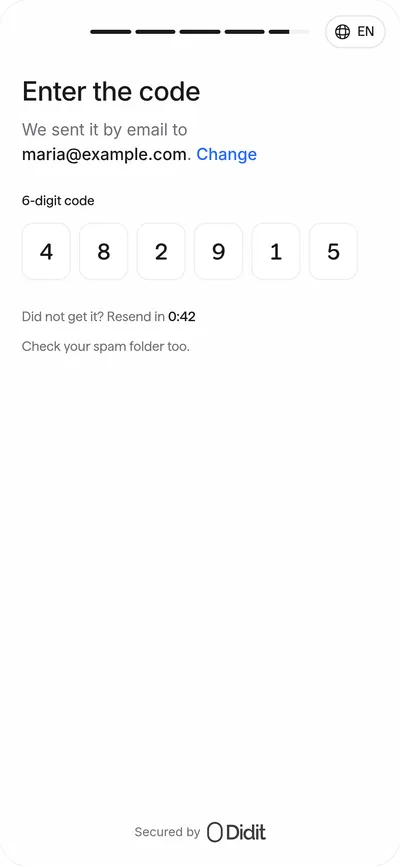
Open Authentication > Sign-in methods and turn on Email code. A new application starts with every method off, and the hosted page offers only the methods you turn on. Add Passkeys if you want them, or Google with Didit test credentials, which work in Sandbox without an OAuth app of your own. Every method is described in the sign-in methods documentation.
Step 4: copy the publishable key
Open Authentication > Developers and copy the Publishable key. In a Sandbox application it starts with pk_test_. The publishable key is public and names your application's Didit sign-in origin. Never put the Secret key in browser or mobile code.
Step 5: install the SDK and create one client
npm install @didit-protocol/authimport { createDiditAuth } from "@didit-protocol/auth";
// Create one client per application and reuse it.
export const auth = createDiditAuth({
publishableKey: "pk_test_...",
redirectUri: "http://localhost:3000/auth/callback",
});Only publishableKey is required, but pass redirectUri explicitly so the callback URL cannot drift with your dev server port. The other options are documented in the JavaScript quickstart: storage (local, session, memory or your own store), language (en, es, fr, de, ja), deviceSignals, navigate, fetch and exchangeCode.
Step 6: start sign-in and finish it on the callback page
import { auth } from "./auth";

// Sign-in button
export async function onSignInClick() {
  await auth.signIn({ returnTo: "/dashboard" });
}

// On http://localhost:3000/auth/callback
export async function onCallbackPage() {
  try {
    const { session, returnTo } = await auth.handleRedirectCallback();
    console.log(session.userId, session.vendorData);
    window.location.replace(returnTo ?? "/");
  } catch (error) {
    console.error(error instanceof Error ? error.message : error);
  }
}
signIn() opens the hosted page with every method you turned on, including any required second factor. The sign-in is bound to the browser with PKCE (S256) and a random state. handleRedirectCallback() refuses a redirect it did not start, exchanges the one-time code and removes it from the address bar, so call it once per page load.
Reading the session in the browser controls what your interface shows. It does not authorize an API call by itself: your backend verifies the access token on every protected request in Step 7.
Step 7: verify the token on your server and check the console
Send the access token from auth.getToken() in the Authorization header and verify it on every protected request:
import { verifyToken } from "@didit-protocol/auth/server";

export async function authenticate(request: Request) {
  const header = request.headers.get("authorization") ?? "";
  const token = header.startsWith("Bearer ") ? header.slice(7) : "";
  try {
    const claims = await verifyToken(token, { publishableKey: process.env.DIDIT_PUBLISHABLE_KEY });
    return { personId: claims.sub, vendorData: claims.vendor_data };
  } catch {
    return null;
  }
}
verifyToken checks the ES256 signature against your issuer's published keys, the issuer and the expiry. Access tokens last at most 5 minutes and auth.getToken() refreshes them for you. Then open Authentication > Sign-ins in the console: your sign-in is listed with the method used, the person and the result.
Redirect URI, allowed origin, and pk_test versus pk_live
This console page controls both values, so mismatches can cause callback or code-exchange failures. Didit only returns a person to a redirect URL you registered, compared character by character, and the allowed origin is what lets the browser exchange the code with your application's Didit origin.
| Value | Sandbox application | Live application | Common mistake |
|---|---|---|---|
| Redirect URL in the console | http://localhost:3000/auth/callback | https://app.example.com/auth/callback | A trailing slash, a different port, or www versus no www |
redirectUri in code | Identical to the registered URL | Identical to the registered URL | Letting the default use the current page, query string included |
| Allowed origin | http://localhost:3000 | https://app.example.com | A path or a trailing slash on the origin |
| Key | pk_test_... | pk_live_... | Shipping a Live key in a build that calls localhost |
| Scheme | http:// allowed on localhost, 127.0.0.1, [::1] | https:// only | Testing a Live application over plain http |
A token minted by a sandbox application is not accepted by a Live application, so keep two clients or two environment variables rather than editing one file before every deploy.
Field and event mapping
| Console or SDK surface | SDK, token or event field | What it carries |
|---|---|---|
| Redirect URL | redirectUri option | Where Didit sends the person back with the one-time code |
| Allowed origin | The origin of the page that calls the token endpoint | Permission for the browser to exchange the code |
| Publishable key | publishableKey option | The application identity, and the issuer encoded after the prefix |
signIn({ returnTo }) | returnTo returned by handleRedirectCallback() | The path to send the person to after the exchange |
| Person id | session.userId, and claims.sub on your server | Identifies the signed-in person |
| Your own metadata | session.vendorData, and claims.vendor_data | The vendor data you attached to the person |
| Profile fields | session.email, session.methods | Address used, and the methods that person has |
| Auth state | onAuthStateChange events SIGNED_IN, TOKEN_REFRESHED, SIGNED_OUT | React to sign-in, refresh and sign-out in your UI |
| Access token | auth.getToken(), verified as Bearer | A short-lived token for your backend calls, at most 5 minutes |
| Webhooks | auth.signup, auth.login, auth.new_device | Server-side notification of activity, documented in the events and webhooks page |
Test with sandbox data
Expected success, in order: you click your button, the hosted page asks for an email address and sends a six-digit code, you enter it, you land on http://localhost:3000/auth/callback, handleRedirectCallback() exchanges the one-time code, the console logs session.userId and session.vendorData, window.location.replace(returnTo ?? "/") sends you to /dashboard, and the sign-in appears under Authentication > Sign-ins. A first sign-in with an address that has no account creates one, because the default sign-up policy lets anyone sign up.
| Symptom | Cause | Fix |
|---|---|---|
| The callback throws instead of returning a session | The redirect did not come from a sign-in this browser started, for example the callback was opened in another tab or the page reloaded before the exchange | Run handleRedirectCallback() once per page load in the page that started the sign-in, and keep storage at local or session |
400 invalid_grant on the token exchange | The code is unknown, already used or older than 60 seconds, the verifier or redirect_uri does not match, the redirect URL is no longer registered, the person is blocked, or you turned off the method they used | Register the exact URL, exchange within 60 seconds, and check the method is still on under Sign-in methods |
400 invalid_client | client_id is not your application ID | Use the key and application you are actually testing |
400 mfa_required | The sign-in did not meet your MFA policy | Complete the second factor on the hosted page, or adjust the policy in the console |
Every runtime route returns 404 | Authentication is not on for a Live application | Turn it on from the Products page |
| The token exchange fails only in production | An http:// origin on a Live application, or the production origin was never added | Register the https:// redirect URL and origin, and switch to the pk_live_ key |
Session is null right after sign-in | You read the session on the wrong page, or from a client created with a different redirectUri | Read it after handleRedirectCallback() resolves, from the same shared client |
When the React redirectUri and allowed origin do not work on localhost
The React package is @didit-protocol/auth-react, and it obeys the same two console entries. Check these in order: the dev server port in the browser address bar matches the registered redirect URL and origin (3000 is not 5173, and 5173 is not 3000); the allowed origin has no path and no trailing slash; the callback component calls the completion once, because a second call has no code left; the route that renders the callback is a real route, not a redirect that strips the code and state before the SDK sees them; and the application you copied the key from is the same one you edited in the console. If you are on a Live application, localhost will never work, so keep the sandbox key for local work.
What the integration costs on both ends
Didit's end: the first 50,000 active users each month are free, and each active user after that is $0.02 per active user month, the line the public price book lists. Growth takes 4% off every Didit price and Scale takes 10%, which makes the same user $0.0192 and $0.018. Your end: one button, one callback route and one server check. The SDK handles PKCE and the code exchange, and no secret goes in the client.
Worked example for one month, at list price:
- 68,000 monthly active users: 68,000 minus 50,000 free = 18,000 billable. 18,000 x $0.02 = $360.00.
- On Growth, the same 18,000 active users at $0.0192: 18,000 x $0.0192 = $345.60.
- On Scale, at $0.018: 18,000 x $0.018 = $324.00.
- The plan fee is separate from usage: Growth is $99 a month with $115 of monthly credit, and Scale is $299 a month with $350 of monthly credit.
Sandbox testing costs nothing, so build the whole flow before you decide a plan. The full price list, plan credit and discounts are on didit.me/pricing and in the pricing documentation.
Disconnect and clean up
- Call
auth.signOut()to end sessions at Didit too, not only in the browser. - Delete the redirect URL and the allowed origin under Authentication > Security and sessions, so nothing can return to your callback.
- Turn Authentication off for the application if you are leaving. Its runtime routes then answer
404, as they did before you turned it on. - Handle person records according to your own documented retention policy. The console shows each person's sign-ins, verifications and transactions.
Sources
- Didit docs: JavaScript quickstart, install, client options, sign-in and callback, session and token members.
- Didit docs: Authentication quickstart, the ten-minute path, redirect URL and allowed origin, publishable key, server verification.
- Didit docs: Authentication integration guide, architecture, hosted versus own screens, SDK table, go-live checklist.
- Didit docs: Tokens and JWKS, PKCE code exchange, ES256 claims, issuer rules, key rotation.
- Didit docs: Authentication overview, sign-in origin, issuer, redirect URL rules.
- Didit docs: Set up Authentication by API, management credentials and method toggles.
- Didit docs: Authentication events and webhooks.
- Didit docs: Pricing and billing, read November 26, 2026.
- Didit pricing page and pricing.json, read November 26, 2026.
- Didit MCP server, read November 26, 2026.
Next step: open the Didit sandbox, create an application, and sign your first person in. Creating the account is free, the sandbox never bills you, and there is no sales call to sit through.
Try it
Try this in the sandbox
Run the check this guide describes, free.
The product this post is about, taken from its topic. Run it free in the sandbox.
Author
Alberto Rosas
Co-founder and CEO

Keep reading
Other guides in the same topic.
 How to Enable Google Sign-In for Didit Authentication via API
One API call turns on Google sign-in for Didit Authentication. Send your OAuth app credentials and register the returned redirect URI at Google, or use Didit's test app on a sandbox application. The secret is write-only.
Alberto RosasNov 26, 2026 Didit Organization Roles: Read org and organizations From the Token
The org claim in the access token holds only the earliest membership. Call GET /session/ for every membership with the organization id, role and custom role, then check permissions on your server.
Alberto RosasNov 26, 2026 Didit authentication webhooks: event types and payloads 2026
Didit emits eight authentication webhook types, from sign-up to a new device. Each event carries method, IP address and device context; the documented auth.new_device sample also includes an authentication summary.
Alberto RosasNov 26, 2026Questions
Frequently asked questions
How do I add Didit authentication to a JavaScript app?
Run npm install @didit-protocol/auth and create one client with createDiditAuth({ publishableKey, redirectUri }) using your pk_test_ key. Then call auth.signIn({ returnTo }) from your button, and call auth.handleRedirectCallback() once on the callback page to get session.userId and session.vendorData. Register the same callback URL and its origin under Authentication > Security and sessions before the first click.
Why is my Didit redirect URI or allowed origin not working on localhost?
Didit compares the redirect URL character by character, so a trailing slash, a different port or a www prefix is enough to fail. The allowed origin must be the origin only, for example http://localhost:3000, with no path and no trailing slash. Sandbox applications accept http:// on localhost, 127.0.0.1 and [::1], while Live applications accept https:// only.
What is the difference between a pk_test and a pk_live key in Didit Authentication?
pk_test_... belongs to a Sandbox application and pk_live_... to a Live application. They point at separate sign-in origins with separate settings, identities and signing keys, so a session from one is not valid on the other. Both keys are public and identify the application, and neither replaces the secret key, which never goes into browser code.
Does the Didit JavaScript SDK handle PKCE and state for me?
Yes. auth.signIn() opens the hosted page bound to the browser with PKCE (S256) and a random state, and handleRedirectCallback() refuses a redirect it did not start. If you build the flow without the SDK, the contract is the authorization code flow with PKCE S256 only, a 43-character code_challenge, and one code exchange within 60 seconds.
How do I read the user id and vendor data after a Didit sign-in?
On the callback page, destructure { session, returnTo } from handleRedirectCallback() and read session.userId and session.vendorData. On your server, the same values arrive as claims.sub and claims.vendor_data after verifyToken. Do not trust a session id your backend has not verified.
Why does my Didit React redirectUri not work on localhost?
The React package @didit-protocol/auth-react uses the same console entries as the plain JavaScript SDK. The usual causes are a dev server port that differs from the registered URL, an allowed origin with a trailing slash, a router that strips the code and state parameters before the SDK reads them, or a callback component that calls the completion twice. Check the port first, then the origin, then whether the completion runs once.
How much does Didit Authentication cost?
The first 50,000 active users each month are free, and each active user after that is $0.02 per active user month. Growth takes 4% off that price and Scale takes 10%, and the sandbox is free on every plan. Identity verification is priced separately, $0.33 for a full ID check.
Can I use Didit Authentication without an identity verification check?
Yes. Authentication signs people into your application and is separate from verifying their identity. Signing in does not approve a verification or authorize a payment, and each product reports its own result, so you can add a verification at sign-up later from the same console.
What happens if handleRedirectCallback runs twice?
The second call has no code left to exchange: the first call consumed the one-time code and removed it from the address bar, so the second one fails. Call it once per page load, then leave the callback route with window.location.replace(returnTo ?? "/").
How long does a Didit access token last, and how do I verify it?
An access token lasts at most 5 minutes and auth.getToken() refreshes it shortly before it expires. On your server, verifyToken from @didit-protocol/auth/server checks the ES256 signature against your issuer's published keys, then the issuer and the expiry. Before a sensitive action, check the live session again, because a verified token stays valid until it expires.
Does Didit have an MCP connector for authentication setup?
Didit runs a hosted MCP server at https://mcp.didit.me/mcp with OAuth sign-in, and the authentication setup API is reachable through an owner-approved didit:management grant. Use it to read back methods and settings, or enable a method such as email code with a PUT on methods/code/. The console is available for setup, and the same method changes are documented for the management API.
Compliance built in
Audited, certified and attested.
We hold the certifications and build each country's rules into your flows, so you can launch anywhere without worrying. Security and Compliance center
- Regulation encoded into your flows
Tell us what you do and where. Didit lists the rules that apply to you, with sources, and builds the checks each country needs into one workflow.
- Ready for AMLR
Every requirement of the new EU anti-money laundering rules, from checking customers to human review, is already covered by a Didit check.
- Tested in Spain's Treasury sandbox
Spain's Treasury published its supervised sandbox report on Didit's NFC plus active liveness onboarding; SEPBLAC took part and valued the added measures positively.
- Audited, not self-declared
iBeta Level 1 and Level 2. Liveness tested under ISO/IEC 30107-3.
Your obligations · 3 regions
 SOC 2 Type 2
 ISO 27001
 iBeta Level 1 and Level 2
 EU regulator attestation
 FSM youth protection
 GDPR
 EBA remote onboarding
 MiCA compatible
 FIDO Alliance member
- AMLREU AML Regulation ready
Integration · Didit MCP
Run Didit from your own AI agent
Connect Didit to Claude, Cursor, VS Code or ChatGPT and just ask in plain words. Your agent can do anything you can do in the console, with the same permissions you have.
 Add to Claude
 ChatGPT
 Cursor
- Build workflowsDescribe the checks you need. The agent creates and publishes the flow.
- Run investigationsAsk why a session was declined, review cases, search people and companies.
- Change rulesCreate payment rules, test them on past data and switch them on.
- Pull reportsAsk for numbers, exports or the audit log.
Didit Academy


