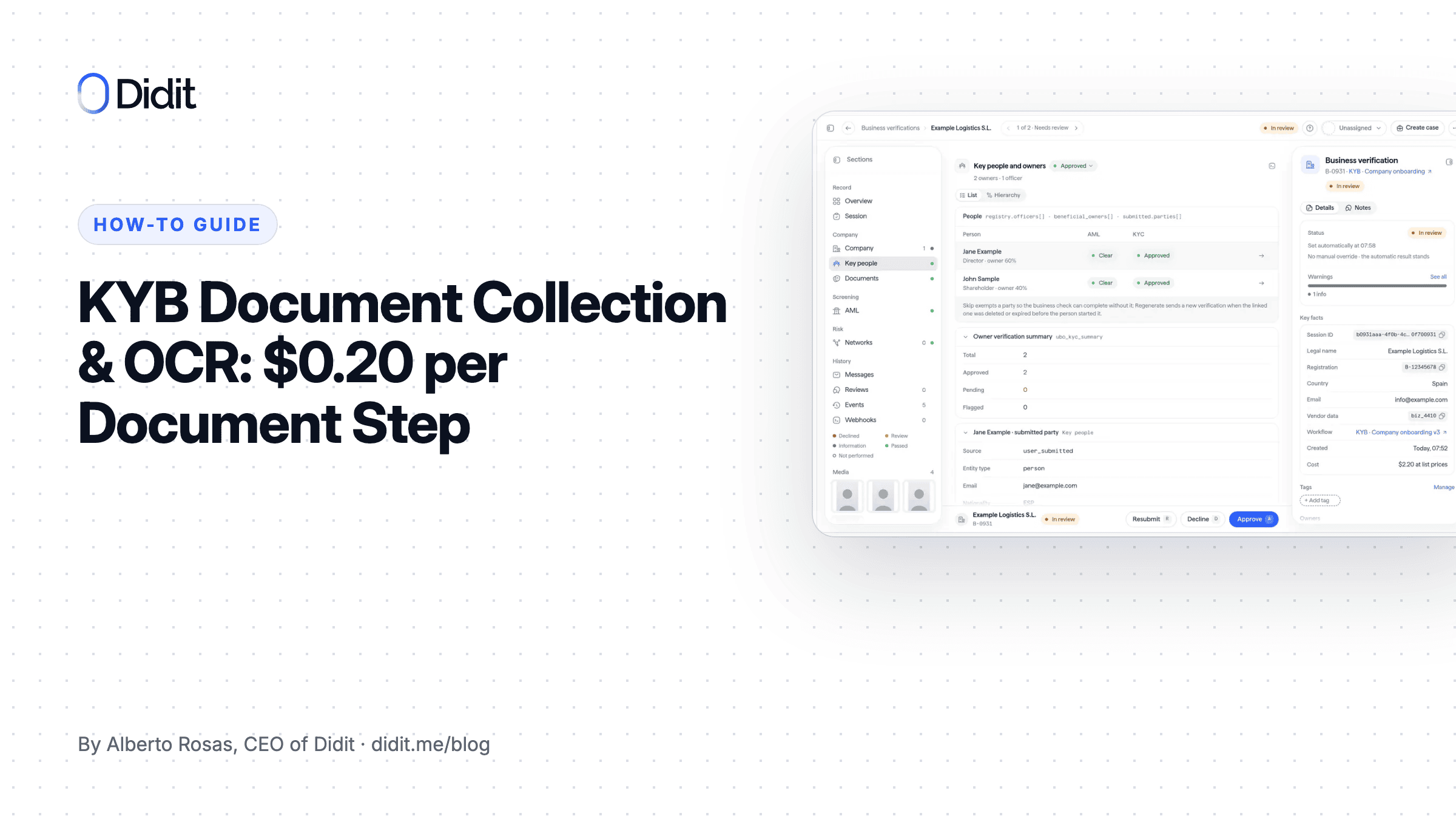
KYB Document Collection & OCR: $0.20 per Document Step
Didit collects, OCRs and cross-references KYB documents inside a business session for $0.20 per document-collection step, however many files arrive in that step.
 Alejandro RosasCo-founder and CTO
Contents
In this guide
Jump to the part you need.
This guide is for teams that collect and read corporate documents during business onboarding. A Didit KYB document-collection step costs $0.20 at list price, however many files the business uploads in that step. Registry retrieval in the same session starts at $2.00 per company, priced by country and data tier, and every other KYB feature bills separately. In KYB, analysts review uploaded documents for authenticity. Standalone Document AI applies configured risk actions, with suspected manipulation set to DECLINE by default.
Last updated: November 26, 2026. Prices checked against the live Didit price feed on November 26, 2026.
| Item | What it covers | Price |
|---|---|---|
| KYB document-collection step | Requests, collects, reads and routes the documents your workflow requires | $0.20 per step |
| Re-upload inside the same step | A resubmission in a step you already paid for | $0.00 |
| An additional document-collection step | A separate document group later in the same session | $0.20 per step |
| Registry retrieval (KYB) | Official registry data for one company at the Lite, Shareholders or UBOs tier | Registry retrieval from $2.00 per company, priced by country and data tier. Documents and other KYB features are billed separately. |
| Company AML screening | Sanctions, PEP and adverse media on the company | $0.20 per check |
| Person AML | Screening for one UBO or officer | $0.20 per person |
| Linked KYC for a key person | A full ID check for one owner, director or officer | $0.33 per check |
| Key People extraction | Owners and officers pulled from registry data | Free |
| Standalone Document AI | Field extraction, code reading and a manipulation check on one file, server to server | $0.20 per document |
| Document statuses | Not Finished, Approved, Declined, In Review, Resub Requested | Included |
Start free in the sandbox at business.didit.me, with no sales call. The product page is Business Verification, and every unit price is published on didit.me/pricing. If you build with an AI assistant, connect Didit through the Didit MCP server.
What the documents step gives you
A registry lookup returns a company's legal record: name, registration number, status, registered address, officers and, at the higher tiers, its owners. Documents cover what the registry cannot. They show that the certificate of incorporation the business uploaded matches that record, that the address on the utility bill is the registered address, and that the shareholders named in the register are the people the business entered. That is why a KYB session treats documents as cross-checks against registry data rather than as a separate file store.
Inside a KYB session the Documents feature handles the whole lifecycle. Didit works out from your workflow configuration which documents the business must supply, presents them for upload in the hosted flow, extracts structured data with OCR, cross-references that data against the registry record and the details the business confirmed, and lets an analyst approve or reject each document on its own. Documents are attached to the business session, so they sit beside registry, Key People and company AML results rather than in a separate folder.
Use the standalone Document AI API for files that do not belong to a corporate onboarding template, such as a payslip for a director or a bank statement that arrived by email.
The four document groups
Didit classifies uploads into structured groups, and each group keeps its own counters for total, approved, pending, declined, in review, other and missing documents. Your workflow decides which groups are required.
| Group | What it proves | Recognised subtypes |
|---|---|---|
LEGAL_PRESENCE | The company legally exists | Certificate of incorporation, certificate of good standing, certificate of incumbency, registry excerpt, business licence, tax registration |
COMPANY_DETAILS | The company's current details | Confirmation statement, annual return, statement of information |
OWNERSHIP_STRUCTURE | The ownership chain | Shareholder registry, memorandum of association, articles of association |
REPRESENTATIVES_AUTHORIZATION | Authority to act for the company | Director registry, power of attorney, trust agreement |
OTHER | Anything Didit cannot confidently classify | UNKNOWN |
Prerequisites
- A Didit application with KYB enabled, created at business.didit.me.
- An API key from Developer Settings, then API Keys.
- A webhook destination reachable from the internet, registered with
POST /v3/webhook/destinations/andwebhook_version: "v3". - A KYB workflow with the Documents feature enabled and the document types you require selected. The console path is Workflows, then Create workflow, then Business Verification as the workflow type.
- Files the business can supply in an accepted format, or a front end that posts them to the upload endpoint.
Integrate document collection in six steps
- Configure the workflow. Create a Business Verification workflow, enable Company registry lookup and Key People, turn on Documents and pick the groups and subtypes you require, save, and copy the
workflow_id. - Create the business session. The workflow type decides that this is a business session, so the same
/v3/session/endpoint serves KYC and KYB.
The response returnscurl -X POST https://verification.didit.me/v3/session/ \ -H "x-api-key: $DIDIT_API_KEY" \ -H "Content-Type: application/json" \ -d '{ "workflow_id": "$KYB_WORKFLOW_ID", "vendor_data": "biz-acme-001", "callback": "https://myapp.com/kyb/return", "expected_details": { "company_name": "Acme Logistics Pty Ltd", "registry_country": "AU", "registration_number": "123 456 789" } }'session_id,session_numberandurl. Theexpected_detailsblock pre-fills the registry search on KYB sessions; person-level fields are ignored there. The company values above are placeholders. - Deliver the link and receive the uploads. Send
urlto the company contact. Documents arrive through the hosted flow, through the Business Console, or from your own front end with the upload documents endpoint. Accepted formats are PDF, JPG, JPEG, PNG, TIFF and WebP, or a ZIP archive of them. PDFs can be up to 50 MB and photos up to 6 MB before compression. For a password-protected PDF, send the password indocument_passwordswhen you upload through the API.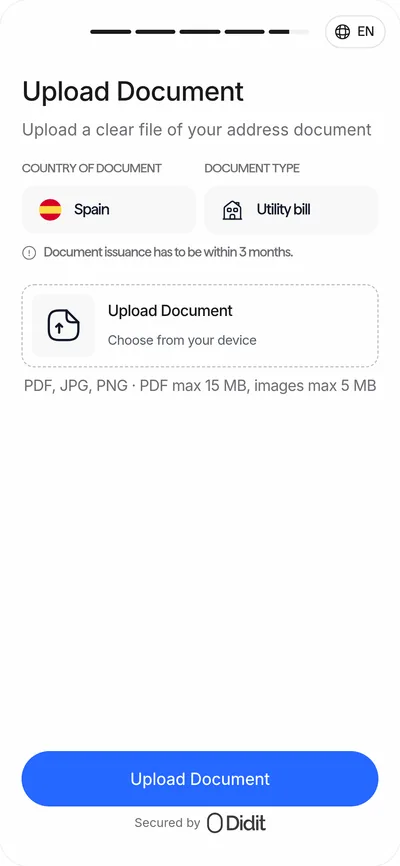
Each required group asks for its document; re-uploads stay inside the step you already paid for. - Wait for the webhook, then fetch the decision. Status changes arrive as
status.updatedwithsession_kind: "business". Note thatdata.updatedis not sent for document uploads, so read the documents from the decision.
The array you iterate iscurl https://verification.didit.me/v3/session/$SESSION_ID/decision/ \ -H "x-api-key: $DIDIT_API_KEY"document_verifications[]. Each entry carries astatus, anode_id,items[]with a signedfile_urland the OCR extract, plusgroupsandrequired_groups. - Reconcile against the registry. Didit cross-references extracted data against the registry record and the details submitted in the Key People flow, and sorts differences into critical fields (a mismatch that needs analyst review, with document value, user value and a confidence score), non-critical fields (formatting or abbreviation differences) and people overlap (names in the document versus names submitted). The results show next to the document preview in the Business Console.
- Recover from a bad document. A document an analyst rejects is
Declined. When an analyst requests a resubmission, the document moves toResub Requested. Re-deliver the sameurl: the hosted flow resumes at the resubmission step. To re-verify one Key Person, resubmit that person's child KYC session, or reissue an expired party link withPOST /v3/session/{session_id}/kyb/parties/{party_uuid}/regenerate/. The parentkyb_key_peoplere-aggregates on its own.
Expected output
On the session, the aggregate documents status follows the standard KYB feature set: Not Finished while an upload, OCR run or cross-check is in flight, Approved, Declined, In Review when an analyst must look, and Resub Requested when the business must supply a new file. Analysts can also press Request document in the console, name the type and description, and the document appears in the session with a Requested status until it is uploaded.
For a single file outside a session, the Document AI API returns the fields you defined, typed as text, number or date, with null for anything the model could not find.
curl -X POST https://verification.didit.me/v3/document-ai/ \
  -H "x-api-key: $DIDIT_API_KEY" \
  -F "document=@./bank-statement.pdf" \
  -F 'fields=[{"key":"account_holder","name":"Account holder","instruction":"Full name of the account holder","type":"text","required":true,"is_full_name":true},{"key":"balance","name":"Closing balance","instruction":"Closing balance as a number","type":"number","required":true}]' \
-F "expected_company_name=Acme Logistics Pty Ltd"| You send | You get back |
|---|---|
document, the PDF or image as multipart form data | extracted_data, keyed by the field keys you defined, with null where nothing was found |
fields, one JSON array string of 1 to 30 field definitions | document_ai.status, set by the strictest triggered action: Approved, In Review or Declined |
expected_company_name or expected_first_name plus expected_last_name, with one field marked is_full_name | name_match_score from 0 to 100 and name_on_document, or null when the name check is skipped |
| Any page that carries a QR code or barcode | document_ai.detected_codes, with the symbology, page number and decoded payload |
| A file that trips one of the documented risks | document_ai.warnings, listing each triggered risk tag |
When you mark a field with is_full_name and send an expected name, the response adds name_match_score from 0 to 100 and name_on_document. A score below document_ai_name_match_score_threshold (default 80) raises the DOCUMENT_AI_NAME_MISMATCH warning. Every processed page is scanned for QR codes and barcodes, and a damaged code comes back with its location and a null payload rather than a guess.

Failure cases and recovery
| Situation | What you see | Recovery |
|---|---|---|
| File type not accepted | DOCUMENT_AI_UNSUPPORTED_FILE, action REVIEW by default | Ask for PDF, JPG, PNG, TIFF, WebP or a ZIP of them |
| Scan cannot be read | DOCUMENT_AI_UNREADABLE_DOCUMENT, action REVIEW | Reject the file and request a clean scan or photo |
| Required field missing | DOCUMENT_AI_MISSING_REQUIRED_FIELDS, action REVIEW | Request a resubmission or review the document manually |
| Suspected editing or forgery | DOCUMENT_AI_SUSPECTED_MANIPULATION, action DECLINE by default | Decline the document and ask for a registry-issued or certified copy |
| Name does not match the expected party | DOCUMENT_AI_NAME_MISMATCH, action NO_ACTION by default | Set the action to REVIEW if a human should decide |
| Password-protected PDF | Extraction cannot open the file | Send the password in document_passwords on upload |
| Analyst asks for that document again | Status Resub Requested | Re-deliver the session url; the hosted flow resumes at the resubmission step |
| Critical field differs from the registry or the submitted data | Critical-field entry with both values and a confidence score | Analyst decides in the console; no automatic pass |
| Malformed Document AI request | 400 before any extraction, for example bracket-style field keys | Send fields as one JSON array string; nothing is billed |
| Wrong workflow type | Session created but runs KYC steps | Check the workflow's workflow_type is kyb |
Invalid workflow_id | 400 Bad Request | Copy the UUID again from the console |
| Rate limit | 429 with a Retry-After header | Back off for the stated interval |
| Registry provider outage during company search | 502 with code: "kyb_registry_provider_unavailable" | Not billed; the hosted flow offers manual company entry instead of a retry loop |
What bills, and where review begins
The documents line is charged once per document-collection step regardless of upload count, so a step that takes a certificate, articles and a utility bill is one $0.20 charge, and re-uploading into that step adds nothing. A separate document-collection step has its own charge. The price book lists the line as KYB Documents, $0.20 per step, $0.192 on Growth and $0.18 on Scale. Standalone Document AI is $0.20 per document, and a request rejected with 400 before extraction is not billed.
Registry retrieval is billed once per selected company at the tier delivered for that country, and in a hosted workflow the charge applies once a company is selected even if the applicant leaves afterwards. Documents are separate from registry pricing. Key People extraction is free, while linked KYC and person AML are billed separately.
Review is a boundary, not a price you can predict. Automatic checks route a document to In Review when it cannot be read, when required fields are missing, or when the cross-check finds a critical mismatch, and the analyst then approves or rejects each document individually in the console. The pricing docs are the place to confirm which lookups and retries bill before you size a budget.

Worked cost example
500 Australian companies a year, one document-collection step each, Lite registry, company AML, and one UBO per company taking person AML and a linked full ID check. Australia's published Lite price is $2.00. All prices are USD list prices from the November 26, 2026 feed.
- Per company: registry Lite $2.00 + documents step $0.20 + company AML $0.20 = $2.40.
- Per UBO: person AML $0.20 + linked KYC $0.33 = $0.53.
- Per company with one UBO: $2.40 + $0.53 = $2.93.
- 500 companies: 500 x $2.93 = $1,465.00.
- Same volume on Scale with 10% off Didit prices: $1,465.00 x 0.90 = $1,318.50.
Two document-collection steps instead of one adds $0.20 per company, so 500 x $0.20 = $100.00 at list price. Splitting the same documents across two steps is the only way the document line grows at a fixed volume. Registry tiers are country-specific: a market whose Lite price is $3.00 adds $1.00 per company to the same calculation, which is why the country comes first.
Where teams use this
- Marketplaces onboarding business sellers: collect incorporation and address documents, read them, and stop doctored uploads before payouts are enabled.
- Fintech and banking teams opening corporate accounts: gather articles and financial statements with extracted data feeding straight into the account record.
- Lending providers underwriting business borrowers: check financial statements and incorporation documents inside the same session as the registry record.
- Crypto B2B platforms onboarding corporate clients: hold the documentation reviewers expect on file, with the extraction and status trail attached to the session.
Didit runs this for 4,000+ companies. If you are replacing an existing provider, the switch page covers migration, and the KYB quickstart gets a test company through the flow in about ten minutes.
Sources
- Didit docs: KYB Documents API
- Didit docs: Document AI API
- Didit docs: KYB integration guide
- Didit docs: KYB quickstart
- Didit docs: Create Session API
- Didit docs: upload documents endpoint
- Didit docs: KYB statuses
- Didit docs: KYB webhooks
- Didit docs: KYB registry pricing by country
- Didit docs: pricing and billing rules
- Didit pricing page
- Didit Business Verification product page
The next step is a sandbox session: create a KYB workflow with Documents enabled at business.didit.me, run one test company through the registry, Key People and documents steps, and read the decision before you build the production path. No sales call.
Try it
Try this in the sandbox
Run the check this guide describes, free.
The product this post is about, taken from its topic. Run it free in the sandbox.
Author
Alejandro Rosas
Co-founder and CTO

Keep reading
Other guides in the same topic.
 What Is the Purpose of FICA in South Africa? 2026 Guide
FICA is South Africa's anti-money laundering law. It creates the Financial Intelligence Centre and requires accountable institutions to identify and verify clients, screen for PEP and sanctions risk and report suspicious.
Alberto RosasNov 26, 2026 Sixth Money Laundering Directive (6AMLD): What Changed and Which Rules Apply
6AMLD is Directive (EU) 2018/1673: Member States must criminalise laundering, widen predicate offences and set a four-year penalty floor. It adds no new due diligence duties for firms.
Alberto RosasNov 26, 2026 Automated Sanctions Screening: Canada, the Entity List and Embargoes
Automated sanctions screening matches people and companies against lists such as Canada's autonomous sanctions made under SEMA and JVCFOA and the OFAC SDN List, and returns candidate hits scored for identity confidence and.
Alberto RosasNov 26, 2026Questions
Frequently asked questions
How much does KYB document collection cost on Didit?
A document-collection step costs $0.20 at list price, $0.192 on Growth and $0.18 on Scale. The charge is per step, not per file, so five documents uploaded into one step is one charge. Registry retrieval in the same session is billed separately, from $2.00 per company and priced by country and data tier.
Is the $0.20 charged per document or per step?
Per step. A step that collects a certificate of incorporation, articles of association and a proof of address is one $0.20 charge, and re-uploading a rejected file into that step adds nothing. A separate document-collection step later in the same session has its own $0.20 charge.
What document types can a KYB session collect?
Didit recognises four groups: legal presence, company details, ownership structure and representatives authorization, plus an Other group for anything it cannot classify. Typical files are certificates of incorporation, articles of association, registry excerpts, business licences, shareholder registers, powers of attorney, address evidence and financial statements.
Does Didit read documents with OCR or only store them?
It reads them. OCR extracts company names and registration numbers from certificates, address data from utility bills, financial figures from statements, and names and roles from shareholder registers. The extracted values are then cross-referenced against the registry record, the details submitted at session creation and the other uploaded documents.
Does Didit detect forged or edited documents?
Yes, in two places. Inside a KYB session analysts verify authenticity in the console before approving a document, and extracted data is cross-checked against the registry record and the other uploads. The Document AI API applies an explicit manipulation check, and a suspected manipulation warning can trigger the configured action, with the default set to Decline.
What happens when a document is rejected?
A rejected document is Declined. When an analyst requests a resubmission instead of declining, the document moves to Resub Requested and the business must upload a new file before the session can progress. Re-deliver the same session url and the hosted flow resumes at the resubmission step. Analysts can also request a specific additional document from the console without rejecting the whole session.
Which webhook tells me a document was approved?
status.updated with session_kind: "business" signals that the session status changed. It does not name which file passed. Each document's own status comes from document_verifications[] in the decision. Didit does not send data.updated for document uploads or Key People submissions, so the decision endpoint is the source of truth for per-document status and the OCR extract.
Can I OCR a single document without a full KYB session?
Yes. POST /v3/document-ai/ takes one file and a JSON array of 1 to 30 field definitions, and costs $0.20 per document. It returns the fields typed as text, number or date, plus any QR codes or barcodes it finds, and can compare the name on the document against an expected person or company.
What file formats and sizes are accepted?
KYB uploads accept PDF, JPG, JPEG, PNG, TIFF and WebP, or a ZIP archive of them. PDFs can be up to 50 MB and photos up to 6 MB before compression. Password-protected PDFs are accepted when you send the password in document_passwords on the upload request.
How do I cross-check OCR output against the registry?
Didit does the first pass itself and sorts results into critical fields, non-critical fields and people overlap. Critical fields carry the document value, the submitted value and a confidence score, and appear next to the document preview in the Business Console. Your integration reads the same results from document_verifications[] in the decision.
Can an analyst request more documents without rejecting the business?
Yes. In the Business Console an analyst opens the business session, presses Request document, and specifies the type and description. The business is notified, the document appears in the session with a Requested status until it is uploaded, and the rest of the session keeps its state.
Is there a sandbox to test document collection?
Yes. Sandbox testing is free and unlimited on every plan, and eligible organizations signing up with a work email get $10 of credit each month. Create a KYB workflow with Documents enabled at business.didit.me, run a test company through it, and read the decision before wiring production.
Compliance built in
Audited, certified and attested.
We hold the certifications and build each country's rules into your flows, so you can launch anywhere without worrying. Security and Compliance center
- Regulation encoded into your flows
Tell us what you do and where. Didit lists the rules that apply to you, with sources, and builds the checks each country needs into one workflow.
- Ready for AMLR
Every requirement of the new EU anti-money laundering rules, from checking customers to human review, is already covered by a Didit check.
- Tested in Spain's Treasury sandbox
Spain's Treasury published its supervised sandbox report on Didit's NFC plus active liveness onboarding; SEPBLAC took part and valued the added measures positively.
- Audited, not self-declared
iBeta Level 1 and Level 2. Liveness tested under ISO/IEC 30107-3.
Your obligations · 3 regions
 SOC 2 Type 2
 ISO 27001
 iBeta Level 1 and Level 2
 EU regulator attestation
 FSM youth protection
 GDPR
 EBA remote onboarding
 MiCA compatible
 FIDO Alliance member
- AMLREU AML Regulation ready
Integration · Didit MCP
Run Didit from your own AI agent
Connect Didit to Claude, Cursor, VS Code or ChatGPT and just ask in plain words. Your agent can do anything you can do in the console, with the same permissions you have.
 Add to Claude
 ChatGPT
 Cursor
- Build workflowsDescribe the checks you need. The agent creates and publishes the flow.
- Run investigationsAsk why a session was declined, review cases, search people and companies.
- Change rulesCreate payment rules, test them on past data and switch them on.
- Pull reportsAsk for numbers, exports or the audit log.
Didit Academy