KYC Automation for SMEs: A Practical Setup Guide
An SME automates KYC by creating a Didit workflow, opening one session per customer, reading the decision by webhook, and sending only In Review cases to a person.
 Alberto RosasCo-founder and CEO
Contents
In this guide
Jump to the part you need.
KYC automation fits an SME that verifies customers at signup with one or two people handling compliance. On Didit a full ID check costs $0.33 per completed check and AML screening $0.20; eligible Free organizations created with a qualifying work email receive $10 of monthly credit. The caveat is honest: automation runs the checks, but your team still owns the policy and the reviews those checks escalate.
Last updated: November 26, 2026. Prices checked against the live Didit price feed on November 26, 2026.
| Step in the flow | Didit module | List price |
|---|---|---|
| Read the identity document | ID Verification | $0.15 per check |
| Confirm a live person | Passive Liveness ($0.10) or Active Liveness ($0.15) | $0.10 per check, passive |
| Match the selfie to the document | Face Match 1:1 | $0.05 per check |
| Device and network signals | Device and IP Analysis | $0.03 per check |
| All four in one pass | Full ID check (KYC) | $0.33 per completed check |
| Sanctions and PEP screening | AML Screening | $0.20 per check |
| Keep screening after onboarding | Ongoing AML Monitoring | $0.07 per person per year |
| Check an address | Proof of Address | $0.20 per check |
| Check a company and its people | Business Verification (KYB) | Registry retrieval is variable by country and data tier, from $2.00 per company. Owners and officers can also incur linked full KYC and person AML charges billed per person. |
| Build flows and test | Workflow Orchestrator, sandbox, MCP server | Free |
| Run it in production | Free, Growth, Scale | Free: $0 a month, with $10 of monthly credit for eligible organizations created with a qualifying work email. Growth: $99 a month. Scale: $299 a month. |
Start free in the sandbox at business.didit.me with no sales call. Developers can connect Didit to an AI assistant through the MCP server. The KYC module is described on the KYC page, AML on AML screening, and every number sits on the pricing page.
What an SME should expect from KYC automation
KYC obligations vary by jurisdiction and by the business you run, so find out which regime covers you, with qualified legal or compliance advice, before you design the flow. That determination is yours, not a vendor's, and it decides what your workflow has to check and what evidence you keep.
Manual KYC fails an SME in three predictable ways. It is slow, because someone reads documents and cross-checks names by hand. It is inconsistent, because two reviewers treat the same edge case differently. And it does not scale, because every new market adds document types and languages nobody on the team recognises.
Automation fixes the repetition, not the judgement. A machine reads the document, runs liveness, compares faces, screens names against sanctions and PEP lists and returns a decision in seconds. A person then reads only the cases the machine flags. That split is what makes a small team viable, and in most SME rollouts the review queue, not the check volume, is the first thing that strains the team.
Prerequisites before you automate anything
- A written policy that says which customers you verify, which documents you accept in each country, and what makes a case escalate. The vendor cannot write this for you.
- A decision on data retention and on who may see identity documents inside your company.
- One identifier per customer in your database, so every verification can be tied back to a person. Didit calls this
vendor_data. - A publicly reachable HTTPS endpoint if you want decisions pushed to you, or a scheduled call to the decision endpoint if you prefer to pull.
- A developer who can make one API call and handle one webhook. The first working session in the sandbox takes minutes; connecting it to your own onboarding is a small piece of engineering your developer scopes.
How to automate KYC in 7 steps
Step 1: Create the organization and a sandbox application
Sign up at business.didit.me, create your organization, and work inside the sandbox application first. Sandbox testing is free and unlimited, sessions are never billed, and every external provider is mocked. On the Free plan, an eligible organization created with a qualifying work email receives $10 of credit a month, which buys about 30 full ID checks at $0.33. An organization created through the API starts at $0 and tops up before it runs live checks.
Step 2: Build the verification workflow
In the console, open Workflows and click New workflow. Choose whether you verify users or businesses, then start from a description, a template or an empty flow. A Simple workflow runs its steps in a fixed order. A Node-based workflow branches on verification results, so you can define different paths for different outcomes. The same workflow can be created by API, and the response returns the id you keep:
curl -X POST https://verification.didit.me/v3/workflows/ \
-H "x-api-key: $DIDIT_API_KEY" \
-H "Content-Type: application/json" \
-d '{
  "workflow_label": "Standard KYC",
  "workflow_type": "kyc",
  "features": [
    {"feature": "OCR"},
    {"feature": "LIVENESS", "config": {"face_liveness_method": "PASSIVE"}},
    {"feature": "FACE_MATCH"},
    {"feature": "AML"}
  ]
}'
Step 3: Create one session per customer
A session is a single customer's run through the workflow. One API call creates it and returns the link you show the customer.
curl -X POST https://verification.didit.me/v3/session/ \
-H "x-api-key: $DIDIT_API_KEY" \
-H "Content-Type: application/json" \
-d '{
  "workflow_id": "'$WORKFLOW_ID'",
  "vendor_data": "user-42",
  "callback": "https://myapp.com/kyc/return",
  "language": "en"
}'
The response contains session_id, url and session_token. Send the customer to url, or open it in an SDK or an iframe. The workflow's type decides which kind of session is created, so a KYB workflow returns a business session from the same endpoint.
Step 4: Let the customer finish the flow
The hosted flow handles document capture, liveness, face match and any extra steps you added, in the customer's browser language unless you pass language. When the customer finishes, Didit redirects to your callback with ?verificationSessionId={session_id}&status={status}. The redirect is a convenience, not the decision: always read the decision from the API or the webhook as well.

url: document capture, liveness, and a final status screen.Step 5: Register a webhook destination and verify the signature
Call POST https://verification.didit.me/v3/webhook/destinations/ with a label, a url, webhook_version set to v3 and the events you want, for example status.updated, data.updated, user.status.updated and user.data.updated. Store the returned secret_shared_key. On every delivery, read the raw body before parsing, check that the X-Timestamp header is within 300 seconds of now, recompute the HMAC-SHA256 signature and compare it in constant time against X-Signature-V2. Answer 2xx within 5 seconds and de-duplicate on event_id.
Step 6: Map the status to your onboarding
Fetch GET https://verification.didit.me/v3/session/{session_id}/decision/ when you need the full result, and treat the status strings as exact, case-sensitive values. Match them strictly, including the single capital K in Kyc Expired. The mapping below is the whole integration for most SMEs.
| Exact status string | What it means | Recommended SME action |
|---|---|---|
Not Started | Session created, the customer has not opened the link | Send a reminder if too much time passes |
In Progress | The customer is working through the steps | No action |
Approved | All checks passed | Grant access and store the decision object |
Declined | One or more checks failed, and the decision carries the warnings | Notify the customer; request a resubmission if the cause is fixable |
In Review | Warnings need a human decision | A reviewer approves, declines or requests a resubmission in the console |
Awaiting User | KYB only: the parent session waits on key people child sessions | Chase the parties who have not finished |
Resubmitted | The customer was asked to redo specific steps | Wait for the new decision |
Expired | The link timed out before the customer opened it | Create a new session and resend it |
Abandoned | The customer started but did not finish in time | Send a reminder or create a new session |
Kyc Expired | An approved document passed its expiry date | Ask for a current document and start a new session for the same person |
Step 7: Add AML screening, monitoring and escalation
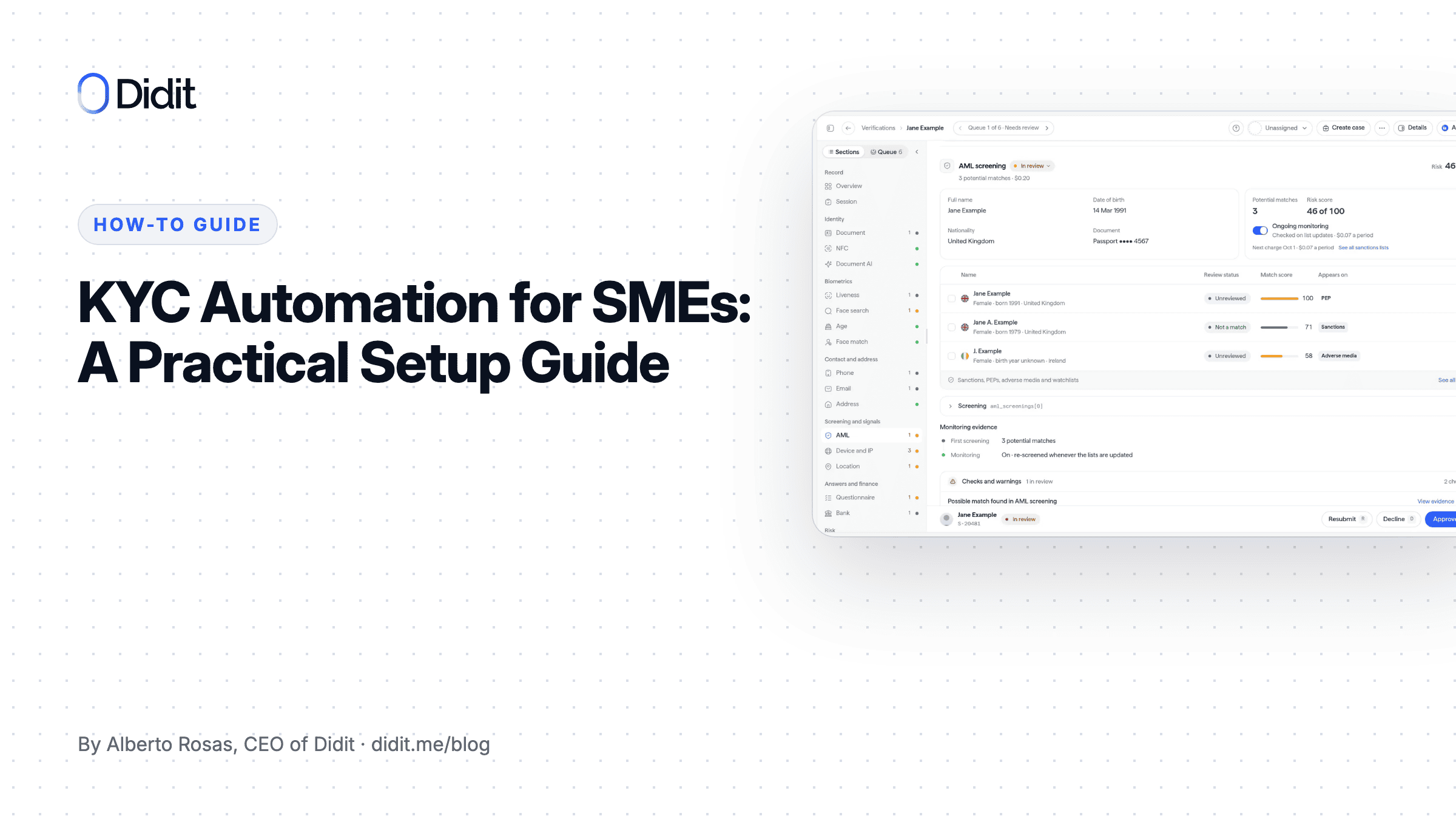
Add the AML step to the same workflow so sanctions and PEP screening runs in the same session, at $0.20 per check against 1,300+ lists. After onboarding, ongoing AML monitoring re-screens a person for $0.07 per person per year, which matters when a customer's status can change after you approved them. Decide now which warnings send a session to In Review and who reads that queue.

Inputs and outputs of the session call
| Field | Direction | What it does |
|---|---|---|
workflow_id | Input, required | The workflow UUID. Decides whether a user or a business is verified. |
vendor_data | Input, recommended | Your stable identifier for the customer. Used for duplicate detection across sessions. |
callback | Input | Where the hosted flow returns the customer. For an HTTP or HTTPS callback, when allowed domains are configured, the URL must match one of them. Custom URL schemes are accepted. |
language | Input | ISO 639-1 code for the verification screens. Defaults to browser detection. |
expected_details | Input | Name, date of birth, nationality, document country. A mismatch comes back as a decision warning. |
metadata, tags | Input | Your own JSON and labels, echoed back and filterable in the console. |
session_expiration_time | Input | Seconds the link stays valid, between 3600 and 2419200. |
session_id, url, session_token | Output | The session reference, the link for the customer, and the token for embedded flows. |
status | Output | One of Not Started, In Progress, Approved, Declined, In Review, Awaiting User, Resubmitted, Expired, Abandoned, Kyc Expired. |
decision | Output | Plural arrays: id_verifications[], liveness_checks[], face_matches[], aml_screenings[], poa_verifications[], phone_verifications[], email_verifications[], ip_analyses[]. |
Failure cases and recovery
| Symptom | Likely cause | Recovery |
|---|---|---|
403 with "You do not have permission to perform this action." on verification.didit.me | No API key on the call | Send the key in the x-api-key header, from the application you are testing. |
401 | Wrong, revoked or expired key | Copy a fresh key from the console and redeploy the environment variable. |
400 on session create | Invalid workflow_id | Use the workflow UUID, not its label, and check it belongs to the same application. |
400 naming your callback | Callback not on the application's allowed domains | Add the origin, or use an app deep link, which is always accepted. |
| No webhook arrives | Handler slower than 5 seconds, or it answered 5xx or 404 | Didit retries twice, after about 1 and 4 minutes, then drops the delivery. Answer 2xx within 5 seconds, then resend from the destination's delivery log if needed. |
| Status sits at In Review | Warnings that need a human decision | A reviewer approves, declines or requests a resubmission in the console, or through the update-status endpoint. |
| Status moves to Kyc Expired | The verified document passed its expiry date | Ask the customer for a current document and start a new session linked to the same person. |

Paid steps and where a person stays in the loop
You pay only for checks that finish with a result. The workflow builder, Reusable KYC, the MCP server, SDKs and sandbox testing carry no charge on the price list; the checks themselves do. A full ID check is $0.33, an AML screening $0.20, a proof of address $0.20, and business verification starts at $2.00 per company for registry retrieval, which is priced by country and data tier. Owners and officers of a company can also incur a linked full KYC check at $0.33 and person AML at $0.20 each, billed per person, so a KYB total depends on how many people the ownership structure brings with it. Credits are consumed per completed check, and the month's plan credit is used before any top-up balance.
One clarification on the $0.33. It is the price of a completed full ID check, meaning the document check, biometrics and device and IP analysis in one pass. The standalone server-to-server API lines in the price book carry their own per-call prices, so assembling the same parts as separate calls is not the same bill as one full check.
Three boundaries stay human by design. A warning the machine cannot resolve sends the session to In Review, and only a reviewer approves, declines or requests a resubmission. Your policy decides which warnings escalate, so the review queue is a design choice, not a vendor setting. And your AML programme, its risk assessment and its record keeping remain your responsibility, whichever vendor runs the checks.
An automated KYC process for cross-border compliance
Cross-border is where manual KYC breaks down hardest. The same customer base can bring Latin American identity cards, Gulf residence permits, EU national eIDs and West African passports in one week, and no small team recognises all of them.
Four pieces make an automated cross-border process work. Document coverage, which on Didit spans 14,000+ document types in 220+ countries and territories, with document recognition in 130+ languages across 50+ scripts. Interface languages, 54 for the verification flow, so a Mexican customer can be verified in Spanish while your console stays in English. Server-side expectations, by passing expected_details with nationality and id_country as ISO-3 codes and expected_document_types, you turn a mismatch into a decision warning instead of an unnoticed exception. And a language-neutral decision object, since every result arrives in the same plural arrays whatever the customer's country.
The same logic applies to companies. A KYB workflow takes registry_country as an ISO 3166-1 alpha-2 code, with the state included for state-level registries, and retrieves official registry data instead of a scanned certificate. The practical difference is provenance: the company record comes from the registry itself, and the result is stored with the session you can show to whoever asks for it. Whether that evidence satisfies your own supervisor or auditor is a question for your compliance adviser, not for the vendor.
AML KYC automation: what runs by itself, what does not
Automation covers more than most SMEs assume, and less than the sales pages suggest. What runs without a person: document capture and data extraction, passive or active liveness, 1:1 face match, device and IP analysis, sanctions and PEP screening against 1,300+ lists, and 200+ fraud signals evaluated on every session. That stack returns most decisions without anyone opening the case.
What does not run by itself: deciding that a partial name match on a sanctions list is a false positive, deciding whether a thin file is acceptable for a low-risk customer, and deciding what to do with a customer who contests a decline. Those are judgement calls your policy has to answer, and Didit can route them to In Review, but it cannot take the responsibility for them.
What KYC automation costs: a worked example
Take an SME with 1,000 new customers a month, a full ID check and an AML screening on every one, and 2,000 customers under ongoing monitoring.
At list prices: 1,000 x $0.33 = $330.00 for the ID checks. 1,000 x $0.20 = $200.00 for AML screening. Monthly total, $330.00 + $200.00 = $530.00. Ongoing monitoring is annual: 2,000 x $0.07 = $140.00 a year, or $11.67 a month spread across the year.
On Growth, $99 a month with 4% off every Didit price and $115 of credit: 1,000 x $0.3168 = $316.80 for the ID checks, 1,000 x $0.192 = $192.00 for AML. Usage is $316.80 + $192.00 = $508.80. The $115.00 credit covers part of it, so the top-up pays $508.80 - $115.00 = $393.80, and the cash out for the month is $99.00 + $393.80 = $492.80.
On Scale, $299 a month with 10% off and $350 of credit: 1,000 x $0.297 = $297.00, 1,000 x $0.18 = $180.00, usage $477.00, top-up $477.00 - $350.00 = $127.00, cash out $299.00 + $127.00 = $426.00.
That is the whole pricing model: published unit prices for self-serve usage, per completed check, with the plan fee buying credit rather than checks. Growth and Scale take 4% and 10% off every price; Enterprise is a custom annual contract starting at $15,000 a year. If your volume is around 30 full ID checks a month, the $10 of credit that an eligible Free organization created with a qualifying work email receives covers them, and an organization created through the API starts at $0 and tops up before live checks.

Sources
- Didit docs: Quick Start
- Didit docs: Identity Verification Pricing
- Didit docs: Create Session API
- Didit docs: Webhooks and HMAC signing
- Didit docs: Verification Statuses
- Didit docs: Sandbox test data and scenarios
- Didit docs: Workflow Builder
- Didit pricing page and pricing as JSON, read November 26, 2026
- Didit KYC product page, AML screening page, business verification page
- Didit MCP server and integration prompt
- FATF, for reading the international recommendations your local regime may draw on
- EUR-Lex, for reading the EU anti-money-laundering texts that may apply to you
Open the sandbox at business.didit.me, build the workflow, and run one session end to end before you touch a live key. No sales call is needed to start, and an eligible Free organization created with a qualifying work email gets $10 of monthly credit, about 30 full checks at $0.33.
Try it
Try this in the sandbox
Run the check this guide describes, free.
The product this post is about, taken from its topic. Run it free in the sandbox.
Author
Alberto Rosas
Co-founder and CEO

Keep reading
Other guides in the same topic.
 What Is the Purpose of FICA in South Africa? 2026 Guide
FICA is South Africa's anti-money laundering law. It creates the Financial Intelligence Centre and requires accountable institutions to identify and verify clients, screen for PEP and sanctions risk and report suspicious.
Alberto RosasNov 26, 2026 Sixth Money Laundering Directive (6AMLD): What Changed and Which Rules Apply
6AMLD is Directive (EU) 2018/1673: Member States must criminalise laundering, widen predicate offences and set a four-year penalty floor. It adds no new due diligence duties for firms.
Alberto RosasNov 26, 2026 Automated Sanctions Screening: Canada, the Entity List and Embargoes
Automated sanctions screening matches people and companies against lists such as Canada's autonomous sanctions made under SEMA and JVCFOA and the OFAC SDN List, and returns candidate hits scored for identity confidence and.
Alberto RosasNov 26, 2026Questions
Frequently asked questions
What is KYC automation for an SME?
KYC automation means a system, not a person, runs the identity checks: it reads the identity document, runs liveness, matches the face to the document, screens the name against sanctions and PEP lists and returns a decision. For an SME it replaces repetitive manual review with a queue of exceptions. On Didit that whole flow runs through one API and is billed per completed check.
How much does automated KYC cost per check on Didit?
A full ID check is $0.33 and includes ID document verification at $0.15, passive liveness at $0.10, face match 1:1 at $0.05 and device and IP analysis at $0.03, priced as one completed check. AML screening costs $0.20 per check and ongoing AML monitoring $0.07 per person per year. Plans are Free at $0 a month, where $10 of monthly credit goes to eligible organizations created with a qualifying work email, Growth at $99 a month and Scale at $299 a month.
What does business verification cost on Didit?
Registry retrieval is variable by country and data tier, from $2.00 per company. Owners and officers can also incur linked full KYC at $0.33 and person AML at $0.20, billed per person, plus $0.20 for each KYB document collection step. The Key People form itself has no separate fee, but the paid registry tiers supply the ownership data that tells you who the people are.
Do I need a developer to automate KYC with Didit?
Not for the flow itself: the workflow builder is no-code and can start from a template or from a plain description of what you need. A developer is needed for the session call and the webhook handler, which is roughly a create call, a redirect and a signature check. Didit also publishes an integration prompt that a coding agent can follow end to end.
Does automation remove manual compliance review entirely?
No. Automated checks do not remove the need for manual compliance review. Automated checks resolve most sessions, but warnings go to In Review, and a reviewer approves, declines or requests a resubmission. Your policy defines which warnings escalate, and your team remains responsible for the AML programme itself.
How do I test a KYC automation flow before going live?
Use the sandbox application. Sandbox testing is free and unlimited, every external provider is mocked, and sessions are never billed. You can arm deterministic scenarios so a session reproduces an approval, a decline or an AML hit without using any real personal data.
How fast is a decision from an automated KYC check?
Didit runs inference at a sub-2-second p99, so the individual checks return almost immediately once the customer submits. That figure measures inference, not the complete customer journey: the total time depends on the customer finishing the steps, since document capture and liveness are interactive. The decision reaches your system by webhook, or by a call to the decision endpoint.
What happens if my webhook endpoint is slow or down?
Didit expects an answer within 5 seconds. If your handler is slower than that, or answers 5xx or 404, Didit retries twice, after about 1 and 4 minutes, then drops the delivery. You can resend it from the destination's delivery log, and you can always pull the decision from the API as a fallback.
Can an automated KYC process handle cross-border documents and languages?
Yes, if coverage is real rather than advertised. Didit covers 14,000+ document types across 220+ countries and territories, with document recognition in 130+ languages and a verification interface in 54 languages. You can set the session language per customer and pass expected nationality and document country so mismatches return as warnings.
Does Didit handle AML screening as well as identity checks?
Yes. AML screening runs as a step inside the same workflow at $0.20 per check against 1,300+ lists, and ongoing AML monitoring re-screens a person for $0.07 per person per year. Transaction monitoring and wallet screening sit in the same account if your business needs them later.
Is Didit suitable for a small company on a tight budget?
It is priced for one. Billing is per completed check from prepaid credit, and the Free plan gives eligible organizations created with a qualifying work email $10 of monthly credit, which buys about 30 full ID checks. Didit runs 4,000+ companies in production. Published list prices apply to self-serve usage, with Growth and Scale discounts, and Enterprise uses a custom annual contract.
How do I handle a customer the automated check declines?
A Declined session carries the warnings that explain the failure, so start by reading them. If the cause is fixable, request a resubmission and the customer redoes only the affected steps. If your policy allows an override, a reviewer can move the session to Approved, and that decision stays in the audit trail.
Compliance built in
Audited, certified and attested.
We hold the certifications and build each country's rules into your flows, so you can launch anywhere without worrying. Security and Compliance center
- Regulation encoded into your flows
Tell us what you do and where. Didit lists the rules that apply to you, with sources, and builds the checks each country needs into one workflow.
- Ready for AMLR
Every requirement of the new EU anti-money laundering rules, from checking customers to human review, is already covered by a Didit check.
- Tested in Spain's Treasury sandbox
Spain's Treasury published its supervised sandbox report on Didit's NFC plus active liveness onboarding; SEPBLAC took part and valued the added measures positively.
- Audited, not self-declared
iBeta Level 1 and Level 2. Liveness tested under ISO/IEC 30107-3.
Your obligations · 3 regions
 SOC 2 Type 2
 ISO 27001
 iBeta Level 1 and Level 2
 EU regulator attestation
 FSM youth protection
 GDPR
 EBA remote onboarding
 MiCA compatible
 FIDO Alliance member
- AMLREU AML Regulation ready
Integration · Didit MCP
Run Didit from your own AI agent
Connect Didit to Claude, Cursor, VS Code or ChatGPT and just ask in plain words. Your agent can do anything you can do in the console, with the same permissions you have.
 Add to Claude
 ChatGPT
 Cursor
- Build workflowsDescribe the checks you need. The agent creates and publishes the flow.
- Run investigationsAsk why a session was declined, review cases, search people and companies.
- Change rulesCreate payment rules, test them on past data and switch them on.
- Pull reportsAsk for numbers, exports or the audit log.
Didit Academy