Manual Review in KYC: Human-in-the-Loop Verification
Manual review handles what automated checks cannot settle: a reviewer works the In Review queue, then approves, declines or requests a resubmission in the console or through the update-status API.
 Alberto RosasCo-founder and CEO
Contents
In this guide
Jump to the part you need.
Manual review fits teams whose automated checks cannot settle every session: a low liveness score, a document field that disagrees with the MRZ, an AML hit that needs a person to read it. This guide covers the reviewer workflow in the Didit console, the statuses involved, and the exact API call that records the decision. You pay per completed check, so a KYC under review is $0.33 and an AML screening $0.20. Reviewer time is your own cost.
Last updated: November 26, 2026. Prices checked against the live Didit price feed on November 26, 2026.
| Item | Detail |
|---|---|
| Status that opens a review | In Review, set when automated checks raise one or more warnings |
| Decisions available to a reviewer | Approved, Declined, Resubmitted |
| Where reviewers work | Verification dashboard, session detail, AML hit review, session chats |
| API that records the decision | PATCH https://verification.didit.me/v3/session/{session_id}/update-status/ |
| Audit trail | Review trail entry with the actor and your comment, plus the reviews array returned on the decision |
| List prices of the checks under review | Full KYC $0.33, AML screening $0.20, proof of address $0.20 |
Start free in the sandbox at https://business.didit.me/, no sales call, and check the unit prices on https://didit.me/pricing/ before you size a review team. Developers connecting an AI assistant to the same account can use https://didit.me/developers/mcp/.
What a manual review has to produce
The output of human-in-the-loop verification is a decision, not an opinion. One session, decided by a named person, with a reason attached and a status your own systems can read. In Didit a session leaves In Review and becomes Approved, Declined or Resubmitted; the change fires a status.updated webhook and the console keeps a review trail entry with the actor and the comment you wrote. That trail is what you show an auditor when they ask why a user was let in.
The recommended method is a warning-driven queue. Configure the workflow so automated checks decide the easy majority and raise warnings only where a person adds value, then have reviewers work the flagged list instead of inspecting every document. Didit reports 4,000+ active customers. Configure automation to handle clear cases and route flagged sessions to reviewers. The next section is about shrinking that residue before you staff for it.
Alternatives to manually reviewing customer ID documents
Most documents do not need a person. Didit's automated document step already covers security feature detection, field-level data consistency, MRZ validation, expiry date verification and image quality analysis. Before you put a reviewer on a step, check whether a module can decide it:
- Document authenticity and data consistency: ID Verification raises the warnings that matter, such as a failed MRZ check digit, an expired document, a data inconsistency between fields, or suspected tampering. Those warnings are what move a session to
In Review, so the reviewer evaluates the warning instead of repeating the whole check. - Biometrics: passive liveness, active liveness and 1:1 face match return scores, so a threshold can clear the obvious cases without a human.
- Duplicate identities: Face Search (1:N) returns same-face matches and earlier verifications, which beats having a person hunt for repeat users by eye.
- Watchlists: AML screening against 1,300+ lists returns a match score and a risk score for each hit, and hits you mark as false positives drop out of the aggregate risk score.
- Government records: Database Validation, and registry checks for businesses, return a source answer where one exists.
- Contextual risk: Device and IP Analysis provides contextual risk signals for review.
What remains is genuinely human: ambiguous tampering, a face match sitting near the threshold, an AML hit whose source and recency need judgement, and the policy call on a borderline user. That residue is your manual review queue, and it is the only part of the funnel that should cost reviewer hours. The full reviewer dashboard is documented at https://docs.didit.me/console/manual-review.
Prerequisites
- A workflow that can raise warnings. Only sessions with one or more warning signals reach
In Review. - A session in an allowed current status:
Approved,Declined,In Review,Kyc Expired,AbandonedorResubmitted. Anything else returns a 400. - An API key with
write:sessionsto change a status andread:sessionsto fetch the decision. - At least one team member whose role can write sessions. The built-in Compliance Officer role is focused on reviewing sessions, AML and blocklists, audit logs, transactions and business profiles, and custom roles can grant
sessionswrite directly. - Optional but useful: a webhook destination subscribed to
status.updated, so your backend learns the moment a session is flagged. - Optional: a blocklist, and Face Search enabled in the workflow if you want duplicate detection.
Step-by-step manual review in the Didit console
Step 1: Find the sessions that need a decision
The verification table lists sessions with their status, document type, country and other key details, and the number of sessions pending review sits at the top of the dashboard. To route new work to your backend, register a webhook destination subscribed to status.updated and branch on the exact string In Review. Status values are case-sensitive and include spaces, and Kyc Expired uses a single capital K.
When you fetch the decision, assignee, waiting_since and sla_due_at tell you who holds the session and where its review clock stands; they are null unless the session is In Review. The decision_trace object gives you decided_by, automatic_status, warning_counts and status_warnings.

Step 2: Read the warnings before the images
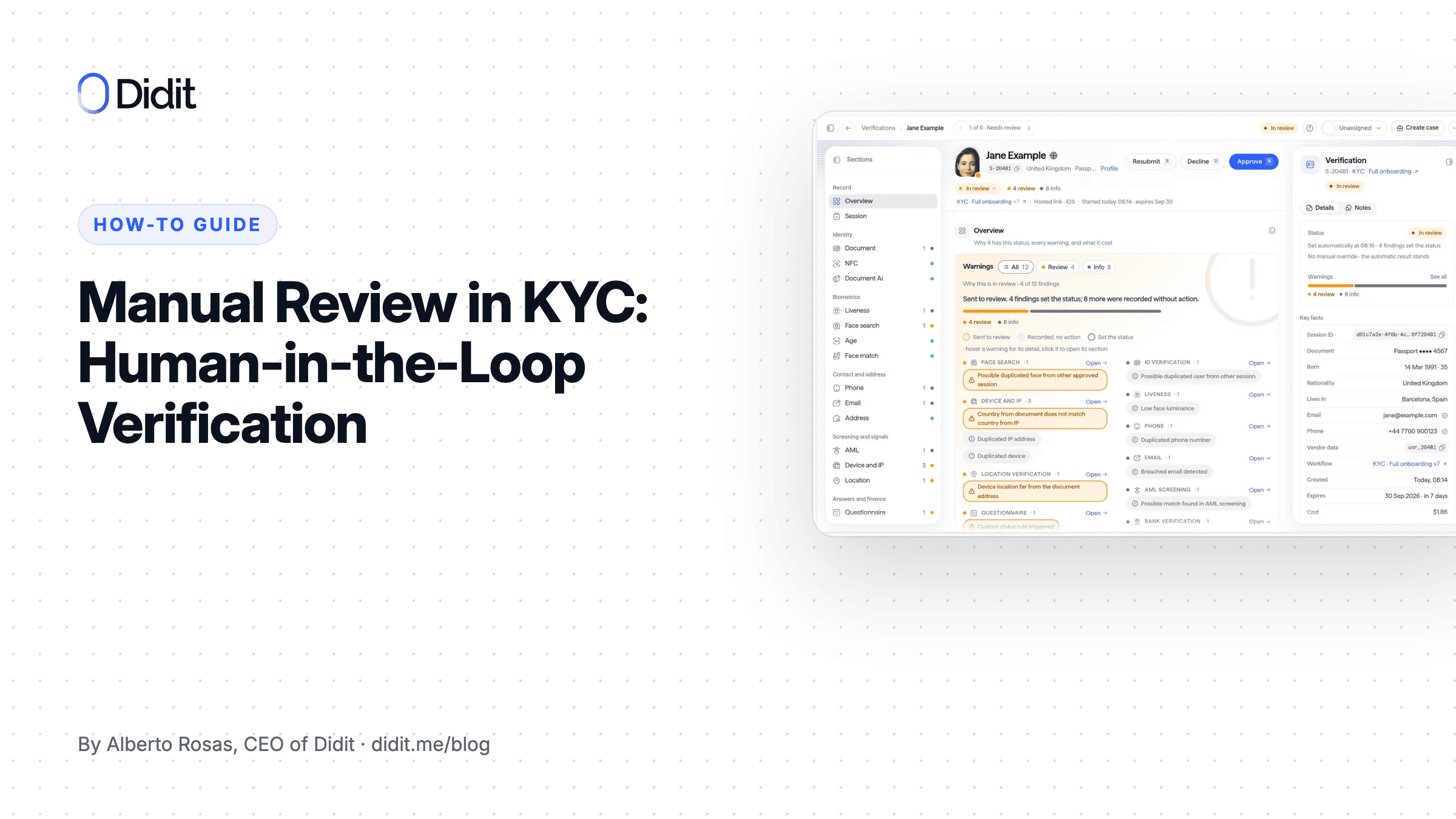
Open the session and read the warnings in the overview first. These are the signals that triggered the review: a low liveness score, an AML match, a document inconsistency. Your job is to evaluate those specific flags, not to re-run the automated check. Check status_override too, which is set when a reviewer already changed the status by hand and carries the automatic_status the system had reached on its own.
Step 3: Check history and the event timeline
Click the user's vendor data to open the session history and see previous verification attempts. The events section is a chronological log of every action in the session, which is where repeated attempts and odd gaps between steps show up. With Face Search enabled, the decision's linked_records object summarises same-face matches, earlier verifications and network links.
Step 4: Inspect the document
Visually verify only where the warning is ambiguous: suspected tampering, low image quality, or a field that disagrees with another field. Hover over document images to zoom for pixel-level inspection of microprinting and holograms. Read the extracted OCR data, where low-confidence fields are highlighted. Where Document AI detected a QR code or barcode, the session view marks its location on the image and shows the decoded payload; a code that was found but could not be decoded is shown as detected only, with no payload claimed. Then review document matches against your blocklist and earlier sessions.

Step 5: Review the biometrics
For a flagged face match, compare structural features such as eye shape, nose geometry, jawline and distinguishing marks rather than overall impression. For liveness, read the score together with the capture conditions: poor camera quality or low lighting can lower the score for a genuine user, and the documented guidance is to request resubmission rather than decline in that case. Face search results need the same care. A duplicate against a different session may be one person verifying under multiple identities, a blocklist match usually warrants a decline, and facial similarity between different people does produce false positives, so weigh the confidence score and look at the images.

Step 6: Review risk signals
AML screening has two shapes. No matches means low risk. Matches means opening each hit, reading the category (PEP, sanctions, watchlist, adverse media) and weighing the source and recency of the data. Use the scores, not just the label: the section header shows the aggregate risk score the AML status came from, which is the highest risk score among hits not marked false positive, compared with the workflow's approve and review thresholds, and each row shows the hit's match score for identity confidence and risk score for entity risk. Then check Device and IP Analysis, which provides contextual risk signals for review, and Database Validation for the government-source answer. If database_validations is null, database_validation_not_performed_reason explains why.

Step 7: Record the decision
Three outcomes, with the criteria we apply:
- Approve when the document looks authentic and unaltered, the data fields are consistent and legible, the face match supports the same person, the liveness score is acceptable, no relevant AML hit remains after review, and device and location data are consistent.
- Decline when the document appears tampered, forged or digitally altered, the selfie does not match the portrait, a high-confidence AML match is confirmed, there are strong indicators of a presentation attack, or device and location inconsistencies point to fraud.
- Request resubmission when the problem is fixable by the user: a blurry image, a liveness failure caused by hardware or lighting, the wrong document, or an incomplete step.
You can decide in the console, or record it through the API. This is the documented call for an approval after review, from the update-status API reference:
curl -X PATCH https://verification.didit.me/v3/session/<SESSION_ID>/update-status/ \
-H "x-api-key: <API_KEY>" \
-H "Content-Type: application/json" \
-d '{
  "new_status": "Approved",
  "comment": "Cleared after compliance review."
}'
And this asks the user to redo one specific step:
curl -X PATCH https://verification.didit.me/v3/session/<SESSION_ID>/update-status/ \
-H "x-api-key: <API_KEY>" \
-H "Content-Type: application/json" \
-d '{
  "new_status": "Resubmitted",
  "nodes_to_resubmit": [{ "node_id": "feature_poa_1", "feature": "POA" }],
  "comment": "Please upload a clearer proof of address",
  "send_email": true,
  "email_address": "user@example.com"
}'
Step 8: Close the loop
Every status change fires status.updated and writes a review trail entry with the actor and your comment. If you send email, preview it first: the decision-email preview and the resubmission preview return subject, html, recipient, will_be_sent and not_sent_reason without changing anything, and the preview_token they return is valid for 15 minutes. Resubmission resets the session expiration window and sends the user back to the steps you listed; what those steps returned before stays readable with include=resubmissions.
Expected output
The update call is deliberately thin. Its whole response body is:
{ "session_id": "<uuid>" }Fetch the refreshed record with GET https://verification.didit.me/v3/session/{session_id}/decision/ and read status, status_override, decision_trace.decided_by and the reviews array to confirm what the console now shows for that session.
Inputs and outputs
| Field | Direction | Notes |
|---|---|---|
new_status | Request, required | Approved, Declined or Resubmitted. Any other value is rejected. |
comment | Request, optional | Free text saved on the audit trail and visible in the console review log. |
nodes_to_resubmit | Request, required when resubmitted | Array of entries such as { "node_id": "feature_poa_1", "feature": "POA" }. |
send_email, email_address, email_language | Request, optional | email_address is required when send_email is true. Language is an ISO 639-1 code, default en. |
email_preview_token | Request, optional | Only valid with send_email=true, and then sends exactly the email you previewed. |
link_to_session_id, link_reason | Request, optional | Groups same-person KYC verifications on approval. Requires new_status of Approved and a non-blank reason of at most 2000 characters. |
session_id | Response | The only field in the response body. |
status.updated webhook | Side effect | Fires on every status change, alongside the user.status.updated or business.status.updated alias. |
| Review trail entry | Side effect | Written with the actor and your comment. |
Failure cases and recovery
| Symptom | Cause | Recovery |
|---|---|---|
400, invalid new_status | Value other than the three accepted strings | Use Approved, Declined or Resubmitted, with exact capitalisation. |
| 400, current status not allowed | The session sits outside the allowed current statuses | The error names the current status. Fetch the decision and confirm a decision is possible at all. |
| 400, new status equals current status | Setting Resubmitted on a session already resubmitted | Fetch the decision and check which steps are still open. |
| 400, nothing to resubmit | nodes_to_resubmit missing or empty | Send at least one node with its node_id and feature. |
| 400, preview receipt only valid when the email is sent | email_preview_token sent with send_email=false | Either set send_email=true and pass the recipient, or drop the token. |
| 409 before anything changes | The email or the session changed since the preview | Preview again and confirm with the fresh token. |
| 403 | The API key lacks write:sessions | Use a key with the privilege, or decide in the console with a role that can write sessions. |
| 404 | Session id does not exist or belongs to a different application | Confirm the id came from the same application as the key. |
Two more rules to know before you automate this. KYB-only nodes KYB_REGISTRY and KYB_KEY_PEOPLE cannot be resubmitted directly, because the parent session recomputes from the child KYC sessions. And link_to_session_id rejects self-links and KYB participants.
Worked cost example
Take 10,000 completed KYC checks a month with AML screening on every session, and assume 6 percent of sessions reach In Review. List prices, no plan discount:
- KYC: 10,000 × $0.33 = $3,300.00
- AML screening: 10,000 × $0.20 = $2,000.00
- Checks total: $3,300.00 + $2,000.00 = $5,300.00
- Review volume: 10,000 × 0.06 = 600 sessions for your team to work
- If 10 percent of those reviews end in a redone proof of address, and each redone step bills as a new completed check: 600 × 0.10 = 60, then 60 × $0.20 = $12.00
- List total: $5,300.00 + $12.00 = $5,312.00
On Growth every Didit price is 4 percent lower: $5,312.00 × 0.96 = $5,099.52, plus the $99.00 monthly fee, for $5,198.52 that month. The 600 reviews add no line item in the public price list; their cost is the reviewer hours you staff. The same arithmetic on the pricing page uses the live feed, and the billing rules are in https://docs.didit.me/getting-started/pricing.
Paid steps and review boundaries
Billing is per completed check from prepaid credit. The checks a reviewer looks at were billed when they completed: ID document verification $0.15, passive liveness $0.10, face match 1:1 $0.05 and device and IP analysis $0.03 make the $0.33 KYC; AML screening is $0.20; proof of address is $0.20; ongoing AML monitoring is $0.07 per user per year. Emails Didit sends during a verification, including codes, links and status updates, are free. The console review dashboard carries no separate per-review line in the public price list, so the cost of a review is the reviewer hour behind it.
Boundaries worth writing into your procedure:
- A reviewer moves a session to
Approved,DeclinedorResubmitted.Kyc Expiredis automatic when the verified document passes its expiry date, unless Expiration mode is set to allow expired documents for that country and document type. - The automated document checks already ran. Reviewers evaluate flagged warnings and confirm visually when a warning is ambiguous.
- Setting
ApprovedorDeclinedon a session that already has that status returns 200 without another status event or email, so retries are safe. A first same-person link can still be created on that call. - Grouping with
link_to_session_iddoes not merge profiles or biometric data, and deleting a verification removes it from the group. - In KYB, a resubmitted child session sends its parent back to
Awaiting User. - Session chats keep the discussion on the session, with
@emailmentions and a permanent log, which is how a borderline case gets escalated without leaving the console.
Sources
- Didit docs: Manual KYC Review, Reviewer Dashboard
- Didit docs: Update Session Status API
- Didit docs: Retrieve Session API
- Didit docs: Verification Statuses
- Didit docs: Webhooks
- Didit docs: Roles and Permissions
- Didit docs: Session Chats
- Didit docs: Pricing and billing rules
- Didit pricing page and the machine-readable price feed, read November 26, 2026
- Didit MCP server
Next step: open the sandbox at https://business.didit.me/, create a test session and work one review end to end, including a resubmission, then read the decision back before you write your review policy. No sales call is needed.
Try it
Try this in the sandbox
Run the check this guide describes, free.
The product this post is about, taken from its topic. Run it free in the sandbox.
Author
Alberto Rosas
Co-founder and CEO

Keep reading
Other guides in the same topic.
 What Is the Purpose of FICA in South Africa? 2026 Guide
FICA is South Africa's anti-money laundering law. It creates the Financial Intelligence Centre and requires accountable institutions to identify and verify clients, screen for PEP and sanctions risk and report suspicious.
Alberto RosasNov 26, 2026 Sixth Money Laundering Directive (6AMLD): What Changed and Which Rules Apply
6AMLD is Directive (EU) 2018/1673: Member States must criminalise laundering, widen predicate offences and set a four-year penalty floor. It adds no new due diligence duties for firms.
Alberto RosasNov 26, 2026 Automated Sanctions Screening: Canada, the Entity List and Embargoes
Automated sanctions screening matches people and companies against lists such as Canada's autonomous sanctions made under SEMA and JVCFOA and the OFAC SDN List, and returns candidate hits scored for identity confidence and.
Alberto RosasNov 26, 2026Questions
Frequently asked questions
What is manual review in KYC?
Manual review, also called human-in-the-loop verification, is the step where a trained person decides a session that automated checks could not settle. In Didit the session sits in In Review until a reviewer approves it, declines it, or asks the user to redo specific steps.
When does a session go to In Review in Didit?
When the automated checks raise one or more warnings, for example a low liveness score, a suspected document inconsistency, a failed MRZ check digit, an expired document or an AML match. The warnings appear in the session overview, and the same signals are returned on the decision as decision_trace.status_warnings and warning_counts.
What are the alternatives to manually reviewing customer ID documents?
Automate the parts that return a score or a verdict: ID Verification for security features, MRZ, expiry and field consistency; passive or active liveness and 1:1 face match for biometrics; Face Search for duplicates; AML screening for watchlists; Database Validation for government records; and Device and IP Analysis for contextual risk signals. Route only the flagged sessions to people. Didit prices those modules individually, from $0.03 for device and IP analysis up to $0.20 for AML screening.
Who can approve a session in the Didit console?
Anyone whose role grants write access to sessions. The built-in Compliance Officer role is built for reviewing sessions and handling AML, blocklists and audit logs, and organization owners can create custom roles with sessions write under Settings, Organization, Roles and permissions.
How do I approve a session through the API?
Send PATCH https://verification.didit.me/v3/session/{session_id}/update-status/ with the x-api-key header and a body containing {"new_status": "Approved"}, optionally with a comment. The response contains only session_id, so fetch the decision again to confirm the new status.
How do I ask a user to redo one step?
Set new_status to Resubmitted and list the steps in nodes_to_resubmit, for example { "node_id": "feature_poa_1", "feature": "POA" }. Only the listed steps are redone, the expiration window resets, and with send_email=true the user receives a fresh link explaining what to redo.
Does manual review cost extra on Didit?
The price list bills per completed check, and the checks a reviewer examines were billed when they completed: a full KYC is $0.33 and an AML screening is $0.20. The console review dashboard adds no per-review charge, so the remaining cost is the reviewer hours you staff.
What happens after a reviewer decides?
The status change fires a status.updated webhook, writes a review trail entry with the actor and the comment, and, if you set send_email=true, sends the decision email or a fresh resubmission link. Your system can read the decision from the webhook payload or re-fetch it from GET /v3/session/{session_id}/decision/.
Can a reviewer reverse an approved session?
Yes. A reviewer or the update-status endpoint can move an Approved, Declined, Resubmitted, Abandoned or Kyc Expired session to Approved, Declined or Resubmitted. Setting Approved or Declined on a session already in that status returns 200 without a second status event or email.
Do reviewers see previous attempts and other sessions for the same person?
Yes, where the data exists. The user's vendor data links to the session history, the events section is a chronological log of the session, and with Face Search enabled the decision's linked_records object summarises same-face matches, earlier verifications and network links.
Compliance built in
Audited, certified and attested.
We hold the certifications and build each country's rules into your flows, so you can launch anywhere without worrying. Security and Compliance center
- Regulation encoded into your flows
Tell us what you do and where. Didit lists the rules that apply to you, with sources, and builds the checks each country needs into one workflow.
- Ready for AMLR
Every requirement of the new EU anti-money laundering rules, from checking customers to human review, is already covered by a Didit check.
- Tested in Spain's Treasury sandbox
Spain's Treasury published its supervised sandbox report on Didit's NFC plus active liveness onboarding; SEPBLAC took part and valued the added measures positively.
- Audited, not self-declared
iBeta Level 1 and Level 2. Liveness tested under ISO/IEC 30107-3.
Your obligations · 3 regions
 SOC 2 Type 2
 ISO 27001
 iBeta Level 1 and Level 2
 EU regulator attestation
 FSM youth protection
 GDPR
 EBA remote onboarding
 MiCA compatible
 FIDO Alliance member
- AMLREU AML Regulation ready
Integration · Didit MCP
Run Didit from your own AI agent
Connect Didit to Claude, Cursor, VS Code or ChatGPT and just ask in plain words. Your agent can do anything you can do in the console, with the same permissions you have.
 Add to Claude
 ChatGPT
 Cursor
- Build workflowsDescribe the checks you need. The agent creates and publishes the flow.
- Run investigationsAsk why a session was declined, review cases, search people and companies.
- Change rulesCreate payment rules, test them on past data and switch them on.
- Pull reportsAsk for numbers, exports or the audit log.
Didit Academy