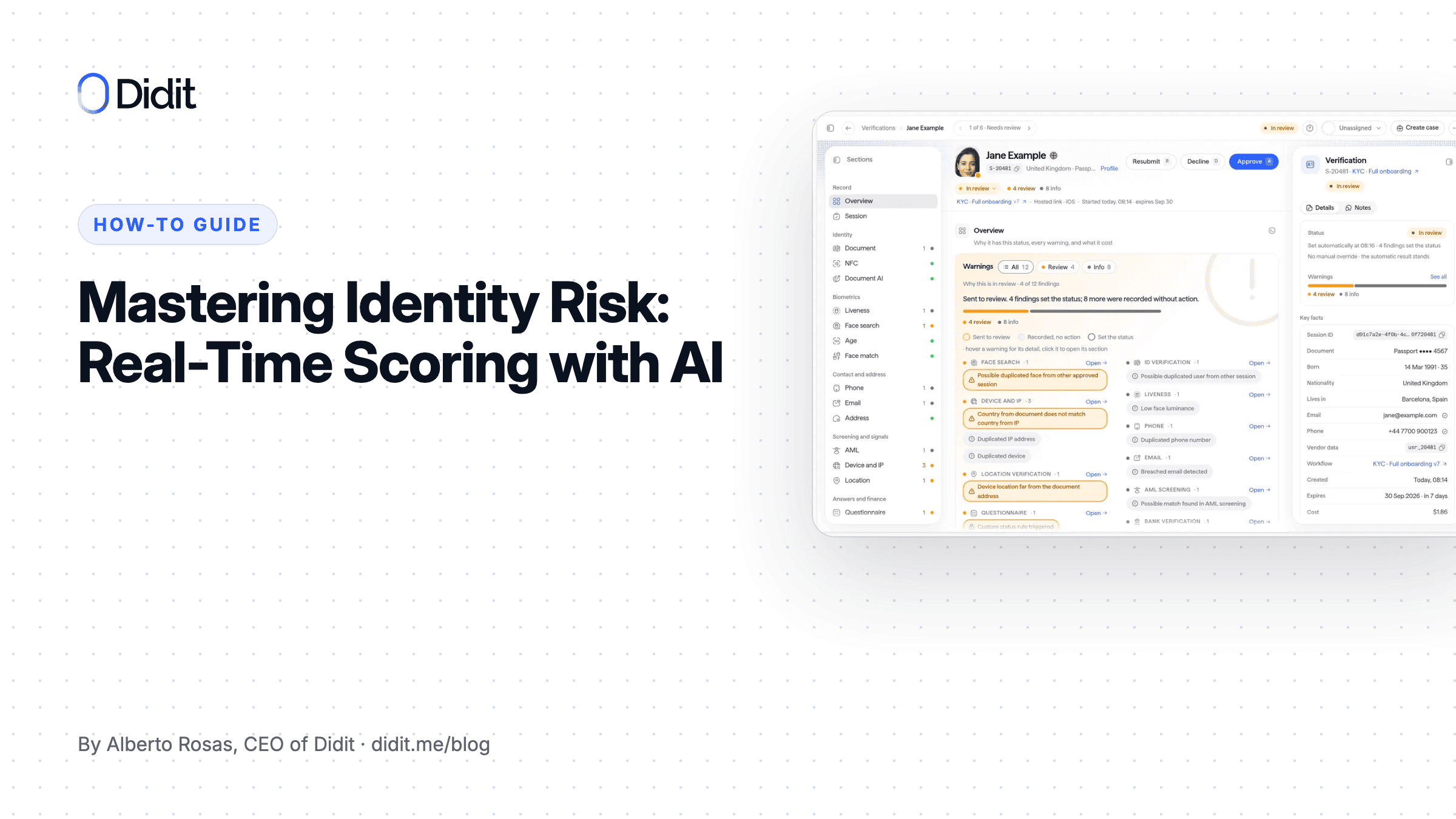
Mastering Identity Risk: Real-Time Scoring with AI
Score identity risk in real time by layering Didit session checks (KYC $0.33, AML $0.20) with transaction rules that add score deltas into an integer score checked against your own thresholds.
 Alberto RosasCo-founder and CEO
Contents
In this guide
Jump to the part you need.
Real-time identity risk scoring on Didit fits product and risk teams that must decide on a signup or transaction at sub-2-second p99 latency and still explain the decision to an auditor. A full ID check costs $0.33, AML screening costs $0.20, and transaction monitoring costs $0.001 per transaction beyond the plan allowance. The caveat: Didit returns session statuses, warnings and decision evidence, while transaction scores map to statuses through your configured thresholds.
Last updated: November 26, 2026. Prices checked against the live Didit price feed on November 26, 2026.
| Building block | What it returns | List price |
|---|---|---|
| Full ID check (KYC) | ID document, passive liveness, face match 1:1, device and IP analysis | $0.33 per completed check |
| AML screening | Screening results against 1,300+ lists, kept for review | $0.20 per check |
| Ongoing AML monitoring | Re-screening after onboarding | $0.07 per person per year |
| Email verification | Email verification check | $0.02 per check |
| Phone verification | Phone verification check | From $0.02 per code plus the carrier price |
| Face Search 1:N | Face search check | $0.05 per search |
| Transaction monitoring | Integer score plus one entry per matched rule | $0.001 per transaction beyond the plan allowance (1,000 Free, 10,000 Growth, 100,000 Scale per month) |
| Wallet screening (KYT) | Screening result for a wallet address | $0.15 per screening |
| Workflow Orchestrator and MCP server | Flow design and assistant access | Free, included on every plan |
Start free in the sandbox at business.didit.me, with no sales call. If you would rather have an assistant draft the first integration, connect Didit through the Didit MCP server. The product this page spends most of its time in is Transaction Monitoring, the screening detail lives on the AML screening page, and every number here appears on the pricing page.
What a real-time identity risk score actually decides
A document verification returns per-check results and warnings for one session. A transaction rule score returns an integer: the sum of the score_delta of every rule that matched. That difference matters because a session can pass a document check and still raise warnings from the device, from a face search or from a watchlist hit at the same time.
Didit splits the work into two layers that share one console and one API.
- Session verification (KYC and KYB). Each verification session runs a sequence of checks and returns per-check results plus warnings. The session resolves to one exact status from a documented set:
Not Started,In Progress,Approved,Declined,In Review,Awaiting User,Resubmitted,Expired,AbandonedorKyc Expired. A session carries 200+ fraud signals and decisions come back at sub-2-second p99. - Transaction scoring. Every transaction gets an integer score, computed as the sum of the
score_deltaof every rule that matched. Thresholds map that score toAPPROVED,IN_REVIEWorDECLINED, and individual rules can override the status.
The two status systems are separate. Session statuses are title case strings such as In Review and Resubmitted. Transaction statuses are upper case values such as IN_REVIEW and DECLINED. Read them from different endpoints and never map one set onto the other.
Our recommended method is the boring one: layer several moderate signals, keep single checks from being able to decide alone, set thresholds you can tune without editing rules, and leave a person on the final call wherever money or a sanctions hit is involved. Didit has 4,000+ companies as active customers across 220+ countries.
Where AI improves identity fraud detection, and where rules still decide
The AI part of an identity risk decision is not a single model score you can point at. It is the accumulation of learned and rule-based signals that a person could not weigh by hand at volume:
- Document forensics. Document AI reads and checks the document, and configurable document liveness thresholds target specific fraud types such as screen replay, printed copy and portrait replacement.
- Biometric comparison. Passive liveness, face match 1:1 and Face Search 1:N catch presentation attacks and repeat faces.
- Device and network signals. Device fingerprinting and IP intelligence flag duplicate devices, VPNs, proxies, Tor and location mismatch, including when someone clears storage or opens an incognito window.
- Watchlist screening. AML screening checks against 1,300+ lists and returns screening results for review, so a hit arrives with its evidence attached instead of as a bare yes.
- Explainability. Every session decision carries
decision_tracewithwarning_countsandstatus_warnings, and every transaction carriesrule_runs. You can show a reviewer or an auditor why a decision happened.
Rules still decide the boundary. Models rank and flag; your thresholds and rule actions choose what happens next. That split keeps an automated decline easier to review and audit.
Prerequisites
- A Didit organization. Sandbox testing is free and unlimited, and the Free plan includes $10 of monthly credit for organizations that sign up with a work email.
- A published workflow and its
workflow_id. Workflows are versioned: publishing creates an immutable version, and every session keeps the version it was created with. - An API key. The decision endpoint needs a key with the
read:sessionsprivilege. - An HTTPS endpoint for webhooks, plus the signing secret shown on the webhook destination.
- Two numbers you are willing to defend: a review threshold and a decline threshold.
Step by step: score identity risk in real time
Step 1. Design the workflow in the console
Open the Workflow Builder. Simple Mode is a template with toggles for liveness, face match and AML. Advanced Mode is a node graph with feature nodes (ID Verification, Liveness, Face Match, NFC, AML, Phone and Email Verification, Questionnaire, Proof of Address, Document AI, Database Validation, Device and IP Analysis, Age Estimation) and branch nodes that route on extracted data, verification status, country, document type, age or a webhook JSON path. Build the layered flow you want, then publish it and copy the workflow UUID.
Step 2. Decide the expected values you will send
expected_details adds comparison signals when you already know user or business data. Send first_name, last_name, date_of_birth, nationality (ISO-3) and id_country (ISO-3) when you have them; a mismatch against the extracted document data surfaces as a decision warning. For a KYB workflow send company_name, registry_country and registration_number instead.
Step 3. Create the session
Post to the unified endpoint POST https://verification.didit.me/v3/session/ with your API key in the x-api-key header. Always send a stable vendor_data: it binds the session to your user entity and feeds duplicate detection.
curl -X POST https://verification.didit.me/v3/session/ \
  -H "x-api-key: $DIDIT_API_KEY" \
  -H "Content-Type: application/json" \
  -d '{
    "workflow_id": "WORKFLOW_UUID",
    "vendor_data": "user-8241",
    "expected_details": {
      "first_name": "Ana",
      "last_name": "Ruiz",
      "date_of_birth": "1992-04-17",
      "nationality": "ESP",
      "id_country": "ESP"
    },
    "metadata": { "plan": "growth" }
  }'
Keep the returned session_id and session_url. The session starts at Not Started and moves to In Progress once the person opens the link.
Step 4. Register the webhook destination and verify signatures
Subscribe to status.updated so you learn about a session decision without polling, and to transaction.created and transaction.status.updated for scored transactions. Read the raw request body before parsing anything, verify X-Signature-V2 (HMAC-SHA256 over the sorted canonical JSON) with your destination secret, reject timestamps outside 300 seconds, and compare in constant time against the header and its -Previous variant during a secret rotation. Return 2xx fast and write idempotently on event_id.
Step 5. Retrieve the decision and read the warnings
The documented call takes the session_id from step 3 and a key with read:sessions.
curl https://verification.didit.me/v3/session/<SESSION_ID>/decision/ \
  -H "x-api-key: <API_KEY>"
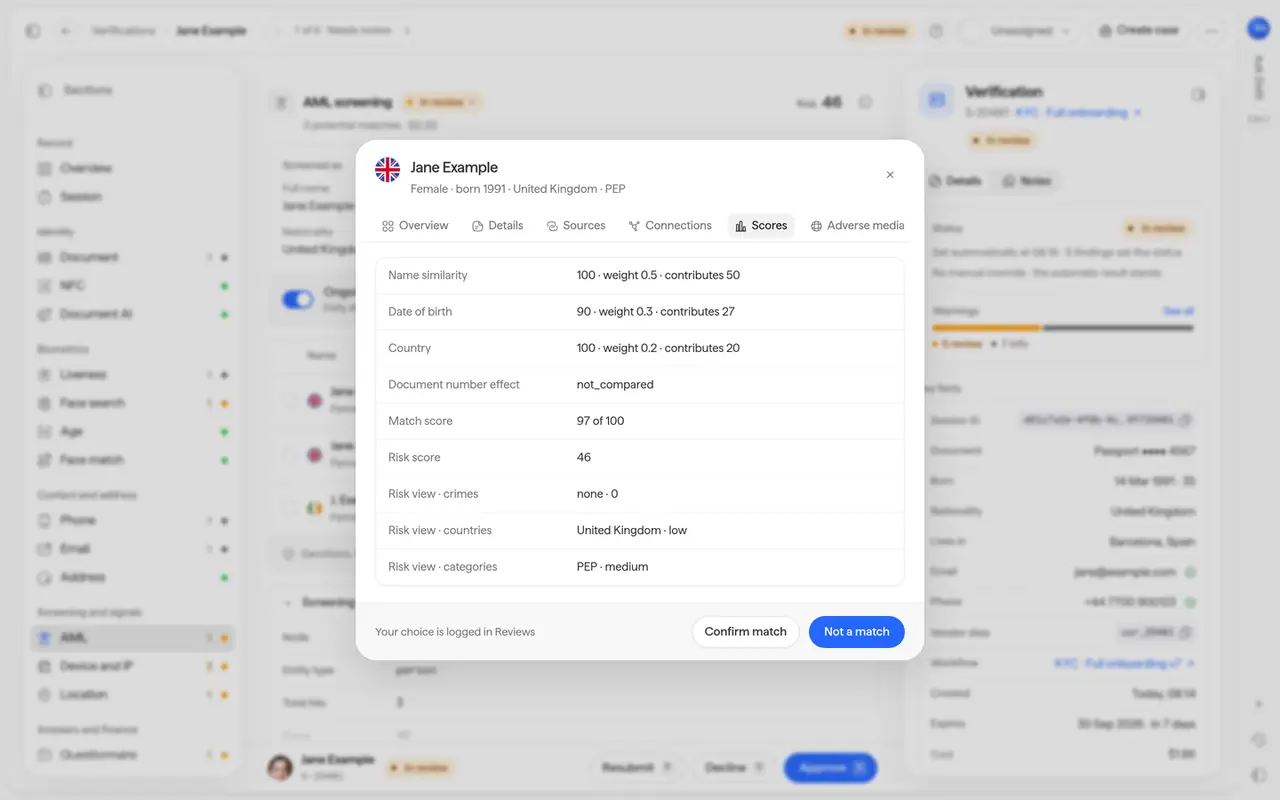
Branch on session_kind first (user or business), then read status. The risk evidence sits in arrays: id_verifications, liveness_checks, face_matches, nfc_verifications, aml_screenings, phone_verifications, email_verifications, ip_analyses, database_validations, plus decision_trace with warning_counts and status_warnings. Feature arrays are always plural; a feature that did not run is absent or null.

Step 6. Turn transaction rules into a score
For transactions, the score is a sum, not a classifier. Configure rules under Transactions, then set thresholds under Transactions, Settings.
score = sum of score_delta of every matched rule

if decline_threshold < 500 and score >= decline_threshold: status = DECLINED
else if score >= review_threshold: status = IN_REVIEW
else: status = APPROVED
The review threshold defaults to 75. The decline threshold defaults to 500, which is also the maximum and means never decline on score alone. Lower it only when you have watched real rule totals, because a typical matched rule contributes 25 to 35 points.
Step 7. Read the score and every rule that produced it
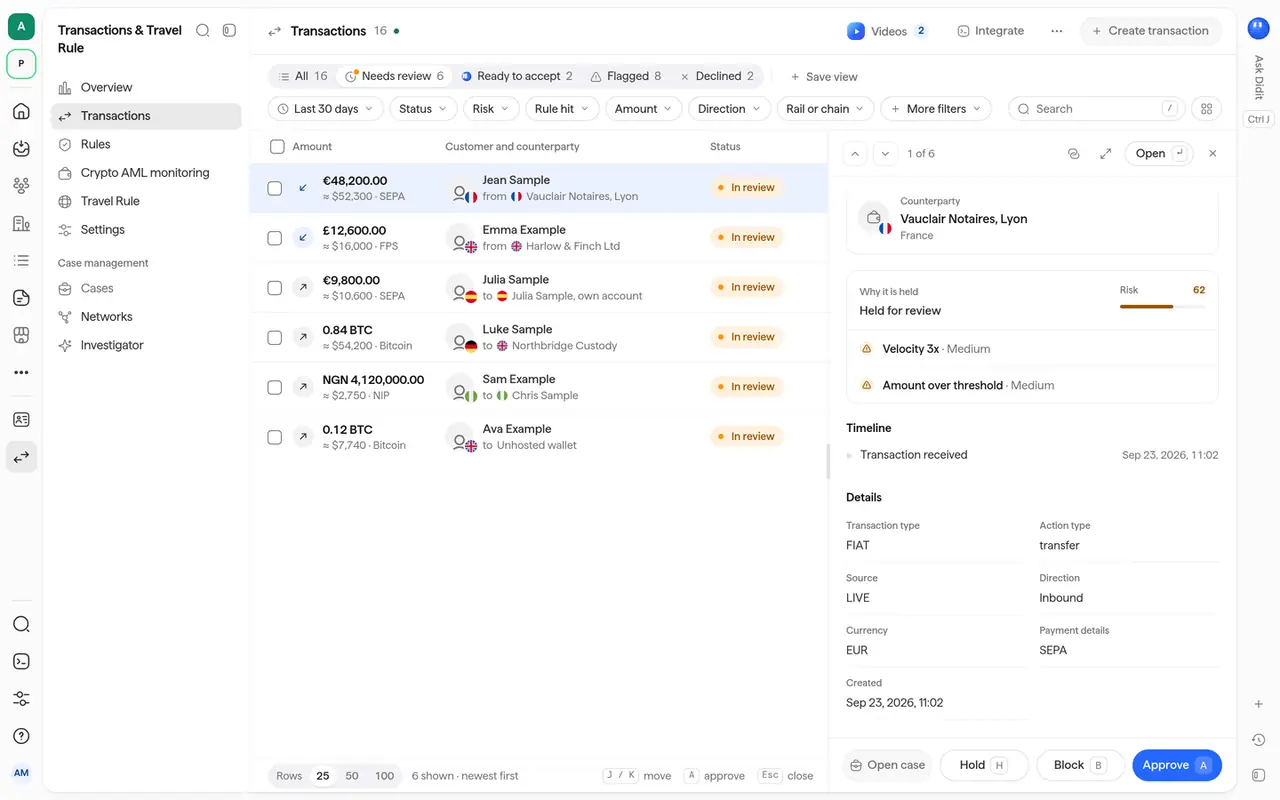
Each transaction response carries score and a rule_runs[] array with one entry per matched rule. The console shows the same breakdown on the Score tab, with the threshold values used at evaluation time available on hover.
{
  "txn_id": "tx-0002",
  "status": "IN_REVIEW",
  "score": 65,
  "rule_runs": [
    {
      "rule_title": "High-value outbound",
      "matched": true,
      "score_delta": 30,
      "severity": null,
      "status_target": null,
      "action_summary": "score +30"
    },
    {
      "rule_title": "High-risk jurisdiction counterparty",
      "matched": true,
      "score_delta": 35,
      "severity": "HIGH",
      "status_target": "IN_REVIEW",
      "action_summary": "score +35; add_tag:high_risk_country"
    }
  ]
}
score_delta, and the actions it can take beyond adding to the score.Step 8. Run new rules in TEST mode before they can decline anyone
A rule in TEST mode evaluates against transactions but contributes nothing to the score or status, and its runs are recorded with is_test = true. Monitor test-mode results before switching the rule to ACTIVE. This is a practical way to avoid a rule that declines your best customers.
Step 9. Keep transaction statuses and session statuses separate
On the transaction side, APPROVED lets the transaction through, IN_REVIEW opens an alert for a reviewer, and DECLINED is the transaction status produced by thresholds or rule actions. Rule actions can also set AWAITING_USER for remediation, add tags, or add an identifier to a blocklist. On the session side, a reviewer approves, declines or requests Resubmitted, so the person redoes only the failed steps, and Kyc Expired arrives when the verified document passes its expiry date. That expiry status is the right trigger for a re-verification flow rather than a new onboarding.
Expected output
After the steps above you should see four things.
- A session that walks
Not StartedtoIn Progressto a decision, with astatus.updatedwebhook carrying the full decision body forApproved,DeclinedandIn Review. - A
decision_traceblock that namesdecided_byasautomatic,manualorinvestigator, withwarning_counts. - Transactions that return an integer
score, astatus, and arule_runsentry per matched rule. A transaction that matches no rule scores 0 and landsAPPROVED. - For a worked case from our docs, three rules contributing 30, 35 and 35 produce a score of 100. With a review threshold of 60 and a decline threshold of 85 that transaction is declined. With the defaults (75 and 500) it goes to review instead, because the default never declines on score.
Failure cases and recovery
| Symptom | Cause | Recovery |
|---|---|---|
401 on the decision call | Invalid or missing API key | Re-issue the key and send it in the x-api-key header |
403 with a permission detail | The key lacks read:sessions | Add the privilege to the key |
404 with Not found. | Wrong session id, or a session owned by another application | Use the session_id returned on create, from the same application |
400 on callback | The callback host is not in the application allowed domains | Add the origin, or use a custom URL scheme such as an app deep link |
| Every transaction scores 0 | No rule matched, or the rules are still in TEST mode | Inspect rule_runs, then switch the rule to ACTIVE |
| A wave of declines after a threshold change | Decline threshold set below normal rule totals | Raise it, or move it back to 500 so high scores route to review |
| Review queue flooded | Review threshold too low for your rule set | Raise the review threshold. Threshold changes apply to new transactions only; historical transactions keep their evaluation-time status |
| Webhook rejected by your own code | Signature computed over parsed JSON, or a stale timestamp | Verify the raw body with X-Signature-V2 and enforce the 300 second window |
Sessions stuck at Expired or Abandoned | The user never opened the link, or did not finish in time | Send a reminder inside the session window, or create a new session and treat it as a retry |
Inputs and outputs
| Input | Sent to | Output | Read it in |
|---|---|---|---|
workflow_id | POST /v3/session/ | session_id, session_url | Create response |
expected_details | POST /v3/session/ | Mismatch warnings against the extracted document data | decision_trace.status_warnings |
vendor_data, metadata | POST /v3/session/ | Echoed identifiers you can join on | Decision response and webhook envelope |
| Destination signing secret | Webhook destination in the console | X-Signature-V2, X-Timestamp headers | Your endpoint, before parsing |
Rule score_delta and actions | Transaction rules | score and rule_runs[] | Transaction response and console Score tab |
preferred_review_score_threshold, preferred_decline_score_threshold | Transactions, Settings | APPROVED, IN_REVIEW or DECLINED | Transaction status |
Paid steps and the review boundary
- Billing is per completed check from prepaid credit. A full ID check is $0.33, AML screening $0.20, email verification $0.02, face search $0.05, phone verification from $0.02 plus the carrier price.
- Database validation is priced per country, and each completed attempt is charged separately, including partial matches and no matches. Two completed attempts mean two charges.
- Transaction monitoring is $0.001 per transaction beyond the monthly allowance. The Workflow Orchestrator and the MCP server cost nothing.
- Plan credit resets monthly and does not roll over. Growth is $99 a month with $115 of credit and 4% off every Didit price; Scale is $299 a month with $350 of credit and 10% off.
- Keep a person on the boundary: sanction and PEP hits, any decline that removes access to money, and every
In Reviewsession. A reviewer approves, declines or requests a resubmission, which makes the automated decision easier to review and audit.
Worked cost example
Take 20,000 new users a month. Each one gets the full ID check plus AML screening plus email verification, and there are 400,000 monitored transactions a month.
Per user at list price: $0.33 (KYC) + $0.20 (AML) + $0.02 (email) = $0.55. For 20,000 users: 20,000 x $0.55 = $11,000.
On the Scale plan the same mix is $0.297 + $0.18 + $0.018 = $0.495 per user, so 20,000 x $0.495 = $9,900.
Transactions on Scale include 100,000 a month, so 400,000 minus 100,000 = 300,000 extra at $0.001 each = $300.
Monthly total on Scale: $9,900 + $300 + $299 (plan fee) = $10,499. The same volume at list prices, with no plan fee, would be $11,000 for the checks plus 399,000 extra transactions x $0.001 = $399, so the list-price total is $11,399. Phone codes and any database validation are excluded from both figures.
Sources
- Didit docs: Transaction Risk Scoring, Formula and Thresholds
- Didit docs: Workflow Builder
- Didit docs: Create Session API
- Didit docs: Retrieve Session API
- Didit docs: Webhooks and HMAC signing
- Didit docs: Verification Statuses
- Didit docs: Device and IP Analysis
- Didit docs: Pricing and billing
- Didit pricing page and pricing as JSON, read November 26, 2026
- Didit Transaction Monitoring product page
- Didit AML screening product page
- Didit MCP server
No third-party vendor pages are cited on this page. Every price and product behaviour above comes from Didit's own published documentation and price feed, read on November 26, 2026.
Next step: open the sandbox at https://business.didit.me/, create a workflow, and run your first scored session with the free monthly credit. No sales call, no setup fee, and the sandbox is free on every plan.
Try it
Try this in the sandbox
Run the check this guide describes, free.
The product this post is about, taken from its topic. Run it free in the sandbox.
Author
Alberto Rosas
Co-founder and CEO

Keep reading
Other guides in the same topic.
 What Is the Purpose of FICA in South Africa? 2026 Guide
FICA is South Africa's anti-money laundering law. It creates the Financial Intelligence Centre and requires accountable institutions to identify and verify clients, screen for PEP and sanctions risk and report suspicious.
Alberto RosasNov 26, 2026 Sixth Money Laundering Directive (6AMLD): What Changed and Which Rules Apply
6AMLD is Directive (EU) 2018/1673: Member States must criminalise laundering, widen predicate offences and set a four-year penalty floor. It adds no new due diligence duties for firms.
Alberto RosasNov 26, 2026 Automated Sanctions Screening: Canada, the Entity List and Embargoes
Automated sanctions screening matches people and companies against lists such as Canada's autonomous sanctions made under SEMA and JVCFOA and the OFAC SDN List, and returns candidate hits scored for identity confidence and.
Alberto RosasNov 26, 2026Questions
Frequently asked questions
What is AI-driven risk scoring for identities?
It is the practice of turning every signal from a verification session into a decision weight instead of a single pass or fail. On Didit that means per-check results and warnings for a session, and an integer rule score for a transaction. The score is what your thresholds act on, and the warnings are what a reviewer reads.
Which AI approaches does Didit use for identity risk signals?
Didit combines document forensics, passive and active liveness, face match 1:1, face search 1:N, device fingerprinting, IP intelligence, AML screening against 1,300+ lists, and rule-based transaction scoring. Each session carries 200+ fraud signals. The output is deliberately explainable: decision_trace for sessions and rule_runs for transactions.
How does AI risk scoring work for authentication?
Authentication is a separate step from onboarding. Didit Biometric Authentication costs $0.10 per authentication, and the first 50,000 active users each month are free. A stored face from an approved verification is reused, so a returning user proves presence without repeating document capture.
Does Didit publish an advanced identity score for a person?
Didit documents transaction scores and session decision fields rather than a documented field named advanced identity score. A session returns per-check results, warnings and one exact status from the documented set, and a transaction returns an integer score built from rule deltas. If you need one number per user, derive it from the decision fields you care about and keep the underlying evidence stored next to it.
How does AI fraud detection work for ID verification?
Document AI reads the document, checks integrity and raises a front and back consistency flag such as DATA_INCONSISTENT when the two sides disagree. Liveness checks look for screen replay, printed copies and portrait replacement, and face match compares the live capture to the document portrait. Mismatches against the expected_details you supplied arrive as decision warnings rather than silent passes.
How do I set up account risk scoring?
Score the account at onboarding with a session workflow, then keep scoring it with transactions and re-screening. Didit exposes user entity status through the user.status.updated webhook with the values ACTIVE, FLAGGED and BLOCKED, and ongoing AML monitoring re-screens people at $0.07 per person per year. Map those states to your own access rules.
Can AI automate identity risk remediation?
Partly. A rule action can set a transaction to AWAITING_USER, which waits for user remediation on the workflow attached to the rule, and a reviewer can move a declined session to Resubmitted so the person redoes only the failed steps. Full automation should stop at sanctions hits and access to funds.
How much does real-time identity risk scoring cost on Didit?
A full ID check is $0.33, AML screening is $0.20, email verification is $0.02 and transaction monitoring is $0.001 per transaction beyond the allowance of 1,000 on Free, 10,000 on Growth or 100,000 on Scale. The Workflow Orchestrator and MCP server are free. Growth takes 4% off Didit prices and Scale takes 10%.
Which AI companies lead in identity verification?
We can only give you numbers you can check. Didit serves 4,000+ companies across 220+ countries, publishes every unit price, and holds SOC 2 Type 2 and ISO/IEC 27001:2022 certification. For any other vendor, read the claim on that vendor's own page and note the date you read it.
What happens when a transaction score lands in review?
Nothing is decided automatically. The transaction is set to IN_REVIEW, a reviewer opens the alert, sees the score and the matched rules, and approves or declines. A rule can also force a status directly with change_status, which bypasses the thresholds entirely.
Can I score wallet activity the same way?
Yes, inside Transaction Monitoring. Wallet screening is a feature of that product at $0.15 per screening, and you can also bring your own screening provider and run it inside Didit. Wallet screening results sit next to transaction scores in the same console, so one reviewer sees both.
Compliance built in
Audited, certified and attested.
We hold the certifications and build each country's rules into your flows, so you can launch anywhere without worrying. Security and Compliance center
- Regulation encoded into your flows
Tell us what you do and where. Didit lists the rules that apply to you, with sources, and builds the checks each country needs into one workflow.
- Ready for AMLR
Every requirement of the new EU anti-money laundering rules, from checking customers to human review, is already covered by a Didit check.
- Tested in Spain's Treasury sandbox
Spain's Treasury published its supervised sandbox report on Didit's NFC plus active liveness onboarding; SEPBLAC took part and valued the added measures positively.
- Audited, not self-declared
iBeta Level 1 and Level 2. Liveness tested under ISO/IEC 30107-3.
Your obligations · 3 regions
 SOC 2 Type 2
 ISO 27001
 iBeta Level 1 and Level 2
 EU regulator attestation
 FSM youth protection
 GDPR
 EBA remote onboarding
 MiCA compatible
 FIDO Alliance member
- AMLREU AML Regulation ready
Integration · Didit MCP
Run Didit from your own AI agent
Connect Didit to Claude, Cursor, VS Code or ChatGPT and just ask in plain words. Your agent can do anything you can do in the console, with the same permissions you have.
 Add to Claude
 ChatGPT
 Cursor
- Build workflowsDescribe the checks you need. The agent creates and publishes the flow.
- Run investigationsAsk why a session was declined, review cases, search people and companies.
- Change rulesCreate payment rules, test them on past data and switch them on.
- Pull reportsAsk for numbers, exports or the audit log.
Didit Academy


