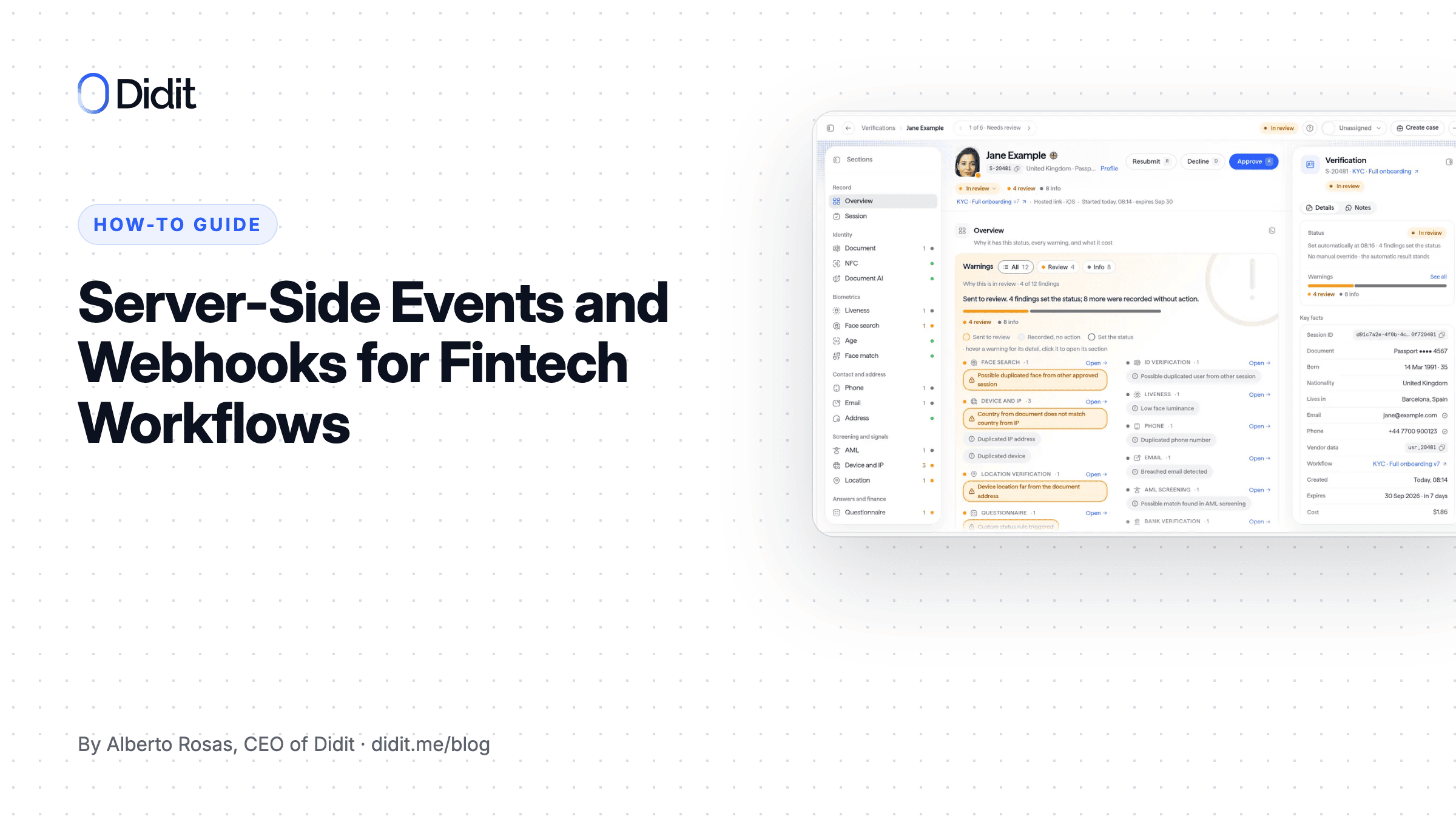
Server-Side Events and Webhooks for Fintech Workflows
Didit sends signed webhooks (HMAC-SHA256, bounded retries, multiple destinations). Verify the signature on the raw body, branch on webhook_type, apply state idempotently, then run your own SSE stream from trusted events.
 Alejandro RosasCo-founder and CTO
Contents
In this guide
Jump to the part you need.
This how-to is for backend engineers at fintechs who need verification and transaction events to reach their own systems, and then their users' screens. Didit sends those events as signed webhooks. Our documentation covers webhooks. Build the SSE response on your own server and feed it from verified events. Webhook delivery is not on the public price list; the checks behind each event are billed per completed check, $0.33 for a full KYC.
Last updated: November 26, 2026. Prices checked against the live Didit price feed on November 26, 2026.
| Piece | Direction | Who provides it | What you get |
|---|---|---|---|
| Didit webhook | Didit server to your HTTPS endpoint | Didit, documented | Signed JSON event, HMAC-SHA256, fan-out destinations, bounded retries |
| SSE stream | Your server to your user's browser | You | One-way live updates over plain HTTP |
| Decision re-fetch | Your server to Didit | Didit, documented | Full V3 decision with per-feature arrays |
| Destination health | Your server to Didit | Didit, documented | health_status, failing_streak, 30-day delivery metrics |
Start free in the sandbox at business.didit.me, no sales call. If you want an AI assistant to read your verification and transaction data while you build, connect Didit through our MCP server.
What you end up with
Two outcomes, both testable. First, your backend applies each status change idempotently, and only after a signature check passed, so a replayed delivery cannot apply the same decision twice. Second, your user's screen updates on its own, because your server streams the change to the browser instead of the browser polling you every few seconds.
Didit delivers the event to each destination you registered and retries within a bounded policy, but it cannot know that your handler finished its work. So return 2xx once the event is accepted, key every write on event_id, and treat the webhook as a notification and the decision endpoint as the record.
Server-sent events and webhooks solve different halves of the same problem. A webhook is a POST from a server to a URL you registered, and it expects your code to act. SSE is a long-lived HTTP response from your server to one browser tab, opened by EventSource, and it carries text frames your page renders. Fintechs usually need both: webhooks to move state into your backend, SSE to move state into the interface.

status.updated event: status, warnings and the checks that produced them.Prerequisites
- A Didit organization and an application. The sandbox is free and unlimited, and nothing in it is charged.
- A public HTTPS endpoint that accepts POST and can read the raw request body before any framework parses it.
- The signing secret of the destination you create. You can read it from the destination record in the Business Console.
- An API key in the
x-api-keyheader if you want to audit destinations from code through the Management API. - The V3 decision endpoint,
GET /v3/session/{session_id}/decision/, for reconciliation. - For the browser half, an HTTP server you control that can hold a response open with content type
text/event-stream.
The seven steps
- Create a destination and subscribe to exact event names. Pick the URL, then set
subscribed_eventsto values from the documented list, for examplestatus.updated,user.status.updated,business.status.updated,transaction.created,transaction.status.updated,travel_rule.status.updatedandworkflow.compliance_changed. There is no wildcard, so include every event family you want; a destination that only subscribes tostatus.updatednever receives transactions. Create several destinations to fan out to different URLs, for example, separate endpoints for separate consumers. Use the Try Webhook test to push a sample event through before you write logic. - Verify the signature on the raw body, before JSON parsing. Check that the absolute difference between now and
X-Timestampis 300 seconds or less. Recompute HMAC-SHA256 with the destination secret over the sorted, Unicode-preserved canonical JSON and compare it withX-Signature-V2using a constant-time comparison. When a destination secret is rotated, the same signatures arrive again inX-Signature-V2-Previousfor 24 hours; accept a match on either header so verification keeps working while you deploy the new secret. - Branch on
webhook_typeand store statuses as exact strings. Statuses are case sensitive and contain spaces, so compare with strict equality againstNot Started,Approved,Declined,In Review,In Progress,Abandoned,Expired,Resubmitted,Awaiting UserandKyc Expired, which uses a single capital K. Session events carrysession_id; KYB payloads addbusiness_session_idand setsession_kindtobusiness, so route them to the business flow. - Return 2xx and update state idempotently. Return 2xx as soon as your documented handler has accepted the event, then apply the update idempotently. Key every write on
event_idso a repeated delivery cannot credit an account twice or send a second email. The acknowledgement is the first thing that leaves your endpoint. - Stream it to the browser with SSE, on your side. Open a response with content type
text/event-stream,Cache-Control: no-cacheandConnection: keep-alive, write adata:line when a trusted event lands, and clear the interval or listener when the client disconnects. The page subscribes withnew EventSource('/stream'). Stream only what the screen needs, such as the status, never the signing secret or the full decision payload. - Watch destination health.
GET /v3/webhook/destinations/returns every destination withwebhook_version,subscribed_events,health_status,failing_streak,failing_since,deliveries_count,failed_deliveries_count,average_response_time_ms,error_rate_percentageand 30 daily points.failingmeans 3 or more consecutive events failed their first attempt since the destination last answered successfully.degradedmeans an attempt failed in the last 24 hours and nothing has delivered that event since. - Reconcile from the decision endpoint. When a payload is incomplete, when you suspect a stale read, or when you verified with the deprecated simple signature that authenticates only the envelope, call
GET /v3/session/{session_id}/decision/and rebuild state from the V3 decision. The per-feature arrays are the record:id_verifications[],liveness_checks[],face_matches[],aml_screenings[],poa_verifications[],bank_verifications[]and, for KYB,registry_checks[]andkey_people_checks[].
Runnable example: audit your destinations
The destination list is the fastest way to prove your subscription set before you write a handler. This call is from the Didit Management API documentation and is safe to run against a sandbox application.
curl -X GET "https://verification.didit.me/v3/webhook/destinations/" \
  -H "x-api-key: YOUR_API_KEY"
The response is a JSON array ordered by creation time, not paginated. It never includes the signing secret; each item carries secret_last4, the last four characters, so you can tell secrets apart. Read the full secret from the single destination call when you need it.
Expected output: the event your endpoint receives
What arrives at your handler is this envelope. The decision object is present only when the status is Approved, Declined, In Review or Abandoned, and it mirrors the decision endpoint. sandbox_scenario carries the armed scenario slug on sandbox sessions and is null on live sessions.
{
  "event_id": "uuid",
  "session_id": "uuid",
  "status": "Approved",
  "webhook_type": "status.updated",
  "created_at": 1627680000,
  "timestamp": 1627680000,
  "application_id": "uuid",
  "environment": "live",
  "sandbox_scenario": null,
  "workflow_id": "uuid",
  "workflow_version": 1,
  "vendor_data": "your-internal-user-id",
  "metadata": { "user_type": "premium" },
  "decision": { }
}
On the destination audit call, the fields you act on are uuid, url, enabled, webhook_version (v3 is current), subscribed_events and health_status. There is no summary object on that response, so iterate the array directly.
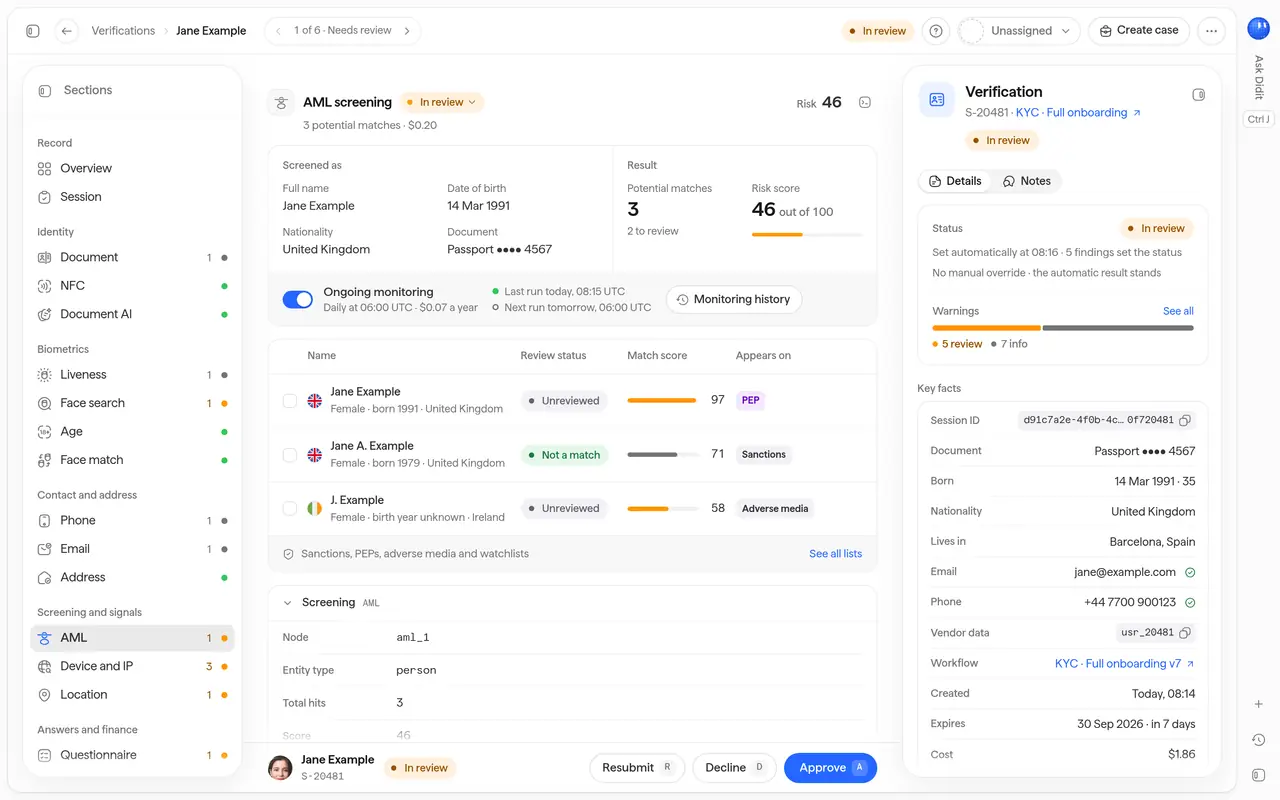
aml_screenings[] inside the decision object.Inputs and outputs
| Name | Type | When it appears | What to do with it |
|---|---|---|---|
X-Signature-V2 | Header | Every delivery | HMAC-SHA256 over sorted canonical JSON, constant-time compare |
X-Timestamp | Header, Unix seconds | Every delivery | Reject anything more than 300 seconds from now |
X-Signature-V2-Previous | Header | 24 hours after secret rotation | Accept a match so rotation does not break verification |
event_id | Envelope | Every delivery | Idempotency key for every write |
webhook_type | Envelope | Every delivery | Route the handler |
status | Envelope, exact string | Session and business sessions | Store as given, strict equality only |
decision | Object | Approved, Declined, In Review, Abandoned | Read the per-feature arrays, or re-fetch the decision |
business_session_id | Envelope | KYB payloads | Join the child business session to its parent |
Failure cases and recovery
- Signature mismatch. Usually the body was parsed and re-encoded, or the canonical JSON was sorted differently. Read raw bytes first, then verify. Check whether a rotation is in flight and retry the comparison against the
-Previousheader. - Stale timestamp. The 300-second window rejected a replay. Check your server clock before changing any code.
- Missing events. There is no wildcard, so an event family you never listed in
subscribed_eventswill not arrive. Compare your handler's switch against the destination record. - Duplicate delivery. Expected, not an error. Deduplicate on
event_idso the second copy changes nothing. - A failing destination.
health_statusturnsfailingafter 3 consecutive failed first attempts. Usefailing_sinceto know when it started, and read the activity endpoint forfailure_alertentries withoccurred_atandfailure_count. Any successful attempt, including a retry or a resend, ends the streak. - Rate limits. The destinations call sits under the generic GET ceiling of 600 requests per minute per API key. A 429 carries
Retry-After,X-RateLimit-Scopeand areference; wait the stated number of seconds, then back off with jitter. - Ambiguous decision. Do not guess from the payload. Re-fetch
GET /v3/session/{session_id}/decision/and rebuild your state from the V3 serializer shape.
What is paid, and where a person has to review
Billing follows the checks, not the transport. Didit bills completed checks according to the published price list. Webhook delivery has no separate listed price. A full ID check (KYC) is $0.33, AML screening is $0.20 per check, ongoing AML monitoring is $0.07 per person a year, wallet screening is $0.15 per screening, business verification starts at $2.00 per company, and transaction monitoring costs $0.001 per transaction beyond your plan's monthly allowance. The public price list carries no per-webhook line, so delivery to your endpoint adds nothing to the arithmetic. The Management API destination calls are documented as pay-per-call and the public list carries no unit price for them, so we leave them out. Read the Didit pricing page for plan fees and credit terms.
Some states are not automated and will not resolve from a webhook alone. An In Review status requires a person to approve, decline, or request resubmission. The Investigator events tell you when automation stopped deciding or when a person took over: investigator.decision.overridden, investigator.decision.contested, investigator.rfi.overdue, investigator.sla.breached and investigator.qa.failed. Design your SSE stream so a reviewer's decision pushes the same way an automated one does.
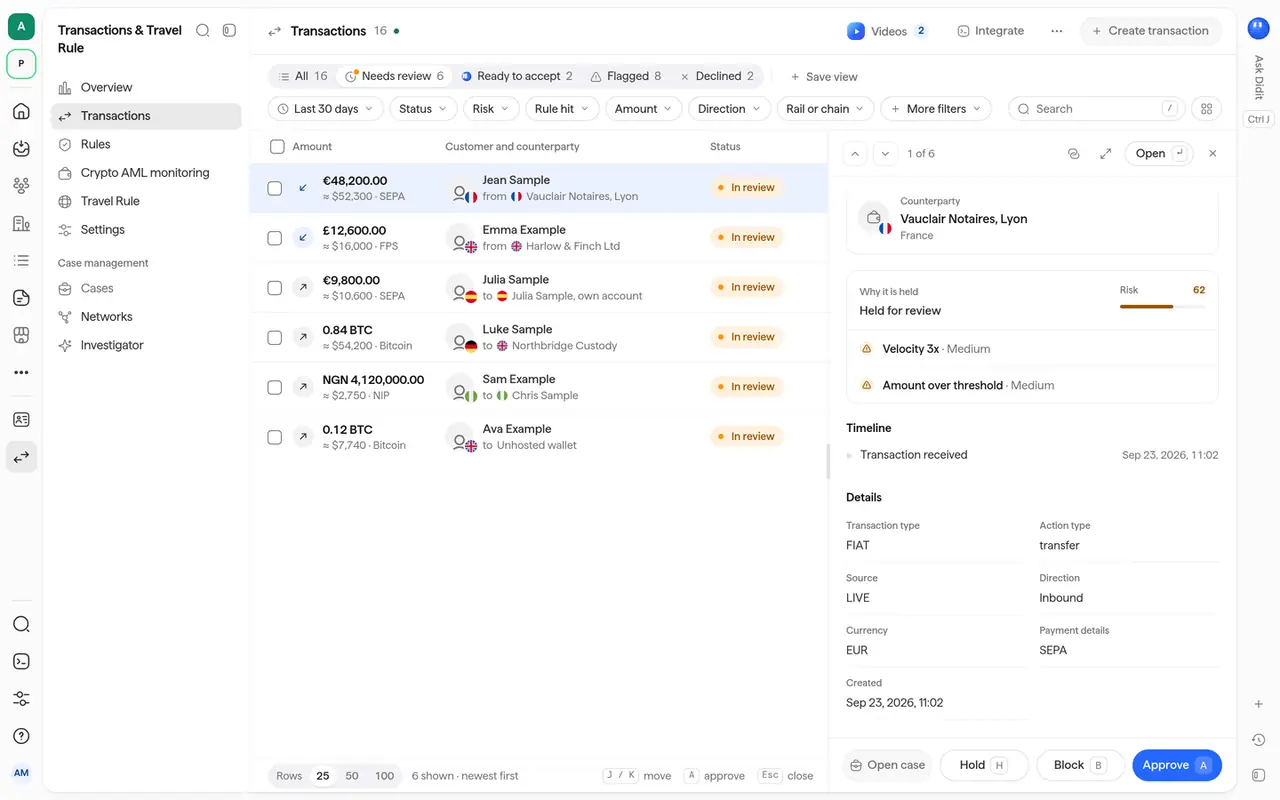
transaction.status.updated event.Worked cost example
Take a lender that runs 20,000 full identity checks a month and screens every one of those users against AML lists, and monitors 50,000 transactions. Prices are list prices from the live feed.
- Full ID check: 20,000 × $0.33 = $6,600.00
- AML screening: 20,000 × $0.20 = $4,000.00
- Checks subtotal: $6,600.00 + $4,000.00 = $10,600.00
- Monitored transactions on Growth (10,000 included): 50,000 − 10,000 = 40,000; 40,000 × $0.001 = $40.00
- Monthly total at list price: $10,600.00 + $40.00 = $10,640.00
The same volume on the discounted plans: Growth takes 4% off Didit prices, so $0.3168 × 20,000 = $6,336.00 and $0.192 × 20,000 = $3,840.00, which with the same $40.00 of transactions gives $10,216.00. Scale takes 10% off, so $0.297 × 20,000 = $5,940.00 and $0.18 × 20,000 = $3,600.00, giving $9,580.00. Growth carries a $99 monthly fee with $115 of credit and Scale a $299 monthly fee with $350 of credit; usage is paid from that credit first, so I have not stacked the fee on top of the check arithmetic here. If each user also needed a wallet screening at $0.15, add $3,000.00 at list price.
Read the AML screening page and the Transaction Monitoring page for what each check returns before you model volume.
Sources
- Didit docs: Webhooks, signatures, destinations and retries (read November 26, 2026)
- Didit docs: Verification statuses and the session lifecycle (read November 26, 2026)
- Didit docs: Data models and the V3 serializer shape (read November 26, 2026)
- Didit docs: List webhook destinations (read November 26, 2026)
- Didit docs: Webhook destination failure activity (read November 26, 2026)
- Didit docs: Retrieve session decision (read November 26, 2026)
- Didit docs: Rate limits, headers and 429 backoff (read November 26, 2026)
- Didit pricing page and live price feed (read November 26, 2026)
- Didit MCP server setup (read November 26, 2026)
- Didit AML screening product page (read November 26, 2026)
- Didit Transaction Monitoring product page (read November 26, 2026)
Start in the sandbox at business.didit.me, which is free and needs no sales call. Register one destination, push a test event through, and get the signature check on the raw body working before you write any business logic.
Try it
Try this in the sandbox
Run the check this guide describes, free.
The product this post is about, taken from its topic. Run it free in the sandbox.
Author
Alejandro Rosas
Co-founder and CTO

Keep reading
Other guides in the same topic.
 What Is the Purpose of FICA in South Africa? 2026 Guide
FICA is South Africa's anti-money laundering law. It creates the Financial Intelligence Centre and requires accountable institutions to identify and verify clients, screen for PEP and sanctions risk and report suspicious.
Alberto RosasNov 26, 2026 Sixth Money Laundering Directive (6AMLD): What Changed and Which Rules Apply
6AMLD is Directive (EU) 2018/1673: Member States must criminalise laundering, widen predicate offences and set a four-year penalty floor. It adds no new due diligence duties for firms.
Alberto RosasNov 26, 2026 Automated Sanctions Screening: Canada, the Entity List and Embargoes
Automated sanctions screening matches people and companies against lists such as Canada's autonomous sanctions made under SEMA and JVCFOA and the OFAC SDN List, and returns candidate hits scored for identity confidence and.
Alberto RosasNov 26, 2026Questions
Frequently asked questions
What is the difference between server-sent events and webhooks?
A webhook is an HTTP POST from a provider's server to a URL you registered, sent because an event happened, and it expects your code to act on it. Server-sent events are a single long-lived HTTP response from your server to one browser client, opened with EventSource, carrying text frames in one direction only. Webhooks move state between backends; SSE moves state from a backend to a screen.
Does Didit support server-sent events?
We document webhooks, not an SSE endpoint. Didit delivers signed webhook events to the destination URLs you register, with HMAC-SHA256 signing and bounded retries. If your product needs a live stream, run the SSE response on your own server and feed it from the events you have already verified.
How do I verify a Didit webhook signature?
Read the raw request body without parsing it, confirm X-Timestamp is within 300 seconds of now, then recompute HMAC-SHA256 with your destination secret over the sorted, Unicode-preserved canonical JSON and compare it to X-Signature-V2 with a constant-time comparison. During a secret rotation, accept a match against X-Signature-V2-Previous too, since that header is sent for 24 hours after the rotation.
Which webhook event types can I subscribe to?
Didit documents families including status.updated, data.updated, user.status.updated, user.data.updated, business.status.updated, business.data.updated, transaction.created, transaction.status.updated, travel_rule.status.updated, workflow.compliance_changed and the Investigator events. There is no wildcard, so you must list each family you want on each destination. Authentication events and bank events have their own documented pages.
What is inside a Didit webhook payload?
The envelope carries event_id, session_id, status, webhook_type, created_at, timestamp, application_id, environment, workflow_id, workflow_version, vendor_data and metadata. A decision object is added for Approved, Declined, In Review and Abandoned, and it mirrors the V3 decision endpoint with per-feature arrays. KYB payloads also include business_session_id and session_kind.
How do I handle retries and duplicate webhooks?
Return 2xx as soon as your documented handler has accepted the event, then apply the update idempotently, treating every delivery as repeatable. Key each write on event_id so a redelivery cannot apply a decision twice. If a payload looks stale or incomplete, re-fetch the decision rather than trusting the copy you received.
What are the exact Didit session status strings?
The session statuses are Not Started, In Progress, Approved, Declined, In Review, Awaiting User, Resubmitted, Expired, Abandoned and Kyc Expired. They are case sensitive and several contain a space, so compare with strict equality. Kyc Expired uses a single capital K, not KYC.
How do I know my webhook destination is failing?
Call GET /v3/webhook/destinations/ and read health_status. It reports failing after 3 or more consecutive events failed their first delivery attempt since the last success, with failing_streak and failing_since telling you how long. The same response carries 30 days of delivery counts, failure counts, average response time and error rate, and the activity endpoint lists the individual failure alerts.
What does a Didit webhook cost?
Webhook delivery has no line on the public price list. What you pay for is the completed check that produced the event, for example $0.33 for a full identity check, $0.20 for AML screening or $0.15 for a wallet screening. The Management API destination calls are documented as pay-per-call, but the public list carries no unit price for them.
Can I send Didit events to more than one endpoint?
Yes. You can create multiple destinations and fan the same event family out to different URLs, for example, separate endpoints for separate consumers. Each destination has its own subscribed event list and its own signing secret, and each destination exposes its own health status.
How do I stream Didit events to a browser without giving the browser the secret?
Keep verification on the server. Your endpoint verifies the signature, updates state, and then writes a minimal frame to an SSE response your own server holds open for that user. The browser receives only what the screen needs, such as the new status, never the destination secret or the full decision payload.
Compliance built in
Audited, certified and attested.
We hold the certifications and build each country's rules into your flows, so you can launch anywhere without worrying. Security and Compliance center
- Regulation encoded into your flows
Tell us what you do and where. Didit lists the rules that apply to you, with sources, and builds the checks each country needs into one workflow.
- Ready for AMLR
Every requirement of the new EU anti-money laundering rules, from checking customers to human review, is already covered by a Didit check.
- Tested in Spain's Treasury sandbox
Spain's Treasury published its supervised sandbox report on Didit's NFC plus active liveness onboarding; SEPBLAC took part and valued the added measures positively.
- Audited, not self-declared
iBeta Level 1 and Level 2. Liveness tested under ISO/IEC 30107-3.
Your obligations · 3 regions
 SOC 2 Type 2
 ISO 27001
 iBeta Level 1 and Level 2
 EU regulator attestation
 FSM youth protection
 GDPR
 EBA remote onboarding
 MiCA compatible
 FIDO Alliance member
- AMLREU AML Regulation ready
Integration · Didit MCP
Run Didit from your own AI agent
Connect Didit to Claude, Cursor, VS Code or ChatGPT and just ask in plain words. Your agent can do anything you can do in the console, with the same permissions you have.
 Add to Claude
 ChatGPT
 Cursor
- Build workflowsDescribe the checks you need. The agent creates and publishes the flow.
- Run investigationsAsk why a session was declined, review cases, search people and companies.
- Change rulesCreate payment rules, test them on past data and switch them on.
- Pull reportsAsk for numbers, exports or the audit log.
Didit Academy