Didit KYT API: Fix the Duplicate Transaction ID Error (400 vs 409)
Your transaction ID is unique per application. A duplicate returns 400, a racing duplicate 409, and neither returns the existing record. Read it back with GET /v3/transactions/{uuid}/ or through the transaction.created webhook.
 Alberto RosasCo-founder and CEO
Contents
In this guide
Jump to the part you need.
If your KYT integration fails with "A transaction with this transaction_id already exists", this page is for you: backend engineers and platform teams wiring Didit Transaction Monitoring into payments or crypto withdrawal flows. Transaction Monitoring costs $0.001 per transaction beyond the plan allowance, which is 1,000 on Free, 10,000 on Growth and 100,000 on Scale. The catch: neither the 400 nor the 409 returns the existing transaction, so reading it back is on your code.
Last updated: November 26, 2026. Prices checked against the live Didit price feed on November 26, 2026.
| What happened | HTTP status | Body | Returns the existing transaction? | What your code should do |
|---|---|---|---|---|
The transaction_id is new | Create succeeds | A record with status, score, rule_runs | Not applicable, this is the new record | Store the uuid next to your txn_id |
You re-submit a transaction_id that already exists | 400 | Field error on transaction_id: "A transaction with this transaction_id already exists." | No | Read the existing one with GET /v3/transactions/{uuid}/ |
| Two identical requests race each other | 409 | The request conflicts with the current state | No | Read the existing one, or take the transaction.created webhook |
| A rate limit or quota was reached | 429 | detail plus Retry-After | Not applicable | Wait for Retry-After, then retry |
| A Didit-side error | 500, 502, 503 | May not be JSON at all | Not applicable | Retry with backoff |
You can prove all of this on the free sandbox: start at business.didit.me, no sales call. The matching product page is Transaction Monitoring, unit prices are on didit.me/pricing, and developers who want an assistant to drive the API can connect Didit over MCP.
Why the same duplicate returns 400 once and 409 another time
Didit treats the transaction_id you send, called txn_id in the data model, as unique per application. The value is yours to choose: your database ID, a UUID, or a hash of transaction fields. It is capped at 128 characters.
Two different things can happen when the same value arrives twice.
400, validation. Your request reached validation and the transaction_id it carries already exists in that application. The API answers 400 with "A transaction with this transaction_id already exists." on the transaction_id field. It is a normal field error in the shape the error reference documents, and no record comes back with it.
409, conflict. When two identical requests race each other, the second one gets 409. Didit's error reference describes 409 as a request that conflicts with the current state and tells you to read code and reload the state. The general reference also names a reused Idempotency-Key as one source of 409 on endpoints that take one; on the transactions endpoint, the duplicate transaction_id is the one that concerns you.
The trap in both cases. Neither response returns the existing transaction. A client that logs the error and moves on loses the link between your txn_id and the record Didit already created. The fix is not a retry. The fix is a read.
Outcome and recommended method
The outcome you want is simple to state: every payment or withdrawal in your system resolves to exactly one monitored Didit transaction, and a duplicate resolves to a read rather than a second create.
The method is three habits. Generate txn_id on your side before the first call. Store the Didit uuid from the create response next to it. On a 400 or 409 for a duplicate transaction_id, look the existing transaction up instead of resubmitting, either with GET /v3/transactions/{uuid}/ or through the Didit uuid that the transaction.created webhook carries next to your txn_id.
Prerequisites
- A Didit application with Transaction Monitoring enabled, under Settings, then Transaction Monitoring, then Enable.
- An API key sent as
x-api-key. The same keys used for sessions and entities work here. - A webhook endpoint reachable from the internet, if you want
transaction.createdas your fallback lookup path. - A place to generate
txn_idbefore the first call: your database ID, a UUID, or a hash of transaction fields.
How to submit transactions idempotently: numbered steps
Generate
transaction_idon your side, once, before you call anything. Keep it where your application can find it again if the process dies between the request and the response. The docs leave the form of the value to you: your own database ID, a UUID, or a hash of transaction fields. The one thing they rule out is letting Didit generate it.Submit the transaction to
POST /v3/transactions/. The minimal payload from the quickstart is enough to see the whole cycle.curl -X POST https://verification.didit.me/v3/transactions/ \ -H "x-api-key: YOUR_API_KEY" \ -H "Content-Type: application/json" \ -d '{ "transaction_id": "baseline-0001", "transaction_category": "finance", "transaction_details": { "direction": "outbound", "amount": "500.00", "currency": "EUR" }, "subject": { "entity_type": "person", "vendor_data": "user-42", "full_name": "Jane Doe" }, "counterparty": { "entity_type": "company", "full_name": "Acme Supplier" } }'Save the Didit
uuidfrom the response against yourtxn_id. The response also carriesstatus,scoreandrule_runs. Theuuidis the key you will use for every later read.Register a webhook destination so the create event reaches you even if your own write failed.
curl -X POST https://verification.didit.me/v3/webhook/destinations/ \
  -H "x-api-key: YOUR_API_KEY" \
  -H "Content-Type: application/json" \
  -d '{
    "label": "TM events",
    "url": "https://yourapp.com/webhooks/didit-tm",
    "subscribed_events": ["transaction.created", "transaction.status.updated"]
  }'
The response includes
secret_shared_key. Store it immediately asDIDIT_WEBHOOK_SECRETand verify theX-Signature-V2HMAC on every incoming call before trusting the payload.On a duplicate, read the existing transaction instead of submitting again. The
{transaction_id}in the path is the Didituuid, not the value you sent at create time.curl https://verification.didit.me/v3/transactions/{transaction_id}/ \ -H "x-api-key: YOUR_API_KEY"In client code, keep the two paths separate. A 400 means the request reached validation and the
transaction_idalready exists; a 409 means two identical requests raced and the second one lost. Both recoveries are the same read, and the read needs theuuidyou stored from the first create response. If you have no storeduuidfor thattxn_id, do not issue the GET yet: reconcile the mapping from thetransaction.createdwebhook first, then read.If you never stored the
uuid, because the process crashed between request and response, take it from thetransaction.createdwebhook. That event carries the Didit uuid next to yourtxn_id, which is exactly the mapping you are missing. Write it down, then issue the GET.Never build idempotency on a Didit-generated ID. Always generate
txn_idon your side, before submitting, and treat the Didit record as something you look up rather than something you name.
Expected output
A successful create returns the transaction record: status of APPROVED if no rules fired, IN_REVIEW or DECLINED if any did, a score that is an integer from 0 upward, and rule_runs listing every rule that evaluated the transaction. Keep the uuid.
A duplicate returns an error and nothing else. The 400 comes back as a field error keyed on transaction_id, in the field-error shape the error reference documents, where the value is a list of messages. The 409 is a conflict body, so read code when it is present and reload the state rather than parsing the human text, because message wording can change while status codes do not.
The read-back returns the full response schema for that transaction: score, matched rules, party enrichment and AML screening. It is a pure read with no side effects.
Failure cases and recovery
| Response | Meaning | Recovery |
|---|---|---|
400 with the duplicate message on transaction_id | The value already exists in this application | GET /v3/transactions/{uuid}/ with the stored uuid. Do not resubmit. |
| 409 on a racing duplicate | Two identical requests hit the API together | Read the existing transaction, or wait for transaction.created. Do not resubmit. |
| 401 | The key is wrong, malformed, revoked or expired | Check DIDIT_API_KEY or create a new key, then retry |
403 with code: insufficient_credits | Transactions, Travel Rule and address validation report a low balance this way | Top up the balance, then retry |
| 415 | The body is not JSON | Send Content-Type: application/json |
| 429 | A rate limit or quota was reached | Wait for Retry-After, then retry |
| 500, 502, 503 | An unexpected Didit-side error, or a dependency unavailable | Retry with backoff. A 500 may have no JSON body, so branch on the status. |

Inputs and outputs
| Field | Direction | Type | Notes |
|---|---|---|---|
transaction_id | request | string | Your identifier, unique per application, up to 128 characters. Alias txnId. |
transaction_category | request | string | finance, kyc, travel_rule, user_event, gambling_bet, gambling_limit_change, gambling_bonus_change or audit_trail_event |
transaction_details.amount | request | decimal string | For example "500.00" |
transaction_details.currency and currency_kind | request | string | ISO currency code, and fiat or crypto, which decides whether crypto screening triggers |
subject | request | object | Required. entity_type is person or company; vendor_data links it to an existing user or business profile |
counterparty | request | object | Optional, same party model as the subject |
transaction_at | request | ISO 8601 | Send a past date for backfill |
include_crypto_screening | request | boolean | Force or skip crypto screening for this transaction; omitted uses the application default |
uuid | response | string | Stable Didit transaction id. This is what goes into GET /v3/transactions/{uuid}/. |
txn_id | response | string | The identifier you supplied, echoed back so you can match it |
status, score, rule_runs | response | mixed | The verdict, the integer score, and every rule that evaluated the transaction |
transaction_number | read | integer | Application-scoped sequential number shown in the Console, useful when you talk to a reviewer |
Paid steps and review boundaries
Nothing is charged until a check runs. Each monitored transaction counts against the monthly allowance: 1,000 on Free, 10,000 on Growth, 100,000 on Scale, then $0.001 per transaction on every plan. Crypto transactions that trigger wallet screening are billed at $0.15 per screening. Counterparty AML screening is $0.20 per check. For a duplicate, what the docs establish is the response: a 400 or a 409, and a read-back with GET /v3/transactions/{uuid}/ that is a pure read with no side effects. Match on uuid in your own reconciliation so every submission maps to exactly one record on your side.
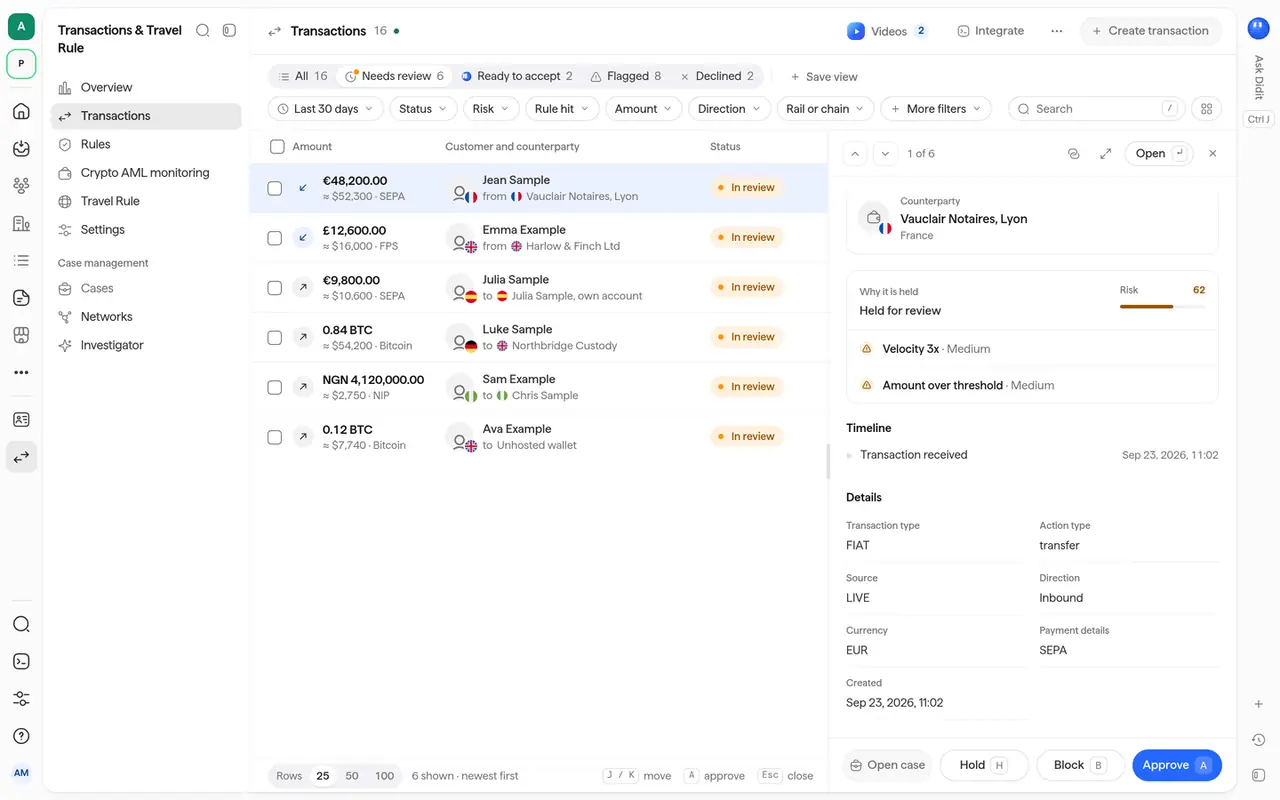
Not every transaction ends at submission. Rules can return IN_REVIEW, and an analyst may then decide that transaction in the Business Console; that review boundary is not something a retry can resolve for you. When an analyst moves a transaction from IN_REVIEW to APPROVED, or an async AML check updates the score, Didit sends transaction.status.updated. Treat that event as the line between what the API decides synchronously and what a reviewer decides afterwards.
IN_REVIEW transaction finally gets its decision.Worked cost example
A platform on the Scale plan submits 180,000 monitored transactions in a month, and 30,000 of them are crypto withdrawals where wallet screening runs.
- Plan fee: $299.00 a month, which includes 100,000 monitored transactions.
- Transactions beyond the allowance: 180,000 minus 100,000 equals 80,000. At $0.001 each: 80,000 x $0.001 = $80.00.
- Wallet screening: 30,000 x $0.135 = $4,050.00.
- Monthly total on Scale: $299.00 + $80.00 + $4,050.00 = $4,429.00.
Duplicate handling sits outside that arithmetic. A duplicate request answers 400 or 409, and the read-back is a pure read. What it does change is your reconciliation: every error response is a record you have to match by hand if you never stored the uuid. On Growth the same 30,000 screenings cost 30,000 x $0.144 = $4,320.00, because Growth takes 4% off every Didit price. The $0.001 per-transaction line is the same on every plan.
Developers who want an AI assistant to drive these calls can connect Didit over MCP: MCP setup for every client.
Sources
- Didit docs: Transaction Monitoring Integration, KYT API and idempotency
- Didit docs: Transaction Monitoring Quickstart
- Didit docs: Submit Transactions API payload and data model
- Didit docs: API errors, status codes and retry guidance
- Didit docs: Get Transaction API
- Didit docs: List Transactions API
- Didit docs: Webhooks and HMAC signing
- Didit docs: Transaction Monitoring webhooks
- Didit pricing page and pricing in the docs
- Didit MCP server
Next step: open the sandbox at business.didit.me, enable Transaction Monitoring on a test application, and submit the same transaction_id twice. You will see the 400 for yourself in under a minute, with no sales call, and sandbox testing is free.
Try it
Try this in the sandbox
Run the check this guide describes, free.
The product this post is about, taken from its topic. Run it free in the sandbox.
Author
Alberto Rosas
Co-founder and CEO

Keep reading
Other guides in the same topic.
 What Is the Purpose of FICA in South Africa? 2026 Guide
FICA is South Africa's anti-money laundering law. It creates the Financial Intelligence Centre and requires accountable institutions to identify and verify clients, screen for PEP and sanctions risk and report suspicious.
Alberto RosasNov 26, 2026 Sixth Money Laundering Directive (6AMLD): What Changed and Which Rules Apply
6AMLD is Directive (EU) 2018/1673: Member States must criminalise laundering, widen predicate offences and set a four-year penalty floor. It adds no new due diligence duties for firms.
Alberto RosasNov 26, 2026 Automated Sanctions Screening: Canada, the Entity List and Embargoes
Automated sanctions screening matches people and companies against lists such as Canada's autonomous sanctions made under SEMA and JVCFOA and the OFAC SDN List, and returns candidate hits scored for identity confidence and.
Alberto RosasNov 26, 2026Questions
Frequently asked questions
Why does the same duplicate return 400 sometimes and 409 other times?
400 is the validation path: a single request arrives with a transaction_id that already exists in the application, and the API fails the field with the message on transaction_id. 409 is the race path: two identical requests hit the API at the same moment and the second one conflicts with the state the first one created. Read the status, not the message, when you branch in code.
Does Didit return the existing transaction when I resubmit a duplicate?
No. Neither the 400 nor the 409 returns the existing transaction. You read it back yourself, either with GET /v3/transactions/{uuid}/ using the uuid from the first response, or through the Didit uuid that the transaction.created webhook carries next to your txn_id.
How do I find the existing transaction if I only have my own txn_id?
Store the Didit uuid from the create response next to your txn_id, and call GET /v3/transactions/{uuid}/. The identifier in that path is the Didit uuid, not the value you sent as transaction_id. If you never stored it, take the Didit uuid from the transaction.created webhook, which carries both values together, write the mapping, and then issue the GET.
Should I let Didit generate the transaction_id?
No. Always generate txn_id on your side before submitting. Use your own database ID, a UUID, or a hash of transaction fields. Relying on a Didit-generated ID removes the one handle that lets you decide, before the call, whether a transaction was already submitted.
Is transaction_id unique per application or across my whole organization?
Per application. The same txn_id can exist independently in two Didit applications, so include the application in your own mapping key when you store txn_id to uuid, otherwise your lookup can point at the wrong record.
What is the difference between transaction_id, txn_id and uuid?
transaction_id is the value you send, and the data model calls it txn_id: up to 128 characters, unique per application, chosen by you. uuid is the stable Didit identifier for the created record, and it is what GET /v3/transactions/{uuid}/ expects in the path.
Should I retry on 400 or 409?
Not for a duplicate transaction_id. Both mean a record with that value already exists, so read the existing transaction instead. Retries are appropriate for 429 after the Retry-After delay, and for 500, 502 and 503 with backoff, as the Didit error reference describes.
Is a duplicate submission billed?
The docs do not publish a billing rule for duplicate requests, so we will not guess at one for you. What is documented is the response: a duplicate answers 400 or 409, and the read-back with GET /v3/transactions/{uuid}/ is a pure read with no side effects. Reconcile on uuid so every submission maps to exactly one record in your own books.
Do I need webhooks to do idempotency right?
Not strictly, but subscribe anyway. Register a destination with transaction.created and transaction.status.updated, save the secret_shared_key as DIDIT_WEBHOOK_SECRET, and verify X-Signature-V2 on every call. The webhook is what gives you the Didit uuid when your own write of the create response failed.
How do I backfill old transactions without firing every rule at once?
Send the transaction date in the past when you submit historically. Rules still run and can trigger webhooks, so the docs recommend importing through the Console with the dry ingest flag, or enabling rules only after ingestion finishes. Feeding six months of history into a 30-day velocity rule generates thousands of alerts in one batch.
Compliance built in
Audited, certified and attested.
We hold the certifications and build each country's rules into your flows, so you can launch anywhere without worrying. Security and Compliance center
- Regulation encoded into your flows
Tell us what you do and where. Didit lists the rules that apply to you, with sources, and builds the checks each country needs into one workflow.
- Ready for AMLR
Every requirement of the new EU anti-money laundering rules, from checking customers to human review, is already covered by a Didit check.
- Tested in Spain's Treasury sandbox
Spain's Treasury published its supervised sandbox report on Didit's NFC plus active liveness onboarding; SEPBLAC took part and valued the added measures positively.
- Audited, not self-declared
iBeta Level 1 and Level 2. Liveness tested under ISO/IEC 30107-3.
Your obligations · 3 regions
 SOC 2 Type 2
 ISO 27001
 iBeta Level 1 and Level 2
 EU regulator attestation
 FSM youth protection
 GDPR
 EBA remote onboarding
 MiCA compatible
 FIDO Alliance member
- AMLREU AML Regulation ready
Integration · Didit MCP
Run Didit from your own AI agent
Connect Didit to Claude, Cursor, VS Code or ChatGPT and just ask in plain words. Your agent can do anything you can do in the console, with the same permissions you have.
 Add to Claude
 ChatGPT
 Cursor
- Build workflowsDescribe the checks you need. The agent creates and publishes the flow.
- Run investigationsAsk why a session was declined, review cases, search people and companies.
- Change rulesCreate payment rules, test them on past data and switch them on.
- Pull reportsAsk for numbers, exports or the audit log.
Didit Academy