SAR vs UAR: AML Case Management That Ends in a Filing
A SAR is the suspicious activity report filed with the FIU. A UAR is the unusual activity report that records why activity looked odd. One case holds the evidence, the decision and the filing.
 Alberto RosasCo-founder and CEO
Contents
In this guide
Jump to the part you need.
This how-to is for compliance leads and engineers who need one repeatable path from a flagged transaction to a filed report. We define the SAR, define the UAR, and show how a single case record connects them in Didit Case Management, which runs on Transaction Monitoring at $0.001 per transaction beyond the plan allowance, with AML screening at $0.20 per check. The caveat comes first: Didit prepares the form and the evidence. It does not submit filings to a regulator.
Last updated: November 26, 2026. Prices checked against the live Didit price feed on November 26, 2026.
| Object | What it is | Who receives it | Where the evidence sits |
|---|---|---|---|
| SAR (STR in the EU) | External report of suspected money laundering or terrorist financing, filed on suspicion rather than proof | Your financial intelligence unit or supervisor | The resolved case and the filing generated from it |
| UAR | Report of activity that is unusual but not yet judged suspicious. In most firms an internal record; a few regimes also require it as a filing | Your MLRO and the compliance file, sometimes a supervisor | The same case, with the escalation note that says why it looked out of character |
| Case | The investigation container: subject, transactions, screening hits, notes, checklist, 4-eyes sign-off | Internal only | One audit trail from the first alert to the final filing |
Start free in the sandbox at business.didit.me (no sales call). For developers, connect Didit to an AI assistant through the Didit MCP server. The product behind this page is Transaction Monitoring, and every unit price is on didit.me/pricing.
Terminology varies by jurisdiction. This page uses SAR for the external suspicious activity filing and UAR for the internal unusual activity record. Confirm your regulator's labels and thresholds before you write them into a procedure.
What a SAR is and what a UAR is
A SAR is a filing to the financial intelligence unit
A suspicious activity report is the external filing your institution sends when it suspects money laundering or terrorist financing. FATF Recommendation 20 is why the filing exists: countries must require financial institutions to report suspicious transactions to their financial intelligence unit. The name changes by regime. The United States files a SAR with FinCEN, the United Kingdom files a SAR with the National Crime Agency, and the EU anti-money-laundering directives call the same object a suspicious transaction report, STR. Institutions file on suspicion, not on proof, so the file has to show what was known, when it was known, and who approved the filing.
A UAR is usually the record underneath the SAR
UAR stands for unusual activity report. Two meanings are in use. In most compliance teams it is an internal document: the analyst writes up activity that departs from the customer's profile but has not crossed the suspicion bar, and the write-up justifies either closing the file or escalating to a SAR. In a smaller number of regimes the same label covers a filing of unusual activity to a supervisor, below the suspicion threshold. Your regulator defines which one applies, and the definition does not travel across borders.
The difference that matters inside a case file
A UAR answers one question: why did this look out of character? A SAR answers a different one: what do we suspect, what did we check, and who signed off? A UAR can close with no filing at all. A SAR is a filing by definition, with a statutory deadline attached. A common workflow is to write the UAR first inside the case, then generate the SAR from the same case once the escalation is approved.
What an AML case management system has to hold
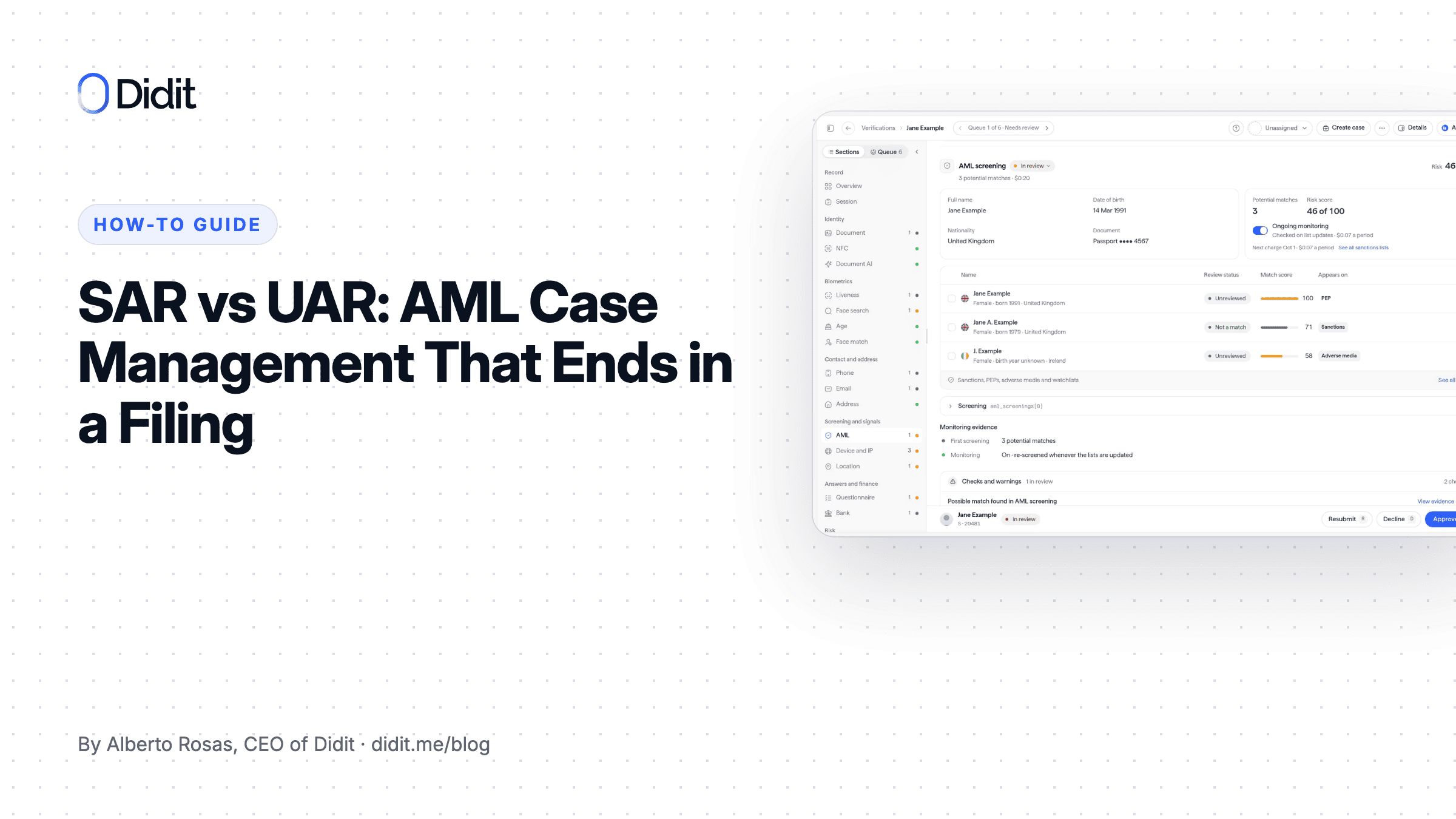
Case Management in Didit is one module and one API for every case in the console, whether the case started from a transaction rule, an AML hit, a workflow or a manual click. That matters for UAR and SAR work, because one subject produces several reports over time and they have to land in one place.
- One subject per case. Grouping by applicant reuses the subject's open case when configured.
- A source and a lifecycle. Cases move through Open, Awaiting user and Resolved, and close with resolution False positive or Valid threat. Cases opened by a rule carry source
TRANSACTION_RULE. - A blueprint. Assignment, escalation, 4-eyes review and the case page content all come from the blueprint the case routes to.
- Evidence. Transactions attach as links, analysts add notes, AML hits keep a review status, and screening reports stay attached to the session.
- A filing template. From a resolved investigation the console generates a SAR, STR, CTR or another filing.
- An API. The Management API lists, creates and resolves cases, attaches transactions and returns case analytics for your own dashboards.
Prerequisites before the first alert arrives
- An application with Transaction Monitoring enabled, and rules written before traffic arrives.
- Score thresholds set in Transactions, Settings. Review scores go to
IN_REVIEWat 75 by default, and the decline threshold defaults to 500, which means never decline by score. - A blueprint for the case type, with assignment, escalation and 4-eyes review defined. See Blueprints.
- Roles: an analyst for triage, a second reviewer for 4-eyes, and the MLRO who signs the filing.
- A filing template mapped to your FIU's format, described in FIU Reports.
- An API key. The same
x-api-keyheader used for sessions and entities. - A decision on where the UAR record lives: a case type, a checklist step, or a note template. Pick one and write it into the blueprint.
From alert to filing in 10 steps
- Write the rule that holds the transaction. A rule carries a
score_delta, typically 25 to 35, plus optional actions such asadd_tagsorchange_status. Example: high-value outbound above $10,000 at 30, and high-risk jurisdiction counterparty at 35. - Set the review threshold so the score reaches your queue. With the two rules above the score is 65, which is
APPROVEDunder the default 75 andIN_REVIEWonce you set the review threshold to 60. Threshold changes apply to new transactions only. - Add the Create case effect to the rule. Choose the blueprint, set grouping to By applicant so the subject's open case is reused, and switch on Attach matched transaction.
- Submit the transaction to
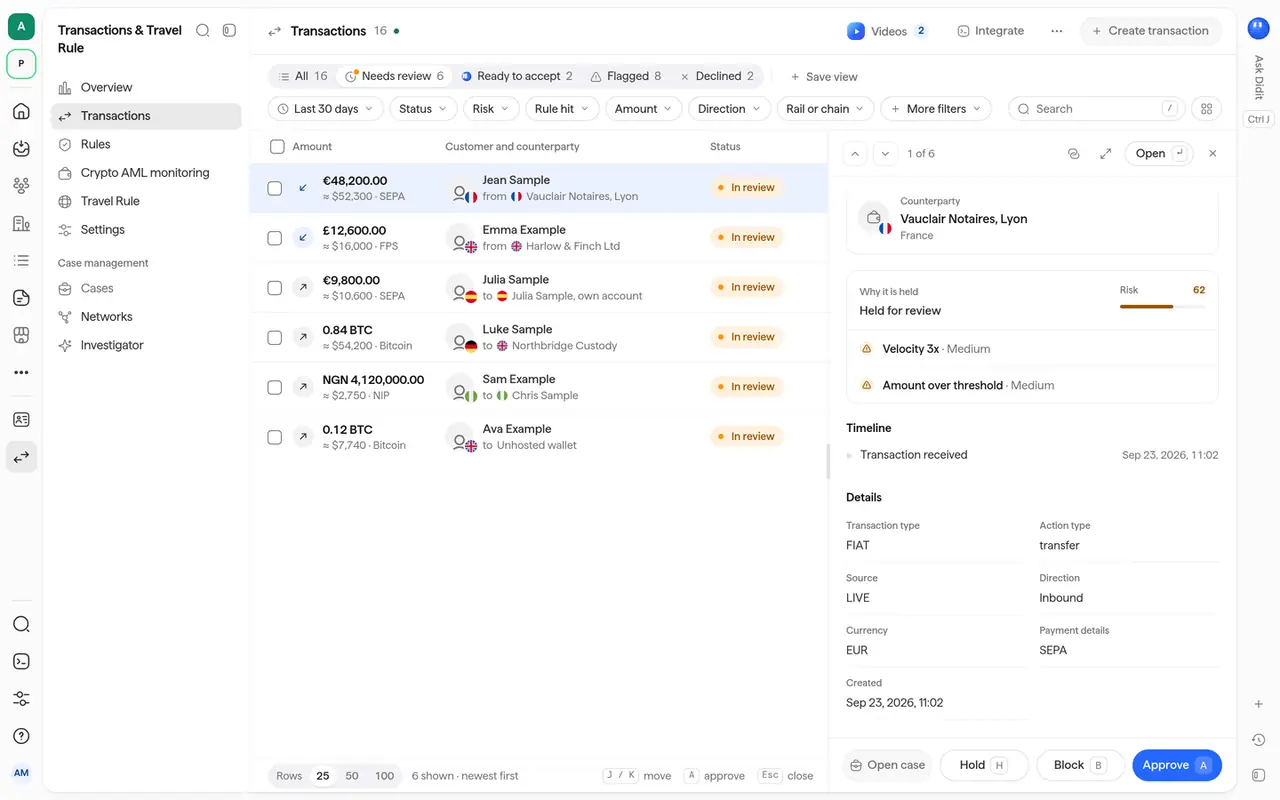
POST /v3/transactions/the moment it happens in your system, not in a nightly batch. - Triage the alert. An alert is a transaction in
IN_REVIEWorAWAITING_USER, and there is no separate alert record. Assign it, add a note, approve or decline it, or escalate it to a case. See Alerts. - Work the case against its checklist. Pull the subject's transaction history, the linked entity profile, the KYC record, device and IP data, and any wallet screening result. Documented events, including notes, assignments, linked transactions and resolution events, are recorded in the case record.
- Screen the parties if that has not run. AML screening covers 1,300+ lists and returns hits with a
match_scoreand arisk_score. Keep the report attached as evidence. - Resolve with a reason and a second pair of eyes. Close as False positive or Valid threat, with the reasoning written into the case, and apply the blueprint's 4-eyes review step when it is configured.
- Generate the filing from the resolved case. The console produces the SAR, STR or CTR form with the case evidence attached.
- File outside Didit, then record the reference and monitor. Your MLRO submits to the regulator. Record the filing reference in your compliance record and add it to the case notes if your process requires it. Ongoing AML monitoring at $0.07 per person a year keeps the profile watched.
Runnable example: a rule that opens a case
Submit the documented transaction payload. The host is the one listed in the API reference, https://verification.didit.me, and the body below is the richer payload from the integration guide, trimmed to the fields this example needs.
curl -s -X POST https://verification.didit.me/v3/transactions/ -H "x-api-key: $DIDIT_API_KEY" -H "Content-Type: application/json" -d '{
  "transaction_id": "tx-0002",
  "transaction_at": "2026-04-16T10:00:00Z",
  "transaction_category": "finance",
  "transaction_details": {
    "direction": "outbound",
    "amount": "12500.00",
    "currency": "USD",
    "action_type": "withdrawal"
  },
  "subject": {
    "entity_type": "person",
    "vendor_data": "user-42",
    "full_name": "John Doe",
    "country_code": "US",
    "payment_method": {
      "method_type": "bank_account",
      "account_id": "US12345678901234567890",
      "issuing_country": "US"
    }
  },
  "counterparty": {
    "entity_type": "company",
    "vendor_data": "biz-acme",
    "full_name": "Acme Corp",
    "country_code": "US"
  }
}'
The response returns the transaction with its score and one rule_runs entry per matched rule. This is the documented shape from Risk scoring:
{
  "txn_id": "tx-0002",
  "status": "IN_REVIEW",
  "score": 65,
  "rule_runs": [
    {
      "rule_title": "High-value outbound",
      "matched": true,
      "score_delta": 30,
      "severity": null,
      "status_target": null,
      "action_summary": "score +30"
    },
    {
      "rule_title": "High-risk jurisdiction counterparty",
      "matched": true,
      "score_delta": 35,
      "severity": "HIGH",
      "status_target": "IN_REVIEW",
      "action_summary": "score +35; add_tag:high_risk_country"
    }
  ]
}
The arithmetic is 30 + 35 = 65. With the review threshold at 60 the transaction is IN_REVIEW and the Create case effect has opened a case with source TRANSACTION_RULE; on the default 75 the same transaction would have been APPROVED, which is why the threshold is part of the design and not a detail. To find held transactions later, list them and read status on each one. The alerts array on the transaction detail is always empty today:
curl -s https://verification.didit.me/v3/transactions/ -H "x-api-key: $DIDIT_API_KEY"If an AML hit is the reason the case is open, screen the party directly with the standalone call. full_name is the only required field, and save_api_request defaults to true, so the screening is stored and appears in the console as a session.
curl -s -X POST https://verification.didit.me/v3/aml/ -H "x-api-key: $DIDIT_API_KEY" -H "Content-Type: application/json" -d '{"full_name": "John Doe", "save_api_request": true}'
Worked cost example at Growth plan-discounted prices
Take a Growth organization processing 30,000 monitored transactions a month, screening 2,500 new customers, and screening 400 wallets. All figures below are Growth plan-discounted prices from the live price feed. The $0.001 transaction monitoring rate is the same on every plan; the other lines already include the Growth 4% discount. List prices before the discount are $0.20 for AML screening, $0.15 for wallet screening, $0.33 for a full KYC check, and $0.07 per person a year for ongoing AML monitoring.
- Transaction monitoring: 30,000 transactions minus the 10,000 included on Growth = 20,000, at $0.001 each = $20.00.
- AML screening: 2,500 checks at $0.192 = $480.00.
- Wallet screening: 400 screenings at $0.144 = $57.60. If you bring your own screening provider and run it inside Didit, that route is priced separately on the pricing page.
- KYC on the same 2,500 customers: $0.3168 per completed check = $792.00.
- Ongoing AML monitoring: 2,500 people at $0.0672 a year = $168.00 a year, which is $14.00 a month.
- Usage total: 20.00 + 480.00 + 57.60 + 792.00 + 14.00 = $1,363.60 a month.
- Cash for the month: the $99 Growth fee, plus $1,363.60 of usage minus the $115 of monthly credit = $99.00 + $1,248.60 = $1,347.60. Monthly credit does not roll over; top-ups last 12 months.
On Scale, with Scale plan-discounted prices, the same AML line is 2,500 at $0.18 = $450.00, and KYC is 2,500 at $0.297 = $742.50, because Scale takes 10% off every Didit price. Transaction monitoring stays at $0.001. Every number here is checkable on didit.me/pricing or in the machine-readable pricing.json.
Inputs and outputs
| Input | Where it enters | Output | Where it goes |
|---|---|---|---|
| Transaction with parties, amount, payment method and device context | POST /v3/transactions/ | Transaction record with score, status and rule_runs | Reviewer queue, and the case as a linked transaction |
| Matching rule with the Create case effect | Console rule editor | Case with source TRANSACTION_RULE and a blueprint | Case Management, same lifecycle and API as every other case |
| Party name, and identifiers where you have them | POST /v3/aml/ | aml.score, aml.status, hits with match_score and risk_score | Session report, attached to the case |
| Analyst notes, checklist answers, the decision and its reason | Case page and transaction notes | Case timeline and audit trail | Case record, retained according to your compliance process |
| Resolved case | Resolution False positive or Valid threat, after 4-eyes where the blueprint requires it | SAR, STR, CTR or other filing | Your MLRO files it outside Didit; the external reference is kept in your compliance record and can be noted in the case |
| Status change | transaction.status.updated webhook | Event with the new status | Your own case or ticketing system, if you keep one |
Failure cases and recovery
| Failure | What you see | Recovery |
|---|---|---|
| A transaction that should be reviewed is approved | status is APPROVED and the score sits under the threshold | Read rule_runs for the deltas, then lower the review threshold or raise the rule deltas. Changes apply to new transactions only. |
| Duplicate submission of the same transaction | 400 with A transaction with this transaction_id already exists. or 409 on a race | Do not resubmit. Look the existing transaction up with GET /v3/transactions/{uuid}/ or take the uuid from the transaction.created webhook. Always generate txn_id on your side. |
| Five cases for one subject | Parallel open cases with the same parties | Set rule grouping to By applicant in the Create case effect, or use Add to case on the transaction to attach it to the open case. |
| A hit closed as a false positive that was not one | review_status says False Positive | Hits below the match_score threshold of 93 are tagged False Positive automatically. Reopen the hit review and update the status; a matching document_number forces match_score to 100 and overrides the threshold. |
| The filing is generated too early | Template pulls an open case with no decision | Resolve the case first, with 4-eyes where required, so the filing cites a decision and a reviewer. |
| Adverse media screening times out | Client aborts before the report returns | include_adverse_media adds an initial wait of about 5 seconds plus up to 25 seconds of polling. Set a client timeout of at least 60 seconds and send an Idempotency-Key when retrying, so a retry is not billed twice. |
| Backfill floods the queue | Thousands of alerts on the day you migrate | Use the console import with dry ingest, or keep rules off until historical ingestion finishes. |
Paid steps and review boundaries
- Paid checks at list price: AML screening $0.20, wallet screening $0.15, KYC $0.33, ongoing AML monitoring $0.07 per person a year, transaction monitoring $0.001 per transaction beyond the plan allowance.
- Included allowances: 1,000 monitored transactions a month on Free, 10,000 on Growth, 100,000 on Scale. The allowance resets on the first of the month and does not roll over.
- Free: sandbox testing, the Workflow Orchestrator, reusable KYC and the MCP server. Sandbox keys skip screening and billing, so a sandbox AML result is a mock and never evidence for a filing.
- Review boundary one: an assigned alert is not a UAR, and a UAR is not a SAR. Write the escalation rule into the blueprint so analysts do not invent it per case.
- Review boundary two: a Valid threat resolution with a filing attached follows the blueprint's 4-eyes review step when it is configured. The filing remains your compliance team's responsibility.
- Review boundary three: Didit prepares the filing and never submits it to a regulator. The deadline is your process.
We publish these prices per call because they are billed per call: 4,000+ companies buy them this way. Sandbox testing and self-serve plans do not require a sales call. Enterprise uses a custom annual contract.
Sources
- Didit docs: KYT Cases and SAR Investigations
- Didit docs: KYT Alerts, held transactions, triage and resolution
- Didit docs: Transaction Risk Scoring, formula and thresholds
- Didit docs: Submit Transactions API, payload and data model
- Didit docs: Transaction Monitoring integration guide
- Didit docs: Transaction Monitoring webhooks
- Didit docs: Case Management lifecycle
- Didit docs: FIU Reports and templates
- Didit docs: Case blueprints
- Didit docs: Management API, cases
- Didit docs: AML Screening API
- Didit pricing page and pricing.json, read November 26, 2026
- FATF Recommendations, including Recommendation 20 on reporting of suspicious transactions, https://www.fatf-gafi.org/, read November 26, 2026
- EUR-Lex, EU anti-money-laundering directives and the suspicious transaction report, https://eur-lex.europa.eu/, read November 26, 2026
The next step is a sandbox run: create an application, submit one transaction that trips a rule carrying the Create case effect, and walk the case from Open to Resolved at business.didit.me. Sandbox testing is free, and there is no sales call.
Try it
Try this in the sandbox
Run the check this guide describes, free.
The product this post is about, taken from its topic. Run it free in the sandbox.
Author
Alberto Rosas
Co-founder and CEO

Keep reading
Other guides in the same topic.
 USA PATRIOT Act Section 314: AML Information Sharing Explained
Section 314(a) lets law enforcement request account data through FinCEN. Section 314(b) gives financial institutions a voluntary, registered safe harbor to share risk information with each other.
Alberto RosasNov 26, 2026 Driver's License Number, ISS and DD: Document Fields Explained
A driver's license number identifies the driving record. ISS is the card's issue date. DD is the document discriminator for that one card, not for the person.
Alberto RosasNov 26, 2026 What Is Knowledge-Based Authentication (KBA) and Why It Fails
KBA treats a correct answer to questions built from credit-header and out-of-wallet records as proof of identity. It is cheap, and it fails against anyone who can look up or talk their way to the answers.
Alberto RosasNov 26, 2026Questions
Frequently asked questions
What is the difference between a SAR and a UAR?
A SAR, or suspicious transaction report in the EU, is an external filing to the financial intelligence unit about suspected money laundering. A UAR, or unusual activity report, is usually an internal record of activity that is odd for the customer but not yet judged suspicious. The UAR justifies closing the file or escalating, and the SAR is the escalation once it is signed off.
Is a UAR a regulatory filing?
It depends on your regime, and the term is not standardised. In most firms a UAR is an internal document kept in the case file. A smaller number of regimes require a filing of unusual activity to a supervisor below the suspicion threshold, so confirm the definition with your regulator before you reuse the label.
Does Didit file the SAR for me?
No. Didit generates a SAR, STR, CTR or other filing from a resolved case and keeps the evidence attached, but it does not submit reports to regulators. Filing stays your compliance team's responsibility, and the console exists to shorten the paperwork.
What should an AML case file contain?
One subject, the transactions that triggered the review, the screening results with their scores, the analyst notes and checklist, the decision with its reason, and the reviewer who approved it. In Didit all of that sits in one case record, and cases created from a rule carry source TRANSACTION_RULE so the trigger is traceable.
How much does Didit case management cost?
Case Management is part of Transaction Monitoring, which is $0.001 per transaction beyond your plan's monthly allowance of 1,000 on Free, 10,000 on Growth or 100,000 on Scale. AML screening is $0.20 per check and wallet screening is $0.15 per screening. The full list sits on didit.me/pricing.
How do I open a case automatically from a transaction rule?
Add the Create case effect to the rule, choose the blueprint, set grouping to By applicant so one subject keeps one open case, and switch on Attach matched transaction. Every match then opens a case with source TRANSACTION_RULE and the triggering transaction linked to it. You can also attach any transaction manually with Add to case.
What does 4-eyes review change in a case?
It puts a second reviewer between the analyst and the resolution, which the configured blueprint may require when the decision is Valid threat. The blueprint controls whether 4-eyes applies and who can approve. Without it, a filing cites one person's judgement and nothing else.
When is an AML hit a false positive?
A hit is treated as a false positive when its match_score falls below the configured match threshold, which defaults to 93, based on the available identity fields, which may include name, date of birth and country. The risk_score then decides severity for the hits that remain. A matching document_number acts as a golden key and forces match_score to 100.
Can I test a SAR workflow in the sandbox?
Yes, and sandbox testing is free and unlimited. Sandbox keys skip screening and billing and return a mocked result, so use the sandbox to prove the rule, the case and the template work, never to produce evidence for a real filing.
What is the difference between an alert and a case?
An alert is a transaction held in IN_REVIEW or AWAITING_USER, with no separate record to manage, and most alerts resolve on their own. A case is the container for a wider investigation: transactions, the subject, screening results and evidence. A pattern that spans several transactions belongs in a case, not in the alert queue.
Compliance built in
Audited, certified and attested.
We hold the certifications and build each country's rules into your flows, so you can launch anywhere without worrying. Security and Compliance center
- Regulation encoded into your flows
Tell us what you do and where. Didit lists the rules that apply to you, with sources, and builds the checks each country needs into one workflow.
- Ready for AMLR
Every requirement of the new EU anti-money laundering rules, from checking customers to human review, is already covered by a Didit check.
- Tested in Spain's Treasury sandbox
Spain's Treasury published its supervised sandbox report on Didit's NFC plus active liveness onboarding; SEPBLAC took part and valued the added measures positively.
- Audited, not self-declared
iBeta Level 1 and Level 2. Liveness tested under ISO/IEC 30107-3.
Your obligations · 3 regions
 SOC 2 Type 2
 ISO 27001
 iBeta Level 1 and Level 2
 EU regulator attestation
 FSM youth protection
 GDPR
 EBA remote onboarding
 MiCA compatible
 FIDO Alliance member
- AMLREU AML Regulation ready
Integration · Didit MCP
Run Didit from your own AI agent
Connect Didit to Claude, Cursor, VS Code or ChatGPT and just ask in plain words. Your agent can do anything you can do in the console, with the same permissions you have.
 Add to Claude
 ChatGPT
 Cursor
- Build workflowsDescribe the checks you need. The agent creates and publishes the flow.
- Run investigationsAsk why a session was declined, review cases, search people and companies.
- Change rulesCreate payment rules, test them on past data and switch them on.
- Pull reportsAsk for numbers, exports or the audit log.
Didit Academy