UK Age Gating for Vape and Tobacco Retailers: Compliance and Tech
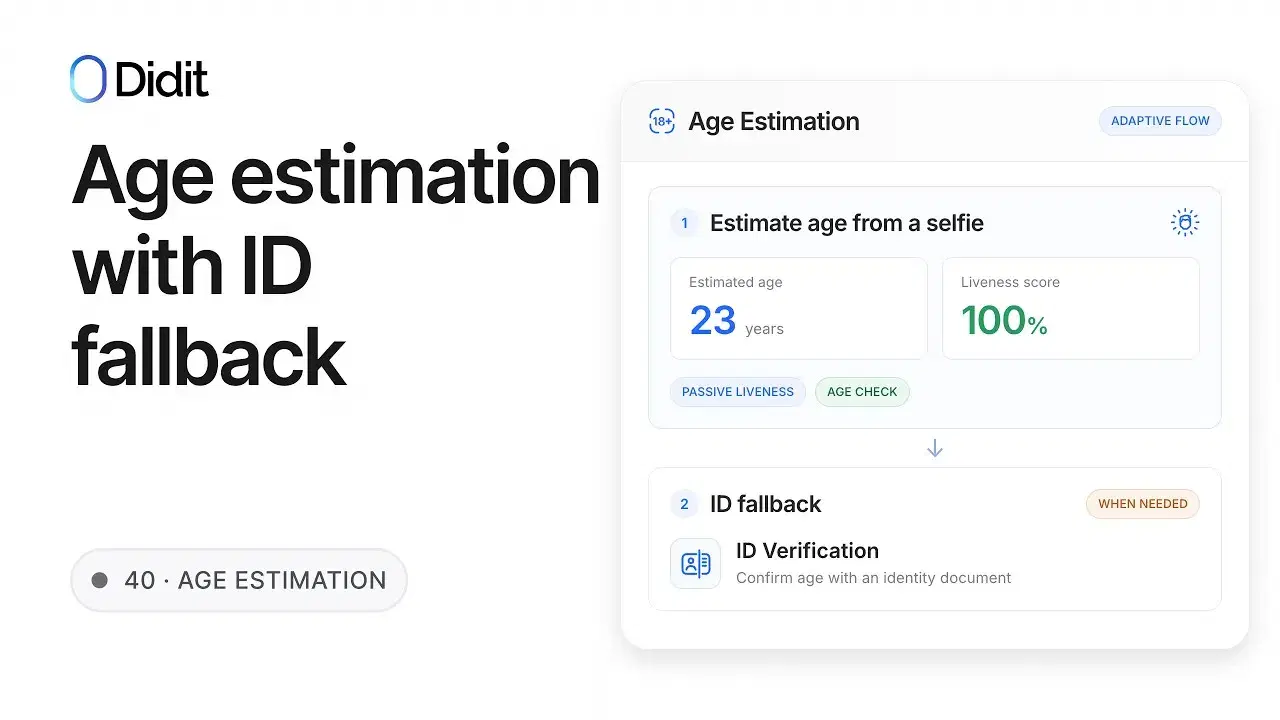
A UK vape or tobacco retailer needs an 18+ gate at checkout. Didit Age Estimation checks a selfie for $0.10, with ID Verification at $0.15 in a workflow, or a full ID check at $0.33 when you need biometrics and device data, for.
 Alberto RosasCo-founder and CEO
Contents
In this guide
Jump to the part you need.
This guide is for UK online retailers selling vapes, e-liquids, tobacco or nicotine products who need an 18+ gate. The method we recommend is selfie age estimation at $0.10 per check, with a document fallback: ID Verification at $0.15 in a workflow, or the full ID check at $0.33 when you also need face match and device data. The caveat: a model estimate is a risk signal, not legal proof of age, so borderline shoppers still need a document.
Last updated: November 26, 2026. Prices checked against the live Didit price feed on November 26, 2026.
| Stage | Didit module | List price (USD) | What you act on |
|---|---|---|---|
| 1. Selfie age gate | Age Estimation, inside the Liveness step or the standalone API | $0.10 per check | Estimated age in years, passive liveness score, warning codes |
| 2. Document fallback | ID Verification with a minimum age of 18 | $0.15 in a workflow, $0.20 through the standalone API | Date of birth from the document, MIN_AGE_NOT_REACHED warning |
| 3. Face to document match | Face Match 1:1 | $0.05 per check | Whether the selfie and the document portrait are the same person |
| 4. Device and network | Device and IP Analysis | $0.03 per check | IP risk attached to the session |
| 5. One bundle for both | Full ID check (KYC) | $0.33 per completed check | Document plus biometrics plus device and IP in one result |
Start free in the sandbox at https://business.didit.me/, no sales call. Developers who work from an AI assistant can connect Didit through the MCP server at https://didit.me/developers/mcp/. The age estimation method and its full field list sit at docs.didit.me/core-technology/age-estimation/overview. The document fallback is documented at docs.didit.me/core-technology/id-verification/overview, and every public price is on the Didit pricing page.
The outcome, and the method we recommend
You end with one gate on the checkout page that returns one of three answers per order: pass, fail, or send the shopper to a document check. The decision is stored, the warnings are recorded, and your order system receives the result.
The method: a Didit workflow built around a Liveness step with age estimation enabled. It asks for a selfie and returns an estimated age plus a passive liveness score. For shoppers who need a document, use the documented ID Verification route. In hosted Didit flows, age estimation is embedded inside the Liveness step. There is no separate age estimation workflow feature to add.
Conditional routing is implemented by your application unless documented workflow branching is available for your case. The hosted workflow docs do not describe an automatic branch based on the age estimate. Your checkout reads the age result, applies your policy, and creates a second session with the ID Verification workflow when the shopper needs the document fallback. If your policy requires every shopper to complete both steps, put Liveness and ID Verification in one workflow instead, and accept that both steps run for everyone.
We recommend this order because of how the errors line up. The age estimation model has a mean absolute error of 1.1 years for 16 and 17 year olds and 1.9 years for 18 to 20 year olds, and it classifies 96% of selfies correctly as under 18 or 18 and over. The published performance supports using age estimation as an initial gate with a document fallback. It is not legal proof, so a shopper close to the line still goes to a document.
Age verification for tobacco and vapes: what UK law asks
Age limits and duties vary by product and UK nation. Check current GOV.UK guidance and the applicable legislation before relying on an age-gating policy. This is a summary, not legal advice.
- England and Wales, tobacco: section 7 of the Children and Young Persons Act 1933.
- England and Wales, nicotine inhaling products: sections 91 and 92 of the Children and Families Act 2014, and the Nicotine Inhaling Products (Age of Sale and Proxy Purchasing) Regulations 2015.
- Scotland, tobacco: section 4 of the Tobacco and Primary Medical Services (Scotland) Act 2010.
- Scotland, nicotine vapour products: section 1 of the Health (Tobacco, Nicotine etc. and Care) (Scotland) Act 2016.
- Northern Ireland, tobacco: section 24 of the Children and Young Persons Act (Northern Ireland) 1968.
- Northern Ireland, nicotine inhaling products: the Nicotine Inhaling Products (Age of Sale and Proxy Purchasing) Regulations (Northern Ireland) 2016, named on legislation.gov.uk.
Local trading standards services enforce age restricted sales. Current trading-standards guidance frames the operational question after an underage sale as what you did to prevent it: what check ran, what it returned, when it ran, and what your staff did with a failed result. A date of birth field and an 'I am over 18' checkbox are self declaration. The shopper types the answer you want, and you have no evidence to show afterwards.
Three things follow for an online shop:
- Set the check timing in your compliance policy after confirming current guidance for each UK nation, and document when the check runs relative to payment and dispatch.
- Keep the decision, not just the outcome. A screenshot of an approved badge proves less than a stored session with its warning codes and timestamp.
- Write down the rule for the borderline shopper. If your policy is 'document check when the estimate is near 18', that policy is part of your due diligence and should be visible to staff.
The same logic applies to vape hardware, e-liquid, pouches and rolling tobacco. If the product cannot be sold to a person under 18 in a shop, the online sale needs a gate.
Prerequisites
- A Didit account. The Free plan gives $10 of credit a month to eligible organizations that sign up with a work email, and the sandbox is free and unlimited on every plan. Unused monthly credit does not roll over.
- An API key from the Business Console.
- A workflow with a Liveness step that has age estimation enabled, and your 18 threshold set through
age_estimation_decline_threshold. - A second workflow with ID Verification and its minimum age set to 18, for the document fallback. If your policy requires one combined workflow, put both steps in the same workflow instead.
- An HTTPS callback URL on one of your application's allowed domains, so Didit can return the shopper to your checkout.
- A server endpoint that can receive a webhook and verify an HMAC-SHA256 signature.
Step by step: put an age gate in front of checkout
- Build the age workflow. Add the LIVENESS feature, enable age estimation on it, and set
age_estimation_decline_thresholdto 18. The default is already 18, so change it only if you sell a product with a different limit. - Build the document workflow. Create a second workflow with ID Verification and set its minimum age to 18. The document check returns the warning
MIN_AGE_NOT_REACHEDand declines when the document date of birth is under the limit. This is the documented route for a document fallback. - Collect the values. Copy each
workflow_id(a stable UUID) and your API key from the console. Keep the key on your server, never in the browser. - Create a session per order. Call
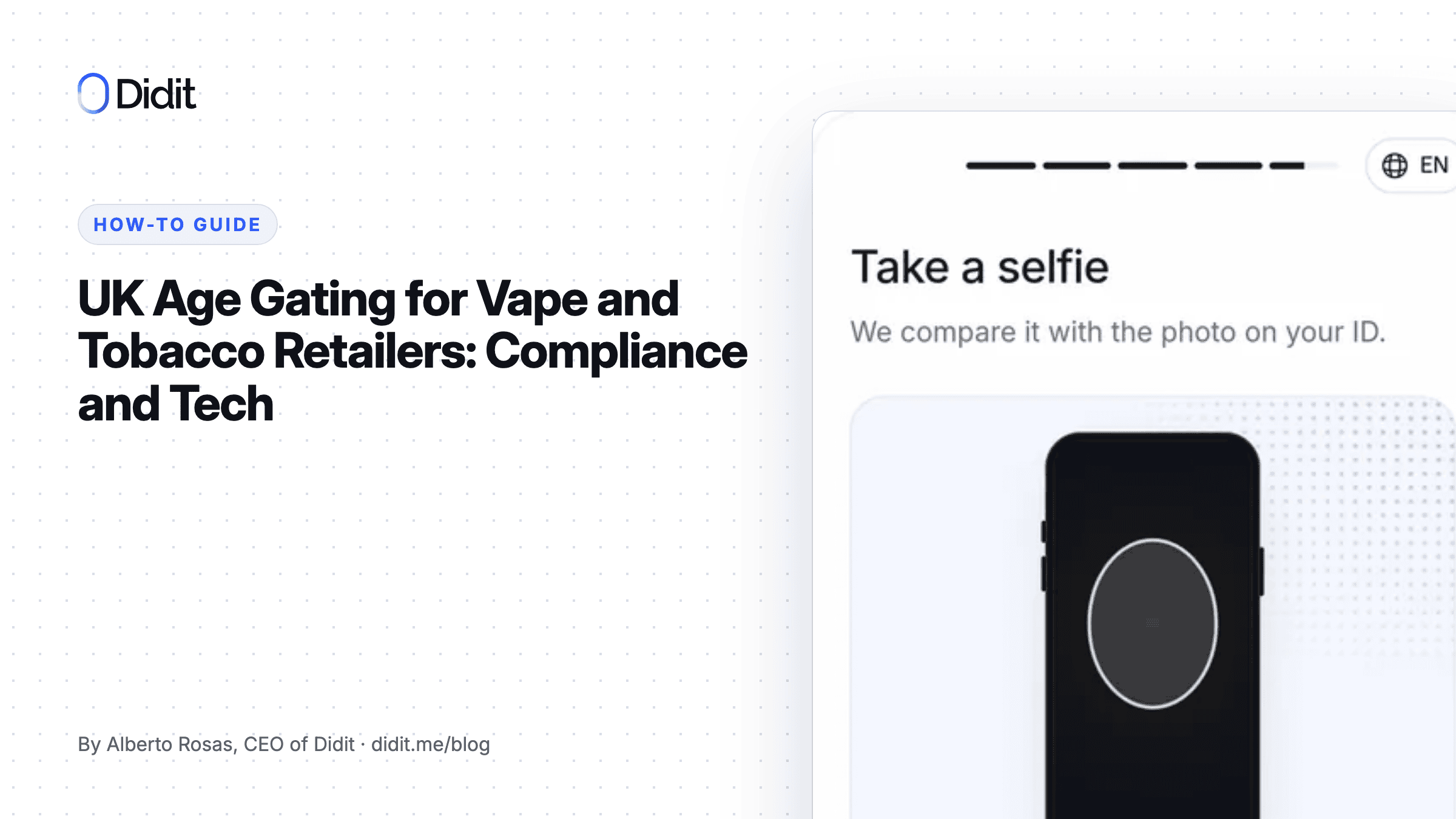
POST https://verification.didit.me/v3/session/with the age workflow'sworkflow_id,vendor_dataset to your order reference, andcallbackset to your return URL. The response gives yousession_idandsession_url. The docs for this endpoint are at docs.didit.me/sessions-api/create-session. - Send the shopper to the check. Redirect to
session_url, or mount the Web or Mobile SDK if you want the flow inside your own page. The shopper sees a selfie prompt and, if your application routes them there, a document scan. - Read the decision. Call the decision endpoint from your server when the shopper returns, and branch on
session_kindfirst. Age results sit atliveness_checks[].age_estimation, one entry per Liveness step, not in a top level age array. - Route in your application. If the result is Approved and the estimate clears your policy band, release the order. If it is Declined with
AGE_BELOW_MINIMUM, block the sale. If the estimate sits in your borderline band, create a second session with the ID Verification workflow. This routing is application logic. The Didit workflow docs do not describe an automatic conditional branch based on the age estimate. - Subscribe to the webhook. Register a destination for
status.updated. VerifyX-Signature-V2with HMAC-SHA256 over the canonical JSON, check thatX-Timestampis within 300 seconds, and return a 2xx fast. Re-fetch the decision if you need the full payload. - Act on three outcomes. Approved: release the order. Declined: block the sale and show a neutral message. In Review: hold the order for a person on your team, never auto-approve it.

Runnable example: a single selfie check from the command line
If your checkout already holds the selfie, for example a capture from a native app, you can skip the session and call the standalone endpoint. This is the exact call from the Didit docs.
curl -X POST 'https://verification.didit.me/v3/age-estimation/' \
-H 'x-api-key: YOUR_API_KEY' \
-F 'user_image=@./selfie.jpg' \
-F 'age_estimation_decline_threshold=18' \
-F 'save_api_request=true' \
-F 'vendor_data=user-1234'
The image must be jpg, jpeg, png, tiff or webp, up to 5 MB. PDFs are not accepted. When more than one face is in the frame, the largest face drives the result, which is another reason to ask for a solo photo.

Expected output
A successful call returns HTTP 200 with a request_id and an age_estimation object. That object carries a status, a method of PASSIVE, the predicted age_estimation as a float in years, a liveness score from 0 to 100, and a warnings array.
The decision logic is strict in a useful way: status is Approved only when the warnings array is empty. Any warning declines. Three conditions produce a decline on their own: a liveness score at or below face_liveness_score_decline_threshold (default 30), a predicted age below age_estimation_decline_threshold, or no face found. A detected presentation attack declines too.
In the sandbox, API keys skip processing and billing. After request validation, the endpoint returns a static Approved payload with an age estimate of 30 and no warnings, and no session is stored. That lets you test the integration and the decline branches in your own code before you touch a live key.

Failure cases and how to recover
| What you see | Why | What to do |
|---|---|---|
| HTTP 400 | Missing or oversized user_image, a PDF, or an unsupported extension | Check the file type and size before upload, then ask for a new selfie |
| HTTP 403, not enough credits | The organization balance cannot cover the call | Top up. The refusal happens before any image processing, so no shopper data is used |
| HTTP 429 | More than 300 write requests a minute on that API key | Stay within the documented shared write budget of 300 requests a minute per API key. If you exceed it, handle the 429 before retrying |
Declined with AGE_BELOW_MINIMUM | The estimate is below your threshold | Block the sale. Do not offer a retry loop, since a retry only searches for a different answer |
Declined with LOW_LIVENESS_SCORE | Liveness score at or below the threshold, often a dim or blurry photo | Offer one retake with guidance, then send the shopper to the document route |
Declined with LIVENESS_FACE_ATTACK | A presentation attack was detected, such as a photo of a photo or a screen replay | Treat it as fraud, not as a camera problem |
Declined with AGE_NOT_DETECTED | The model could not extract an age, usually image quality | Ask for a retake |
Declined with NO_FACE_DETECTED | No face in the frame | Ask for a retake with the face centred |
Declined with MULTIPLE_FACES_DETECTED | More than one person in the photo | Ask for a solo photo |
| In Review | The workflow or a document warning routed the session to manual review | A person on your side decides. Do not approve automatically |
Record the warning code next to the order. The docs do not promise fraud scoring beyond the returned warnings; the value is in having a timestamped record for review and for your due diligence file.
Inputs and outputs
| Direction | Field | Type | Notes |
|---|---|---|---|
| Send | user_image | file | Required. jpg, jpeg, png, tiff or webp, max 5 MB, no PDF |
| Send | age_estimation_decline_threshold | number | Default 18. Set this to your UK age of sale |
| Send | face_liveness_score_decline_threshold | number | Default 30. Raise it to be stricter on photo quality |
| Send | save_api_request | boolean | Default true. Set false and request_id is a one-off UUID you cannot look up later |
| Send | vendor_data | string | Your order or customer reference, echoed back in the result and the webhook |
| Send | rotate_image | boolean | Set true when captures may arrive sideways or upside down |
| Receive | status | enum | Not Started, In Progress, Approved, In Review, Declined, Abandoned, Kyc Expired |
| Receive | age_estimation.age_estimation | float | Predicted age in years, null when no age could be estimated |
| Receive | age_estimation.score | number | Passive liveness score, 0 to 100 |
| Receive | age_estimation.warnings | array | Risk codes such as AGE_BELOW_MINIMUM or LIVENESS_FACE_ATTACK |
| Receive | request_id | UUID | A real session id when save_api_request is true, usable at the decision endpoint |
Paid steps and where our responsibility stops
Billing is per completed check, from prepaid credit. A 200 response consumes one Age Estimation credit at $0.10, and that includes a Declined response. A shopper who fails the gate still costs you $0.10, so budget for failed attempts rather than for orders. The document fallback bills at $0.15 inside a workflow or $0.20 through the standalone upload API. A full ID check bundles document, passive liveness, face match and device and IP at $0.33.
What we do not do: we do not decide whether your shop is compliant. Didit returns a status and a set of warning codes. Your team sets the threshold, writes the retry and fallback policy, decides what to do with In Review sessions, and keeps the record. A Didit decision is evidence for your due diligence file, not a certificate that replaces it. Customers on a Free plan get $10 of credit a month, and the sandbox never bills, so you can test the whole path before you pay anything.
We publish every price on the pricing page and in the pricing docs, and 4,000+ companies run on the platform today.
Worked cost example
A shop taking 10,000 orders a month, where 8,500 shoppers clear the selfie gate and 1,500 need a document. This example prices the fallback as a full ID check at $0.33, so it includes document, passive liveness, face match and device and IP.
| Line | Volume | Unit price | Cost |
|---|---|---|---|
| Selfie age estimation | 10,000 checks | $0.10 | 10,000 x $0.10 = $1,000.00 |
| Document fallback, full ID check | 1,500 checks | $0.33 | 1,500 x $0.33 = $495.00 |
| Total at list price | 10,000 orders | blended $0.1495 | $1,000.00 + $495.00 = $1,495.00 |
The $0.33 is itself a sum: ID document $0.15 + passive liveness $0.10 + face match 1:1 $0.05 + device and IP $0.03 = $0.33.
If you run only ID Verification in a workflow for the fallback, the list price is $0.15. The same 1,500 document checks cost 1,500 x $0.15 = $225.00, for a total of $1,000.00 + $225.00 = $1,225.00. Through the standalone upload API, ID Verification is $0.20, so 1,500 checks cost 1,500 x $0.20 = $300.00, for a total of $1,000.00 + $300.00 = $1,300.00.
On the Scale plan, Didit prices carry a 10% discount, and carrier or Meta charges are not part of this. Age estimation becomes $0.09: 10,000 x $0.09 = $900.00. The full ID check becomes $0.297: 1,500 x $0.297 = $445.50. Total $900.00 + $445.50 = $1,345.50, a blended $0.1346 per order.
For a smaller shop at 1,000 orders a month with the same 85 to 15 split: 1,000 x $0.10 = $100.00 for the selfie gate, 150 x $0.33 = $49.50 for documents, $149.50 in total.
Sources
- Didit docs: Age Estimation API overview
- Didit docs: standalone age estimation endpoint, request fields and decision logic
- Didit docs: age estimation warning catalogue
- Didit docs: ID Verification API overview
- Didit docs: ID verification warning catalogue
- Didit docs: Create Session API
- Didit docs: Retrieve Session decision API
- Didit docs: webhooks and HMAC signing
- Didit docs: pricing and billing rules
- Didit pricing page, prices read November 26, 2026
- Didit MCP server setup
- legislation.gov.uk: Children and Young Persons Act 1933, section 7
- legislation.gov.uk: Children and Families Act 2014, section 91
- legislation.gov.uk: Nicotine Inhaling Products (Age of Sale and Proxy Purchasing) Regulations 2015
- legislation.gov.uk: Tobacco and Primary Medical Services (Scotland) Act 2010, section 4
- legislation.gov.uk: Health (Tobacco, Nicotine etc. and Care) (Scotland) Act 2016, section 1
- legislation.gov.uk: Children and Young Persons Act (Northern Ireland) 1968, section 24
- legislation.gov.uk: Nicotine Inhaling Products (Age of Sale and Proxy Purchasing) Regulations (Northern Ireland) 2016, read November 26, 2026
Next step: open the sandbox at https://business.didit.me/, create a workflow with Liveness and age estimation enabled, and run one selfie through the test key. No sales call is needed, and the sandbox does not bill.
Try it
Try this in the sandbox
Run the check this guide describes, free.
The product this post is about, taken from its topic. Run it free in the sandbox.
Author
Alberto Rosas
Co-founder and CEO

Keep reading
Other guides in the same topic.
 What Is the Purpose of FICA in South Africa? 2026 Guide
FICA is South Africa's anti-money laundering law. It creates the Financial Intelligence Centre and requires accountable institutions to identify and verify clients, screen for PEP and sanctions risk and report suspicious.
Alberto RosasNov 26, 2026 Sixth Money Laundering Directive (6AMLD): What Changed and Which Rules Apply
6AMLD is Directive (EU) 2018/1673: Member States must criminalise laundering, widen predicate offences and set a four-year penalty floor. It adds no new due diligence duties for firms.
Alberto RosasNov 26, 2026 Automated Sanctions Screening: Canada, the Entity List and Embargoes
Automated sanctions screening matches people and companies against lists such as Canada's autonomous sanctions made under SEMA and JVCFOA and the OFAC SDN List, and returns candidate hits scored for identity confidence and.
Alberto RosasNov 26, 2026Questions
Frequently asked questions
What age verification do UK vape and tobacco retailers need online?
Age limits and duties vary by product and UK nation. Check current GOV.UK guidance and the applicable legislation before relying on an age-gating policy. In England and Wales, see section 7 of the Children and Young Persons Act 1933 for tobacco, and sections 91 and 92 of the Children and Families Act 2014 plus the Nicotine Inhaling Products (Age of Sale and Proxy Purchasing) Regulations 2015 for nicotine inhaling products. Scotland and Northern Ireland have their own instruments, so check the consolidated text for the nation you sell into.
Is a date of birth field or an 'over 18' checkbox enough for age verification?
No. A checkbox only records what the shopper chose to type. A due diligence file needs evidence of a check that was outside the shopper's control, with a timestamp and a result. That is what an age estimation call or a document check produces.
How accurate is selfie age estimation at the 18 threshold?
Didit Age Estimation has a mean absolute error of 1.1 years for 16 and 17 year olds and 1.9 years for 18 to 20 year olds, and it classifies 96% of selfies correctly as under 18 or 18 and over. That accuracy is strongest exactly where an age gate decides. It is still a model estimate, so keep a document fallback for shoppers near the line.
What should happen when the estimated age is close to 18?
Your application sends that shopper to the ID Verification route, where the document date of birth decides and a failure returns MIN_AGE_NOT_REACHED. Face Match 1:1 then confirms the person holding the document is the person in the selfie. Your threshold on the Liveness step controls how wide that borderline band is, and the routing itself is application logic unless documented workflow branching is available.
Can someone beat a selfie age check with a photo, a screen or a mask?
Passive liveness runs in the same call as the age estimate, needs no user action, and returns a score from 0 to 100. A score at or below the decline threshold produces LOW_LIVENESS_SCORE, and a detected presentation attack produces LIVENESS_FACE_ATTACK. Either one declines the session.
How much does an age gate cost per check?
Age Estimation is $0.10 per check and every 200 response bills, including a Declined one. A full ID check is $0.33 when you need the document route. A shop taking 10,000 orders a month where 15% need a full ID check pays $1,495.00 at list price.
Does Didit keep the shopper's selfie?
By default yes. save_api_request defaults to true, so the call is stored as a session in the Business Console with a real request_id, the face crop and reference image are kept, and a status.updated webhook fires. Set it to false and nothing is stored, but the request_id becomes a one-off UUID you cannot look up later, which weakens your audit trail.
Can I add this to Shopify or WooCommerce?
Didit's docs describe four integration routes: the hosted session_url, the Web and Mobile SDKs, the REST API and webhooks. There is no documented platform connector for a storefront plugin. A plugin you build or buy would wrap the session API and pass your order id as vendor_data.
What should I keep for a due diligence file?
Keep the order reference you passed as vendor_data, the session_id, the final status, the warning codes, and the timestamp. For an In Review session, keep the review activity and the decision reason returned by Didit, since a reviewer name may not always be available. The session itself stays retrievable in the Business Console.
How fast is the check for a shopper at checkout?
Didit reports a sub-2-second p99 for inference. The age estimation call accepts one front-facing, well-lit photo.
Compliance built in
Audited, certified and attested.
We hold the certifications and build each country's rules into your flows, so you can launch anywhere without worrying. Security and Compliance center
- Regulation encoded into your flows
Tell us what you do and where. Didit lists the rules that apply to you, with sources, and builds the checks each country needs into one workflow.
- Ready for AMLR
Every requirement of the new EU anti-money laundering rules, from checking customers to human review, is already covered by a Didit check.
- Tested in Spain's Treasury sandbox
Spain's Treasury published its supervised sandbox report on Didit's NFC plus active liveness onboarding; SEPBLAC took part and valued the added measures positively.
- Audited, not self-declared
iBeta Level 1 and Level 2. Liveness tested under ISO/IEC 30107-3.
Your obligations · 3 regions
 SOC 2 Type 2
 ISO 27001
 iBeta Level 1 and Level 2
 EU regulator attestation
 FSM youth protection
 GDPR
 EBA remote onboarding
 MiCA compatible
 FIDO Alliance member
- AMLREU AML Regulation ready
Integration · Didit MCP
Run Didit from your own AI agent
Connect Didit to Claude, Cursor, VS Code or ChatGPT and just ask in plain words. Your agent can do anything you can do in the console, with the same permissions you have.
 Add to Claude
 ChatGPT
 Cursor
- Build workflowsDescribe the checks you need. The agent creates and publishes the flow.
- Run investigationsAsk why a session was declined, review cases, search people and companies.
- Change rulesCreate payment rules, test them on past data and switch them on.
- Pull reportsAsk for numbers, exports or the audit log.
Didit Academy