Identity Assurance Levels (LoA 1-4): How to Choose One in 2026
LoA 1 to 4 is legacy shorthand for confidence in a claimed identity. NIST and eIDAS ask different questions, and we record three evidence tiers from the method used. See how an illustrative policy maps onto those tiers and costs.
 Alberto RosasCo-founder and CEO
Contents
In this guide
Jump to the part you need.
This guide fits product, risk and compliance teams that must name an assurance level for a journey and prove it to an auditor. We bill per check: the full ID check is $0.33 and ID document verification alone is $0.15. The caveat is terminology. LoA 1 to 4 is legacy shorthand, NIST and eIDAS ask different questions, and we report three evidence tiers, so you map your policy before you configure anything.
Last updated: November 26, 2026. Prices checked against the live Didit price feed on November 26, 2026.
The 4 levels of assurance: our example policy at a glance
NIST SP 800-63-2 described LoA 1 as little or no confidence, LoA 2 as some confidence, LoA 3 as high confidence, and LoA 4 as very high confidence in the asserted identity. The four rows below are an illustrative internal policy for teams that still use LoA language, not a published standard. Each row names an example workflow and the evidence we record.
| Level | What the policy asks for | Example workflow | Evidence we record | Published price |
|---|---|---|---|---|
| LoA 1 | Self-reported details. Nothing is checked against an issuer. | Custom Questionnaire, or no identity step | None, because no ID Verification method ran | $0.10 per questionnaire check |
| LoA 2 | The details match an authoritative record, and the user controls an email address or phone number | Non-document ID Verification lookup, plus a separate Email or Phone Verification possession check | data_match for the non-document ID Verification method | Lookup priced per service; email $0.02; phone $0.02 Didit fee per code plus carrier charges |
| LoA 3 | A document was captured and checked for authenticity, and a live person matched its portrait | ID document verification, Passive Liveness, Face Match 1:1, and Device and IP Analysis | documentary for the document method; read Liveness and Face Match separately | $0.15 + $0.10 + $0.05 + $0.03 = $0.33 |
| LoA 4 | An issuer authenticated the person and signed the attributes it shared | Wallet sign-in, with document capture permitted as a fallback | cryptographic for the wallet; documentary when document fallback produces the result | Wallet price varies; published rates for available wallets run $0.10 to $0.95 |
Start free in the sandbox at https://business.didit.me/, no sales call. Developers can connect Didit to an AI assistant through the Didit MCP server. Read the published rates on the Didit pricing page, and check wallet rates in the digital ID wallet price feed. The product these methods belong to is User Verification.
What an assurance level is, and which framework you are quoting
An assurance level is a written statement of how confident you are that the person on screen is who they claim to be. It is not a product feature. You set it from the risk of the transaction and implement it with evidence. FATF is a standard setter, not a regulator. Recommendation 10 of the FATF Recommendations and its Interpretive Note ask firms to apply customer due diligence proportionate to risk. It does not prescribe a four-level ladder.
Legacy LoA 1 to 4 survives in older national guidance and vendor material, and no current standard defines those exact four combinations. NIST SP 800-63-4 separates identity, authentication and federation assurance levels, and Regulation (EU) 910/2014 on eIDAS uses low, substantial and high. When a requirement names a level, ask for the framework and the version, for example NIST SP 800-63-4 IAL2 or eIDAS substantial.
| Framework | What it names | What to check |
|---|---|---|
| Legacy LoA 1 to 4 | Four degrees of confidence in the asserted identity, from little or no confidence at LoA 1 to very high confidence at LoA 4 | The source document and its date, because the four combinations are not standardised |
| NIST SP 800-63-4 | Separate identity (IAL), authentication (AAL) and federation (FAL) assurance levels | Which of the three is required, and at what level |
| eIDAS, Regulation (EU) 910/2014 | Low, substantial and high for electronic identification | Which level, for which service, in which member state |
| Our evidence tier | documentary, data_match or cryptographic, derived from the method that produced the result | Which method produced the result, and what else the policy requires |
Every ID Verification result carries an assurance tier derived from the method that produced it. The tier is an honest description of what was actually proven, not a ranking.
We do not certify a NIST or eIDAS level. We record one of three tiers, derived from the method that produced the result.
The 4 levels of assurance: our example policy, one by one
Example policy for LoA 1: self-reported information
Under our example internal policy, LoA 1 is a self-asserted identity with nothing checked against an issuer. A questionnaire collects self-reported information: the user answers questions or types a date of birth and we record the claim.
Use it for low-risk steps such as a newsletter sign-up, a saved profile or a support ticket. If a questionnaire is the only step, the session carries no evidence tier, because no ID Verification method ran. A Custom Questionnaire is $0.10 per check.
Example policy for LoA 2: a data match plus a possession check
Under our example internal policy, LoA 2 means the details were checked against a record and the user proved control of a contact channel. We run the first half as non-document ID Verification, which returns data_match: the details matched a record held by the source, and no document was inspected, so nothing is claimed about a document's authenticity.
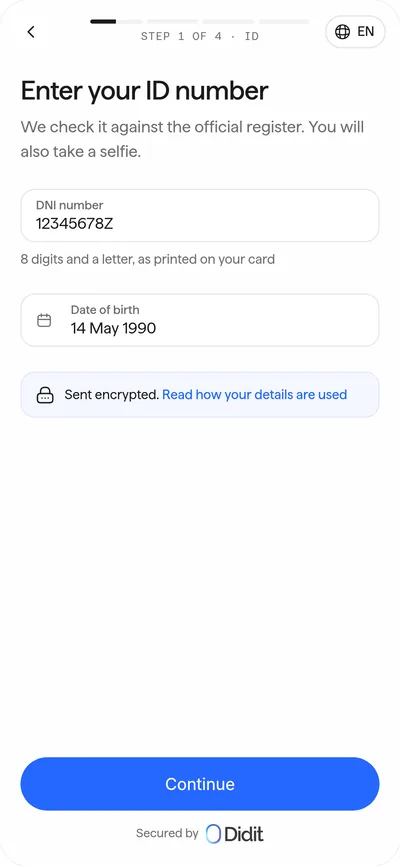
The source differs by country, and that changes what the match proves. In most supported countries, we query a government register: the Department of Home Affairs in South Africa, RENAPER in Argentina, UIDAI in India, the CPR register in Denmark. In Canada, France, Indonesia, the Netherlands, Norway, Singapore, the United Kingdom and the United States the record we can reach is a credit-bureau, financial-services, utility or residential-records file. The docs name the exact source per country, and the session records it as id_lookup.source.
Portraits follow the per-service documentation, and three cases matter:
- A source that returns the holder's photograph supports bundled passive liveness and face matching inside the lookup and inside the lookup price. The per-service lookup documentation names the countries.
- A source that verifies the selfie itself returns a verdict, with no bundled liveness. Any Liveness or Face Match step in the workflow still runs, and Face Match can compare against the selfie the source verified. Brazil, Nigeria and specific Argentine and Panamanian services work this way.
- A data-only source leaves no Face Match reference.
Email or phone verification is a separate possession check. Add it when policy requires proof that the user controls the contact channel, and budget $0.02 per email check or a $0.02 Didit fee per phone code plus carrier charges.
Example policy for LoA 3: a document and a live face
Under our example internal policy, LoA 3 means a physical document plus a live person matched to its portrait. The documentary tier records that the document was captured, read and checked for authenticity. It describes the document method alone, so read the Liveness and Face Match results separately before you accept a policy that requires both.
The full ID check is $0.33 per completed check: $0.15 for document verification, $0.10 for passive liveness, $0.05 for Face Match 1:1 and $0.03 for device and IP analysis. Active liveness is a separate option at $0.15 per check, and using it instead of passive liveness changes the total.

The Liveness documentation reports 99.9% accuracy with a false acceptance rate under 0.1%, and iBeta Level 1 PAD testing. Face Match compares a live capture with a reference portrait and returns a score from 0 to 100; your threshold decides pass or fail. In a session a fixable capture failure does not decline immediately: the user retries with guidance up to face_match_max_attempts, default 3 and range 1 to 3, and the computed status is applied only when that budget runs out. The standalone endpoint is single-shot.
Example policy for LoA 4: an issuer's signed attributes
Under our example internal policy, LoA 4 means an issuer authenticated the person and signed the attributes it shared. Wallet sign-in returns cryptographic, which means an identity provider authenticated the person and signed what it returned. It does not mean the holder was matched to a document photo, and a wallet without a portrait includes no selfie comparison.
Wallet rates vary by wallet and country. Published rates for available wallets in the digital ID wallet price feed run from $0.10 for Google Wallet to $0.95 for iDIN full identification, with MitID personal at $0.25, BankID Sweden at $0.20, Smart-ID and Mobile-ID at $0.21, Bank iD at $0.20, BankID Norway High at $0.35 and Personalausweis Profile 2 at $0.49. OneID is $2.75 with production availability still coming soon; some coming-soon methods have a published rate and some do not.

A document fallback returns documentary when document capture produces the result, not cryptographic. If your policy requires signed attributes, do not let a fallback satisfy LoA 4: send that outcome to a review or decline step the policy permits. Apply the journey's evidence requirement to each outcome separately. Coverage is per wallet and per country. MitID, BankID Sweden, iDIN, Finnish Trust Network, Smart-ID, Mobile-ID, Bank iD, BankID Norway High, Personalausweis Profile 2 and Google Wallet are available in production, and a workflow that enables a coming-soon wallet is rejected on save.
How to map an illustrative LoA policy onto our evidence tiers
Outcome
The concrete hosted result is a session whose decision payload records the tier of the method that produced it, plus separate Liveness and Face Match results where the workflow runs those steps. Before you configure anything, decide whether policy allows collecting self-reported details without running ID Verification. If it does not, every route needs at least one ID Verification method.
Prerequisites
- A Didit account and an API key from the console.
- The Free plan includes $10 in monthly credit for the first organization created with an eligible work email for a company domain. Unused monthly credit expires, and phone codes are excluded. Sandbox testing is free on every plan.
- The countries you serve, and for each one whether a document, a lookup or a wallet is acceptable.
- A written rule for what a no-match means and who reviews it.
Steps
- Decide what evidence each approval requires, how a fallback is handled and what reviewers inspect. Write the decision down before you open the console.
- Create the workflow and add ID Verification in the Business Console or with
POST /v3/workflows/. Document verification is $0.15 per check. - Turn on the methods each country may use. Methods live under the
methodskey on theOCRfeature config, keyed by ISO 3166-1 alpha-3 country code. If you omitmethodsor leave a country unconfigured, document capture is the default. For a configured country, explicitly enable each method you intend to offer. The Denmark example enables document capture and lookup. This is the documented South Africa and Denmark lookup configuration, with wallets disabled so it does not depend on a wallet being enabled in your environment:{ "feature": "OCR", "config": { "methods": { "ZAF": { "document": { "enabled": true }, "id_lookup": { "enabled": true, "max_attempts": 2, "skip_liveness_and_face_match": true, "on_partial_match": "fallback_to_document", "on_no_match": "fallback_to_document", "on_provider_error": "fallback_to_document" }, "wallet": { "enabled": false, "providers": [], "on_failure": "fallback_to_document" } }, "DNK": { "document": { "enabled": true }, "id_lookup": { "enabled": true, "on_no_match": "decline" } } } } } - Use the separate MitID example where the wallet is available. The docs show this alternative for Denmark once MitID is available in your environment:
A workflow that enables a wallet marked coming soon is rejected on save, including the rest of that save.{ "DNK": { "document": { "enabled": true }, "wallet": { "enabled": true, "providers": ["mitid"], "on_failure": "fallback_to_document" } } } - Use only the fallback actions the examples demonstrate. South Africa sets
fallback_to_documentfor partial match, no match and provider error, and Denmark setsdeclinefor no match. A fallback runs a separate document check, billed as document capture. Liveness and face match require their own steps and results, so a fallback alone does not produce them. Check the feature configuration reference before you rely on another value. - Add the steps that carry the level. For LoA 3, add Liveness and Face Match after ID Verification. For LoA 2, add Email Verification or Phone Verification as a separate possession check. Publishing is blocked for a country when every path into Face Match leaves no reference and every route out of the ID Verification step leads there. Mixed or bypassable paths warn instead, a supported source-verified selfie can supply a reference, Face Match does not use wallet portraits, and a workflow that collects a reference face at session creation with
portrait_imageis never flagged. - Create a session. Call
POST /v3/session/withworkflow_id,vendor_dataandcallback, then opensession.urlor mount the Web or Mobile SDK. - Optionally test one source on its own. The standalone Database Validation call checks identity data against a registry without a session, and its output is
database_validation.match_typewith per-field results. This is the documented Brazil CPF example; substitute your own key and test data.curl -X POST 'https://verification.didit.me/v3/database-validation/' \ -H 'x-api-key: YOUR_API_KEY' \ -F 'issuing_state=BRA' \ -F 'identification_number=00000000191' \ -F 'first_name=Jane' \ -F 'last_name=Doe' \ -F 'date_of_birth=1990-01-15' \ -F 'vendor_data=user-1234' - Read the decision. Fetch
GET /v3/session/{sessionId}/decision/or subscribe tosession.status.updated. Read the method-derived tier,id_lookup.sourcefor lookups, and the separateliveness_checks[]andface_matches[]results. Record the method, tier, policy decision, and check outcomes required by your audit policy. Retain and export only the fields authorized by that policy.
Expected output
For a hosted ID Verification, read the decision payload: the tier from the method that completed, id_lookup.source for a lookup, and liveness_checks[] and face_matches[] when those steps run.
Database Validation returns match_type as one of full_match, partial_match or no_match, plus match_score and per-service results.
Inputs and outputs
| You send | Where it goes | What comes back | What you do with it |
|---|---|---|---|
workflow_id, vendor_data, callback | POST /v3/session/ | session.url and a session id | Open the URL or mount the SDK, keep vendor_data as your join key |
| Country, national ID number and personal details | ID Verification, non-document lookup | The method-derived tier data_match and id_lookup.source | Apply the configured no-match and partial-match actions |
| Identity fields for a standalone check | Database Validation API | match_type, per-field validations, warnings | Read match_type first, then route a partial match to review |
| A selfie | Liveness | Status, score and warnings such as LIVENESS_FACE_ATTACK | Retry on a capture problem, decline on a suspected attack |
| Live capture and reference portrait | Face Match | Score 0 to 100 and a status | Compare against your threshold |
| Wallet sign-in | ID Verification, wallet method | Signed attributes and cryptographic | Check the requested attributes were shared, and apply the fallback rule if policy requires signed attributes |
| Session id | GET /v3/session/{sessionId}/decision/ | The decision payload with the tier and separate biometric results | Record only the fields your audit policy authorizes |
Failure cases and how to recover
- HTTP 400 on a database validation call. The service is not eligible for that
issuing_state, a required field is missing, or a service flaggedrequires_consent=truewas called withoutconsent=true. Fix the request, not the user. - HTTP 502 with
validation_errors[]. Every selected upstream service failed. The request is not billed and aCOULD_NOT_PERFORM_DATABASE_VALIDATIONlog is written. Retry later or fall back to document capture. no_match. A no-match means the selected check did not confirm the submitted details. Apply the configured decline or document-fallback action, and note that some no-match lookups and retries are billable.partial_match. Route to review. A date of birth that matches with a name that does not is not a pass.- The workflow will not publish for a country. Every path into Face Match leaves no reference and every route out of the ID Verification step leads there. Allow document capture, pick a source that returns a photograph or verifies the selfie, or remove the Face Match step. A branch whose outcomes all lead back to Face Match does not change the block.
- A face match warning on a mixed route. Document capture is offered too, or a branch can send users to an outcome without Face Match, so we warn instead of blocking. If a user who completed a data-only lookup reaches Face Match, the step has no reference unless the workflow supplied one separately. A branch can send those users to an outcome that bypasses Face Match.
FACE_MATCH_NOT_COMPUTEDwith a null score. Face Match had no reference, usually after a data-only lookup or a wallet sign-in. We report that instead of declining automatically. Give the workflow a reference face or remove the step.- Wallet save rejected. The wallet is marked coming soon in your environment. Enable an available wallet for that country.
- Liveness declined with
LIVENESS_FACE_ATTACKorLOW_LIVENESS_SCORE. Do not approve.NO_FACE_DETECTEDandMULTIPLE_FACES_DETECTEDare capture problems, so ask for a retry. - HTTP 403. On the documented Liveness and Face Match API calls this means out of credits. Top up or move plan.
Paid steps and review boundaries
We bill per completed check from prepaid credit. Approval, review and decline are workflow outcomes you configure, not a separate service on this page. For exhausted Face Match retries the computed result is applied as Declined or In Review.
| Step | Price (USD) | When it is charged |
|---|---|---|
| Custom Questionnaire | $0.10 | Per questionnaire check |
| Email Verification | $0.02 | Per check |
| Phone Verification | $0.02 Didit fee per code plus carrier charges | Per code, carrier price for the country and channel passes through at cost |
| Non-document lookup | Variable per lookup | Priced by the service chosen |
| Database Validation | Variable per check | Priced per service; selecting several services can produce several usage events |
| ID Verification, document capture | $0.15 | Per check |
| Passive Liveness | $0.10 | Per check |
| Active Liveness | $0.15 | Per check |
| Face Match 1:1 | $0.05 | Per check |
| Device and IP Analysis | $0.03 | Per check |
| Digital ID wallet | Variable; published rates for available wallets run $0.10 to $0.95 | Per completed wallet verification |
Some no-match lookups and retries are billable, and the docs pricing page lists which. Read the rate for the exact service you plan to call before you enable a country.
Worked cost example
2,000 users a month in Denmark, documents for everyone versus wallet first for part of the traffic:
- Document route per user: $0.15 + $0.10 + $0.05 + $0.03 = $0.33.
- All 2,000 on documents: 2,000 x $0.33 = $660.00.
- Mixed route, 800 users on MitID personal and 1,200 on documents: 800 x $0.25 = $200.00, plus 1,200 x $0.33 = $396.00, total $596.00.
- Before email checks, the mixed route costs $0.08 less per user who completes MitID, or $64.00 less across 800 users at list price. That $64.00 is the difference before email checks, and the routes collect different evidence.
- Add a separate Email Verification check for each of the 1,200 document users. At $0.02 per check, 1,200 x $0.02 = $24.00. The mixed route with these checks totals $620.00.
- Usage subtotal before plan fees and credits: on Scale, $620.00 x 0.90 = $558.00; on Growth, $620.00 x 0.96 = $595.20.
The comparison assumes no failed wallet attempts and no document fallbacks. It only works because MitID is available in production for Denmark. Substitute a country with no available wallet and the mixed route cannot be offered at all.
Sources
- Didit pricing page and pricing as JSON, read November 26, 2026
- Didit pricing in the docs
- User Verification product page
- ID Verification overview
- ID Verification methods and assurance tiers
- Non-document lookup
- Digital ID wallets
- Didit digital ID wallet price feed, read November 26, 2026
- Database Validation overview and per-service pricing
- Liveness Detection and Face Match 1:1
- Verification statuses
- Sessions API: create a session
- Workflow feature configuration reference
- Didit MCP server
- NIST SP 800-63-4, Digital Identity Guidelines
- NIST SP 800-63-2, Digital Identity Guidelines, read November 26, 2026
- Regulation (EU) 910/2014 on electronic identification (eIDAS)
- FATF Recommendations, including Recommendation 10 and its Interpretive Note, read November 26, 2026
Next step: open the sandbox at https://business.didit.me/, build the LoA 3 workflow as a full ID check with document verification, passive liveness, Face Match 1:1 and device and IP analysis, and read the method-derived tier and the separate Liveness and Face Match results off the first session before you commit to a four-level policy. No sales call is needed to start.
Try it
Try this in the sandbox
Run the check this guide describes, free.
The product this post is about, taken from its topic. Run it free in the sandbox.
Author
Alberto Rosas
Co-founder and CEO

Keep reading
Other guides in the same topic.
 What Is the Purpose of FICA in South Africa? 2026 Guide
FICA is South Africa's anti-money laundering law. It creates the Financial Intelligence Centre and requires accountable institutions to identify and verify clients, screen for PEP and sanctions risk and report suspicious.
Alberto RosasNov 26, 2026 Sixth Money Laundering Directive (6AMLD): What Changed and Which Rules Apply
6AMLD is Directive (EU) 2018/1673: Member States must criminalise laundering, widen predicate offences and set a four-year penalty floor. It adds no new due diligence duties for firms.
Alberto RosasNov 26, 2026 Automated Sanctions Screening: Canada, the Entity List and Embargoes
Automated sanctions screening matches people and companies against lists such as Canada's autonomous sanctions made under SEMA and JVCFOA and the OFAC SDN List, and returns candidate hits scored for identity confidence and.
Alberto RosasNov 26, 2026Questions
Frequently asked questions
What is LoA 4 in identity verification?
NIST SP 800-63-2 described LoA 4 as very high confidence in the asserted identity. Under the example policy in this guide, the top rung means an issuer authenticated the person and signed the attributes it shared, while NIST SP 800-63-4 uses separate identity, authentication and federation levels and eIDAS uses low, substantial and high. On our platform the matching evidence is a digital ID wallet sign-in, which returns cryptographic. It is not a ranking above a document check, because a wallet without a portrait includes no selfie comparison.
What are the 4 levels of assurance?
NIST SP 800-63-2 described LoA 1 as little or no confidence, LoA 2 as some confidence, LoA 3 as high confidence, and LoA 4 as very high confidence in the asserted identity. Our example internal policy then uses LoA 1 for self-assertion, LoA 2 for a data match plus a possession check, LoA 3 for a document and live face match, and LoA 4 for signed attributes from an identity issuer. Those four rows are illustrative, not a published standard. Name the framework and version when you write a requirement.
What is LoA 1?
NIST SP 800-63-2 described LoA 1 as little or no confidence in the asserted identity. Under the example policy in this guide, LoA 1 is a self-asserted identity with nothing checked against an issuer. A questionnaire collects self-reported information, and we record the claim without an evidence tier because no ID Verification method ran. A Custom Questionnaire is $0.10 per check.
Does Didit certify a NIST assurance level or an eIDAS level?
We record three method-derived evidence tiers: documentary, data_match, and cryptographic. To claim a NIST IAL, AAL, or FAL, assess the relevant end-to-end controls against that framework's requirements. When relying on a notified eIDAS scheme, verify the assurance level of the specific electronic identification means.
How much does each assurance level cost on Didit?
We price the checks that run. An internal assurance level has no fixed Didit price. A questionnaire is $0.10, email verification is $0.02, phone verification is a $0.02 Didit fee per code plus carrier charges, and a lookup price varies by service and country. A full ID check with document verification, passive liveness, Face Match 1:1 and device and IP analysis is $0.15 + $0.10 + $0.05 + $0.03 = $0.33. Wallet rates vary, and available wallets run from $0.10 for Google Wallet to $0.95 for iDIN full identification.
Can a data match reach LoA 3?
Under the example policy in this guide, no. That policy requires document authenticity and a live match to the document portrait. A non-document lookup returns data_match, which means the details matched a record and no document was inspected, so nothing about document authenticity is claimed. A source that returns a portrait supports bundled passive liveness and face matching inside the lookup price, a source that verifies the selfie returns a verdict with no bundled liveness, and a data-only source leaves no Face Match reference. Read the per-service lookup documentation for the exact country behaviour.
What happens when a non-document lookup returns no match?
A no-match means the selected check did not confirm the submitted details. Apply the configured decline or document-fallback action, which is on_no_match in the feature config. Some no-match lookups and retries are billable, and the docs pricing page lists them.
Which assurance tier appears on a Didit session?
The tier is derived from the method that actually produced the result: documentary for document capture, data_match for a non-document lookup and cryptographic for a wallet sign-in. It is admin-facing and appears on the session payload, in the console and in exports. End users never see the tier, the price or the name of the source we queried.
Can I run LoA 4 for every user?
No. Wallet coverage is per wallet and per country, and availability is specific to your environment. OneID has a published rate of $2.75 but production availability is still coming soon, and some coming-soon methods have a published rate while others do not. Keep document capture enabled as a fallback, and remember that a fallback produces documentary evidence, not cryptographic.
What does a document fallback change?
A fallback runs a separate document check, which produces documentary evidence if document capture returns the result. If policy requires signed attributes from an issuer, a fallback does not satisfy that requirement, so send the outcome to a review or decline step the policy permits. Liveness and face match also require their own steps and results.
Where do retries end and manual review begin?
In a session, a fixable capture failure keeps the user on the step with feedback and a retry, up to face_match_max_attempts, which defaults to 3 and ranges from 1 to 3. When the budget is exhausted the computed result is applied as Declined or In Review. Approval, review and decline are workflow outcomes you configure, and no separate review price appears on this page.
Compliance built in
Audited, certified and attested.
We hold the certifications and build each country's rules into your flows, so you can launch anywhere without worrying. Security and Compliance center
- Regulation encoded into your flows
Tell us what you do and where. Didit lists the rules that apply to you, with sources, and builds the checks each country needs into one workflow.
- Ready for AMLR
Every requirement of the new EU anti-money laundering rules, from checking customers to human review, is already covered by a Didit check.
- Tested in Spain's Treasury sandbox
Spain's Treasury published its supervised sandbox report on Didit's NFC plus active liveness onboarding; SEPBLAC took part and valued the added measures positively.
- Audited, not self-declared
iBeta Level 1 and Level 2. Liveness tested under ISO/IEC 30107-3.
Your obligations · 3 regions
 SOC 2 Type 2
 ISO 27001
 iBeta Level 1 and Level 2
 EU regulator attestation
 FSM youth protection
 GDPR
 EBA remote onboarding
 MiCA compatible
 FIDO Alliance member
- AMLREU AML Regulation ready
Integration · Didit MCP
Run Didit from your own AI agent
Connect Didit to Claude, Cursor, VS Code or ChatGPT and just ask in plain words. Your agent can do anything you can do in the console, with the same permissions you have.
 Add to Claude
 ChatGPT
 Cursor
- Build workflowsDescribe the checks you need. The agent creates and publishes the flow.
- Run investigationsAsk why a session was declined, review cases, search people and companies.
- Change rulesCreate payment rules, test them on past data and switch them on.
- Pull reportsAsk for numbers, exports or the audit log.
Didit Academy


