What an Email Address Reveals About a User in 2026
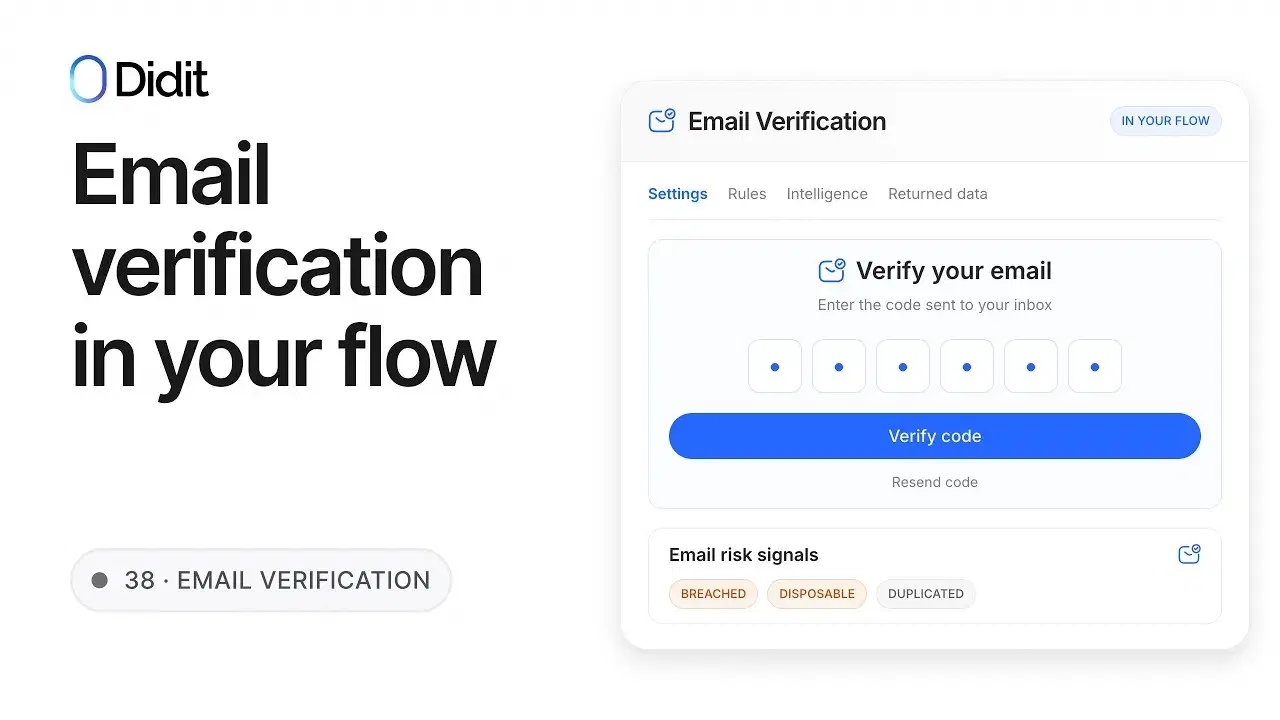
An email address shows whether the inbox can receive mail, whether it is a throwaway, whether it appears in breaches and whether it appears in earlier verification data. Didit returns those signals with an OTP check for $0.02.
 Alberto RosasCo-founder and CEO
Contents
In this guide
Jump to the part you need.
Email verification fits any team that collects an address before it pays for a document check. We publish $0.02 per completed email verification: a one-time code plus breach, disposable-provider and deliverability signals. The caveat matters more than the price. No single signal proves fraud, because a breached address can belong to a paying customer and a clean address can front a fraud ring, so you set a policy for each warning instead of trusting one flag.
Last updated: November 26, 2026. Prices checked against the live Didit price feed on November 26, 2026.
| What the address shows | What it usually means | Warning code | Action to configure |
|---|---|---|---|
| The domain cannot receive mail, or the address is malformed | The code never arrives and the account cannot be contacted | UNDELIVERABLE_EMAIL, INVALID_EMAIL | Decline before any document spend |
| A disposable provider | Signup without a traceable inbox: trial farming, referral abuse, ban evasion | DISPOSABLE_EMAIL | Decline |
| The address appears in known data breaches | Old, widely used address; credentials may be in circulation | BREACHED_EMAIL | Review |
| The address appears in your historical verification data | Duplicate use in earlier data: multi-accounting or a shared inbox | DUPLICATED_EMAIL | Apply the policy you configured for that warning |
| Repeated wrong or late codes | Code guessing, or a user who walked away | OTP_MAX_ATTEMPTS_REACHED, OTP_EXPIRED | Restart the send step |
Start free in the sandbox at business.didit.me, no sales call, and run the flow below on a test address. Developers can connect Didit to an AI assistant through the Didit MCP server. The matching product documentation is the Email Verification API guide.
What an email address reveals about a user
An address has two halves. Everything before the @ is the local part, chosen by the user or generated by a script. Everything after it is a domain, which is internet infrastructure with a registration date, mail servers and a reputation. Read the two halves separately, then read them against breach data and your own enrolment history, and you have a risk read before the user submits a single document.
What the local part tells you
Common fraud heuristics treat sequential strings, keyboard walks and long random alphanumeric strings as unusual for a person typing their own address and common for accounts generated in bulk. The local part is the weakest of the signals on its own, because people do choose strange handles, so treat it as context, not as a verdict. Its practical value is in volume: if a batch of signups shares the same pattern, you are looking at one script rather than a hundred customers.
What the domain tells you, including .com addresses
The top-level domain alone says almost nothing. .com is shared by Gmail, by a two-person consultancy and by a domain registered this morning. What carries weight is the mail configuration behind the domain and its history. Operationally, if the domain publishes no valid MX records, nobody can receive at that address and the code will bounce. Common fraud heuristics treat a domain registered weeks ago with no mail history differently from a domain that has been sending mail for a decade. A custom domain on a new seller account is another heuristic worth a second look before a business verification, because it is cheap to create and it can make the account look established. Treat those domain-age and custom-domain patterns as context, not as a Didit signal.
What the provider tells you
Disposable providers exist to complete a signup and then vanish. Someone who wants a durable account has no reason to use one; someone farming referrals, cycling through free trials or returning after a ban does. Detection depends on current provider data, because throwaway services appear and disappear constantly. Generic webmail is a different case: Gmail and Outlook are not throwaway services, and treating them as risky would flag most of your legitimate signups.
What the breach history tells you
When databases leak, the exposed rows contain addresses paired with passwords or personal data. As a heuristic, an address in many breaches is old, widely used, and may have credentials circulating against it, which is the profile behind credential stuffing and account takeover. The inverse profile matters too: addresses minted for synthetic accounts often have no breach history at all, because they have never been used anywhere real. Both ends of that scale are context, not proof.
What your own records tell you
The duplicate signal comes from historical verification data. The same address appearing again can be a mistake, a shared inbox or multi-accounting. Families and shared inboxes exist, so the duplicate warning is usually a review signal rather than an automatic decline, but it surfaces the pattern before a payout, a bonus or a seller listing goes live.
How Didit turns those signals into warnings
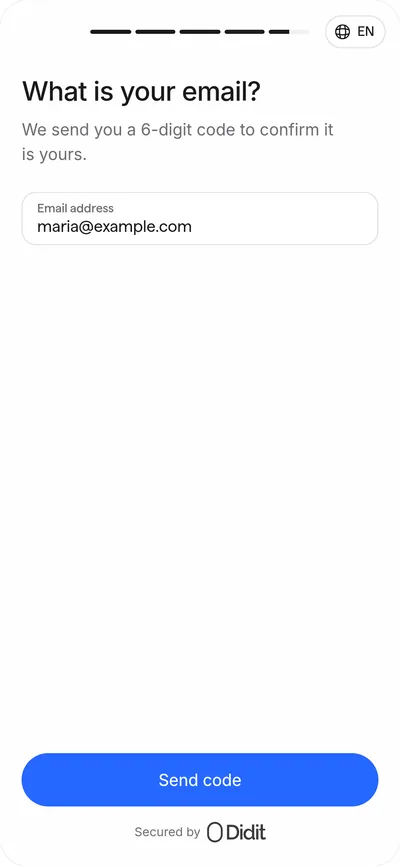
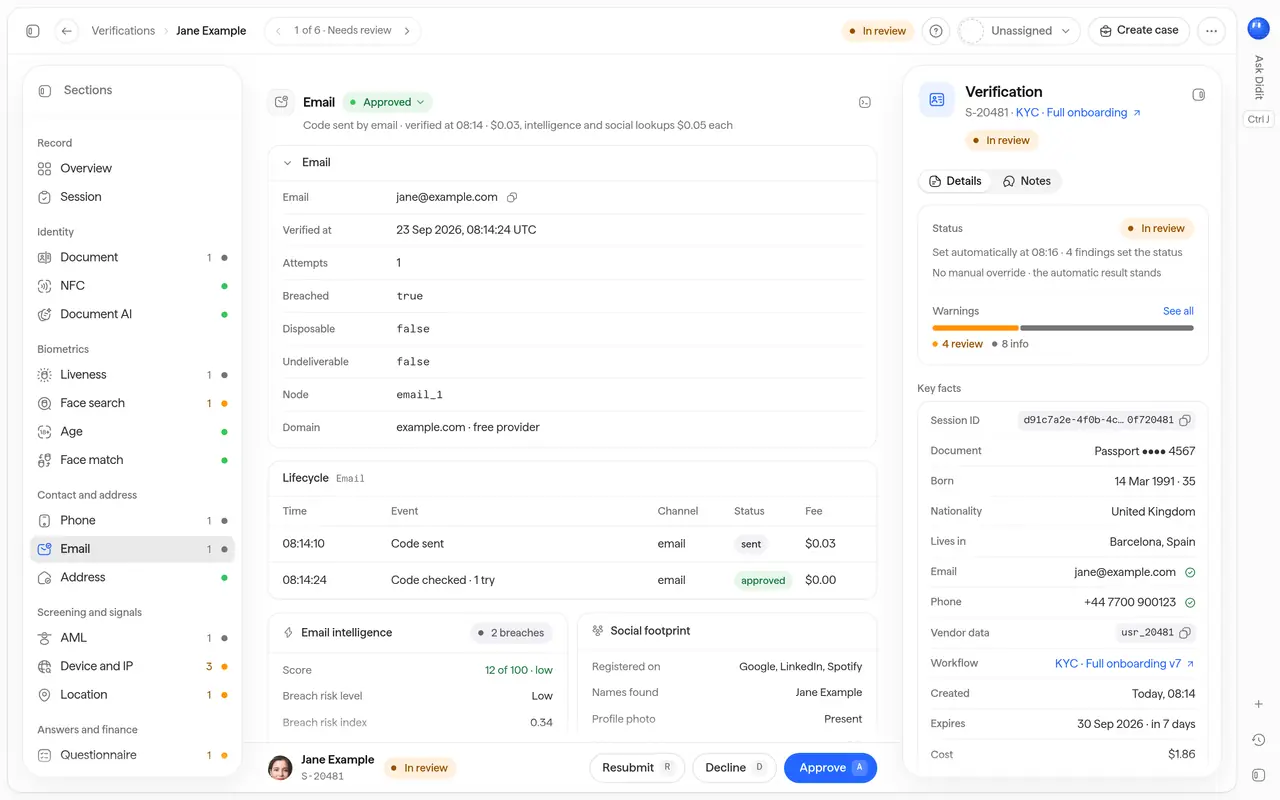
Our Email Verification runs a one-time code and the risk lookup in one check. The response carries a warnings[] array drawn from the EMAIL feature, with these codes: BREACHED_EMAIL, DISPOSABLE_EMAIL, UNDELIVERABLE_EMAIL, INVALID_EMAIL, DUPLICATED_EMAIL, plus OTP_MAX_ATTEMPTS_REACHED and OTP_EXPIRED for the code flow. Each warning object carries the feature, the stable risk code, a short description, a longer description you can show a reviewer, and an additional_data object with the context for that risk.
The duplicated, breached and disposable warnings each have a configurable action. Configure actions for duplicated, breached and disposable email warnings in your workflow. That is where your policy lives. A referral program can decline a disposable address outright while a wealth platform routes a high breach count to a person.
Prerequisites
- A Didit account. Sandbox testing is free and unlimited on every plan.
- An API key from the Business Console for the standalone route.
- A published workflow with the EMAIL feature added, for the session route. Add it in the Business Console or through
POST /v3/workflows/. - A place to read the result: your backend calling the decision endpoint, or a webhook endpoint that verifies the HMAC-SHA256 signature described in the webhooks documentation.
- A policy decision before you start: which warnings decline automatically and which ones a person reviews.
Run email verification inside a Didit session
Use this route when the user is already going through a hosted Didit flow and you want the email step recorded with the rest of the session.
- Add the EMAIL feature to the workflow and configure actions for duplicated, breached and disposable email warnings.
- Create a session with
POST /v3/session/, passingworkflow_id,vendor_dataandcallback. - Open
session.urlfor the user, or mount the Web or Mobile SDK. Address entry, the code and the risk lookup happen in that flow. - Read the decision from
GET /v3/session/{sessionId}/decision/or from thestatus.updatedwebhook. The email result lands inemail_verifications[].
curl -X POST 'https://verification.didit.me/v3/session/' -H 'x-api-key: YOUR_API_KEY' -H 'Content-Type: application/json' -d '{"workflow_id": "YOUR_WORKFLOW_ID", "vendor_data": "user-1234", "callback": "https://yourapp.com/post-kyc"}'Run email verification as a standalone API pair
Use this route when you own the signup screen and only need the email step. Two endpoints, paired by the address: POST /v3/email/send/ and POST /v3/email/check/. Full reference on the standalone Email Verification API page.
- Send the code to the address. The default is 6 numeric digits, configurable from 4 to 8, delivered with Didit branding unless you set
use_white_label_customization. Codes expire in 5 minutes and there is one free retry per email inside that window. - Let the user type the code in your own UI.
- Check the code. The check response always returns the full email metadata: the breach list, the disposable flag and the deliverable flag. The check request can carry the action you configured for a disposable address.
# Step 1: send the code
curl -X POST 'https://verification.didit.me/v3/email/send/' -H "x-api-key: $DIDIT_API_KEY" -H "Content-Type: application/json" -d '{"email": "alice@example.com", "options": {"code_size": 6, "locale": "en", "use_white_label_customization": false}, "vendor_data": "user-1234"}'

# Step 2: check the code the user typed
curl -X POST 'https://verification.didit.me/v3/email/check/' -H "x-api-key: $DIDIT_API_KEY" -H "Content-Type: application/json" -d '{"email": "alice@example.com", "code": "123456", "disposable_email_action": "DECLINE"}'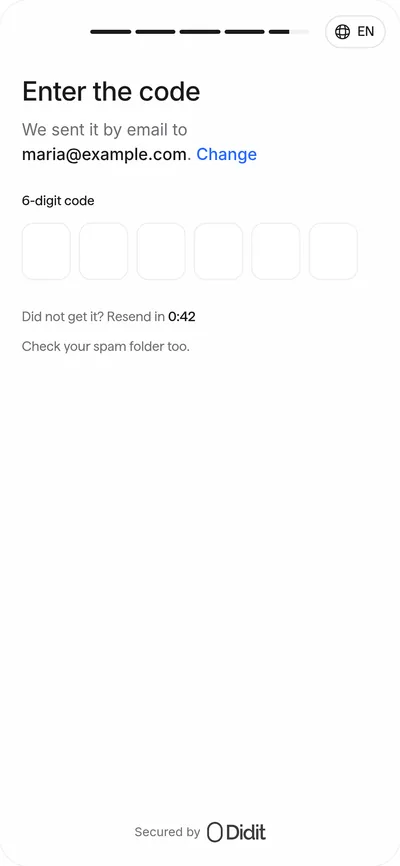
Expected output
A correct code returns status Approved. On the session route the object sits in email_verifications[] on the decision payload, with a node_id that pins the report to the workflow node that produced it, and the same shape arrives inside the decision envelope of a webhook. On the standalone route you get a single object back. Either way you can read the risk metadata: breaches[] with the exposed services, is_disposable and is_undeliverable, alongside warnings[].
| Status | What happened | What your code should do |
|---|---|---|
| Approved | Code accepted, risk checks returned | Apply your warning policy, then continue |
| Failed | Wrong code, attempts remain | Re-prompt for the code |
| Declined | Third failed attempt | Restart from the send step |
| Undeliverable | Bounce or invalid domain on send | Surface the error and ask for another address |
| Expired or Not Found | Outside the 5 minute window | Restart from the send step |
| In Progress, Not Started, Abandoned, Kyc Expired | Lifecycle states around the step | Do not treat as a pass |
Failure cases and recovery
| Failure | What you see | Recovery | Billing |
|---|---|---|---|
| Domain cannot receive mail | Send response with status Undeliverable | Surface it to the user and ask for another address | No charge for that send |
| Wrong code | Check response with status Failed | Re-prompt, up to 3 attempts per session | Per completed check |
| Third wrong code | Check response with status Declined | Restart the flow with a new send | Per completed check |
| Code left unused | Status Expired or Not Found | Restart the flow with a new send | Per completed check |
| Address in breach data | BREACHED_EMAIL warning | Route to review per your policy, never auto-decline on the flag alone | Per completed check |
| Duplicate use in historical verification data | DUPLICATED_EMAIL warning | Apply the policy you configured for that warning | Per completed check |
Inputs and outputs at a glance
| Field | Where it is used | What it does |
|---|---|---|
email | send, check, risk | The address under test; the send and check pair is keyed on it |
vendor_data | send, session | Your user identifier carried through the session and the report |
options.code_size | send | Code length, 4 to 8, 6 by default |
options.alphanumeric_code | send | Letters plus digits instead of digits only; the check is case-insensitive |
options.locale | send | Language of the code email |
options.use_white_label_customization | send | Use your configured white-label sender and branding; default false |
code | check | The code the user typed |
disposable_email_action | check | The configured action for a throwaway address |
status | response | Feature status, values in the table above |
warnings[] | response | Risk codes with short and long descriptions and their context |
breaches[], is_disposable, is_undeliverable | check response | The risk metadata behind the warnings |
Worked cost example
Take a consumer app with 20,000 signups a month. Assume 8 percent are disposable addresses that stop at the email step after the email check returns its result and your policy routes them out, so 1,600 do not continue and 18,400 go to a full ID check. All prices are the published list prices on didit.me/pricing.
- Email verification: 20,000 x $0.02 = $400.00
- Full ID check on the survivors: 18,400 x $0.33 = $6,072.00
- Total with the pre-filter: $400.00 + $6,072.00 = $6,472.00
- Total without it: 20,000 x $0.33 = $6,600.00
- Difference: $6,600.00 minus $6,472.00 = $128.00, plus 1,600 sessions filtered before manual review
On Growth the same month costs $384.00 for email (20,000 x $0.0192) and $5,829.12 for the ID checks (18,400 x $0.3168), so $6,213.12 in total. The plan discount applies to every Didit price, and the full KYC price is built from published parts: $0.15 for the ID document, $0.10 for passive liveness, $0.05 for face match and $0.03 for device and IP analysis.
Paid steps and review boundaries
You pay per completed check from prepaid credit, not per API call. The published lines that cover this page are email verification at $0.02 per check, the email verification API at $0.02, the email risk API at $0.04 for a risk score with no code, and email intelligence at $0.05. The OTP pair is published at $0.02 per check. The email risk API is a separate risk-only endpoint at $0.04 per check, distinct from the $0.02 OTP verification flow.
- Plan credit: the Free plan carries $10 a month for organizations that sign up with a work email, Growth is $99 a month with $115 of credit and 4 percent off every price, Scale is $299 a month with $350 of credit and 10 percent off. Credit resets monthly and does not roll over; top-ups run from $50 to $20,000 and last 12 months. See pricing in the docs and the November 2026 pricing note.
- Sandbox testing is free and unlimited on every plan. No production traffic is needed to build the integration.
- A send that returns Undeliverable is not charged, so a typo costs you nothing but a prompt to the user.
Automate the mechanical cases: an undeliverable or invalid address should never reach a reviewer, and a disposable address should follow the action you configured. Keep people on the judgment calls: a breached address on a high-value account, a duplicate that looks like a shared family inbox, or a cluster of new custom domains appearing on seller accounts in the same week. Pair the email step with device and IP analysis when you need to know whether the same hardware is behind several accounts, which is a separate published line at $0.03 per check and part of the $0.33 full check.
Where email intelligence belongs in a flow
- Consumer fintech onboarding. Disposable and undeliverable addresses stop low-effort account fraud before a document check is paid for, and breach exposure flags recycled credentials at signup.
- Marketplace seller onboarding. A freshly registered domain on a seller account is a common heuristic worth a second look before a business verification that costs from $2.00 per company plus linked checks for owners.
- Referral and promotion abuse. Throwaway addresses are the cheapest way to farm a signup bonus, and disposable detection is the direct countermeasure.
- Step-up flows. When a user changes their email mid-lifecycle, re-running the check catches a substitution to a throwaway provider, a pattern worth re-checking for account takeover.
Where email intelligence is not enough
Email is a first filter, not a verdict. Real customers use free webmail, appear in old breach dumps and occasionally sit behind odd mail configuration. A clean address proves nothing about who typed it. Use the email result to decide what to spend next and to route the suspicious cases, then confirm identity with a document, a liveness check and a face match. Didit runs those steps in the same workflow and returns them on the same decision payload, so the email warning sits next to the document and biometric results instead of in a separate system.
Sources
- Didit docs: Email Verification API, OTP and risk assessment
- Didit docs: standalone Email Verification API
- Didit docs: email verification warnings catalogue
- Didit docs: data models, email verification report
- Didit docs: webhooks and HMAC signing
- Didit docs: device and IP analysis
- Didit docs: pricing and billing
- Didit pricing page and pricing as JSON
- Didit blog: what changed in pricing, November 2026
- Didit MCP server
The next step is a test address in the sandbox: open business.didit.me, add the EMAIL feature to a workflow, and run one verification end to end. No sales call, and the sandbox is free and unlimited on every plan.
Try it
Try this in the sandbox
Run the check this guide describes, free.
The product this post is about, taken from its topic. Run it free in the sandbox.
Author
Alberto Rosas
Co-founder and CEO

Keep reading
Other guides in the same topic.
 What Is the Purpose of FICA in South Africa? 2026 Guide
FICA is South Africa's anti-money laundering law. It creates the Financial Intelligence Centre and requires accountable institutions to identify and verify clients, screen for PEP and sanctions risk and report suspicious.
Alberto RosasNov 26, 2026 Sixth Money Laundering Directive (6AMLD): What Changed and Which Rules Apply
6AMLD is Directive (EU) 2018/1673: Member States must criminalise laundering, widen predicate offences and set a four-year penalty floor. It adds no new due diligence duties for firms.
Alberto RosasNov 26, 2026 Automated Sanctions Screening: Canada, the Entity List and Embargoes
Automated sanctions screening matches people and companies against lists such as Canada's autonomous sanctions made under SEMA and JVCFOA and the OFAC SDN List, and returns candidate hits scored for identity confidence and.
Alberto RosasNov 26, 2026Questions
Frequently asked questions
What can you tell from an email address?
You can tell whether the domain can receive mail, whether it belongs to a throwaway provider, whether the address appears in known data breaches, and whether it appears in earlier verification data. You cannot tell who the person is. The address is a risk signal that decides what to check next, not proof of identity.
Does an email address ending in .com tell you anything?
Not on its own. .com is shared by Gmail, by established businesses and by domains registered this week, so the top-level domain carries no risk meaning. Heuristics that teams use include the mail configuration behind the domain, how long the domain has existed, whether the provider is a throwaway service and the breach history of the specific address. Treat them as context, not a single score.
How much does Didit charge for email verification?
Email verification is $0.02 per completed check at list price, $0.0192 on Growth and $0.018 on Scale. A risk-only lookup without a code is a separate published line, the email risk API at $0.04 per check. You pay from prepaid credit and only when a check finishes with a result.
Does email verification replace document verification?
No. It removes low-effort fraud before you spend on documents and biometrics, and it tells you which accounts deserve a closer look. Identity confirmation still needs a document check, liveness and a face match, which is the $0.33 full check at list price.
What counts as a disposable email provider?
A disposable provider is a service built to issue temporary addresses that stop working quickly. Didit detects disposable providers and returns a DISPOSABLE_EMAIL warning. Generic webmail such as Gmail or Outlook is not a throwaway service and is handled by the other reputation signals instead.
Can a breached email address still belong to a real customer?
Yes, and often does. Breach exposure means the address appeared in a leaked database, which is more common for older, heavily used addresses. Treat BREACHED_EMAIL as a reason to review or to add a step-up check, not as a reason to decline on its own.
What happens if the email turns out to be undeliverable, and do I pay for it?
The send returns status Undeliverable because the domain cannot receive mail or the address is malformed, and that send is not charged. Surface it to the user and ask for a different address instead of letting them fail a document check they can never complete.
How long does an email code last and how many attempts are allowed?
Codes expire in 5 minutes and each session allows up to 3 code-entry attempts. There is one free retry per email inside the window. After the third failed attempt the status is Declined and you restart from the send step.
How does the duplicate email check work?
DUPLICATED_EMAIL indicates duplicate use in historical verification data. Apply the policy you configured for that warning. Because shared family inboxes exist, most teams route this warning to review rather than to an automatic decline.
Should I use the session route or the standalone email API?
Use the session route when the user is already in a hosted Didit flow and you want the email result recorded with the document and biometric results on one decision payload. Use the standalone pair, POST /v3/email/send/ and POST /v3/email/check/, when you own the signup screen and only need the email step.
Can I check email risk without sending a code?
Yes. The standalone API includes a score endpoint, POST /v3/email/risk/, which scores deliverability, breach and disposable risk without sending a code. It is published at $0.04 per check, while the OTP verification that also returns the risk metadata is $0.02.
Compliance built in
Audited, certified and attested.
We hold the certifications and build each country's rules into your flows, so you can launch anywhere without worrying. Security and Compliance center
- Regulation encoded into your flows
Tell us what you do and where. Didit lists the rules that apply to you, with sources, and builds the checks each country needs into one workflow.
- Ready for AMLR
Every requirement of the new EU anti-money laundering rules, from checking customers to human review, is already covered by a Didit check.
- Tested in Spain's Treasury sandbox
Spain's Treasury published its supervised sandbox report on Didit's NFC plus active liveness onboarding; SEPBLAC took part and valued the added measures positively.
- Audited, not self-declared
iBeta Level 1 and Level 2. Liveness tested under ISO/IEC 30107-3.
Your obligations · 3 regions
 SOC 2 Type 2
 ISO 27001
 iBeta Level 1 and Level 2
 EU regulator attestation
 FSM youth protection
 GDPR
 EBA remote onboarding
 MiCA compatible
 FIDO Alliance member
- AMLREU AML Regulation ready
Integration · Didit MCP
Run Didit from your own AI agent
Connect Didit to Claude, Cursor, VS Code or ChatGPT and just ask in plain words. Your agent can do anything you can do in the console, with the same permissions you have.
 Add to Claude
 ChatGPT
 Cursor
- Build workflowsDescribe the checks you need. The agent creates and publishes the flow.
- Run investigationsAsk why a session was declined, review cases, search people and companies.
- Change rulesCreate payment rules, test them on past data and switch them on.
- Pull reportsAsk for numbers, exports or the audit log.
Didit Academy