What Is a Sanctions Hit? AML False Positives Explained
A sanctions hit is an alert that your data may match a sanctions list entry, not a finding. Match score estimates identity, risk score sets the screening status.
 Alberto RosasCo-founder and CEO
Contents
In this guide
Jump to the part you need.
A sanctions hit is an alert that a person or company may match an entry on a sanctions list. Compliance and engineering teams use the alert to decide what identifiers to verify. We charge USD list rates of $0.20 per completed AML check and $0.07 per person per year for ongoing monitoring. A screening score alone cannot resolve a potential match.
Last updated: November 26, 2026. Prices checked against the live Didit price feed on November 26, 2026.
| Term | Plain meaning | Where you meet it | Didit field or price |
|---|---|---|---|
| Sanctions hit | Possible match between your subject and a sanctions list entry | Onboarding, payments, monitoring | Entry in aml_screenings[].hits[] |
| False positive | An alert that points to a different person or company | Review queue, audit file | The API also labels below-threshold hits review_status False Positive and excludes them from risk scoring; verify the match before relying on the label. |
| Possible match | Alert at or above the match threshold, eligible for risk scoring | Risk scoring and review as applicable | review_status set to Unreviewed |
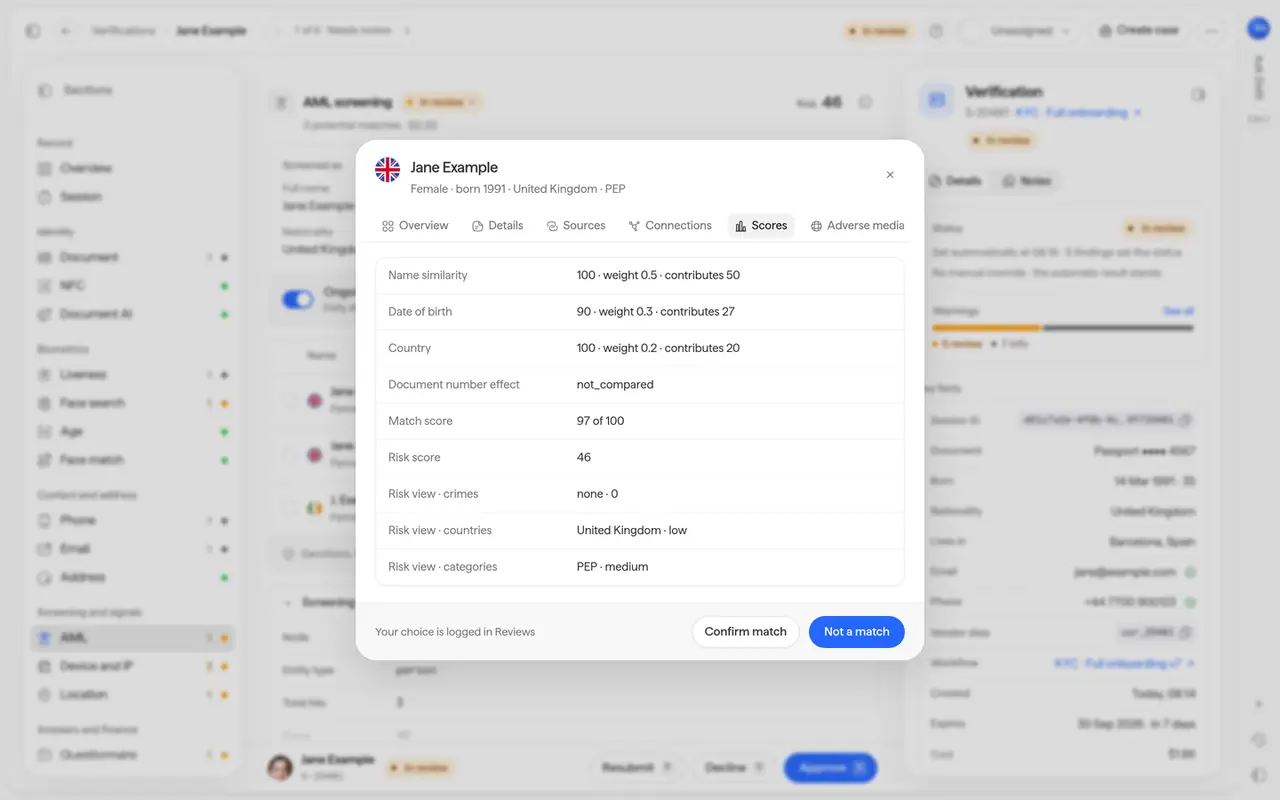
| Match score | Estimates whether the record refers to the same person or company, 0 to 100 | Every hit | match_score, threshold default 93 |
| Risk score | The risk associated with the matched entry, 0 to 100 | Decision step | risk_score, approve default 80, review default 100 |
| AML hit | Any hit: sanctions, PEP, warnings, criminal, adverse media | All screening | Same array, different category |
| Ongoing monitoring | Repeat screening after onboarding | Existing customer base | $0.07 per person per year |
Start free in the Didit sandbox, with no sales call. Developers can connect Didit to an AI assistant through the Didit MCP server.
Sanctions hit: the definition
Definition. A sanctions hit is a screening result that flags a possible match between the person or company you are checking and an entry on a sanctions list. It reports similarity, not identity.
A hit describes the alert, not the person. The lists behind the alert are published by governments and international bodies: the US Treasury OFAC SDN list, the EU consolidated financial sanctions list, the UN Security Council consolidated list, and national regimes. FATF Recommendations 6 and 7 address targeted financial sanctions. The duties that apply to a particular business or transaction depend on the relevant jurisdiction and sanctions regime.
Three properties matter. A hit is probabilistic. A hit is not a determination by a court or a regulator. A hit costs the same whether it is real or not, because you pay for the screening, not for the outcome.
Where the term is used
| Context | Who or what is the subject | Evidence to keep |
|---|---|---|
| Onboarding alert | Applicant, and for a company its identified owners and officers | Application data, ID document, date of birth, nationality, ownership record, list entry and match score. |
| Payment alert | Counterparty on the payment, not only the account holder | Payment details, counterparty identifiers, purpose and route, list entry, reviewer decision. |
| New designation during monitoring | Existing customer or business and its people | Publisher record, listing date, aliases, identifiers compared, what changed, decision and reviewer. |
Repeat screening can surface a new designation or a changed list entry after onboarding. For audit and supervision, keep the list entry, evidence reviewed, decision rationale, and reviewer details so the decision can be reconstructed.
Sanctions hit, AML hit and the phrase sanction it
An AML hit is the wider term. It covers a sanctions hit plus PEP matches, warning lists, criminal records, fitness and probity registers and adverse media. A sanctions hit is one category inside it. When a reviewer says the team had four AML hits, three may be PEP or adverse media and one may be sanctions.
In a sanctions-screening context, “sanction it” may be a typo or transcription of “sanctions hit.” A sanctions hit is a possible match to a list entry. In other contexts, “sanction it” can mean authorize something or impose a penalty.
Worked example: one name, three outcomes
Suppose you send Maria Garcia Lopez, born 1988-03-02, nationality ES, to the standalone AML API using the default weights: name 60, date of birth 25, country 15, summing to 100. Match threshold 93, approve threshold 80, review threshold 100. The component scores below are hypothetical inputs to show the arithmetic; they are not matcher outputs.
| Candidate | Name score | DOB score | Country score | Match score | Risk score | Hit classification |
|---|---|---|---|---|---|---|
| A: Maria Garcia Lopez, born 1962 | 100 | 0 | 100 | 100 x 0.60 + 0 x 0.25 + 100 x 0.15 = 75 | Not used | False positive, excluded from risk scoring |
| B: Maria Garcia Lopez, born 1988-03-02 | 96 | 100 | 100 | 96 x 0.60 + 100 x 0.25 + 100 x 0.15 = 97.6 | 95 | Unreviewed possible match |
| C: the same screening repeated with review threshold 90 | 96 | 100 | 100 | 97.6 | 95 | Same hit and risk score; only the screening status changes |
Candidate A uses the full screened name, so a name score of 100 is consistent. The name and country match, but the date of birth does not, so the weighted score lands at 75, below 93. We tag it False Positive and leave it out of the risk calculation. The threshold excludes this candidate from Didit's risk calculation. Follow your review procedure for any alert that still needs verification.
Candidate B passes at 97.6 and is an unreviewed possible match. Its risk score is 95, the highest among the hits that were not filtered, so the screening score is 95. With approve 80 and review 100, 95 is above approve and not above review, so the standalone screening status is In Review. Candidate C is the same screening repeated with the review threshold set to 90; the hit's classification does not change, but 95 is above 90, so the screening status is Declined.
Two details change the arithmetic. Components missing from the request are re-normalized away, so a name-only request is scored on name alone, which is why date of birth and nationality are worth collecting. A matching document number acts as a golden key that overrides the match score to 100. In the standalone API the result is aml.status; in a workflow the AML feature result is inside aml_screenings[]. A score-driven status is the AML screening status, not the parent verification session status.

Standalone threshold example
In the standalone API, thresholds use strict comparisons. With the defaults, approve threshold 80 and review threshold 100, a risk score of exactly 80 is Approved, 81 is In Review, and 100 is In Review because it is not above 100. A non-zero score at or above the approve threshold adds a POSSIBLE_MATCH_FOUND warning, so that warning can appear on an Approved result.
| Risk score | Default status | Warning | Status with review threshold 90 |
|---|---|---|---|
| 80 | Approved | POSSIBLE_MATCH_FOUND | Approved |
| 81 | In Review | POSSIBLE_MATCH_FOUND | In Review |
| 100 | In Review | POSSIBLE_MATCH_FOUND | Declined |
Lowering the review threshold to 90 permits a Declined result at 100 while leaving 80 Approved. Passing the match threshold is not manual review; the review threshold and your review policy decide what happens next.
The fields and settings behind a hit
| Field | What it holds | Default or value |
|---|---|---|
aml_screenings[] | AML feature result on a workflow decision | Array on the decision payload |
aml.status | Standalone AML screening status | Same enum, including Kyc Expired |
match_score | Identity confidence, 0 to 100 | Matching hits are returned from 75 upwards |
risk_score | Entity risk, 0 to 100 | The highest score among hits not filtered as False Positive becomes aml.score |
aml_match_score_threshold | Below it, the hit is a false positive | Standalone API default: 93 |
aml_score_approve_threshold | Standalone API behavior: a score must exceed it to leave Approved | Standalone API default: 80 |
aml_score_review_threshold | Standalone API behavior: a score above it is Declined | Standalone API default: 100 |
aml_name_weight, aml_dob_weight, aml_country_weight | Weights for the match score, must sum to exactly 100 | Standalone API defaults: 60, 25, 15 |
entity_type | Standalone request example: entity_type is person. Company AML session report: entity_type is COMPANY. | Use the value for the interface you call |
warnings[] | Risk codes attached to the screening | SANCTIONED_ENTITY, PEP_MATCH, POSSIBLE_MATCH_FOUND, HIGH_RISK_COUNTRY |
status | Lifecycle state of the screening | Not Started, In Progress, Approved, In Review, Declined, Abandoned, Kyc Expired |
The table carries two independent questions. Match score estimates whether the record refers to the same person or company. Risk score is the risk associated with the matched entry if it is. Record both scores so a reviewer can distinguish identity confidence from the risk assigned to the listed entry.
The workflow returns the AML feature result inside aml_screenings[]; the standalone call returns the aml object with aml.status. Do not treat either as the parent session status.
How Didit handles a sanctions hit
We screen a person in real time against 1,300+ global sanctions, PEP and watchlist sources and adverse media, at $0.20 per check. See the AML Screening product page, the AML screening overview, the Standalone AML Screening API documentation and Didit pricing. The result is a status plus every hit, each with a match score and a risk score.
- Classification. We tag hits below
aml_match_score_thresholdas False Positive and ignore them for risk. The highest risk score among the rest becomes the screening score. - Status. On the standalone API, a screening score above the review threshold is Declined. Otherwise, a score above the approve threshold is In Review. All other scores are Approved. This is the AML screening status.
- Weights. The three weights must sum to exactly 100 or the request is rejected with HTTP 400.
- Review. On standalone calls,
save_api_requestdefaults to true, so the screening is stored and hit review statuses can be updated later. The decision stays with the session in the Business Console. - Monitoring.
include_ongoing_monitoring=truekeeps the person under provider-driven monitoring at $0.07 per person per year. On standalone API calls it requiressave_api_request=true. - Business screening. We screen a company at $0.20 and each beneficial owner or officer at $0.20. The business AML status takes the highest-risk result across the company and its people.
Company AML monitoring is configured on the business session or in the console. Review billing before enabling it across all business sessions; the $0.07 rate applies per person per year, not to the company entity.
We serve 4,000+ companies. The console shows the session and its AML feature result so a reviewer can update hit review statuses.
The standalone call below is the shortest route to one screening. It is server to server, so it needs an API key rather than a browser session.
curl -X POST 'https://verification.didit.me/v3/aml/' -H "x-api-key: $DIDIT_API_KEY" -H "Content-Type: application/json" -d '{"full_name": "Javier Ejemplo Modelo", "entity_type": "person", "date_of_birth": "1974-01-01", "nationality": "ES", "include_adverse_media": true, "vendor_data": "user-1234"}'The response carries request_id and an aml object with status, screening_id, hits and warnings. With include_adverse_media=true, the API pauses for about five seconds and then polls for up to about 25 seconds. Set a client timeout of at least 60 seconds. Send an Idempotency-Key on the original request. After a timeout, retry with the same key and identical body to avoid a second screening charge. If the original request is still running, retry later with the same key.
Inside a workflow, add the AML feature and set the thresholds once. Read the result from GET /v3/session/{sessionId}/decision/ in aml_screenings[], or subscribe to the status.updated webhook.

Analyst worked case: from the list record to the decision
Start from the publisher record, not our hit. Suppose a list entry reads Samir Haddad, born 1975, Lebanon, alias Samir Hadi. Your customer is Samir Haddad, born 1975-06-12, nationality LB, passport X1234567. The names and birth year are close; the full date of birth, alias and document number need checking against the list record.
Compare the full name and aliases, date of birth, nationality, address, place of birth and any document number the list entry provides. If the listed record has no passport number, the match may stay unresolved even when the name is common. For a resolved namesake, document the publisher record, the list entry, each identifier compared and the evidence that distinguishes the person, such as a reliable conflicting full date of birth. A passport number absent from the source record is missing evidence, not a conflicting identifier. Record the rationale, reviewer and date. For an unresolved match, document the same evidence, state why it remains unresolved, escalate under your review procedure, and do not record it as clear just because the match score is low.
Worked cost example
Take 1,000 people screened once and monitored for a year. Gross usage totals below are before subscriptions, included credits and taxes.
- Standalone AML only: 1,000 x $0.20 = $200.00.
- AML plus one year of person monitoring: 1,000 x $0.07 = $70.00 for one year of monitoring. $200.00 + $70.00 = $270.00 total.
- Full ID check plus AML and monitoring: a full ID check is $0.33 and AML is $0.20, so one person is $0.53. 1,000 x $0.53 = $530.00, plus $70.00 monitoring, total $600.00 gross usage before subscriptions, included credits and taxes.
- Growth, 4% off: 1,000 x $0.5088 = $508.80, plus 1,000 x $0.0672 = $67.20, total $576.00 gross usage before subscriptions, included credits and taxes.
- Scale, 10% off: 1,000 x $0.477 = $477.00, plus 1,000 x $0.063 = $63.00, total $540.00 gross usage before subscriptions, included credits and taxes.
Hits do not add a separate fee. At the USD list rate, a completed standalone AML check costs $0.20 whether it returns zero hits or five, so false-positive volume is a labour cost, not a screening cost. If your review policy sends 20% of 1,000 screenings to analysts, that is 200 reviews. At five minutes each, 200 x 5 = 1,000 minutes, or about 16.7 analyst hours, before any second-level check.
If you are replacing another screening provider, start at didit.me/switch.
Common mistakes
- Treating a hit as a finding. A hit is an alert. Document the identifiers and evidence you used to resolve the alert.
- Raising the match threshold just to reduce alerts. A higher threshold excludes more candidates from risk scoring and can suppress genuine matches. Test proposed changes against known matches and false positives before deploying them.
- Screening on name alone. Missing date of birth and country are re-normalized away, so the name carries the whole score.
- Screening the company while overlooking identified owners and officers. For a business, identified owners and officers are separate screenings at $0.20 each, and the highest-risk result sets the business AML status. Transaction counterparties are a separate review question; their scope depends on the applicable rules and your review procedure.
- No rescreening. A customer who was clean at onboarding can be designated next month. Repeat screening can surface a new designation or a changed list entry after onboarding. Monitoring at $0.07 per person per year keeps that check running.
- Clearing a false positive with no note. An automated False Positive label is not a reviewer note. If a person dismisses an alert, write the reason.
- Retrying a slow adverse-media call without an idempotency key. If the original screening and an unkeyed retry both complete, each can be billed. Send an
Idempotency-Keyon the original request and reuse it with the identical body when retrying.
Sources
- AML Screening product page
- Didit docs: AML screening overview
- Didit docs: Standalone AML Screening API documentation
- Didit docs: business AML screening
- Didit docs: business AML coverage
- Didit docs: data models
- Didit docs: verification statuses
- Didit docs: pricing
- Didit docs: AML warnings
- Didit docs: continuous AML monitoring
- Didit pricing page
- Didit pricing as JSON, machine-readable price feed
- Didit MCP server
- FATF Recommendations: fatf-gafi.org
- OFAC FAQ 5, how to assess a potential match: ofac.treasury.gov
- OFAC Sanctions List Service: ofac.treasury.gov
- UN Security Council consolidated list: un.org
Start free in the Didit sandbox and use a documented sandbox_scenario to test how your integration handles a mocked AML result. No sales call.
Try it
Try this in the sandbox
Run the check this guide describes, free.
The product this post is about, taken from its topic. Run it free in the sandbox.
Author
Alberto Rosas
Co-founder and CEO

Keep reading
Other guides in the same topic.
 What Is the Purpose of FICA in South Africa? 2026 Guide
FICA is South Africa's anti-money laundering law. It creates the Financial Intelligence Centre and requires accountable institutions to identify and verify clients, screen for PEP and sanctions risk and report suspicious.
Alberto RosasNov 26, 2026 Sixth Money Laundering Directive (6AMLD): What Changed and Which Rules Apply
6AMLD is Directive (EU) 2018/1673: Member States must criminalise laundering, widen predicate offences and set a four-year penalty floor. It adds no new due diligence duties for firms.
Alberto RosasNov 26, 2026 Automated Sanctions Screening: Canada, the Entity List and Embargoes
Automated sanctions screening matches people and companies against lists such as Canada's autonomous sanctions made under SEMA and JVCFOA and the OFAC SDN List, and returns candidate hits scored for identity confidence and.
Alberto RosasNov 26, 2026Questions
Frequently asked questions
What does sanctions hit mean?
A sanctions hit means a screening system found a possible match between the data you submitted and an entry on a sanctions list. It is an alert about similarity, not a legal finding that the person is sanctioned. If an alert needs review under your procedure, compare the submitted identifiers with the source record. Didit can filter a below-threshold hit out of risk scoring, and an Approved screening status does not resolve an alert your procedure still requires you to review.
Is an AML hit the same as a sanctions hit?
No. AML hit is the wider term and covers sanctions, PEP matches, warning lists, criminal records and adverse media. A sanctions hit is one category inside an AML hit. One screening can return several hits of different categories at the same time.
What does sanction it mean?
In a sanctions-screening context, “sanction it” may be a typo or transcription of “sanctions hit.” A sanctions hit is a possible match to a list entry. In other contexts, “sanction it” can mean authorize something or impose a penalty.
A hit against the SDN list should be investigated to determine its validity. True or false?
True. The OFAC Sanctions List Service publishes the SDN list and other sanctions lists, and OFAC FAQ 5 explains how to assess a potential match. A hit against the SDN list should be investigated to determine its validity, because the match may be a namesake or a data error. Compare full name and aliases, date of birth, nationality, address and document number where the list entry provides them. If the match remains unresolved, record the identifiers compared, the list entry, the evidence, the decision and the reviewer, and escalate under your procedure.
What is a discounted hit in AML screening?
“Discounted hit” is workflow terminology, not a field in our API. It can describe three different things: a hit that automated filtering excluded from risk scoring (below the match threshold, tagged False Positive), a reviewer's disposition that sets an alert aside after checking it, and the underlying finding that the subject and the listed party are different people or companies. A reviewer can dismiss an alert precisely because the evidence establishes a false positive, so the disposition and its rationale serve different purposes. Only that underlying finding is a substantive conclusion, so keep the three apart in your file.
What is the difference between a match score and a risk score?
Match score estimates whether the record refers to the same person or company; risk score is the risk associated with the matched entry if it is. We score match from name, date of birth, country and document number, and risk from category, country and criminal records. Match score classifies the hit; the highest risk score among hits that are not filtered as False Positive sets the AML screening status, not the parent session status.
How much does sanctions screening cost?
At USD list rates, we charge $0.20 per completed AML check against 1,300+ sanctions, PEP and watchlist sources. Ongoing monitoring is $0.07 per person per year at the USD list rate. A full KYC check is $0.33, so KYC plus AML is $0.53 per person. Sandbox testing is free on every plan.
Does Didit rescreen customers after onboarding?
Yes, when ongoing monitoring is on. With include_ongoing_monitoring=true, the provider keeps the screened entity under provider-driven monitoring and reports the updates it receives. The latest-rescan fields on the screening and the data.updated webhook event are documented for business screenings. The USD list rate for person monitoring is $0.07 per person per year. On standalone API calls, monitoring requires save_api_request=true. Company AML monitoring is configured separately on the business session or in the console.
What happens when a hit is a false positive in Didit?
A hit below aml_match_score_threshold, default 93, is automatically labeled False Positive and excluded from risk scoring. The AML screening status can still be Approved if no other hit passes the threshold. That automated label is not the same as a reviewer establishing that the alert concerns a different person or company. A reviewer can update hit review statuses later if the screening was saved. The standalone API saves by default unless you set save_api_request=false.
Can I screen a company and its owners for sanctions?
Yes. Business verification screens the company entity and every identified beneficial owner and officer, each at $0.20. The overall business AML status takes the highest-risk result across the company and the people. Company coverage includes sanctions, regulatory enforcement watchlists and insolvency registers.
How long does an AML screening take?
A plain screening usually completes in a few seconds. With include_adverse_media=true, the API pauses for about five seconds and then polls for up to about 25 seconds. Set a client timeout of at least 60 seconds. Ongoing monitoring runs after the check, not inside it.
Compliance built in
Audited, certified and attested.
We hold the certifications and build each country's rules into your flows, so you can launch anywhere without worrying. Security and Compliance center
- Regulation encoded into your flows
Tell us what you do and where. Didit lists the rules that apply to you, with sources, and builds the checks each country needs into one workflow.
- Ready for AMLR
Every requirement of the new EU anti-money laundering rules, from checking customers to human review, is already covered by a Didit check.
- Tested in Spain's Treasury sandbox
Spain's Treasury published its supervised sandbox report on Didit's NFC plus active liveness onboarding; SEPBLAC took part and valued the added measures positively.
- Audited, not self-declared
iBeta Level 1 and Level 2. Liveness tested under ISO/IEC 30107-3.
Your obligations · 3 regions
 SOC 2 Type 2
 ISO 27001
 iBeta Level 1 and Level 2
 EU regulator attestation
 FSM youth protection
 GDPR
 EBA remote onboarding
 MiCA compatible
 FIDO Alliance member
- AMLREU AML Regulation ready
Integration · Didit MCP
Run Didit from your own AI agent
Connect Didit to Claude, Cursor, VS Code or ChatGPT and just ask in plain words. Your agent can do anything you can do in the console, with the same permissions you have.
 Add to Claude
 ChatGPT
 Cursor
- Build workflowsDescribe the checks you need. The agent creates and publishes the flow.
- Run investigationsAsk why a session was declined, review cases, search people and companies.
- Change rulesCreate payment rules, test them on past data and switch them on.
- Pull reportsAsk for numbers, exports or the audit log.
Didit Academy


