Send OTP via WhatsApp With Automatic SMS Fallback
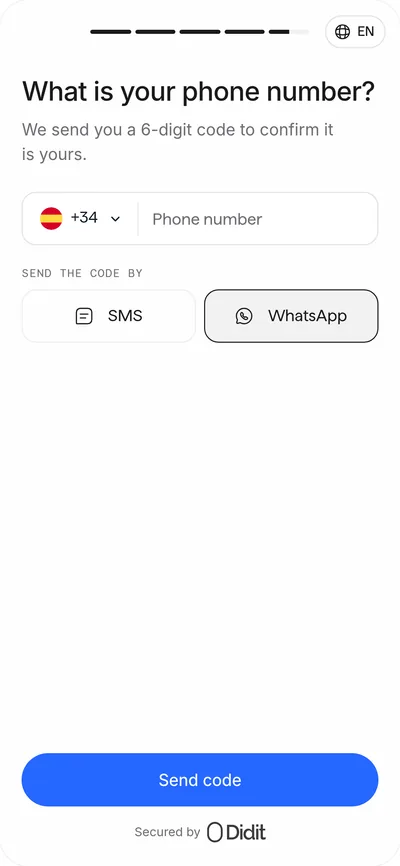
Didit sends OTPs via WhatsApp by default and falls back to SMS when WhatsApp is unavailable. The list price is $0.02 plus the carrier rate per code. Codes expire 5 minutes after the first send by default.
 Alberto RosasCo-founder and CEO
Contents
In this guide
Jump to the part you need.
If you are adding phone verification to signup or sign-in, POST /v3/phone/send/ from our Phone Verification API prefers WhatsApp by default and falls back to SMS when WhatsApp is unavailable. You pay the carrier price plus our $0.02 fee per code, and the default code window is 5 minutes from the first send. Caveat: WhatsApp OTPs use a fixed message. Connect your own WhatsApp Business number in the Business Console to send them under your business name.
Last updated: November 26, 2026. Prices checked against the live Didit price feed on November 26, 2026.
| Item | What it is |
|---|---|
| Endpoint to send a code | POST https://verification.didit.me/v3/phone/send/ |
| Endpoint to check a code | POST https://verification.didit.me/v3/phone/check/ |
| Default channel | Prefers whatsapp. You can ask for sms, telegram or voice. |
| SMS fallback | Automatic when WhatsApp is unavailable for the number. One send request, no second call. |
| Code window | Default is 5 minutes from the first send. A same-window retry keeps that deadline. |
| WhatsApp branding | WhatsApp OTPs use a fixed message. Connect your own WhatsApp Business number to send them under your business name. |
| SMS branding | Your app's SMS sender name on every send, at no extra cost. options.sms_sender_name signs one code with another name (1 to 30 characters). |
| Price | Carrier price for the country and channel plus $0.02 per code. Only our fee takes the plan discount. |
| Wrong-code limit | verification.max_attempts defaults to 5 per standalone verification. |
| Authentication | x-api-key header with an Application key, server-side only. |
| Sandbox | Free, and sandbox calls are mocked. Use it to test the send and check integration, not real delivery. |
Start free in the sandbox at business.didit.me, no sales call. For developers, connect Didit to an AI assistant via the Didit MCP setup page. The Didit Phone Verification product page shows what the product does and which channels it covers, and the Phone Verification API documentation holds the endpoint reference. Per-country rates are on the phone price list, and plan terms are on the pricing page.
How a WhatsApp code with SMS fallback behaves
WhatsApp is the default, so a send with no options.preferred_channel prefers WhatsApp. Set it explicitly anyway, so a future default change never surprises your integration. This guide uses four documented channel values: whatsapp, sms, telegram and voice. The standalone API overview lists the broader channel set.
When WhatsApp is unavailable for the number, Didit automatically falls back to SMS. You do not need a second call and you do not have to detect the failure yourself. Two edge cases are worth knowing. A voice send that is not answered falls back to SMS. Separately, an eligible new send requested by SMS to a fixed line, which takes no SMS, may be read out in a call instead and is then priced as a voice code; that read-out never applies to a repeat, a reused pending code, a destination without voice or a sandbox send, and the abuse protections may skip the call. The full conditions are in the Fixed lines section of the Send Phone Code reference.
| Scenario | What Didit does | What your app does |
|---|---|---|
| WhatsApp is unavailable for the number | Falls back to SMS on the same send request. | Makes one send request, then checks the user's code with the check endpoint. |
| User asks for the code again inside the window | A same-window retry preserves the original 5-minute deadline. | Calls the retry endpoint if you want a same-window retry. |
| Preferred channel is wrong for the user | The verification can move to the next channel. | Calls the next-channel endpoint. |
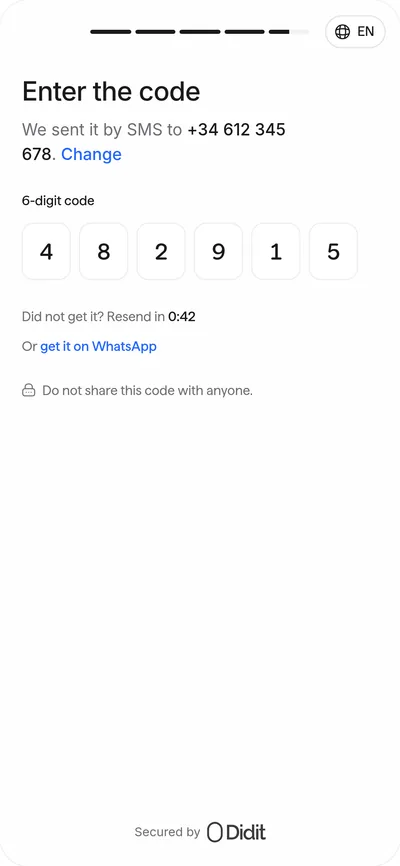
The default code window is 5 minutes from the first send. A same-window retry preserves that deadline, so a user who asks for the code again does not get a fresh 5 minutes from the retry. If the user types the code after the window closes, the check answers Expired or Not Found and you start a new verification.
Install route: the REST recipe and the assistant route
The documented route for sending a WhatsApp OTP with SMS fallback is the Phone Verification REST API. The pair of REST calls below works with any HTTP client: Send Phone Code and Check Phone Code. Connect an AI assistant through the Didit MCP setup page. For a coding agent, our integration prompt hands over the whole recipe in one paste, and the raw Markdown lives at docs.didit.me/integration/integration-prompt.md.
Prerequisites
| Requirement | What you need | Where it is set |
|---|---|---|
| Plan | On self-serve plans, live OTP sending requires a Growth or Scale subscription or a first top-up. Free plan credit excludes phone codes. The sandbox is free and uses mocked responses. | didit.me/pricing |
| API key | New sandbox keys start with sk_test_ and new live keys start with sk_live_. Older keys may have no prefix. Select your sandbox Application key for testing. Keep it server-side. | Business Console, Developers, API keys |
| Client | Any HTTP client that can post JSON with an x-api-key header. No SDK is required. | your server |
| Number format | E.164, for example +14155552671. A number that is not E.164 returns HTTP 400 on send. | your app |
| SMS sender name | Set once. Every SMS code then carries your app's sender name at no extra cost. | Business Console |
| WhatsApp Business number (optional) | WhatsApp OTPs use a fixed message. Connect your own WhatsApp Business number in the Business Console to send them under your business name. | Business Console |
| Sandbox | Free on every plan and nothing is charged. Sandbox calls are mocked. Use the sandbox to test the send and check integration, then use an eligible live application and a number you control to verify actual WhatsApp delivery or SMS fallback. | business.didit.me |
Step by step: send a WhatsApp OTP with SMS fallback
Copy your Application key. Sign in at business.didit.me, pick the Application in the top dropdown, open Developers then API keys, and copy the Primary key or create a scoped key for this service. New sandbox keys start with
sk_test_and new live keys start withsk_live_. Older keys may have no prefix. Select your sandbox Application key for testing and store it asDIDIT_API_KEYon your server, never in a browser or mobile bundle. The authentication page covers the two hosts and their two auth schemes.Set your sender identity in the Business Console. Add your SMS sender name once; every SMS code then reads like a branded message at no extra cost. WhatsApp OTPs use a fixed message. If you want WhatsApp codes to arrive under your business name, connect your own WhatsApp Business number in the same console.
Send the code over WhatsApp. One call, with
options.preferred_channelset towhatsapp. The minimum glue is the API key header and a JSON body.curl -X POST 'https://verification.didit.me/v3/phone/send/' -H "x-api-key: $DIDIT_API_KEY" -H 'Content-Type: application/json' -d '{"phone_number":"+14155552671","options":{"code_size":6,"preferred_channel":"whatsapp","locale":"en-US"},"vendor_data":"user-1234"}'Read the send response. Keep the
verification_idand the returnedstatus. A send can answerstatusofBlockedwithreasonofspam: that is an anti-abuse block, no code is sent and nothing is charged, so do not loop on it. The warning codes are covered separately in the warnings reference.Check the code the user typed. Pass the same number, the code, the
verification_idfrom the send response, and a risk action for VoIP numbers.curl -X POST 'https://verification.didit.me/v3/phone/check/' -H "x-api-key: $DIDIT_API_KEY" -H 'Content-Type: application/json' -d '{"phone_number":"+14155552671","code":"123456","verification_id":"<verification_id from the send response>","voip_number_action":"DECLINE"}'The check response carries the full phone metadata: carrier, line type, disposable, VoIP and ported.
Handle the 5-minute window and retries. A retry inside the window keeps the original deadline. If the channel is wrong for that user, the API reference has a call to move the verification to the next channel, one to retry the code in the same window, and one to cancel it. The list endpoint returns every attempt on one record, newest first, and can export CSV for reconciliation.
Go live. On self-serve plans, live OTP sending requires a Growth or Scale subscription or a first top-up. Free plan credit excludes phone codes. The sandbox is free and uses mocked responses. Switch to the live Application key and use a number you control to test live delivery.
code value you send to the check endpoint.Field and status mapping
| Field | Call | What it does |
|---|---|---|
phone_number | send and check | The number to verify, in E.164. The two calls are paired by it. |
options.preferred_channel | send | Prefers whatsapp by default. Falls back to SMS when WhatsApp is unavailable. |
options.code_size | send | Length of the code. The documented example uses 6. |
options.locale | send | Message locale, for example en-US. |
options.sms_sender_name | send | Signs one code with another sender name, 1 to 30 characters, instead of your default. |
vendor_data | send | Your reference, such as user-1234 in the send example. |
verification_id | check | The id from the send response, so you check that specific verification. |
code | check | The code the user typed. |
voip_number_action | check | Risk action for VoIP numbers, for example DECLINE. |
| Status | Meaning | What your app does |
|---|---|---|
Approved | The code matched. | Let the user continue. |
Failed | Wrong code, attempts remain. | Prompt the user to enter the code again. |
Declined | The verification ended. With the attempts warning, the user hit the configured limit. | Stop the flow or route to support. |
Expired or Not Found | Outside the 5-minute window, or no pending verification for that number. | Start a new verification. |
Blocked (send) | Anti-abuse block with reason of spam. No code sent, no charge. | Do not retry in a loop. |
Phone warning codes include DUPLICATED_PHONE_NUMBER, DISPOSABLE_NUMBER, VOIP_NUMBER, INVALID_PHONE_NUMBER, OTP_DELIVERY_FAILED, OTP_MAX_ATTEMPTS_REACHED, OTP_EXPIRED and PHONE_NUMBER_BLOCKED. The full catalogue is in the Phone warnings reference, and the risk fields are described in the Phone Verification report.
Test with sandbox data, then live data
Use the sandbox Application key and a number you control. Nothing is charged in the sandbox, and sandbox calls are mocked, so this is where you validate the send and check integration. The expected sandbox success is a mocked send that returns a verification_id and a mocked check response. Do not expect a real WhatsApp message in sandbox.
Use an eligible live application and numbers you control. To test WhatsApp delivery, request whatsapp for a number that can receive WhatsApp messages and confirm the code arrives there. To test SMS fallback, request whatsapp for a number that can receive SMS but cannot receive WhatsApp messages. Confirm the code arrives by SMS without a second send request. Submit the received code to the check endpoint and confirm it returns Approved for a test number that passes your configured risk rules.
| What you see | Why | Fix |
|---|---|---|
| HTTP 400 on send | Request validation failed. A non-E.164 phone number is one documented cause. | Read the response body for the invalid field. If it names phone_number, send the number in E.164 format. |
| HTTP 401 | The key is wrong, malformed, revoked or expired. | Re-copy the key from Developers, API keys. The error reference lists each body. |
| HTTP 403 | No key sent, a scoped key without access to this endpoint, or a call from outside the key's IP list. | Use a key with Phone access, or fix the IP list. |
| HTTP 403 with an insufficient-credit error | The available balance cannot cover the call. | Check your plan credit and eligible top-up balance. Free plan credit excludes phone codes. |
| HTTP 429 | Rate limit or quota reached. | Wait for the retry window in the response, then retry. See rate limiting. |
Warning OTP_DELIVERY_FAILED | The channel could not deliver to that number. | Read the Phone warnings reference and inspect the verification record and its delivery attempts. |
Check returns Failed | Wrong code, attempts remain. | Prompt the user to enter the code again. The default limit is 5 wrong entries per standalone verification. |
Check returns Expired or Not Found | Past the 5-minute window, or no pending verification for that number. | Send a new code and treat it as a fresh verification. |
One audit detail: the list endpoint filters by status, channel, number, reference, tag and creation time, and returns every attempt on a record. The list endpoint's status filter accepts pending, verified, not_delivered, expired, blocked and cancelled. These values differ from the status strings shown in the check response. Remember that next and previous are offsets, not URLs, so pass next as offset when you page.
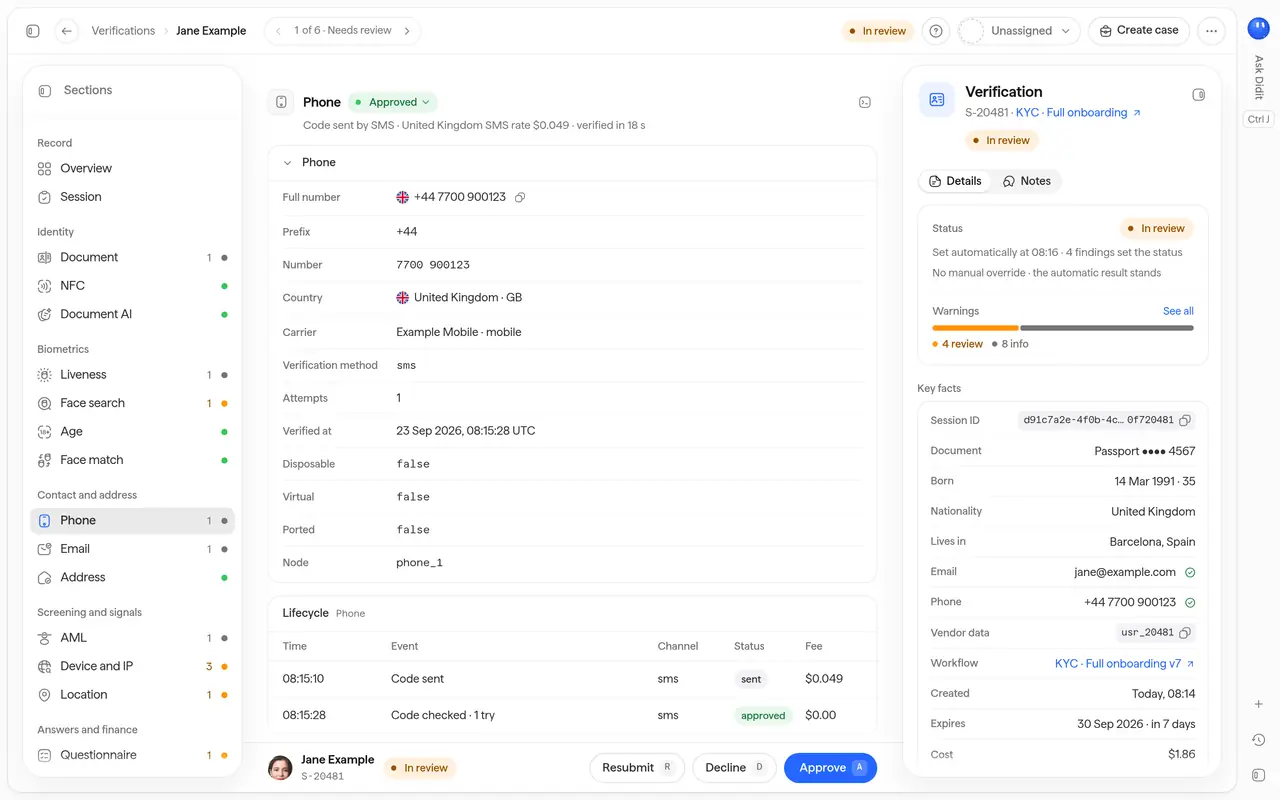
WhatsApp message vs branded SMS sender name
The two channels brand differently. SMS codes carry your app's SMS sender name on every send, at no extra cost. You set that name once in the Business Console, and the message reads with your brand on it. If one flow needs a different name, pass options.sms_sender_name on that send, 1 to 30 characters, and only that code is signed with it.
WhatsApp OTPs use a fixed message. Connect your own WhatsApp Business number in the Business Console to send them under your business name.
What it costs on both ends: Didit fee and carrier price
Every phone code has two components: the carrier price for the country and channel, which passes through at cost, and our fee of $0.02 per code. On Growth the fee is $0.0192 and on Scale it is $0.018, and only our fee takes the plan discount. The totals below are list prices from the live feed, already including the $0.02. Check the phone price list for the published total by country and channel. Billing uses the higher of the listed carrier price and the price reported by the route, plus the applicable Didit fee.
| Country | SMS | Difference per code | |
|---|---|---|---|
| United States | $0.0431 | $0.0473 | $0.0042 |
| United Kingdom | $0.0599 | $0.0783 | $0.0184 |
| Germany | $0.0899 | $0.1145 | $0.0246 |
| India | $0.0413 | $0.0948 | $0.0535 |
| Nigeria | $0.0461 | $0.2597 | $0.2136 |
| Saudi Arabia | $0.0496 | $0.1502 | $0.1006 |
In Mexico, the published list price is $0.0478 per WhatsApp code and $0.0413 per SMS code. Compare the country and channel before you choose a default.
Worked example: 10,000 codes, 80 percent WhatsApp
Assume 10,000 billable codes, one per signup, in the United States, with 8,000 on WhatsApp and 2,000 on SMS. These totals are estimates using listed rates, before subscription charges and credits.
- List price: WhatsApp 8,000 x $0.0431 = $344.80. SMS 2,000 x $0.0473 = $94.60. Total $439.40, or $0.04394 per code.
- On Scale: the carrier portion of WhatsApp is $0.0431 minus $0.02 = $0.0231, plus the $0.018 fee = $0.0411. The carrier portion of SMS is $0.0473 minus $0.02 = $0.0273, plus $0.018 = $0.0453. Then 8,000 x $0.0411 = $328.80 and 2,000 x $0.0453 = $90.60, for $419.40 in total.
- On Growth: $0.0231 + $0.0192 = $0.0423 for WhatsApp and $0.0273 + $0.0192 = $0.0465 for SMS. Then 8,000 x $0.0423 = $338.40 and 2,000 x $0.0465 = $93.00, for $431.40.
Retries and no-match lookups can be billable, and the billing rules sit on the docs pricing page. Carrier prices are also listed per country on didit.me/pricing/phone and as JSON in pricing.json.

Cancel and review verifications
- Cancel pending verifications with the cancel call so no code stays live in the 5-minute window.
- Revoke the API key in Developers, API keys, when a service stops using it, rather than leaving a key alive.
- Read back what happened with the list endpoint or one record and its attempts with the retrieve call before you delete anything.
Sources
- Didit Phone Verification product page
- Didit docs: Phone Verification API overview (channels, fallback, 5-minute window, branding)
- Didit docs: Phone Verification standalone APIs
- Didit docs: Send Phone Code, including the Fixed lines section
- Didit docs: Check Phone Code
- Didit docs: List Phone Verifications
- Didit docs: Retrieve Phone Verification
- Didit docs: retry a code in the same window, move to the next channel, cancel a verification
- Didit docs: Phone verification warnings catalogue
- Didit docs: Phone Verification report
- Didit docs: pricing and billing rules
- Didit docs: API authentication and API errors
- Didit docs: rate limiting
- Didit docs: integration prompt
- didit.me/pricing, phone price list, pricing.json, live feed read November 26, 2026
- Didit MCP server and integration prompt page
- Didit documentation index for AI agents
Open the sandbox at business.didit.me, select your sandbox Application key from Developers, API keys, and test the mocked send and check flow. No sales call, and nothing is charged while you test. When you are ready for real delivery, switch to an eligible live application and a number you control.
Try it
Try this in the sandbox
Run the check this guide describes, free.
The product this post is about, taken from its topic. Run it free in the sandbox.
Author
Alberto Rosas
Co-founder and CEO

Keep reading
Other guides in the same topic.
 Migrate KYC Sessions From Sumsub to Didit: 2026 Guide
Didit imports completed Sumsub KYC records with POST /v3/session/imports/ and import_type=user_verification, keeping applicant id, status, document fields, images, rejection labels, tags and raw provider metadata.
Alberto RosasNov 26, 2026 Passive Liveness Detection API in cURL: Send a Selfie, Read the JSON
Send a selfie to Didit's standalone Passive Liveness API using cURL and multipart form data. Read the request ID, liveness verdict, score, warnings and capture quality in the JSON response.
Alberto RosasNov 26, 2026 How to Detect Duplicate Accounts and Fraud Rings With 1:N Face Search
POST /v3/face-search/ searches the largest face in a selfie against your application's face index and returns up to five ranked matches. $0.05 per search. Duplicate warnings are informational and never decline.
Alberto RosasNov 26, 2026Questions
Frequently asked questions
What is the default OTP channel in Didit's Phone Verification API?
WhatsApp is the default. A call to POST /v3/phone/send/ with no options.preferred_channel prefers WhatsApp. Delivery can begin on SMS when WhatsApp is unavailable. This guide uses sms, telegram and voice as the other documented channel values.
Does Didit automatically fall back to SMS when WhatsApp is unavailable?
Yes. Didit falls back to SMS when WhatsApp is unavailable for the number. Your application makes one send request and then checks the user's code with the check endpoint.
How long does a WhatsApp OTP stay valid in Didit?
The default code window is 5 minutes from the first send. A same-window retry preserves that original deadline instead of restarting it. After the window, the check answers Expired or Not Found and the user needs a new verification.
Can I send WhatsApp OTPs from my own WhatsApp Business number?
Yes. WhatsApp OTPs use a fixed message. Connect your WhatsApp Business number in the Business Console to send them under your business name.
How much does it cost to send an OTP over WhatsApp with Didit?
Didit's WhatsApp OTP list price is $0.02 per code plus the carrier rate for the destination country and channel. On Growth the fee is $0.0192 and on Scale $0.018. On self-serve plans, live OTP sending requires a Growth or Scale subscription or a first top-up. Free plan credit excludes phone codes, and the sandbox is free and uses mocked responses.
Which endpoint do I call to check the code the user typed?
Call POST /v3/phone/check/ with the same phone_number, the code and the verification_id from the send response. Add voip_number_action if you want VoIP numbers handled your way. The response returns the result plus carrier, line type, disposable and ported signals.
How many wrong code attempts can a user make?
Our verification.max_attempts setting defaults to 5 wrong code entries per standalone verification. A wrong code returns Failed, which means attempts remain, so prompt the user to enter the code again. The last one ends the verification with Declined and the attempts warning.
What phone number format does the send endpoint require?
E.164, for example +14155552671. A number that is not E.164 returns HTTP 400 on the send call, so normalise before you call. The same number must be used on the check call, since the two calls are paired by it.
Can I test WhatsApp OTPs for free in the sandbox?
Yes. The sandbox is free on every plan and nothing is charged there, and sandbox calls are mocked. Use the sandbox key to test the send and check integration, not real delivery. To verify actual WhatsApp delivery or SMS fallback, use an eligible live application and a number you control.
What is the difference between the WhatsApp message and the SMS sender name?
SMS codes carry your app's sender name on every send at no extra cost, set once in the Business Console, and options.sms_sender_name can sign a single code with another name of 1 to 30 characters. WhatsApp OTPs use a fixed message. Connect your WhatsApp Business number in the Business Console to send them under your business name.
Is WhatsApp always cheaper than SMS?
No. In Mexico, the published list price is $0.0478 per WhatsApp code and $0.0413 per SMS code. Compare the country and channel before you choose a default.
What should I do when a check returns Expired or Not Found?
That means the 5-minute window closed, or there is no pending verification for that number. Send a new code and treat it as a fresh verification. Do not reuse the old verification_id for the new code.
Compliance built in
Audited, certified and attested.
We hold the certifications and build each country's rules into your flows, so you can launch anywhere without worrying. Security and Compliance center
- Regulation encoded into your flows
Tell us what you do and where. Didit lists the rules that apply to you, with sources, and builds the checks each country needs into one workflow.
- Ready for AMLR
Every requirement of the new EU anti-money laundering rules, from checking customers to human review, is already covered by a Didit check.
- Tested in Spain's Treasury sandbox
Spain's Treasury published its supervised sandbox report on Didit's NFC plus active liveness onboarding; SEPBLAC took part and valued the added measures positively.
- Audited, not self-declared
iBeta Level 1 and Level 2. Liveness tested under ISO/IEC 30107-3.
Your obligations · 3 regions
 SOC 2 Type 2
 ISO 27001
 iBeta Level 1 and Level 2
 EU regulator attestation
 FSM youth protection
 GDPR
 EBA remote onboarding
 MiCA compatible
 FIDO Alliance member
- AMLREU AML Regulation ready
Integration · Didit MCP
Run Didit from your own AI agent
Connect Didit to Claude, Cursor, VS Code or ChatGPT and just ask in plain words. Your agent can do anything you can do in the console, with the same permissions you have.
 Add to Claude
 ChatGPT
 Cursor
- Build workflowsDescribe the checks you need. The agent creates and publishes the flow.
- Run investigationsAsk why a session was declined, review cases, search people and companies.
- Change rulesCreate payment rules, test them on past data and switch them on.
- Pull reportsAsk for numbers, exports or the audit log.
Didit Academy