White-Label AML for Fintechs: Trust as a Service in 2026
White-label AML puts sanctions, PEP and adverse media screening under your brand for $0.10 per finished check plus $0.20 per AML check, with your own domain on Scale and Enterprise.
 Alberto RosasCo-founder and CEO
Contents
In this guide
Jump to the part you need.
White-label AML fits fintechs that need sanctions, PEP and adverse media screening inside their own product without building the list pipeline themselves. On Didit the white label adds $0.10 per finished check on top of the $0.20 AML check, and your own domain is part of the Scale and Enterprise plans. The caveat is the one that matters: branding moves to you, the compliance decision never leaves you.
Last updated: November 26, 2026. Prices checked against the live Didit price feed on November 26, 2026.
| Item | Detail |
|---|---|
| Outcome | Sanctions, PEP, watchlist and adverse media checks rendered in your colors, logo, wording and, on Scale and Enterprise, your own domain |
| Fits | Neobanks, PSPs, crypto platforms, lenders, brokerages and banks onboarding at volume |
| White label price | $0.10 per finished check at list, less your plan discount |
| Your own domain | Included on Scale and Enterprise plans |
| AML screening price | $0.20 per check against 1,300+ sanctions, PEP, watchlist and adverse media sources |
| KYC plus AML plus white label | $0.63 per customer at list ($0.33 + $0.20 + $0.10) |
| Ongoing monitoring | $0.07 per screened person per year |
| Decision model | Two scores per hit, match score and risk score, against thresholds you set |
| Who decides | Your team. Didit produces the checks and the evidence |
Start free in the sandbox at business.didit.me, no sales call needed. Developers can hand the integration to an AI assistant through the Didit MCP server. The product page is AML screening and every unit price is on the pricing page.
What white-label AML means in practice
White-label AML and standalone AML screening use the same screening checks but deliver them differently. White-label AML runs the checks inside your branded verification flow: the customer can see your branding while Didit runs the check behind the flow, and the result is bound to the session. Standalone AML is a server-to-server call with no hosted UI: you send a name and get the hits, scores and warnings back to your own screens. Some teams call the white-label route AML whitelisting or trust as a service. Use the branded flow when the customer completes onboarding; use the standalone endpoint when the check runs behind an existing form.
Three things stay on your side of the line, and no vendor can take them:
- You are the obliged entity. Under the EU Anti-Money Laundering Regulation, Regulation (EU) 2024/1624, an obliged entity stays fully liable for any task it outsources (Article 18). The regulation is in force and applies from 10 July 2027.
- You set the risk appetite. Your thresholds decide what approves automatically, what goes to review and what declines.
- You keep the human in the loop. Article 76(5) expects a person behind automated decisions, and Article 77 expects records kept for five years.
Didit provides the checks and the evidence. We do not decide whether to onboard a customer, and we do not give legal advice. We run identity and fraud checks for 4,000+ companies, and the AML screening covers 1,300+ global sanctions, PEP and watchlist sources plus adverse media.
Session-based AML versus the standalone AML API
Session-based AML runs as a step inside a verification session. You add the AML feature to the workflow, create a session with POST /v3/session/, and read aml_screenings[] on the decision. Decisions, ongoing monitoring and the audit history are bound to the session and surfaced in the console.
The standalone endpoint, POST https://verification.didit.me/v3/aml/, is a one-shot server-to-server check decoupled from a hosted KYC flow. It returns request_id and an aml object with status, hits and warnings. save_api_request defaults to true, so the screening is stored as a session, appears in the console, fires a status.updated webhook, and can be retrieved with GET /v3/session/{sessionId}/decision/.
Does white-label AML make sense, or should you build it in house?
Buy the screening layer when you need breadth across 1,300+ sources, adverse media, ongoing re-screening after onboarding, and a decision record you can retrieve from the console and the decision endpoint. That work depends on list coverage, adverse media enrichment and re-screening, which the screening provider operates for you, and it does not differentiate your product.
Build in house only when the scope is genuinely narrow: one jurisdiction, a small list set you already license, and a team that can own list ingestion and change management for years. Even then, most teams still buy the identity document and biometric side.
The middle path is the one most fintechs take: buy the checks and the branded flow, keep decisioning, case management and reporting inside your own systems. Didit fits that path because the same API returns the raw hits, the scores and the warnings.
Prerequisites
- A Didit account. Sandbox testing is free and unlimited on every plan.
- A KYC workflow with the AML feature added, in the console or through the workflows API.
- Thresholds chosen before launch:
aml_match_score_threshold(default 93),aml_score_approve_threshold(default 80) andaml_score_review_threshold(default 100). - Weights for name, date of birth and country that sum to exactly 100. Defaults are 60, 25 and 15.
- Brand assets: a square logo, a rectangular logo, your hex colors and a font you have the right to use.
- DNS access if you want the flow on your own subdomain. That is available on Scale and Enterprise.
- An API key for server-to-server calls, or console access for the no-code path.
- A named reviewer and a written procedure for anything that lands in In Review.
- A retention decision. One year on Free, five on Growth, up to ten on Scale, custom on Enterprise.
How to white-label AML screening: 7 steps
-
Build the workflow and set the thresholds. Add the AML feature to a KYC workflow in the console, or create it through the workflows API. Set the three thresholds and make the three weights sum to exactly 100, otherwise the request is rejected with HTTP 400.
-
Run a screening call before you brand anything. The standalone endpoint returns the raw result, which is the fastest way to see how your thresholds behave on real names:
curl -X POST 'https://verification.didit.me/v3/aml/' -H 'x-api-key: $DIDIT_API_KEY' -H 'Content-Type: application/json' -d '{"full_name": "Javier Ejemplo Modelo", "entity_type": "person", "date_of_birth": "1974-01-01", "nationality": "ES", "include_adverse_media": true, "vendor_data": "user-1234"}'Sandbox keys skip screening and billing and return a mocked Approved result with zero hits unless you pass
sandbox_scenario, so use a live key with a small top-up to see real hits. Add anIdempotency-Keyheader when you retry after a timeout. -
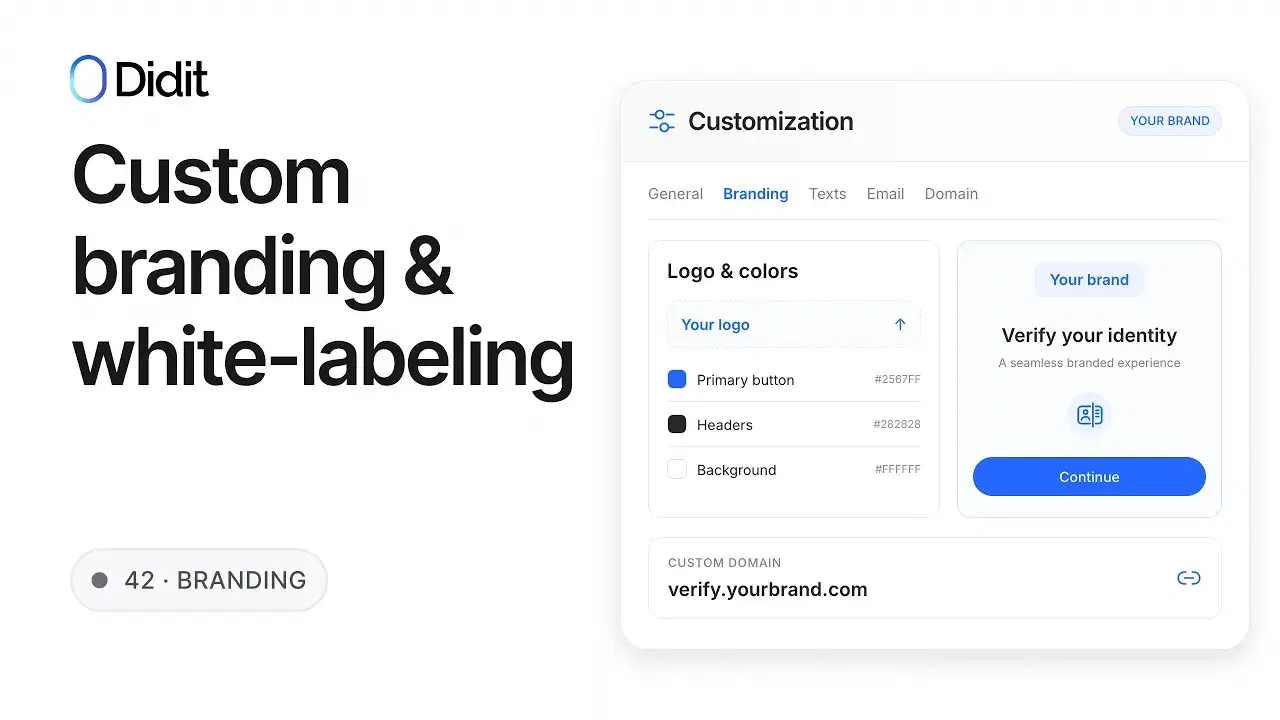
Brand the flow in Customization. Under Identity verification, open Customization and set colors, typography, both logo formats, border radius and whether the login screen shows. Every color element in the verification UI is yours to change.
-
Point it at your domain. Serve the flow from your own subdomain instead of
verify.didit.me. DNS records and verification steps are in the custom domain documentation, and the subdomain is part of the Scale and Enterprise plans. -
Override the wording and pick a completion mode. Open Customization then Texts to rewrite the welcome screen, document selection, capture screens, selfie intro, navigation buttons and completion screen per locale. Overrides accept
{appName},{stepIndex}and{stepTotal}, and each string is capped at 500 characters. Set the completion screen to Decision to show the real outcome, or to Submitted for review to show a neutral message while your product communicates the decision later. -
Enable the custom style per workflow. Open Workflows, pick the workflow, go to Settings then Options and switch on Include custom style. Branding only applies where that toggle is on, which is the most common reason a launch looks unbranded.
-
Create sessions from your backend and read the decision. Your server creates the session, the user completes the branded flow, a webhook fires and you fetch the full decision:
curl -X POST 'https://verification.didit.me/v3/session/' -H 'x-api-key: $DIDIT_API_KEY' -H 'Content-Type: application/json' -d '{"workflow_id": "YOUR_WORKFLOW_UUID", "vendor_data": "user-1234", "callback": "https://app.example.com/verified"}'Then subscribe to
session.status.updatedand callGET /v3/session/{sessionId}/decision/. The AML results sit in theaml_screeningsarray on the decision. If you also want monitoring after onboarding, addinclude_ongoing_monitoring=truetogether withsave_api_request=true, at $0.07 per screened person per year.
Expected output
The standalone call returns the request id, the status, the hit list and the warnings:
{
  "request_id": "...",
  "aml": {
    "status": "Approved",
    "screening_id": "...",
    "hits": [],
    "warnings": []
  }
}
The status is one of Not Started, In Progress, Approved, In Review, Declined, Abandoned or Kyc Expired. Warning codes you will see include POSSIBLE_MATCH_FOUND, MATCH_FOUND, HIGH_RISK_COUNTRY, ADVERSE_MEDIA_HIT, SANCTIONED_ENTITY, PEP_MATCH and ONGOING_MONITORING_ENABLED.
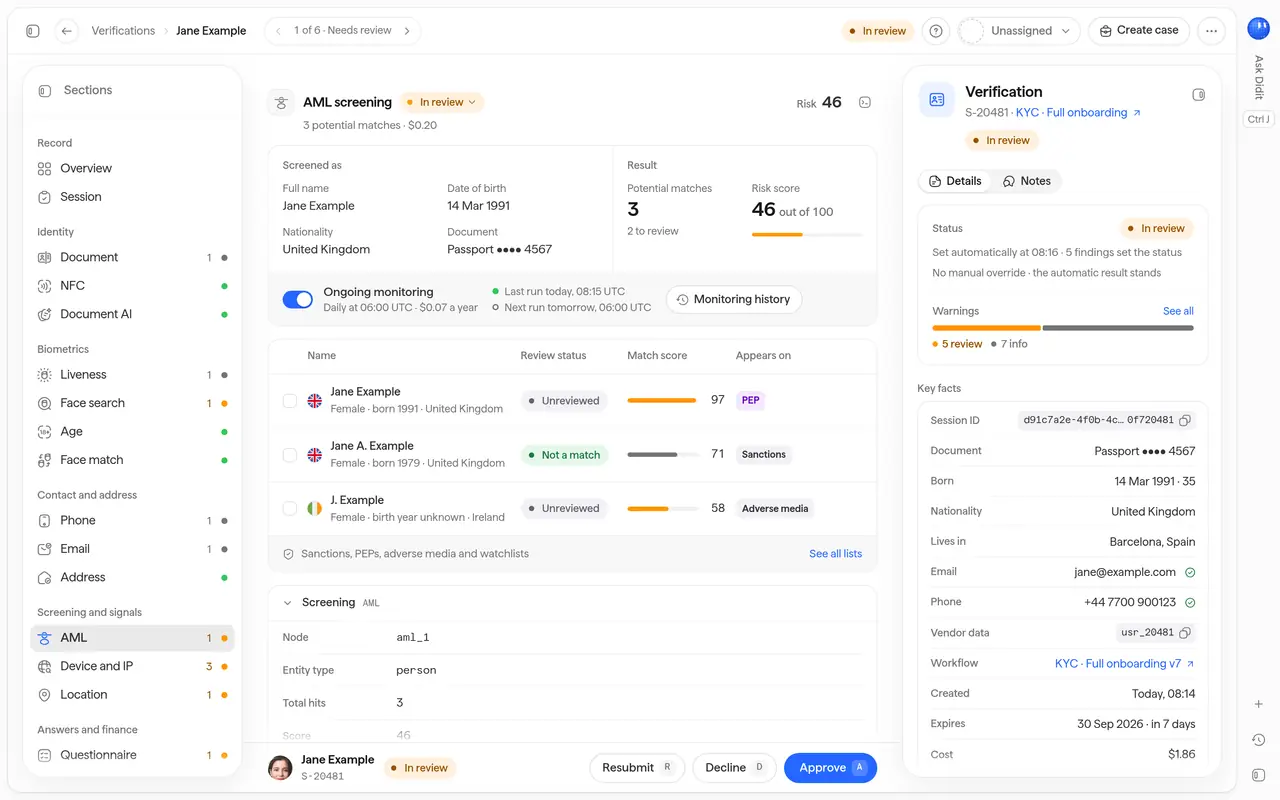
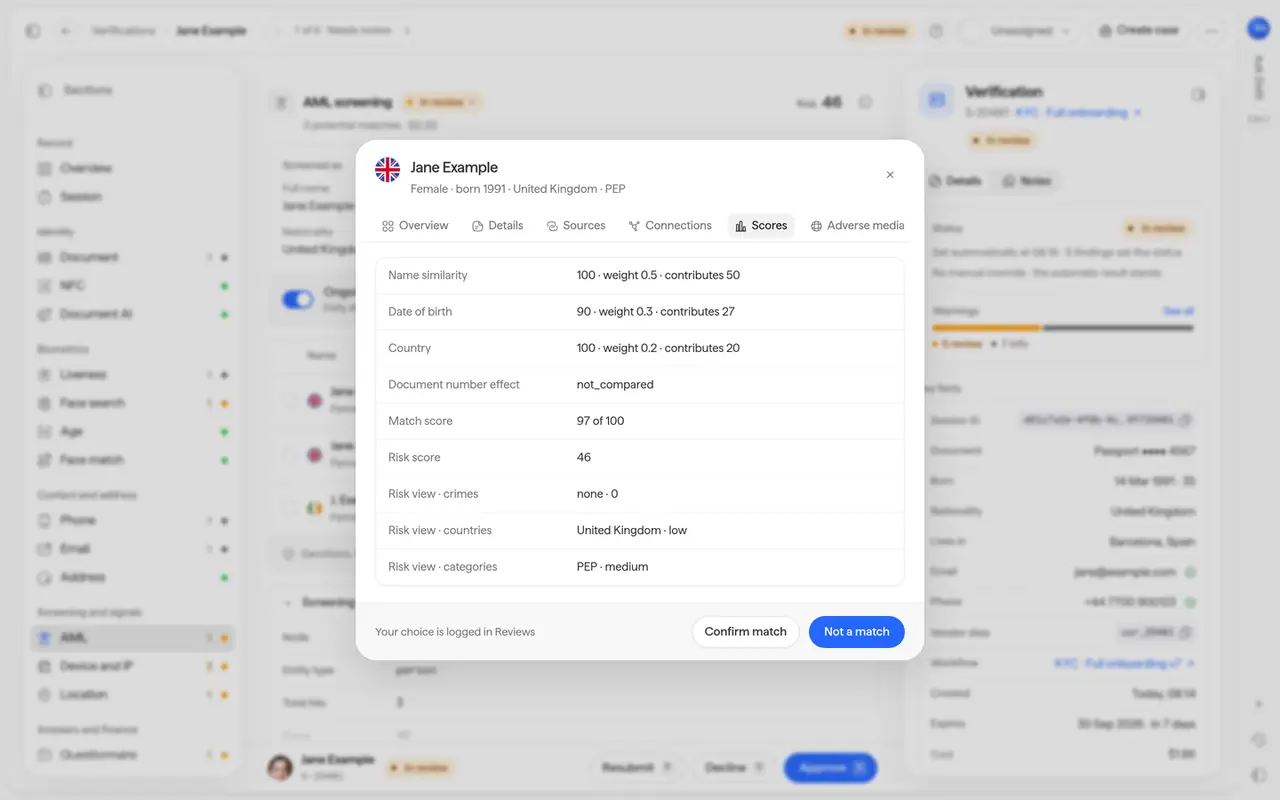
Each hit carries two numbers. The match score asks whether this is the same person: name similarity, date of birth, country and document number, weighted by the three values you set. Hits below the match score threshold are tagged False Positive and ignored for risk purposes. The risk score asks how risky the listed entity is if the match is real, and the highest risk score among the remaining hits becomes the session score that drives Approved, In Review or Declined.
Failure cases and recovery
| Symptom | Cause | Recovery |
|---|---|---|
| HTTP 400 on the screening call | Weights do not sum to exactly 100 | Fix the three weights and resend. The check is rejected before it runs. |
| HTTP 400 on ongoing monitoring | include_ongoing_monitoring=true sent without save_api_request=true | Send both flags together. |
| HTTP 400 on session creation | Callback URL is not on the application's allowed domains | Add the origin in the webhook settings, or use an app deep link. |
| HTTP 403 | Out of credits | Top up or switch on auto top-up. Billing happens after the first successful screening. |
| HTTP 409 | The same Idempotency-Key reused with a different body | Use a new key for a new body. |
| Sandbox returns Approved with zero hits | Sandbox keys skip screening and return a mocked result | Use a live key with available credit to see real hits, or pass sandbox_scenario to reproduce a chosen outcome. |
| Result arrives without adverse media hits | Upstream adverse media enrichment timed out | Set a client timeout of at least 60 seconds. The partial result is still actionable. |
| Status is In Review | Risk score sits between the approve and review thresholds | Route to your manual queue, review the hit, then update the session status. |
| Status is Declined | Risk score crossed the review threshold | Your compliance team decides. Keep the evidence and the rationale. |
| Flow renders with Didit branding | Include custom style is off for that workflow | Workflows, Settings, Options, enable Include custom style. |
Inputs and outputs
| Direction | Field | What it does |
|---|---|---|
| In | full_name | Person or company to screen. Minimum two characters, required. |
| In | date_of_birth, nationality | Feed the date of birth and country weights in the match score. |
| In | entity_type | Person or company. |
| In | include_adverse_media | Adds adverse media enrichment, which can add roughly 25 seconds; set a client timeout of at least 60 seconds. |
| In | include_ongoing_monitoring | Keeps the profile under provider-driven monitoring, billed yearly per person. |
| In | aml_name_weight, aml_dob_weight, aml_country_weight | Match score weights. Must sum to exactly 100. |
| In | workflow_id, vendor_data, callback | Start a branded session bound to your own user identifier. |
| Out | aml.status | Approved, In Review, Declined and the rest of the status enum. |
| Out | hits[].match_score, hits[].risk_score | The two scores behind every decision, plus the review status per hit. |
| Out | warnings[] | Risk codes such as SANCTIONED_ENTITY or PEP_MATCH. |
| Out | session.status.updated | Webhook event, signed, so your backend knows when to fetch the decision. |
Paid steps and review boundaries
| Step | List price | Note |
|---|---|---|
| White label flow | $0.10 per check | Every plan. A few workflow types carry no white label charge. |
| AML screening | $0.20 per check | Two-score model, 1,300+ sources. |
| Full KYC | $0.33 per check | ID document, passive liveness, face match, device and IP. |
| Ongoing AML monitoring | $0.07 per person per year | Requires save_api_request=true. |
| Business verification | From $2.00 per company | Person AML for each owner or officer is $0.20. |
| Workflow orchestrator, MCP server, SDKs, reusable KYC | Included | No separate fee. |
Didit returns the hit, the two scores, the warning codes and the evidence, and shows them in the console with the session. Your team decides the customer's risk profile, whether to onboard, and what to do with an In Review case. Plan for a reviewer on your side from day one.
Growth includes email and chat support with a reply within one business day and the Investigator agent for reviews. Scale adds priority support within 24 hours with an SLA, scheduled reports, custom roles and full case management with routing.

Worked cost example
A lender onboards 5,000 new customers a month and wants the whole flow under its own brand, with ongoing monitoring after onboarding.
At list prices per customer: full KYC $0.33 + AML screening $0.20 + white label $0.10 = $0.63. For 5,000 customers that is 5,000 x $0.63 = $3,150.00 a month. Ongoing monitoring is billed per person per year: 5,000 x $0.07 = $350.00 for the first year of the cohort.
On the Scale plan the same unit prices carry a 10% discount: $0.297 + $0.18 + $0.09 = $0.567 per customer. At 5,000 customers that is 5,000 x $0.567 = $2,835.00. The plan fee is $299.00 a month and the plan credit is $350.00 a month, so the month costs $2,835.00 + $299.00 - $350.00 = $2,784.00. Monitoring at Scale prices is 5,000 x $0.063 = $315.00 for the year.
Sources
- Didit docs: White Label KYC, Custom Branding and Domain
- Didit docs: Custom domain
- Didit docs: Identity Verification Pricing
- Didit docs: AML Screening API overview
- Didit docs: standalone AML screening endpoint
- Didit docs: Create Session API
- Didit docs: AMLR Compliance Guide
- Didit docs: Webhooks
- Didit pricing page
- Didit AML screening product page
- Didit AMLR solution page
- Didit MCP server setup
- Didit switch page for teams moving from another provider
- Regulation (EU) 2024/1624 on the prevention of the use of the financial system for the purposes of money laundering or terrorist financing
- FATF, the Financial Action Task Force
Next step: open the sandbox at business.didit.me and run one AML check. Sandbox keys return mocked results; live screening needs a live key and available credit. Then switch on Include custom style on the workflow and see the branded flow yourself. No sales call.
Try it
Try this in the sandbox
Run the check this guide describes, free.
The product this post is about, taken from its topic. Run it free in the sandbox.
Author
Alberto Rosas
Co-founder and CEO

Keep reading
Other guides in the same topic.
 What Is the Purpose of FICA in South Africa? 2026 Guide
FICA is South Africa's anti-money laundering law. It creates the Financial Intelligence Centre and requires accountable institutions to identify and verify clients, screen for PEP and sanctions risk and report suspicious.
Alberto RosasNov 26, 2026 Sixth Money Laundering Directive (6AMLD): What Changed and Which Rules Apply
6AMLD is Directive (EU) 2018/1673: Member States must criminalise laundering, widen predicate offences and set a four-year penalty floor. It adds no new due diligence duties for firms.
Alberto RosasNov 26, 2026 Automated Sanctions Screening: Canada, the Entity List and Embargoes
Automated sanctions screening matches people and companies against lists such as Canada's autonomous sanctions made under SEMA and JVCFOA and the OFAC SDN List, and returns candidate hits scored for identity confidence and.
Alberto RosasNov 26, 2026Questions
Frequently asked questions
What is white-label AML screening?
White-label AML screening is a service where a provider runs sanctions, PEP, watchlist and adverse media checks while the fintech presents the flow under its own brand, colors, wording and, on Scale and Enterprise, its own domain. The customer can see your branding while Didit runs the check behind the flow. On Didit the white label is a $0.10 per check option on top of the $0.20 AML check, available on every plan.
How much does white-label AML cost on Didit?
It is $0.10 white label plus $0.20 AML screening per screened customer, before the identity check. Add a full KYC at $0.33 and the combined price is $0.63 per customer at list. Growth applies 4% off every price and Scale applies 10%.
Who stays responsible for AML compliance when screening is white-labeled?
You do. White-labeling changes the branding of the flow, not your legal obligations. Under Article 18 of Regulation (EU) 2024/1624 an obliged entity remains fully liable for any task it outsources, and Articles 76 and 77 put the human review and the five-year record keeping on your side.
Can the verification flow run on my own domain?
Yes, on the Scale and Enterprise plans. You point a subdomain at Didit instead of using verify.didit.me, add the DNS records and complete the verification step. The white label itself, with your colors, logos, typography and text overrides, is available on every plan including Free.
What is the difference between the match score and the risk score?
The match score answers whether the hit is the same person, using weighted name, date of birth and country similarity, with a matching document number overriding it to 100. The risk score answers how risky that listed entity is. Hits below the match threshold are marked False Positive and left out of the risk calculation, and the highest remaining risk score sets the session status.
How does name matching work, and what are anti money laundering name matching products?
Anti money laundering name matching products compare customer details against sanctions, PEP and watchlist entries and return possible matches with a similarity score. Didit weights name, date of birth and country, which you set and which must total 100, then applies a match score threshold of 93 by default to separate false positives from possible matches. A matching document number overrides the match score to 100.
Does Didit keep screening users after onboarding?
Yes, if you enable it. Sending include_ongoing_monitoring=true with save_api_request=true keeps the profile under provider-driven monitoring, billed at $0.07 per screened person per year, and changes reach your report and your webhooks. Ongoing monitoring is what turns a one-off onboarding check into a program that matches Article 26 of the EU regulation.
What are AML tech-enabled services and is white-label one of them?
AML tech-enabled services are outsourced AML tasks performed with the provider's own technology and data rather than the client's headcount. White-label AML is the delivery model for that service inside your own product.
Can a bank white-label Didit's KYC onboarding?
Yes. A bank or another regulated firm can run the identity and AML flow under its own brand on its own subdomain with Scale or Enterprise, and keep decisioning inside its existing case management. The bank remains the obliged entity, keeps its own outsourcing register and maps each check to its supervisor's rules, which is what Article 18 asks for.
What if I do not want a hosted flow at all?
Use the standalone AML endpoint. POST https://verification.didit.me/v3/aml/ screens a person or company server to server and returns the status, the hits, the two scores and the warnings, with no hosted UI. You keep your own onboarding screens and you lose the branded flow, which is fine when the check runs behind an existing form.
Can I bring my own wallet screening provider?
Yes on Growth and above. You can bring your own wallet screening provider and run it inside Didit, alongside the native wallet screening at $0.15 per screening. That is the usual setup for crypto platforms that already have a screening contract and want identity, AML and transactions on one platform.
How long does an AML check take?
A plain screening typically returns in a few seconds. Adding adverse media enrichment can add roughly 25 seconds, so set a client timeout of at least 60 seconds.
Where do I see the AML result and who reviews it?
The result appears in the Didit Business Console against the session, with each hit, its scores and its review status, and it comes back on GET /v3/session/{sessionId}/decision/. Your reviewer works the In Review cases and updates the status, and the hit and decision remain available through the session record.
Compliance built in
Audited, certified and attested.
We hold the certifications and build each country's rules into your flows, so you can launch anywhere without worrying. Security and Compliance center
- Regulation encoded into your flows
Tell us what you do and where. Didit lists the rules that apply to you, with sources, and builds the checks each country needs into one workflow.
- Ready for AMLR
Every requirement of the new EU anti-money laundering rules, from checking customers to human review, is already covered by a Didit check.
- Tested in Spain's Treasury sandbox
Spain's Treasury published its supervised sandbox report on Didit's NFC plus active liveness onboarding; SEPBLAC took part and valued the added measures positively.
- Audited, not self-declared
iBeta Level 1 and Level 2. Liveness tested under ISO/IEC 30107-3.
Your obligations · 3 regions
 SOC 2 Type 2
 ISO 27001
 iBeta Level 1 and Level 2
 EU regulator attestation
 FSM youth protection
 GDPR
 EBA remote onboarding
 MiCA compatible
 FIDO Alliance member
- AMLREU AML Regulation ready
Integration · Didit MCP
Run Didit from your own AI agent
Connect Didit to Claude, Cursor, VS Code or ChatGPT and just ask in plain words. Your agent can do anything you can do in the console, with the same permissions you have.
 Add to Claude
 ChatGPT
 Cursor
- Build workflowsDescribe the checks you need. The agent creates and publishes the flow.
- Run investigationsAsk why a session was declined, review cases, search people and companies.
- Change rulesCreate payment rules, test them on past data and switch them on.
- Pull reportsAsk for numbers, exports or the audit log.
Didit Academy