Address Validation API: Structured Fields vs One Line
Send an address to <code>POST /v3/address-validation/</code> on one line or as structured fields, never both, with the country in ISO 3166-1. Results show the match level and cost $0.10 per validated address.
 Alberto RosasCo-founder and CEO
Contents
In this guide
Jump to the part you need.
Use the Didit Address Validation API when your backend already holds a postal address and needs to know whether the place exists and how the country writes it. You send the address on one line or as structured fields, never both, and you always include the country. Each validated address costs $0.10. The main caveat: a verified result confirms the place, not that anyone lives there.
Last updated: November 26, 2026. Prices checked against the live Didit price feed on November 26, 2026.
Structured fields vs one line at a glance
| Question | Structured fields | One line in address |
|---|---|---|
| Fields you send | address_line_1, plus address_line_2, city, region and postal_code when you have them | address only |
| Best for | Checkout forms, KYC and KYB records, any address your own form collected part by part | Data you did not collect yourself: pasted text, CRM notes, a CSV import, a single-field form |
| Country | Required, ISO 3166-1 alpha-2 or alpha-3 | Required, ISO 3166-1 alpha-2 or alpha-3 |
| What comes back | The normalised address, its components and coordinates | The same, with the components parsed out of your text |
| Main risk | A missing or wrong part pitches the match to a lower level | Free text that mixes a unit, a floor or a building name into the street line |
| Price | $0.10 per validated address | $0.10 per validated address |
Start free in the sandbox at business.didit.me, no sales call. Developers who want an assistant to do the wiring can connect Didit to an AI assistant through the Didit MCP server. The Didit Address Validation product page is Address Validation API, and every price behind this page is on the pricing page.
Never send both shapes in one request. Choose either address or structured fields. The decision rule is short: if your own form or your own database holds the address as separate parts, send structured fields and keep those parts as the canonical record. If the address arrived as one string, pasted by a person or brought in by an import, send it in address and keep the normalised result the API returns.
What the endpoint does
POST /v3/address-validation/ on https://verification.didit.me confirms that a postal address exists and returns it normalised, with its delivery lines, components and coordinates. It is a server-to-server call: your backend has an address and needs to know whether it exists, and in which normalised form. It is one of the standalone APIs, priced per call rather than as part of a session.
It confirms the address only. It never links the address to a person, so a verified result means the place exists, not that anyone lives there.
Prerequisites
- A Didit application. Create one in the Didit Business Console; the sandbox application that comes with your organization is enough to start.
- Its API key, from Developers then API keys. New keys start with
sk_test_for a sandbox application andsk_live_for a live one. - The key kept server-side. The verification API reads it from the
x-api-keyheader and nothing else. Never ship it in a browser or mobile bundle. - The address you want to check, in one shape or the other, and the country as an ISO 3166-1 code.
If you would rather create the organization and its keys programmatically, API authentication shows the register, verify-email and login calls, and returns both the sandbox and the live key.
Step by step
- Create an application and copy its key. Open Developers then API keys in the console. The Primary key is the application's own secret; create an extra key if a service or partner needs its own. Keep it server-side.
- Pick the shape from where the address came from. If your own form collected the parts, send structured fields. If a person pasted an address or you imported one, send a single line and let the API parse it.
- Settle the country code.
countryis always required, as an ISO 3166-1 alpha-2 or alpha-3 code.USandUSAboth work,ESandESPboth work. Pick one form and stay consistent across your records. - Send the structured request. Every part supplied separately, with the country last:
curl -X POST https://verification.didit.me/v3/address-validation/ \ -H "x-api-key: $DIDIT_API_KEY" \ -H "Content-Type: application/json" \ -d '{ "address_line_1": "1600 Amphitheatre Pkwy", "city": "Mountain View", "region": "CA", "postal_code": "94043", "country": "US" }' - Or send the same idea on one line. The text and the country, nothing else:
curl -X POST https://verification.didit.me/v3/address-validation/ \ -H "x-api-key: $DIDIT_API_KEY" \ -H "Content-Type: application/json" \ -d '{ "address": "Paseo de la Castellana 259, 28046 Madrid", "country": "ES" }' - Read the status before anything else.
address_validation.statusis the answer to build on:verified,partially_verified,not_verifiedorunavailable. - Store what you need. No session is created and the result is returned only in this response, so persist the normalised address, the status and the
request_idyourself. - Decide what each status does in your product. Accept a verified address, ask the user to correct a
not_verifiedone, look at apartially_verifiedone under your own rules, and retry anunavailableone later.
The response you get back
HTTP is 200 for every completed request, unavailable included. The block below shows the field names the documentation defines and the values each one can take. It is the shape of the object, not a result for any particular address: the normalised lines, the coordinates and the classification come from the address you sent.
{
  "request_id": "the id of this request",
  "address_validation": {
    "status": "verified, partially_verified, not_verified or unavailable",
    "verification_level": "administrative_area, locality, thoroughfare, premise or delivery_point",
    "address": "the normalised address, with its delivery lines and components",
    "formatted_address": "the normalised address as text, written the way the country writes it",
    "latitude": "the latitude of the matched address",
    "longitude": "the longitude of the matched address",
    "address_type": "street, po_box, high_rise, rural_route, general_delivery, firm, building or null",
    "is_residential": "true, false or null"
  }
}
Note what the response does not say. It does not say who lives there, and it does not open a case. It reports the place, the precise level that matched, and the country's own way of writing the address. Quote request_id in a support request; it identifies the call and nothing else.
What partially_verified means
partially_verified is the middle answer. The address was confirmed only to the street, or to the most precise level the postal reference data holds for that place. It is not a failure, and it is not verified, which means the address was confirmed down to the building, the flat or the PO box.
Read it together with verification_level, the most precise level matched: administrative_area, locality, thoroughfare, premise or delivery_point. If only the region or the city matched, the status comes back not_verified instead.
How you act on it is your call. As one example of a product policy, a merchant might accept a street-level match on a printed delivery label. That is a policy choice for that product, not a general delivery standard, and it is the kind of choice the API leaves to you. For a proof of address record or a regulated onboarding file, treat it as something your own rules or a person should look at.
Failure cases and recovery
| Symptom | What it means | Recovery |
|---|---|---|
400 with a field error | A field failed validation, for example a country that is not an ISO 3166-1 code | Fix the field the body names, then retry with one shape only |
401 | The key is wrong, malformed, revoked or expired | Check DIDIT_API_KEY or create a new key, then retry |
403, key has no access to this endpoint | The key is scoped and lacks the access this call needs | Use a key that can reach the endpoint |
403 with code insufficient_credits | The balance cannot cover the call | Top up, then retry |
429 | A rate limit was reached | Wait for Retry-After, then retry |
200 with status unavailable | The validation could not run at all | Retry later. It is not charged and it never changes a workflow verification |
200 with status not_verified | Only the region or the city matched, or nothing did | Ask the user or your source system to correct the address. This is a real answer, not an error |
500, 502 or 503 | An unexpected error on our side, or a service we depend on | Retry with backoff and contact support if it continues. API errors lists every code |
Inputs
| Field | Required | Notes |
|---|---|---|
address | Only when you are not sending structured fields | The whole address on one line |
address_line_1 | Only when you are not sending address | Street and number |
address_line_2 | Optional | Flat, suite, unit, building or floor |
city | Optional with structured input | The locality |
region | Optional with structured input | State, province or region |
postal_code | Optional with structured input | Postal or ZIP code |
country | Always | ISO 3166-1 alpha-2 or alpha-3 |
Outputs
| Field | Values | How to use it |
|---|---|---|
address_validation.status | verified, partially_verified, not_verified, unavailable | The answer to build on |
address_validation.verification_level | administrative_area, locality, thoroughfare, premise, delivery_point | The most precise level matched |
address_validation.address | The normalised address | Your canonical record |
address_validation.formatted_address | The normalised address as text, written the way the country writes it | Show to the user, print on labels |
address_validation.latitude and address_validation.longitude | Coordinates | Place the matched address |
address_validation.address_type | street, po_box, high_rise, rural_route, general_delivery, firm, building, or null | United States and Canadian addresses only; null for other countries and when no type is on record |
address_validation.is_residential | true, false or null | Available for the United States, Great Britain, the Netherlands and Ireland; null when unknown and for other countries |
request_id | Identifier of the request | Quote it in a support request. No session is created |
Address validation inside a workflow
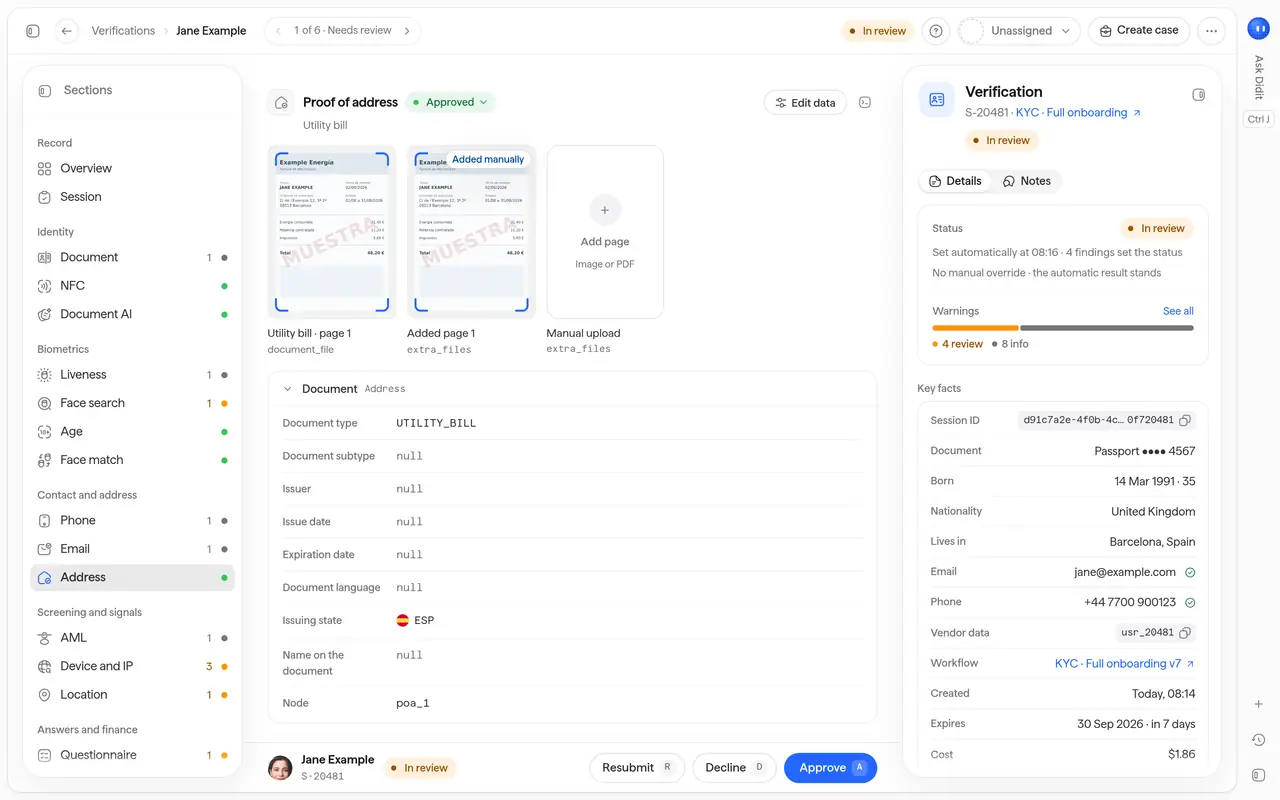
The same check is an add-on of the ID Verification and Proof of Address steps. Turn on address_validation_enabled in the step's settings, and the address the person supplied, either printed on the identity document or on the proof of address, is validated once their upload is read.
The result lands in the address_validation object of that step's entry in the session decision, under id_verifications[] or poa_verifications[], with the same fields as the API response, address_type and is_residential included. Webhooks that carry the session decision carry them too.
A partially_verified or not_verified result raises the ADDRESS_NOT_VERIFIED warning. What happens next is the step's address_not_verified_action, which is NO_ACTION by default: the warning is recorded and nothing else changes. An unavailable validation never raises that warning and never changes the verification.

ADDRESS_NOT_VERIFIED warning next to the session's other checks.What the sandbox returns
Sandbox keys validate the request and always return a deterministic verified result that echoes the address you sent. address_type and is_residential are always null in the sandbox: it never classifies an address, but both keys are present in the response. That means the sandbox shows you request-shape handling and nothing more. It does not demonstrate real normalisation or classification, because it never calls a postal reference to do either.
Sandbox calls consume no credits, so you can test both request shapes without consuming credits while you build, and check that one shape at a time is accepted. Read sandbox test data for how the rest of the sandbox behaves.
What you pay and where review starts
- $0.10 per validated address on the API. An
unavailableresult is not charged. - In a workflow, the add-on costs $0.10 per address a step validated.
- Sandbox calls consume no credits.
- The API confirms the address only and never links it to a person. A
verifiedresult is not evidence that someone lives there. - With the default
NO_ACTION, a warning is recorded and the session keeps the outcome its other checks gave it. Your code or a reviewer decides what a partial match means for that customer. That boundary is deliberate: the API reports the place, it does not make your onboarding decision.

Worked cost example
Say you validate 25,000 addresses a month at list price: 25,000 x $0.10 = $2,500.00.
On Growth the plan discount of 4% applies to Didit prices: $0.10 x 0.96 = $0.096 per address, so 25,000 x $0.096 = $2,400.00. Your $115 of monthly credit pays the first $115 and top-ups pay the remaining $2,285.00.
On Scale the discount is 10%: $0.10 x 0.90 = $0.09 per address, so 25,000 x $0.09 = $2,250.00.
Inside a workflow the arithmetic stacks the same way. A full ID check is $0.33 and the address validation add-on is $0.10, so a KYC that also validates the address printed on the document costs $0.33 + $0.10 = $0.43 per person. For 1,000 people that is 1,000 x $0.43 = $430.00.
Sources
- Didit docs: Address Validation API
- Didit docs: Identity Verification Pricing
- Didit docs: API Authentication
- Didit docs: API Errors
- Didit docs: Sandbox Test Data
- Didit pricing and pricing as JSON
- Didit MCP server
- ISO 3166-1 country codes, the standard the
countryfield follows (named, not linked)
Start with a sandbox key at business.didit.me, send one structured request and one one-line request to check that your integration builds and sends the right shape, then move to a live key when the shape of the result fits your product. No sales call is needed at any point.
Try it
Try this in the sandbox
Run the check this guide describes, free.
The product this post is about, taken from its topic. Run it free in the sandbox.
Author
Alberto Rosas
Co-founder and CEO

Keep reading
Other guides in the same topic.
 Travel Rule API Integration: Match Inbound Deposits
The unmatched deposits endpoint shares filters with the transfers list: direction, status, rail (INTERNAL, TRP, GTR, TRUST, VERIFYVASP, SYGNA, EMAIL, TEST_VASP), kind, currency, dates and counterparty UUID.
Alberto RosasNov 26, 2026 Didit sandbox vs live mode: what is mocked and what is billed
Didit sandbox is free, mocks providers, stores real captures, and allows 500 session creates per app every 24 hours. Live mode calls real providers. A completed full KYC check lists at $0.33.
Alberto RosasNov 26, 2026 How to AML Screen UBOs and Company Officers With an API
Screen each identified UBO and officer for sanctions, PEP, criminal records, adverse media and fitness and probity at $0.20 per person. The session's AML status reflects the highest-risk result across the company and all.
Alberto RosasNov 26, 2026Questions
Frequently asked questions
What does partially_verified mean in the address validation API?
It means the address was confirmed only to the street, or to the most precise level the postal reference data holds for that place. The API returns it when the street matched but the exact building or house number could not be confirmed. It is a partial match and not a failure, and it is different from verified, which is confirmed down to the building, the flat or the PO box.
Should I send structured fields or a one-line address?
Send structured fields when your own form collected the parts as address_line_1, address_line_2, city, region and postal_code. Send one line in address when the address arrived as free text, pasted, imported or typed into a single field. Either way, country is required, and you never send both shapes in the same request.
Is the country field required, and in what format?
Yes, country is required on every request. It takes an ISO 3166-1 alpha-2 or alpha-3 code, so US and USA both work, and so do ES and ESP. Pick one form and keep it consistent in your database.
Can I send address and address_line_1 in the same request?
No. The endpoint takes one shape per request: either one line in address or the structured fields. Choose the shape from where the address came from before you build the request, and never send both in one body.
How much does an address validation call cost?
An Address Validation API call costs $0.10 per validated address. An unavailable result is not charged, and inside a workflow the add-on costs $0.10 per address a step validated. Sandbox calls consume no credits.
Does a verified address prove that a person lives there?
No. The API confirms that the place exists and returns it normalised; it never links the address to a person. A verified result means the building, flat or PO box was confirmed, not that the person you are onboarding lives at it.
What is the difference between not_verified and unavailable?
not_verified is a real answer about the address: only the region or the city matched, or nothing did. unavailable means the validation could not run at all, so the right move is to retry later. An unavailable result is not charged and never changes a workflow verification.
What does verification_level tell me?
It is the most precise level that matched: administrative_area, locality, thoroughfare, premise or delivery_point. Read it with the status, because it tells you how far down the address the confirmation reached. A street-level match can be useful for some product policies and is worth a second look for a regulated address record.
Which countries return address_type and is_residential?
address_type is returned for United States and Canadian addresses, with values such as street, po_box, high_rise, firm or building; it is null for other countries and when no type is on record. is_residential is available for the United States, Great Britain, the Netherlands and Ireland, and null when it is unknown or unavailable.
Does an address validation call create a session?
No. No session is created and the result is returned only in that response, so store the normalised address, the status and the request_id yourself. If you want the check inside a verification, use the step add-on instead of the standalone call.
Can I validate the address inside a KYC or proof of address step?
Yes. Turn on address_validation_enabled in the ID Verification or Proof of Address step and the address on the uploaded document is validated. A partially_verified or not_verified result raises ADDRESS_NOT_VERIFIED, and the step's address_not_verified_action decides what happens, which is NO_ACTION by default.
What does the sandbox show me for an address validation call?
The sandbox validates the request and returns a deterministic verified result that echoes the address you sent, with address_type and is_residential always null. Use it to check your request shape and your parsing of the response keys. It does not demonstrate real normalisation or classification, so check live behaviour before you set policy on a match level.
Compliance built in
Audited, certified and attested.
We hold the certifications and build each country's rules into your flows, so you can launch anywhere without worrying. Security and Compliance center
- Regulation encoded into your flows
Tell us what you do and where. Didit lists the rules that apply to you, with sources, and builds the checks each country needs into one workflow.
- Ready for AMLR
Every requirement of the new EU anti-money laundering rules, from checking customers to human review, is already covered by a Didit check.
- Tested in Spain's Treasury sandbox
Spain's Treasury published its supervised sandbox report on Didit's NFC plus active liveness onboarding; SEPBLAC took part and valued the added measures positively.
- Audited, not self-declared
iBeta Level 1 and Level 2. Liveness tested under ISO/IEC 30107-3.
Your obligations · 3 regions
 SOC 2 Type 2
 ISO 27001
 iBeta Level 1 and Level 2
 EU regulator attestation
 FSM youth protection
 GDPR
 EBA remote onboarding
 MiCA compatible
 FIDO Alliance member
- AMLREU AML Regulation ready
Integration · Didit MCP
Run Didit from your own AI agent
Connect Didit to Claude, Cursor, VS Code or ChatGPT and just ask in plain words. Your agent can do anything you can do in the console, with the same permissions you have.
 Add to Claude
 ChatGPT
 Cursor
- Build workflowsDescribe the checks you need. The agent creates and publishes the flow.
- Run investigationsAsk why a session was declined, review cases, search people and companies.
- Change rulesCreate payment rules, test them on past data and switch them on.
- Pull reportsAsk for numbers, exports or the audit log.
Didit Academy