Didit Registry Search: Exact vs Contains and UK Number Rules
Didit registry search is asynchronous: exact or contains matching, UK company numbers zero-padded to eight digits, and <code>searched_by</code> reports <code>name</code>, <code>registration_number</code> or.
 Alberto RosasCo-founder and CEO
Contents
In this guide
Jump to the part you need.
This page is for developers and compliance teams wiring company registry lookup into Didit KYB. It covers exact versus contains matching, how a UK registration number is zero-padded to eight digits, what searched_by reports, and the one-tap override to search by name instead. Registry retrieval starts at $2.00 per company, priced by country and data tier. The caveat: search is asynchronous, so you poll or let the hosted flow wait.
Last updated: November 26, 2026. Prices checked against the live Didit price feed on November 26, 2026.
| Item | What it does | Billing |
|---|---|---|
| Exact search | Matches the company name or the registration number precisely | Inside the registry check |
| Contains search | Matches companies whose name contains the search term, for when the legal name is unknown | Inside the registry check |
Standalone search POST /v3/kyb/search/ | Returns candidate companies: name, registration number, status, type | $0.50 per request when paid-source results are returned |
| UK number normalization | Company numbers zero-padded to eight digits before the lookup | No extra charge |
searched_by | Reports name, registration_number or registration_number_and_name | No extra charge |
Lite retrieval POST /v3/kyb/select/ | Profile, identifiers, status, legal form, incorporation date, registered address, activity, contacts, officers | $2.00 to $3.00 by country |
| Shareholders retrieval | Lite plus direct shareholders with their ownership bands | $5.00 to $22.00 by country |
| UBO retrieval | Shareholders plus the beneficial owners resolved through the ownership chain | $9.00 to $96.00 by country |
Start free in the sandbox at business.didit.me, with no sales call. Developers who want the registry check driven from an AI assistant can connect Didit through the MCP server. The full product is on the Business Verification page, and every unit price is on didit.me/pricing.
The outcome and the method we recommend
The outcome is a company record attached to a KYB session: the legal name, the official registration number, the registry status, the registered address, the officers, and the ownership data at the tier you asked for. Every downstream decision about the business rests on that record being the right company.
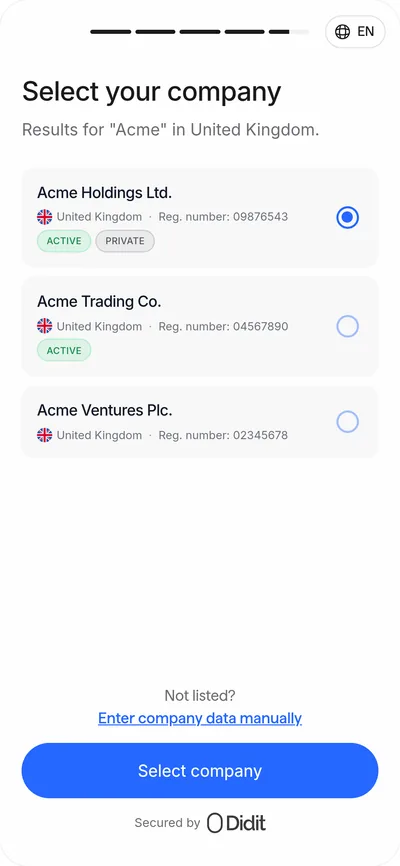
Our recommendation is the hosted flow with expected_details prefilled. You pass company_name, registry_country and registration_number when you create the session. The hosted flow pre-selects and locks the country (and the state for state-level registries such as US-CA), pre-fills the matching search fields, and runs the asserted search automatically, so the applicant lands on their company's own result rather than a list of near matches. Both fields stay editable so a wrong assertion can be corrected.
Use the standalone endpoints when you already own the interface and only need the data: POST /v3/kyb/search/ for candidates, then select, shareholders or ubo for the profile at the tier you need. Registration numbers are normalized where the registry requires it; UK company numbers are zero-padded to eight digits.
Exact versus contains search in Didit
Exact matches the company name or the registration number precisely. Contains matches companies whose name contains the search term, which is what you use when the exact legal name is unknown.
| Mode | Matches | Use it when |
|---|---|---|
| Exact | The company name or the registration number, precisely | You hold the legal name or the official number |
| Contains | Companies whose name contains the search term | The exact legal name is unknown |
Contains is defined on company names. A registration number is matched exactly. In the hosted flow, when results came from a registration number, the interface offers the one-tap name override described below.
UK registration numbers are zero-padded to eight digits
Registration numbers are normalized where the registry requires it, and UK company numbers are zero-padded to eight digits. A number typed as 1234567 is looked up as 01234567.
You do not have to pad the number yourself when you call Didit. The normalization happens before the registry query. The docs describe zero-padding only. They do not describe handling of prefixed formats, so test any prefixed format in the sandbox before you rely on it in production. The sandbox is free and unlimited on every plan.
What searched_by tells you
Every search response carries a searched_by field that reports how the results were matched. It has three values.
| Value | How the results were matched |
|---|---|
name | The lookup used the company name only |
registration_number | The lookup used the registration number only |
registration_number_and_name | Both identifiers were supplied and the registry lookup combined them |
Read it before you read the candidates. Use searched_by to record which matching mode the response reports. A value of name means the response reports a name match, registration_number means a number match, and registration_number_and_name means both identifiers were supplied and combined. The field describes the matching mode the response reports. It is not a diagnosis of why a candidate set is small.
The one-tap override: search as company name instead
In the hosted flow, when results came from a registration number, the interface offers a one-tap "Search as company name instead" override. Use the override when the registration-number search does not find the intended company.
The hosted UI offers the documented override described in the company data docs. If you build your own interface on the standalone endpoints, call the documented search endpoint again with the name and read searched_by to confirm the reported matching mode.
Prerequisites
- A Didit application with KYB enabled. Create one at business.didit.me if you do not have one.
- An API key from Developer Settings, API Keys.
- A KYB workflow with Company registry lookup enabled. Copy the
workflow_id. - A webhook endpoint reachable from the internet if you want the decision pushed to you.
- The company's country of incorporation from the supported countries table, which uses ISO 3166-1 alpha-2 codes such as
GB.
Step by step: run a registry search
- Create the workflow. In the console, go to Workflows, Create workflow, choose Business Verification, and enable Company registry lookup. Key People and Company AML are the usual companions. Save and copy the
workflow_id. - Create the session with the company asserted. Pass
expected_detailsso the hosted flow pre-fills and locks the country and runs the search for the applicant. The call below is the documented session create from the KYB quickstart, with the prefill block added as described in company data.
curl -X POST https://verification.didit.me/v3/session/ \
  -H "x-api-key: YOUR_API_KEY" \
  -H "Content-Type: application/json" \
  -d '{
    "workflow_id": "YOUR_KYB_WORKFLOW_ID",
    "vendor_data": "biz-acme-001",
    "expected_details": {
      "company_name": "Acme Holdings Ltd",
      "registry_country": "GB",
      "registration_number": "1234567"
    }
}'- Send the link or drive the endpoints yourself. The response contains
session_id,session_numberandurl. Deliver theurlto the company admin through your own email or chat. If you are building your own interface, use the documentedPOST /v3/kyb/search/endpoint described in the standalone API docs instead. - Read
searched_byand the candidates. The search runs asynchronously. Large registries take a few seconds, so poll the search status until the results are resolved. - Recover with the name override if the number did not find the intended company. In the hosted flow the applicant can use the documented name override. On the standalone path, call the search endpoint again with the name.
- Select the company. Review the returned companies and pick the correct match. Didit links the selected company to the KYB check and populates every field the registry holds. On the standalone path this is
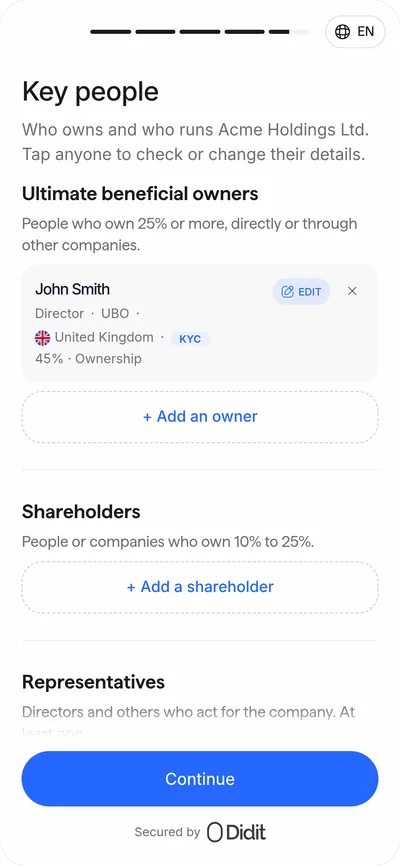
POST /v3/kyb/select/for the Lite tier, or the shareholders and UBO endpoints for a deeper tier. - Confirm and continue. The applicant confirms or corrects the company details and moves to the next configured step. A registry prefill never blocks the Key People form: people can be entered manually, and available registry people appear before submission as the report arrives.
Expected output
The search returns candidate companies: name, registration number, status and type. The selected company then returns the registry fields below, each of which you can log, display or branch on.
company_name,registration_number,country_code,company_type,registry_statusincorporation_date,registered_address,tax_number,alternative_names,legal_entity_identifiernature_of_business,registered_capital,location_of_registration,control_schemewebsite,email,phone,addresses[],industries[],accounts,financial_summaryconfirmed_by_user_at,last_console_edit_at,is_editable,is_from_registry,fetch_status,verification_status
On a retrieval you also get registry_tier_requested, registry_tier_delivered, registry_ownership_status and, where relevant, registry_data.ownership_error and registry_data.section_errors. When the KYB session reaches a terminal status you receive a status.updated webhook with session_kind: "business" inside data, and the decision payload carries key_people_checks[], document_verifications[] and aml_screenings[].
Failure cases and recovery
| Symptom | Cause | Recovery |
|---|---|---|
502 with code: "kyb_registry_provider_unavailable" | The registry provider was down during the company search | Not billed. In the hosted flow the business is automatically offered manual company entry instead of a retry-only error. On your own path, handle the failure according to your application's error policy. |
KYB_COUNTRY_RESTRICTED warning | The company country is outside the workflow's allowed countries | Adjust the workflow's allowed countries, or route that applicant to a workflow whose coverage includes it. |
| No candidates returned | The identifiers did not match a returned candidate | Use the hosted name override, or submit company data manually if the registry holds no record. |
| Company genuinely not in the registry | The registry holds no record | Manual submission. The session continues with the provided data and is_from_registry is false. |
fetch_status is failed | The lookup did not resolve | The application must handle a failed lookup according to its own error policy. |
registry_ownership_status: "not_held" | The ownership source does not cover this company, so another registry source found it | The Lite profile is delivered and billed. This is a coverage gap, not proof that nobody owns the company. |
registry_ownership_status: "unavailable" | The ownership section was not served: an outage, an empty section, or a registry that could not be asked | Lite is delivered and billed. Read ownership_error: no_owners_on_record and ownership_section_unavailable mean different things. |
registry_ownership_status: "pending" | The ownership section has not been retrieved yet | Nothing is billed and registry_tier_delivered is null until it resolves. Do not treat it as complete. |
429 | Rate limit or quota reached | Wait for Retry-After, then retry. |
400 on session create | Invalid workflow_id, or the balance cannot cover the call | Fix the id, or top up. See API errors. |
One more trap worth naming. A session created with a KYC workflow instead of a KYB workflow is still created, but it runs KYC steps. Check that the workflow's workflow_type is kyb before you debug the search.
Inputs and outputs
| Field | Direction | Notes |
|---|---|---|
registry_country | In | ISO 3166-1 alpha-2 from the supported countries table, plus the state for state-level registries such as US-CA |
company_name | In | Legal name or, with contains, a term inside it |
registration_number | In | Normalized before lookup, UK numbers zero-padded to eight digits |
expected_details | In | Prefill block on session create. Locks the country, pre-fills the fields, runs the asserted search |
searched_by | Out | name, registration_number or registration_number_and_name |
registry_tier_requested / registry_tier_delivered | Out | The tier you asked for and the tier you were charged for. You pay for what was delivered |
registry_ownership_status | Out | not_requested, delivered, not_held, unavailable or pending |
ownership_error | Out | The reason, such as company_not_found, no_owners_on_record or ownership_section_unavailable |
section_errors | Out | Keyed by officers, shareholders or group_structure, with the status the registry answered |
is_from_registry | Out | true for a registry company, false for manual entry |
What you pay for, and where review starts
Billing follows the work that actually happened, not the work you asked for.
- Standalone search. A successful search that uses a paid company-data source costs $0.50 per request, whatever the number of candidates. Empty results, failed searches and results served only by other sources are not charged. Retrieval is billed separately.
- Retrieval. Sold in three data tiers, one endpoint each, priced per country: Lite $2.00 to $3.00, Shareholders $5.00 to $22.00, UBOs $9.00 to $96.00. The full table is in KYB registry pricing.
- You pay the tier delivered. When the country's registries hold no ownership data, an ownership request is delivered and billed as the highest tier available, usually Lite, and
registry_ownership_statussays why. A UBO request that resolves to no natural person is delivered and billed as Shareholders. - Hosted flow. A hosted KYB workflow bills a registry check at the Lite level through
select, and the contract it has always had stays the same. A later profile retrieval in the standalone path is billed separately. - Manual entry. A country with no supported tier is not offered for registry checks. The applicant enters the company manually and it is billed at the flat manual-entry price in the per-country price list, which is the number to check before you quote.
- Around the registry check. Company AML $0.20 per check, person AML $0.20 per UBO or officer, linked KYC $0.33 per person, KYB documents $0.20 per collection step regardless of how many files are uploaded in it. Key People extraction has no separate fee.
Review is a separate boundary from lookup. A pending ownership report does not count as a completed registry check and does not produce an automatic approval, and report-dependent decisions wait for the report rather than guessing. When a session lands in In Review, an analyst decides and you get another webhook when it resolves.
Worked cost example
Take 500 companies a month, each with two owners, using the standalone endpoints and paying for company AML plus person AML and linked KYC. The Lite line uses the published lower bound of the Lite range, $2.00, as a hypothetical. Replace it with the exact Lite price for your selected country from the per-country table before you quote a total.
- 500 searches at $0.50 = $250.00, assuming every search returns paid-source results.
- 500 Lite retrievals at the $2.00 lower bound = $1,000.00. This is a hypothetical lower-bound line, not an exact country price. Read the per-country table for the Lite price of the selected country.
- Company AML: 500 at $0.20 = $100.00.
- Person AML: 1,000 owners at $0.20 = $200.00.
- Linked KYC: 1,000 owners at $0.33 = $330.00.
Hypothetical lower-bound total: 250.00 + 1,000.00 + 100.00 + 200.00 + 330.00 = $1,880.00 a month, or $3.76 per company. The total is conditional on the selected country's published Lite price. On the Scale plan the Didit prices carry a 10% discount, so the same mix spends less from the same unit list, and the arithmetic is the same arithmetic with each line reduced.
Sources
- Didit docs: Company Registry API, automated KYB extraction
- Didit docs: KYB quickstart
- Didit docs: KYB integration guide
- Didit docs: KYB supported countries and tier coverage
- Didit docs: KYB Registry API, company search and select
- Didit docs: search endpoint, select endpoint, shareholders endpoint, UBO endpoint
- Didit docs: KYB registry pricing by country
- Didit docs: API errors, status codes and retry rules
- Didit pricing page and the machine-readable price feed
- Didit Business Verification product page
- Companies House for UK company number formats and the public register
The next step is to run one search yourself: open the sandbox at business.didit.me, create a KYB workflow with registry lookup, and send the session create call above with a real company number. No sales call is involved, and sandbox testing is free.
Try it
Try this in the sandbox
Run the check this guide describes, free.
The product this post is about, taken from its topic. Run it free in the sandbox.
Author
Alberto Rosas
Co-founder and CEO

Keep reading
Other guides in the same topic.
 What Is the Purpose of FICA in South Africa? 2026 Guide
FICA is South Africa's anti-money laundering law. It creates the Financial Intelligence Centre and requires accountable institutions to identify and verify clients, screen for PEP and sanctions risk and report suspicious.
Alberto RosasNov 26, 2026 Sixth Money Laundering Directive (6AMLD): What Changed and Which Rules Apply
6AMLD is Directive (EU) 2018/1673: Member States must criminalise laundering, widen predicate offences and set a four-year penalty floor. It adds no new due diligence duties for firms.
Alberto RosasNov 26, 2026 Automated Sanctions Screening: Canada, the Entity List and Embargoes
Automated sanctions screening matches people and companies against lists such as Canada's autonomous sanctions made under SEMA and JVCFOA and the OFAC SDN List, and returns candidate hits scored for identity confidence and.
Alberto RosasNov 26, 2026Questions
Frequently asked questions
What is the difference between exact and contains search in Didit KYB?
Exact matches the company name or the registration number precisely. Contains matches companies whose name contains the search term, which is what you use when the exact legal name is unknown. Registration numbers are matched exactly.
How does Didit handle a UK company registration number with leading zeros?
UK company numbers are zero-padded to eight digits before the registry lookup, so a number typed as 1234567 is queried as 01234567. You do not have to pad it yourself; send what the user typed. The docs describe zero-padding only.
What does searched_by mean and which values can it return?
searched_by reports how a search response was matched. It returns name when only the company name was used, registration_number when only the number was used, and registration_number_and_name when both were supplied and the registry lookup combined them. Read it before you read the candidate list, because it records the matching mode the response reports.
Can I search with both a company name and a registration number?
Yes. When both identifiers are provided, the registry lookup combines them, and searched_by then reports registration_number_and_name. Use searched_by to record which matching mode the response reports.
How do I prefill the company so the applicant lands on the right result?
Pass expected_details with company_name, registry_country and registration_number when you create the KYB session. The hosted flow pre-selects and locks the country, pre-fills the search fields and runs the asserted search automatically. Both fields stay editable so a wrong assertion can be corrected, and selecting a different company than asserted does not raise a warning, so prefill is not a control.
How do I search by company name when the registration number returns nothing?
In the hosted flow, a registration-number result offers a one-tap "Search as company name instead" override. If you build your own interface, call the documented search endpoint again with the name and read searched_by to confirm the reported matching mode.
What happens when the registry provider is unavailable?
The call fails with 502 and code: "kyb_registry_provider_unavailable", and it is not billed. In Didit's hosted flow the business is automatically offered manual company entry instead of a retry-only error. On your own path, handle the failure according to your application's error policy rather than looping.
What does KYB_COUNTRY_RESTRICTED warning mean?
It means the company's country of incorporation sits outside the countries the workflow allows. The registry check raises the warning rather than silently continuing. Fix it by adding the country to the workflow, or by routing that applicant to a workflow whose coverage includes it.
Is a failed or empty registry search billed?
No. Empty results, failed searches and results served only by other sources are not charged on the standalone search. The $0.50 applies when a paid company-data source returns results, whatever the number of candidates.
What does not_held in registry_ownership_status mean?
not_held means the ownership source answered and does not list that company, so it was found by another of the country's registry sources. The Lite profile is delivered and billed, with ownership_error: "company_not_found". It is a coverage gap, not a finding that the company has no owners.
What do I pay for a search versus a company profile?
Standalone search is $0.50 per request when a paid source returns results. The profile is billed separately by country and tier: Lite $2.00 to $3.00, Shareholders $5.00 to $22.00, UBOs $9.00 to $96.00. You pay for the tier actually delivered, which the response states in registry_tier_delivered.
How long does a registry search take?
The search runs asynchronously and large registries may take a few seconds to return results. Poll the search status until results are resolved, or wait for the status.updated webhook on a hosted KYB session. The decision payload carries the full result, so you only need to fetch it separately if you did not subscribe.
Compliance built in
Audited, certified and attested.
We hold the certifications and build each country's rules into your flows, so you can launch anywhere without worrying. Security and Compliance center
- Regulation encoded into your flows
Tell us what you do and where. Didit lists the rules that apply to you, with sources, and builds the checks each country needs into one workflow.
- Ready for AMLR
Every requirement of the new EU anti-money laundering rules, from checking customers to human review, is already covered by a Didit check.
- Tested in Spain's Treasury sandbox
Spain's Treasury published its supervised sandbox report on Didit's NFC plus active liveness onboarding; SEPBLAC took part and valued the added measures positively.
- Audited, not self-declared
iBeta Level 1 and Level 2. Liveness tested under ISO/IEC 30107-3.
Your obligations · 3 regions
 SOC 2 Type 2
 ISO 27001
 iBeta Level 1 and Level 2
 EU regulator attestation
 FSM youth protection
 GDPR
 EBA remote onboarding
 MiCA compatible
 FIDO Alliance member
- AMLREU AML Regulation ready
Integration · Didit MCP
Run Didit from your own AI agent
Connect Didit to Claude, Cursor, VS Code or ChatGPT and just ask in plain words. Your agent can do anything you can do in the console, with the same permissions you have.
 Add to Claude
 ChatGPT
 Cursor
- Build workflowsDescribe the checks you need. The agent creates and publishes the flow.
- Run investigationsAsk why a session was declined, review cases, search people and companies.
- Change rulesCreate payment rules, test them on past data and switch them on.
- Pull reportsAsk for numbers, exports or the audit log.
Didit Academy